ContactOut vs Influno (2026): Which Finds Better B2B Emails?
ContactOut and Influno both promise accurate B2B contact data, but they solve different problems. Here's an honest breakdown of accuracy, pricing, and which one fits your prospecting stack in 2026.
Choosing between ContactOut and Influno usually comes down to one question you can't answer from a pricing page: which one hands you real, deliverable email addresses instead of plausible guesses? Both tools market themselves on accuracy and coverage. Only one is likely to fit your specific motion, and the honest answer depends on whether you live inside LinkedIn all day or run high-volume outbound sequences.
This is a neutral, side-by-side look at what each tool actually does, where the data comes from, what it costs, and where a third option might beat both.
TL;DR: ContactOut vs Influno at a glance#
- ContactOut is a LinkedIn-first contact finder. Its Chrome extension pulls personal and work emails plus phone numbers as you browse profiles. Strong for recruiters and one-by-one sourcing.
- Influno leans toward the outbound-execution side: finding contacts and then sending sequenced cold email from the same place. Better if you want find-and-send under one login.
- Accuracy is the real battleground. Neither publishes independently audited bounce rates, so you should test both against your own list before committing budget.
- Pricing favors ContactOut for light LinkedIn users and Influno for teams that want outreach bundled in — but per-credit economics get expensive at scale for both.
- If your priority is verified emails with a transparent API and a generous free tier, a dedicated finder like Tomba Email Finder is worth benchmarking alongside them.

What is ContactOut and who is it for?#
ContactOut built its reputation as a recruiter's browser extension. You open a LinkedIn profile, click the ContactOut icon, and it surfaces the person's work email, personal email, and often a mobile number. That workflow is genuinely fast for one-at-a-time sourcing, which is why talent teams adopted it early.
The product has since expanded into a searchable database, list-building, and basic email campaigns. But the center of gravity is still the LinkedIn overlay. If your day is spent inside LinkedIn Recruiter or Sales Navigator, ContactOut feels native.
Where it gets weaker: bulk enrichment of a CSV that has no LinkedIn URLs attached, and any workflow that needs a clean API rather than a browser action. It's a person-in-the-loop tool by design.
What is Influno and who is it for?#
Influno positions itself closer to an all-in-one outbound platform. The pitch is that you find prospects, get their emails, and run cold email sequences without stitching three subscriptions together. For a small sales team that hates tool sprawl, that consolidation is attractive.
The trade-off with any find-and-send bundle is depth. A tool that does discovery, verification, and sending tends to be good-not-great at each, versus a specialist that does one thing exceptionally. Influno's sending layer competes with dedicated cold-email platforms, and its data layer competes with dedicated finders. Whether the convenience outweighs the specialization gap depends on your volume and how much deliverability risk you can tolerate.
If you're already committed to a separate sequencer, Influno's bundled sending becomes redundant, and you're really just evaluating its finder.

ContactOut vs Influno: the core comparison table#
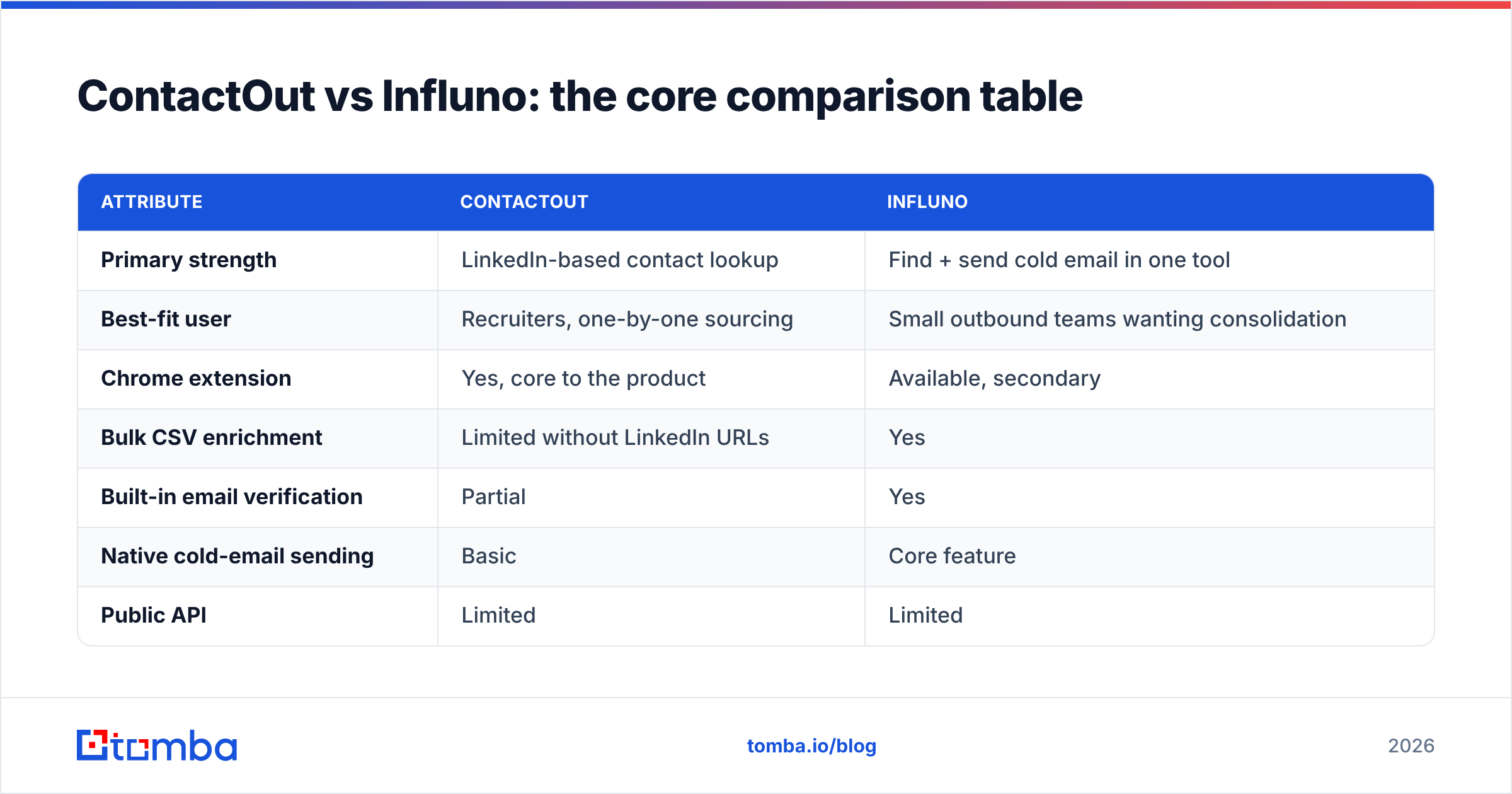
Here's the head-to-head on the attributes that actually change your results. Treat the accuracy row as a starting hypothesis you must validate on your own data, not a settled fact.
| Attribute | ContactOut | Influno |
|---|---|---|
| Primary strength | LinkedIn-based contact lookup | Find + send cold email in one tool |
| Best-fit user | Recruiters, one-by-one sourcing | Small outbound teams wanting consolidation |
| Chrome extension | Yes, core to the product | Available, secondary |
| Bulk CSV enrichment | Limited without LinkedIn URLs | Yes |
| Built-in email verification | Partial | Yes |
| Native cold-email sending | Basic | Core feature |
| Public API | Limited | Limited |
| Free tier | Small monthly credits | Trial-based |
| Ideal volume | Low to medium | Low to medium |
The pattern is clear: ContactOut wins the LinkedIn moment, Influno wins the consolidation story. Neither is built primarily as a high-accuracy, API-driven data source for engineering-led enrichment.
Which tool has better data accuracy?#
Accuracy is where you should spend your evaluation time, because a cheap tool with a 25% bounce rate is more expensive than a pricier tool at 3% once you count damaged sender reputation.
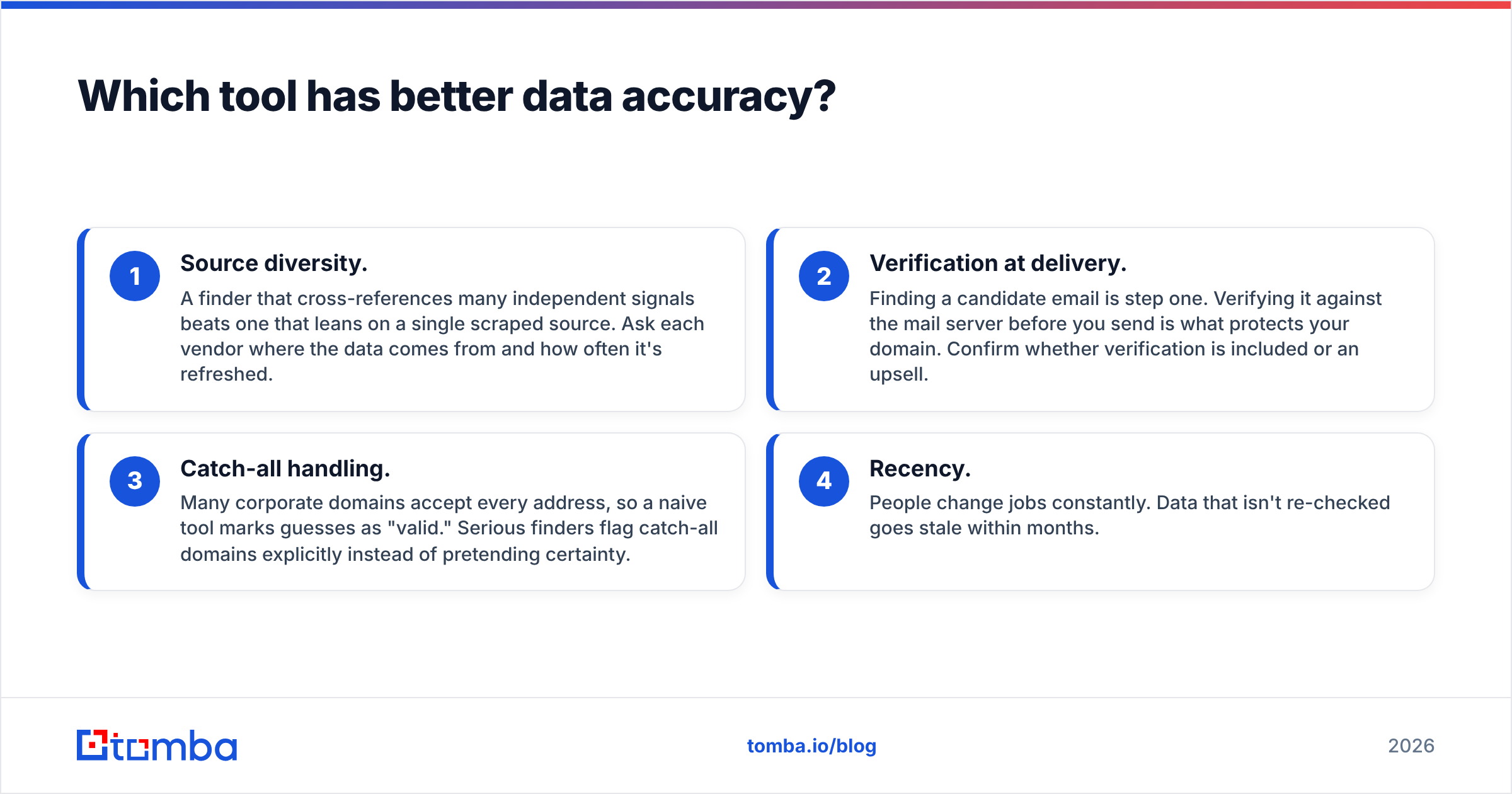
Four things drive real-world accuracy:
- Source diversity. A finder that cross-references many independent signals beats one that leans on a single scraped source. Ask each vendor where the data comes from and how often it's refreshed.
- Verification at delivery. Finding a candidate email is step one. Verifying it against the mail server before you send is what protects your domain. Confirm whether verification is included or an upsell.
- Catch-all handling. Many corporate domains accept every address, so a naive tool marks guesses as "valid." Serious finders flag catch-all domains explicitly instead of pretending certainty.
- Recency. People change jobs constantly. Data that isn't re-checked goes stale within months.
Because neither ContactOut nor Influno publishes third-party-audited bounce numbers, the honest move is a bake-off: pull 100 known-good contacts, run them through each tool, and measure hit rate and bounce rate yourself. Pair whatever you pick with a standalone email verifier so you're never sending on unvalidated data.

How do ContactOut and Influno price compare?#
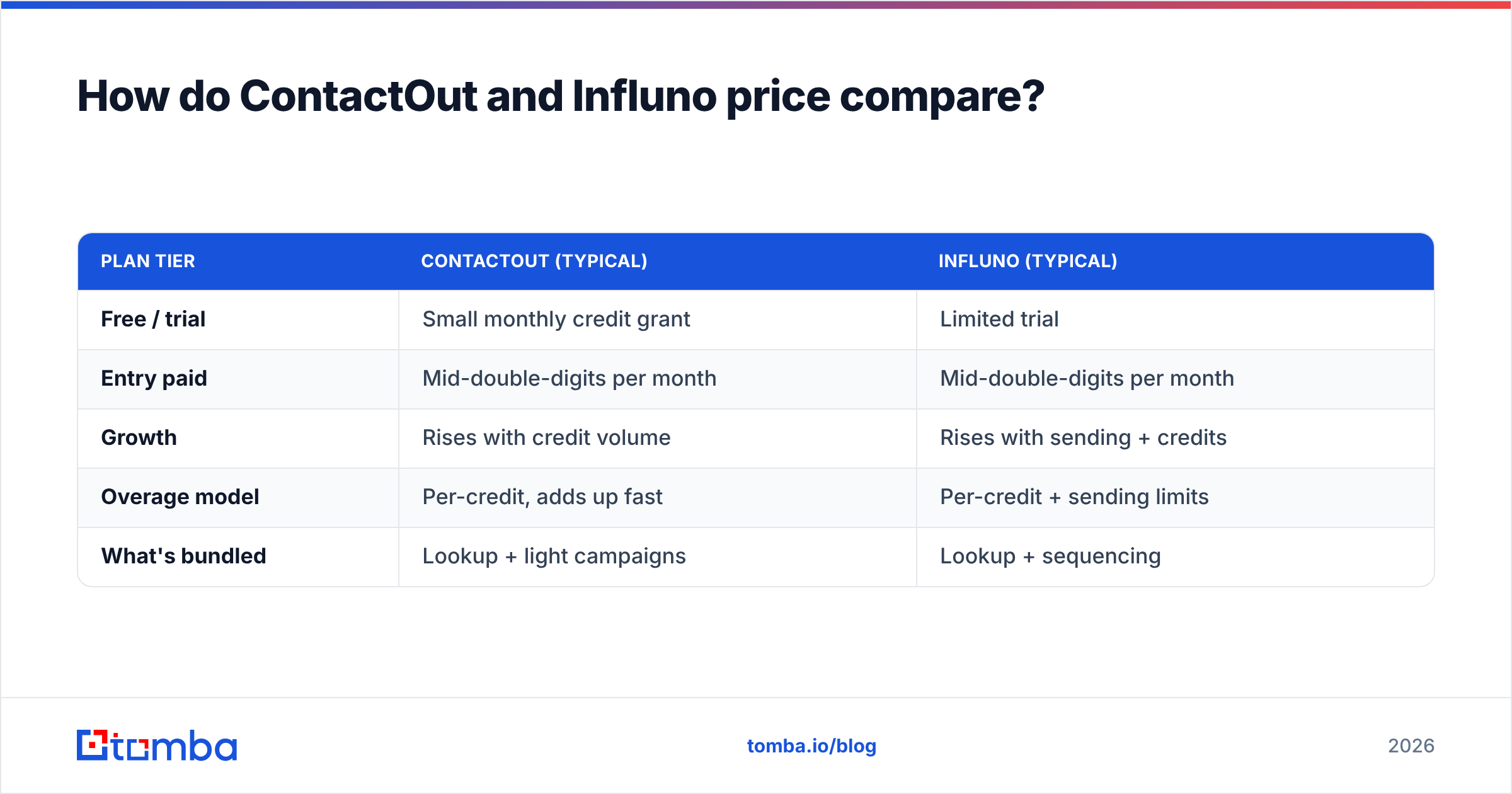
Both tools use credit-based pricing, and both get materially more expensive as you scale past a few hundred lookups a month. The headline number on the pricing page rarely reflects your true cost per usable, verified contact.
| Plan tier | ContactOut (typical) | Influno (typical) |
|---|---|---|
| Free / trial | Small monthly credit grant | Limited trial |
| Entry paid | Mid-double-digits per month | Mid-double-digits per month |
| Growth | Rises with credit volume | Rises with sending + credits |
| Overage model | Per-credit, adds up fast | Per-credit + sending limits |
| What's bundled | Lookup + light campaigns | Lookup + sequencing |
Two things to watch. First, "credits" are consumed even when a lookup returns a guess you can't use, so effective cost per deliverable email is higher than the sticker price. Second, bundling sending (Influno) can look cheaper than buying a finder plus a sequencer separately — but only if the bundled sender meets your deliverability bar. If it doesn't, you'll pay twice.
For reference on how a specialist prices, Tomba pricing runs a free tier of 25 searches/month, Starter at $49/mo, Growth at $99/mo, and Pro at $249/mo, with the API included rather than gated behind an enterprise call.
When should you pick ContactOut?#
Choose ContactOut when your prospecting genuinely happens inside LinkedIn and you value speed per profile over batch throughput. Concretely:
- You're a recruiter or founder sourcing candidates and need personal emails and mobile numbers, not just work addresses.
- Your workflow is one-by-one, not thousand-row CSV enrichment.
- You want a browser extension that overlays contact data on profiles you're already viewing.
It's a poor fit if you need programmatic enrichment, high-volume bulk lookups from partial data, or a clean API to wire into your CRM. For that motion, look at ContactOut alternatives — including this ContactOut alternative breakdown — before you lock in an annual plan.
When should you pick Influno?#
Choose Influno when tool consolidation matters more than best-in-class depth, and your volume is modest enough that a bundled sender won't torch your deliverability. Concretely:
- You're a small team that wants find-and-send under one login and one bill.
- You don't already own a dedicated sequencer like a cold-email specialist you're happy with.
- Your daily send volume is low-to-medium, keeping you inside safe sending limits.
Skip it if you already run a mature outreach stack, if you need enterprise-grade deliverability controls, or if you want the data layer decoupled from the sending layer so you can swap either independently.
Is there a better alternative to both?#
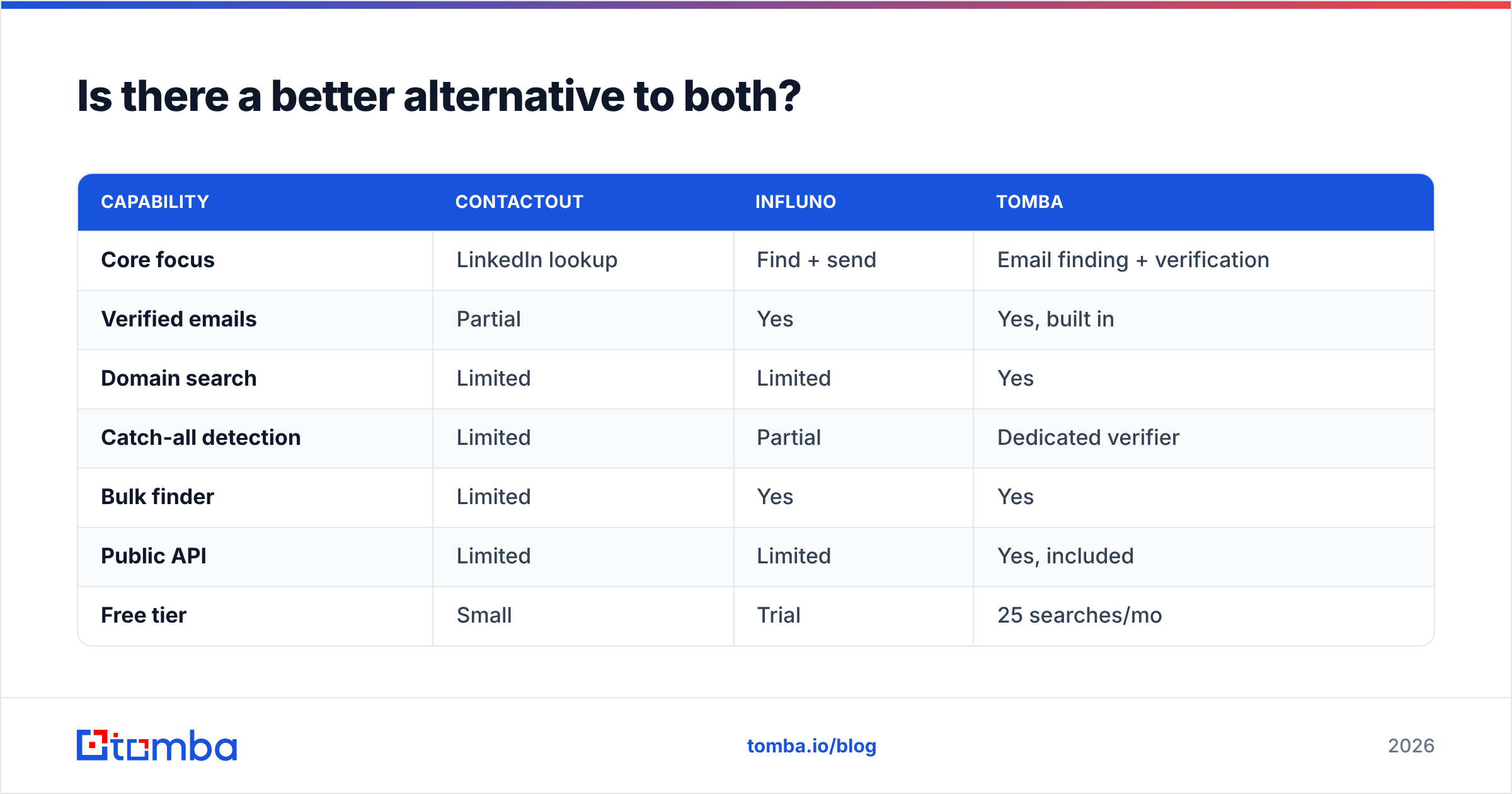
For teams whose bottleneck is accurate, verified email data rather than a bundled sender, a dedicated finder often wins on both cost-per-usable-contact and integration flexibility. This is where a specialist like Tomba fits into the comparison.
| Capability | ContactOut | Influno | Tomba |
|---|---|---|---|
| Core focus | LinkedIn lookup | Find + send | Email finding + verification |
| Verified emails | Partial | Yes | Yes, built in |
| Domain search | Limited | Limited | Yes |
| Catch-all detection | Limited | Partial | Dedicated verifier |
| Bulk finder | Limited | Yes | Yes |
| Public API | Limited | Limited | Yes, included |
| Free tier | Small | Trial | 25 searches/mo |
| Starter price | Varies | Varies | $49/mo |
The point isn't that one tool is universally best. It's that the right pick depends on your bottleneck. If it's sourcing inside LinkedIn, ContactOut is compelling. If it's consolidating find-and-send, Influno is reasonable. If it's verified data you can pipe anywhere through an API, a finder-first tool is the stronger foundation — and you can add any sender you like on top.

How to run your own 30-minute bake-off#
Don't buy on marketing claims. Test:
- Build a truth set. Take 100 contacts whose emails you already know are valid (past customers, teammates, opted-in leads).
- Strip the emails. Feed each tool the names, companies, and domains only.
- Measure hit rate. What percentage did each tool find at all?
- Measure accuracy. Of those found, how many match your known-good address?
- Measure bounce risk. Run the results through an independent verifier and count catch-alls and invalids.
- Divide by cost. Compute cost per verified, matching email — the only number that matters.
Cross-check vendor reputation on independent review platforms like G2 rather than the vendors' own testimonials, and read the fine print on each official site — ContactOut and Influno — for current credit and sending limits, which change often.
The bottom line#
ContactOut and Influno win in different lanes: ContactOut for LinkedIn-native, human-in-the-loop sourcing, Influno for small teams that want find-and-send in one place. Neither is built primarily as a transparent, API-first, verified-data engine, and neither publishes audited accuracy numbers — so validate on your own list before you commit.
If your real constraint is deliverable, verified B2B emails you can automate at a predictable cost, benchmark Tomba Email Finder against both. Start on the free tier of 25 searches a month, run it through your bake-off, and let the bounce rate decide. Clean data is the cheapest thing you'll ever buy, because everything downstream — reputation, reply rate, pipeline — depends on it.
Related guides#
Ready to find emails that actually work?
Join 150,000+ professionals who stopped guessing and started sending. Free credits on signup — no credit card required.
Get the Tomba newsletter
Practical outbound tactics and product updates — once every two weeks.
About the author