ContactOut vs LeadFuze (2026): Which Prospecting Tool Wins?
ContactOut nails LinkedIn contact data; LeadFuze automates list-building on autopilot. Here's an honest, side-by-side breakdown of pricing, accuracy, and fit — plus a cheaper pick.
Choosing between ContactOut and LeadFuze usually comes down to one question: do you want to pull contact data one prospect at a time from LinkedIn, or do you want a machine that builds whole lists while you sleep? They solve the same problem — getting verified B2B contacts into your pipeline — from opposite ends.
This is a neutral, hands-on comparison. No vendor is paying for a verdict here. Below you get pricing, accuracy, real workflow fit, and where a leaner tool undercuts both on cost per verified contact.
TL;DR: ContactOut vs LeadFuze at a glance#
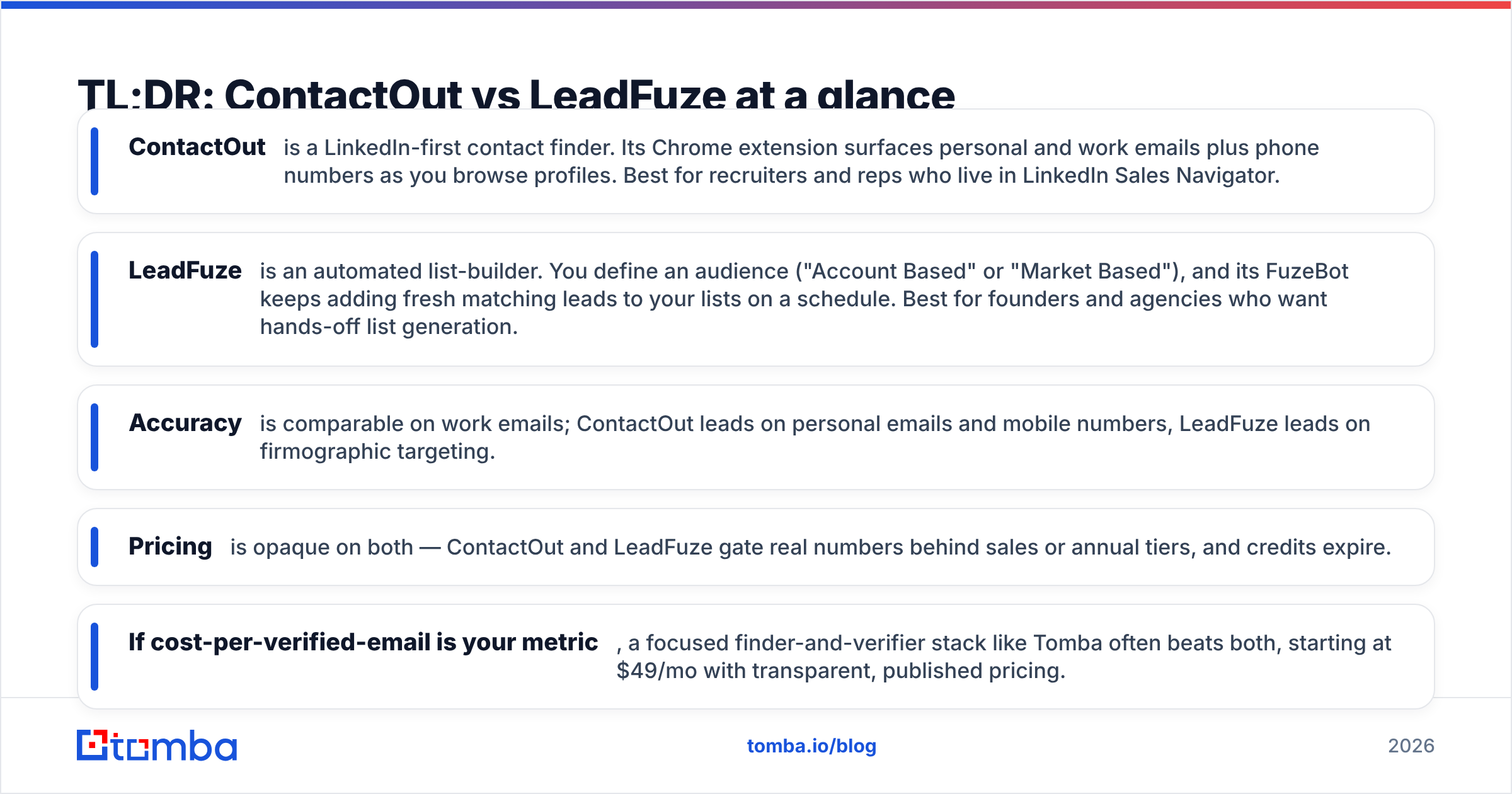
- ContactOut is a LinkedIn-first contact finder. Its Chrome extension surfaces personal and work emails plus phone numbers as you browse profiles. Best for recruiters and reps who live in LinkedIn Sales Navigator.
- LeadFuze is an automated list-builder. You define an audience ("Account Based" or "Market Based"), and its FuzeBot keeps adding fresh matching leads to your lists on a schedule. Best for founders and agencies who want hands-off list generation.
- Accuracy is comparable on work emails; ContactOut leads on personal emails and mobile numbers, LeadFuze leads on firmographic targeting.
- Pricing is opaque on both — ContactOut and LeadFuze gate real numbers behind sales or annual tiers, and credits expire.
- If cost-per-verified-email is your metric, a focused finder-and-verifier stack like Tomba often beats both, starting at $49/mo with transparent, published pricing.

What is ContactOut and who is it for?#
ContactOut built its reputation as the recruiter's email finder. The core experience is a browser extension that overlays LinkedIn: open a profile, and ContactOut reveals candidate emails (including personal Gmail-style addresses), phone numbers, and social links. It also ships a web-based search portal and an email verifier layer to reduce bounces.
Where ContactOut shines is depth on the individual. Because it emphasizes personal contact data, recruiters chasing passive candidates — people who won't answer a work address — get value most tools can't match. Sales teams working named accounts inside Sales Navigator get similar reach.
The trade-offs: it's LinkedIn-centric, so if your prospecting starts from a list of domains rather than profiles, you're working against the grain. Credits are consumed per reveal, plan limits are strict, and the published pricing is limited — most real numbers arrive through a sales conversation or the annual checkout.

What is LeadFuze and who is it for?#
LeadFuze flips the model. Instead of enriching one profile at a time, you describe an entire market — role, industry, company size, technology used, hiring signals — and LeadFuze assembles a list of matching leads with verified emails. Its standout feature, FuzeBot, runs continuously: it watches your search criteria and drips new matching leads into your account automatically, deduplicating against what you've already pulled.
That makes LeadFuze a natural fit for founders, agencies, and lean outbound teams who'd rather set an audience once than grind through LinkedIn. Native pushes to your CRM and outreach tools mean lists don't sit idle. The Account Based mode targets specific companies; Market Based casts a wider role-and-industry net.
The trade-offs: you have less granular control over each individual contact than a profile-by-profile tool, personal-email and mobile coverage is thinner than ContactOut's, and — like ContactOut — the entry price and per-lead economics aren't posted plainly. Unused lead credits generally don't roll over.
ContactOut vs LeadFuze: full comparison table#
Here's the head-to-head on the attributes that actually change your cost and conversion.
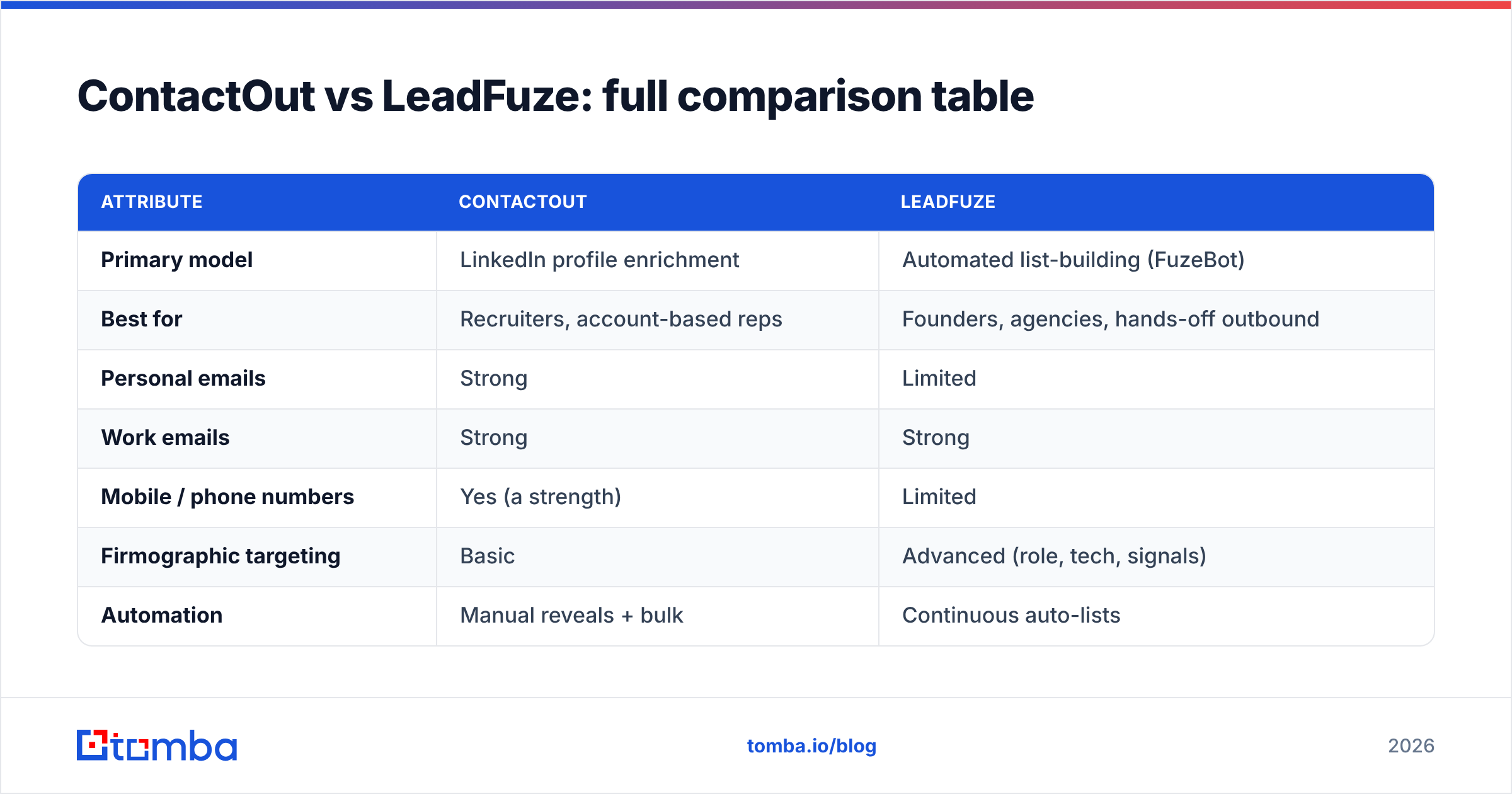
| Attribute | ContactOut | LeadFuze |
|---|---|---|
| Primary model | LinkedIn profile enrichment | Automated list-building (FuzeBot) |
| Best for | Recruiters, account-based reps | Founders, agencies, hands-off outbound |
| Personal emails | Strong | Limited |
| Work emails | Strong | Strong |
| Mobile / phone numbers | Yes (a strength) | Limited |
| Firmographic targeting | Basic | Advanced (role, tech, signals) |
| Automation | Manual reveals + bulk | Continuous auto-lists |
| Native CRM push | Yes | Yes |
| Free plan | Limited trial credits | Limited trial |
| Pricing transparency | Low (sales/annual gated) | Low (sales/annual gated) |
| Credit rollover | Generally no | Generally no |
Neither tool is "wrong" — they're built for different motions. If your day is spent on LinkedIn hunting named people, ContactOut fits your hand. If you want a list of 500 matching CTOs delivered on autopilot, LeadFuze fits your calendar.
Is ContactOut or LeadFuze more accurate?#
Accuracy depends on what you're finding. On standard corporate emails (first.last@company.com), both post competitive verified-hit rates because both run SMTP-level checks before handing you an address. The differences show at the edges:
- Personal emails and mobiles — ContactOut is the stronger option. Its data model is built around reaching the human, not just the role, which is exactly what recruiting and executive outreach need.
- Firmographic precision — LeadFuze wins. When "accuracy" means the right person at the right kind of company showing the right signal, its targeting filters surface better-fit leads even if the raw email match rate is similar.
- Catch-all domains — both struggle here, as every provider does. A domain that accepts all mail can't be verified by SMTP alone, so you'll see "accept-all" or "risky" flags rather than a clean pass. This is where a dedicated catch-all verifier earns its keep.
The honest takeaway: don't trust a single tool's "verified" badge as gospel. Whatever you pull, run it through an independent email verification pass before a big send. Bounce rates above 3-4% drag your sender reputation down fast, and no list is worth a burned domain.

How do ContactOut and LeadFuze pricing compare?#
Both vendors keep their real pricing close to the chest, which makes cost-per-verified-contact hard to calculate up front. Here's the shape of it in 2026:
- ContactOut offers a limited free tier for testing, then moves to paid plans that are largely quoted through sales or annual commitments. Higher tiers unlock more reveals and team seats. Credits are per-reveal and typically don't roll over.
- LeadFuze publishes a starter "Scaling" tier and an "Unlimited" tier, with volume gated behind lead credits. FuzeBot automation is the headline value; unused leads generally expire monthly, and custom volume requires a conversation.
The practical problem for a small team is predictability. When credits expire and prices sit behind an annual wall, budgeting your true cost per booked meeting gets fuzzy. That's the gap transparent, published pricing fills.
Where Tomba fits the pricing conversation#
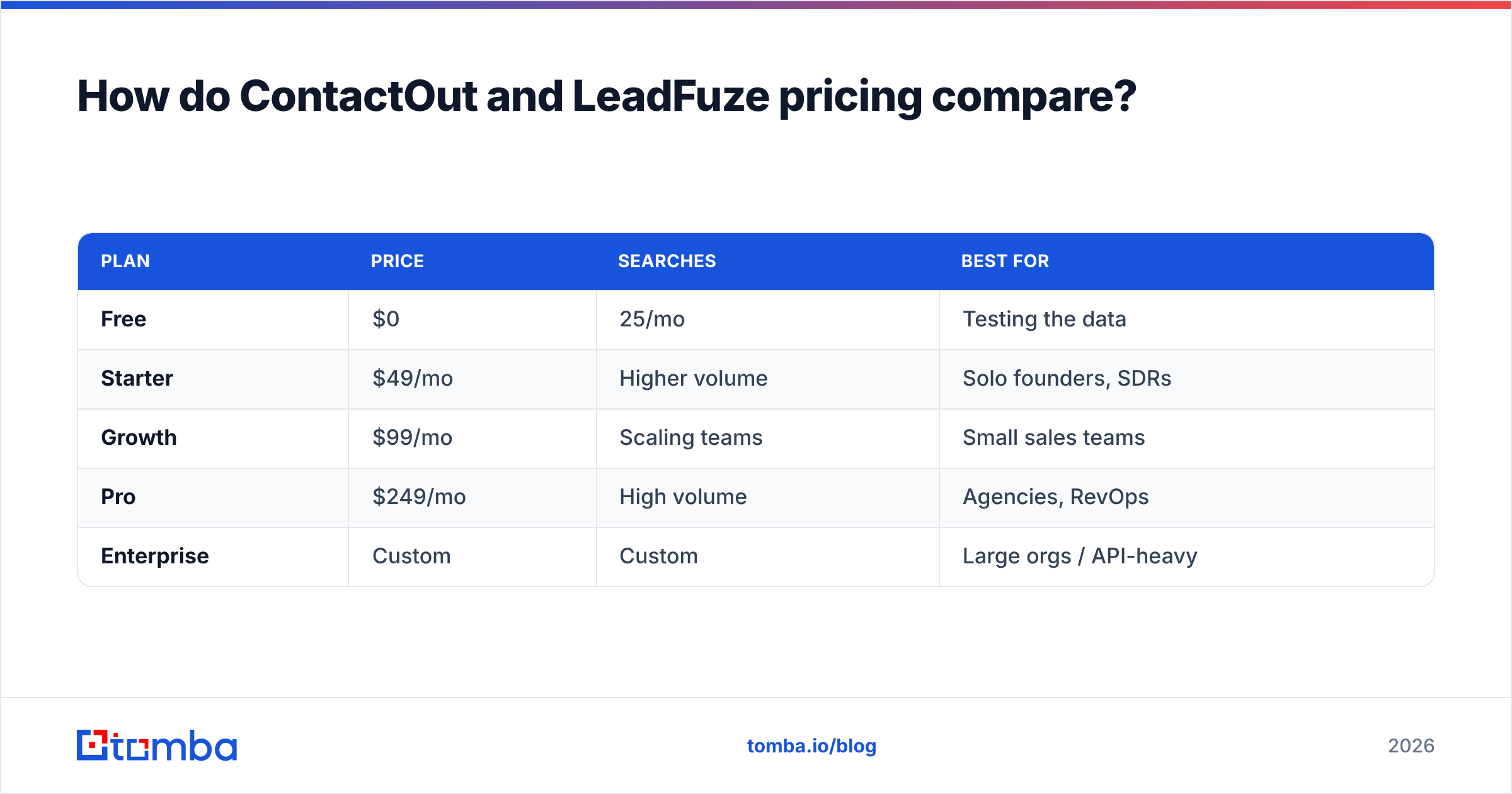
If your core need is find the email, verify the email, move on — without paying for a recruiting suite or a full automation engine — a focused stack is cheaper. Tomba pricing is public and flat:
| Plan | Price | Searches | Best for |
|---|---|---|---|
| Free | $0 | 25/mo | Testing the data |
| Starter | $49/mo | Higher volume | Solo founders, SDRs |
| Growth | $99/mo | Scaling teams | Small sales teams |
| Pro | $249/mo | High volume | Agencies, RevOps |
| Enterprise | Custom | Custom | Large orgs / API-heavy |
You can run domain-level prospecting with domain search, find individuals with the email finder, and clean the whole list with the verifier — all under one predictable bill. For LinkedIn-sourced lists specifically, the LinkedIn finder covers the same profile-to-email job ContactOut is known for.
ContactOut vs LeadFuze vs Tomba: which should you pick?#
Match the tool to the motion, not the hype:
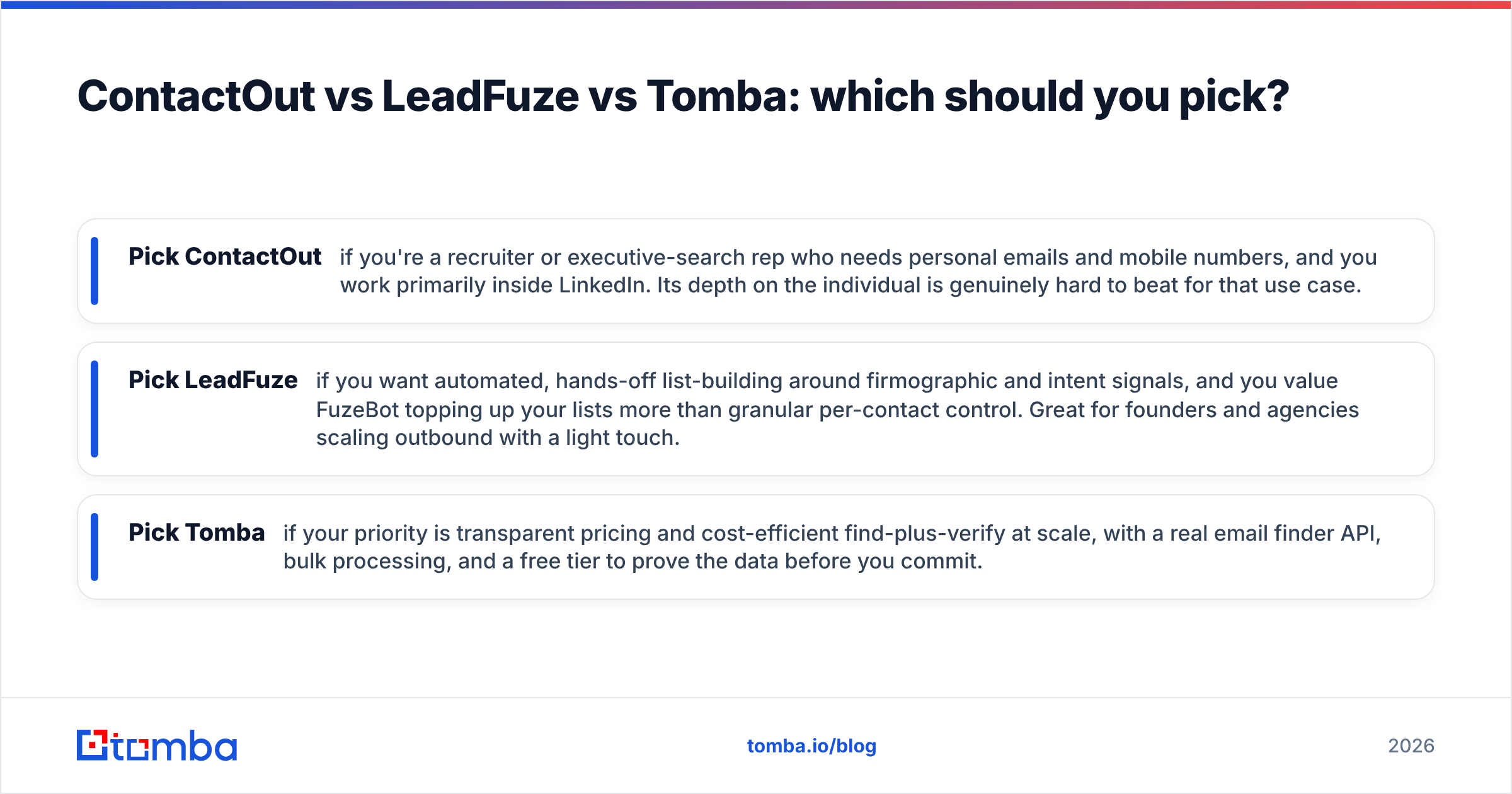
- Pick ContactOut if you're a recruiter or executive-search rep who needs personal emails and mobile numbers, and you work primarily inside LinkedIn. Its depth on the individual is genuinely hard to beat for that use case.
- Pick LeadFuze if you want automated, hands-off list-building around firmographic and intent signals, and you value FuzeBot topping up your lists more than granular per-contact control. Great for founders and agencies scaling outbound with a light touch.
- Pick Tomba if your priority is transparent pricing and cost-efficient find-plus-verify at scale, with a real email finder API, bulk processing, and a free tier to prove the data before you commit.
Many teams end up running two of these. A common pattern: use LeadFuze or ContactOut to source, then push everything through an independent verifier so your outreach tool never sees a risky address. The bulk email finder and verifier handle that cleanup step without another seat-based subscription.

What do real workflows look like with each tool?#
Recruiting a passive candidate (ContactOut's home turf): You're on a senior engineer's LinkedIn profile. ContactOut reveals a personal Gmail and a mobile. You reach them off-hours on a channel a work address would never win. This is where ContactOut's personal-data depth converts.
Launching a market campaign (LeadFuze's home turf): You define "VP Marketing, SaaS, 50-500 employees, using HubSpot." FuzeBot delivers 400 matching contacts this week and keeps adding as new people match. You never touched LinkedIn. This is automation doing the boring part.
Running lean, cost-controlled outbound (Tomba's fit): You have a list of 300 target domains from a conference. You run domain search to get the right contacts per company, verify in bulk, and export to your CRM — one predictable bill, no per-reveal anxiety, and you enrich leads with firmographics before the first touch.
None of these workflows is universally best. The best one is the one that matches how your team already prospects.
The bottom line on ContactOut vs LeadFuze#
ContactOut wins on individual depth — personal emails, mobiles, LinkedIn-native reveals — and is the right call for recruiters and account-based reps. LeadFuze wins on automation — describe a market once and let FuzeBot fill your lists — and suits founders and agencies who want outbound to run itself. Both are legitimate tools; both keep pricing frustratingly opaque and expire your credits.
If what you actually need is accurate emails found and verified at a price you can predict, that's a narrower job than either platform is built for — and it's exactly where a focused finder wins.
Ready to test the data yourself? Start with the Tomba Email Finder — find professional emails by name, domain, or company, verify them in the same workflow, and check the results against your current tool on the free 25-search tier before you spend a cent. Compare the hit rate, then decide.
Related guides#
Ready to find emails that actually work?
Join 150,000+ professionals who stopped guessing and started sending. Free credits on signup — no credit card required.
Get the Tomba newsletter
Practical outbound tactics and product updates — once every two weeks.
About the author