ContactOut vs Mailshunt: Which Email Finder Wins in 2026?
ContactOut is a LinkedIn-first contact revealer. Mailshunt is a domain-first finder with sending attached. They solve different problems — here's which one actually fits your pipeline, and where both fall short.
TL;DR — ContactOut vs Mailshunt in 30 seconds#
- ContactOut is a browser-first, LinkedIn-centric contact revealer. You live in LinkedIn Recruiter or Sales Navigator, you click, you get a personal email and often a phone number. Take it out of the browser and its value drops fast.
- Mailshunt is a domain-first email finder with sending bolted on. You feed it a company domain or a name + domain and it returns a work email, then lets you run the campaign in the same tab. It is not a LinkedIn scraper.
- They are not really the same product. Choosing between them is choosing between sourcing from profiles and sourcing from domains — and most B2B teams end up needing both.
- Cost is where the story gets ugly. ContactOut prices per seat with credit caps that punish teams; Mailshunt bundles sending, which is cheap until you outgrow the sender.
- The neutral third option: an API-first finder like Tomba ($49/mo Starter, free tier at 25 searches) that does domain search, verification, and enrichment without locking you to a browser tab or an inbox.
What is ContactOut, actually?#
ContactOut started as a Chrome extension for recruiters. The pitch has not changed much: open a LinkedIn profile, click the ContactOut icon, and the sidebar reveals personal emails, work emails, and phone numbers pulled from an aggregated dataset.
That workflow is genuinely good if — and only if — your prospecting starts on LinkedIn. Recruiters love it because personal Gmail addresses reach candidates who ignore work inboxes. Sales teams who source via Sales Navigator like it for the same reason.
The catch is structural. ContactOut's coverage is built around people who have a LinkedIn presence. If your ICP is a 40-person manufacturing firm in the Midwest whose ops manager last logged into LinkedIn in 2019, the extension has nothing to reveal. There is a search product and an API, but the center of gravity is the extension, and the pricing reflects that: you buy seats, not throughput.
What is Mailshunt, and how is it different?#
Mailshunt approaches the problem from the other end. You start with a domain, not a profile. Give it acme.com and it returns the email patterns and known addresses on that domain. Give it a name plus a domain and it constructs and validates the most likely address.
Its second half is what ContactOut does not have at all: a sending layer. Verification, list cleanup, and campaign send sit in the same product. For a solo founder or a small agency, that consolidation is the whole appeal — one bill, one login, one place to blame when replies stop coming.
The trade-off is depth. A domain-first finder cannot hand you a personal Gmail for a passive candidate. It also cannot enrich from a LinkedIn URL, which is how a lot of modern outbound actually gets sourced. And bundling send with find means you inherit whatever deliverability infrastructure the vendor runs — you are trusting one company with both your data quality and your sender reputation.

How do ContactOut and Mailshunt compare head to head?#
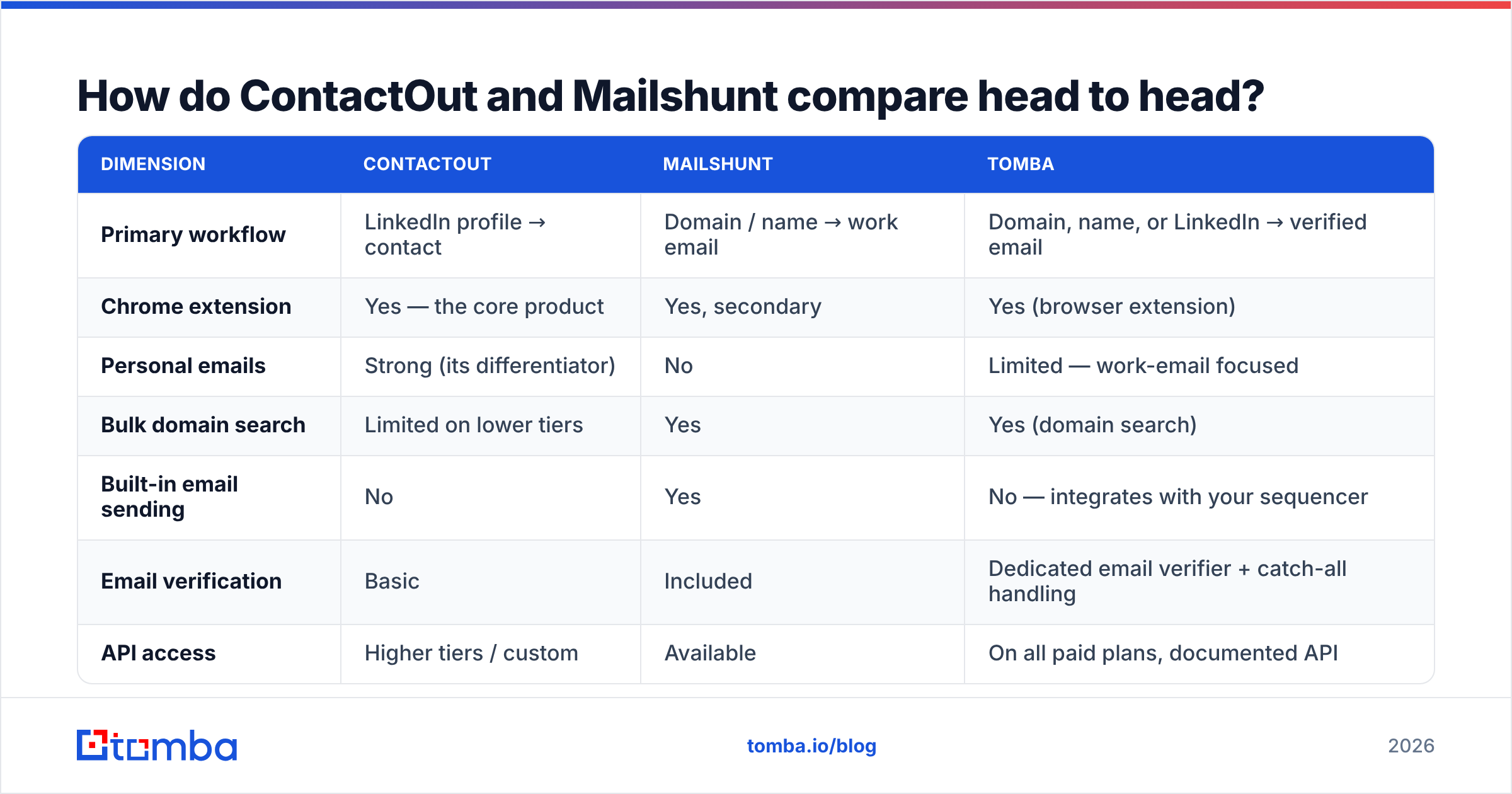
Here is the honest side-by-side. Pricing on both platforms moves — treat these as directional and verify on the vendor pages before you sign anything.
| Dimension | ContactOut | Mailshunt | Tomba |
|---|---|---|---|
| Primary workflow | LinkedIn profile → contact | Domain / name → work email | Domain, name, or LinkedIn → verified email |
| Chrome extension | Yes — the core product | Yes, secondary | Yes (browser extension) |
| Personal emails | Strong (its differentiator) | No | Limited — work-email focused |
| Bulk domain search | Limited on lower tiers | Yes | Yes (domain search) |
| Built-in email sending | No | Yes | No — integrates with your sequencer |
| Email verification | Basic | Included | Dedicated email verifier + catch-all handling |
| API access | Higher tiers / custom | Available | On all paid plans, documented API |
| Free tier | Small monthly credit allowance | Limited free credits | 25 searches/mo |
| Entry paid price | Per-seat, mid-double-digits and up | Low entry, sending bundled | $49/mo Starter |
| Pricing model | Seats + credits | Credits + send volume | Credits, no seat tax |
| Best for | Recruiters living in LinkedIn | Solo founders wanting find + send | Teams who need clean data piped into their own stack |
The row that decides most deals is pricing model, not features. ContactOut's seat-based structure means a five-person SDR team pays five times before anyone has found a single email. Mailshunt's bundled model means you pay for sending capacity you may not want if you already run Instantly, Smartlead, or Salesloft.
Which one is more accurate?#
Accuracy is the only metric that compounds. A 12% bounce rate does not just waste 12 credits — it drags your domain into spam folders and poisons the 88% that were fine.
Both tools publish confidence scores. Neither publishes a methodology you can audit. So here is how to reason about it instead of trusting a marketing number:
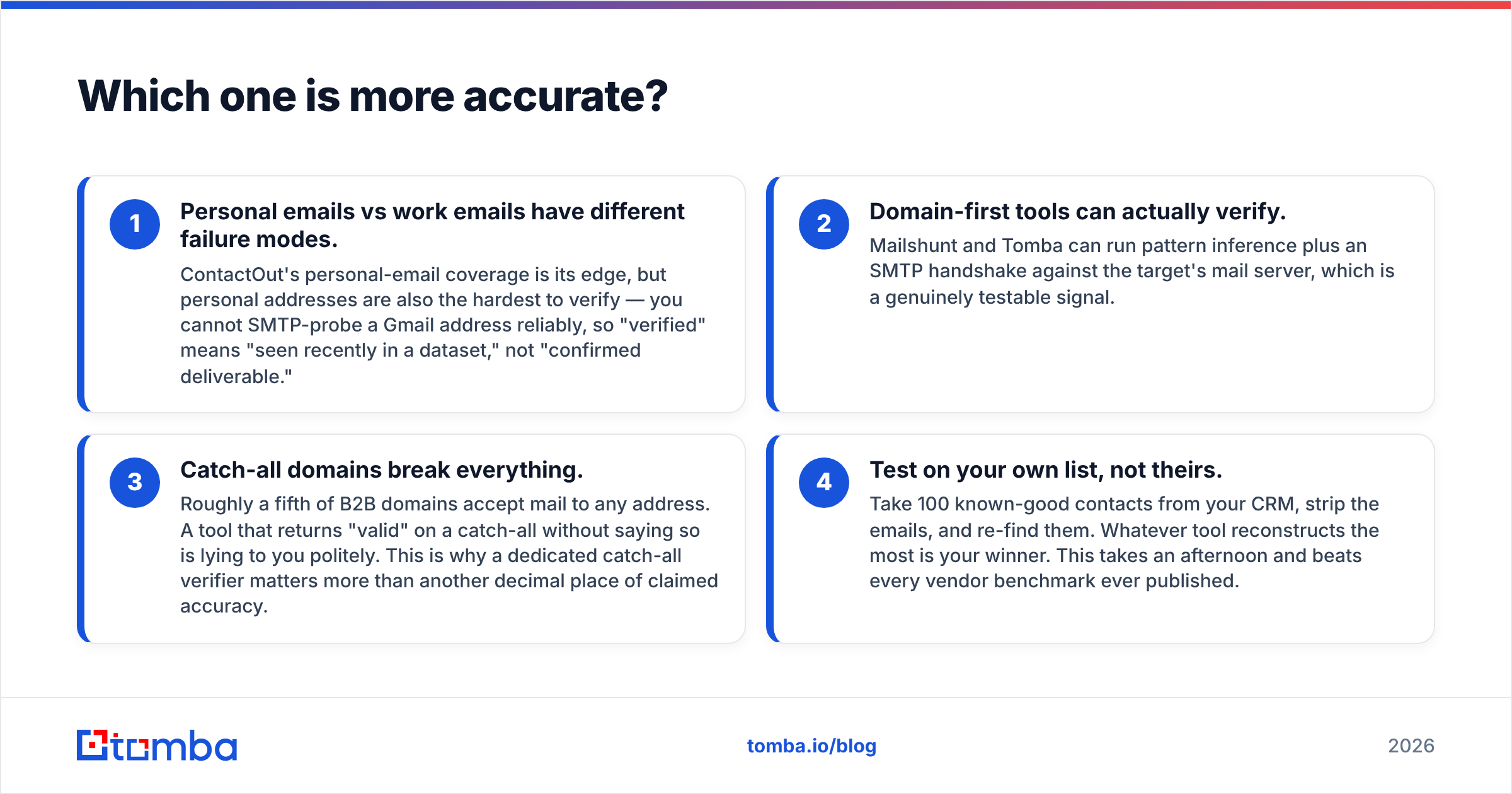
- Personal emails vs work emails have different failure modes. ContactOut's personal-email coverage is its edge, but personal addresses are also the hardest to verify — you cannot SMTP-probe a Gmail address reliably, so "verified" means "seen recently in a dataset," not "confirmed deliverable."
- Domain-first tools can actually verify. Mailshunt and Tomba can run pattern inference plus an SMTP handshake against the target's mail server, which is a genuinely testable signal.
- Catch-all domains break everything. Roughly a fifth of B2B domains accept mail to any address. A tool that returns "valid" on a catch-all without saying so is lying to you politely. This is why a dedicated catch-all verifier matters more than another decimal place of claimed accuracy.
- Test on your own list, not theirs. Take 100 known-good contacts from your CRM, strip the emails, and re-find them. Whatever tool reconstructs the most is your winner. This takes an afternoon and beats every vendor benchmark ever published.

The independent signal worth checking is user review volume on G2 — not the star rating, which everyone games, but the complaint patterns in three-star reviews. For ContactOut, those cluster around credit exhaustion and seat cost. For Mailshunt, around coverage gaps on smaller or non-US domains.
Is ContactOut worth it for sales teams (not recruiters)?#
Partly. ContactOut was built for talent acquisition and it shows. Sales use cases work, but you pay a recruiter-shaped price for a sales-shaped job.
Choose ContactOut if:
- Your entire sourcing motion is LinkedIn. Sales Navigator lists are your source of truth and you want one-click reveal without leaving the tab.
- You need mobile numbers. ContactOut's phone coverage is a real asset if you run a calling motion alongside email.
- You have 1-3 reps, not 15. Seat pricing is survivable at small headcount.
Skip it if:
- You prospect from domains, funding lists, job boards, or website visitors. The extension is useless without a profile to sit on.
- You need programmatic access. API access sits behind higher tiers, and per-seat licensing does not map cleanly to a data pipeline.
- You are enriching in bulk. Uploading a 5,000-row CSV to a seat-priced tool is a bad deal by construction.
If those last three describe you, the comparison you actually want is a ContactOut alternative built for throughput rather than clicks.
Is Mailshunt's all-in-one bundle a trap?#
Not a trap — but a bet. You are betting that one vendor can be adequate at three different jobs: finding, verifying, and sending. Those are three genuinely hard engineering problems, and the companies that are best at each of them are different companies.
The bundle wins when:
- You are a solo operator or 2-person agency and vendor sprawl costs more than any quality gap.
- Your volume is low enough that deliverability is forgiving — a few hundred sends a week.
- You want one number to look at, not four dashboards.
The bundle hurts when:
- You already own a sequencer. Paying for send capacity twice is pure waste.
- Your email deliverability depends on infrastructure you control — dedicated IPs, your own warmed domains, your own SPF/DKIM posture. Bundled senders abstract that away, which is convenient right up until it is not.
- You need to swap one layer out. In a bundle, you cannot replace just the finder; you replace everything.

The uncomfortable truth under both products: every finder in this category eventually resolves to the same handful of signals — pattern inference, crawled sources, contributed data, and an SMTP handshake. The differentiator is not magic. It is coverage breadth, honesty about catch-alls, and whether you can get the data out.
What should you actually do if you need both?#
Decouple. Treat finding and sending as separate purchases, and treat LinkedIn reveal and domain enrichment as separate jobs.
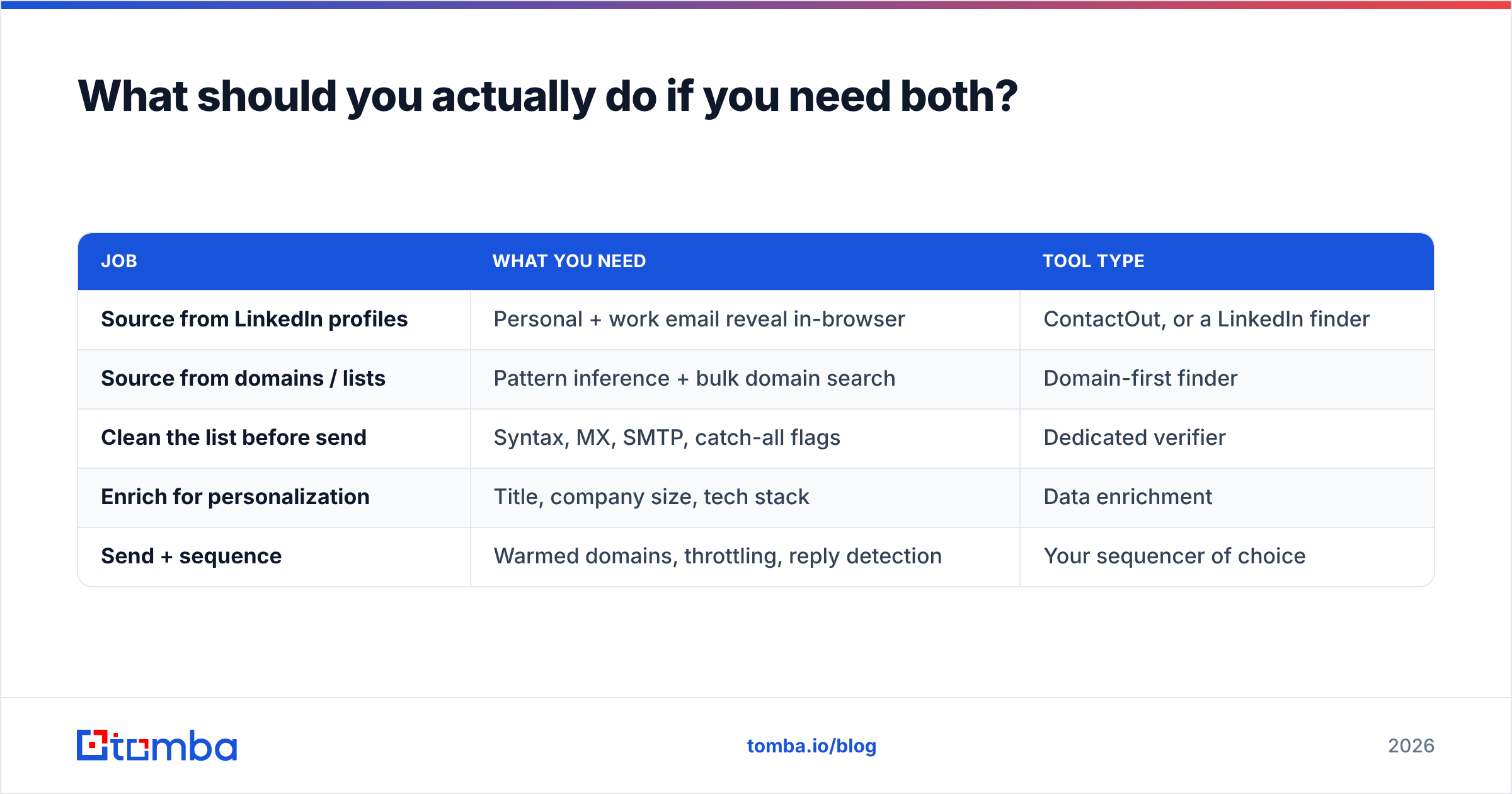
A stack that survives contact with reality looks like this:
| Job | What you need | Tool type |
|---|---|---|
| Source from LinkedIn profiles | Personal + work email reveal in-browser | ContactOut, or a LinkedIn finder |
| Source from domains / lists | Pattern inference + bulk domain search | Domain-first finder |
| Clean the list before send | Syntax, MX, SMTP, catch-all flags | Dedicated verifier |
| Enrich for personalization | Title, company size, tech stack | Data enrichment |
| Send + sequence | Warmed domains, throttling, reply detection | Your sequencer of choice |
Notice that no single row says "and also does the other four." That is deliberate. The teams with the healthiest reply rates I have seen are the ones who kept these layers separate and swapped whichever one underperformed, rather than re-platforming their whole outbound every eighteen months.

How does Tomba fit into the ContactOut vs Mailshunt debate?#
Honestly? It does not compete with ContactOut on personal Gmail reveal. If your job is finding a passive engineering candidate's personal inbox, ContactOut's dataset is built for that and Tomba's is not.
Where Tomba is the better answer is the layer both of these tools treat as secondary:
- Domain-first discovery at volume. Feed a domain, get the verified addresses and the pattern. Feed 5,000 domains, get 5,000 answers. The bulk email finder exists because CSV enrichment is a first-class job, not an upsell.
- Verification that tells you the truth. Catch-all domains get flagged as catch-all, not laundered into "valid." That is the single highest-leverage thing a finder can do for your sender reputation.
- No seat tax. Tomba pricing runs Free (25 searches/mo), Starter at $49/mo, Growth at $99/mo, and Pro at $249/mo, with credits pooled rather than per-user. A five-person team on Starter pays $49, not $245.
- It gets out of your way. API, CLI, Chrome extension, Google Sheets, Excel, HubSpot, Salesforce. The data goes where your workflow already is instead of asking your workflow to move into a new tab.
Final verdict: which one should you buy?#
- Pick ContactOut if you are a recruiter or a LinkedIn-native seller who needs personal emails and mobile numbers, and your headcount is small enough that seat pricing does not compound against you.
- Pick Mailshunt if you are a solo founder or small agency who wants find-verify-send in one bill and you have no existing sequencer to protect.
- Pick neither if what you actually need is clean, verified, high-volume contact data flowing into a stack you already own — because that is a different product category, and buying a browser extension or a bundled sender to do it is how teams end up paying twice.
Run the 100-contact reconstruction test on all three before you commit. It costs you one afternoon and it will tell you more than any comparison post, including this one.
Ready to test the domain-first approach? Tomba's Email Finder gives you 25 free searches a month — enough to run the reconstruction test on your own list and see the hit rate for yourself before a card ever touches the form. Feed it a name and a domain, get a verified work email with a catch-all flag you can actually trust, and pipe it straight into your CRM via the API. No seats, no bundled sender you did not ask for.
Related guides#
Ready to find emails that actually work?
Join 150,000+ professionals who stopped guessing and started sending. Free credits on signup — no credit card required.
Get the Tomba newsletter
Practical outbound tactics and product updates — once every two weeks.
About the author