ContactOut vs Mailstand: Which B2B Contact Tool Wins in 2026?
ContactOut is a LinkedIn-first contact database. Mailstand is a shared-inbox sending layer. They solve opposite halves of outbound — here is which one you actually need, and what each costs you.
TL;DR
- These are not competitors. ContactOut is a contact database you search from LinkedIn; Mailstand is an inbox-aggregation and sending layer that pools multiple mailboxes into one cold-email engine. Comparing them head-to-head only makes sense because teams keep asking "which do I buy first?"
- Buy ContactOut if your bottleneck is finding people — you live in LinkedIn Sales Navigator and need emails and phones attached to profiles.
- Buy Mailstand if your bottleneck is sending — you already have a list, and you need many mailboxes rotating so 3,000 sends/month don't torch one domain.
- Most teams need both halves, and neither product covers both. That's why an API-first finder plus a dedicated sender is the cheaper, more durable stack.
- Budget reality: LinkedIn-tethered tools price per seat, which quietly triples cost the moment a second SDR joins.
What are ContactOut and Mailstand, actually?#
Think of outbound like a restaurant. ContactOut is the supplier who brings you ingredients. Mailstand is the line of stoves you cook on. Asking "ContactOut vs Mailstand" is like asking whether you'd rather have vegetables or a kitchen — the honest answer is that you need both, and you should stop pretending one substitutes for the other.
ContactOut is a Chrome-extension-led contact-data tool. You browse a LinkedIn profile, click the extension, and it surfaces personal and work emails plus phone numbers. It also ships a searchable people database and a lightweight Recruiter/Sales workflow layer. Its center of gravity is recruiting: the company's marketing, integrations, and coverage claims all lean toward talent acquisition, where personal Gmail addresses matter as much as work domains.
Mailstand is a sending-infrastructure product. It connects many mailboxes — Google Workspace, Microsoft 365, custom SMTP — into a single unified sending pool, then rotates sends across them so no individual mailbox exceeds safe daily volume. It also merges those inboxes into one shared view so replies don't scatter across eight accounts. It does not find you a single email address.
So the real question isn't "which one wins." It's: where is your outbound actually breaking?
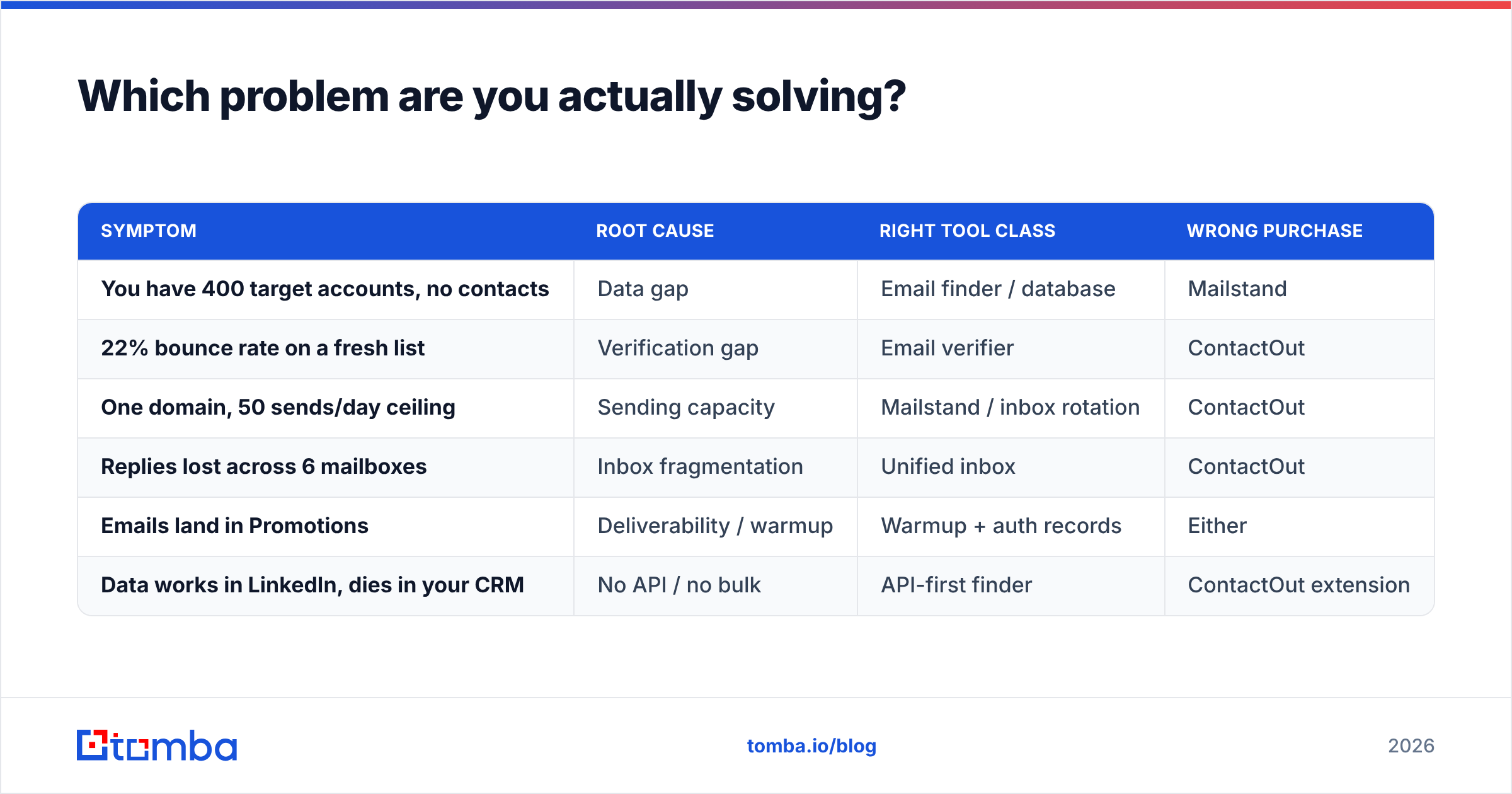
Which problem are you actually solving?#
Run this diagnostic before you spend a dollar.
| Symptom | Root cause | Right tool class | Wrong purchase |
|---|---|---|---|
| You have 400 target accounts, no contacts | Data gap | Email finder / database | Mailstand |
| 22% bounce rate on a fresh list | Verification gap | Email verifier | ContactOut |
| One domain, 50 sends/day ceiling | Sending capacity | Mailstand / inbox rotation | ContactOut |
| Replies lost across 6 mailboxes | Inbox fragmentation | Unified inbox | ContactOut |
| Emails land in Promotions | Deliverability / warmup | Warmup + auth records | Either |
| Data works in LinkedIn, dies in your CRM | No API / no bulk | API-first finder | ContactOut extension |
If two or more of your symptoms sit in the top half of that table, your problem is data, and a sending tool will not save you. If they sit in the bottom half, your problem is infrastructure, and no amount of contact enrichment fixes it.


How do ContactOut and Mailstand compare feature by feature?#
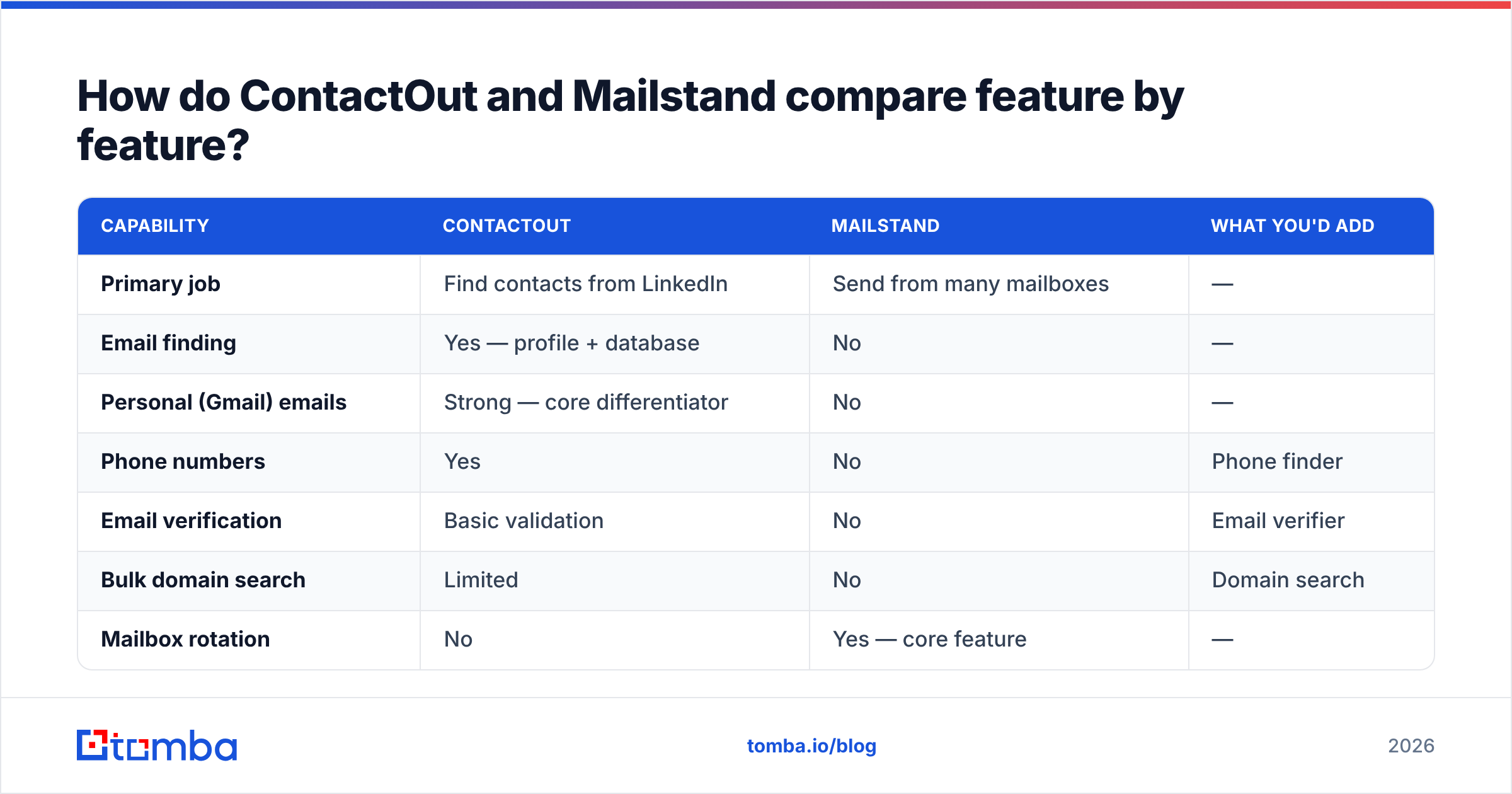
| Capability | ContactOut | Mailstand | What you'd add |
|---|---|---|---|
| Primary job | Find contacts from LinkedIn | Send from many mailboxes | — |
| Email finding | Yes — profile + database | No | — |
| Personal (Gmail) emails | Strong — core differentiator | No | — |
| Phone numbers | Yes | No | Phone finder |
| Email verification | Basic validation | No | Email verifier |
| Bulk domain search | Limited | No | Domain search |
| Mailbox rotation | No | Yes — core feature | — |
| Unified shared inbox | No | Yes | — |
| Sequences / campaigns | Light | Yes | — |
| Public REST API | Limited / higher tiers | Sending-side only | Tomba API |
| Pricing model | Per seat | Per mailbox / per seat | — |
| Free tier | Limited credits | Trial | — |
| Best for | Recruiters, LinkedIn-first SDRs | High-volume cold email teams | — |
The table makes the overlap obvious: it's roughly zero. ContactOut's row of "no"s in the sending half and Mailstand's row of "no"s in the data half are not accidents. These companies chose different halves of the funnel on purpose.
Is ContactOut worth it for B2B sales in 2026?#
ContactOut is genuinely good at one thing: turning a LinkedIn profile into a reachable human, including a personal email. If you're a recruiter chasing passive candidates who ignore work inboxes, that's a real edge and few tools match it.
For B2B sales, the picture is more mixed, and three constraints deserve a straight answer.
1. It's tethered to LinkedIn. The extension workflow is fast for one profile and miserable for 500. If your motion is account-based — "find the VP of Engineering at these 300 SaaS companies" — you're starting from a company list, not a LinkedIn list, and a domain search that returns every addressable contact at a domain in one call is a structurally better fit.
2. Per-seat pricing punishes growth. Contact tools priced per seat are cheap for one rep and expensive for six. The credits don't pool the way you assume they will. Model the cost at your headcount twelve months from now, not today.
3. Personal emails are a liability in cold outbound. Recruiters can email a Gmail address. A B2B seller emailing a prospect's personal Gmail is a spam complaint waiting to happen, and under GDPR-style regimes it's a harder legitimate-interest argument to make. The feature that makes ContactOut great for recruiting is the feature you should mostly not use in sales.
None of that makes it a bad tool. It makes it a recruiting tool that sales teams keep buying by accident.
Is Mailstand worth it, or should you just use a sequencer?#
Mailstand's pitch — pool many mailboxes, rotate sends, unify replies — solves a problem that is real and getting worse. Google and Microsoft both tightened bulk-sender enforcement, and the practical daily ceiling on a single Workspace mailbox for cold outbound is far lower than the theoretical limit. If you need 3,000 sends a month, that's not one mailbox. It's six to ten, warmed, on separate domains.
Where it gets complicated: most modern sequencers now ship inbox rotation natively. Instantly, Smartlead, and Saleshandy all do multi-mailbox rotation and a unified inbox. So the honest evaluation of Mailstand isn't "Mailstand vs ContactOut" — it's "Mailstand vs the rotation feature already bundled in the sequencer you're paying for."
Buy Mailstand if you want the sending layer decoupled from the sequencer, or if you're consolidating mailboxes across tools that don't talk to each other. Skip it if your sequencer already rotates and your reply volume is manageable — you'd be paying twice for the same capability. If you're weighing the bundled path, our Instantly alternative breakdown covers where those tradeoffs land.
And regardless of which sender you pick: rotation is not a substitute for hygiene. Rotating a bad list across ten mailboxes burns ten mailboxes instead of one. Authentication comes first — check your SPF record and DKIM before you scale volume, and understand that email deliverability is a function of list quality far more than send mechanics. Google's own sender guidelines are the primary source here, not a vendor blog.
What does a complete outbound stack actually look like?#
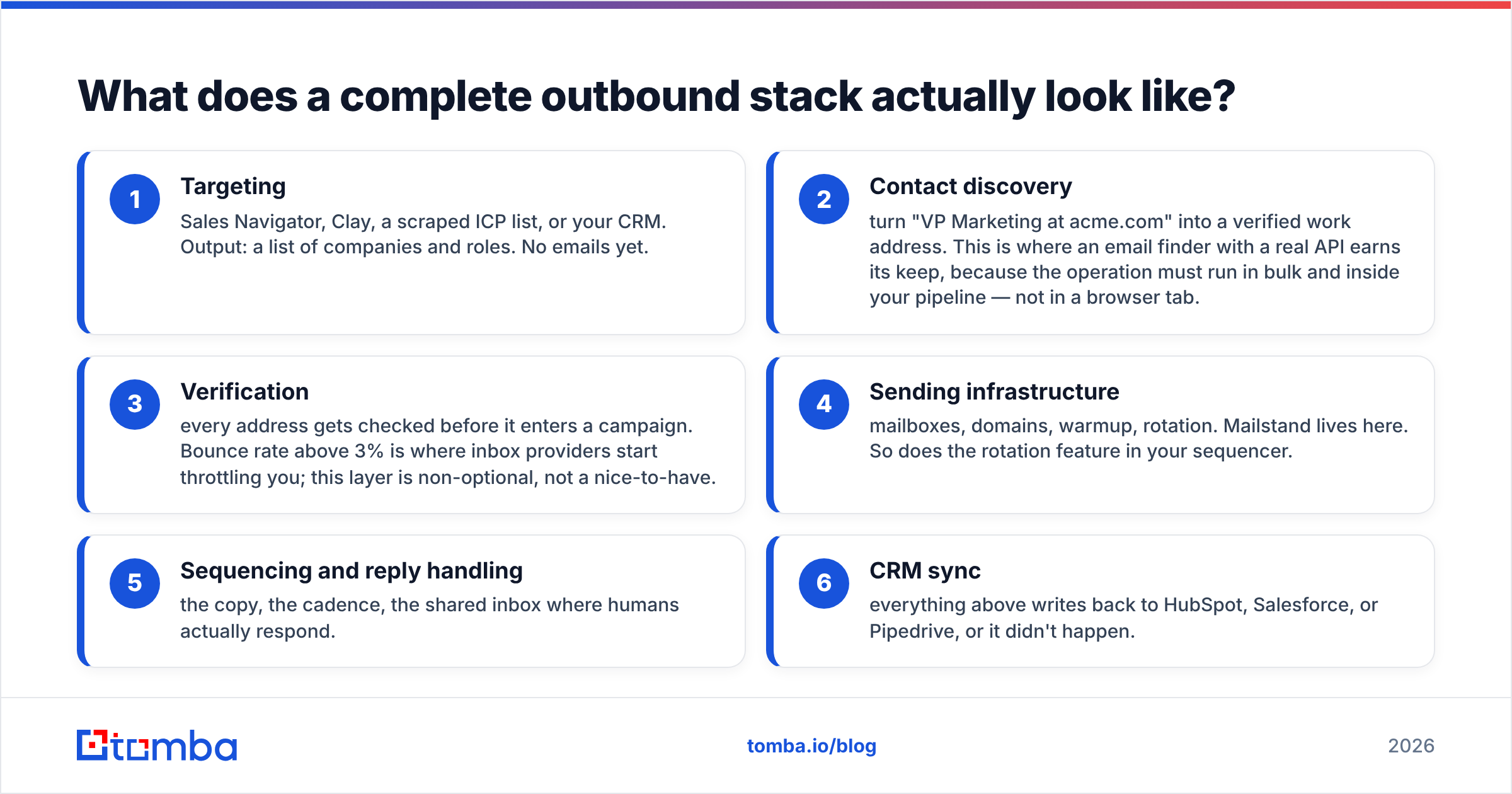
Here's the layered model that survives contact with reality. Each layer has one job, and you should be able to swap any layer without rebuilding the others.
- Targeting — Sales Navigator, Clay, a scraped ICP list, or your CRM. Output: a list of companies and roles. No emails yet.
- Contact discovery — turn "VP Marketing at acme.com" into a verified work address. This is where an email finder with a real API earns its keep, because the operation must run in bulk and inside your pipeline — not in a browser tab.
- Verification — every address gets checked before it enters a campaign. Bounce rate above 3% is where inbox providers start throttling you; this layer is non-optional, not a nice-to-have.
- Sending infrastructure — mailboxes, domains, warmup, rotation. Mailstand lives here. So does the rotation feature in your sequencer.
- Sequencing and reply handling — the copy, the cadence, the shared inbox where humans actually respond.
- CRM sync — everything above writes back to HubSpot, Salesforce, or Pipedrive, or it didn't happen.
ContactOut covers layer 2, partially, for LinkedIn-shaped inputs. Mailstand covers layer 4. Neither touches layer 3, which is the layer that quietly determines whether the other five work. That's the gap that kills more campaigns than any tool choice.
Where does Tomba fit between them?#
Tomba sits in layers 2 and 3 — the part both of these tools leave open.
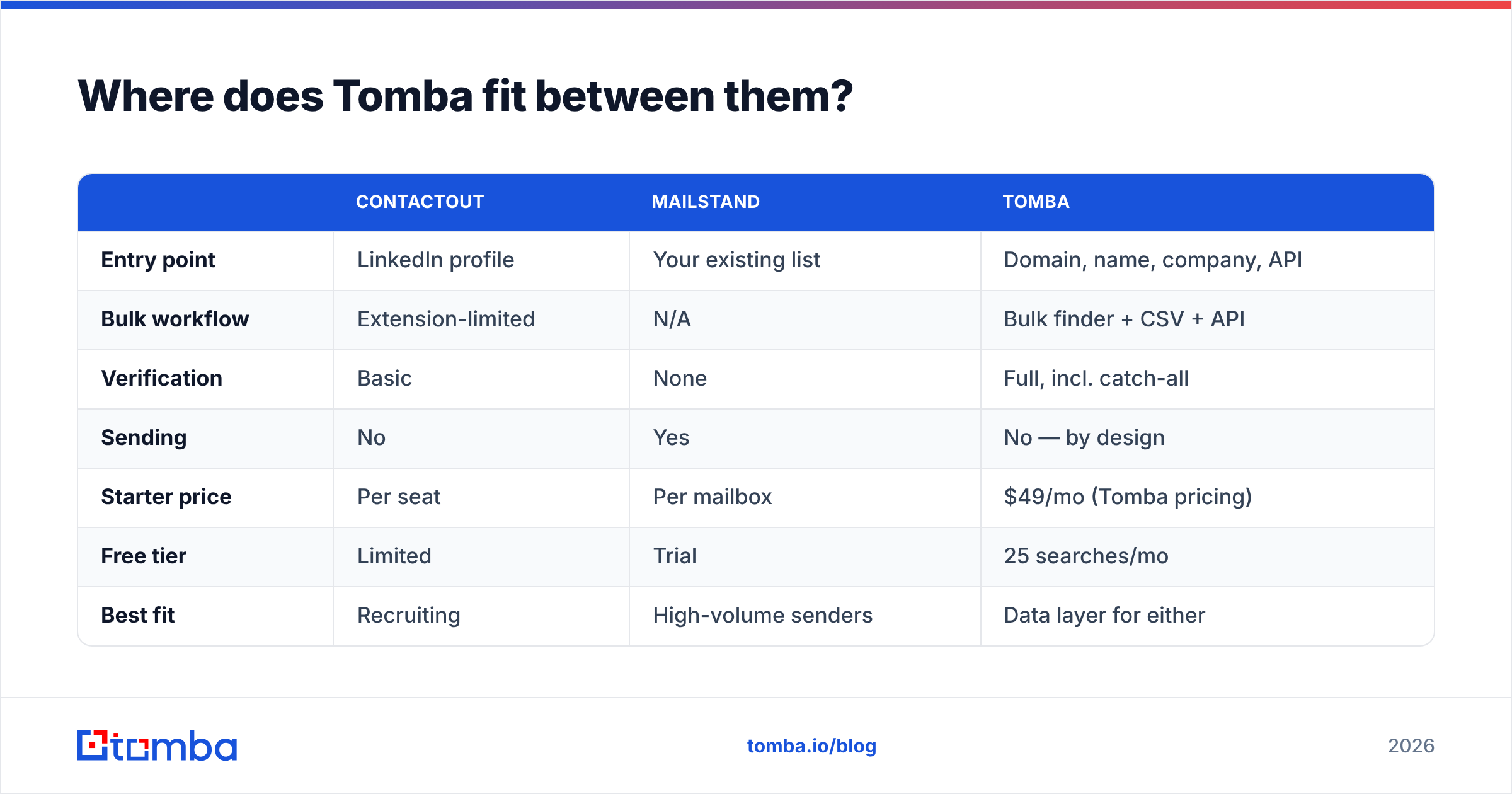
The practical difference from ContactOut is the entry point. ContactOut starts from a person on LinkedIn. Tomba starts from a domain, a name, a company, or an API call, which means it fits the account-based motion most B2B teams actually run and it fits inside automation, not just a browser. Feed it a company list, get back verified work emails, push them to your sequencer. A LinkedIn finder covers the profile-first workflow when you need it, so you're not giving up that path either.
The practical difference from Mailstand is simpler: Tomba doesn't send. It makes sure that what you send goes somewhere real. Every address runs through the email verifier, including the catch-all verifier for domains that accept everything and confirm nothing — the single largest source of "verified" addresses that bounce anyway.
| ContactOut | Mailstand | Tomba | |
|---|---|---|---|
| Entry point | LinkedIn profile | Your existing list | Domain, name, company, API |
| Bulk workflow | Extension-limited | N/A | Bulk finder + CSV + API |
| Verification | Basic | None | Full, incl. catch-all |
| Sending | No | Yes | No — by design |
| Starter price | Per seat | Per mailbox | $49/mo (Tomba pricing) |
| Free tier | Limited | Trial | 25 searches/mo |
| Best fit | Recruiting | High-volume senders | Data layer for either |
Worth naming honestly: if you want a pre-built list you buy outright rather than a find-and-verify workflow, that's a different product category entirely — BookYourData is a solid choice there, and pay-as-you-go list purchase is a legitimate strategy for teams that don't want to run a discovery pipeline at all. Different job, different tool. Don't force one to be the other.
How should you decide?#
Three questions, in order.
Q1: Do you have a list of verified emails right now? No → your problem is data. ContactOut or an email finder. Mailstand does nothing for you yet. Yes → continue.
Q2: Is your bounce rate under 3%? No → your problem is verification. Neither ContactOut nor Mailstand solves this. Fix it before you buy anything else. Yes → continue.
Q3: Are you hitting a sending ceiling on one domain? Yes → your problem is infrastructure. Mailstand, or the rotation feature in your sequencer. Check whether you already own it before buying it again. No → you don't need either. Your problem is copy or targeting, and no tool fixes that.
Most teams that ask "ContactOut vs Mailstand" fail Q2 and don't know it. They're shopping for a sending upgrade while sitting on a list where a fifth of the addresses don't exist. Rotation across ten mailboxes doesn't fix a bad list — it distributes the damage.
For a broader view of how these tools stack up in third-party reviews rather than vendor copy, G2's sales intelligence category is a reasonable place to sanity-check any of this against real user counts.
The verdict#
ContactOut wins if you're a recruiter, or an SDR whose entire motion begins and ends inside LinkedIn, and you accept per-seat pricing as the cost of that convenience.
Mailstand wins if you already have clean data, you're pushing real volume, and your sequencer doesn't rotate mailboxes natively.
Neither wins the actual comparison, because they're answering different questions. The team that buys ContactOut and wonders why deliverability is bad, or buys Mailstand and wonders why nobody replies, has diagnosed the wrong problem in both cases.
The stack that holds up: an API-first data layer that finds and verifies contacts in bulk, feeding a sending layer built for rotation and warmup. Two layers, two tools, each doing one thing well.
Start with the layer everything else depends on. If your contacts are wrong, nothing downstream matters — not rotation, not copy, not cadence. The Tomba Email Finder turns a domain or a name into a verified work email, in bulk, through an API that drops into whatever sequencer you already run. The free tier gives you 25 searches a month to test coverage against your own ICP before you commit; paid starts at $49/mo. Run 50 of your real target accounts through it and compare the hit rate to whatever you're using now — that's the only benchmark that counts.
Related guides#
Ready to find emails that actually work?
Join 150,000+ professionals who stopped guessing and started sending. Free credits on signup — no credit card required.
Get the Tomba newsletter
Practical outbound tactics and product updates — once every two weeks.
About the author