ContactOut vs Market Location (2026): Which B2B Data Tool Wins?
ContactOut scrapes LinkedIn profiles. Market Location sells curated UK business files. They solve different problems — and picking the wrong one wastes a year of budget. Here's the honest breakdown.
TL;DR
- They are not really competitors. ContactOut is a LinkedIn-first contact finder (Chrome extension + search app) built for recruiters and SDRs. Market Location is a UK-focused B2B business-data house that sells curated, licensed lists and firmographic files.
- Pick ContactOut if you prospect person-by-person inside LinkedIn and need personal + work emails for individual profiles.
- Pick Market Location if you need a licensed, GDPR-documented UK business file (site-level firmographics, telemarketing data, direct-mail records) delivered as a dataset, not a browser popup.
- Neither is a great fit if your workflow is API-first — enriching a CRM, a signup form, or a scraped domain list programmatically. That's a third category.
- Pricing transparency is the sharpest divide: ContactOut publishes credit-based tiers; Market Location works on quotes. Budget accordingly.
What is ContactOut?#
ContactOut is a contact-data tool that lives mostly inside your browser. Install the Chrome extension, open a LinkedIn profile, and it reveals work emails, personal emails, and phone numbers for that person. There's also a standalone search app where you filter by title, company, seniority, and location, plus a data-enrichment upload for existing lists.
Its core promise is personal contact data. Most B2B tools stop at first.last@company.com. ContactOut is one of the few that leans hard into personal Gmail-style addresses and mobile numbers — which is exactly why recruiters adopted it first. If you're trying to reach an engineer who ignores their work inbox, a personal address is the whole ballgame.
The trade-off is scope. ContactOut is anchored to LinkedIn. If a person doesn't have a LinkedIn profile, or their profile is thin, the tool has very little to work with. That's fine for recruiting and for enterprise SaaS prospecting. It's poor for reaching the owner of a 12-person plumbing firm in Leeds who has never logged into LinkedIn.
What is Market Location?#
Market Location is a British B2B data provider — a different species entirely. Instead of a browser extension, you buy access to a curated database of UK businesses: company records, site-level detail, employee bands, turnover, SIC codes, decision-maker names, telephone data, and postal addresses. Data is licensed for a defined use (a mailing, a telemarketing campaign, a CRM refresh) rather than tapped credit-by-credit.
This is the classic "list house" model, modernised. The strengths are real:
- Depth on UK SMEs. Traditional list vendors do the unglamorous work of phone-verifying small businesses that never appear on LinkedIn. That's coverage no scraper replicates.
- Licensing and compliance paperwork. For UK/EU direct mail and telemarketing, you want a supplier who can show provenance, suppression file screening (MPS/TPS), and a lawful basis. That's their home turf.
- Site-level firmographics. Multi-branch companies are messy. A dataset built around physical sites handles that better than a profile-based scraper.
The weaknesses mirror the strengths. It's UK-centric, it's not built for real-time API enrichment, and pricing is quote-based — you'll talk to a salesperson before you see a number.

ContactOut vs Market Location: how do they actually compare?#
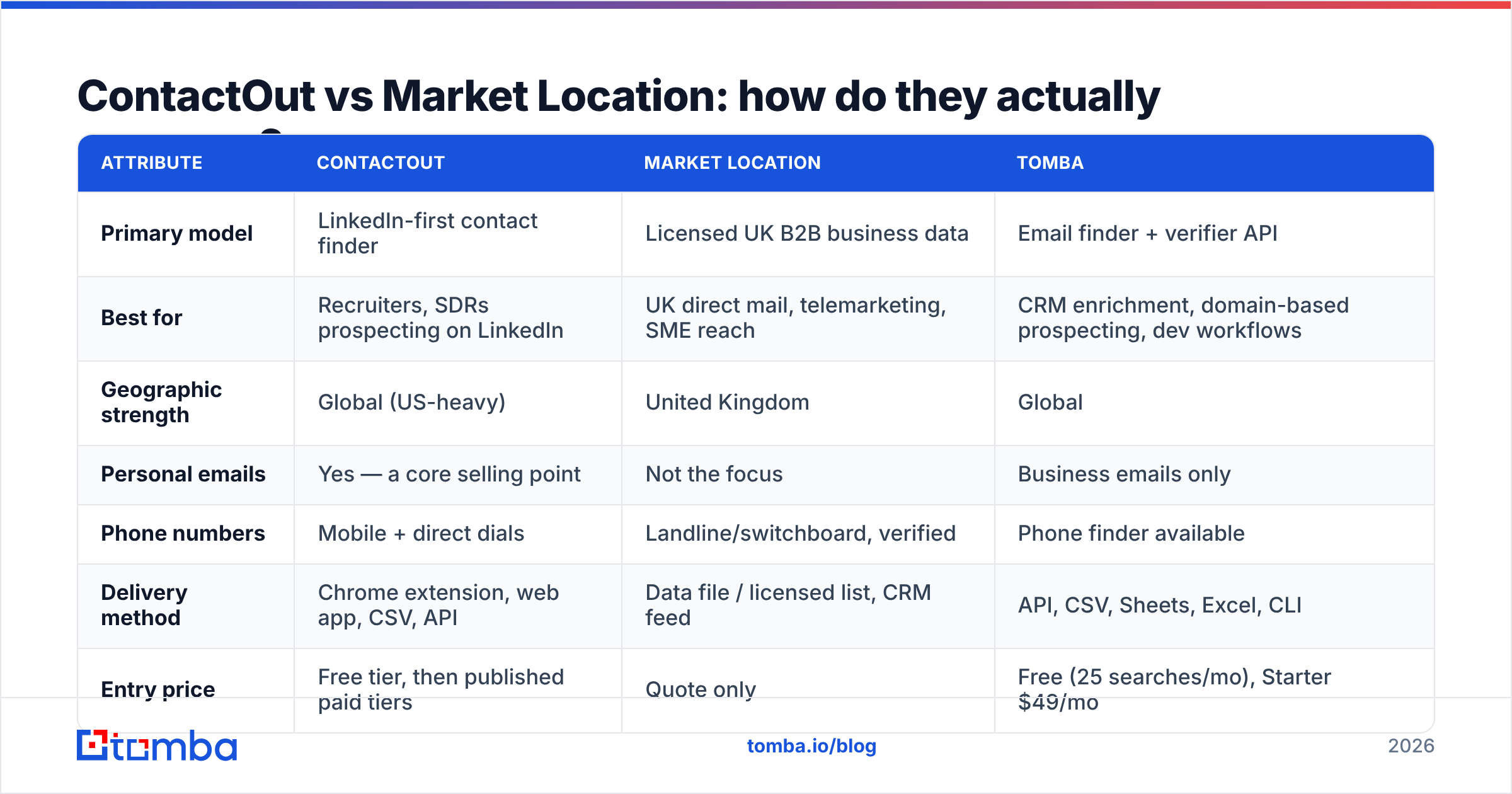
Here's the head-to-head, with Tomba included as the API-first reference point since most teams end up needing that third column.
| Attribute | ContactOut | Market Location | Tomba |
|---|---|---|---|
| Primary model | LinkedIn-first contact finder | Licensed UK B2B business data | Email finder + verifier API |
| Best for | Recruiters, SDRs prospecting on LinkedIn | UK direct mail, telemarketing, SME reach | CRM enrichment, domain-based prospecting, dev workflows |
| Geographic strength | Global (US-heavy) | United Kingdom | Global |
| Personal emails | Yes — a core selling point | Not the focus | Business emails only |
| Phone numbers | Mobile + direct dials | Landline/switchboard, verified | Phone finder available |
| Delivery method | Chrome extension, web app, CSV, API | Data file / licensed list, CRM feed | API, CSV, Sheets, Excel, CLI |
| Entry price | Free tier, then published paid tiers | Quote only | Free (25 searches/mo), Starter $49/mo |
| Verification built in | Basic validation | Human/phone-verified records | Dedicated email verifier + catch-all handling |
| Works without LinkedIn | No, largely | Yes | Yes — domain or name + company |
Read the "works without LinkedIn" row twice. It's the single line that decides most of these evaluations.
Which one has better data accuracy?#
Accuracy questions get answered badly in this category because vendors quote accuracy against different denominators. A tool that only returns a contact when it's 95% sure will report gorgeous accuracy and dreadful coverage. A tool that guesses aggressively reports the reverse. Always ask for hit rate and bounce rate together.

Practically, here's how these two behave:
- ContactOut does well on people who maintain an active LinkedIn presence at mid-to-large companies. Work-email accuracy is respectable; personal-email accuracy is its differentiator but is inherently harder to validate — a personal Gmail doesn't respond to SMTP checks the way a corporate MX does. Expect a meaningful share of "found but unverifiable" results, and route them through a verifier before you send.
- Market Location does well on UK company-level truth: is this business trading, at this address, in this SIC code, with roughly this headcount. Where list-house data decays fastest is the named contact — people change jobs long before the company file updates. A record can be perfectly accurate about the business and stale about the person.
If you're buying either one, run a paid sample of 200–500 records through an independent email verifier before you commit to an annual contract. Both vendors will let you trial. The bounce rate on that sample is worth more than any case study.
One more accuracy trap specific to UK data: catch-all domains. Small UK businesses on Microsoft 365 frequently accept every address at the domain, so a naive verifier marks everything as valid. That inflates a supplier's apparent accuracy and destroys your sender reputation two weeks later. A catch-all verifier is not a nice-to-have on that segment — it's the difference between a working domain and a burned one.
What do ContactOut and Market Location cost?#
This is where the two models diverge hardest.
ContactOut publishes tiered, credit-based pricing: a free plan with a small monthly credit allowance, then paid tiers that scale credits, add team seats, and unlock the search app and API. As with most credit tools, the sticker price is not the real price — you pay per reveal, and failed reveals still consume attention if not credits. Model your cost as cost per usable, verified contact, not cost per credit.
Market Location does not publish a rate card. Cost depends on record count, fields selected, licence duration (one-time use vs multi-use vs annual), and channel (email, phone, post carry different permissions). For a mid-size UK campaign, expect a four-figure engagement. That's normal for licensed data and is not a criticism — you're buying provenance, not just rows.

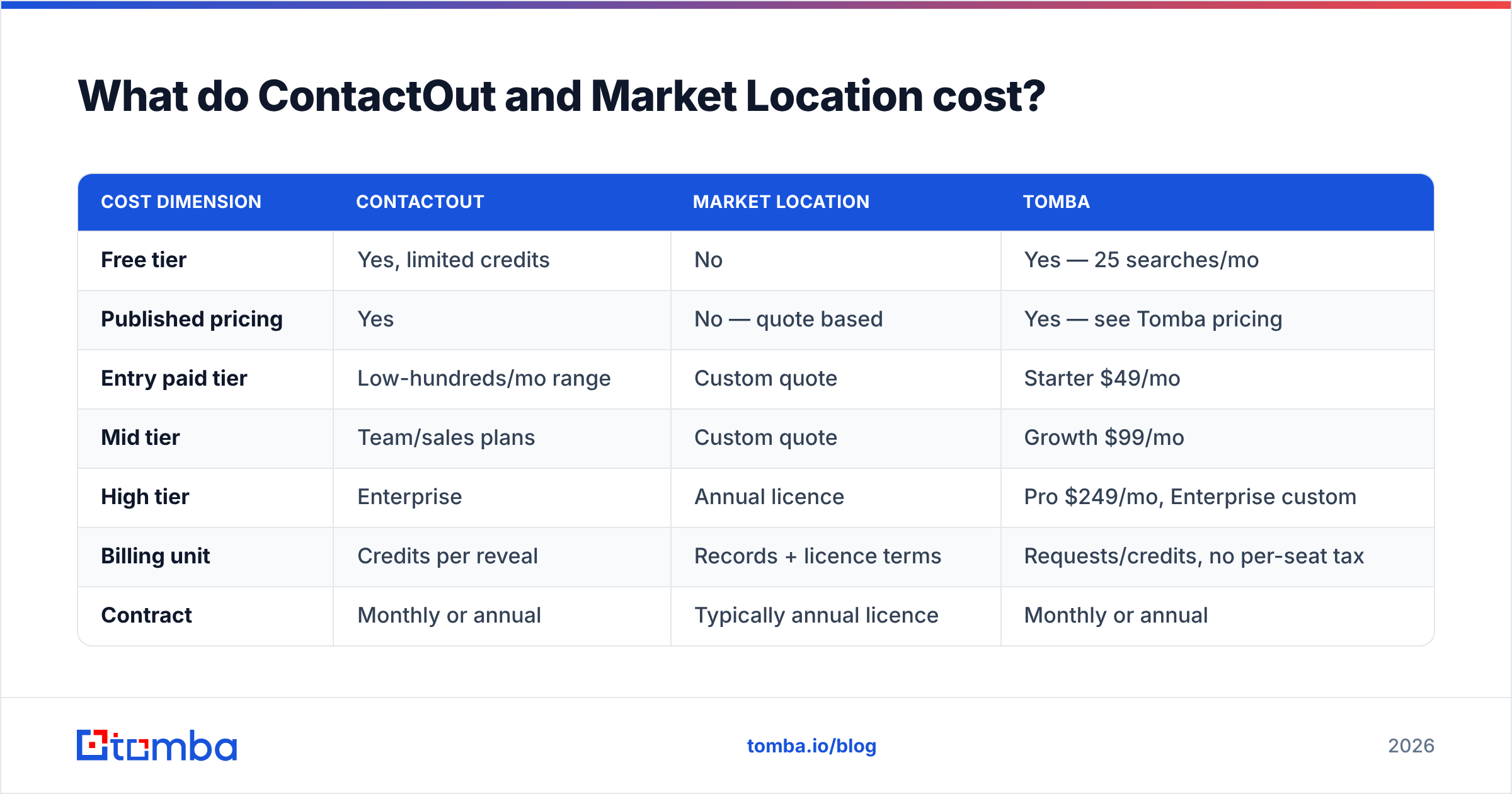
| Cost dimension | ContactOut | Market Location | Tomba |
|---|---|---|---|
| Free tier | Yes, limited credits | No | Yes — 25 searches/mo |
| Published pricing | Yes | No — quote based | Yes — see Tomba pricing |
| Entry paid tier | Low-hundreds/mo range | Custom quote | Starter $49/mo |
| Mid tier | Team/sales plans | Custom quote | Growth $99/mo |
| High tier | Enterprise | Annual licence | Pro $249/mo, Enterprise custom |
| Billing unit | Credits per reveal | Records + licence terms | Requests/credits, no per-seat tax |
| Contract | Monthly or annual | Typically annual licence | Monthly or annual |
Always confirm current numbers on each vendor's own pricing page before you buy — credit tools reprice often, and licensed-data quotes are bespoke by definition.

Is ContactOut better than Market Location?#
Wrong question — and asking it is how teams end up with two subscriptions and one working list. The right question is: what does your ICP actually look like on the internet?
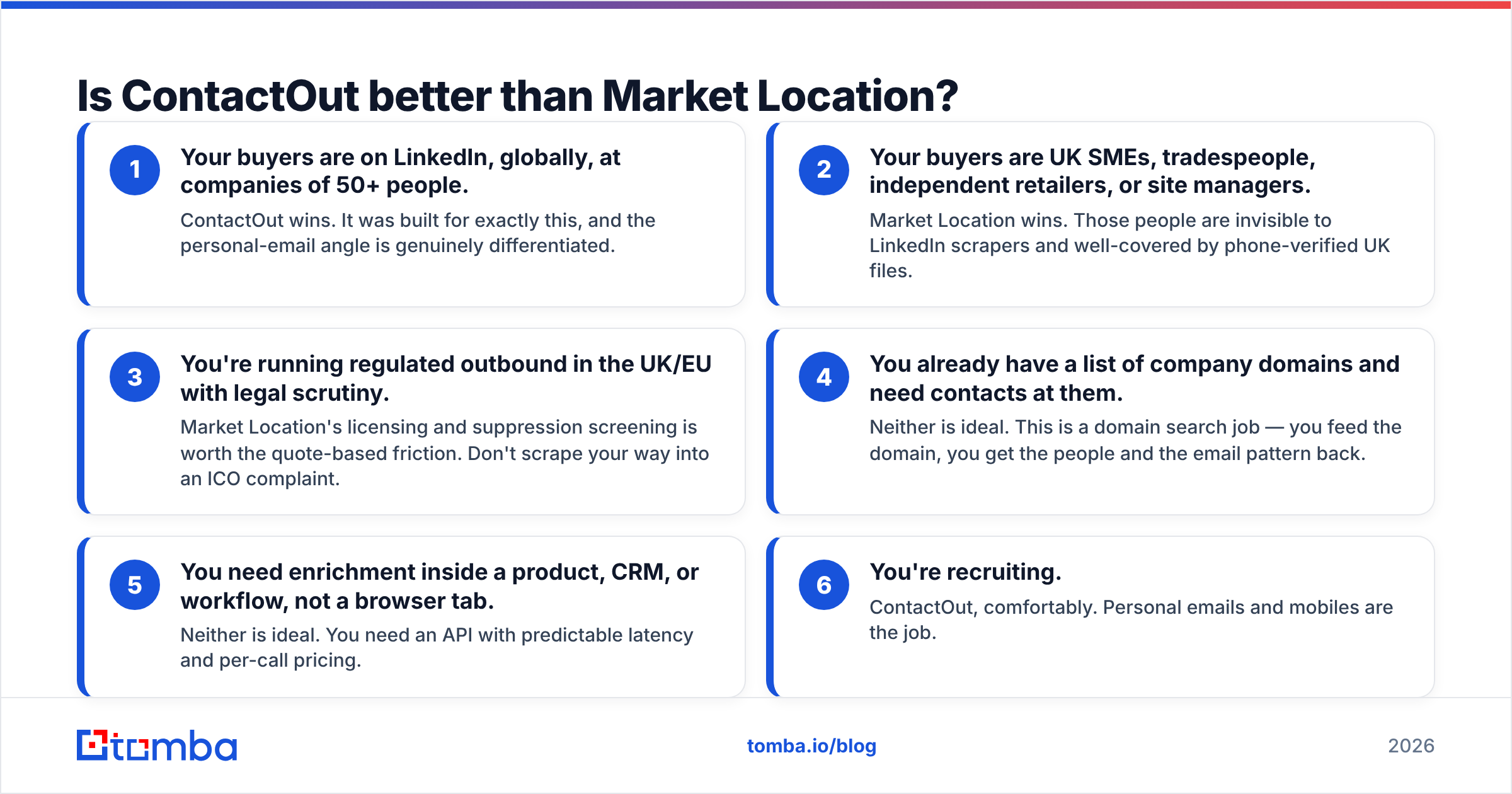
Use this as a decision checklist:
- Your buyers are on LinkedIn, globally, at companies of 50+ people. ContactOut wins. It was built for exactly this, and the personal-email angle is genuinely differentiated.
- Your buyers are UK SMEs, tradespeople, independent retailers, or site managers. Market Location wins. Those people are invisible to LinkedIn scrapers and well-covered by phone-verified UK files.
- You're running regulated outbound in the UK/EU with legal scrutiny. Market Location's licensing and suppression screening is worth the quote-based friction. Don't scrape your way into an ICO complaint.
- You already have a list of company domains and need contacts at them. Neither is ideal. This is a domain search job — you feed the domain, you get the people and the email pattern back.
- You need enrichment inside a product, CRM, or workflow, not a browser tab. Neither is ideal. You need an API with predictable latency and per-call pricing.
- You're recruiting. ContactOut, comfortably. Personal emails and mobiles are the job.
Notice that half the checklist points away from both tools. That's not a rhetorical trick — it reflects how these categories evolved. Extensions solved the "I'm looking at a profile right now" problem. List houses solved the "I need a compliant campaign file" problem. Neither was designed for the modern motion where a scraped domain list, an enrichment API, and a sequencer talk to each other with no human in the loop.
Where does Tomba fit in this comparison?#
Honestly: as the third column, not as a drop-in replacement for either.
Tomba is an email finder and verification platform, not a LinkedIn extension and not a licensed UK list house. What it does well is the connective work between them:
- Domain-first discovery. Give it a company domain and get back the people, roles, and the company's email pattern — no LinkedIn dependency.
- Verification as a first-class product. Finding is half the job. Catch-all handling, SMTP checks, and bulk verification are where deliverability is won or lost.
- API, CLI, Sheets, Excel, and Chrome. Same data, whichever surface your team actually works in — including a bulk email finder for list-scale work.
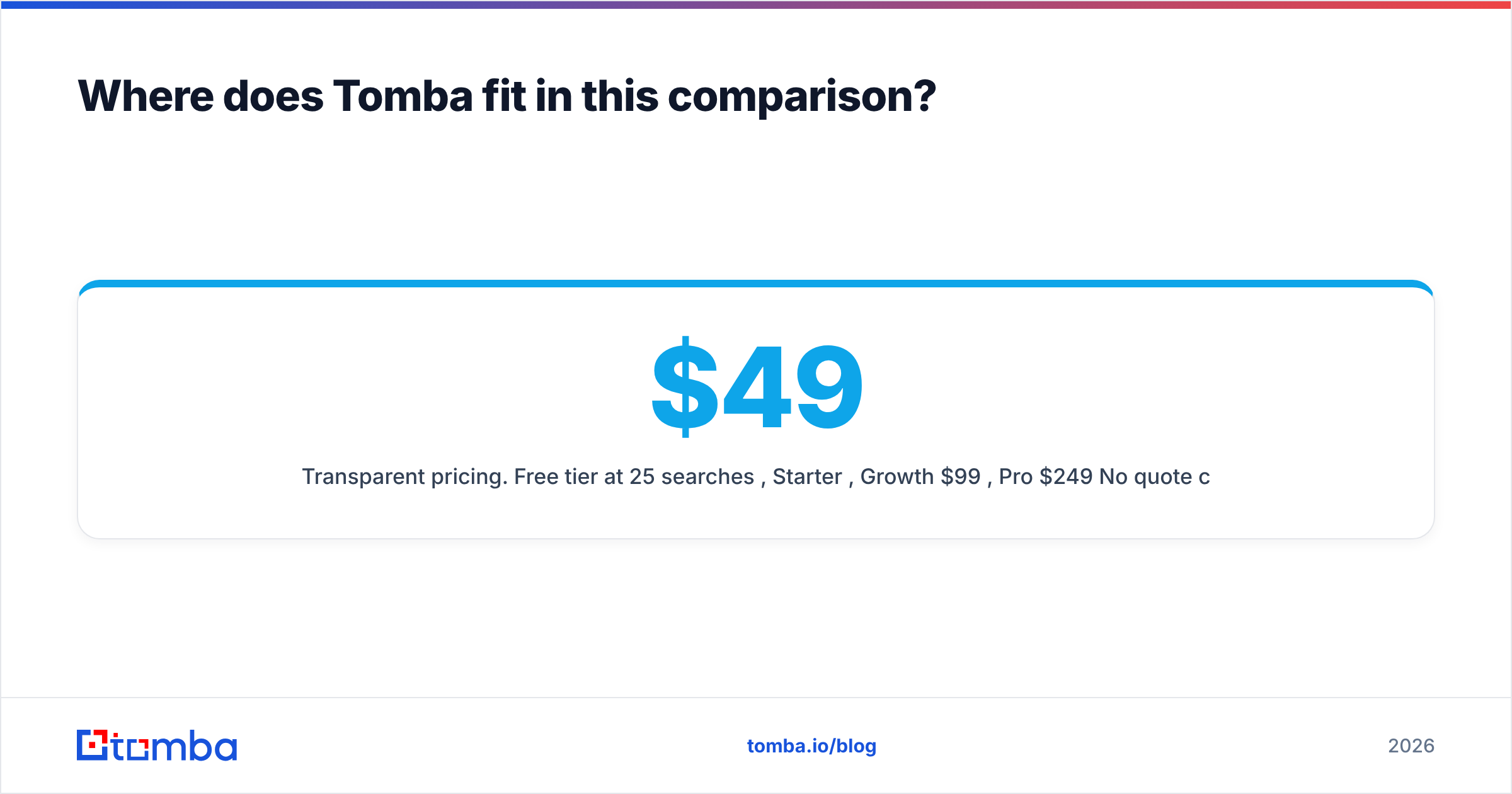
- Transparent pricing. Free tier at 25 searches/mo, Starter $49/mo, Growth $99/mo, Pro $249/mo. No quote calls to find out whether you can afford it.
The common stack we see: ContactOut (or a similar extension) for one-off LinkedIn reveals during manual prospecting, a licensed file like Market Location's when a compliant UK campaign demands it, and an API layer underneath for everything programmatic. If you're only buying one, buy the one that matches the checklist above. If you're consolidating, start by asking which of your three tools you actually open every day — usually it's not the one costing you the most.
For a broader look at how the extension category stacks up, see our ContactOut alternative breakdown, and cross-check any vendor's claims against real reviews on G2 rather than their own case-study page.
What should you do next?#
Run a two-week bake-off, not a six-month contract. Take 300 accounts from your real ICP. Try to find contacts with each tool. Measure four numbers: hit rate (contacts found / accounts attempted), bounce rate (measured after verification, not before), cost per usable contact, and time to first send. Whichever tool wins on cost-per-usable-contact for your ICP is the correct answer, and it will not necessarily be the one with the best marketing.
If your accounts are UK SMEs, expect Market Location to win. If your accounts are LinkedIn-active knowledge workers, expect ContactOut to win. If your accounts are just a list of domains — which, increasingly, is how modern GTM teams source — expect both to disappoint, and expect a domain-first finder to close the gap.
Start with the free tier of the Tomba Email Finder. Twenty-five searches a month is enough to run the bake-off above on a real sample before you sign anything. Feed it your domain list, verify what comes back, and compare the bounce rate against whatever quote is sitting in your inbox. If a $49/mo Starter plan covers the same ground as a five-figure annual licence, you deserve to know that before you sign — and if it doesn't, you'll have hard numbers to justify the spend.
Related guides#
Ready to find emails that actually work?
Join 150,000+ professionals who stopped guessing and started sending. Free credits on signup — no credit card required.
Get the Tomba newsletter
Practical outbound tactics and product updates — once every two weeks.
About the author