ContactOut vs OneMoreLead (2026): Which B2B Data Tool Wins?
ContactOut sells LinkedIn-sourced personal emails one profile at a time. OneMoreLead sells pre-built B2B lists in bulk. They solve different problems — and only one of them fits how you actually prospect.
TL;DR
- ContactOut is a LinkedIn-first contact finder: a Chrome extension that reveals work and personal emails plus phone numbers while you browse profiles. Strongest when your ICP lives on LinkedIn and you prospect one person at a time.
- OneMoreLead is a bulk B2B database: you filter by industry, title, size, and location, then export a pre-built list. Strongest when you want volume fast and don't want to touch LinkedIn.
- The two tools fail in opposite ways. ContactOut gets expensive per contact and caps you on seats; OneMoreLead gives you volume but the data is only as fresh as its last refresh cycle — verify before you send.
- Neither ships a serious verification layer you'd trust unverified at scale. Whichever you buy, budget for an email verifier in front of your sending tool.
- If you mostly need accurate work emails at a predictable price, a dedicated email finder with credit-based pricing (Tomba starts free, then $49/mo) usually beats both on cost-per-usable-contact.
What are ContactOut and OneMoreLead, really?#
They get compared because they both end with a CSV of emails. That's where the similarity stops.
ContactOut is a profile-level enrichment tool. Its center of gravity is the Chrome extension: you're on a LinkedIn profile, you click, and it surfaces work email, personal email, and often a mobile number. It also ships a web-based search portal and an API, but the extension is what people actually pay for. Its differentiator is personal/consumer emails — the Gmail addresses recruiters live on — which most B2B databases don't touch.
OneMoreLead is a list-building database. You log into a web app, apply filters (industry, job title, company size, geography, technology), and pull a segment of contacts out of a stored database of tens of millions of business records. There's no LinkedIn dependency at all. You're shopping in a warehouse, not scraping a profile.
That structural difference drives everything else: pricing model, accuracy profile, and the type of outbound motion each tool actually supports.
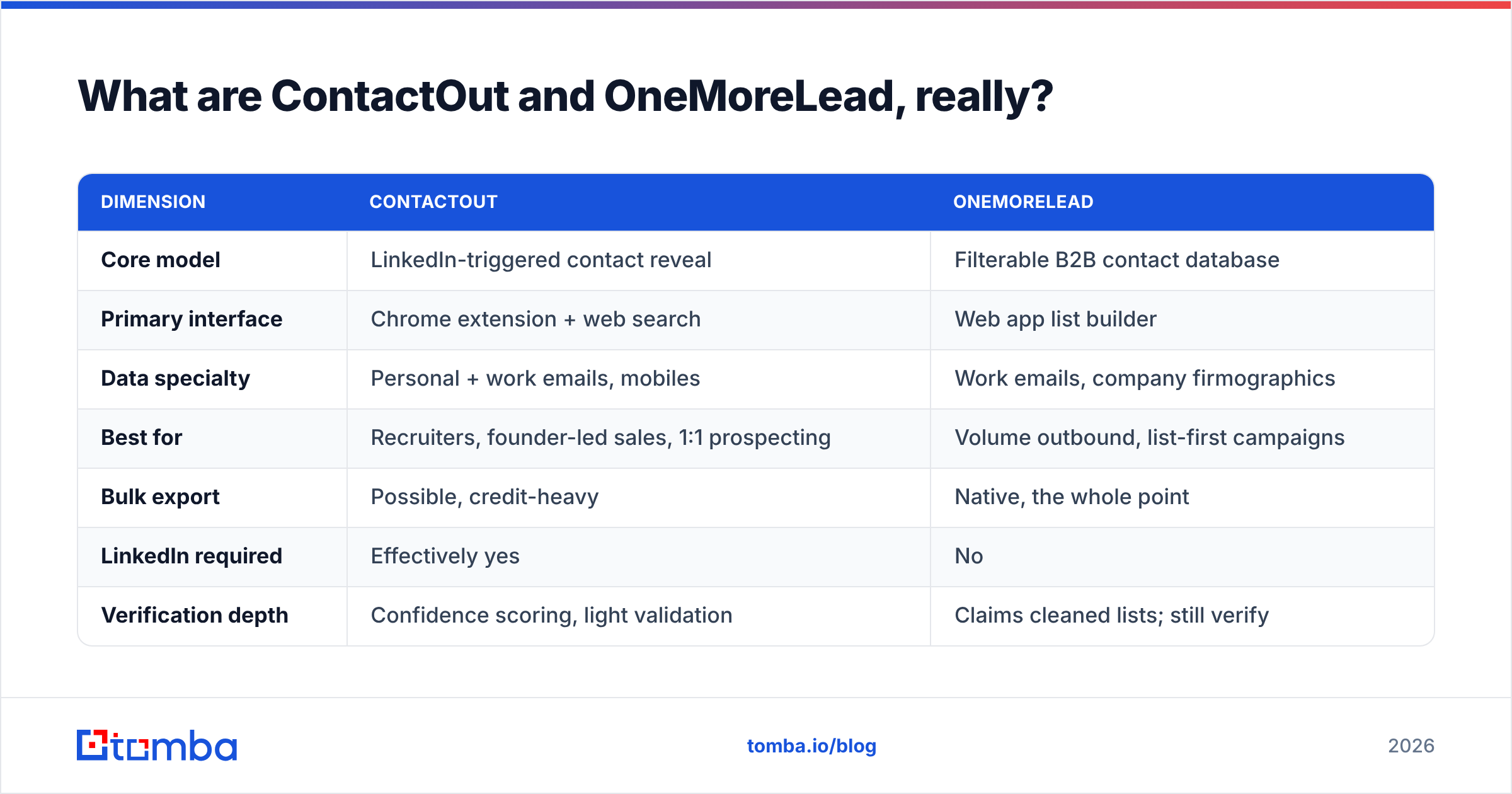
| Dimension | ContactOut | OneMoreLead |
|---|---|---|
| Core model | LinkedIn-triggered contact reveal | Filterable B2B contact database |
| Primary interface | Chrome extension + web search | Web app list builder |
| Data specialty | Personal + work emails, mobiles | Work emails, company firmographics |
| Best for | Recruiters, founder-led sales, 1:1 prospecting | Volume outbound, list-first campaigns |
| Bulk export | Possible, credit-heavy | Native, the whole point |
| LinkedIn required | Effectively yes | No |
| Verification depth | Confidence scoring, light validation | Claims cleaned lists; still verify |
| Pricing shape | Per-seat + credit tiers | Per-plan record volume |
Which one has better data accuracy?#
Different questions hide inside "accuracy," and vendors exploit the ambiguity.
Match rate is what percentage of the profiles you look up return any email. Deliverability is what percentage of those emails don't bounce. A tool can win one and lose the other badly.
ContactOut's structural advantage is that it works from a live LinkedIn profile — a strong identity anchor. When you're standing on a real person's profile page, the tool knows exactly who it's resolving. That tends to produce high match rates on tech, SaaS, and recruiting personas who keep their profiles current. Its published accuracy claims sit in the high-90s, which is a vendor claim, not an audit — treat it accordingly.
OneMoreLead's structural weakness is time. Any stored database is a photograph of the market on the day it was compiled. B2B contact data decays at roughly 25–30% per year — people change jobs, companies get acquired, domains get retired. If a record was harvested 14 months ago and hasn't been re-verified, the odds it still routes to a live inbox are meaningfully worse than a freshly resolved one, no matter what the marketing page says.

The practical read:
- ContactOut skews toward higher per-lookup confidence because it starts from a live identity, but you pay for that confidence one profile at a time.
- OneMoreLead skews toward volume and asks you to accept a wider quality band across the export.
- Both leave the verification job to you. Neither replaces an SMTP-level check before you load a list into a sequencer.
- Catch-all domains break both. If a company accepts every address at the MX layer, no provider can confirm the mailbox exists without deeper logic — that's what a catch-all verifier is for.
The only accuracy number that matters is your own. Take 200 contacts from each tool, run them through a verifier, and count valid/risky/invalid. That test costs you an afternoon and settles the argument permanently.

How does the pricing actually compare?#
This is where the two tools diverge hardest, and where most buyers get surprised.
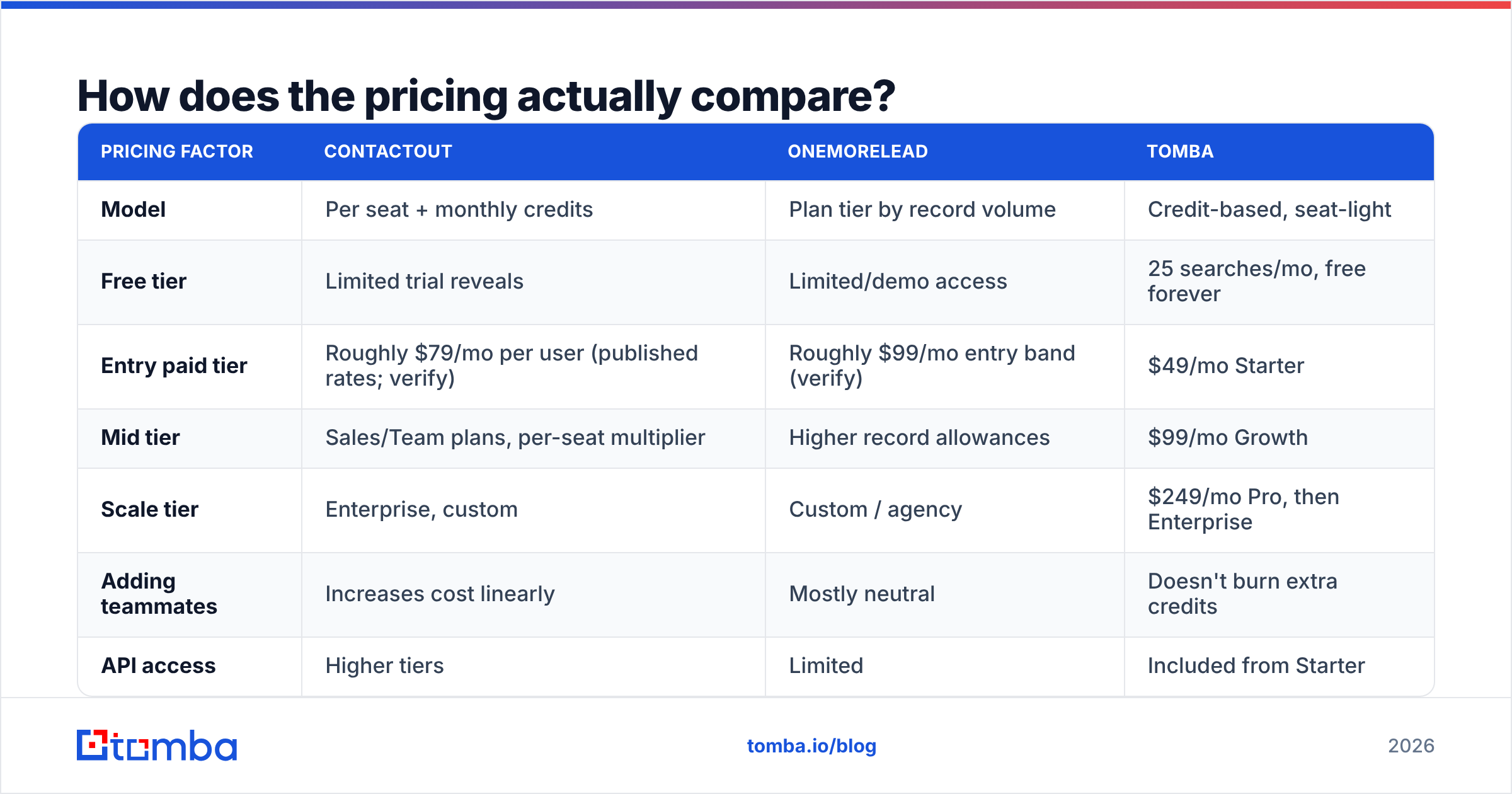
ContactOut prices like a seat-based SaaS with credit ceilings. Every user on your team needs a license, and each license carries a monthly reveal allowance. Add a second SDR and your bill roughly doubles even if your total contact volume doesn't change. There's a limited free tier to try it, but the useful plans start in the mid-double-digits per user per month and climb quickly for teams and API access.
OneMoreLead prices like a volume database: you buy access to a tier that defines how many records you can pull. Cost per record drops as you go up. Seats matter less; volume matters more.
| Pricing factor | ContactOut | OneMoreLead | Tomba |
|---|---|---|---|
| Model | Per seat + monthly credits | Plan tier by record volume | Credit-based, seat-light |
| Free tier | Limited trial reveals | Limited/demo access | 25 searches/mo, free forever |
| Entry paid tier | Roughly $79/mo per user (published rates; verify) | Roughly $99/mo entry band (verify) | $49/mo Starter |
| Mid tier | Sales/Team plans, per-seat multiplier | Higher record allowances | $99/mo Growth |
| Scale tier | Enterprise, custom | Custom / agency | $249/mo Pro, then Enterprise |
| Adding teammates | Increases cost linearly | Mostly neutral | Doesn't burn extra credits |
| API access | Higher tiers | Limited | Included from Starter |
Vendor pricing changes without notice. The two competitor figures above reflect publicly listed rates at the time of writing — check their sites before you buy. Tomba pricing is listed publicly and doesn't change per seat.
Do the arithmetic that matters: cost per usable contact. Take the plan price, divide by the credits, then divide again by your verified-valid rate. A $79 plan with 1,000 credits at an 80% valid rate is $0.099 per usable contact. A $99 plan with 5,000 records at a 65% valid rate is $0.030. The cheaper sticker price loses; the cheaper usable contact wins. Most teams never run this calculation and overpay for a year.
Is ContactOut better than OneMoreLead for cold email?#
For pure cold email at volume, OneMoreLead's model fits better — but only if you bolt verification onto the front.
Cold email is a numbers game with a hard constraint: your bounce rate. Keep it under about 2–3% or your sender reputation degrades, and once Google and Microsoft downgrade you, the campaign is over regardless of how good your copy is. A 10,000-record export from any bulk database, sent raw, will torch a domain. That's not a knock on OneMoreLead specifically — it's true of every database on the market.
So the honest workflow with OneMoreLead is: export → verify → segment → send. The verification step is not optional, and it's a line item most buyers forget to budget for.
ContactOut, meanwhile, is a poor fit for volume cold email for a boring reason: the reveal motion doesn't scale. Clicking through profiles is fine at 30 contacts a day and miserable at 3,000. Its bulk search exists but the credit economics get punishing fast, and per-seat pricing means you can't just throw a junior on it for a week without adding a license.
Where ContactOut genuinely wins:
- Recruiting. Personal emails and mobile numbers are the whole job. No B2B database competes here.
- Founder-led sales. You're hand-picking 20 accounts a week, and the LinkedIn context matters as much as the email.
- Executive outreach. When the work email is gatekept, the personal one is the only door.
Where OneMoreLead genuinely wins:
- Territory sweeps. "Every operations manager at US logistics companies with 50–200 employees" is a filter query, not a browsing session.
- Non-LinkedIn ICPs. Contractors, local services, manufacturing, healthcare admin — segments where LinkedIn coverage is genuinely thin.
- Agency list delivery. You need 20k rows by Friday and the client doesn't care how you got them.
Worth noting: if bulk list purchasing is your motion, this is a category with several credible players — BookYourData is a well-regarded option for pay-as-you-go verified B2B lists, and it's a reasonable third name to price against before you commit.
What are the hidden costs nobody mentions?#
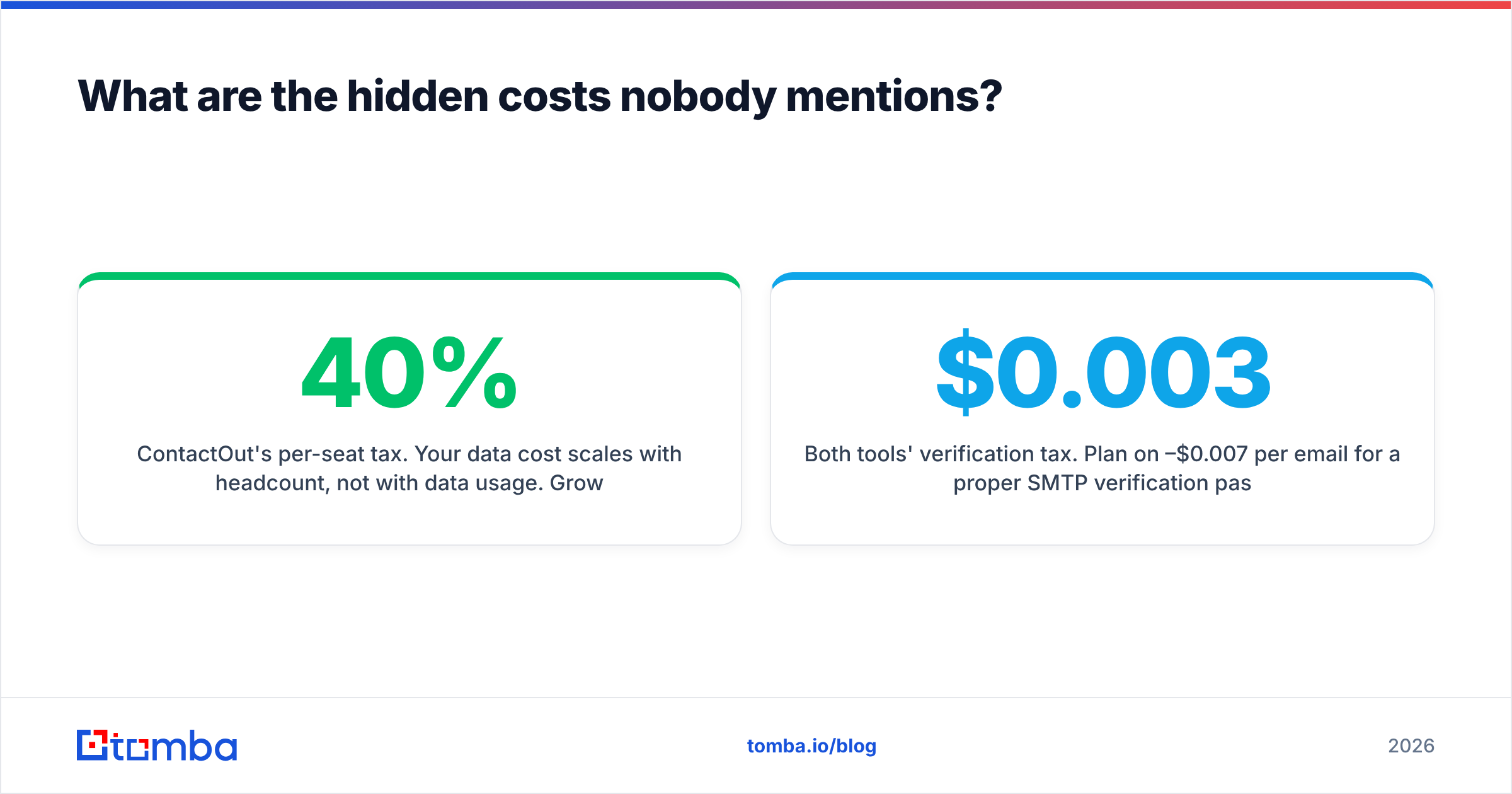
ContactOut's per-seat tax. Your data cost scales with headcount, not with data usage. Grow the SDR team from 2 to 6 and your contact-data bill triples while your actual contact volume might only go up 40%. That's a structural mismatch, and it's why teams eventually migrate to credit-pooled tools.
OneMoreLead's decay tax. Bulk records you don't use this month are worth less next month. If you pull 20,000 and work 4,000, the other 16,000 are quietly rotting. Buying volume you can't process is buying garbage on a delay.
Both tools' verification tax. Plan on $0.003–$0.007 per email for a proper SMTP verification pass, or use a tool that includes it. Tomba's bulk email finder runs finding and verification in a single credit flow, which is the main reason its cost-per-usable-contact tends to undercut a find-tool-plus-verify-tool stack.
Compliance overhead. If you're emailing the EU or UK, GDPR applies to B2B contact data. Both vendors publish compliance positions; read them, and keep an audit trail of your legitimate-interest basis. This is not optional and not a formality.

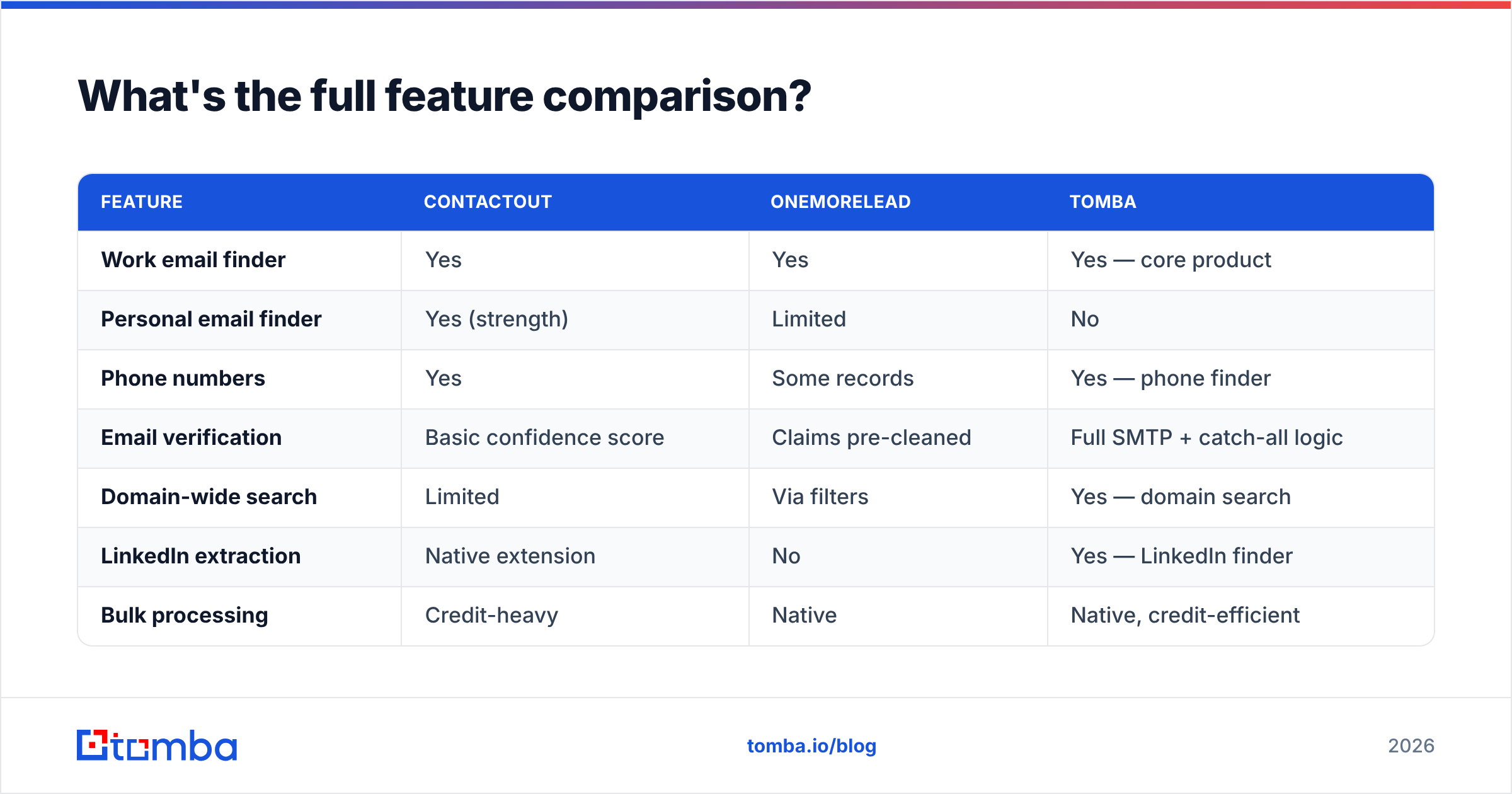
What's the full feature comparison?#

| Feature | ContactOut | OneMoreLead | Tomba |
|---|---|---|---|
| Work email finder | Yes | Yes | Yes — core product |
| Personal email finder | Yes (strength) | Limited | No |
| Phone numbers | Yes | Some records | Yes — phone finder |
| Email verification | Basic confidence score | Claims pre-cleaned | Full SMTP + catch-all logic |
| Domain-wide search | Limited | Via filters | Yes — domain search |
| LinkedIn extraction | Native extension | No | Yes — LinkedIn finder |
| Bulk processing | Credit-heavy | Native | Native, credit-efficient |
| API | Higher tiers | Limited | Tomba API from Starter |
| Chrome extension | Yes (flagship) | No | Yes |
| Sheets / Excel add-ons | Limited | CSV export | Yes |
| Free tier | Trial reveals | Demo | 25 searches/mo |
| Entry price | ~$79/mo/user | ~$99/mo | $49/mo |
How should you actually choose?#
Answer three questions honestly.
1. Where does your ICP live? If the answer is "LinkedIn, and I can name the 200 people I want," ContactOut earns its price. If the answer is "a filterable segment of 8,000 companies I've never heard of," a database is the right shape and ContactOut will bleed you.
2. How many seats? Per-seat pricing is fine at one or two users and punitive at eight. If you're scaling a team, model the 12-month cost at your projected headcount before you sign an annual contract — that's where the ugly number shows up.
3. What's your bounce tolerance? If you're sending from a domain you care about, verification isn't a nice-to-have. Whatever you buy, put a verifier between the export and the sequencer. A tool that includes verification in the same credit pool removes a vendor, a bill, and a failure point.
And a fourth question most people skip: do you actually need personal emails? If you're in B2B sales — not recruiting — the honest answer is usually no. Work emails convert better, comply cleaner, and don't feel invasive. ContactOut's headline differentiator is a feature many B2B teams never legitimately use, and you're paying for it every month.
The verdict#
Choose ContactOut if you're a recruiter or a founder doing high-touch, low-volume, LinkedIn-native prospecting where personal emails and mobiles change outcomes. It's a good product being used for the wrong job by most of the people who complain about it.
Choose OneMoreLead if your motion is list-first volume outbound into segments LinkedIn doesn't cover well, and you have a verification step and the discipline to work the list you bought.
Choose neither if what you actually need is accurate work emails, at volume, at a price that doesn't punish you for hiring — which describes most B2B sales teams. That's the gap a dedicated email finder fills.
The Tomba Email Finder resolves work emails from a name and domain, verifies them with real SMTP and catch-all logic in the same pass, and prices by credits rather than seats — so adding an SDR doesn't add a bill. Start on the free tier (25 searches a month, no card), test it head-to-head against your current export, and compare the number that actually matters: valid contacts per dollar. If Tomba doesn't win that test on your data, don't switch. Most teams find it does.
Related guides#
Ready to find emails that actually work?
Join 150,000+ professionals who stopped guessing and started sending. Free credits on signup — no credit card required.
Get the Tomba newsletter
Practical outbound tactics and product updates — once every two weeks.
About the author