ContactOut vs Pipileads (2026): Which Email Finder Wins?
ContactOut is built for recruiters living inside LinkedIn. Pipileads is built for cheap bulk volume. Here is how they compare on accuracy, credits, and real cost per verified lead in 2026.
ContactOut vs Pipileads is a fair fight only once you know what you are buying. One is a LinkedIn sidebar for recruiters. The other is a cheap credit pack for bulk lists. Here is how they compare in 2026.
TL;DR
- ContactOut is a LinkedIn-first finder. It shines when a human browses profiles one by one — recruiters, agency sourcers, founder-led sales. The Chrome extension is the product; the API is an afterthought.
- Pipileads is a budget bulk play. Credit packs are cheap and domain search is decent. It competes on price, not on match rate.
- Neither tool is really an infrastructure product. Wire either one into a CRM and both start to strain.
- Judge them on cost per verified email, not sticker price. A $29/mo plan at a 55% hit rate costs more than a $49/mo plan at 90%+ with verification bundled.
- Practical pick: ContactOut for LinkedIn recruiting, Pipileads for throwaway bulk lists, and a verification-first finder like Tomba when the data has to survive a real cold-email sequence.
What are ContactOut and Pipileads, actually?#
They get lumped together because both promise "find anyone's email." But they were built for different buyers.
ContactOut started as a recruiter tool and never really left. The core experience is the browser extension. You open a LinkedIn profile, the sidebar pops out, and you get personal emails, work emails, and often a phone number. It also runs its own contact database, a search portal, and team seats. Recruiters love it because personal (non-work) emails are its specialty — and those are exactly what you need when you're poaching an engineer who ignores their corporate inbox.
Pipileads sits in the value tier of the market. It offers domain search, single email finding, verification, and an extension, and it competes mainly on credit price. Tools in this bracket often surface through lifetime-deal marketplaces and low-commitment monthly packs. That makes them attractive to solo founders and agencies who need volume more than they need guarantees.
So the honest framing is not "which is better." It's: are you a human browsing profiles, or a system processing lists? ContactOut optimizes for the first. Pipileads optimizes for the second, at a price point that necessarily constrains its data pipeline.
ContactOut vs Pipileads: how do they compare head-to-head?#
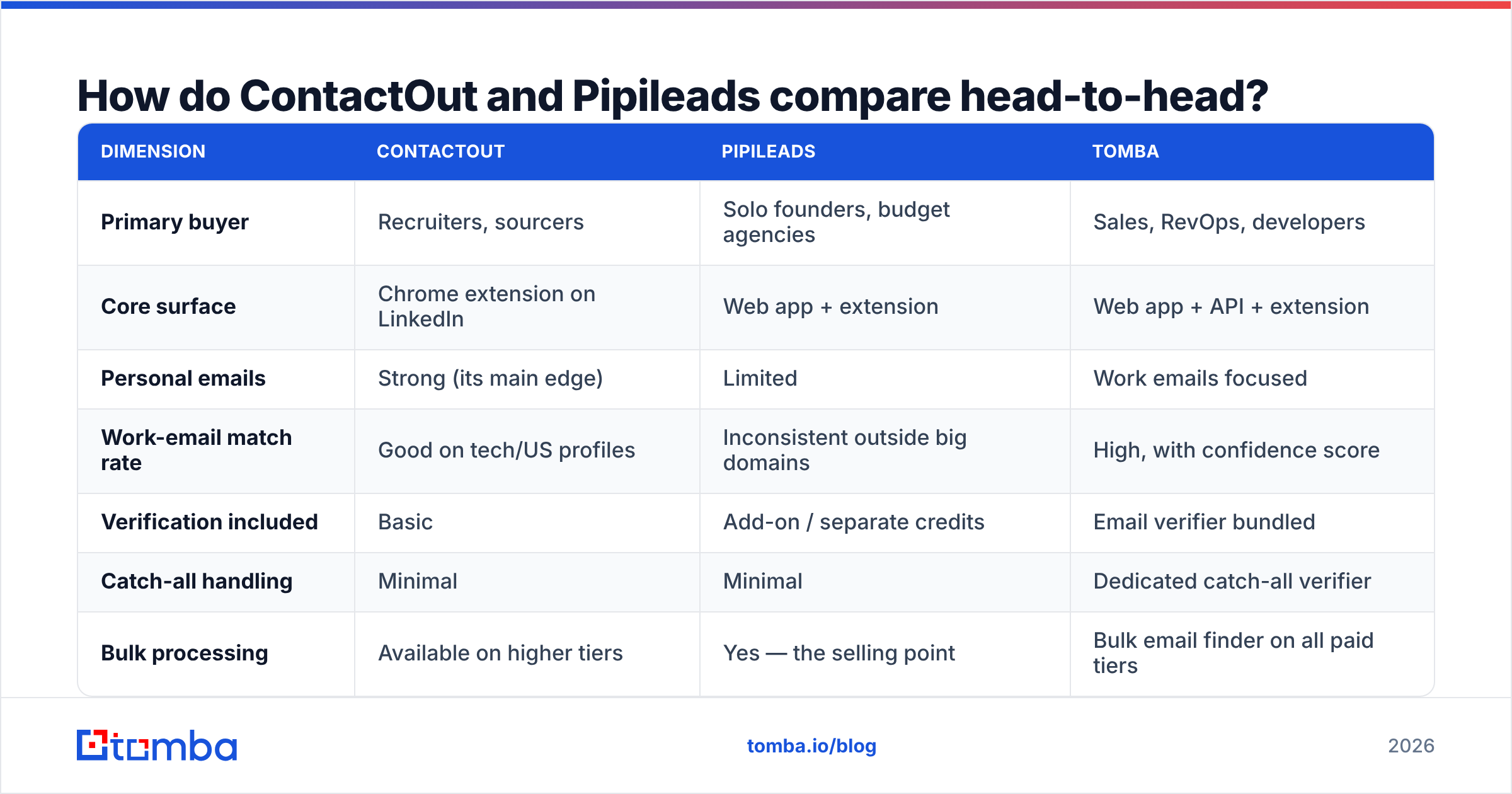
Here is the comparison that matters. Treat pricing as directional — every vendor in this space reprices, so confirm on their site before you buy.
| Dimension | ContactOut | Pipileads | Tomba |
|---|---|---|---|
| Primary buyer | Recruiters, sourcers | Solo founders, budget agencies | Sales, RevOps, developers |
| Core surface | Chrome extension on LinkedIn | Web app + extension | Web app + API + extension |
| Personal emails | Strong (its main edge) | Limited | Work emails focused |
| Work-email match rate | Good on tech/US profiles | Inconsistent outside big domains | High, with confidence score |
| Verification included | Basic | Add-on / separate credits | Email verifier bundled |
| Catch-all handling | Minimal | Minimal | Dedicated catch-all verifier |
| Bulk processing | Available on higher tiers | Yes — the selling point | Bulk email finder on all paid tiers |
| API maturity | Exists, secondary | Basic | First-class, documented, rate-limited |
| Entry price | Free tier, then paid seats (~$49+/mo listed) | Cheap credit packs, LTD history | Free (25 searches/mo), Starter $49/mo |
| Team scaling | Per-seat, gets expensive | Credit-based | Growth $99/mo, Pro $249/mo |
| Best at | LinkedIn sourcing | Cheap volume | Verified outbound at scale |
The table exposes the real trade-off. ContactOut charges per seat because it assumes a human is in the loop. Pipileads charges per credit because it assumes a script is. If your motion is both — a rep prospecting by hand plus a nightly enrichment job — you end up paying twice, in two tools, at two data qualities.

Which one is more accurate?#
Accuracy is where email finders quietly diverge. It is also where marketing copy is least trustworthy.
Three numbers matter, and vendors rarely publish all three:
- Match rate — of 1,000 names you submit, how many come back with any email? Vendors love this number because it's easy to inflate by returning guesses.
- Deliverable rate — of the emails returned, how many actually accept mail? This is the one your bounce dashboard measures.
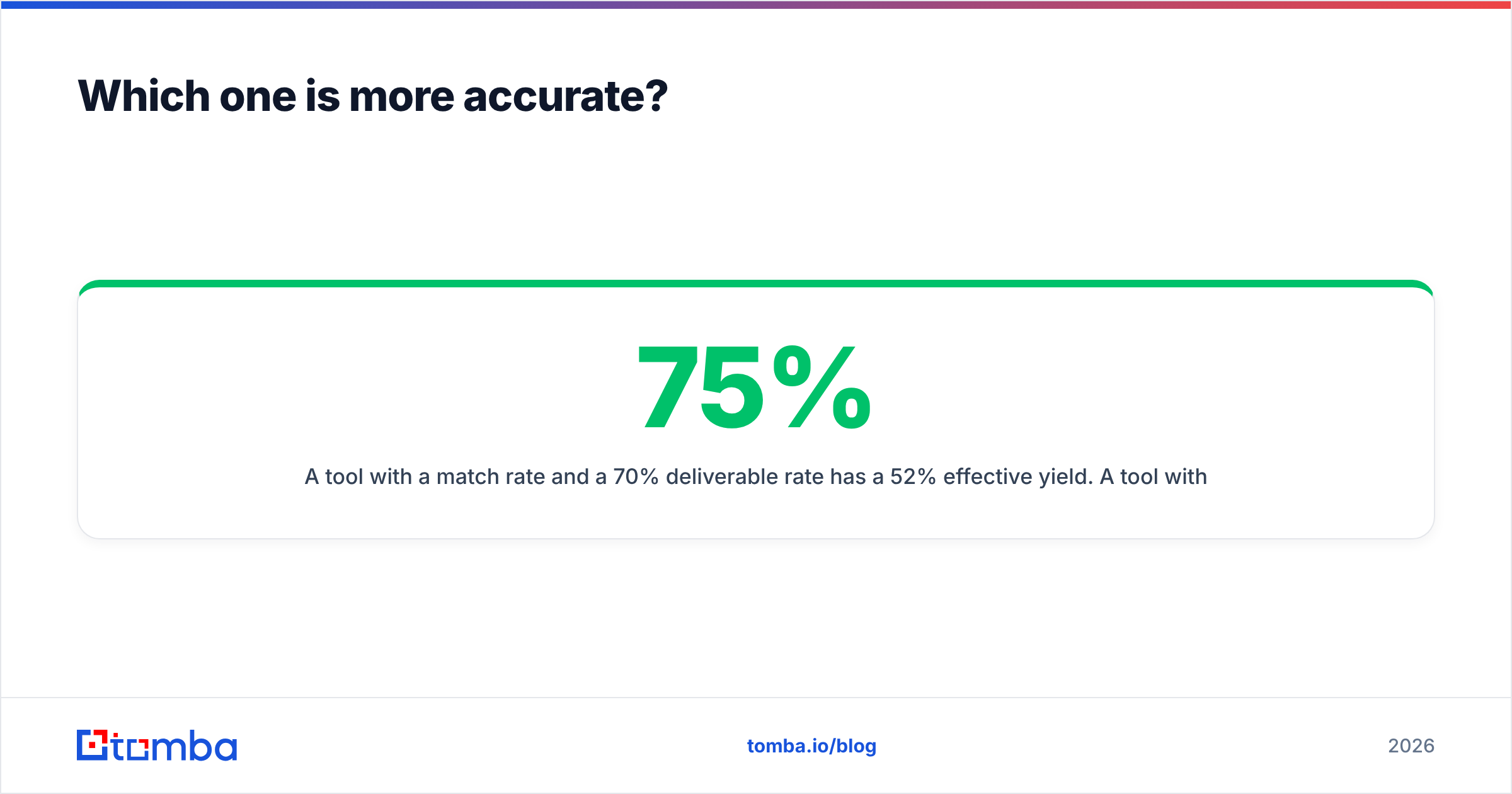
- Effective yield — match rate × deliverable rate. This is the only number that maps to pipeline.
A tool with a 75% match rate and a 70% deliverable rate has a 52% effective yield. A tool with a 65% match rate and a 95% deliverable rate has a 62% effective yield. The second one also spares your sender reputation from bounces. It looks worse on the landing page and performs better in production.

How each stacks up in practice:
- ContactOut performs well on profiles it has seen — US tech, mid-to-large companies, active LinkedIn users. Coverage thins on EMEA SMBs, non-English profiles, and low-LinkedIn industries such as trades, logistics, and regional manufacturing.
- Pipileads is more variable. Common patterns on well-known domains resolve fine. Long-tail domains, catch-all servers, and unusual name formats are where budget tools return
firstname@domain.comand hope for the best. - Neither gives you a robust catch-all answer. Roughly a fifth of B2B domains accept every address at the SMTP layer. There, "verified" means nothing unless the tool has a separate signal. That is what a catch-all verifier exists to solve.
Run your own test before you commit. Take 100 contacts whose emails you already know, strip the emails, and run the names through the free tier of each tool. Score match rate and correctness yourself. Two hours of work will tell you more than every review site combined — including G2, which is useful for support and UX signal but nearly useless for data quality.
What does each one actually cost per verified lead?#
Sticker price is a distraction. Model it properly.
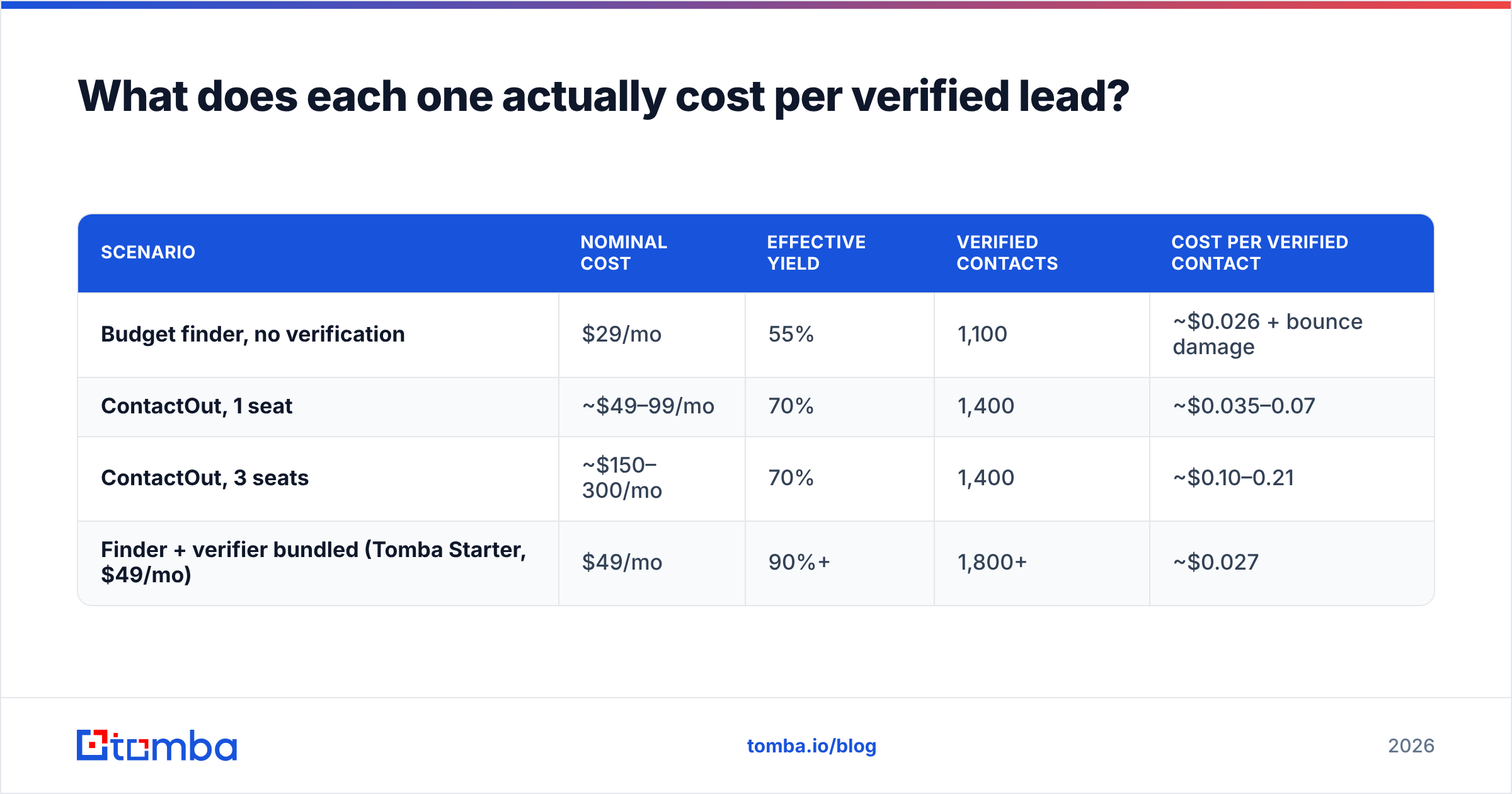
Say you need 2,000 verified contacts a month.
| Scenario | Nominal cost | Effective yield | Verified contacts | Cost per verified contact |
|---|---|---|---|---|
| Budget finder, no verification | $29/mo | 55% | 1,100 | ~$0.026 + bounce damage |
| ContactOut, 1 seat | ~$49–99/mo | 70% | 1,400 | ~$0.035–0.07 |
| ContactOut, 3 seats | ~$150–300/mo | 70% | 1,400 | ~$0.10–0.21 |
| Finder + verifier bundled (Tomba Starter, $49/mo) | $49/mo | 90%+ | 1,800+ | ~$0.027 |
Two things jump out.
First, per-seat pricing punishes teams. A three-person SDR pod on ContactOut pays roughly triple for the same data. Credit-based pricing is seat-agnostic, which is why RevOps teams gravitate toward it.
Second, the "cheap" option isn't cheap once you price bounces. A 12% bounce rate on a cold domain is not a rounding error. It is a deliverability incident. Google and Microsoft both tightened bulk-sender enforcement, and Google's own sender guidelines put a hard spam-complaint ceiling on senders. Burning a warmed domain costs weeks of ramp time. That never shows up on the credit-pack invoice.
If you're asking "which is cheaper," the more useful comparison is a bundled finder-plus-verifier stack against a two-tool stack. Bundling wins on cost and on workflow friction almost every time. That's the argument our ContactOut alternative page makes in more detail, with the caveat that we're obviously not a disinterested party there.
Is ContactOut better than Pipileads for recruiting?#
Yes — clearly, and it isn't close.
Recruiting has a requirement most sales tools ignore: personal email addresses. A senior engineer at a big company either doesn't read the work inbox or won't reply to a recruiter there. ContactOut's entire moat is that it surfaces gmail/outlook personal addresses next to work addresses, straight from the LinkedIn profile you're already looking at.
Pipileads isn't built for that. It's a work-email tool. Ask it for a personal address and coverage gets thin fast.
So if you're a recruiter:
- ContactOut for the sourcing motion — extension, personal emails, phone numbers.
- A verifier on top, because personal-email deliverability is noisier than corporate.
- Skip Pipileads unless you also do outbound to hiring managers.
If you're a sales team, the calculus flips. You want work emails, at volume, with confidence scores, pushed into a CRM automatically. That's a data-infrastructure problem, not a browsing problem. ContactOut's per-seat model gets expensive fast in that world.

What should you look for in any email finder in 2026?#
Strip away branding and six things decide whether a finder works for you.
- Confidence scores, not booleans. A tool that returns "found: true" with no score is hiding uncertainty. You want a number, so you can route low-confidence hits to a manual queue instead of a send.
- Verification in the same product. Every hand-off between a finder and a separate verifier is a place where credits, formats, and dedupe logic break. A bundled email verifier removes an entire class of pipeline bugs.
- Catch-all intelligence. If the tool marks every catch-all domain "unknown" and moves on, it's punting ~20% of your TAM back to you.
- A real API. Extensions don't scale. If a webhook can't enrich an inbound signup within 300ms, your GTM automation has a hole in it.
- Source transparency. Where does the data come from, and can you defend it under GDPR? Ask. Vendors that won't answer are telling you something. Tomba publishes its data sources; demand the same from anyone you buy from.
- Sane pricing shape. Per-seat for a data product means you pay more for the same bytes because more humans looked at them. Credit-based pricing scales with usage, which is what you actually consume.

What are the strongest alternatives to both?#
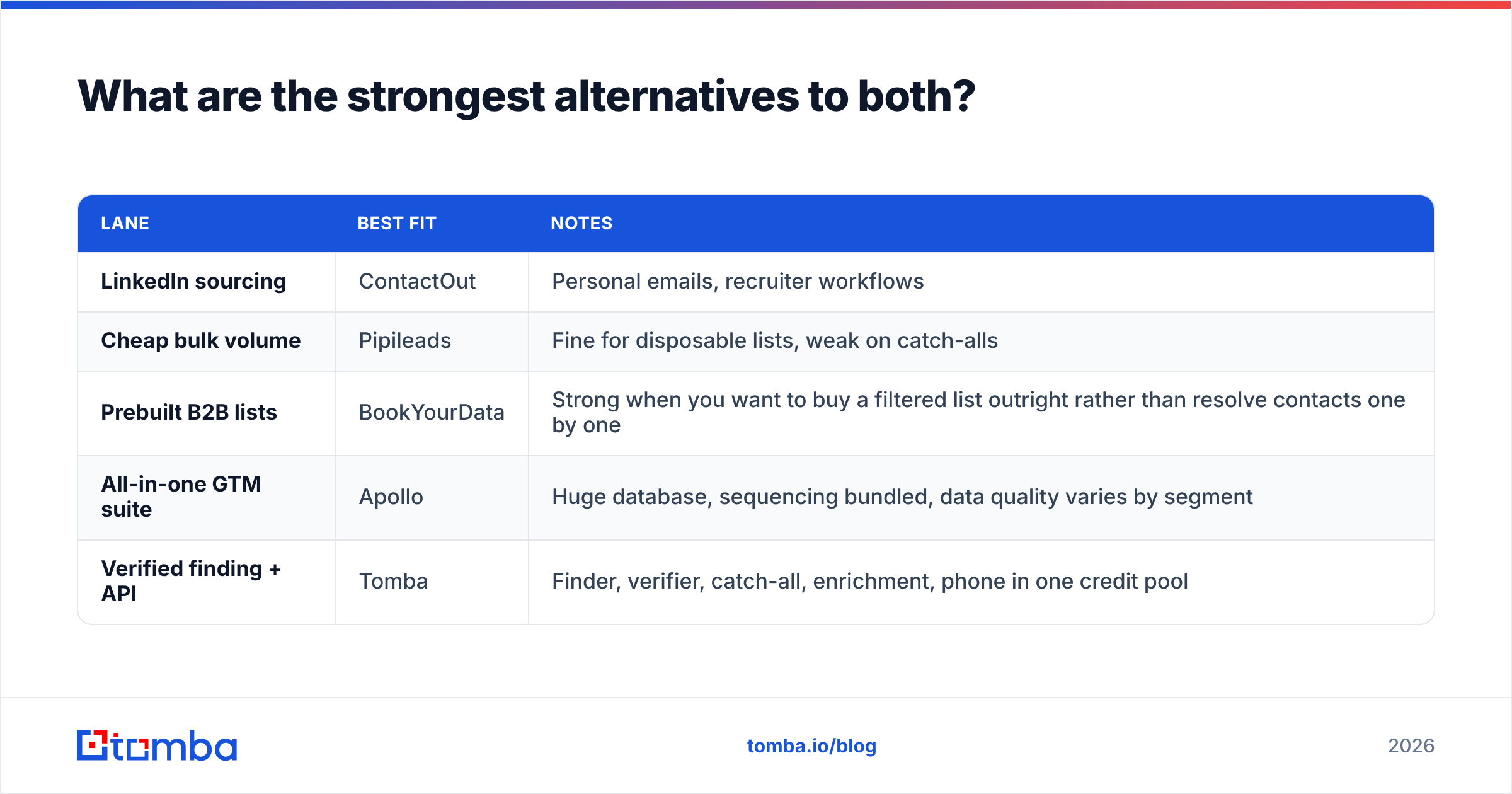
The ContactOut vs Pipileads frame is too narrow. The market has clear lanes:
| Lane | Best fit | Notes |
|---|---|---|
| LinkedIn sourcing | ContactOut | Personal emails, recruiter workflows |
| Cheap bulk volume | Pipileads | Fine for disposable lists, weak on catch-alls |
| Prebuilt B2B lists | BookYourData | Strong when you want to buy a filtered list outright rather than resolve contacts one by one |
| All-in-one GTM suite | Apollo | Huge database, sequencing bundled, data quality varies by segment |
| Verified finding + API | Tomba | Finder, verifier, catch-all, enrichment, phone in one credit pool |
BookYourData deserves a mention because it solves a different problem well. If you already know the ICP and just want a clean, filtered list delivered, buying the list beats resolving it contact by contact. It's a complement to a finder, not a substitute.
For sales and RevOps teams, the practical setup usually looks like this. One finder with a real API handles systematic enrichment — CRM sync, form enrichment, list building. An extension covers reps doing manual research. Verification runs before anything hits a sequencer. What you want to avoid is three vendors, three credit pools, and three different definitions of "valid."
Which should you pick?#
Pick ContactOut if: you recruit, you live on LinkedIn, you need personal emails and mobile numbers, and your team is small enough that per-seat pricing doesn't hurt yet.
Pick Pipileads if: you need a lot of contacts for very little money, you accept a lower hit rate, and you already run a separate verification step. It's a reasonable budget tool, as long as you don't mistake it for an infrastructure tool.
Pick neither if: you're building outbound as a repeatable system. Then you need confidence scores, bundled verification, catch-all handling, and an API. That's a different product category than either of these.
That's the gap Tomba was built for. The email finder, verifier, domain search, catch-all verifier, and enrichment all draw from one credit pool and one API. You aren't stitching vendors together, and you aren't paying twice to check whether the first vendor's data was real. Pricing is credit-based, not per-seat: free tier at 25 searches/mo, Starter at $49/mo, Growth at $99/mo, Pro at $249/mo — see Tomba pricing for the current breakdown.
Start with the free tier and run the 100-contact test above against both tools at the same time. Whichever wins on effective yield — not match rate, not sticker price — is the one still in your stack next quarter.
Related guides#
Ready to find emails that actually work?
Join 150,000+ professionals who stopped guessing and started sending. Free credits on signup — no credit card required.
Get the Tomba newsletter
Practical outbound tactics and product updates — once every two weeks.
About the author