ContactOut vs Pubrio (2026): Which Email Finder Wins?
ContactOut is a LinkedIn-first contact extractor. Pubrio is an AI-led GTM database. They solve different problems badly if you pick wrong. Here is the honest breakdown, plus what each one costs you at real volume.
TL;DR
- ContactOut is a LinkedIn-first contact extractor. Its strongest asset is personal email and phone coverage on LinkedIn profiles, surfaced through a browser extension while you prospect.
- Pubrio is an AI-led GTM platform: a searchable B2B database with intent signals, lead scoring, and enrichment, aimed at teams who want the whole prospecting motion in one tab.
- They are not really the same product. ContactOut wins if your pipeline starts on LinkedIn. Pubrio wins if you want to build lists from filters and layer intent data on top.
- Both charge per seat, which punishes small teams and anyone who needs API volume more than they need dashboards.
- If you mostly need accurate, verified work emails at predictable cost, a dedicated email finder with credit-based pricing is usually the cheaper third path. We cover where each option breaks down below.
What are ContactOut and Pubrio, actually?#
Short answer: ContactOut is a LinkedIn contact-extraction layer, Pubrio is a database-plus-intent platform. The comparison only makes sense because both promise to hand you a working email address at the end.
ContactOut built its reputation as a Chrome extension. You open a LinkedIn profile, the sidebar shows work email, personal email, and sometimes a mobile number. It has since added a search portal, list building, and an API, but the extension is still the center of gravity — most of its heavy users are recruiters who live inside LinkedIn Recruiter all day.
Pubrio comes at it from the opposite direction. It positions itself as an AI sales intelligence and GTM platform: search a contact database by title, geography, technology, and headcount, get buying-intent signals, run lead scoring, and enrich records. The extension exists, but the product wants you working from filters and saved searches, not from individual profile pages.
That difference in shape drives everything else — pricing model, accuracy profile, and who gets value out of the tool.
How do ContactOut and Pubrio compare head-to-head?#
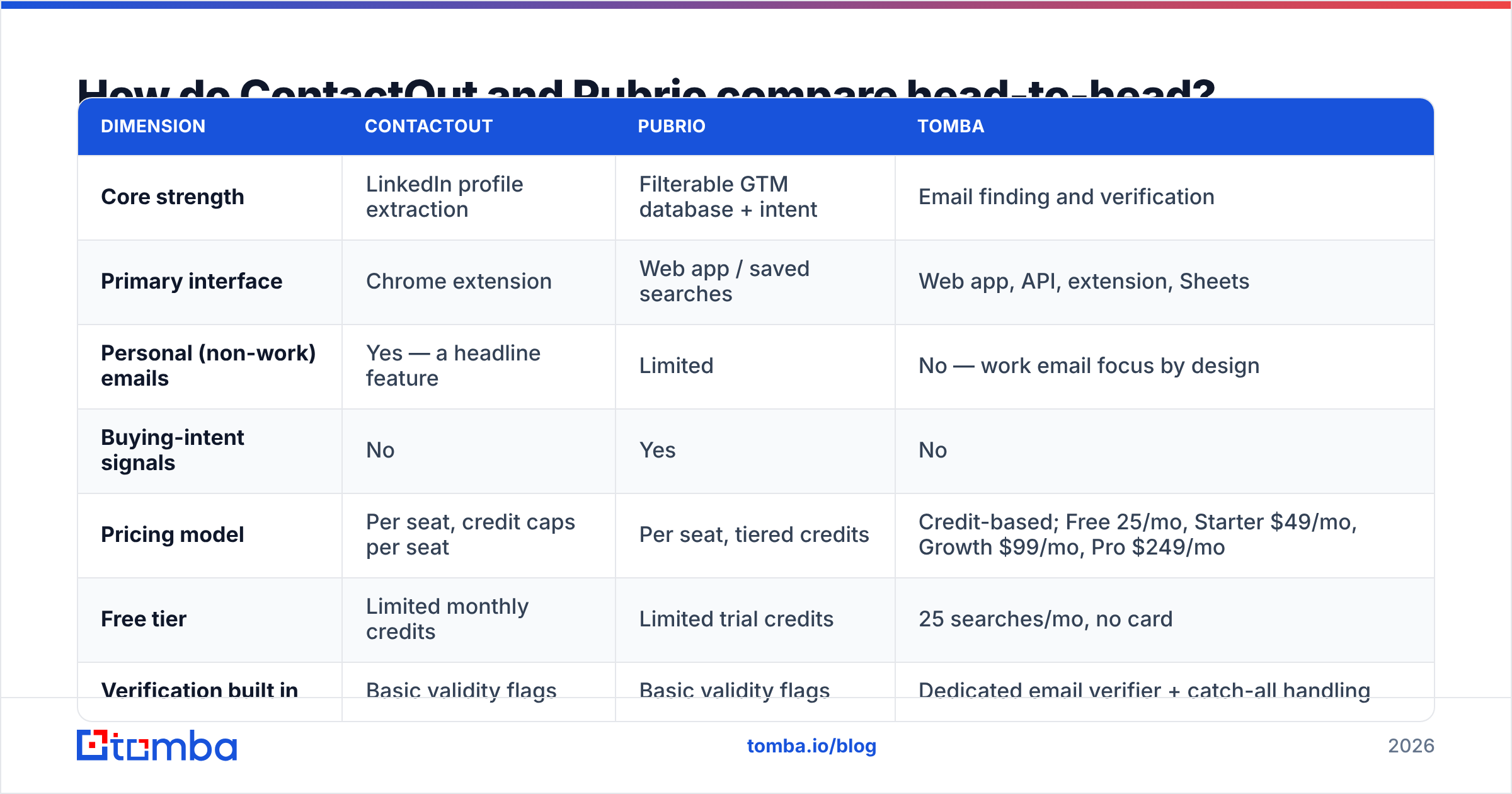
Here is the honest side-by-side. Vendor pricing moves frequently, so treat the cost row as a directional guide and confirm on each vendor's own pricing page before you buy.
| Dimension | ContactOut | Pubrio | Tomba |
|---|---|---|---|
| Core strength | LinkedIn profile extraction | Filterable GTM database + intent | Email finding and verification |
| Primary interface | Chrome extension | Web app / saved searches | Web app, API, extension, Sheets |
| Personal (non-work) emails | Yes — a headline feature | Limited | No — work email focus by design |
| Buying-intent signals | No | Yes | No |
| Pricing model | Per seat, credit caps per seat | Per seat, tiered credits | Credit-based; Free 25/mo, Starter $49/mo, Growth $99/mo, Pro $249/mo |
| Free tier | Limited monthly credits | Limited trial credits | 25 searches/mo, no card |
| Verification built in | Basic validity flags | Basic validity flags | Dedicated email verifier + catch-all handling |
| API access | Yes, on higher tiers | Yes, on higher tiers | Yes, on every paid tier |
| Best fit | Recruiters, LinkedIn-heavy AEs | RevOps teams building ICP lists | Outbound teams needing verified work emails at volume |
The row that decides most deals is the pricing model, not the feature grid. Per-seat tools assume every user is a human clicking a sidebar. The moment you want to enrich 20,000 rows through an API or a Sheets add-on, per-seat pricing gets expensive in a way the marketing page never shows you.

Which one finds more valid emails?#
Neither vendor publishes an audited accuracy number, so treat every "98% accurate" claim — from anyone, including us — as marketing until you test it on your own list.
What you can reason about is where the data comes from, because that predicts where it fails:
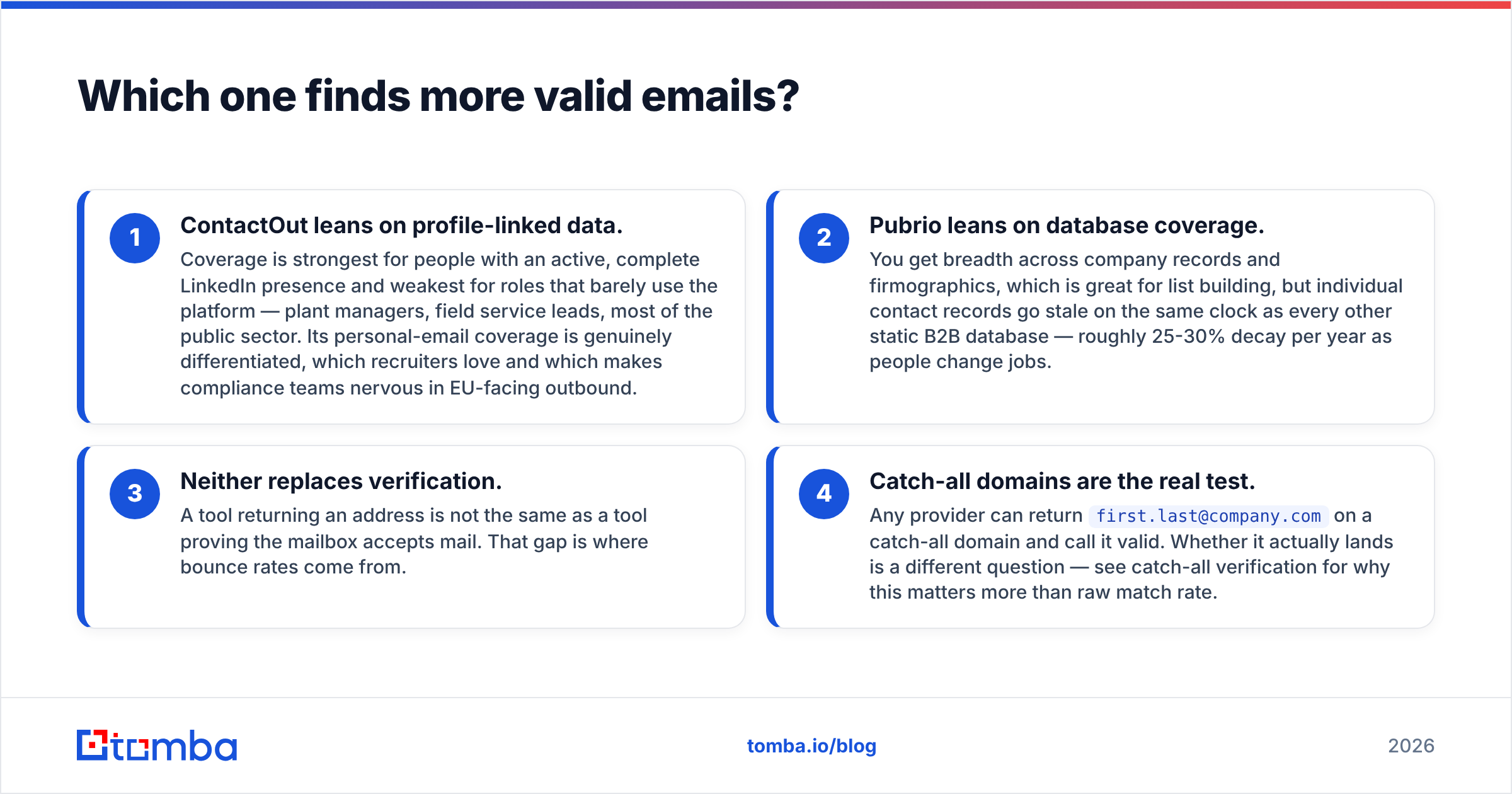
- ContactOut leans on profile-linked data. Coverage is strongest for people with an active, complete LinkedIn presence and weakest for roles that barely use the platform — plant managers, field service leads, most of the public sector. Its personal-email coverage is genuinely differentiated, which recruiters love and which makes compliance teams nervous in EU-facing outbound.
- Pubrio leans on database coverage. You get breadth across company records and firmographics, which is great for list building, but individual contact records go stale on the same clock as every other static B2B database — roughly 25-30% decay per year as people change jobs.
- Neither replaces verification. A tool returning an address is not the same as a tool proving the mailbox accepts mail. That gap is where bounce rates come from.
- Catch-all domains are the real test. Any provider can return
first.last@company.comon a catch-all domain and call it valid. Whether it actually lands is a different question — see catch-all verification for why this matters more than raw match rate.

The practical move is to stop asking "which tool is more accurate" and start measuring cost per verified, delivered email. That number folds match rate, verification quality, and pricing into one figure you can actually compare. Run 200 known-good contacts through each trial, then check what actually landed.
Is ContactOut worth it in 2026?#
Yes, if LinkedIn is where your pipeline literally starts. No, if it isn't.
Where ContactOut earns its money:
- In-workflow speed. For a recruiter working a Recruiter search, having emails and mobiles appear in the sidebar removes a context switch on every single profile. That compounds across 80 profiles a day.
- Personal emails and phones. If you're recruiting engineers who ignore their work inbox, this is the whole ballgame. Most work-email-focused tools simply won't have that record.
- Extension reliability. It has survived years of LinkedIn DOM changes, which is not trivial.
Where it falls down:
- Per-seat cost scales badly. Credits are tied to seats. Three prospectors means three subscriptions, even if two of them only pull 50 contacts a month.
- It's not a list-building engine. The search portal exists, but you're paying for an extension-shaped product and using it in a shape it wasn't optimized for.
- Verification is thin. You'll still want a separate verification pass before any real send, especially on catch-all domains.
- Compliance friction. Personal-email outreach into the EU or UK is a conversation your legal team will want to have. Recruiting has carve-outs; B2B cold sales largely does not.
If ContactOut's per-seat model is the problem rather than its data, the ContactOut alternative breakdown covers what changes when you move to credit-based pricing.
Is Pubrio worth it in 2026?#
Yes, if you're building lists from an ICP definition and want intent signals in the same tool. Less so if you already own a data stack.
What Pubrio does well:
- Filter-first prospecting. Define your ICP once — headcount, tech stack, geography, title — and generate lists on demand instead of hunting profile by profile.
- Intent layered on top. Knowing which accounts are actively researching your category is a legitimate prioritization edge, and it's the piece a pure email finder cannot give you.
- Enrichment for existing records. Useful when you already have a CRM full of half-empty rows.
Where it gets awkward:
- Overlap with what you already pay for. If you run 6sense, Demandbase, or Clay, you're buying a second copy of capabilities you already have. That's a hard budget conversation.
- Contact-level freshness. Broad databases decay. The firmographic layer stays useful longer than the person-level layer.
- You pay for the platform, not the email. If all you actually needed was a verified work email for 3,000 contacts, you're funding a lot of dashboard you'll never open.
Both G2 and Capterra carry current user reviews for both tools — read the G2 category listings for the complaints, not the praise. Praise is generic; complaints are specific and tell you where the product actually breaks.
What does each tool really cost per verified email?#
This is the number that should decide your purchase, and it's the one nobody prints on their pricing page.
Work it out like this:
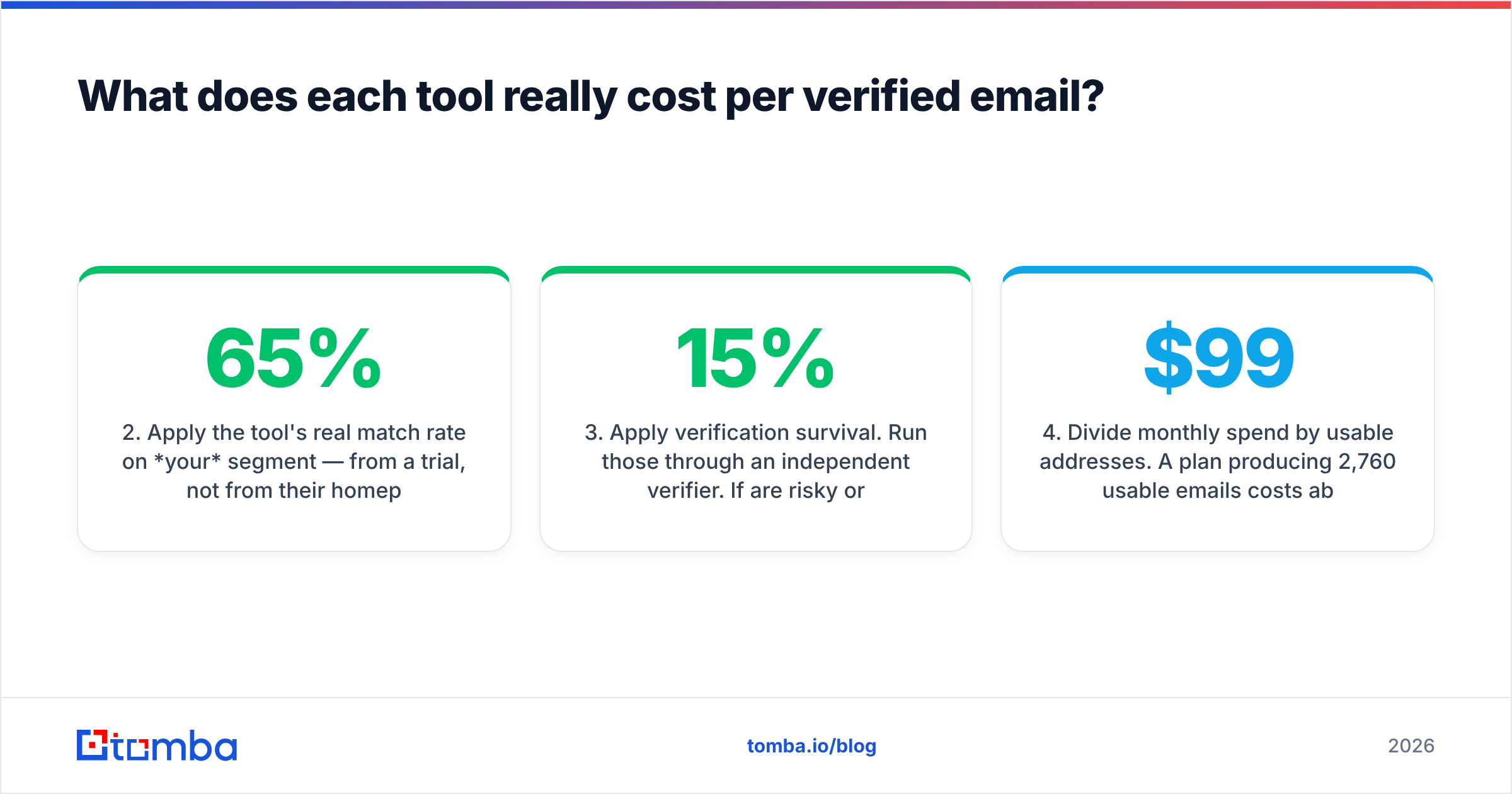
- Take your monthly contact volume. Not your seat count. Say 5,000 contacts.
- Apply the tool's real match rate on your segment — from a trial, not from their homepage. Say 65%. You now have 3,250 addresses.
- Apply verification survival. Run those through an independent verifier. If 15% are risky or invalid, you're at ~2,760 usable addresses.
- Divide monthly spend by usable addresses. A $99/month plan producing 2,760 usable emails costs about 3.6 cents each. A $200/month three-seat setup producing the same volume costs over 7 cents.
- Add the bounce cost. Every invalid address that reaches your sending domain damages sender reputation, which lowers deliverability for the good addresses too. This is the hidden line item that makes cheap-but-dirty data the most expensive option you can buy.

Do this math for three days of trial data and the decision usually makes itself. Teams are consistently surprised that the tool with the flashiest match-rate claim ends up second or third on cost per delivered email, because the addresses it found were the ones nobody could verify.

When should you pick something else entirely?#
Pick a third option when your actual job description is narrower than either platform assumes.
Choose a dedicated email finder if:
- Your volume is API-shaped, not seat-shaped. You're enriching a Sheets export, a CRM sync, or a scraper output. Nobody is clicking a sidebar. Per-seat pricing is pure waste here.
- You need work emails, not personal ones. Most B2B outbound does. Personal-email coverage is a recruiting feature you're paying for and never using.
- Verification quality matters more than database breadth. If your list already exists — from events, a webinar, a scrape, a partner — you don't need a database. You need a bulk verify pass that tells you the truth about catch-alls.
- You want predictable spend. Credits carry a clear unit cost. Seats do not.
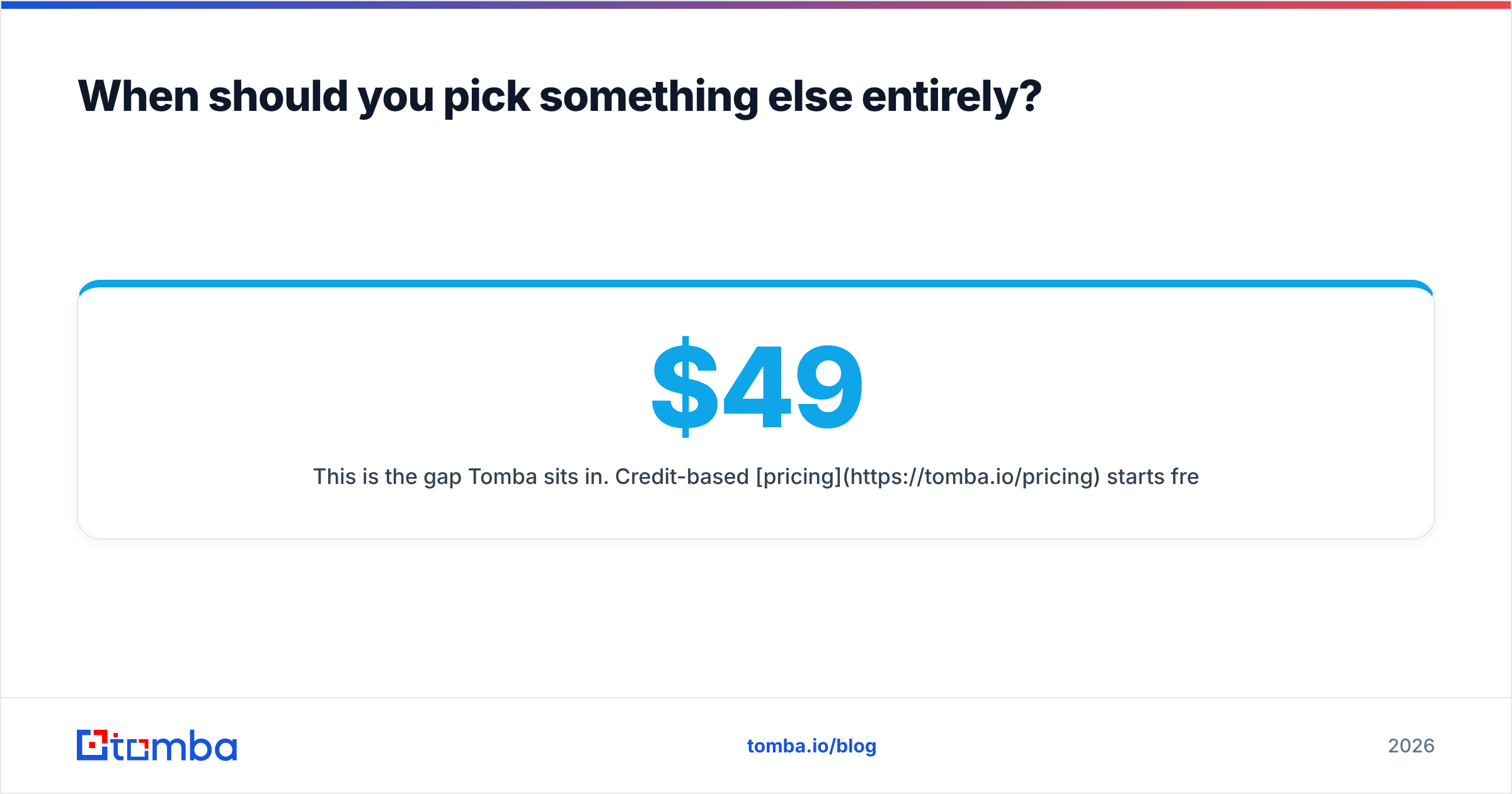
This is the gap Tomba sits in. Credit-based pricing starts free at 25 searches a month, then $49/month for Starter, $99/month for Growth, and $249/month for Pro — with API access on every paid tier rather than gated behind an enterprise call. Domain search handles the list-building half, the verifier handles the deliverability half, and the Tomba API handles the "we have 40,000 rows and no time" half.
What Tomba deliberately does not do: intent data, personal emails, or sequence sending. If those are core to your motion, Pubrio or ContactOut respectively will serve you better, and that's a real answer rather than a hedge.
What's the verdict on ContactOut vs Pubrio?#
ContactOut for LinkedIn-native prospecting and recruiting. Pubrio for ICP-driven list building with intent. Neither if what you actually need is verified work emails at volume.
A practical decision tree:
- Do 80%+ of your prospects come from LinkedIn profile pages you're already viewing? → ContactOut. The workflow saving is real and nothing else replicates it.
- Do you build lists from filters and want intent signals in the same tool? → Pubrio, assuming you don't already own an intent platform.
- Do you enrich lists programmatically, care mostly about work-email deliverability, and hate per-seat math? → A credit-based email finder.
- Are you unsure? Run all three trials against the same 200 contacts and measure cost per verified email. Three days of work, and it beats any blog post — including this one.
One last thing that applies regardless of which you pick: verify before you send. Every provider on this list returns addresses that will bounce. That's not a knock on any of them, it's how contact data works — the world changes faster than any database indexes it. The tools that admit this and ship a real verification layer are the ones that keep your domain alive.
Ready to test the cost-per-verified-email math yourself? Start with the Tomba Email Finder — 25 free searches a month, no card required. Drop in the same 200 contacts you're testing ContactOut and Pubrio with, run them through the verifier, and compare what actually lands in an inbox. If the numbers favor another tool for your segment, you'll know in an afternoon and you'll have spent nothing to find out.
Related guides#
Ready to find emails that actually work?
Join 150,000+ professionals who stopped guessing and started sending. Free credits on signup — no credit card required.
Get the Tomba newsletter
Practical outbound tactics and product updates — once every two weeks.
About the author