ContactOut vs QuickEnrich (2026): Which Email Finder Wins?
ContactOut sells LinkedIn-first reach through a browser extension. QuickEnrich sells waterfall enrichment through an API. They solve different problems — here is how to pick, and when neither is the right answer.
TL;DR
- ContactOut is a LinkedIn-first contact finder. Its strength is a Chrome extension that pulls personal and work emails plus phone numbers off profiles while you browse. Its weakness is that the workflow assumes a human is doing the browsing.
- QuickEnrich is an enrichment-first platform. Its strength is waterfall lookups through an API and bulk file processing. Its weakness is a thinner brand footprint, less third-party review volume, and no meaningful browser-based prospecting motion.
- They are not really competitors. One is a recruiter/AE sourcing tool; the other is a data-ops pipe. Choosing between them is mostly a question of who touches the data first — a human or a script.
- Per-seat pricing punishes teams that want data everywhere. Credit-based pricing punishes teams that want unlimited manual sourcing. Model your real volume before you commit annually.
- If you need both — profile-level lookups and a clean API with verification built in — a domain-and-API-first tool like Tomba is usually the cheaper third option.
What are ContactOut and QuickEnrich, actually?#
Start with the honest framing, because the marketing pages blur it.
ContactOut built its business on the LinkedIn surface. You install the extension, open a profile, and it surfaces work emails, personal emails, and phone numbers in a side panel. It layers a search portal and a recruiter-oriented ATS-adjacent workflow on top, but the extension is the product people actually renew for. Its heaviest users are recruiters and SDRs who source one profile at a time and want a personal Gmail address when the corporate one bounces.
QuickEnrich approaches the same data from the opposite end. It positions as an enrichment layer: you feed it a domain, a name, a LinkedIn URL, or a CSV, and it returns enriched records — typically running a waterfall across multiple upstream providers so a miss with one source can be caught by another. The buyer is usually a RevOps or growth engineer wiring enrichment into a CRM, a form, or a nightly job.
So the real question behind "contactout vs quickenrich" is rarely which tool has better data. It's where in your process the lookup happens.
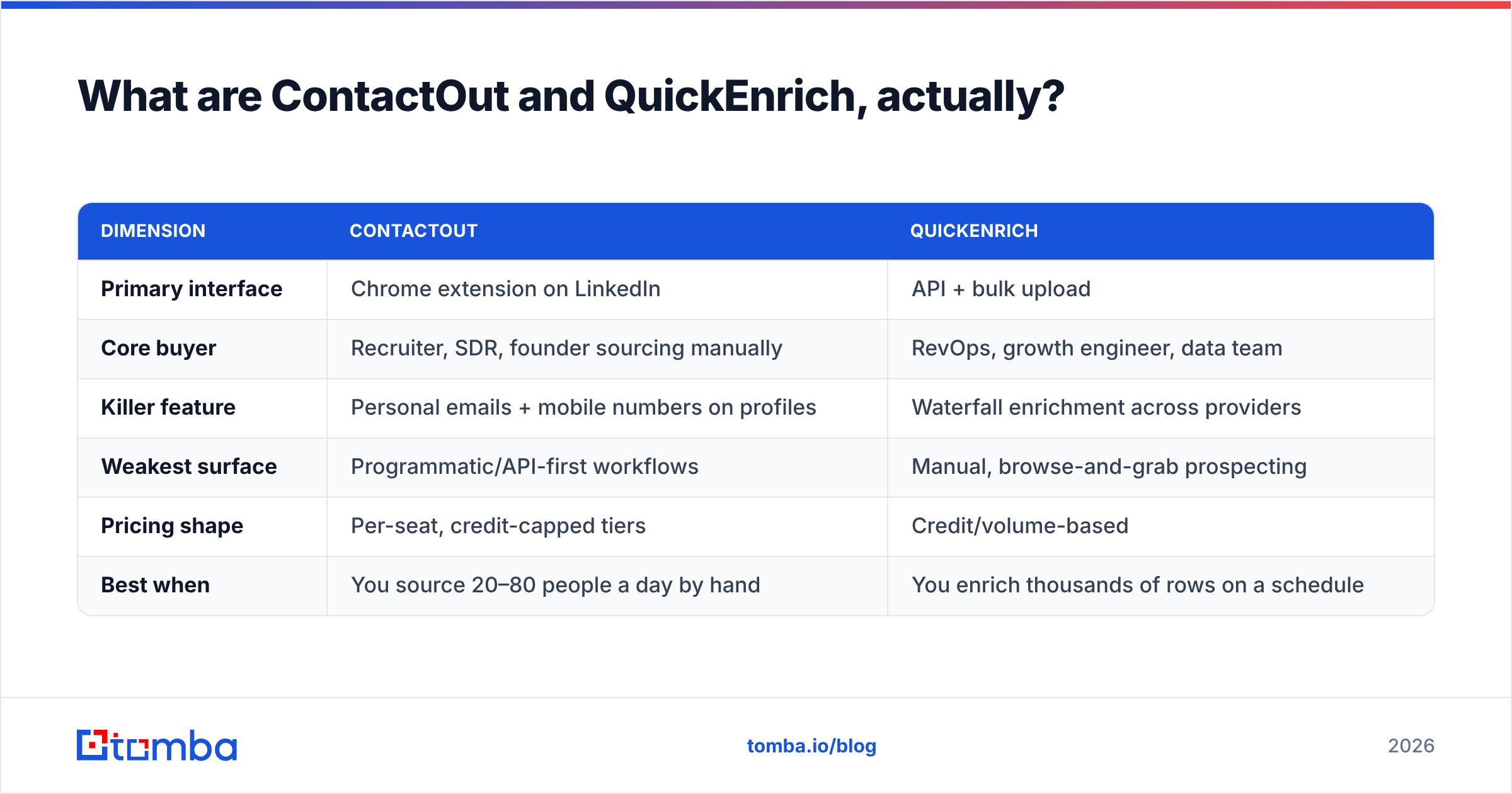
| Dimension | ContactOut | QuickEnrich |
|---|---|---|
| Primary interface | Chrome extension on LinkedIn | API + bulk upload |
| Core buyer | Recruiter, SDR, founder sourcing manually | RevOps, growth engineer, data team |
| Killer feature | Personal emails + mobile numbers on profiles | Waterfall enrichment across providers |
| Weakest surface | Programmatic/API-first workflows | Manual, browse-and-grab prospecting |
| Pricing shape | Per-seat, credit-capped tiers | Credit/volume-based |
| Best when | You source 20–80 people a day by hand | You enrich thousands of rows on a schedule |
If you can answer "who opens the record first — a person or a cron job?", you have already narrowed the choice by 80%.
How accurate is each one — and does the number mean anything?#
Every contact vendor publishes an accuracy figure. ContactOut has long advertised numbers in the high-90s. Waterfall tools like QuickEnrich advertise higher coverage (match rate) by definition, because they query multiple sources per record. Both claims can be technically true and still mislead you, because vendors measure different things:
- Match rate — what percentage of your input rows got any email back. Waterfall tools win here almost by construction.
- Deliverability rate — what percentage of returned emails actually accept mail. This is the number that costs you money when it's wrong.
- Verification status — whether the tool tells you why it's confident (SMTP check, pattern match, historical send data) or just hands you a string.
- Catch-all handling — whether a
catch-alldomain is returned as "valid" (a lie) or flagged honestly.
That fourth point separates serious tools from resellers. A domain configured as catch-all accepts every address at the SMTP handshake, so a naive verifier marks everything valid. You then send 400 emails to first.last@ at a company that uses f.last@, and your bounce rate quietly eats your domain reputation.

The practical move: ignore the marketing percentage and run your own 200-row test. Take a list you already know the answers for — past customers, current pipeline, colleagues at partner companies — push it through both trials, and score the output yourself. Then re-verify every returned address through an independent email verifier before it touches a sequencer. A finder that grades its own homework is not a control.
Correction on the image syntax aside — the point stands: seat math and credit math produce wildly different bills for the same volume, and neither vendor will model it for you.

ContactOut vs QuickEnrich: the head-to-head comparison#
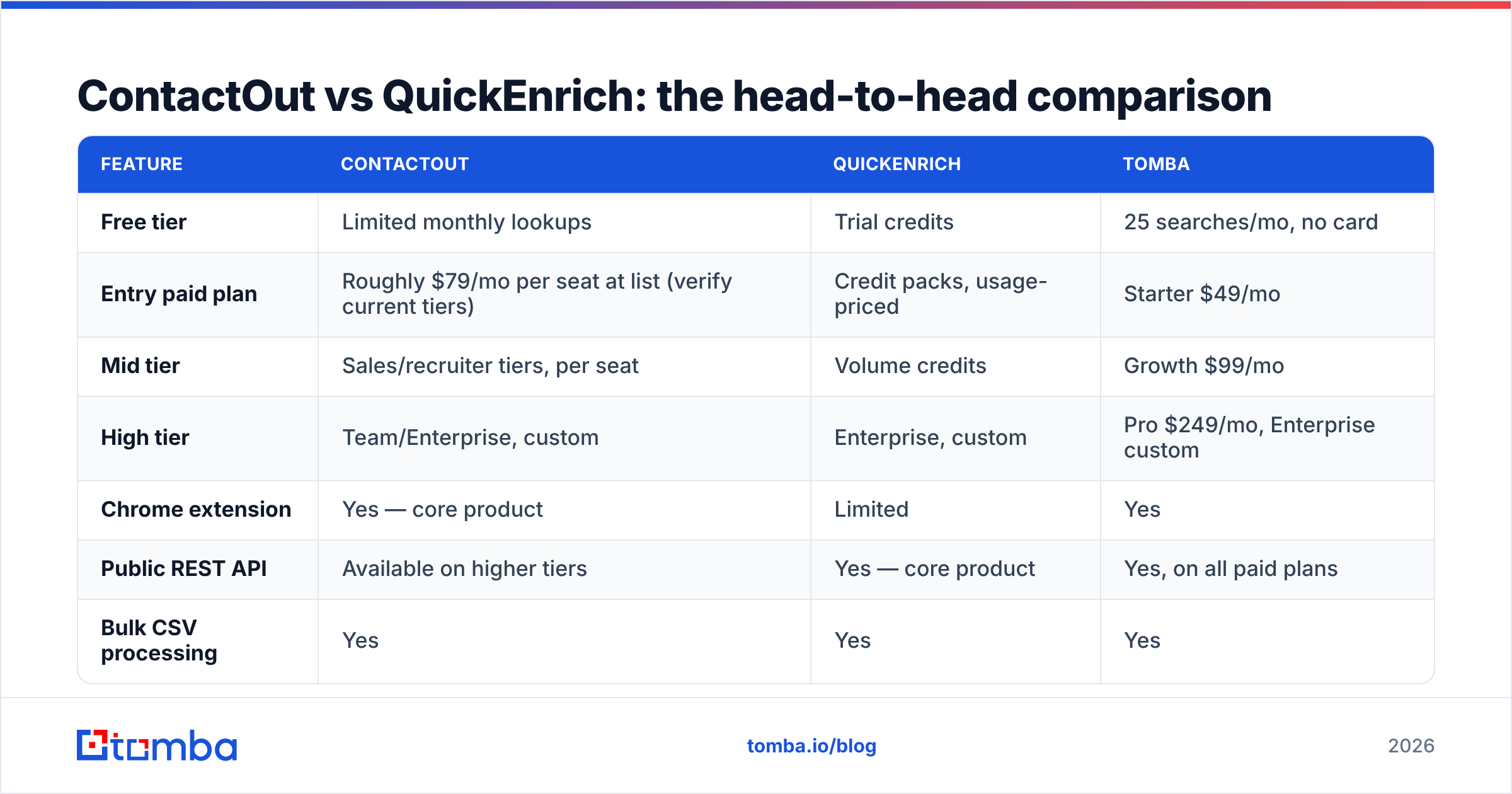
Here is the comparison table most buyers actually need, with Tomba included as the reference third option since it sits between the two models.

| Feature | ContactOut | QuickEnrich | Tomba |
|---|---|---|---|
| Free tier | Limited monthly lookups | Trial credits | 25 searches/mo, no card |
| Entry paid plan | Roughly $79/mo per seat at list (verify current tiers) | Credit packs, usage-priced | Starter $49/mo |
| Mid tier | Sales/recruiter tiers, per seat | Volume credits | Growth $99/mo |
| High tier | Team/Enterprise, custom | Enterprise, custom | Pro $249/mo, Enterprise custom |
| Chrome extension | Yes — core product | Limited | Yes |
| Public REST API | Available on higher tiers | Yes — core product | Yes, on all paid plans |
| Bulk CSV processing | Yes | Yes | Yes |
| Built-in verification | Basic | Waterfall-dependent | Dedicated verifier + catch-all check |
| Phone numbers | Yes — a genuine strength | Varies by waterfall source | Yes |
| Personal (non-work) emails | Yes — its differentiator | Limited | Work-email focused |
| Pricing model risk | Seats you don't use still bill | Credits burn on failed lookups (check policy) | Flat plan + predictable credits |
Two honest notes on that table.
First, ContactOut's personal-email and mobile coverage is real and hard to replicate. If you're a recruiter and the whole job is reaching a passive candidate who ignores their work inbox, that capability is worth the seat price on its own. No amount of domain-pattern intelligence gives you someone's Gmail.
Second, published pricing moves. Both vendors have changed tiers, credit definitions, and what counts as a "lookup" more than once. Treat any number you read in a blog post — including this one — as a starting point, then open their pricing pages before you sign. The one figure I'll state flatly, because it's ours: Tomba pricing starts at $49/mo for Starter, with a free tier at 25 searches a month.
Which one should you choose for outbound sales?#
For a classic outbound motion — SDRs building lists, sequencing, and booking meetings — the decision splits cleanly by team size.
Solo founder or 1–3 SDRs, sourcing by hand. ContactOut wins on ergonomics. You live on LinkedIn Sales Navigator anyway; a side panel that fills in the email without a context switch saves real minutes per prospect. The per-seat cost is tolerable at that headcount.
5+ reps, or any team building lists in bulk. The extension model starts working against you. Every rep needs a seat. Every seat has a credit cap. Reps hoard credits at month-end, or burn them and go dark for a week. Meanwhile, the actual list-building work — "give me every marketing director at these 400 companies" — is not a browsing task at all. It's a domain search task, and a good one returns the whole org's addresses with confidence scores in a single call.
RevOps automating enrichment. QuickEnrich's shape is correct here. Inbound form fills, CRM records with a domain and no contact, nightly reconciliation jobs — that's API work, and a waterfall genuinely does lift match rates when your input data is messy. The trade-off is opacity: with a waterfall, you often can't tell which upstream source produced the address, which makes debugging a bad segment harder.
If you want the extension convenience and a first-class API without paying twice, that's the gap tools like the Tomba Email Finder and LinkedIn finder are built for — same data layer, reachable from a browser panel, a spreadsheet, or a curl call, on the same plan.
What are the hidden costs neither vendor puts on the pricing page?#
Four, and they are the ones that actually determine your cost per meeting.
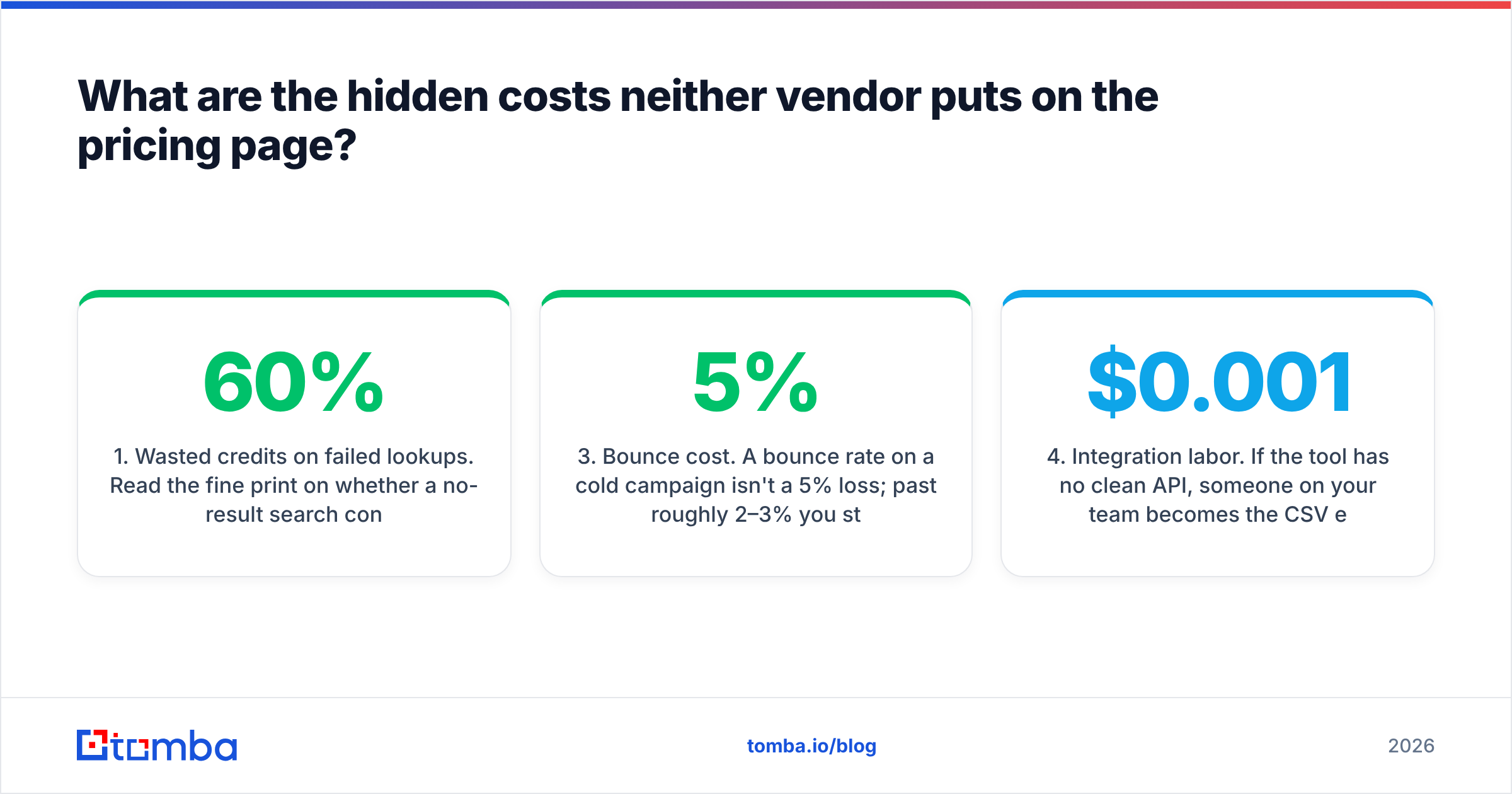
1. Wasted credits on failed lookups. Read the fine print on whether a no-result search consumes a credit. Some vendors charge for the attempt; some don't. On a 10,000-row list with a 60% match rate, that difference is 4,000 credits — often more than a month's allotment.
2. Seat sprawl. Per-seat tools create a political tax: every person who might need a lookup asks for a license, and you either say no (and become a bottleneck) or say yes (and double the bill). API-priced tools sidestep this entirely — one key, one budget, everyone gets data.
3. Bounce cost. A 5% bounce rate on a cold campaign isn't a 5% loss; past roughly 2–3% you start damaging sender reputation, which suppresses deliverability for every good address you send to afterward. Budget for verification as a separate, mandatory line item — not an optional add-on. This is exactly why a standalone catch-all verifier matters more than another 2 points of match rate.
4. Integration labor. If the tool has no clean API, someone on your team becomes the CSV export/import robot. That's a salaried human doing a $0.001 job. Price it.

How do you actually test them before you buy?#
Run this in an afternoon. It costs nothing and it beats every G2 review, including the ones on G2's contact-data category pages — which are useful for directional sentiment and useless for your specific ICP.
- Build a 200-row truth set. Rows you can independently confirm: existing customers, people who've replied to you, colleagues at partner firms. Include 20 rows from known catch-all domains and 20 from small companies with non-obvious email patterns — that's where tools separate.
- Run it through every trial in parallel. Same input file, same day. Do not let one vendor "help you set it up" — you want the out-of-the-box result.
- Score three columns, not one: match rate, verified-deliverable rate, and how many results the tool flagged honestly as risky/unknown. A tool that says "I don't know" is more valuable than one that guesses confidently.
- Send a real 100-address test campaign from a warmed secondary domain. Measure hard bounces. This is the only metric that survives contact with reality.
- Time the workflow. How many seconds from "I want this person's email" to "it's in my sequencer"? Multiply by your monthly volume. That number, times a loaded rep-hour cost, is often larger than the subscription difference.
- Test the failure path. Feed it a fake person at a real company and a real person at a dead domain. A good tool returns nothing. A bad one invents
john.smith@and charges you for it.
If you're doing this at volume, a bulk email finder run plus an independent verification pass is the fastest way to score all three vendors on the same input.
Is there a better option than either?#
Sometimes. It depends on what you're optimizing for, and I'll be direct about where each tool genuinely wins.
Pick ContactOut if: your job is people-first sourcing — recruiting, executive search, or high-touch founder-led sales — and personal emails plus mobile numbers are the difference between a reply and silence. Nothing in the enrichment-API category replicates that.
Pick QuickEnrich if: your job is filling gaps in records you already have, at volume, on a schedule, and you'd rather pay for a waterfall than build one. If you're comfortable with less visibility into provenance, the coverage lift is real.
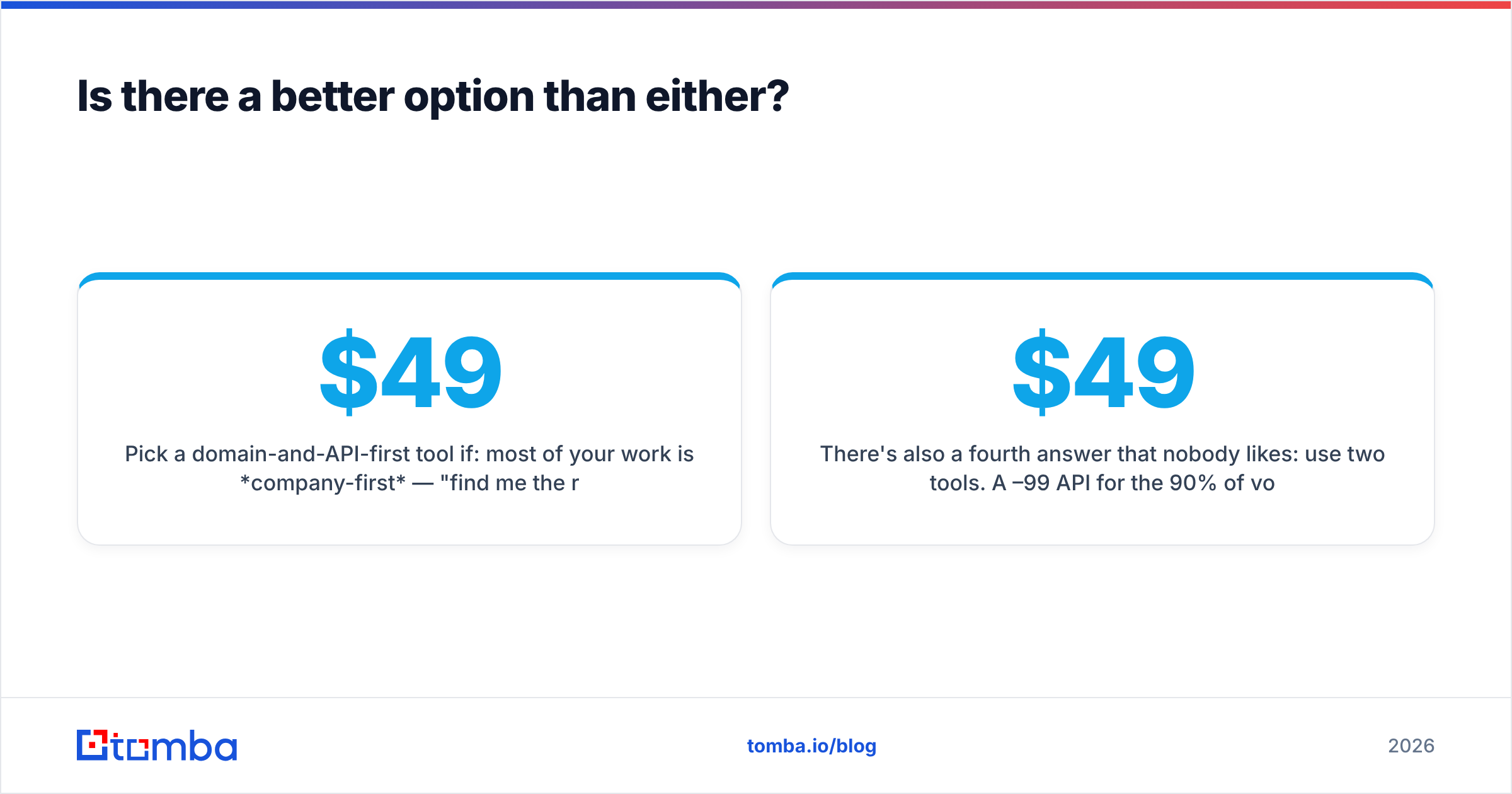
Pick a domain-and-API-first tool if: most of your work is company-first — "find me the right people at these accounts" rather than "find me this specific person's Gmail" — and you want verification, catch-all handling, and programmatic access on the same plan you already pay for. That's the lane Tomba sits in: an email finder API with a real free tier, flat plans from $49/mo instead of per-seat escalation, and a verifier that flags catch-alls honestly instead of laundering them into "valid."
There's also a fourth answer that nobody likes: use two tools. A $49–99/mo API for the 90% of volume that's company-first, plus one or two seats of a LinkedIn-first extension for the recruiters and senior AEs who genuinely need personal contact data. That combination is usually cheaper than putting the whole team on per-seat pricing, and it's strictly better data than forcing an enrichment API to do work it wasn't designed for. For context on how vendors source and refresh records before you trust any of them, it's worth reading how a provider documents its data sources — if a vendor won't say where the data comes from, that silence is the answer.
The bottom line#
ContactOut and QuickEnrich are both defensible purchases for the buyer each was built for. The mistake is buying one for the other's job: putting a data team on a Chrome extension, or asking an enrichment API to support manual LinkedIn sourcing. Both failures show up the same way — a tool nobody uses, renewing on autopay.
Model your volume. Run the 200-row test. Verify everything before it hits a sequencer, regardless of which vendor you choose.
If most of your prospecting starts with a company rather than a person, start with the Tomba Email Finder. The free tier gives you 25 searches a month with no card, Starter is $49/mo, and every plan includes API access plus catch-all-aware verification — so you can run the exact head-to-head test above against ContactOut and QuickEnrich this week, with your own list, and let the bounce rate settle the argument.
Related guides#
Ready to find emails that actually work?
Join 150,000+ professionals who stopped guessing and started sending. Free credits on signup — no credit card required.
Get the Tomba newsletter
Practical outbound tactics and product updates — once every two weeks.
About the author