ContactOut vs ReachStream: Which B2B Data Tool Wins in 2026?
ContactOut scrapes LinkedIn in real time. ReachStream sells you a static contact database. They solve different problems — and one of them is probably wrong for your team. Here's the honest breakdown.
TL;DR#
- ContactOut is a LinkedIn-first contact finder. You browse a profile, the extension surfaces a personal and work email, and you push it to your CRM. Strong on people you can already see; useless when LinkedIn isn't part of your workflow.
- ReachStream is a static B2B contact database. You filter by industry, title, geography and revenue, then export a CSV. Strong on volume and cheap per-record pricing; weaker on freshness, because records age the moment they're written.
- They are not really the same product. ContactOut = enrichment at the point of research. ReachStream = list building at the point of planning.
- Both leak money at scale. ContactOut's per-seat pricing punishes teams; ReachStream's exports punish you when 20-30% of a bought list bounces and you paid for every row anyway.
- The pragmatic play in 2026 is an API-first finder + verifier (Tomba starts at $49/mo, free tier included) that works from a domain or a name, so you're not locked to one source of truth.
What Is ContactOut, Actually?#
ContactOut started life as a Chrome extension that sat on top of LinkedIn and revealed the email behind a profile. That's still its center of gravity. You install the extension, log into LinkedIn, open a profile or a Sales Navigator search, and ContactOut shows work emails, personal emails, and often a phone number.
The pitch it makes on contactout.com is coverage of personal email addresses — the Gmail-style inbox a candidate or prospect actually reads. That's why recruiters adopted it first and why its usage patterns still skew talent-acquisition rather than sales.
What you get:
- Chrome extension that overlays LinkedIn, GitHub, and company sites.
- Search portal with filters on title, company, skills, location.
- Recruiter-grade personal emails, which most B2B databases don't touch.
- ATS/CRM push into Greenhouse, Lever, Salesforce, HubSpot and similar.
- API — available, but gated to higher tiers and not the primary product.
What it does badly: batch work. If you need 5,000 contacts across 800 companies and you don't want to click 5,000 profiles, ContactOut is the wrong shape of tool. Bulk is possible but it feels bolted on, and seat-based pricing means every teammate who touches the data costs you again.
What Is ReachStream, Then?#
ReachStream is the opposite architecture. It's a database company. You sign in, use the filter builder — industry, employee count, revenue band, job function, seniority, geography, technology — and it tells you how many records match. Then you buy or download those records.
ReachStream advertises tens of millions of B2B contacts with firmographic and technographic attributes attached. Their sell is cost-per-record: you can pull large lists at prices that make per-seat SaaS look silly on paper.
The catch is the one every static database shares. A B2B contact database decays at roughly 2-2.5% per month — people change jobs, companies rebrand, mail servers get reconfigured. A record written eight months ago has a meaningful chance of being wrong today, and you have no way of knowing which rows are the rotten ones until you send. Buying volume without verification is how teams end up with 25% bounce rates and a scorched sending domain.
ContactOut vs ReachStream: How Do They Compare Head to Head?#
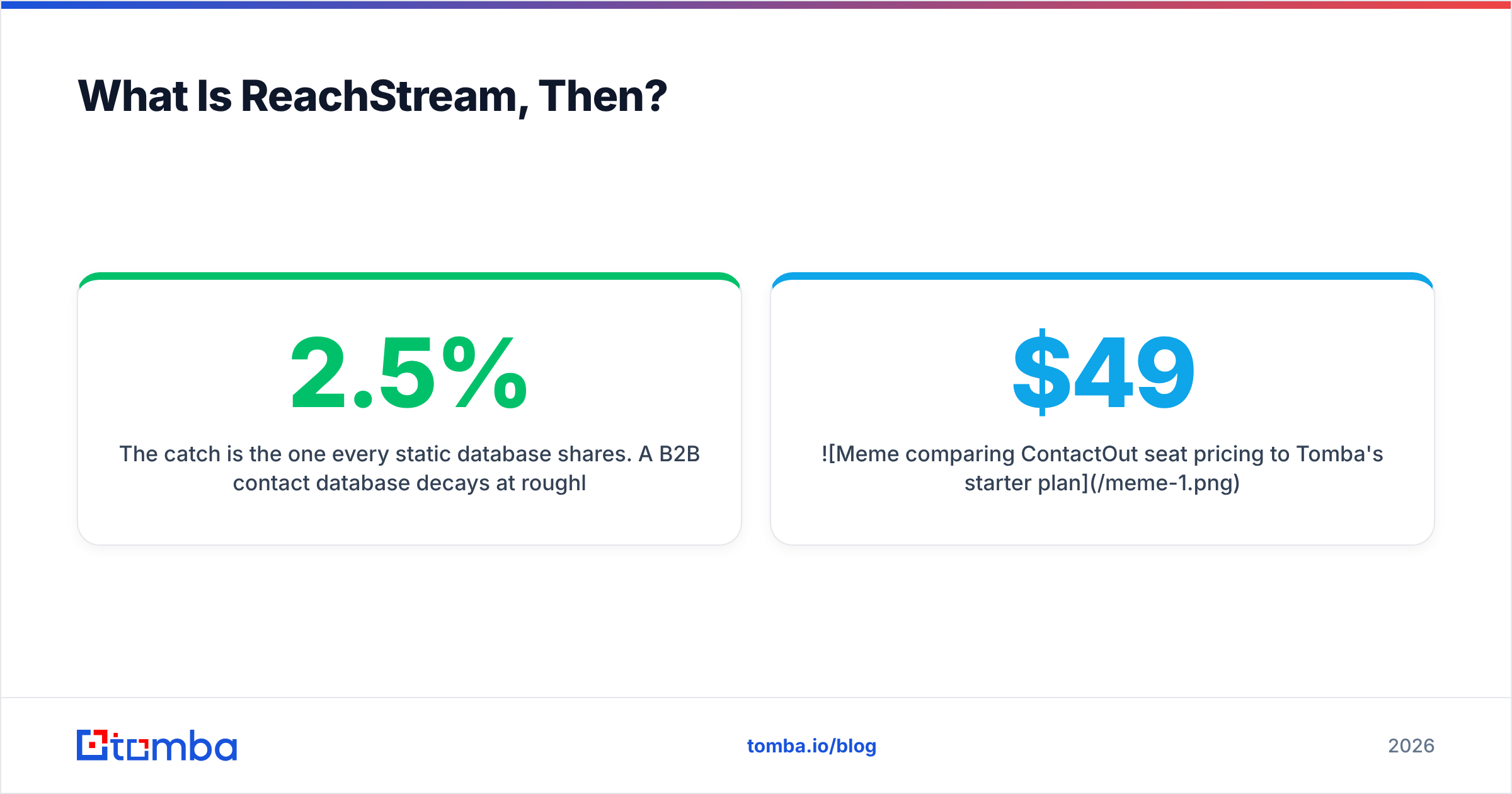
Here's the honest side-by-side. Prices move; check both vendors before you sign anything.
| Dimension | ContactOut | ReachStream | Tomba |
|---|---|---|---|
| Core model | LinkedIn-sourced contact finder | Static B2B contact database | API-first finder + verifier |
| Entry price | ~$99/mo per seat (annual) | Credit/record packs, low $ per record | $49/mo Starter (Free tier: 25 searches/mo) |
| Free tier | Limited trial credits | Sample records on request | Yes — 25 searches/mo, no card |
| Personal emails | Yes (its strongest feature) | Rare | No — work emails only |
| Bulk export | Possible, awkward | Native strength | Native (bulk email finder) |
| Verification built in | Basic | Add-on / variable | Yes — email verifier included |
| Works without LinkedIn | No, effectively | Yes | Yes — domain, name, or company |
| API access | Higher tiers only | Available | Core product (Tomba API) |
| Best for | Recruiters, 1:1 research | Volume list building | SDR/RevOps pipelines, dev teams |
| Weakest at | Scale, per-seat cost | Data freshness | Personal/consumer emails |
Read the table twice. The pattern that matters isn't "who wins" — it's that these tools sit on different axes. ContactOut optimizes for depth on one person. ReachStream optimizes for breadth across a segment. If you buy the wrong axis, no amount of price negotiation saves you.
Which One Has Better Data Accuracy?#
This is where the honest answer annoys everyone.
ContactOut's accuracy is high when the profile is active. Because it resolves against a live LinkedIn profile, the job title and company are usually correct at the moment you look. The email itself is a mix of found and inferred — and inferred addresses are exactly as good as the pattern engine behind them. Its personal-email hit rate is genuinely differentiated; nobody else consistently surfaces Gmail addresses for senior operators.
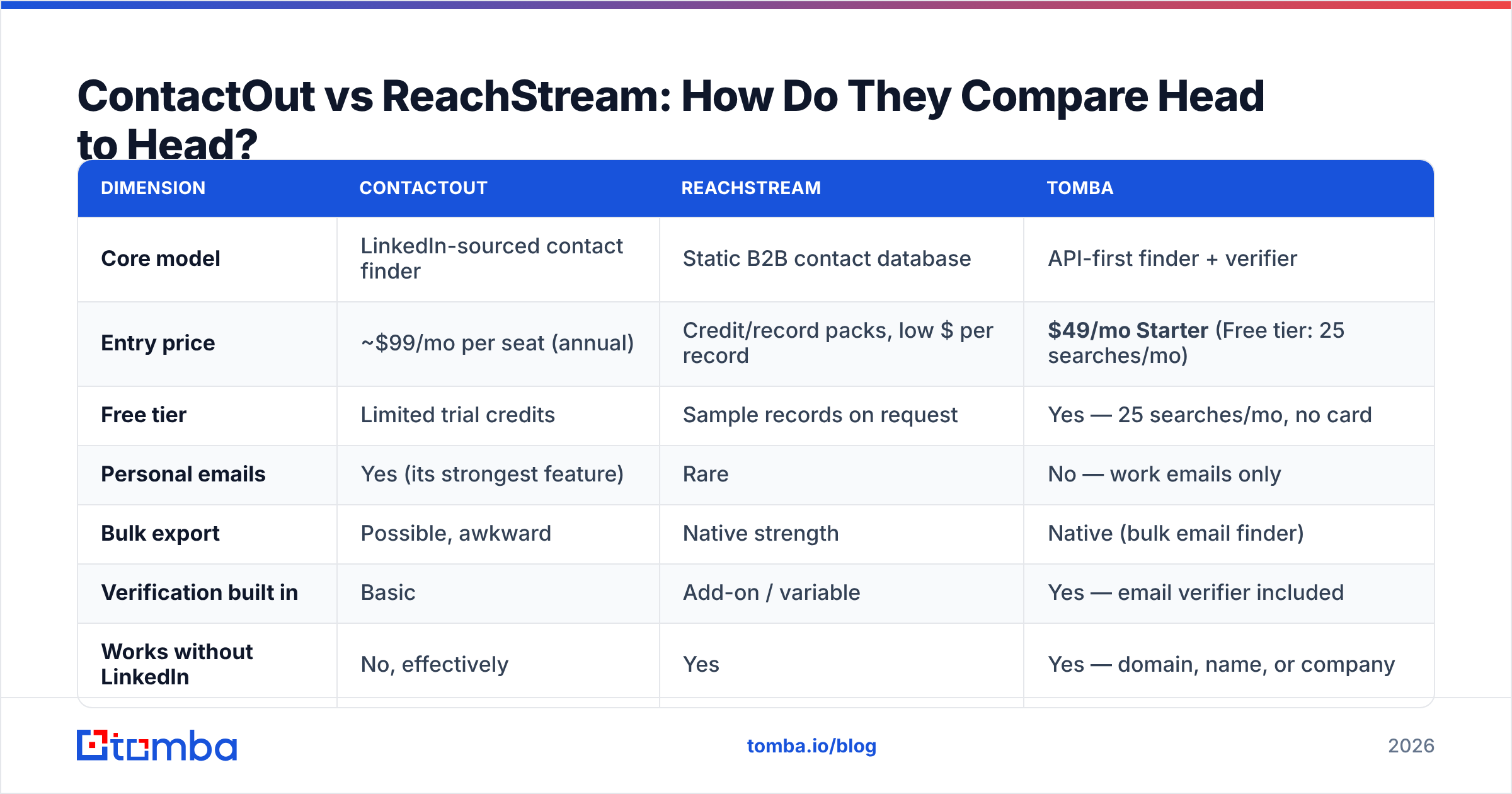
ReachStream's accuracy is a function of when the record was last touched. A database vendor can quote a 90-95% accuracy figure and still hand you a list where a quarter of the rows are stale, because "accuracy at time of collection" and "accuracy at time of send" are different numbers. Nothing dishonest about it — it's physics.

The operational fix is the same regardless of who you buy from: never send to an unverified list. Run every record through a verifier before it enters a sequence. That means SMTP-level checks, MX validation, role-account flags, and a real position on catch-all domains — which is where most verifiers quietly give up. Tomba's catch-all verifier will give you a graded confidence score instead of shrugging and marking everything "unknown," and that single distinction changes your usable-list size more than any vendor's marketing claim.
If you're doing the math on a bought list: 10,000 records at $0.02 each is $200. If 24% bounce, you paid $200 for 7,600 usable contacts and took a deliverability hit that costs you far more than $200 in reply rate across the next quarter. Verification isn't an upsell. It's the difference between a list and a liability.
How Does Pricing Actually Compare?#
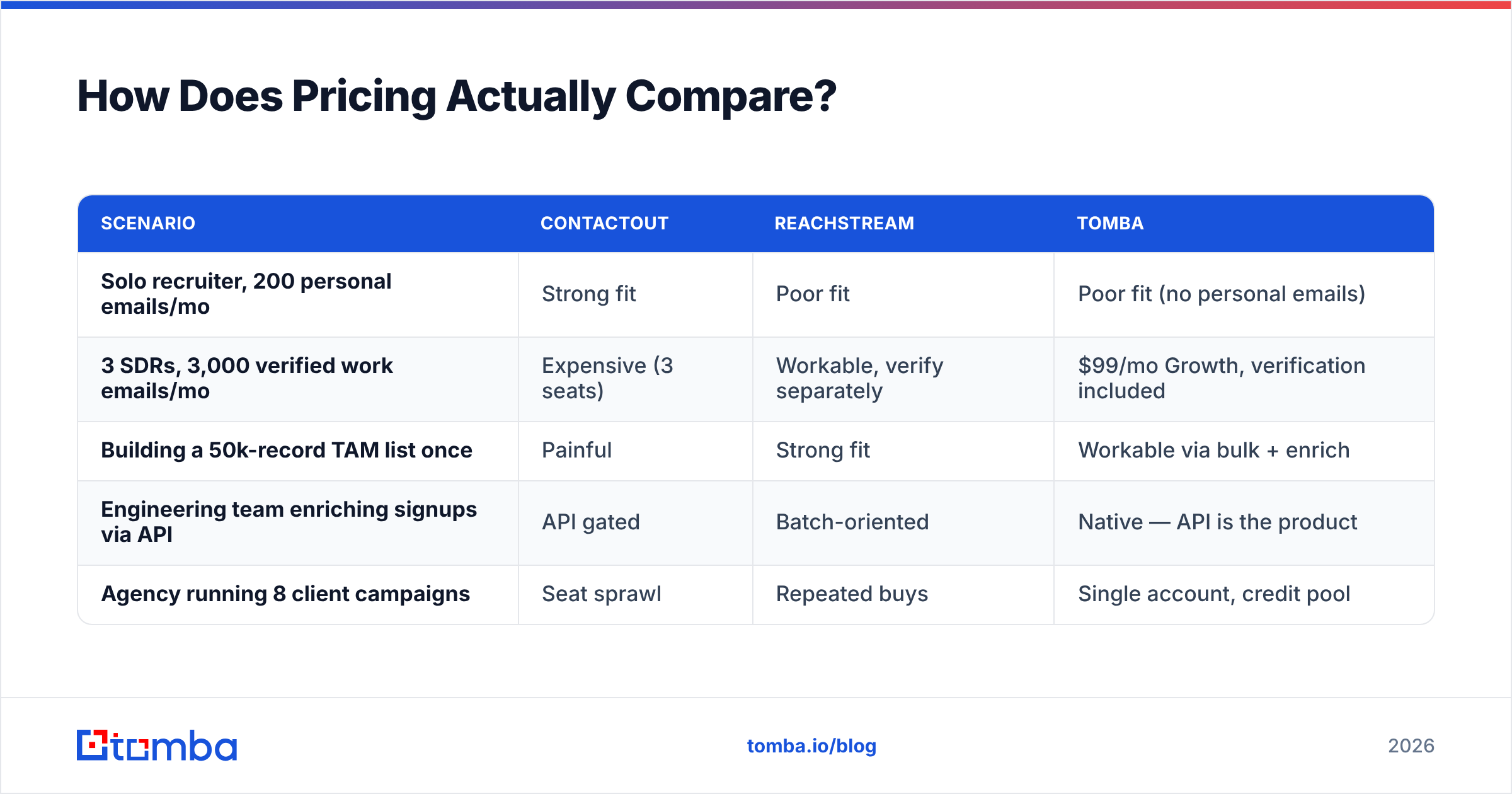
Pricing is where these two diverge hardest, and where most buyers get surprised.
ContactOut prices per seat, per month, usually with an annual commitment for the good rate. It's clean for a 3-person recruiting team. It becomes painful the moment you want data flowing into an automated system, because the value is locked behind a human clicking an extension. Adding a fourth SDR means adding a fourth license, even if that SDR only needs 200 contacts a quarter.
ReachStream prices per record or per credit pack. Cheap upfront. The hidden cost is the bounce tax described above, plus the fact that you're buying a snapshot — need it refreshed in six months? Buy again.
Tomba sits between them structurally: pricing runs Free (25 searches/mo) → Starter $49/mo → Growth $99/mo → Pro $249/mo → Enterprise. Credits are consumed by usage, not by headcount, and the same credits work through the UI, the Chrome extension, Google Sheets, or the API. That model matters when four people share one workflow.
| Scenario | ContactOut | ReachStream | Tomba |
|---|---|---|---|
| Solo recruiter, 200 personal emails/mo | Strong fit | Poor fit | Poor fit (no personal emails) |
| 3 SDRs, 3,000 verified work emails/mo | Expensive (3 seats) | Workable, verify separately | $99/mo Growth, verification included |
| Building a 50k-record TAM list once | Painful | Strong fit | Workable via bulk + enrich |
| Engineering team enriching signups via API | API gated | Batch-oriented | Native — API is the product |
| Agency running 8 client campaigns | Seat sprawl | Repeated buys | Single account, credit pool |
Is There a Better Alternative to Both?#
Depends entirely on what you're solving.
Stay with ContactOut if your workflow is LinkedIn. Recruiters sourcing passive candidates, founders doing high-touch outreach to 40 specific people — the extension pays for itself. Nothing else touches personal emails as reliably.
Stay with ReachStream if you genuinely need volume, you have a verification layer in place, and your ICP is well-served by static firmographic filters. Their per-record economics are hard to beat when the use case fits.
Look at a third option if either of these describes you:
- You want data in a pipeline, not a browser. An email finder API that takes
{first_name, last_name, domain}and returns a scored, verified address is a fundamentally different tool from a Chrome extension. You can call it from your signup flow, your CRM webhook, or a nightly job. - You're paying per seat for something a script should do. Seat pricing on data is a tax on team growth.
- Your bounce rate is above 3%. That means your provider isn't verifying, and no amount of "95% accurate" marketing copy changes what your ESP is telling you.
- You need coverage beyond LinkedIn. Domain search pulls every discoverable address at a company — including the ops person who hasn't logged into LinkedIn since 2019 and is exactly who you need.
Worth naming honestly: BookYourData occupies similar ground to ReachStream and is a solid, pay-as-you-go option if what you want is a clean prebuilt list with an accuracy guarantee attached — it's a reasonable pick for teams who prefer buying records over running a finder. Different philosophy, legitimately good at what it does.
What Does a Sane 2026 Stack Look Like?#
Stop thinking "which vendor" and start thinking "which layer." A working contact-data stack has four:
- Discovery — who should I talk to? (ReachStream, a database, or your own ICP filters.)
- Resolution — what's their actual email? (ContactOut for LinkedIn-visible people; a finder API for everyone else.)
- Verification — will this address accept mail? (Non-negotiable. Every single record.)
- Enrichment — what else do I know about them? (Company size, tech stack, phone. See data enrichment.)
Most teams buy one tool, assume it covers all four layers, and then wonder why campaign performance is flat. ContactOut is excellent at layer 2 for a narrow population. ReachStream is excellent at layer 1. Neither is a complete stack, and pretending otherwise is the single most common mistake I see in outbound audits.

Here's the practical assembly for a mid-market SDR team:
- Source a target account list from your CRM, a database vendor, or intent data.
- Resolve contacts at those accounts by domain, not by clicking profiles — bulk, not manual.
- Verify everything before it enters a sequence. Kill catch-alls you can't grade.
- Enrich the survivors with phone and firmographics so your reps have a second channel.
- Re-verify anything older than 90 days before you touch it again.
That loop is boring. It also works, and it's why the teams with the best reply rates are rarely the teams with the most exotic tooling.
What About Data Compliance?#
Briefly, because it matters and most comparison posts skip it.
ContactOut's personal-email coverage is its best feature and its biggest compliance exposure. Personal addresses fall under stricter treatment in GDPR jurisdictions than corporate role-based addresses do. If you're prospecting into the EU or UK, understand what your legal basis is before you load a list of Gmail addresses into a cold sequence. Recruiting has more latitude here than sales does — know which one you're doing.
ReachStream, like all database vendors, is only as compliant as its collection sources. Ask for their data-sourcing documentation and their opt-out handling. Any vendor that can't answer that in writing is a vendor you don't use in a regulated market.
Whichever way you go, keep suppression lists clean and honor unsubscribes across tools, not just within one. Read the vendor reviews on G2 with a filter for compliance complaints — they're more informative than the feature ratings.
The Verdict#
ContactOut wins if you live inside LinkedIn and need personal emails. Recruiters, keep your license.
ReachStream wins if you need a big static list cheaply and you already own a verification step. List builders, this is fine — just don't send raw.
Neither wins if what you actually need is programmable, verified, work-email data that flows into a system instead of a spreadsheet. That's a different category, and it's the one most revenue teams have quietly moved toward since seat-based data pricing stopped making sense.
If that's you, start with the Tomba Email Finder — free tier gives you 25 searches a month with no card, Starter is $49/mo, and verification is built into the same credit pool instead of sold as an afterthought. Point it at a domain, a name, or a LinkedIn URL, get back a confidence-scored address, and move on. If it doesn't fit your workflow, you've lost twenty minutes. If it does, you've stopped paying per seat for something an API should be doing while you sleep. Compare the ContactOut alternative breakdown if you want the line-by-line before you commit.
Related guides#
Ready to find emails that actually work?
Join 150,000+ professionals who stopped guessing and started sending. Free credits on signup — no credit card required.
Get the Tomba newsletter
Practical outbound tactics and product updates — once every two weeks.
About the author