ContactOut vs Smartlead: Full 2026 Comparison and Verdict
ContactOut finds the contact. Smartlead sends the email. Most teams compare them as rivals, then buy the wrong one. Here's the honest 2026 breakdown of pricing, data accuracy, deliverability, and which one your stack actually needs.
ContactOut vs Smartlead is the wrong fight. One tool finds the email. The other sends it. This guide breaks down the ContactOut vs Smartlead choice for 2026 — what each tool does, what each one costs, and which half of your outbound is actually broken.
TL;DR
- ContactOut and Smartlead are not rivals. ContactOut finds contact data — LinkedIn emails and phone numbers. Smartlead sends the mail and runs the sequence. Buy one instead of the other and half your outbound stays broken.
- Send only to lists you already own? You need Smartlead, not ContactOut.
- Need contact data for a CRM or an SDR team? You need ContactOut, or a cheaper API-first data source.
- ContactOut is priced per seat. That punishes teams. Smartlead is priced by sending volume and inbox count. That punishes scale.
- The cheapest correct stack in 2026 is usually an API data layer (Tomba, ~$49/mo) plus Smartlead for sending. It costs less than a two-seat ContactOut plan, and you get programmatic enrichment.
ContactOut vs Smartlead: what does each tool do?#
People compare these two tools every day. The comparison is a category error. Here is what each one really does.
ContactOut is a contact-data platform. Most people use its Chrome extension on LinkedIn. You open a profile, click the extension, and it shows a personal email, a work email, and often a phone number. It also ships a B2B database, list-building screens, and an API on higher plans. Recruiters were the first users. Sales teams came later. ContactOut does not send email at scale. It has a small sending feature, but nobody runs real volume through it.
Smartlead is cold email infrastructure. You connect as many mailboxes as you like. It rotates sends across them and warms them up. It spins subject lines and body copy, detects replies, and drops them into one shared inbox. It also handles sequences, A/B tests, and deliverability. Smartlead does not find contacts. You bring the CSV.
So the honest framing is simple. ContactOut fills the CSV. Smartlead sends the CSV.
ContactOut vs Smartlead: are they even competitors?#
Only in one way. They fight for the same line in your budget. On features, they barely overlap.
Here is the split, job by job:
- Finding the person — ContactOut. Smartlead has no search layer.
- Getting a verified email — ContactOut, or a dedicated email verifier. Smartlead will happily send to a bad address and eat the bounce.
- Warming inboxes and guarding sender reputation — Smartlead. ContactOut does not touch this.
- Sequences, follow-ups, reply routing — Smartlead. This is the whole product.
- Enriching CRM records at scale — ContactOut's API, or a cheaper data API. Smartlead does none of it.
- Reporting on what actually replied — Smartlead, easily.
Take one thing from this post. "ContactOut vs Smartlead" almost always means "which half of my outbound is missing?"

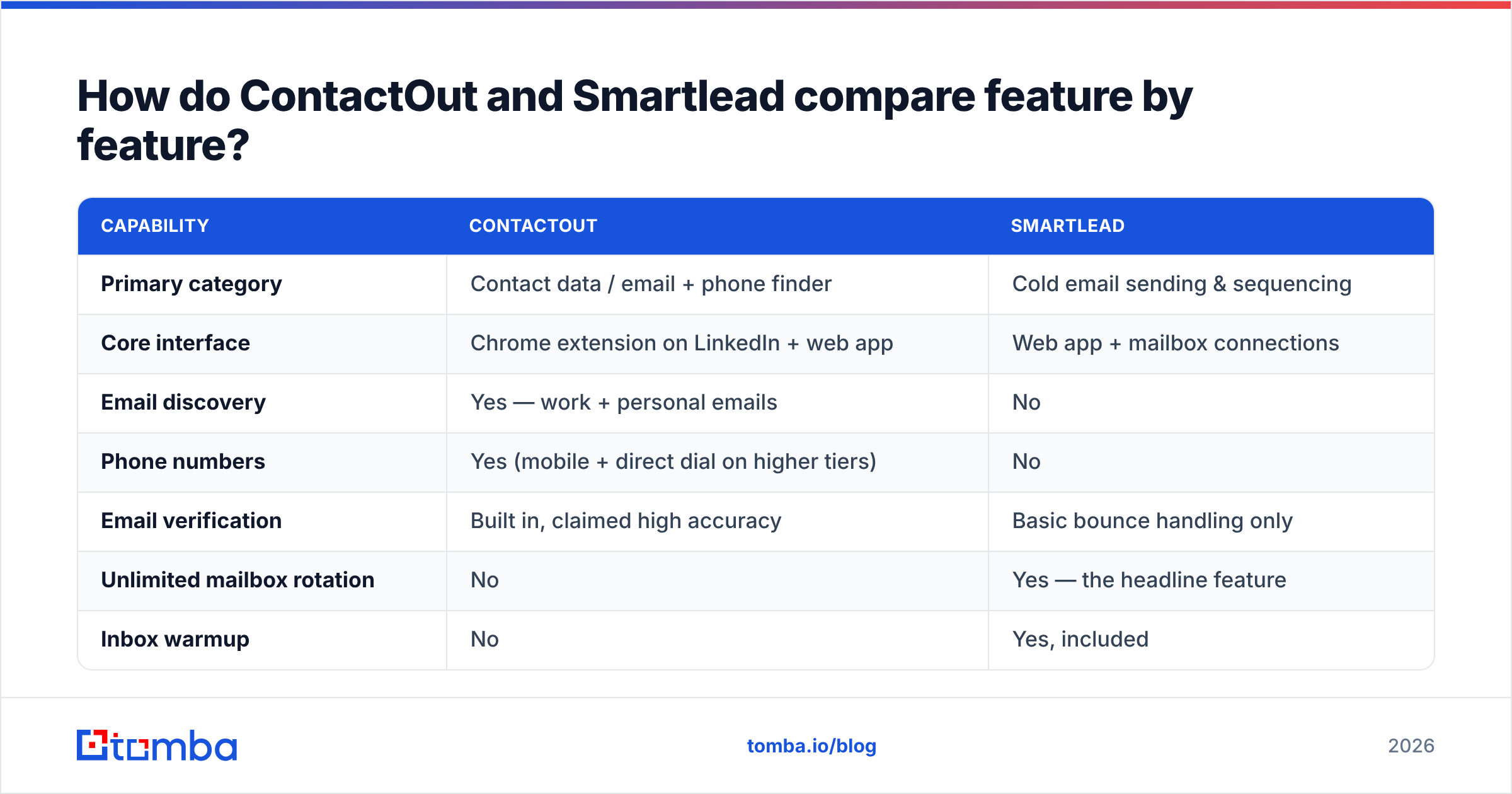
ContactOut vs Smartlead: feature by feature#
| Capability | ContactOut | Smartlead |
|---|---|---|
| Primary category | Contact data / email + phone finder | Cold email sending & sequencing |
| Core interface | Chrome extension on LinkedIn + web app | Web app + mailbox connections |
| Email discovery | Yes — work + personal emails | No |
| Phone numbers | Yes (mobile + direct dial on higher tiers) | No |
| Email verification | Built in, claimed high accuracy | Basic bounce handling only |
| Unlimited mailbox rotation | No | Yes — the headline feature |
| Inbox warmup | No | Yes, included |
| Sequences / drip campaigns | Very limited | Full multi-step, multi-channel |
| Master inbox / reply management | No | Yes |
| Spintax + A/B testing | No | Yes |
| API access | Yes, on higher tiers | Yes, on all paid tiers |
| CRM integrations | HubSpot, Salesforce, Greenhouse, Lever | HubSpot, Salesforce, Pipedrive, Zapier |
| Deliverability reporting | No | Yes (bounce, spam, inbox placement signals) |
| Best for | Recruiters, SDRs sourcing on LinkedIn | Agencies, outbound teams sending volume |
Look at the "No" column on each side. Almost no row gets a confident "Yes" from both tools. That is the whole story.
ContactOut vs Smartlead pricing in 2026#
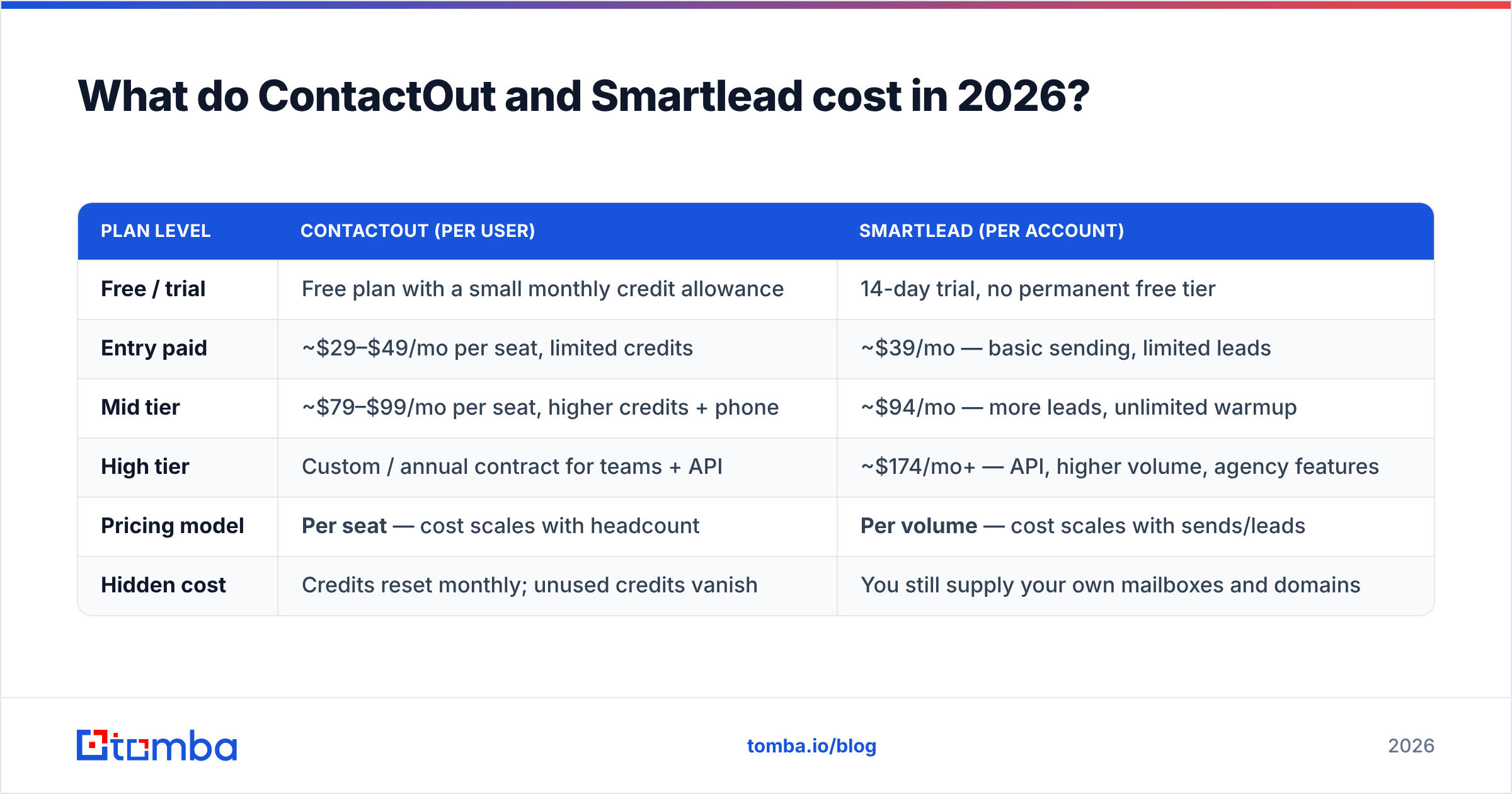
Both vendors change plans often, and they rarely announce it. Treat these numbers as a guide. Check the vendor sites before you buy.
| Plan level | ContactOut (per user) | Smartlead (per account) |
|---|---|---|
| Free / trial | Free plan with a small monthly credit allowance | 14-day trial, no permanent free tier |
| Entry paid | ~$29–$49/mo per seat, limited credits | ~$39/mo — basic sending, limited leads |
| Mid tier | ~$79–$99/mo per seat, higher credits + phone | ~$94/mo — more leads, unlimited warmup |
| High tier | Custom / annual contract for teams + API | ~$174/mo+ — API, higher volume, agency features |
| Pricing model | Per seat — cost scales with headcount | Per volume — cost scales with sends/leads |
| Hidden cost | Credits reset monthly; unused credits vanish | You still supply your own mailboxes and domains |
The pricing models are the real difference. They fail in opposite ways.
ContactOut charges per seat, so teams pay a lot. Five SDRs on a mid-tier plan runs about $400–$500 a month. That is before you send a single email. Each seat also gets its own credit bucket. One rep can run dry on day 18 while another rep's credits sit unused.
Smartlead charges per volume, so success costs more. It is cheap to start. The price climbs as your lead volume grows. That is fair for infrastructure. Just budget for the ramp.
Neither model is unfair. But your data need may be programmatic, not one rep clicking a browser extension. Then the seat model is the wrong shape. An API-first email finder changes the math. One $49/mo plan feeds your whole enrichment pipeline, not one browser tab.
ContactOut vs Smartlead: which one wins on data accuracy?#
ContactOut wins. Smartlead does not compete here at all.
Still, "accurate" needs unpacking. Every data vendor quotes its own test numbers. Those numbers rarely hold up on a real ICP list. ContactOut is strong on personal emails pulled from LinkedIn. That is great for recruiting, because candidates change jobs but personal emails stay. In B2B sales you want the work email at the current employer. There, the personal-email edge matters much less.
Test three things before you trust any accuracy claim:
- Bounce rate on a 200-contact sample. Use your number, not theirs. Anything above 3% will hurt your email deliverability within two weeks.
- Catch-all handling. About a fifth of B2B domains are catch-all. SMTP checks return "valid" for anything. A tool that reports 99% valid on that list tells you nothing. Run those addresses through a catch-all verifier first.
- Coverage on your segment. Coverage swings by country and company size. A tool that nails US SaaS VPs may hit 30% on European mid-market ops managers.
Smartlead's role here is defensive. It bounces gracefully, pauses campaigns when bounce rates spike, and rotates sending so one bad list does not burn a domain. That is useful. But it is damage control for bad data, not a substitute for good data.
ContactOut vs Smartlead: which one wins on deliverability?#
Smartlead, with no argument. This one is not close.
Smartlead handles the dull plumbing that decides inbox or spam folder:
- Unlimited mailbox rotation. Spread 500 sends a day across 20 inboxes, at 25 each. Hammering one inbox with 500 sends is a fast way to get the domain blocked.
- Automated warmup. Inboxes trade real-looking mail with a network. That builds reputation before you point them at cold prospects.
- Spintax and variant rotation. Identical bulk sends leave a fingerprint. Spun copy blurs it.
- Per-inbox health checks. A mailbox drops out of rotation when its reputation dips.
ContactOut offers none of that. Its sending feature exists so a recruiter can fire off one message from the extension. It is not built for 30,000 sends a month.
If your emails are not landing, ContactOut cannot fix it. If you have nobody to email, Smartlead cannot fix it.

The third option: a data layer neither tool is#
Most vs-posts skip this part. ContactOut is not the only way to feed a Smartlead campaign. For most sales teams it is not the cheapest way either.
ContactOut assumes a human sits in the browser. A rep opens LinkedIn, clicks a profile, clicks the extension. That fits a recruiter working 20 candidates a day. It fits badly for:
- Enriching a 5,000-row list from a conference attendee page.
- Adding emails to inbound signups in your CRM.
- Building a target account list by domain instead of by profile.
- Any workflow that runs in a script, a Zap, or a Make scenario.
For those jobs, an API-first data source is a better shape. A domain search returns every known address at a company in one call. A bulk email finder runs the whole CSV with no clicks. The Tomba API is priced by search volume, not by how many people hold a login.
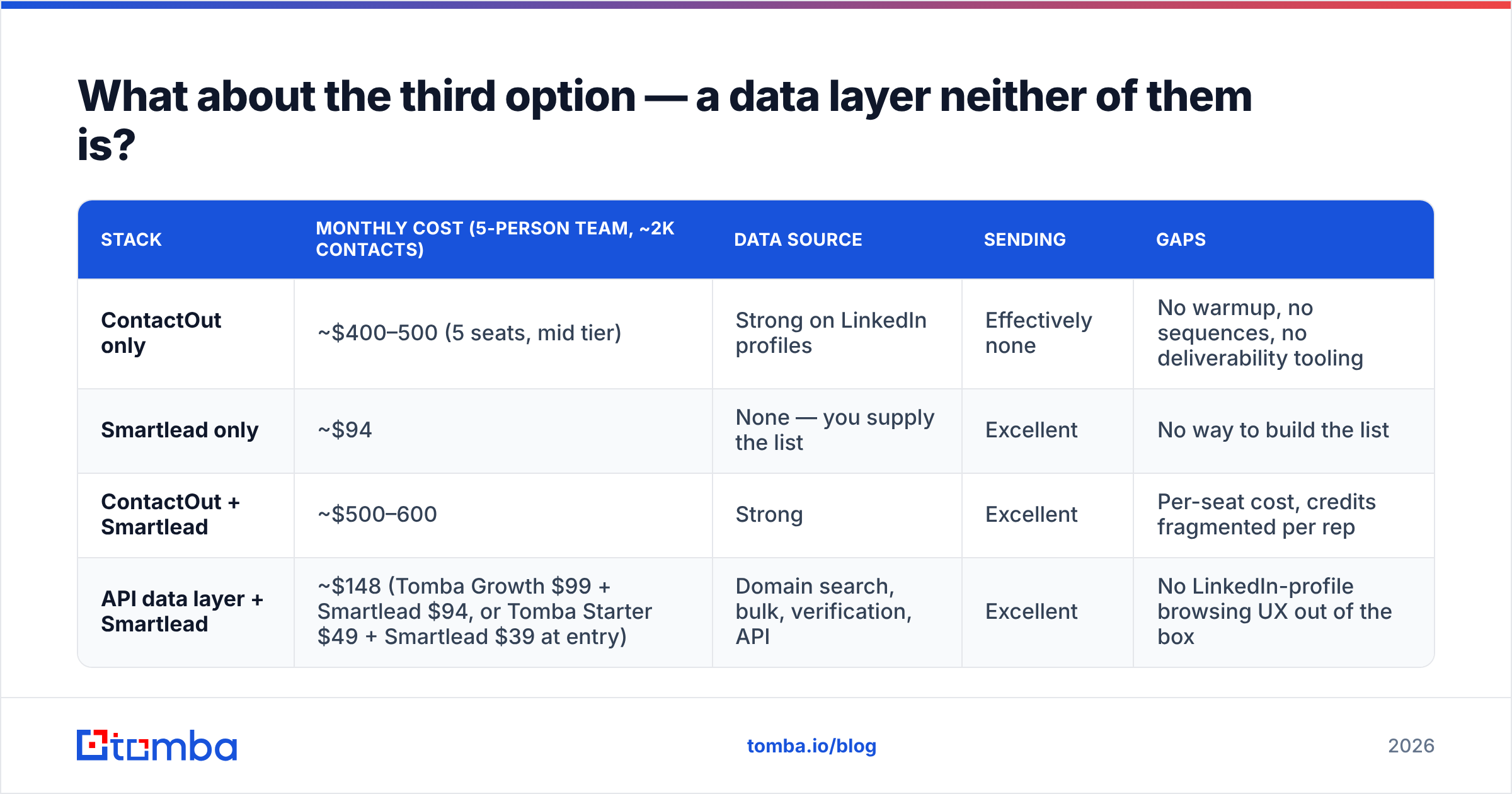
Here is the stack comparison that matters:
| Stack | Monthly cost (5-person team, ~2k contacts) | Data source | Sending | Gaps |
|---|---|---|---|---|
| ContactOut only | ~$400–500 (5 seats, mid tier) | Strong on LinkedIn profiles | Effectively none | No warmup, no sequences, no deliverability tooling |
| Smartlead only | ~$94 | None — you supply the list | Excellent | No way to build the list |
| ContactOut + Smartlead | ~$500–600 | Strong | Excellent | Per-seat cost, credits fragmented per rep |
| API data layer + Smartlead | ~$148 (Tomba Growth $99 + Smartlead $94, or Tomba Starter $49 + Smartlead $39 at entry) | Domain search, bulk, verification, API | Excellent | No LinkedIn-profile browsing UX out of the box |
Most efficient outbound teams land on the last row by year two. Cheap programmatic data, plus a dedicated sending engine. You lose the ContactOut extension workflow. That hurts if your reps prospect on LinkedIn all day. You save roughly $350 a month, and you gain a pipeline your RevOps person can automate.
If LinkedIn is your prospecting motion, a LinkedIn finder covers the profile-to-email step with no seat tax.
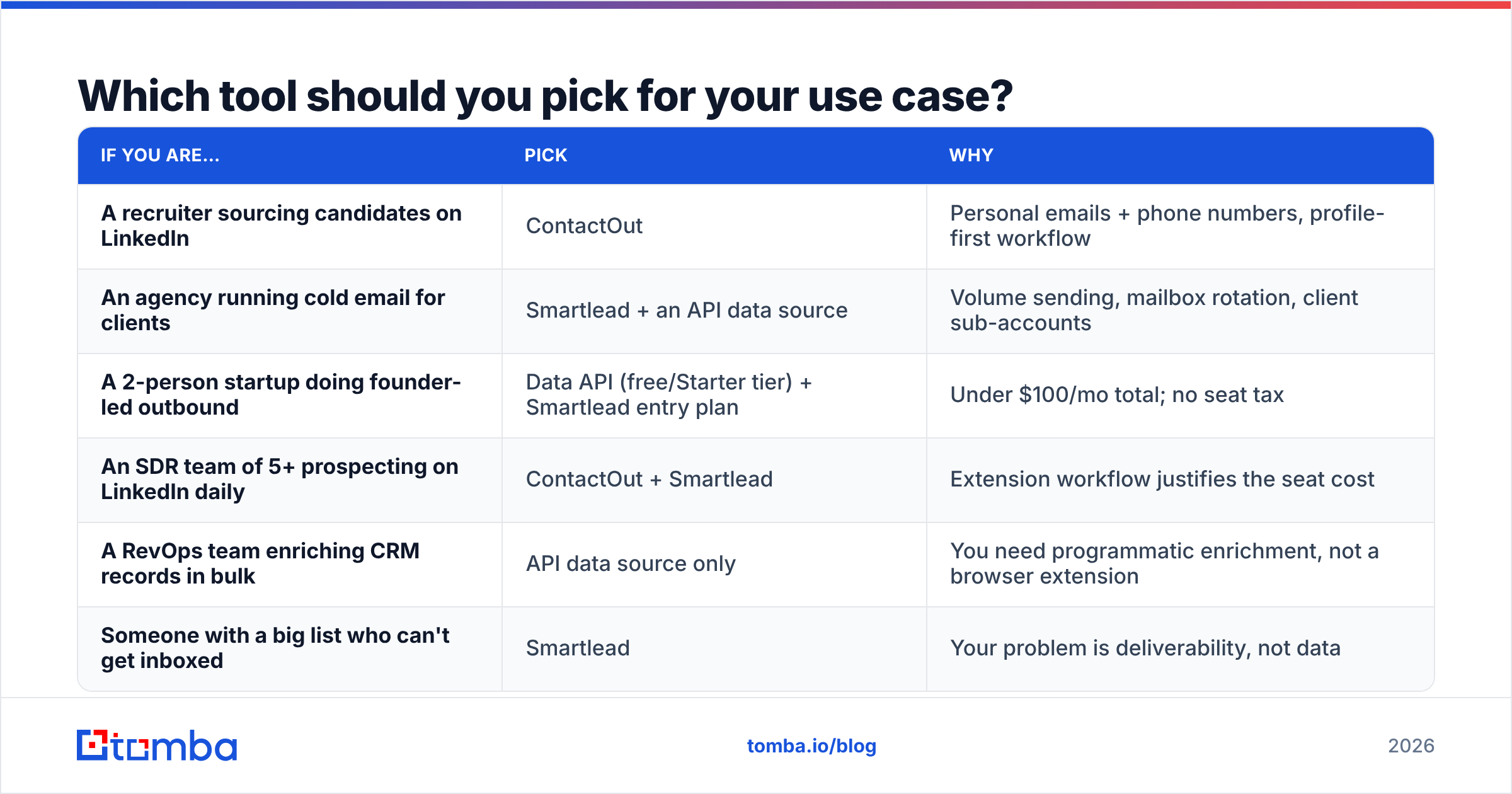
Which tool should you pick for your use case?#
| If you are… | Pick | Why |
|---|---|---|
| A recruiter sourcing candidates on LinkedIn | ContactOut | Personal emails + phone numbers, profile-first workflow |
| An agency running cold email for clients | Smartlead + an API data source | Volume sending, mailbox rotation, client sub-accounts |
| A 2-person startup doing founder-led outbound | Data API (free/Starter tier) + Smartlead entry plan | Under $100/mo total; no seat tax |
| An SDR team of 5+ prospecting on LinkedIn daily | ContactOut + Smartlead | Extension workflow justifies the seat cost |
| A RevOps team enriching CRM records in bulk | API data source only | You need programmatic enrichment, not a browser extension |
| Someone with a big list who can't get inboxed | Smartlead | Your problem is deliverability, not data |
The answer is rarely "one of these two, and nothing else." It is "which layer am I missing, and what is the cheapest way to fill it?"
ContactOut vs Smartlead: the honest verdict#
ContactOut is a good contact-data tool with a pricing model that gets expensive fast. The LinkedIn extension is the best part of the product. If your reps live in LinkedIn, that UX is worth paying for. The weak spot is billing. Per-seat pricing and per-seat credit pools scale badly, and the API sits behind higher tiers.
Smartlead is a very good sending platform, and it does not really compete with ContactOut. If you are weighing them head to head, you have probably misread your problem. Work out which half of the funnel is broken — the list, or the send. Then buy for that.
The stack most teams should default to in 2026: a cheap, API-accessible data layer for finding and verifying addresses, plus Smartlead for the sending. Two tools, each good at one job. It usually costs less than one mid-tier ContactOut plan with a few seats on it.
Check the current tiers on G2 before you commit. Both vendors move prices more often than their marketing pages suggest. Reviewer notes on credit rollover and bounce rates are more honest than the feature grid.
Ready to fix the data half of your stack? Tomba's Email Finder gives you verified work emails by name, domain, or company. You get domain search, bulk processing, and a full API on every paid tier — not just the enterprise one. Start free with 25 searches a month. Or take Starter at $49/mo and feed Smartlead a list that lands. See the full Tomba pricing page and compare it with what you pay per seat today.
Related guides#
Ready to find emails that actually work?
Join 150,000+ professionals who stopped guessing and started sending. Free credits on signup — no credit card required.
Get the Tomba newsletter
Practical outbound tactics and product updates — once every two weeks.
About the author