ContactOut vs Span Global Services: Which Data Wins in 2026?
One sells you a Chrome extension bolted to LinkedIn. The other sells you a licensed mailing list. They fail in completely different ways — here's the honest breakdown of cost, accuracy, and bounce risk in 2026.
TL;DR — what you actually need to know#
- ContactOut is a lookup tool. Span Global Services is a list vendor. They are not the same product category, and comparing them on price alone will lead you to the wrong purchase.
- ContactOut wins when your prospecting starts on LinkedIn and you want per-profile personal + work emails, pulled live, with a browser extension your SDRs already understand.
- Span Global Services wins when you need a bulk, pre-built, segment-filtered list — healthcare decision-makers, ERP users, a specific SIC code — delivered as a file you can hand to marketing.
- Both carry real bounce risk. LinkedIn-derived emails go stale when people change jobs; licensed lists go stale the moment they are compiled. Neither replaces an email verifier run before send.
- If you want per-search accuracy without a seat-based extension or a five-figure list order, a pay-for-what-you-use email finder with an API is usually the cheaper middle path. Tomba starts free at 25 searches/mo and $49/mo on Starter.
What is ContactOut and who actually uses it?#
ContactOut is a contact-lookup platform best known for its Chrome extension. You open a LinkedIn profile, click the extension, and it surfaces work emails, personal emails, and often a phone number. It also ships a searchable database (its own people/company search), an API, and a bulk CSV enrichment flow.
The distinguishing feature — and the reason recruiters love it — is personal email coverage. Most B2B data tools chase the corporate address (first.last@company.com). ContactOut leans into Gmail/Outlook personal addresses, which matters enormously if you're recruiting engineers who ignore their work inbox, and matters far less if you're selling enterprise software into a procurement chain.
Who it fits:
- Recruiters and talent sourcers working profile-by-profile inside LinkedIn Recruiter.
- SDRs doing account-based outbound where the target list is 50–300 named humans, not 50,000.
- Founders doing manual, high-touch prospecting who want the email without leaving the tab.
Who it doesn't fit: anyone who needs 20,000 contacts filtered by industry, revenue band, and install base by Friday. That's not what a per-profile extension does well, and credit costs escalate fast at volume.
What is Span Global Services and how is it different?#
Span Global Services sits in a different tradition entirely: it's a B2B data and mailing list provider. You tell them the segment — "IT directors at US hospitals with 500+ beds," "companies running SAP," "CPA firms in the Midwest" — and they deliver a list, typically as a licensed file, with fields like name, title, company, email, phone, mailing address, employee count, and revenue.
The model is pre-built and brokered, not live lookup. Their catalog is organized around technology-user lists, industry lists, healthcare lists, and job-title lists. Delivery is usually a quote-based, human sales conversation — not a self-serve checkout with a public price page.
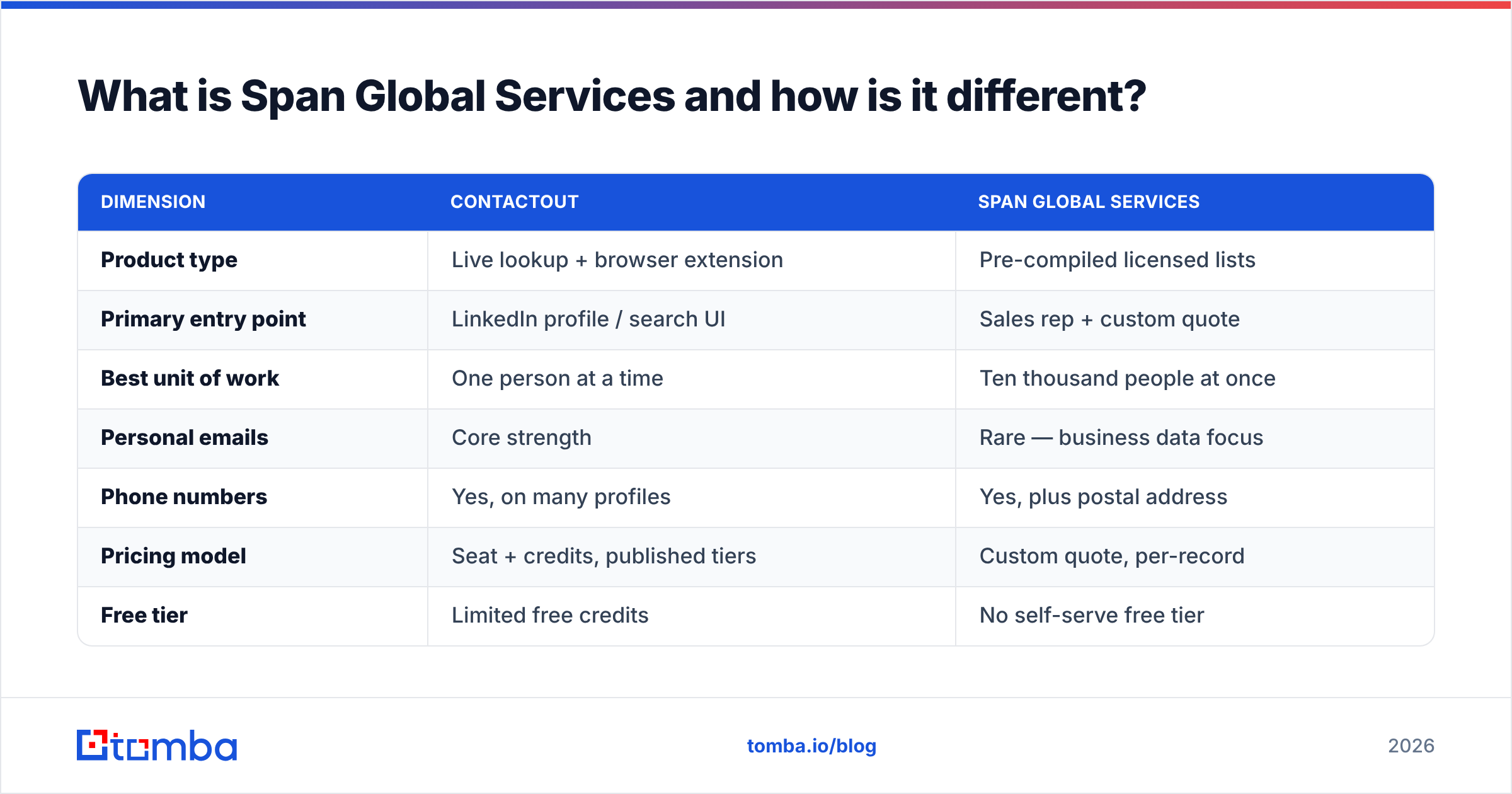
That's the fundamental split you're evaluating:
| Dimension | ContactOut | Span Global Services |
|---|---|---|
| Product type | Live lookup + browser extension | Pre-compiled licensed lists |
| Primary entry point | LinkedIn profile / search UI | Sales rep + custom quote |
| Best unit of work | One person at a time | Ten thousand people at once |
| Personal emails | Core strength | Rare — business data focus |
| Phone numbers | Yes, on many profiles | Yes, plus postal address |
| Pricing model | Seat + credits, published tiers | Custom quote, per-record |
| Free tier | Limited free credits | No self-serve free tier |
| API access | Yes, on higher tiers | Limited / not the core motion |
| Typical buyer | Recruiter, SDR | Demand gen, direct mail, ABM ops |
| Freshness model | Refreshed on lookup | As-of compile date |
If you read that table and thought "these solve different problems," you've already got the main insight of this article. The rest is about which failure mode you can live with.

Is ContactOut more accurate than Span Global Services?#
Accuracy in contact data is not one number. It splits into three questions, and the two vendors score differently on each.
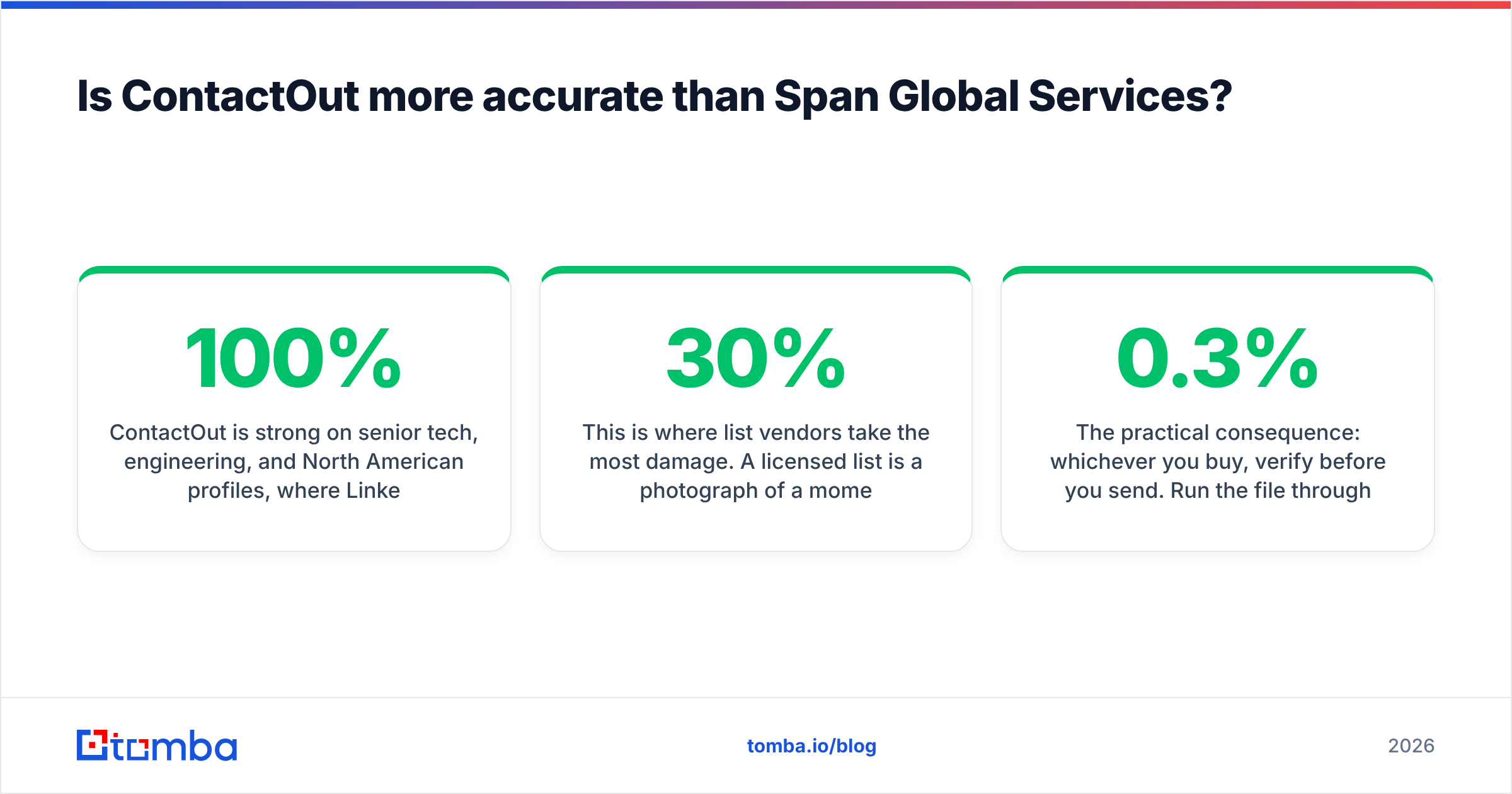
1. Match rate — did you get an email at all? ContactOut is strong on senior tech, engineering, and North American profiles, where LinkedIn density is high. It gets noticeably weaker on non-LinkedIn-native regions, on SMB owners, and on blue-collar or field roles. Span Global's match rate is effectively 100% by definition — you're buying records that already have emails attached — but that's a bit of a trick. The relevant question becomes whether those emails still work.
2. Deliverability — will it bounce? This is where list vendors take the most damage. A licensed list is a photograph of a moment. B2B contact data decays at roughly 20–30% per year through job changes, title changes, domain migrations, and departures. If a list was compiled 14 months ago and resold three times, a meaningful slice of it is dead — and you find out by burning your sending domain. LinkedIn-derived tools like ContactOut fail differently: they're often current, because profiles update, but the derived work email may be a pattern guess that was never SMTP-confirmed.
3. Correctness — is it the right person? Both can misfire. Extensions can attach a stale personal Gmail to a profile that moved companies twice. Brokered lists can carry duplicate records with conflicting titles.
The practical consequence: whichever you buy, verify before you send. Run the file through a catch-all verifier and a standard SMTP check, drop the unknowns into a separate low-volume sequence, and never dump an unverified purchase straight into your primary sending domain. Google and Microsoft both tightened bulk-sender enforcement, and a spam complaint rate above 0.3% is now a real deliverability cliff, not a theoretical one.

How do ContactOut and Span Global Services compare on price?#
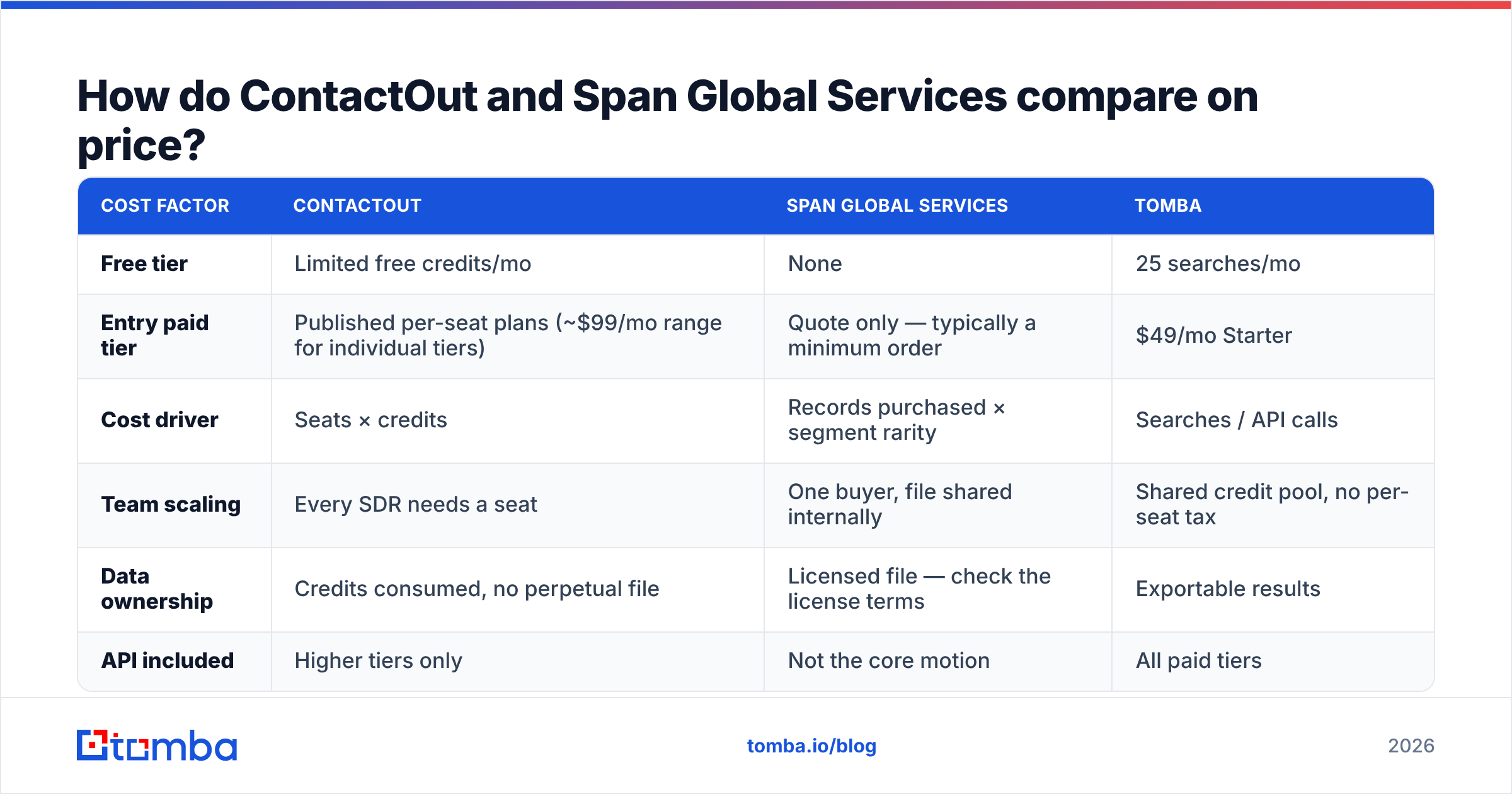
Here's the uncomfortable part: only one of these two has a public price page, which makes an apples-to-apples table impossible without caveats. Below is the honest shape of each model.
| Cost factor | ContactOut | Span Global Services | Tomba |
|---|---|---|---|
| Free tier | Limited free credits/mo | None | 25 searches/mo |
| Entry paid tier | Published per-seat plans (~$99/mo range for individual tiers) | Quote only — typically a minimum order | $49/mo Starter |
| Cost driver | Seats × credits | Records purchased × segment rarity | Searches / API calls |
| Team scaling | Every SDR needs a seat | One buyer, file shared internally | Shared credit pool, no per-seat tax |
| Data ownership | Credits consumed, no perpetual file | Licensed file — check the license terms | Exportable results |
| API included | Higher tiers only | Not the core motion | All paid tiers |
Three things worth flagging before you sign anything:
- Seat-based pricing punishes teams. If you have six SDRs, an extension model multiplies by six whether or not all six are actively sourcing.
- "Custom quote" is not a synonym for expensive — but it is a synonym for slow. Expect a discovery call, a sample file, and a negotiation. If you need contacts this afternoon, that's a real cost.
- Ask about the license. Some list contracts are single-use or time-limited. Read the clause about how many times you may mail the file, and whether you may load it into your CRM permanently.
For teams that just want emails on demand without a seat tax or a procurement cycle, transparent per-search pricing is the third option. Tomba pricing runs Free (25 searches), Starter $49/mo, Growth $99/mo, Pro $249/mo, and Enterprise custom — with the API available on every paid plan rather than gated behind the top tier.

When should you buy a list instead of running lookups?#
There's a persistent snobbery in modern sales circles that buying a list is always wrong. That's lazy. Bought lists have legitimate uses — the mistake is using them for the wrong motion.
Buy a list (Span Global Services or a peer like BookYourData, which sells verified, self-serve B2B contacts) when:
- You need postal or field data. Direct mail, event invites, and conference targeting need mailing addresses that lookup tools rarely carry.
- Your segment is defined by firmographics, not by people you already identified. "All hospital CIOs in Texas" is a list problem. "These 40 people I found on LinkedIn" is a lookup problem.
- You're feeding an ABM ad audience or a matched-audience upload, where a bounce costs you nothing and match rate is all that matters.
- You need install-base / technographic filters ("uses Oracle," "runs Shopify Plus") that most email finders don't index.
Run lookups (ContactOut, Tomba, or similar) when:
- Your ICP is discovered, not purchased. You find the account first, then you need the human.
- You're sending 1:1 or 1:few cold email where a single bounce meaningfully hurts a small, warm domain.
- You want data at the moment of use, not at the moment of compile.
- Your workflow lives in a CRM or a script, and you want an API call rather than a CSV import ritual.

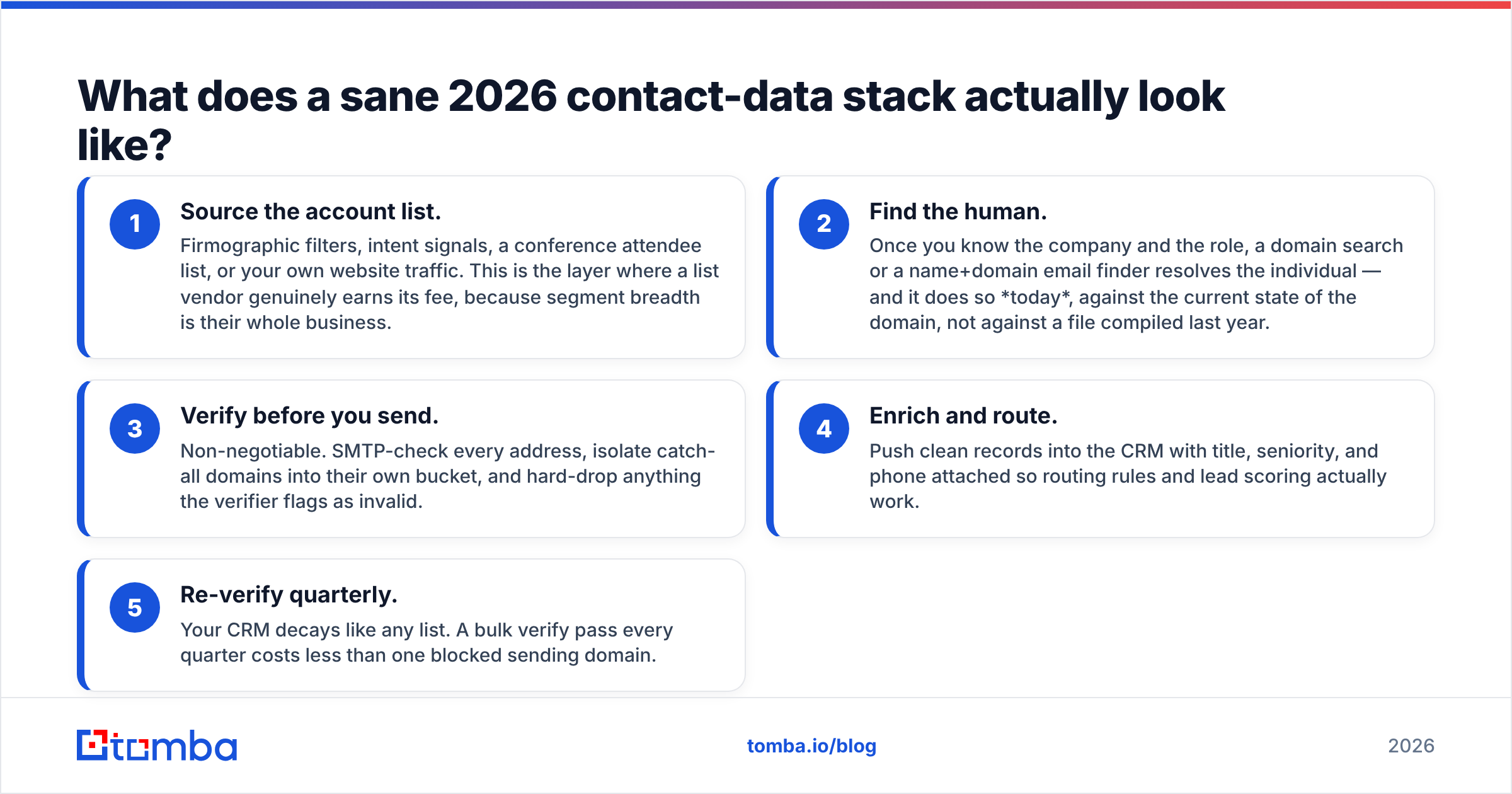
What does a sane 2026 contact-data stack actually look like?#
The teams getting good results aren't picking one vendor. They're layering three cheap steps and refusing to skip the last one.
- Source the account list. Firmographic filters, intent signals, a conference attendee list, or your own website traffic. This is the layer where a list vendor genuinely earns its fee, because segment breadth is their whole business.
- Find the human. Once you know the company and the role, a domain search or a name+domain email finder resolves the individual — and it does so today, against the current state of the domain, not against a file compiled last year.
- Verify before you send. Non-negotiable. SMTP-check every address, isolate catch-all domains into their own bucket, and hard-drop anything the verifier flags as invalid.
- Enrich and route. Push clean records into the CRM with title, seniority, and phone attached so routing rules and lead scoring actually work.
- Re-verify quarterly. Your CRM decays like any list. A bulk verify pass every quarter costs less than one blocked sending domain.
The single most expensive mistake we see is teams treating step 3 as optional because the vendor said "verified." Vendor-side verification is a claim about the file's state at some point in the past. Your bounce rate is a measurement about right now.
ContactOut vs Span Global Services: the honest verdict#
Neither of these is the "winner" in a way that survives contact with your actual workflow. Pick based on the shape of the work:
| If your situation is... | Lean toward |
|---|---|
| Recruiting engineers, need personal Gmail addresses | ContactOut |
| SDR sourcing 100 named prospects a week from LinkedIn | ContactOut |
| Buying 25,000 healthcare IT records for a direct-mail campaign | Span Global Services |
| Need postal address + technographic filters | Span Global Services |
| Running programmatic enrichment from a CRM or script | Neither — use an API-first email finder |
| Small team, no budget for seats or minimum orders | Neither — start with a per-search tool |
| Already have a list, just need it cleaned | Neither — you need a verifier |
If you find yourself in the bottom three rows, you're not really shopping in this category. You're shopping for programmable contact data — and that's a different, usually cheaper, purchase. It's also why the ContactOut alternative page exists: a large share of people evaluating these tools discover their real need is an API and a verifier, not a browser extension seat or a licensed file.
One more practical note on evaluation: don't trust anyone's self-reported accuracy stat, including ours. Take 50 contacts you already know the correct emails for — people in your CRM who have replied to you — strip the emails, run all three vendors, and score them. That 30-minute test tells you more than every review on G2 combined, because it tests your ICP, your regions, and your seniority mix rather than someone else's.
Where does Tomba fit in this comparison?#
Squarely in the middle, deliberately. Tomba isn't trying to be a LinkedIn extension with a personal-email database, and it isn't trying to broker mailing lists with postal addresses. It's an email finder built as infrastructure: give it a name and a domain, or just a domain, and it returns verified professional emails — through the app, a Chrome extension, Google Sheets, Excel, or the API.
That means:
- No per-seat tax. Credits are pooled across the team.
- No procurement cycle. Free tier at 25 searches/mo, then $49/mo.
- Verification built in, so you aren't buying data from one vendor and sanity-checking it with another.
- API on every paid plan, so enrichment can live inside your CRM workflow instead of a CSV round-trip.
If your prospecting is LinkedIn-first and recruiter-shaped, ContactOut is a reasonable buy. If you need broad, filtered, postal-grade segments in bulk, a list provider is the right tool and you should shop several. But if what you actually need is the correct work email for a person at a company, right now, at a price that doesn't scale with headcount — start with the Tomba Email Finder. The free tier is enough to run the 50-contact accuracy test above before you commit a dollar to anyone.
Related guides#
Ready to find emails that actually work?
Join 150,000+ professionals who stopped guessing and started sending. Free credits on signup — no credit card required.
Get the Tomba newsletter
Practical outbound tactics and product updates — once every two weeks.
About the author