ContactOut vs Thomson Data (2026): Which B2B Data Wins?
ContactOut scrapes LinkedIn profiles in real time. Thomson Data licenses pre-built contact lists. They solve the same problem in opposite ways — and only one of them fits how your team actually prospects.
TL;DR#
- ContactOut is a browser-extension email and phone finder built around LinkedIn. You look at a profile, you get a contact. It is a per-seat, per-lookup tool for reps who prospect by hand.
- Thomson Data is a list vendor. You describe an audience (industry, job title, tech stack, geography), they quote you a price, and you receive a file. It is a per-record, bulk-purchase motion for campaigns that need volume fast.
- The real difference is not features — it is freshness. Live enrichment re-checks a mailbox when you ask. A licensed list is only as good as the day it was compiled.
- ContactOut wins for SDRs working named accounts on LinkedIn. Thomson Data wins when you need 50,000 records in a niche vertical and have a verification budget.
- Neither is the cheapest path if what you actually need is a verified email on demand via API. That is where an email finder priced on credits, not seats, usually beats both.
What is ContactOut, and who is it for?#
ContactOut started as a Chrome extension that surfaces personal and work emails while you browse LinkedIn. It has since grown a web search app, a bulk-lookup workflow, a small dataset of its own, and CRM pushes into Salesforce, HubSpot and Lever.
Its center of gravity has not moved, though: the profile page is the unit of work. You are on a LinkedIn or GitHub profile, you click the extension, and it returns work email, personal email, and sometimes a mobile number. Recruiters adopted it first — the personal-email coverage is genuinely strong, which matters when you are contacting passive candidates who ignore their work inbox. Sales teams picked it up second.
Who it fits:
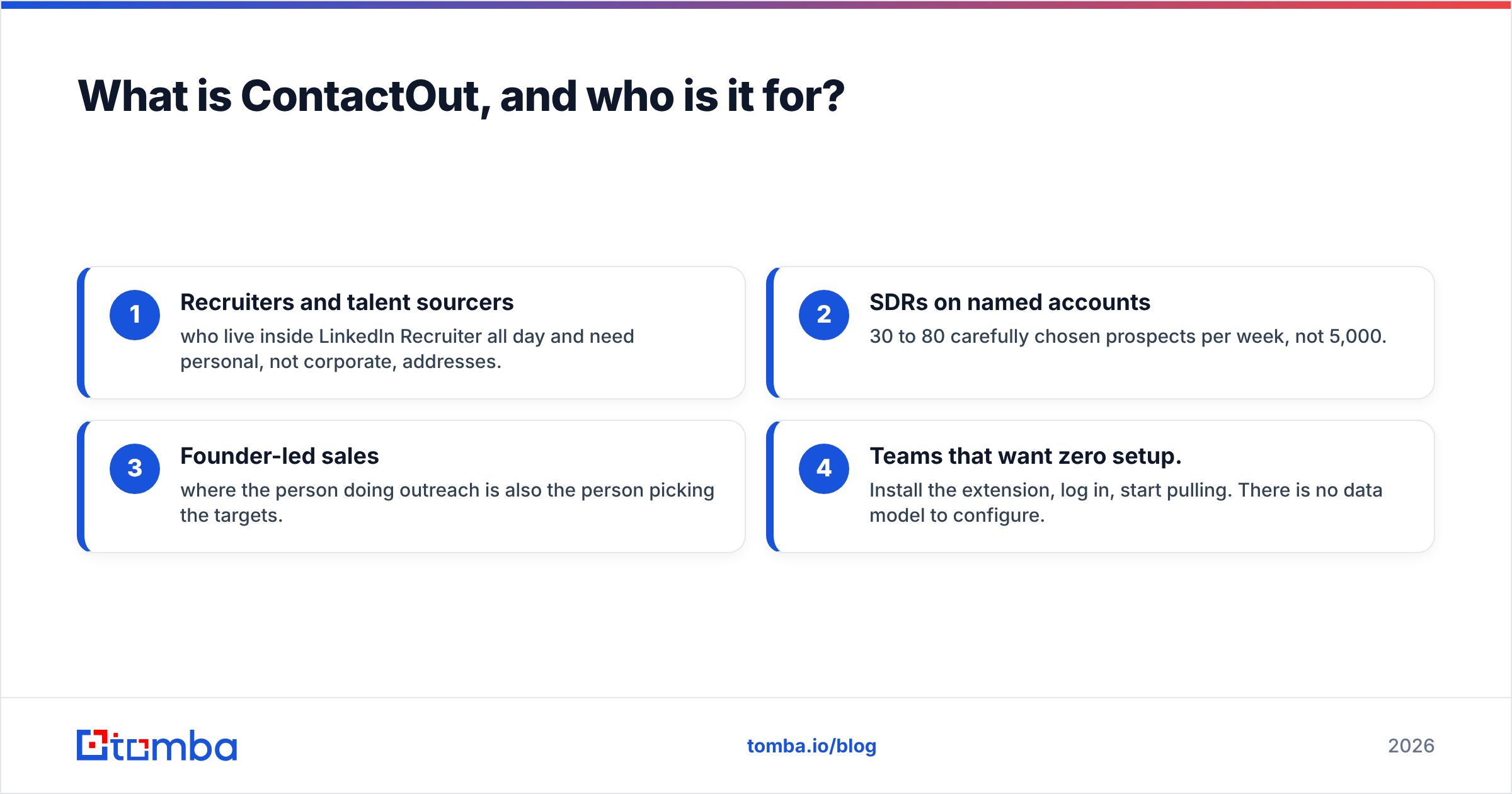
- Recruiters and talent sourcers who live inside LinkedIn Recruiter all day and need personal, not corporate, addresses.
- SDRs on named accounts — 30 to 80 carefully chosen prospects per week, not 5,000.
- Founder-led sales where the person doing outreach is also the person picking the targets.
- Teams that want zero setup. Install the extension, log in, start pulling. There is no data model to configure.
Who it does not fit: anyone who needs 20,000 contacts by Friday, anyone building a data pipeline rather than clicking through profiles, and anyone with more prospectors than budget — the per-seat pricing scales badly across a large team.
What is Thomson Data, and how does it actually work?#
Thomson Data is a B2B data provider in the older, more traditional sense of that phrase. It is a list company. You come to them with an ideal customer profile — "IT decision makers at US manufacturers with 200 to 1,000 employees using SAP" — and they come back with a count, a sample, and a quote. You pay, you get a file, the file goes into your CRM or sequencer.
Their catalog is organized as pre-packaged segments: healthcare lists, technology user lists, industry-specific mailing lists, C-level executive lists, international databases. They also sell append and data-cleansing services, which is the tell: list vendors know their files decay, so they monetize the fix.
The mechanics you need to understand before buying:
- Pricing is quote-based, per record. There is no self-serve plan page. Cost varies by segment scarcity, volume, and whether you want emails only or emails plus direct dials.
- Accuracy is promised, not observable. Vendors in this category typically advertise 85–95% deliverability and offer replacement credits for bounces above a threshold. You cannot test this before you buy — you can only test the sample.
- The data is a snapshot. It was compiled at some point. Whether that point was last month or two years ago is the single most important question, and it is rarely on the invoice.
- Licensing terms matter. Ask whether the file is perpetual-use, multi-use, or single-campaign, and whether it is exclusive to you.

ContactOut vs Thomson Data: how do the two sourcing models compare?#
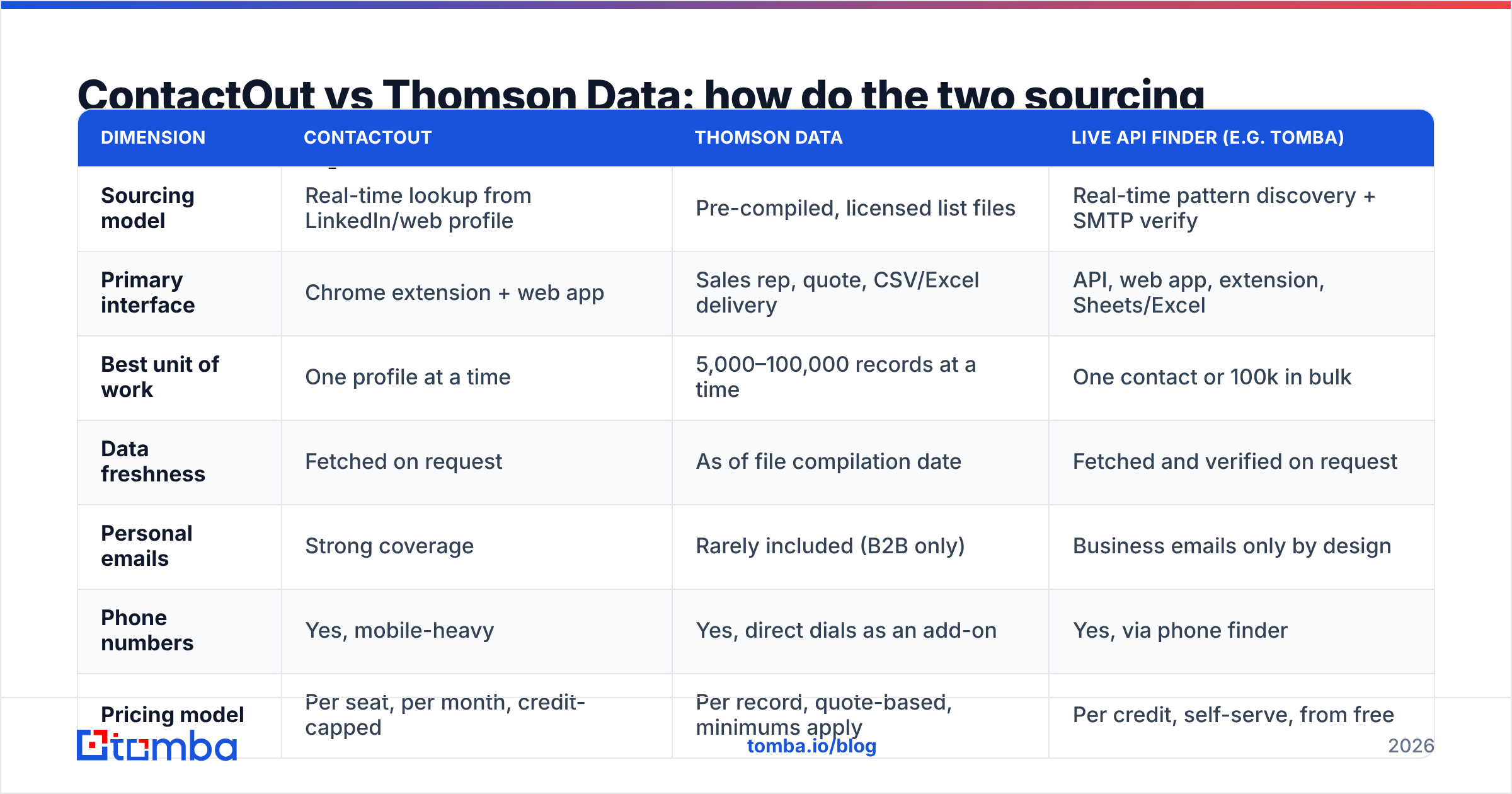
The cleanest way to see the gap is to stop comparing features and compare sourcing models. One pulls data at the moment you ask. The other hands you data compiled before you asked.
| Dimension | ContactOut | Thomson Data | Live API finder (e.g. Tomba) |
|---|---|---|---|
| Sourcing model | Real-time lookup from LinkedIn/web profile | Pre-compiled, licensed list files | Real-time pattern discovery + SMTP verify |
| Primary interface | Chrome extension + web app | Sales rep, quote, CSV/Excel delivery | API, web app, extension, Sheets/Excel |
| Best unit of work | One profile at a time | 5,000–100,000 records at a time | One contact or 100k in bulk |
| Data freshness | Fetched on request | As of file compilation date | Fetched and verified on request |
| Personal emails | Strong coverage | Rarely included (B2B only) | Business emails only by design |
| Phone numbers | Yes, mobile-heavy | Yes, direct dials as an add-on | Yes, via phone finder |
| Pricing model | Per seat, per month, credit-capped | Per record, quote-based, minimums apply | Per credit, self-serve, from free |
| Buying friction | Sign up, install, go | Discovery call → sample → quote → invoice | Sign up, call the API |
| Bounce risk owner | You | You (with replacement clauses) | Reduced by verification before send |
| Fits automation | Partially (bulk + integrations) | No (file drop, then it goes stale) | Yes — built for pipelines |
Read that table twice and the strategic split becomes obvious. ContactOut sells you time saved per prospect. Thomson Data sells you coverage of a market you cannot enumerate yourself. Those are different purchases, and teams get burned when they buy one expecting the other.
Which one is more accurate?#
This is where the comparison stops being about brand and starts being about physics.
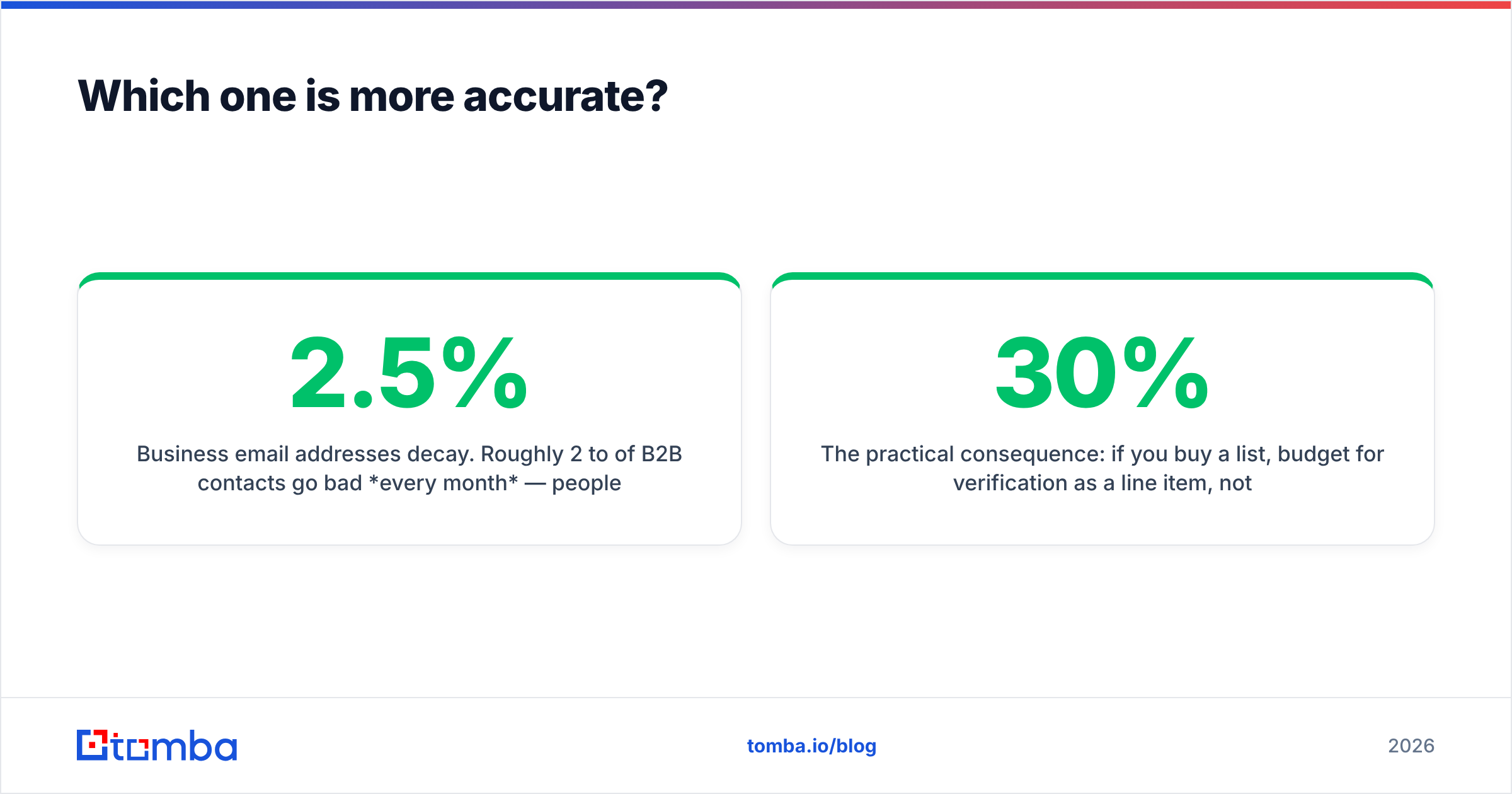
Business email addresses decay. Roughly 2 to 2.5% of B2B contacts go bad every month — people change jobs, companies get acquired, mailbox naming conventions change after a migration. Compound that and a list compiled 18 months ago is around 30–35% dead on arrival, no matter how good the vendor was on compilation day.

That decay curve punishes the two products differently:
- ContactOut re-fetches at request time, so its data is fresh by construction. Its weakness is coverage, not staleness — if a person has a thin LinkedIn presence or works at a company with an unusual mail setup, you get nothing, or you get a guess.
- Thomson Data can hand you a segment ContactOut could never assemble — 12,000 procurement managers at mid-market manufacturers, say. But every record in that file has been aging since the day it was built. The vendor's advertised accuracy is a compilation-day number, not a delivery-day number.
The practical consequence: if you buy a list, budget for verification as a line item, not an afterthought. Run every purchased record through an email verifier before it touches your sequencer. Expect to discard 10–30% of a bought file. If the vendor's replacement clause covers bounces above 5%, that clause only pays out if you measure the bounce rate — which means verifying anyway.
Catch-all domains are the second trap. A meaningful slice of corporate domains accept every address at the SMTP layer, so a naive verifier marks them "valid" and your bounce rate looks fine right up until your sender reputation collapses. A dedicated catch-all verifier is the difference between "the list verified clean" and "the list is actually clean."

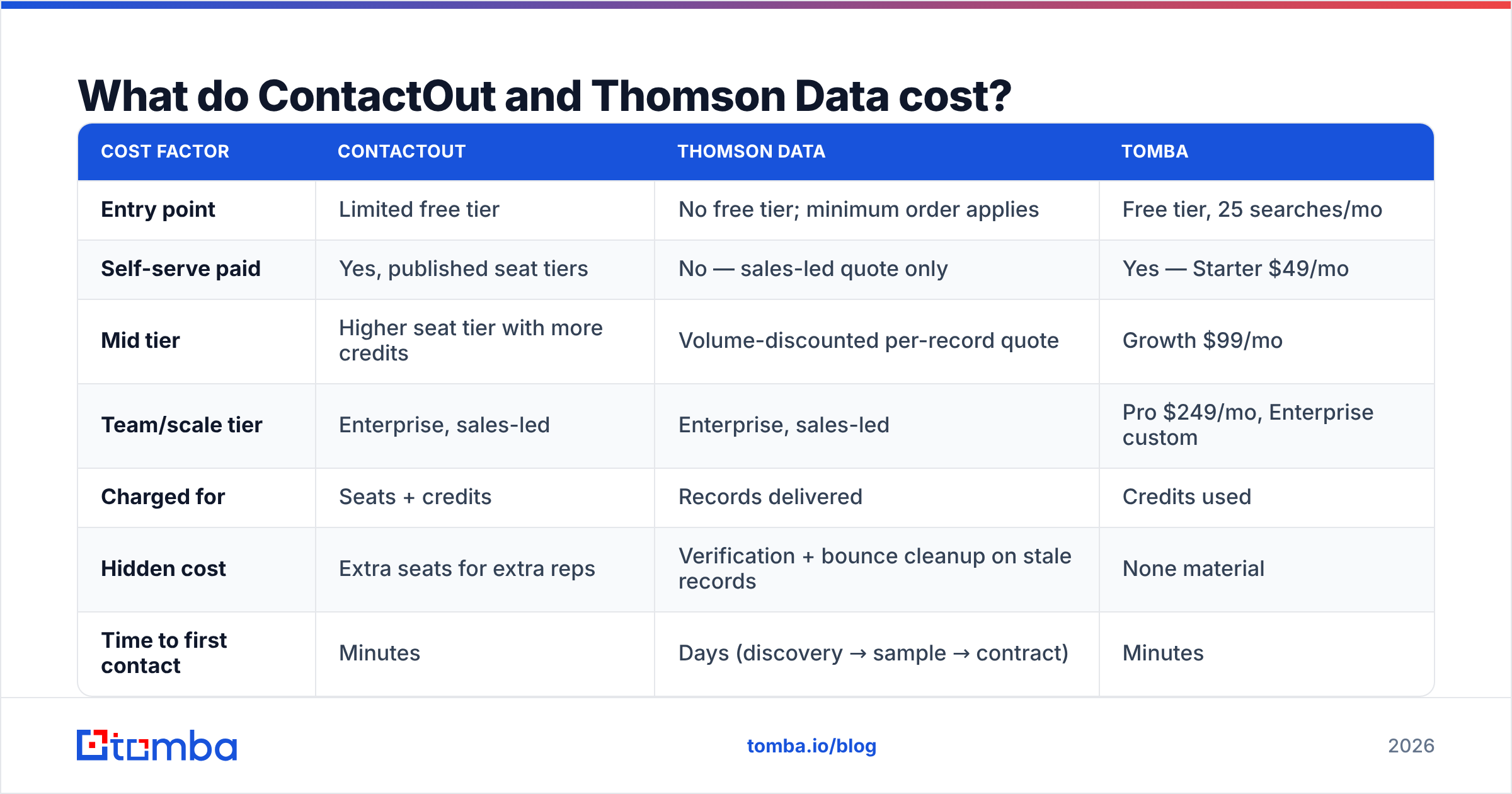
What do ContactOut and Thomson Data cost?#
Pricing is the least comparable part of this matchup, because the two vendors do not price the same object. ContactOut publishes tiers around a seat plus a monthly credit allowance; ContactOut's free tier is small and deliberately taste-test sized, with paid plans stepping up from there and enterprise handled by sales. Thomson Data does not publish rates at all — every engagement is a quote, and quotes move with segment, volume, and add-ons like direct dials or tech-stack filters.
Always confirm current numbers on the vendor's own pricing page before you commit; both companies revise tiers regularly, and this is a fast-moving category.
| Cost factor | ContactOut | Thomson Data | Tomba |
|---|---|---|---|
| Entry point | Limited free tier | No free tier; minimum order applies | Free tier, 25 searches/mo |
| Self-serve paid | Yes, published seat tiers | No — sales-led quote only | Yes — Starter $49/mo |
| Mid tier | Higher seat tier with more credits | Volume-discounted per-record quote | Growth $99/mo |
| Team/scale tier | Enterprise, sales-led | Enterprise, sales-led | Pro $249/mo, Enterprise custom |
| Charged for | Seats + credits | Records delivered | Credits used |
| Hidden cost | Extra seats for extra reps | Verification + bounce cleanup on stale records | None material |
| Time to first contact | Minutes | Days (discovery → sample → contract) | Minutes |
The structural point: ContactOut's cost grows with headcount. Thomson Data's grows with volume. Credit-based tools like Tomba's plans grow with usage — which is the only one of the three that tracks the value you actually extract. If four reps each need 300 lookups a month, seat-based pricing charges you four times for a workload one credit pool would cover.
When should you pick ContactOut over Thomson Data?#
Pick ContactOut when:
- Your prospecting starts on a LinkedIn profile. If the ICP lives in your head and you find people by browsing, the extension model is genuinely faster than any list.
- You need personal emails. Recruiting outreach, founder-to-founder notes, or contacting people mid-job-change. Purchased B2B lists almost never carry these.
- Volume is modest and targeting is surgical. Under a few hundred contacts a month, per-lookup economics beat a minimum-order list purchase every time.
- You cannot wait. Procurement cycles on list buys take days. Extensions take five minutes.
Pick Thomson Data when:
- You need a market you cannot enumerate. Nobody browses their way to 15,000 hospital administrators. A list vendor can assemble that; a profile-by-profile extension cannot.
- You are running channels beyond email — direct mail, telemarketing, event invites — where postal and firmographic fields carry real weight.
- You have a verification budget and process. A purchased list is a raw input, not a finished asset. Teams that treat it as finished are the ones filing deliverability incident reports a month later.
- Your ICP is stable and slow-moving. Regulated industries and legacy verticals churn contacts slower, so file decay hurts less.
Is there a third option that beats both?#
For most B2B sales teams, yes — and it is not a compromise, it is a different architecture.
The gap between a browser extension and a list vendor is filled by a credit-priced finder with an API and native verification. That model gives you ContactOut's freshness without its per-seat tax, and Thomson Data's bulk capability without its staleness:
- Domain search enumerates every discoverable contact at a company — the closest thing to "buy me the list for this account," except it runs live and returns results in seconds.
- Bulk email finder takes a CSV of names and companies and returns verified addresses, which is what you do to a purchased list anyway. Skip the purchase and keep the step.
- The Tomba API puts enrichment inside your workflow — CRM, sequencer, internal tooling — instead of inside a Chrome tab a rep has to remember to click.
- Verification runs before send, not after bounce. Which is the entire ballgame for email deliverability.
Both ContactOut and Thomson Data are legitimate tools with real user bases — check current reviews on G2 before you sign anything, and read the ones from teams whose motion looks like yours. But if you are choosing today, and your team does anything more automated than clicking through profiles by hand, the seat-and-list era of contact data is the wrong thing to be locked into.

What should you actually do next?#
Run a bake-off. Take 100 real prospects from your ICP — names and company domains, nothing else. Send the same 100 to each option you are considering. Then measure three things and only three things:
- Match rate. How many of the 100 came back with an address at all?
- Verified rate. Of those, how many survive an independent verification pass?
- Cost per verified contact. Total spend divided by the number that survived. This is the only number that matters, and it is almost never the number in the sales deck.
Do that once and the ContactOut vs Thomson Data debate resolves itself with your own data instead of someone's marketing page.
If you want to run that test without a procurement call, start with the Tomba Email Finder — the free tier gives you 25 searches a month, enough to sanity-check a sample, and paid plans start at $49/mo with credits pooled across your whole team rather than metered per seat. Every result comes back with a confidence score and verification status, so "cost per verified contact" is a number you can read directly instead of one you have to reconstruct after the bounces roll in.
Related guides#
Ready to find emails that actually work?
Join 150,000+ professionals who stopped guessing and started sending. Free credits on signup — no credit card required.
Get the Tomba newsletter
Practical outbound tactics and product updates — once every two weeks.
About the author