ContactOut vs Tomba (2026): Which Email Finder Wins?
ContactOut is built around LinkedIn and personal emails. Tomba is built around domains, verification, and API volume. Here is where each one actually wins, and how to pick without wasting a quarter of your credits.
TL;DR
- ContactOut is a LinkedIn-first contact finder. Its strength is the browser extension and personal (non-work) email coverage — which is why recruiters love it.
- Tomba is a domain-first email finder with a verification layer and a developer-grade API. Its strength is bulk work, catch-all handling, and automation.
- If your workflow starts on a LinkedIn profile and you need a mobile number and a Gmail address, ContactOut fits. If your workflow starts with a list of 5,000 domains, Tomba fits.
- Price shape differs more than the headline numbers: ContactOut is credit-and-seat oriented; Tomba pricing starts at Free (25 searches/mo), then $49/mo Starter, $99/mo Growth, $249/mo Pro.
- Whichever you pick, verify before you send. Unverified "found" emails are the single biggest cause of a bounce spike.
What are ContactOut and Tomba, actually?#
They both return an email address. That's where the similarity ends.
ContactOut (contactout.com) grew up inside the recruiting world. Its core surface is a Chrome extension that overlays LinkedIn, GitHub, and a handful of other profile sites. You're browsing a candidate, you click the extension, and it reveals work email, personal email, and often a phone number. It also ships a Search Portal for building lists without leaving the app, plus ATS and CRM pushes.
Tomba (tomba.io) grew up on the other side of the problem: the domain. You feed it a company domain and a name, or just a domain, and it returns verified professional email addresses along with the confidence score, the sources it used, and the company's dominant email pattern. Around that core sit an email verifier, catch-all handling, phone lookup, and enrichment.
Put crudely: ContactOut is a person-first tool. Tomba is a domain-first tool. Most head-to-head reviews miss this and end up arguing about credit counts, which tells you almost nothing about which one will actually work for your team.
Which one is more accurate?#
Both vendors advertise high accuracy numbers. Both are telling a version of the truth — because they measure different things.
ContactOut's accuracy claims lean heavily on its personal-email and mobile data, sourced through a large profile graph. When it finds a Gmail address for a senior engineer, it's usually right, and that's genuinely hard data to get.
Tomba's accuracy is measured on verified professional emails at a given domain. Every result carries a status and a score, and the email verifier runs SMTP checks, MX validation, disposable detection, and a dedicated catch-all path rather than shrugging at catch-all domains and calling it "risky."

The practical test is not "who claims 99%." It's this: run 200 of your real target accounts through both, send to both lists, and count the bounces. Accuracy is domain-dependent. A tool that nails US SaaS companies can fall apart on European manufacturers or Japanese enterprises. Anyone who tells you one number covers all of that is selling.
Three things that actually move your bounce rate more than the vendor's headline stat:
- Verification depth. Does the tool tell you why an address is risky, or just that it is?
- Catch-all handling. Roughly 15-25% of B2B domains are catch-all. A tool that returns "unknown" on all of them is handing you a coin flip. Tomba's catch-all verifier exists specifically for this.
- Recency. A 2023 email at a company that rebranded in 2025 is a bounce, regardless of how confident the score was when it was scraped.

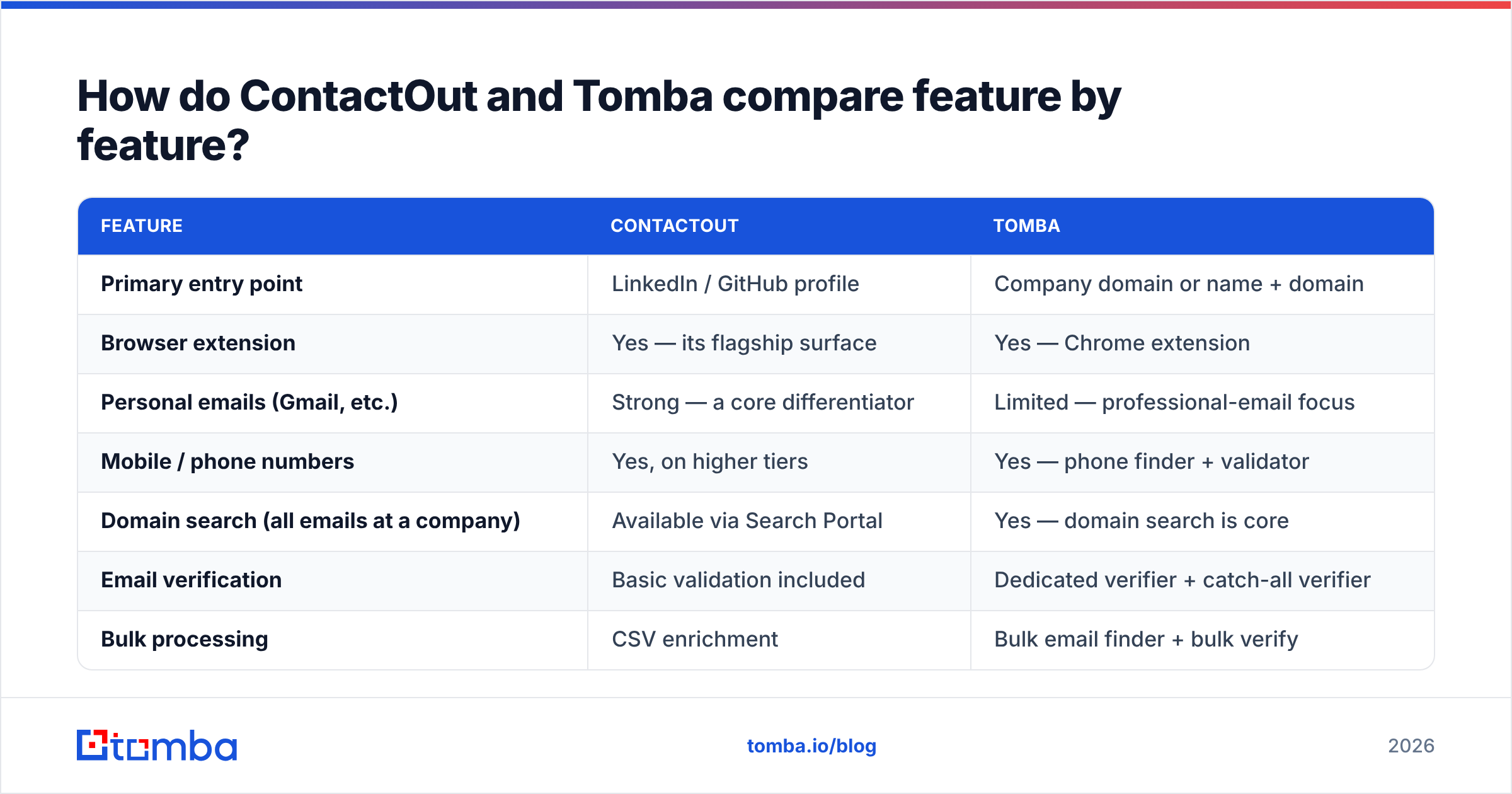
How do ContactOut and Tomba compare feature by feature?#
| Feature | ContactOut | Tomba |
|---|---|---|
| Primary entry point | LinkedIn / GitHub profile | Company domain or name + domain |
| Browser extension | Yes — its flagship surface | Yes — Chrome extension |
| Personal emails (Gmail, etc.) | Strong — a core differentiator | Limited — professional-email focus |
| Mobile / phone numbers | Yes, on higher tiers | Yes — phone finder + validator |
| Domain search (all emails at a company) | Available via Search Portal | Yes — domain search is core |
| Email verification | Basic validation included | Dedicated verifier + catch-all verifier |
| Bulk processing | CSV enrichment | Bulk email finder + bulk verify |
| API | Yes, on paid/enterprise tiers | Yes — Tomba API, CLI, and MCP server |
| Free tier | Limited monthly credits | 25 searches/mo, no card |
| Entry paid price | Per-seat, credit-tiered (see their pricing page) | $49/mo Starter |
| Best fit | Recruiters, candidate sourcing | Sales, RevOps, growth engineering |
Two notes before you screenshot that table.
One: ContactOut publishes and revises its tiers regularly, and quotes vary by seat count and credit bundle. Check their pricing page rather than trusting any blog — including this one — on the exact number this month.
Two: "Has an API" is doing a lot of work in most comparisons. The question is whether the API is a checkbox or the product. Tomba ships a documented REST API, a CLI, an MCP server so agents can call it directly, and native Google Sheets and Excel add-ins. If your team's plan is "wire this into our enrichment pipeline," that difference compounds fast.
Is ContactOut better than Tomba for recruiting?#
Usually, yes — and it's worth saying plainly.
Recruiting has a structural quirk that sales doesn't: the work email is often the wrong email. You do not want to land in a candidate's corporate inbox, where their employer's DLP tooling may read it and their manager may hear about it. You want the personal address and the mobile.
That is exactly the data ContactOut optimizes for. Its LinkedIn overlay, personal-email coverage, and ATS integrations are built around a sourcer's day. If you're filling engineering roles and living inside LinkedIn Recruiter, this is a legitimate reason to choose it, and no amount of API elegance from a competitor changes that.
Tomba's LinkedIn finder will pull a professional email from a profile URL, and it does that well — but the design intent is B2B outreach to a business inbox, not candidate outreach to a private one. Different job.
Is Tomba better than ContactOut for B2B sales?#
For most outbound sales and RevOps motions, yes — for three concrete reasons.
Volume economics. Sales teams don't enrich 40 profiles a week; they enrich 4,000 accounts a quarter. When your unit of work is a domain list rather than a browser tab, per-seat extension pricing gets awkward fast. A domain-first tool with bulk endpoints is simply the right shape.
Verification is not an add-on. Google and Yahoo's bulk-sender rules put a hard ceiling on complaint and bounce rates. If you're sending 5,000+ messages a month, your email deliverability depends on a clean list, and "clean" means verified at send time — not scraped at some point in 2024. Tomba treats verification as a first-class product; ContactOut treats it as a validation step behind the reveal.
Automation surface. RevOps teams want the finder to disappear into the stack — a webhook, a Zapier step, a HubSpot integration that enriches on record creation. That's a different product philosophy from "open the extension and click reveal."

What does each one actually cost?#
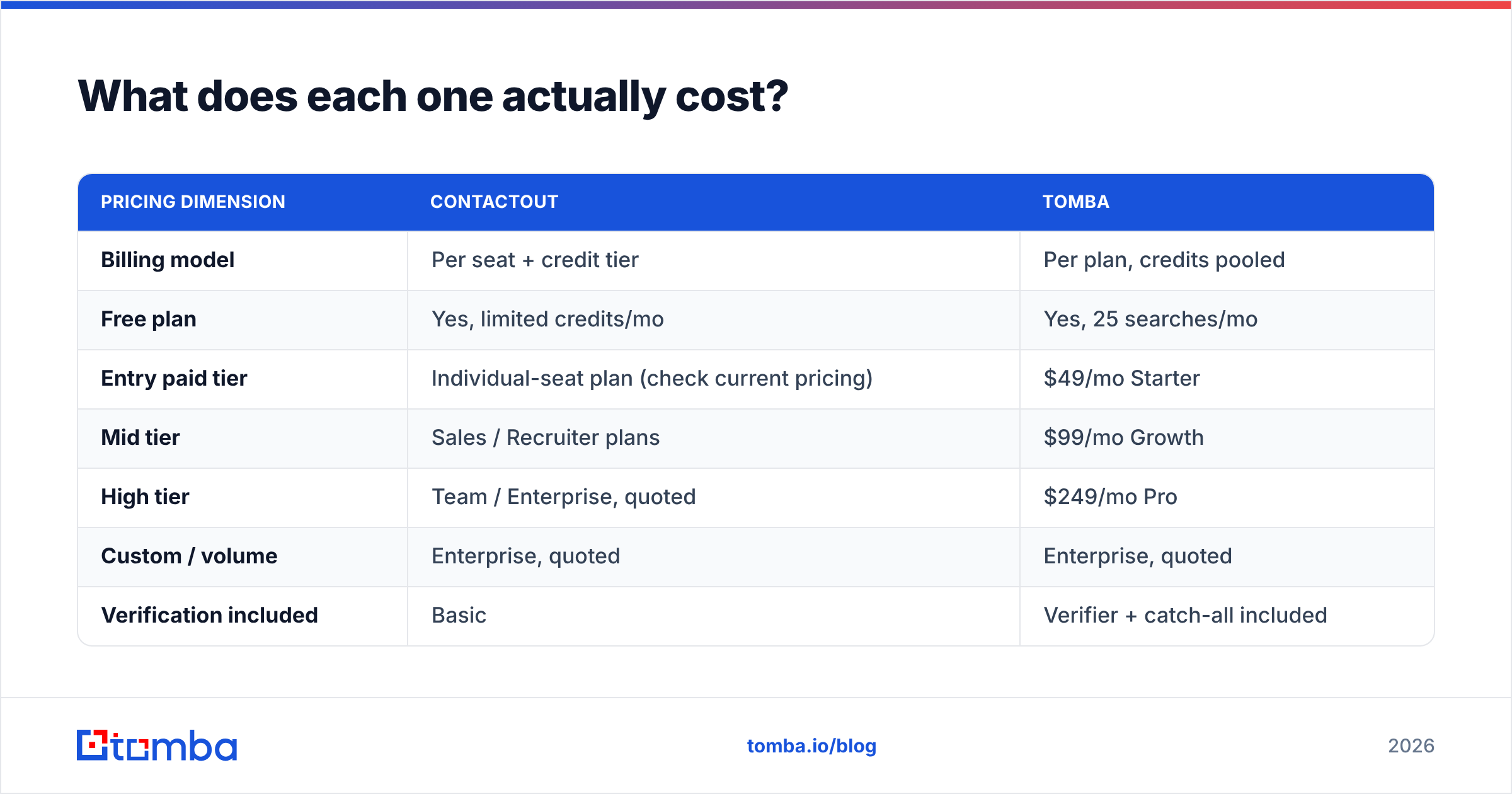
Here's where most comparisons go wrong: they line up the cheapest tier of each tool and declare a winner. But the two tools bill on different axes.
| Pricing dimension | ContactOut | Tomba |
|---|---|---|
| Billing model | Per seat + credit tier | Per plan, credits pooled |
| Free plan | Yes, limited credits/mo | Yes, 25 searches/mo |
| Entry paid tier | Individual-seat plan (check current pricing) | $49/mo Starter |
| Mid tier | Sales / Recruiter plans | $99/mo Growth |
| High tier | Team / Enterprise, quoted | $249/mo Pro |
| Custom / volume | Enterprise, quoted | Enterprise, quoted |
| Verification included | Basic | Verifier + catch-all included |
| API access | Paid tiers / enterprise | Included on paid plans |
The number that matters isn't the monthly fee — it's cost per usable, verified contact. A $60/mo plan that returns 300 addresses with a 12% bounce rate is more expensive than a $99/mo plan returning 300 addresses with a 2% bounce rate, once you price in the domain-reputation damage. That's not a rhetorical flourish; a burned sending domain costs weeks of warmup to recover.
Run the math on your own data before you commit to an annual contract. Both tools have free tiers precisely so you can.
How do they compare against the rest of the market?#
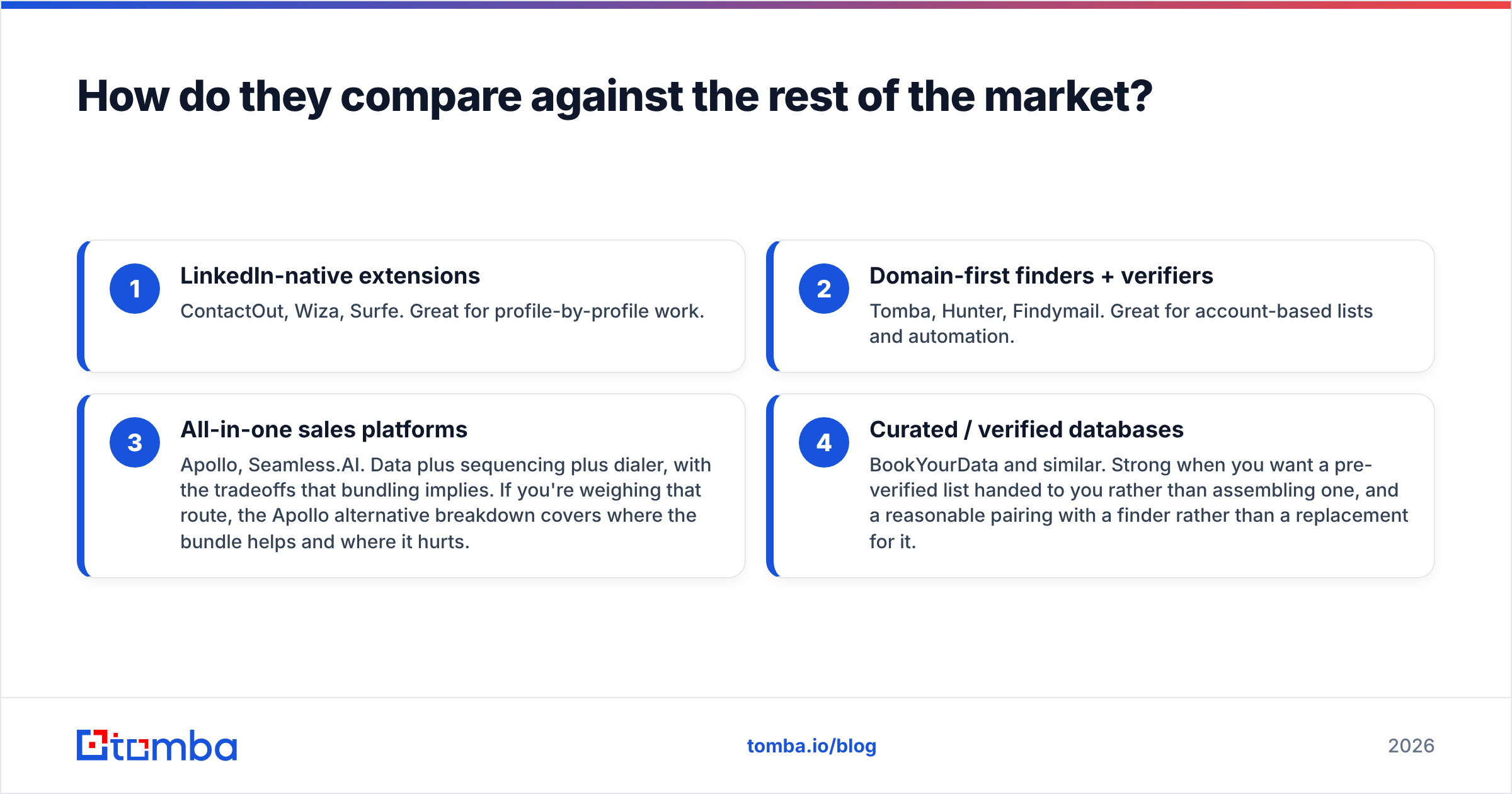
Neither tool exists in a vacuum. The 2026 contact-data market has roughly four camps:
- LinkedIn-native extensions — ContactOut, Wiza, Surfe. Great for profile-by-profile work.
- Domain-first finders + verifiers — Tomba, Hunter, Findymail. Great for account-based lists and automation.
- All-in-one sales platforms — Apollo, Seamless.AI. Data plus sequencing plus dialer, with the tradeoffs that bundling implies. If you're weighing that route, the Apollo alternative breakdown covers where the bundle helps and where it hurts.
- Curated / verified databases — BookYourData and similar. Strong when you want a pre-verified list handed to you rather than assembling one, and a reasonable pairing with a finder rather than a replacement for it.

Cross-check any shortlist against real user reviews on G2 or Capterra rather than vendor-authored comparison pages — including, again, this one. Read the 3-star reviews specifically. That's where the real limits show up.
Which should you pick?#
A short decision tree, based on where your work starts:
- You start on a LinkedIn profile and need a personal email or mobile. → ContactOut. It's built for that, and it's good at it.
- You start with a company domain or a target-account list. → Tomba. Domain search plus bulk verify is the whole point.
- You need a documented API, a CLI, or an agent-callable MCP endpoint. → Tomba. This is a real gap, not a marketing line.
- You're a recruiter filling technical roles. → ContactOut, likely paired with a verifier.
- You're an SDR team or RevOps org sending at volume and answerable for bounce rate. → Tomba, with verification wired into the send step.
- You do both. → Run both. They're cheap relative to a burned domain, and they cover genuinely different data. A ContactOut seat for the sourcers and a Tomba API key for the pipeline is a perfectly rational stack.
The failure mode to avoid is buying one tool, discovering it doesn't match your workflow's entry point, and then blaming "bad data" when the real problem was shape mismatch. Data quality and workflow fit are separate variables. Test both.
What's the fastest way to test this yourself?#
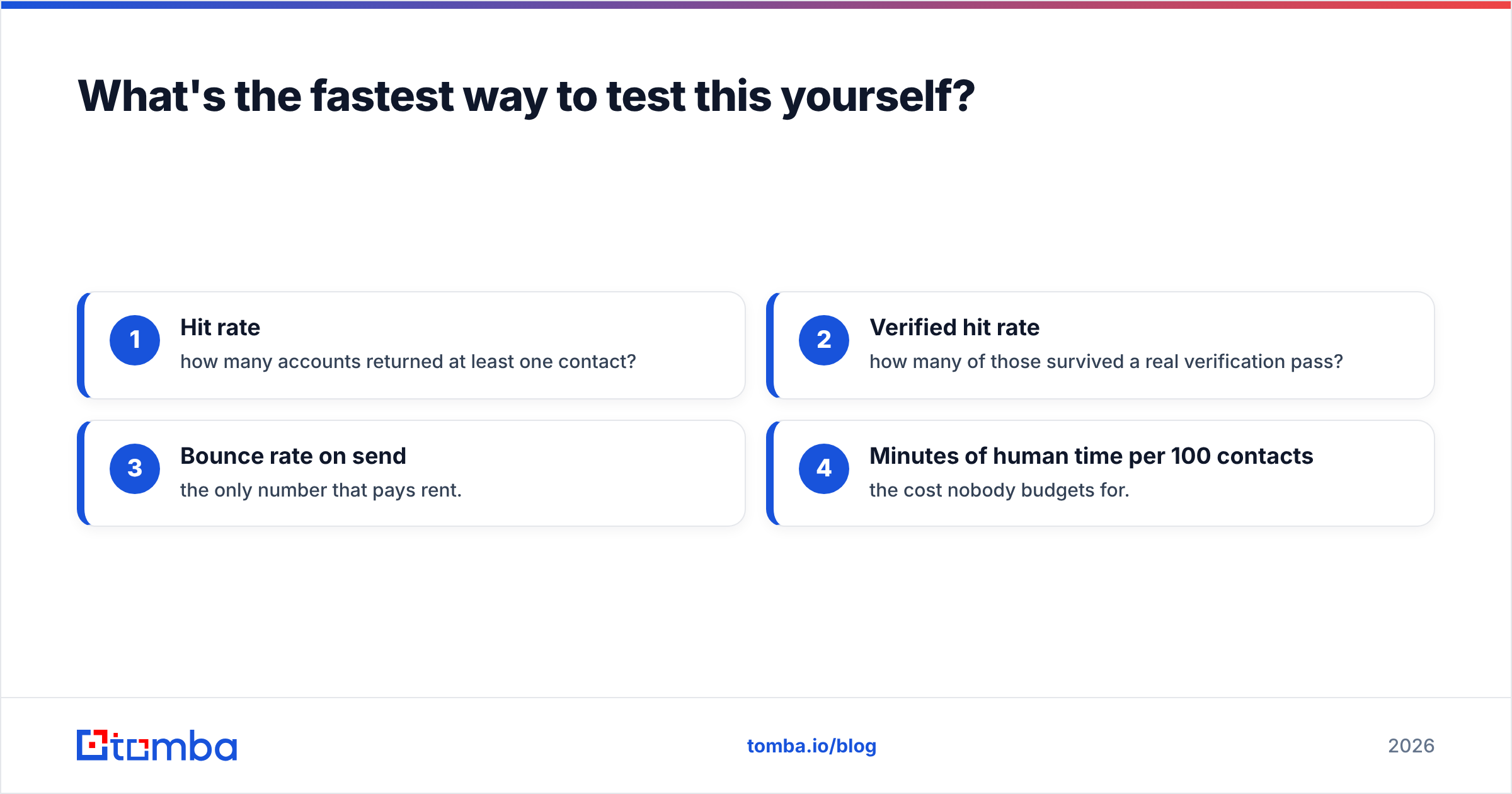
Take 100 accounts you actually care about. Run them through both tools. Then measure four things:
- Hit rate — how many accounts returned at least one contact?
- Verified hit rate — how many of those survived a real verification pass?
- Bounce rate on send — the only number that pays rent.
- Minutes of human time per 100 contacts — the cost nobody budgets for.
If you'd rather not guess: Tomba's free tier gives you 25 searches a month with no card, which is enough to sanity-check a handful of your hardest domains — the weird ones, the catch-alls, the non-US companies where every vendor's accuracy claim quietly falls apart.
Start with the Tomba Email Finder, point it at the ten accounts your current tool keeps failing on, and compare the results side by side with what ContactOut returns. Ten minutes of testing beats ten blog posts — this one included.
Related guides#
Ready to find emails that actually work?
Join 150,000+ professionals who stopped guessing and started sending. Free credits on signup — no credit card required.
Get the Tomba newsletter
Practical outbound tactics and product updates — once every two weeks.
About the author