ContactOut vs VerifyEmailAddress.com: Which One Do You Need?
One finds the email. The other only tells you if it exists. Here's the honest breakdown of ContactOut vs VerifyEmailAddress.com — coverage, accuracy, pricing, and which tool actually belongs in your outbound stack.
ContactOut vs VerifyEmailAddress.com is a strange matchup. One tool finds emails. The other only checks the ones you already have. So the real question is not which tool is better. It is which gap you are trying to close.
TL;DR
- These tools do not compete. ContactOut is a contact-discovery tool built around LinkedIn profiles. VerifyEmailAddress.com is a lightweight SMTP checker. It tells you whether an address you already have is deliverable.
- If you have zero emails, a verifier is useless. You need a finder — ContactOut, Tomba, or a database.
- If you have a list from a conference, a scraper, or an old CRM export, a verifier is exactly what you need. A free one will handle small volumes fine.
Two more things shape the budget:
- Free SMTP checkers break on the modern web. Google Workspace and Microsoft 365 no longer give honest SMTP answers. Catch-all and role accounts are where cheap verifiers quietly fail.
- Most teams end up paying for both functions. A single platform that finds and verifies is usually cheaper than stitching a LinkedIn scraper to a standalone checker.
ContactOut vs VerifyEmailAddress.com: what is each tool, exactly?#
Start here, because the naming makes this confusing.
ContactOut is a B2B contact-data platform best known for its Chrome extension. You open a LinkedIn profile, the sidebar pops out, and it surfaces personal and work emails plus phone numbers for that person. It maintains its own contact database, offers a search product, and sells team seats with CRM integrations. Its center of gravity is discovery: turning a name and a company into a reachable address. You can see its own positioning at contactout.com.
VerifyEmailAddress.com is a different species entirely. It's a single-purpose email-validation utility: you paste an address, it runs syntax checks, resolves MX records, and performs an SMTP handshake against the receiving mail server to see whether the mailbox is accepted. Free tools of this shape have existed since the early 2000s, and the underlying mechanism hasn't changed much — it's the SMTP RCPT TO probe wearing a web UI.
So the honest framing is not "which is better." It's: do you need to create contact data, or clean contact data you already have?

How do ContactOut and VerifyEmailAddress.com compare feature by feature?#
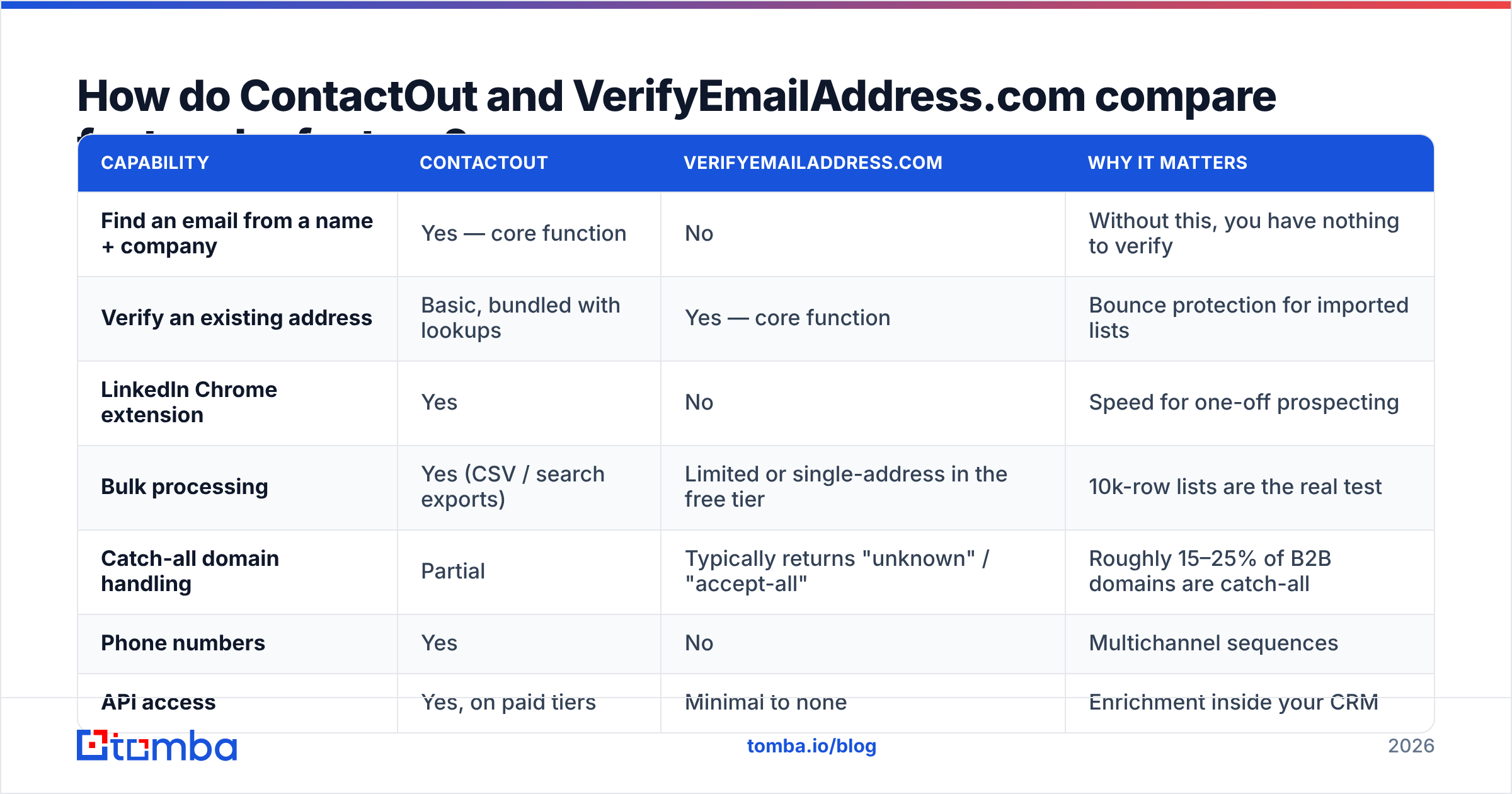
| Capability | ContactOut | VerifyEmailAddress.com | Why it matters |
|---|---|---|---|
| Find an email from a name + company | Yes — core function | No | Without this, you have nothing to verify |
| Verify an existing address | Basic, bundled with lookups | Yes — core function | Bounce protection for imported lists |
| LinkedIn Chrome extension | Yes | No | Speed for one-off prospecting |
| Bulk processing | Yes (CSV / search exports) | Limited or single-address in the free tier | 10k-row lists are the real test |
| Catch-all domain handling | Partial | Typically returns "unknown" / "accept-all" | Roughly 15–25% of B2B domains are catch-all |
| Phone numbers | Yes | No | Multichannel sequences |
| API access | Yes, on paid tiers | Minimal to none | Enrichment inside your CRM |
| Pricing model | Per-seat / per-credit subscription | Free or very low cost | Budget shape differs wildly |
| Best for | SDRs living inside LinkedIn | Cleaning a list you already own | Determines who on your team buys it |
The table exposes the asymmetry. ContactOut does eight things adequately and one thing well. VerifyEmailAddress.com does one thing, does it free, and doesn't pretend otherwise. Neither is a stack on its own.
Which one is more accurate — and what does "accurate" even mean here?#
Accuracy means different things for a finder and a verifier, and vendors exploit that ambiguity constantly.
For a finder, accuracy = the percentage of returned emails that are real, active mailboxes belonging to the right person. Two sub-metrics matter and are usually reported as one:
- Coverage (hit rate) — of 1,000 prospects you searched, how many came back with any email?
- Precision (bounce rate) — of the emails returned, how many actually deliver?
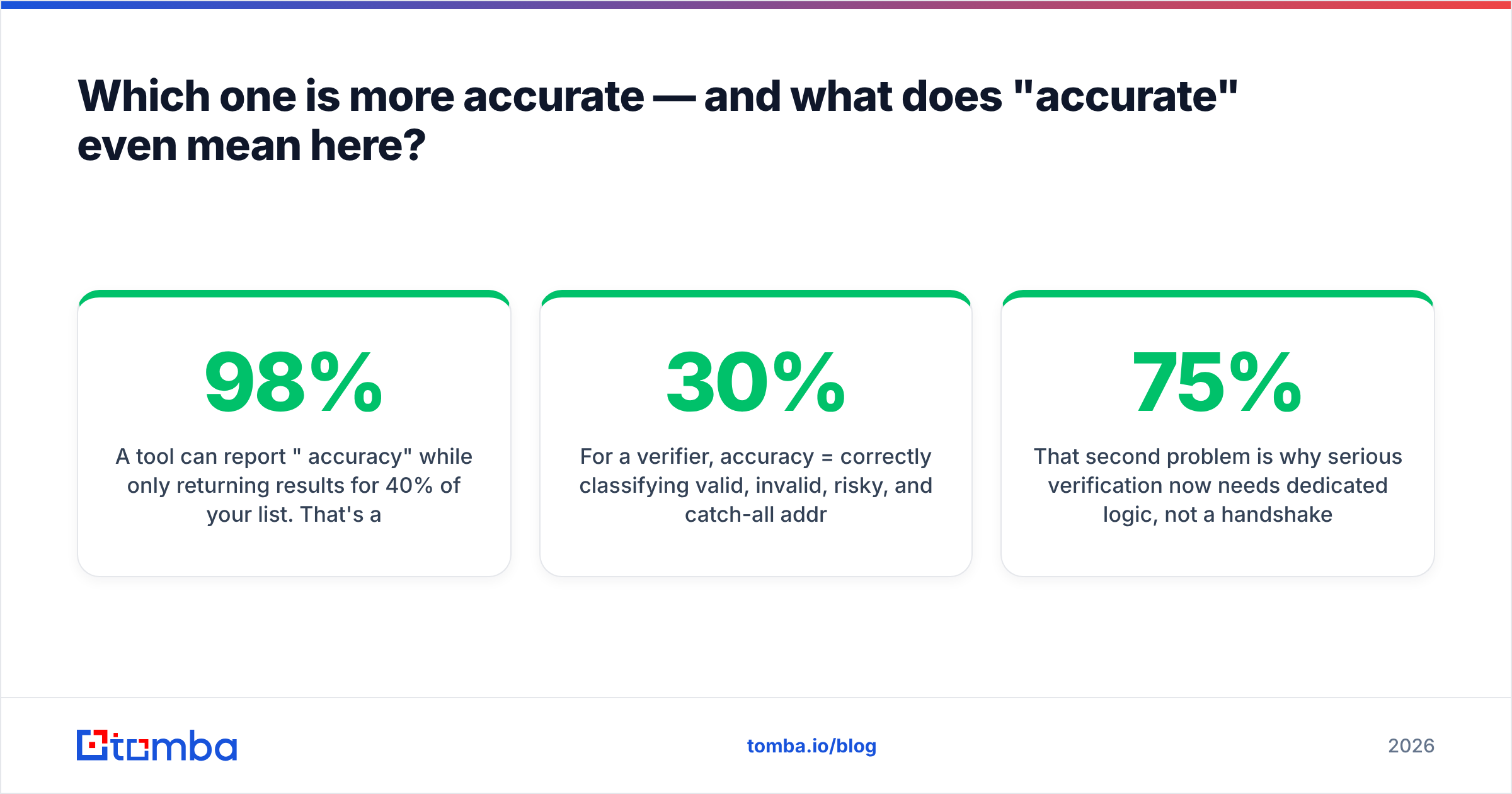
A tool can report "98% accuracy" while only returning results for 40% of your list. That's a coverage problem dressed up as an accuracy win. Always compute both against the same input file.
For a verifier, accuracy = correctly classifying valid, invalid, risky, and catch-all addresses. The failure mode isn't false positives — it's the "unknown" bucket. Free SMTP checkers routinely dump 20–30% of a B2B list into "unknown" because the receiving server won't answer honestly.

Two structural realities distort both numbers in 2026:
- Google Workspace and Microsoft 365 have degraded SMTP probing. They accept-then-bounce, rate-limit aggressive probers, and return generic responses. A naive
RCPT TOcheck against a Gmail-hosted domain is now closer to a coin flip than a verdict. - Catch-all domains accept everything. If a company's mail server accepts
asdkjh@company.com, it will also accept your prospect's guessed address — and a basic checker will mark it valid. You'll only learn the truth when your bounce rate spikes.
That second problem is why serious verification needs dedicated logic, not a handshake. A catch-all verifier uses pattern confidence, historical send data, and secondary signals to grade an accept-all address instead of shrugging. If a verifier's answer to a quarter of your list is "we don't know," you didn't verify a list. You verified 75% of one.
What do ContactOut and VerifyEmailAddress.com cost?#
Pricing is where ContactOut vs VerifyEmailAddress.com gets uncomfortable, because one of these tools is free.
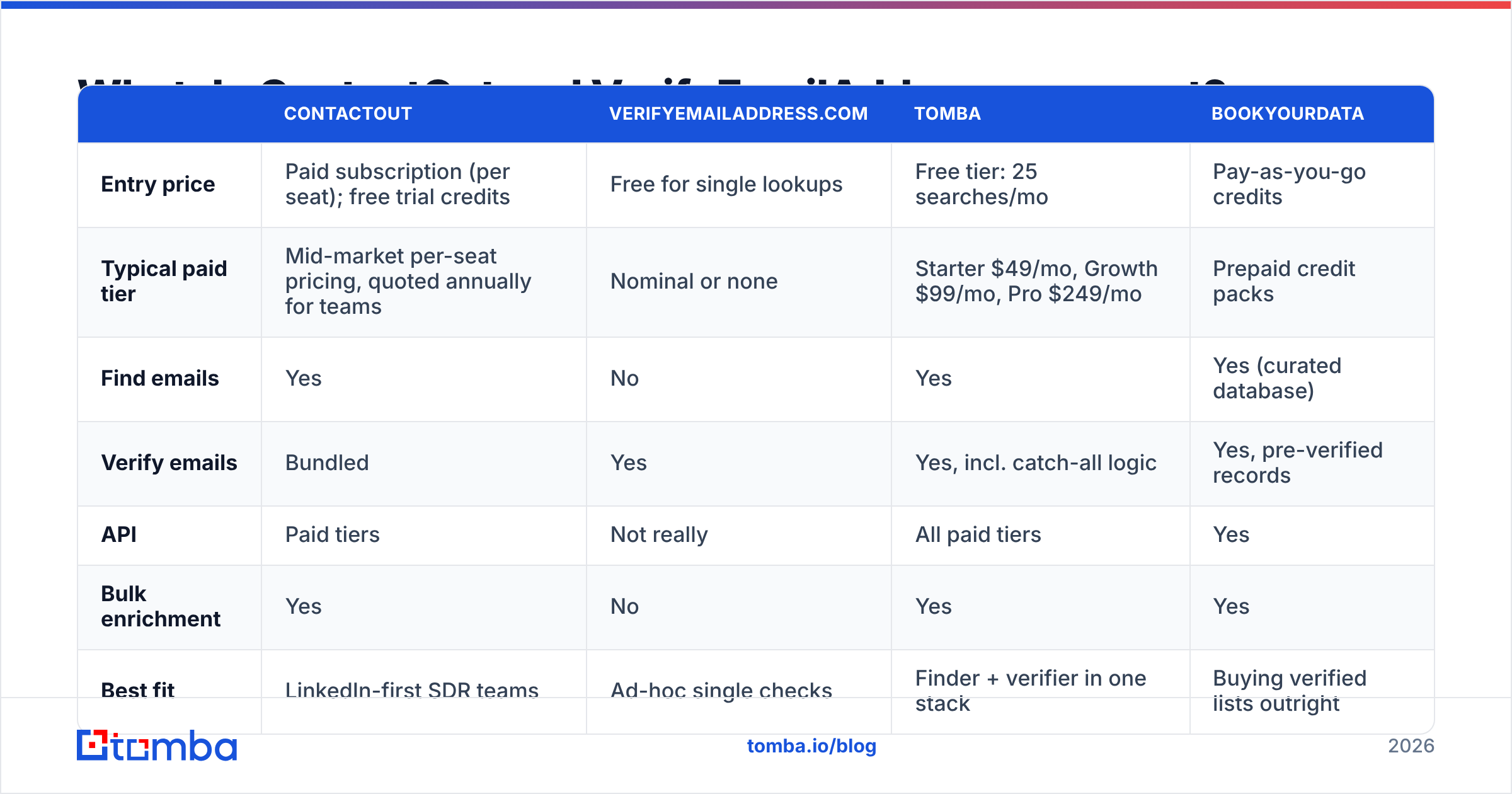
| ContactOut | VerifyEmailAddress.com | Tomba | BookYourData | |
|---|---|---|---|---|
| Entry price | Paid subscription (per seat); free trial credits | Free for single lookups | Free tier: 25 searches/mo | Pay-as-you-go credits |
| Typical paid tier | Mid-market per-seat pricing, quoted annually for teams | Nominal or none | Starter $49/mo, Growth $99/mo, Pro $249/mo | Prepaid credit packs |
| Find emails | Yes | No | Yes | Yes (curated database) |
| Verify emails | Bundled | Yes | Yes, incl. catch-all logic | Yes, pre-verified records |
| API | Paid tiers | Not really | All paid tiers | Yes |
| Bulk enrichment | Yes | No | Yes | Yes |
| Best fit | LinkedIn-first SDR teams | Ad-hoc single checks | Finder + verifier in one stack | Buying verified lists outright |
Read that as a budgeting exercise, not a scoreboard. Three genuinely different purchase paths exist:
- Free verifier + manual guessing. Costs $0, burns hours, produces a 40–60% hit rate. Fine for ten prospects a week.
- LinkedIn finder + free verifier. ContactOut for discovery, a checker for hygiene. It works. But you pay per seat for the finder and accept "unknown" verdicts from the free half.
- One platform that does both. Tomba pricing starts at $49/mo for Starter and $99/mo for Growth. An email verifier and catch-all handling are included rather than bolted on. BookYourData takes a different and equally valid route: it sells pre-verified contact records by the credit, which suits teams who want a list handed over rather than a tool to run.
Neither path 2 nor path 3 is wrong. Path 2 makes sense when your entire motion runs inside LinkedIn Sales Navigator and your reps live in that sidebar. Path 3 makes sense when discovery starts from a domain list, a CSV of target accounts, or an API call inside your CRM. If you're evaluating a switch, the ContactOut alternative breakdown compares the two workflows directly.
Is a free SMTP checker still enough in 2026?#
For volumes under roughly 50 addresses a month, yes. Paste, check, move on. Don't overbuy.
It stops being enough at exactly the point where three things become true:
- You send more than ~200 cold emails per week. At that volume, a 5% bounce rate is a deliverability event, not a rounding error.
- Your list contains catch-all domains. Which it does. Any list of 1,000 B2B contacts will hold a few hundred addresses a naive checker cannot resolve.
- You need this inside a workflow, not a browser tab. Copy-pasting 4,000 rows into a form one at a time is not a process. Bulk verification and an API exist because manual checking doesn't scale past a spreadsheet.
The first point deserves a sentence more. Mailbox providers treat bounce rate as a primary reputation signal. Once your domain gets flagged, everything downstream lands in spam — including the perfectly good addresses. Google and Yahoo's bulk-sender rules formalized this: keep spam complaints under 0.3% and keep your lists clean, or delivery degrades.

What should you actually check before buying either one?#
Run this five-point test against any finder or verifier before you enter a card. It takes an afternoon. It is the only benchmark that reflects your market.
- Bring your own list. Take 200 real prospects from your ICP — same industries, same company sizes, same regions you sell into. Vendor demo data is curated. Yours isn't.
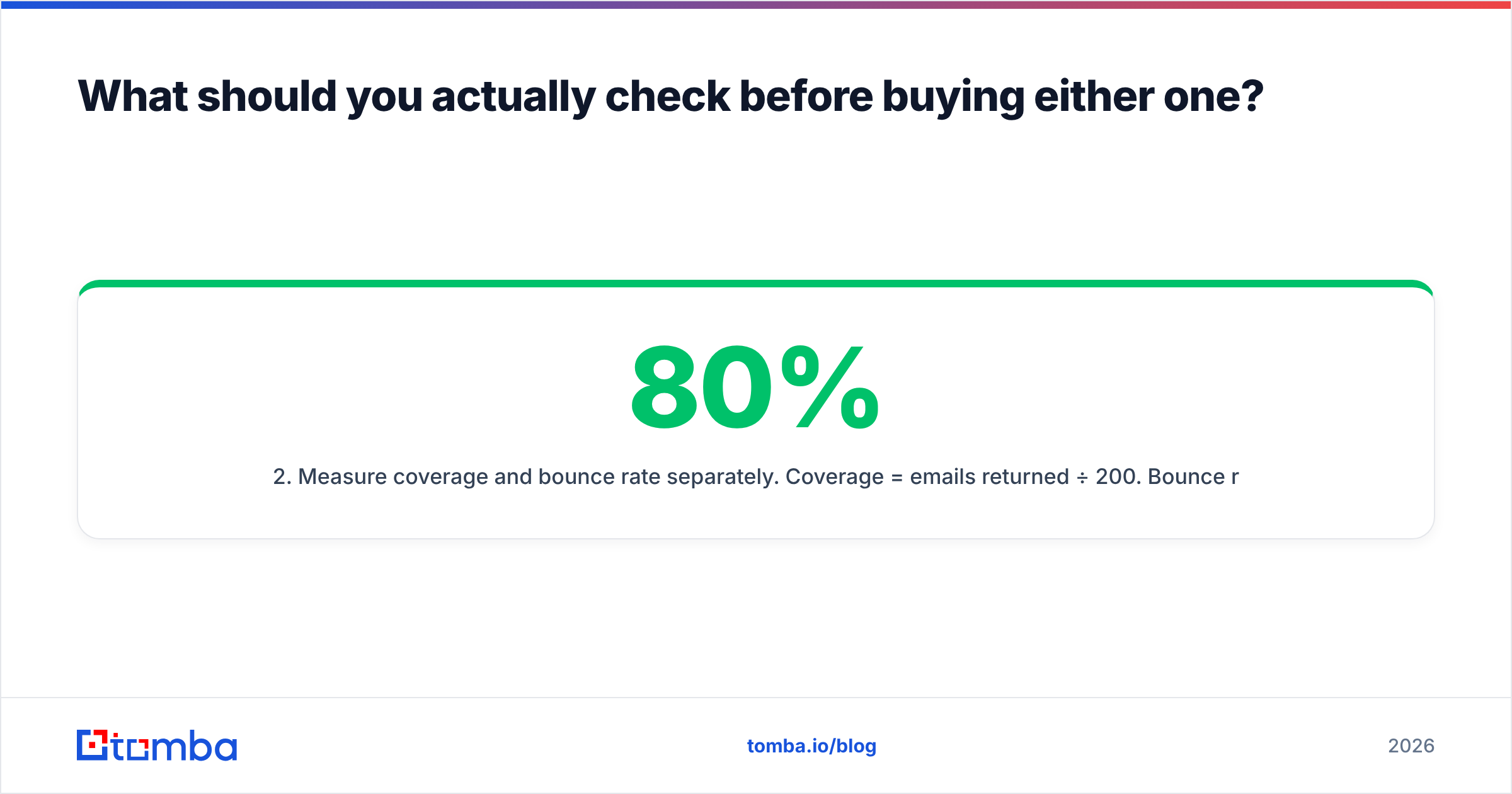
- Measure coverage and bounce rate separately. Coverage = emails returned ÷ 200. Bounce rate = hard bounces ÷ emails returned. A tool with 80% coverage and a 3% bounce rate beats one with 45% coverage and zero bounces. The second tool is just declining to answer.
- Force the catch-all question. Run five known catch-all domains from your target market. If every verdict comes back "unknown" or "accept-all," the tool has handed the hard part back to you.
The last two points are commercial, not technical:
- Test the geography you sell into. Contact databases skew heavily toward US tech. Coverage for German mittelstand, Japanese enterprise, or LATAM SMBs can be half the headline number. If you sell to EMEA, benchmark EMEA.
- Price the whole job, not the sticker. Add up finder seats, verifier credits, and the CRM enrichment you'll bolt on in month three. Compare that total against a single platform's tier. Per-seat pricing that looks cheap for one rep multiplies badly at five.

Third-party review sites help you narrow the shortlist — G2's data-provider category shows where support and billing complaints cluster — but no review replaces running your own 200 rows.
When should you pick ContactOut?#
Pick ContactOut when your prospecting motion is LinkedIn-native and person-first. Concretely:
- Your reps build lists inside Sales Navigator and want a sidebar that surfaces contact details without leaving the tab.
- You need personal emails as well as work emails — recruiters and executive-search teams especially, where the work address is a dead end after someone changes jobs.
- Phone numbers matter to your sequence, not just email.
- You're happy with per-seat pricing and your team size is stable.
It's a good tool for that job. If that's your motion, the extension genuinely saves reps time every day, and time is the expensive input.
When should you pick VerifyEmailAddress.com?#
Pick it when you need a single verdict on a single address, right now, for free. Examples:
- Somebody handed you a business card and you want to sanity-check the email before sending a proposal.
- You're spot-checking a handful of rows in a list before deciding whether to pay for full verification.
- A message bounced once and you want to know if the mailbox is dead or the send just failed.
That's a real need and it deserves a free tool. What it is not is list hygiene infrastructure. The moment you're checking hundreds of addresses, you need bulk processing, catch-all grading, an API, and a rate limit that doesn't throttle you at row 30.
What if you need both, from one place?#
This is where most teams land after a quarter of duct tape.
The workflow that actually holds up looks like this: start from a target-account list, run a domain search to pull every reachable contact at those companies, verify every returned address including catch-alls, then push the survivors straight into your CRM. Discovery and verification are one pipeline, not two vendors with a CSV export between them.
That's the case for consolidating. One credit pool instead of two invoices. One API instead of two integrations. One accuracy number you can hold someone accountable to, instead of a finder blaming the verifier and a verifier blaming the finder.
The bottom line on ContactOut vs VerifyEmailAddress.com: ContactOut wins if your entire world is LinkedIn and you'll pay per seat for a fast sidebar. VerifyEmailAddress.com wins if you need one free check and nothing more. But if you're building a repeatable outbound engine — target accounts in, verified contacts out, at volume, through an API — neither one covers the job alone. Paying for both is usually the most expensive way to get there.
If that's your situation, start with the Tomba Email Finder. The free tier gives you 25 searches a month to run your own 200-row benchmark. Verification and catch-all grading are built in rather than sold separately, and paid plans start at $49/mo — less than most per-seat finders charge for discovery alone. Run your list through it, compare the coverage and bounce numbers against whatever you use today, and let the spreadsheet decide.
Related guides#
Ready to find emails that actually work?
Join 150,000+ professionals who stopped guessing and started sending. Free credits on signup — no credit card required.
Get the Tomba newsletter
Practical outbound tactics and product updates — once every two weeks.
About the author