ContactOut vs Verimail: Full 2026 Comparison and Verdict
ContactOut finds emails. Verimail verifies them. They are not really rivals — but most teams only budget for one. Here is the honest 2026 breakdown of accuracy, pricing, and which half of the pipeline you are actually missing.
TL;DR#
- They are not competitors. ContactOut is a contact finder built around LinkedIn. Verimail is an email verifier built around SMTP and syntax validation. Buying one does not remove the need for the other.
- Pick ContactOut if your prospecting starts on LinkedIn and you want personal + work emails scraped straight from a profile in the browser.
- Pick Verimail if you already have a list — from a form, a CRM export, a scraper — and you need bounce risk squashed before you press send.
- Accuracy claims are marketing until you test them. Every vendor in this space advertises "99%." Run 200 known-good contacts through each tool before committing budget.
- If you only have one line item, a combined finder + verifier (Tomba, Hunter, Dropcontact) usually beats stitching two single-purpose tools together on cost and on hand-off friction.
What are ContactOut and Verimail, exactly?#
Start here, because half the confusion in the ContactOut vs Verimail debate comes from people assuming these tools overlap. They barely do.
ContactOut is a contact-discovery platform. Its centre of gravity is a Chrome extension that sits on top of LinkedIn: you open a profile, the sidebar pops out, and it surfaces a work email, a personal email, and often a phone number. It also ships a searchable database, a bulk-search screen, and an API. Recruiters adopted it first — that origin story still shows in the product, which surfaces personal Gmail addresses more aggressively than most sales-focused finders.
Verimail is an email verification service. You hand it addresses, it hands back a verdict: valid, invalid, disposable, role-based, catch-all. It does syntax checks, MX record lookups, SMTP handshakes, and disposable-domain matching. It has a dashboard for uploading CSVs and an API for wiring verification into signup forms or a data pipeline. It does not find you a single new contact.
So the honest framing is this: ContactOut fills your list. Verimail cleans it. Asking which is "better" is like asking whether a tap is better than a filter.
Why does comparing them feel like apples and oranges?#
Because it is — and yet the comparison keeps getting made, for a reason worth naming.
Most outbound teams have a fixed tooling budget and a single unfilled slot. The question they are actually asking is not "which product is superior," it is "which failure is costing me more right now?" There are only two failure modes:
- You cannot find enough contacts. Your TAM list is 4,000 companies and you have emails for 900 of them. Coverage is the bottleneck. A verifier does nothing for you here.
- You find plenty of contacts but your bounce rate is 7%. Your domain reputation is decaying, your sequences are landing in spam, and inbox providers are starting to throttle you. A finder makes this worse — it feeds more unvalidated addresses into a leaking bucket.
Diagnose which one you are before you compare feature grids. If you are unsure, pull your last 1,000 sends and check the hard-bounce rate. Under 2% and struggling for volume? You need a finder. Over 3%? You need verification yesterday — Google and Microsoft both tightened bulk-sender enforcement, and sustained bounces are the fastest route to a throttled domain. Google's own bulk sender guidelines spell out the spam-rate thresholds you are expected to stay under.

How do ContactOut and Verimail compare head-to-head?#
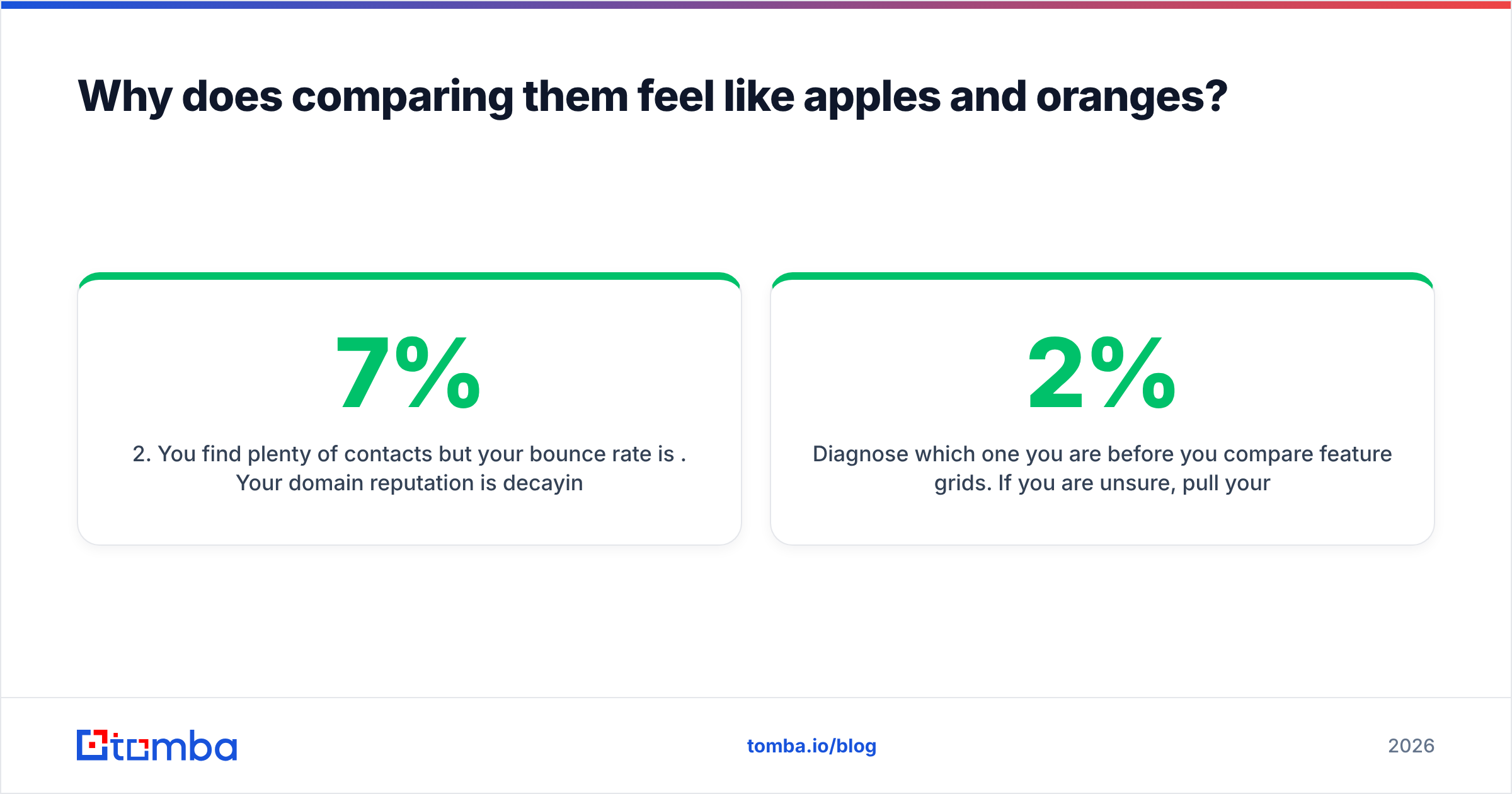
Here is the structural comparison. Note how few rows have a genuine head-to-head — that absence is the finding.
| Attribute | ContactOut | Verimail | Tomba |
|---|---|---|---|
| Primary job | Find emails + phones | Verify existing emails | Find and verify |
| Core surface | Chrome extension on LinkedIn | Web dashboard + API | Web app, API, extension, Sheets/Excel |
| Finds new contacts | Yes | No | Yes |
| Verifies addresses | Basic validation only | Yes — full SMTP + syntax + MX | Yes |
| Catch-all handling | Limited | Flags catch-all | Dedicated catch-all verifier |
| Personal (non-work) emails | Yes — a genuine strength | N/A | Work emails only |
| Bulk processing | Yes | Yes (CSV upload) | Yes (bulk email finder) |
| Free tier | Limited monthly credits | Small free credit allowance | 25 searches/mo |
| API available | Yes | Yes | Yes (Tomba API) |
| Best for | LinkedIn-first recruiting and sales | List hygiene before sending | Teams who need both halves in one bill |
Two takeaways from that grid.
First, the only row where they genuinely compete is "verifies addresses" — and it is not close. ContactOut does light validation as a by-product of finding; Verimail's entire engineering effort goes into the verdict. If verification quality is what you are buying, buy a verifier.
Second, ContactOut's personal-email coverage is a real differentiator that neither Verimail nor most sales-focused finders match. If you are recruiting, that alone can justify the line item.

How accurate is each tool in practice?#
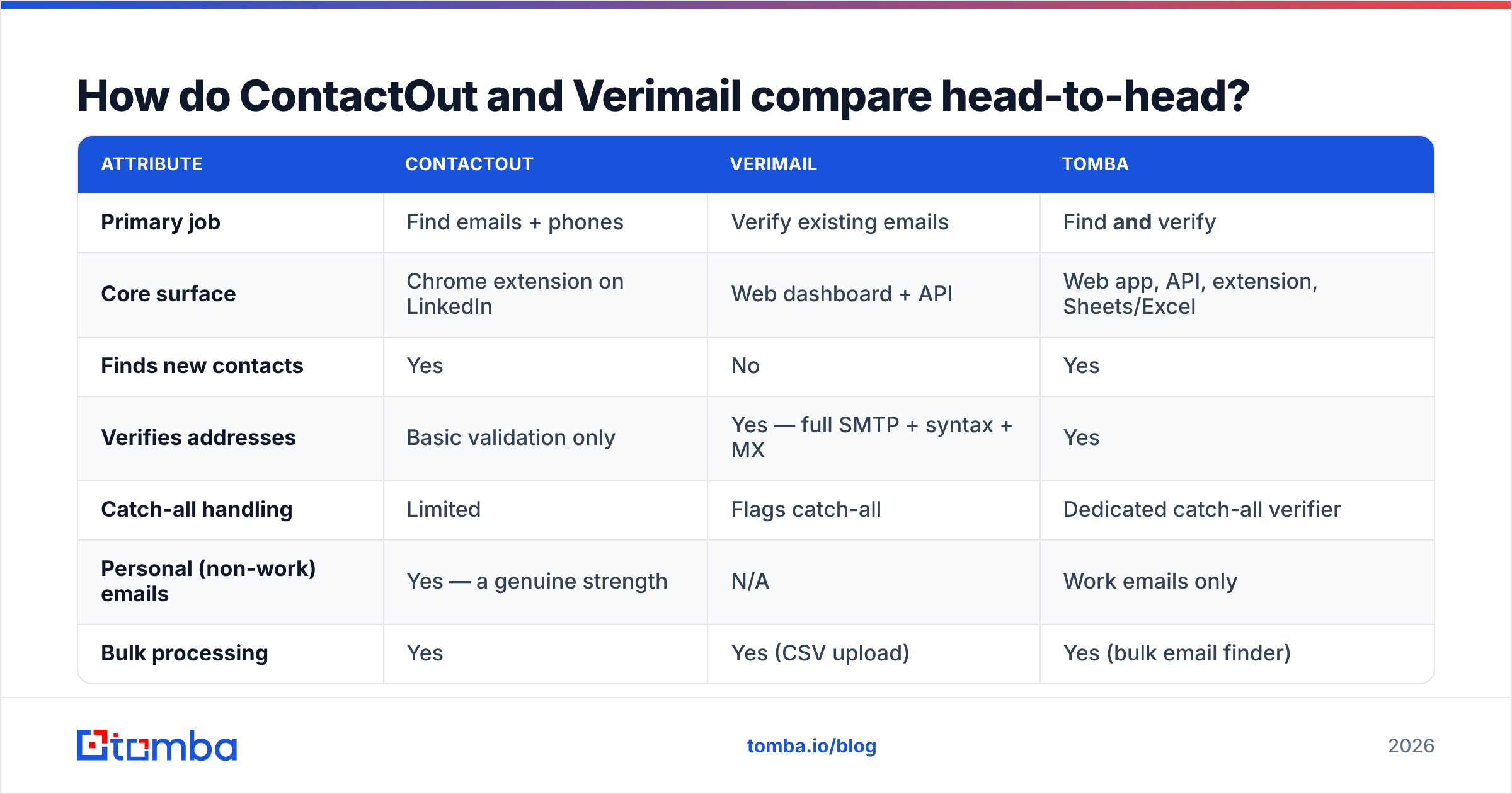
Everyone in this category claims 95–99% accuracy. Those numbers are not lies, exactly — they are just measuring different things on different samples.
- A finder's "accuracy" usually means: of the addresses we returned, this percentage were deliverable. It says nothing about coverage — the percentage of your list it found anything for at all. A tool can hit 98% accuracy by simply refusing to guess on hard domains, leaving you with a 40% fill rate.
- A verifier's "accuracy" usually means: our verdict matched the real mailbox state. The hard cases are catch-all domains, greylisting servers, and providers that accept everything at the SMTP layer and bounce later. Any verifier that returns a confident "valid" on a catch-all domain is guessing.

The only accuracy number that matters is the one you generate. Run this test before you buy anything:
- Build a 200-contact ground-truth set — people you have already emailed successfully, pulled from your sent folder or CRM.
- Strip the emails. Keep name + company domain only.
- Run the list through each finder. Score coverage (how many returned anything) and precision (how many matched the known-good address).
- Run the emails through each verifier. A good verifier returns "valid" on nearly all of them; false "invalid" verdicts are the expensive error, because they delete real prospects from your list.
- Add 20 deliberately dead addresses. Made-up mailboxes at real domains. A verifier that passes these is worthless.
Two afternoons of work, and you will never argue about vendor accuracy claims again. Check user-reported experiences on G2 as a sanity check, but do not substitute reviews for your own test — accuracy is heavily dependent on your specific ICP's domains.
What does each one cost in 2026?#
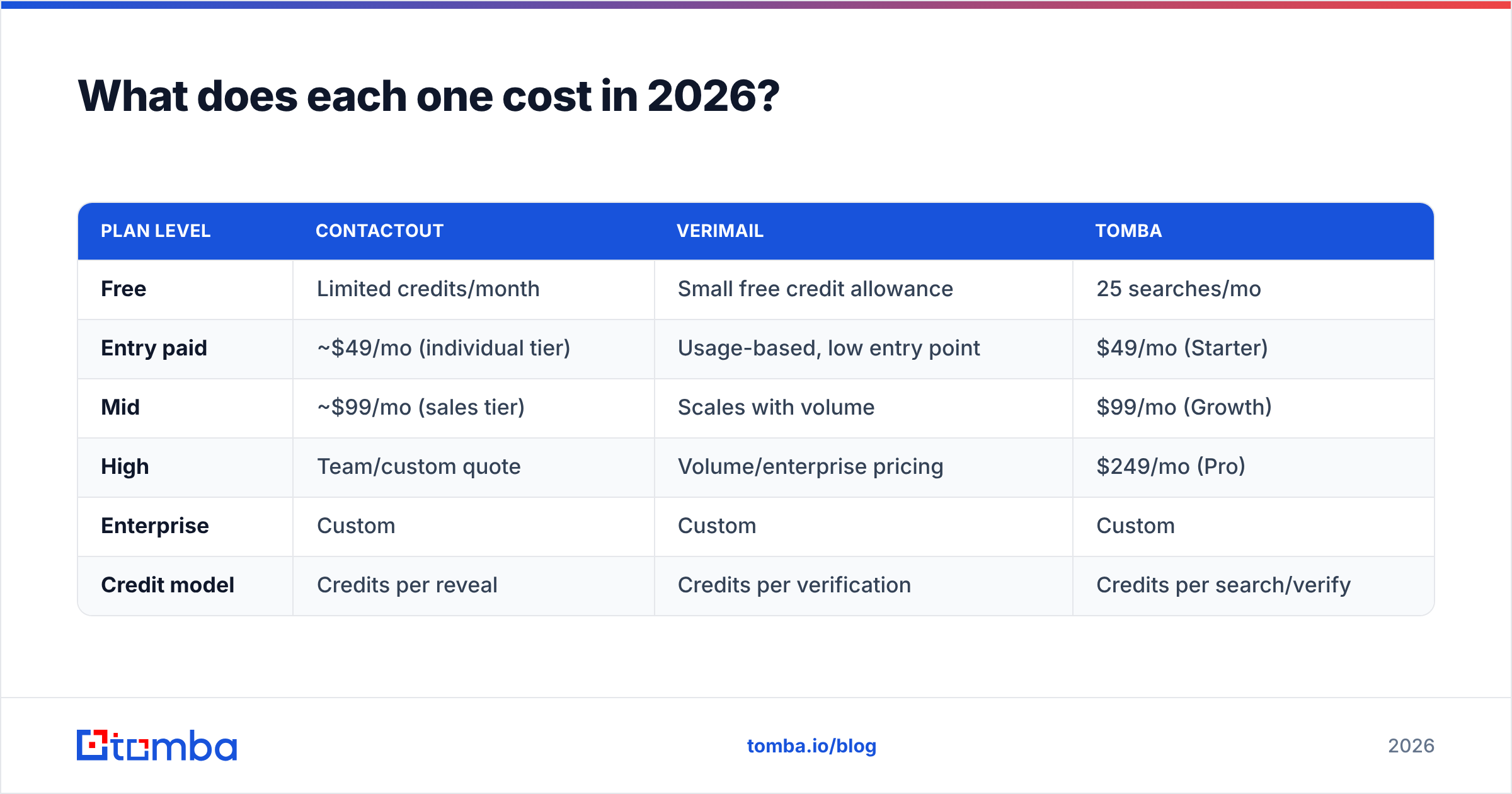
Pricing in this category moves constantly, so treat everything below as a shape rather than a quote, and confirm on each vendor's live pricing page before you sign.
| Plan level | ContactOut | Verimail | Tomba |
|---|---|---|---|
| Free | Limited credits/month | Small free credit allowance | 25 searches/mo |
| Entry paid | ~$49/mo (individual tier) | Usage-based, low entry point | $49/mo (Starter) |
| Mid | ~$99/mo (sales tier) | Scales with volume | $99/mo (Growth) |
| High | Team/custom quote | Volume/enterprise pricing | $249/mo (Pro) |
| Enterprise | Custom | Custom | Custom |
| Credit model | Credits per reveal | Credits per verification | Credits per search/verify |
The number that actually bites is not the sticker price — it is the stacked price. Buying ContactOut for discovery and Verimail for hygiene means two subscriptions, two credit pools that expire independently, and a CSV shuttle between them. At entry tier that is comfortably over $60–$100/mo before you have sent a single email, plus the ops tax of somebody remembering to run the export.
That stacking cost is why single-vendor finder + verifier setups win on TCO for most small teams. Tomba's pricing puts both halves in one credit pool: Free (25 searches/mo), Starter $49/mo, Growth $99/mo, Pro $249/mo. Whether that is cheaper than the two-tool stack depends entirely on your volume split — if you verify 100x more addresses than you find, a dedicated verifier's usage-based pricing may still win.
Do the arithmetic on your actual monthly volumes. Vendors bank on you not doing it.
Which should you pick for your workflow?#
Match the tool to the job, not to the review score.
- Recruiting, LinkedIn-first, personal emails matter → ContactOut. Its personal-email coverage and in-profile UX are built for exactly this. Pair it with any cheap verifier before you send.
- You have a big dirty list and a bounce problem → Verimail. You do not need more contacts. You need the ones you have to stop hurting your sender reputation.
- Signup-form validation in a product → Verimail (or any verification API). Real-time API verification at the point of entry stops garbage getting into your database in the first place. A finder is irrelevant here.
- Cold outbound at scale, domain-driven prospecting → A finder with built-in verification. You are working from company lists, not LinkedIn profiles, so you need domain search plus an email verifier in a single flow.
- Data enrichment on an existing CRM → A finder with a strong API and enrichment endpoints, so you can fill gaps in bulk without a human in the loop.
- You genuinely have both problems and one budget line → A combined tool. The hand-off tax between two vendors is real and it compounds.
Do you still need a verifier if your finder verifies?#
Yes — sometimes. Here is the nuance most comparison posts skip.
A finder that "verifies" is usually running a validation pass on addresses it just generated, which is a narrower job than validating a list that arrived from an unknown source. If your only source of email addresses is your finder, the built-in verification is normally enough. Bounce rates in that setup should sit comfortably under 2%.
But the moment you introduce a second source — a scraped list, a conference badge dump, a spreadsheet from a partner, an old CRM segment nobody has touched since 2023 — you are validating strangers. That is when a dedicated verifier earns its keep, and it is where catch-all domains become the deciding factor. A catch-all server accepts every address at the SMTP layer, so a naive verifier marks all of them "valid" and you find out the truth only when the bounces land. Tools with a dedicated catch-all verifier apply extra signals rather than shrugging.
Rule of thumb: verify anything you did not find yourself. Every time.

What are the honest weaknesses of each?#
ContactOut's weak spots. It is tightly coupled to LinkedIn. If your ICP is under-represented there — trades, local services, regional manufacturing, most of APAC's SME market — coverage falls off. Credits burn on reveals whether or not the contact turns out to be relevant. And personal-email surfacing, while a strength for recruiters, is a compliance question for B2B sales teams in GDPR jurisdictions; know your legal basis before you email someone's Gmail.
Verimail's weak spots. It solves exactly one problem. It has no answer to "I need 3,000 more contacts by Friday." Catch-all domains remain fundamentally unresolvable at the SMTP layer, so any verifier's confidence on those is an estimate — read the docs on how each one handles the "unknown" bucket, and be suspicious of a vendor that never returns "unknown." And verification is a commodity: prices vary 5x for very similar output, so shop it.
The combined-tool weak spot, in fairness: a tool that does both is rarely the single best at either. If you need absolute best-in-class personal-email coverage, a specialist beats a generalist. Most teams do not need best-in-class — they need good-enough at both, on one invoice.
FAQ#
Is ContactOut a replacement for Verimail? No. ContactOut's validation is a by-product of finding, not a dedicated verification engine. If bounces are your problem, ContactOut alone will not fix them.
Is Verimail a replacement for ContactOut? No. Verimail cannot find a single new contact. It only judges the ones you bring it.
Can I just use one tool for both? Yes, and for most teams that is the pragmatic call. A combined email finder with built-in verification covers both halves and removes the CSV shuttle between vendors.
What bounce rate should I be targeting? Under 2% hard bounces. Above 3% and you are actively damaging your domain's ability to reach the inbox — mailbox providers notice long before you do.
Which is cheaper? Verimail, in isolation, because verification is a cheaper computation than discovery. But cheaper-per-unit is not cheaper-per-outcome if you still have to buy a finder.
The verdict#
ContactOut vs Verimail is a false binary. ContactOut wins the finding job, especially for LinkedIn-native recruiting. Verimail wins the verifying job, especially for list hygiene and form-level validation. Neither one covers the other's ground, and any post that declares an outright winner is comparing a hammer to a spirit level.
The real decision is architectural: do you want two specialist vendors, or one tool that covers the whole pipeline? Two specialists give you depth and a higher combined bill. One tool gives you a single credit pool, one API, and no hand-off.
If you land on the second option, Tomba's Email Finder is built exactly for that shape: find work emails by name, domain, or company, verify them in the same pass, handle catch-all domains explicitly, and push the results into your CRM through the API or a Sheets add-on. Start on the free tier (25 searches/mo), run the 200-contact ground-truth test above against whatever you use today, and let your own numbers pick the winner.
Related guides#
Ready to find emails that actually work?
Join 150,000+ professionals who stopped guessing and started sending. Free credits on signup — no credit card required.
Get the Tomba newsletter
Practical outbound tactics and product updates — once every two weeks.
About the author