ContactOut vs Voila Norbert (2026): Full Feature Comparison
ContactOut is a LinkedIn-first contact scraper. Voila Norbert is a domain-first bulk email finder. They solve different problems — and picking wrong costs you a whole quarter of pipeline. Here's the honest breakdown.
TL;DR#
- ContactOut is a LinkedIn-first tool. Its strength is a browser extension that pulls work and personal emails plus mobile numbers off LinkedIn profiles. It is built for recruiters and one-profile-at-a-time prospecting, and it prices per seat.
- Voila Norbert is a domain-first tool. You give it a first name, last name, and company domain, and it returns a verified work email. It shines on CSV bulk uploads and pay-as-you-go credits, not on LinkedIn browsing.
- They are not really competitors. They overlap on the word "email finder" and almost nowhere else. If your list starts on LinkedIn, ContactOut fits. If your list starts in a spreadsheet, Voila Norbert fits.
- Pricing models diverge hard. ContactOut charges per user seat; Voila Norbert charges per credit. A five-person team pays very differently under each model.
- If you need both motions in one place — LinkedIn lookups, domain search, bulk CSV, verification, and an API — a consolidated platform like Tomba (free tier, then $49/mo) usually beats stitching two point tools together.
What is ContactOut and who is it actually for?#
ContactOut started as a Chrome extension that sits on top of LinkedIn. You open a profile, click the extension, and it surfaces the person's work email, personal email, and — on paid tiers — a phone number. Everything is stored in a lightweight in-app list you can export or push to an ATS.
The design intent is obvious once you use it: this is a recruiting tool that sales teams adopted. Its deepest integrations are with applicant tracking systems, its personal-email coverage (Gmail, Yahoo, iCloud) is unusually good, and its whole workflow assumes a human is browsing profiles.
That focus creates a real strength and a real ceiling.
Strength: personal email addresses. Most B2B data vendors only touch corporate mailboxes. If you're recruiting engineers who ignore their work inbox, a personal address is the only channel that works. ContactOut is one of the few tools that treats this as a first-class feature rather than an afterthought.
Ceiling: it is coupled to LinkedIn. Take LinkedIn away — because you're working from a conference attendee list, a Crunchbase export, or your CRM's stale accounts — and the tool has much less to say. There's a search product and a bulk feature on higher tiers, but the center of gravity is the extension.
What is Voila Norbert and how does it work?#
Voila Norbert takes the opposite approach. It is a pattern-and-verify engine. You supply a name and a company domain; it infers the likely email format for that domain (first.last@, flast@, first@, and so on), tests candidates against the mail server, and returns the one that resolves — with a confidence score attached.
There is no LinkedIn dependency at all. There's a single-search UI, a Chrome extension, a bulk CSV upload, and an API. Verification is a separate paid product you can run on lists you already own.
This makes Voila Norbert genuinely good at one specific job: you have 4,000 rows of names and companies, and you need emails for them by Friday. Upload, wait, download. No seat math, no browsing.
The trade-off is that it only knows what the domain will tell it. Ask it for a Gmail address and it has nothing. Ask it for a mobile number and it has nothing. Ask it about a person whose company runs a catch-all mail server and the confidence score gets soft — which is exactly why a dedicated catch-all verifier matters in any serious workflow.

ContactOut vs Voila Norbert: the head-to-head table#
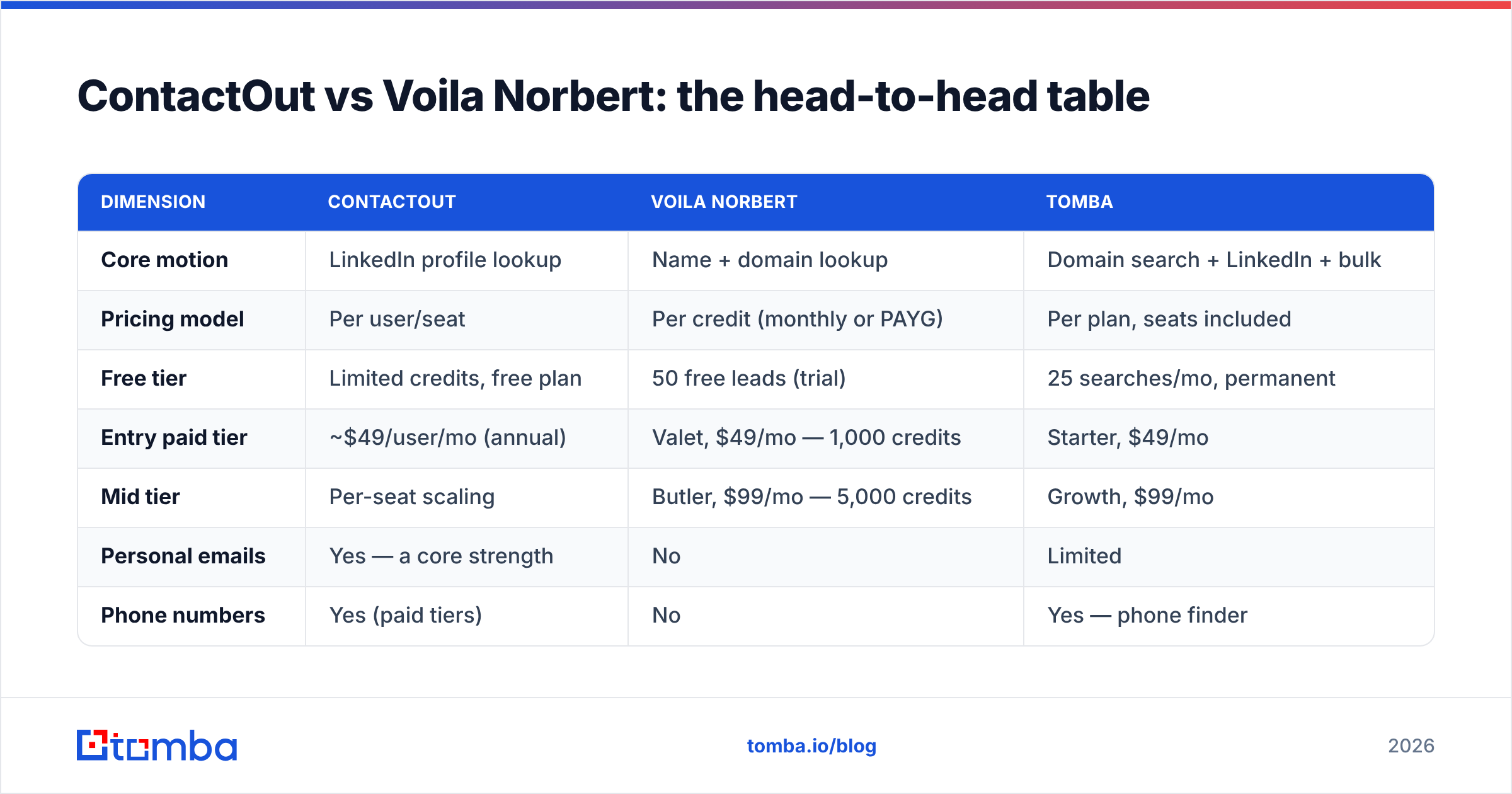
Here's the comparison most posts skip, laid out honestly. Pricing reflects each vendor's published plans at the time of writing; both change them, so verify on their own sites before you buy.
| Dimension | ContactOut | Voila Norbert | Tomba |
|---|---|---|---|
| Core motion | LinkedIn profile lookup | Name + domain lookup | Domain search + LinkedIn + bulk |
| Pricing model | Per user/seat | Per credit (monthly or PAYG) | Per plan, seats included |
| Free tier | Limited credits, free plan | 50 free leads (trial) | 25 searches/mo, permanent |
| Entry paid tier | ~$49/user/mo (annual) | Valet, $49/mo — 1,000 credits | Starter, $49/mo |
| Mid tier | Per-seat scaling | Butler, $99/mo — 5,000 credits | Growth, $99/mo |
| Personal emails | Yes — a core strength | No | Limited |
| Phone numbers | Yes (paid tiers) | No | Yes — phone finder |
| Bulk CSV | Higher tiers | Yes — core feature | Yes — bulk email finder |
| Verification | Basic | Yes (separate credits, ~$0.003/email) | Included email verifier |
| Public API | Yes, higher tiers | Yes | Yes — Tomba API |
| Works without LinkedIn | Weakly | Yes | Yes |
| Best fit | Recruiters, LinkedIn-native SDRs | Bulk list enrichment | Teams needing both |
Two things jump out.
First, the $49 entry price is a coincidence, not an equivalence. Fifty dollars buys you one ContactOut seat with a credit cap, or a thousand Voila Norbert credits that anyone on your team can spend. If you're a solo founder those are similar. If you're five SDRs sharing a list, they are wildly different — one bills you 5×, the other doesn't.
Second, verification is billed separately at Voila Norbert. That $0.003/email is cheap in isolation, but it means a 10,000-row list costs you finder credits and verification credits. Model the real number before you commit.
Which one is more accurate?#
The honest answer: they are accurate at different things, and any single accuracy number that ignores that is marketing.
ContactOut publishes very high coverage claims for LinkedIn-sourced contacts, and in practice its hit rate on tech-industry profiles with a public LinkedIn presence is strong. Where it slips is the long tail — small companies, non-English markets, industries where people barely maintain a profile.
Voila Norbert's accuracy is a direct function of how guessable the target's domain is. Companies on first.last@company.com with a normal, responsive SMTP server? Excellent. Companies behind a catch-all, a security gateway, or Microsoft 365 with SMTP probing disabled? The confidence score drops and you get "risky" results that need a second verification pass.

The practical lesson is one most teams learn the expensive way: never treat a finder's output as final. Whatever tool you use, run the result through verification before it touches your sending domain. One 4% bounce campaign can undo a month of sender reputation work, and neither ContactOut nor Voila Norbert will refund you for that.
If you want to sanity-check any list without committing budget, a free email checker will tell you whether an address resolves before you load it into a sequencer.
How do the pricing models really compare at team scale?#
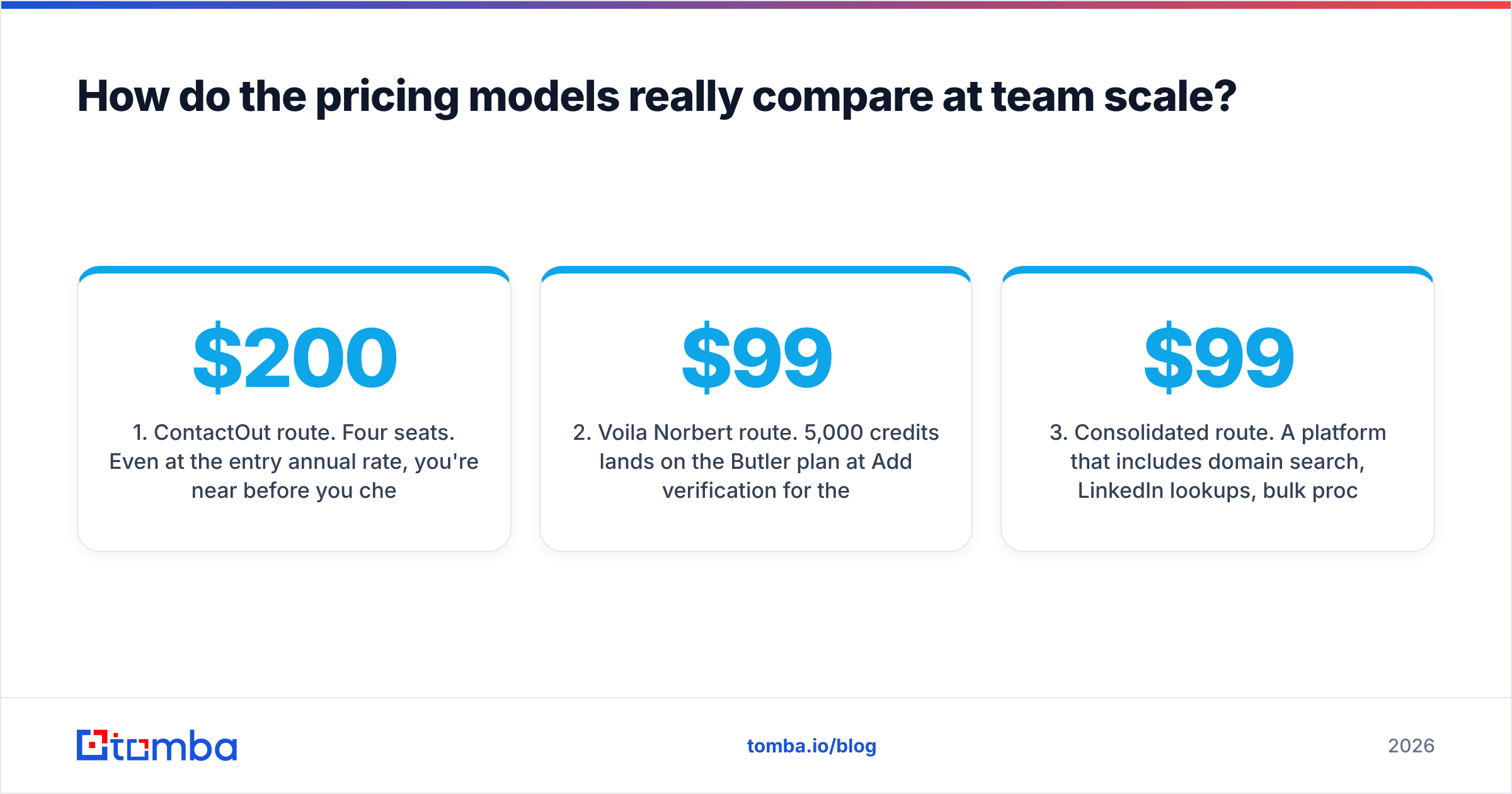
Run the math on a common scenario: a four-person outbound team enriching 5,000 contacts a month.
- ContactOut route. Four seats. Even at the entry annual rate, you're near $200/month before you check whether the per-seat credit cap covers 1,250 lookups per rep. If it doesn't, you're upgrading tiers, not adding credits — per-seat models punish you for having a team.
- Voila Norbert route. 5,000 credits lands on the Butler plan at $99/mo. Add verification for the same 5,000 addresses (~$15) and you're around $114 total, shared across the whole team. Cheaper — but you get no LinkedIn workflow, no phones, no personal emails.
- Consolidated route. A platform that includes domain search, LinkedIn lookups, bulk processing, and verification under one plan removes the "which credit bucket did that come out of" accounting entirely. Tomba pricing puts Growth at $99/mo with the verifier bundled, not billed as a second SKU.
- The hidden cost nobody quotes. Engineering time. If you're gluing a LinkedIn tool to a bulk tool to a verifier via Zapier, that integration is a permanent maintenance tax on someone's calendar.

The per-seat versus per-credit distinction is the single most consequential choice here, and it has almost nothing to do with data quality. Decide how your team consumes data before you compare feature checklists.
When should you pick ContactOut?#
Pick ContactOut if three or more of these describe you:
- You are recruiting, not selling. Personal emails and mobile numbers are non-negotiable for talent outreach, and ContactOut's ATS integrations save real hours.
- Your prospecting starts on LinkedIn every single day. If your reps live in LinkedIn Sales Navigator, an extension that overlays it removes friction that a separate web app can't.
- You need phone numbers alongside emails. Voila Norbert simply doesn't do this.
- Your team is small enough that seat pricing doesn't hurt. One or two users, no problem. Ten, and the model gets expensive fast.
Skip it if your ICP lists come from anywhere except LinkedIn, or if you need to process thousands of rows in one go — that's not the workflow it was designed around. If you want the LinkedIn motion without the seat tax, a LinkedIn finder built into a broader platform covers the same ground.
When should you pick Voila Norbert?#
Pick Voila Norbert if:
- Your input is a spreadsheet, not a profile. Names plus domains in, verified emails out. That's the whole job, and it does it cleanly.
- You need pay-as-you-go, not a subscription. Occasional list-building projects don't justify a recurring seat.
- You want simple, predictable API access for a lightweight enrichment script.
- You do not need phones or personal emails. If those are on your requirements list, this tool is disqualified immediately.
Where it falls short is breadth. There's no domain search in the "show me every email at this company" sense, no visitor identification, no author lookup, no phone data. It is a single-purpose instrument, priced like one, and it doesn't pretend otherwise — which is more than you can say for a lot of the category.
Is there a better option than either one?#
For most modern outbound teams: yes, and the reason is consolidation, not raw superiority on any one metric.
The tooling landscape has shifted. Five years ago you assembled a stack. In 2026, the G2 grid for lead intelligence is dominated by platforms that fold finding, verifying, enriching, and exporting into a single credit pool — because managing four vendors, four credit balances, and four API keys is a RevOps burden nobody wants to own.

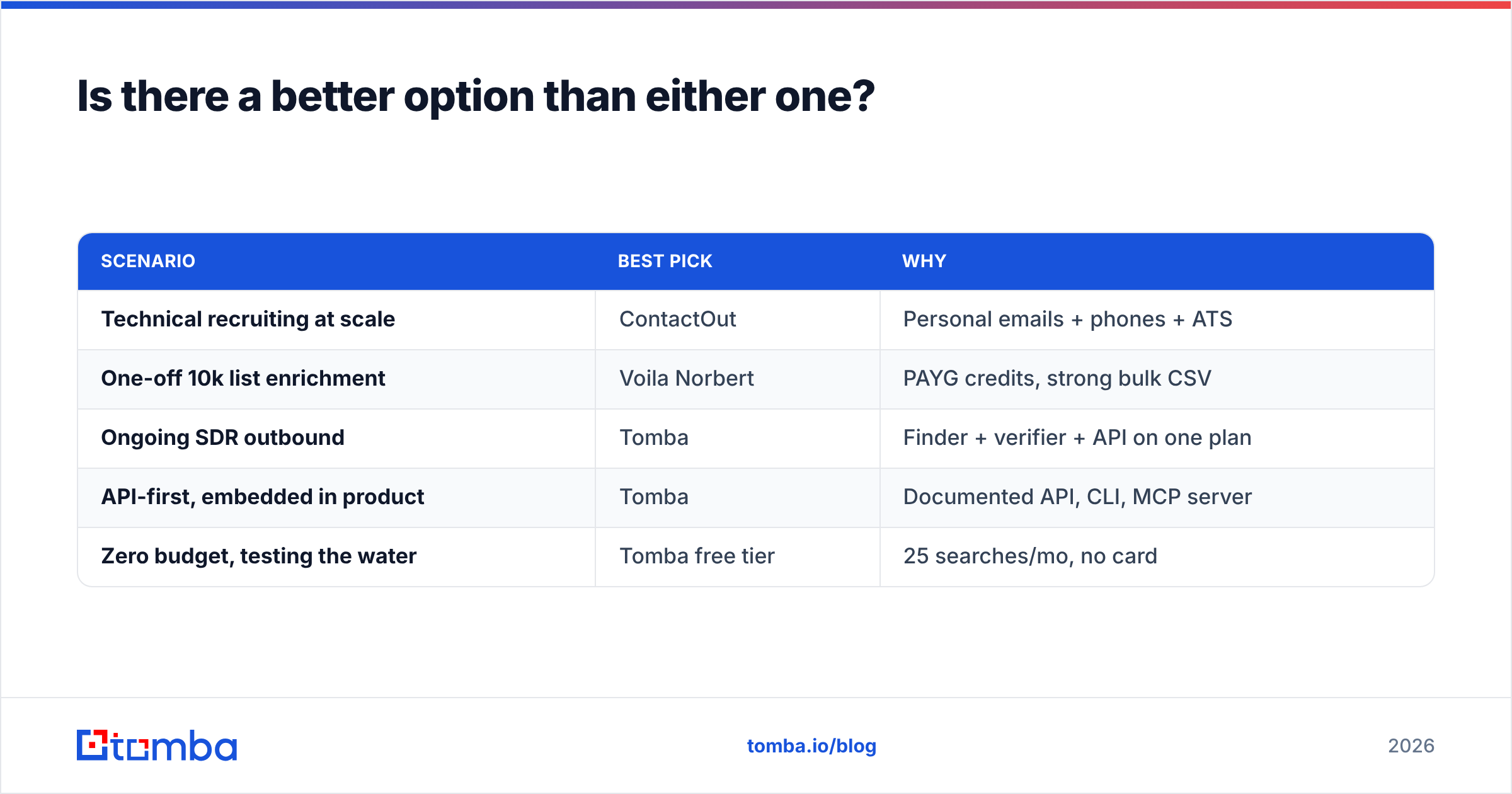
Here's the honest positioning of the three options discussed:
| Scenario | Best pick | Why |
|---|---|---|
| Technical recruiting at scale | ContactOut | Personal emails + phones + ATS |
| One-off 10k list enrichment | Voila Norbert | PAYG credits, strong bulk CSV |
| Ongoing SDR outbound | Tomba | Finder + verifier + API on one plan |
| API-first, embedded in product | Tomba | Documented API, CLI, MCP server |
| Zero budget, testing the water | Tomba free tier | 25 searches/mo, no card |
Worth naming honestly: if your problem is buying a pre-built list rather than looking up individuals you already identified, neither of these tools is the right shape. A database provider such as BookYourData — which sells verified, filterable B2B contacts outright — solves that job better than any lookup tool, ContactOut and Voila Norbert included. Different tool, different question. Know which one you're actually asking.
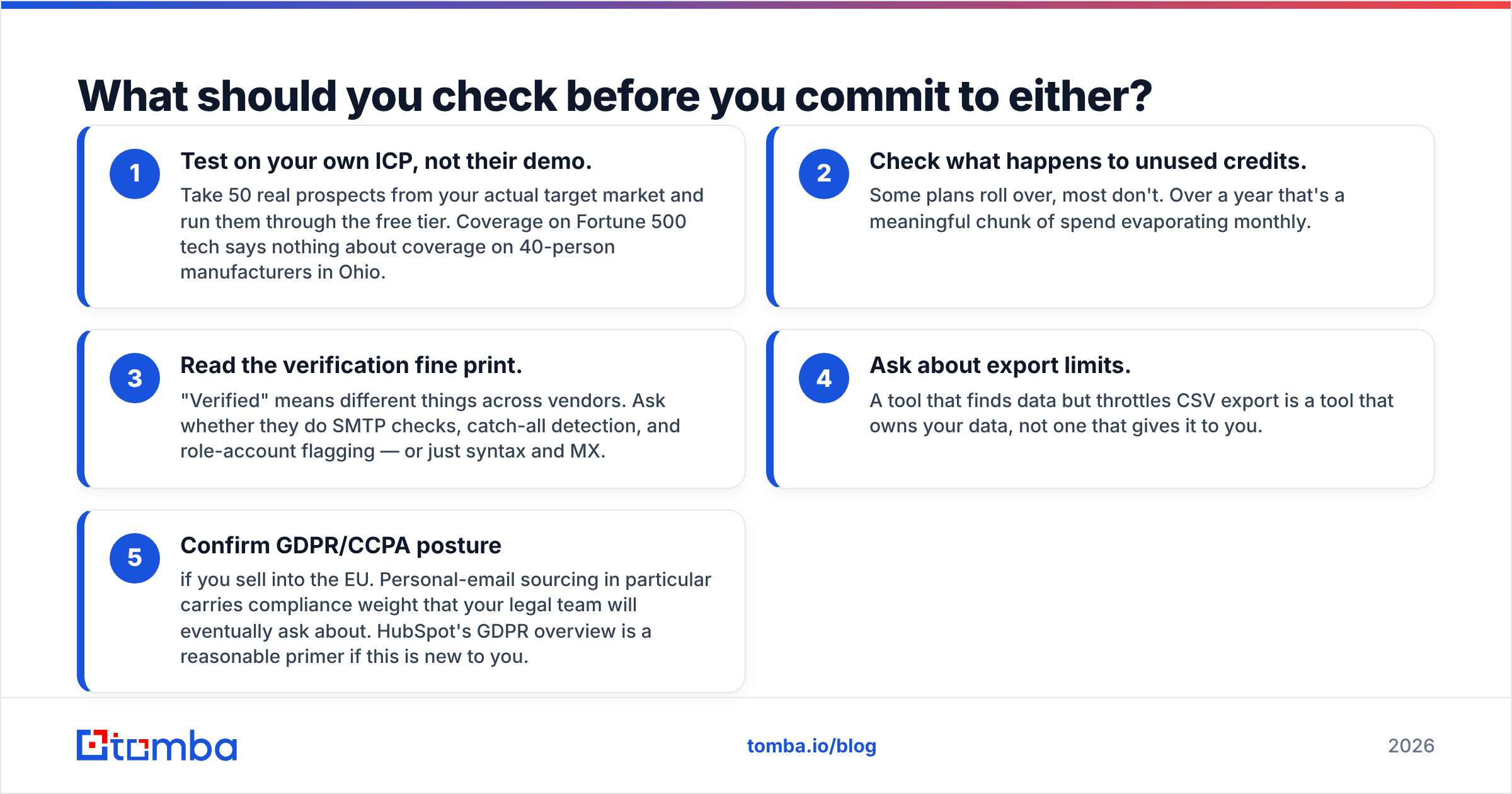
What should you check before you commit to either?#
Before you put a card down, run this checklist against whichever tool you're leaning toward:
- Test on your own ICP, not their demo. Take 50 real prospects from your actual target market and run them through the free tier. Coverage on Fortune 500 tech says nothing about coverage on 40-person manufacturers in Ohio.
- Check what happens to unused credits. Some plans roll over, most don't. Over a year that's a meaningful chunk of spend evaporating monthly.
- Read the verification fine print. "Verified" means different things across vendors. Ask whether they do SMTP checks, catch-all detection, and role-account flagging — or just syntax and MX.
- Ask about export limits. A tool that finds data but throttles CSV export is a tool that owns your data, not one that gives it to you.
- Confirm GDPR/CCPA posture if you sell into the EU. Personal-email sourcing in particular carries compliance weight that your legal team will eventually ask about. HubSpot's GDPR overview is a reasonable primer if this is new to you.
That last point deserves emphasis for anyone eyeing ContactOut's personal-email feature. It's a genuine capability and a genuine liability, depending on jurisdiction. Recruiters generally have a defensible basis; cold B2B sellers emailing someone's private Gmail usually do not.
The bottom line#
ContactOut vs Voila Norbert isn't a fight — it's a fork in the road. ContactOut is a per-seat, LinkedIn-native contact tool with unusually strong personal-email and phone coverage, built for people who prospect one profile at a time. Voila Norbert is a per-credit, domain-native bulk finder built for people who prospect one spreadsheet at a time. Buying the wrong one for your motion is far more costly than picking the "worse" tool for the right one.
And if the answer is "we actually need both" — a LinkedIn workflow and bulk domain enrichment and verification that doesn't bill separately — then the two-tool stack is the expensive path, not the safe one.
That's the gap Tomba is built to close. The Tomba Email Finder gives you domain search, LinkedIn lookups, bulk processing, and verification on a single plan — starting free with 25 searches a month, then $49/mo when you outgrow it, with seats included rather than metered. Run your own 50-contact ICP test against it before you renew anything else. The data will tell you more than any comparison post can.
Related guides#
Ready to find emails that actually work?
Join 150,000+ professionals who stopped guessing and started sending. Free credits on signup — no credit card required.
Get the Tomba newsletter
Practical outbound tactics and product updates — once every two weeks.
About the author