ContactOut vs Wiza (2026): Which LinkedIn Email Finder Wins?
ContactOut and Wiza both turn LinkedIn profiles into contact data — but they solve different problems, price differently, and fail in different places. Here is the honest breakdown, plus when neither is the right call.
TL;DR
- ContactOut is a browser-first tool built around LinkedIn profile pages. It is strongest when you are sourcing one person at a time and want personal (non-work) emails and mobile numbers — the classic recruiting motion.
- Wiza is a list-first tool built around LinkedIn Sales Navigator. It shines when you already have a saved search or a 2,000-row lead list and want a clean CSV with verified work emails.
- Neither is cheap at volume. Both charge per credit, both meter exports, and both get expensive the moment you add seats.
- If your workflow starts from a domain or a company list rather than a LinkedIn tab, a dedicated email finder with a real API will cost you less per usable contact than either.
- The honest verdict: ContactOut for recruiters, Wiza for Sales-Navigator-heavy SDR teams, and an API-first finder for anyone building repeatable pipeline at scale.
What are ContactOut and Wiza, actually?#
Both tools answer the same question — "what is this person's email?" — but they enter the problem from opposite ends.
ContactOut is essentially a Chrome extension with a database behind it. You open a LinkedIn profile, the sidebar pops out, and it surfaces work emails, personal emails, and phone numbers. It also ships a web search app and an ATS integration path. Its heritage is recruiting, and that shows: personal Gmail addresses are a first-class citizen, because a candidate ignores a work-inbox pitch but reads their own.
Wiza is a LinkedIn Sales Navigator exporter with verification bolted on. You build a Sales Navigator search, hand Wiza the list, and it returns a CSV of prospects with verified work emails (and phones on higher tiers). Its heritage is outbound sales: bulk, structured, CRM-shaped output.
Put simply: ContactOut is a scalpel, Wiza is a conveyor belt. Choosing between them is mostly a question of whether your day starts on a profile page or in a spreadsheet.

How do ContactOut and Wiza compare head-to-head?#
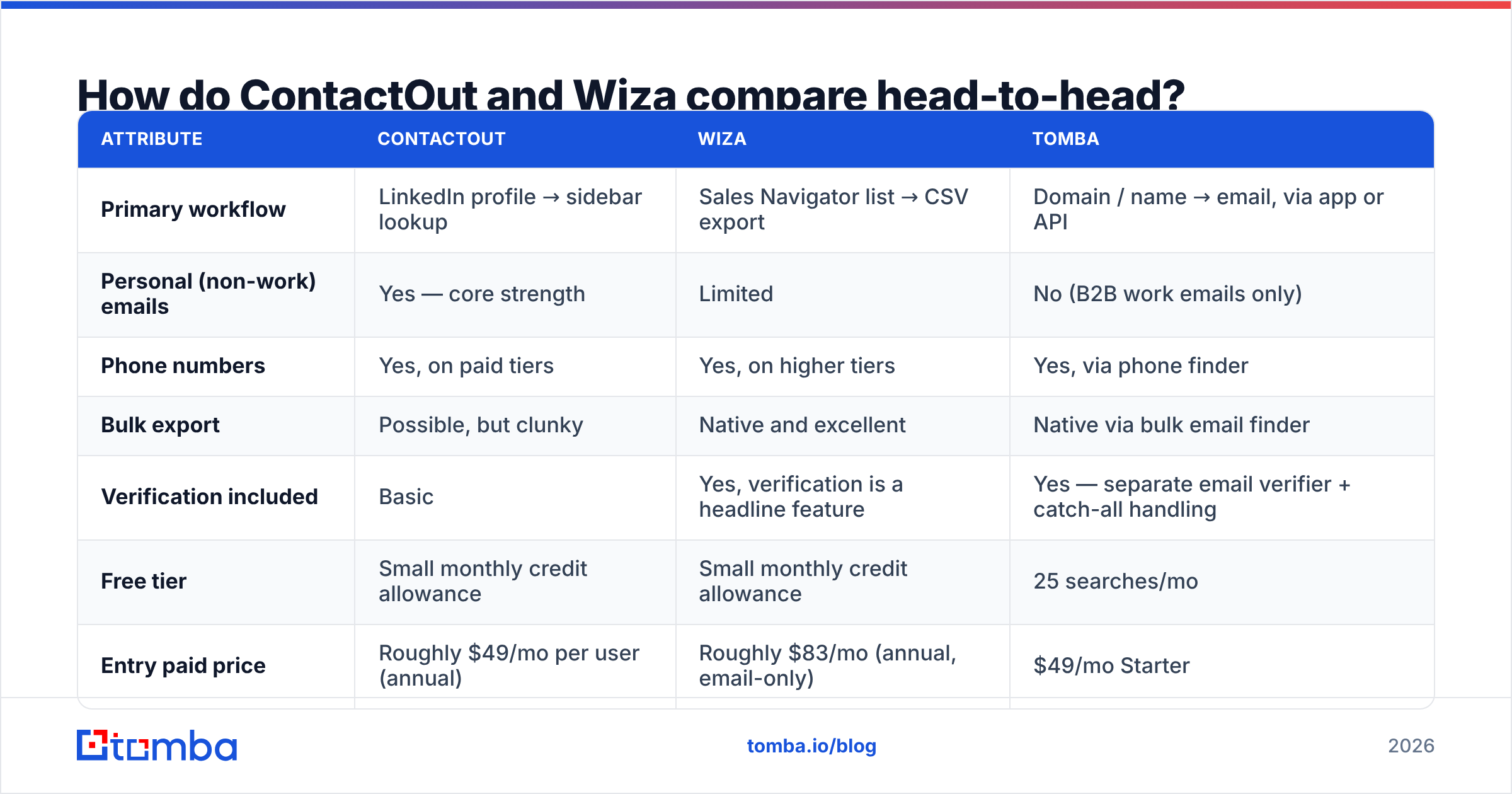
Here is the practical comparison. Pricing moves — always confirm on the vendor's own page before you buy — but the shape of the offer has been stable.
| Attribute | ContactOut | Wiza | Tomba |
|---|---|---|---|
| Primary workflow | LinkedIn profile → sidebar lookup | Sales Navigator list → CSV export | Domain / name → email, via app or API |
| Personal (non-work) emails | Yes — core strength | Limited | No (B2B work emails only) |
| Phone numbers | Yes, on paid tiers | Yes, on higher tiers | Yes, via phone finder |
| Bulk export | Possible, but clunky | Native and excellent | Native via bulk email finder |
| Verification included | Basic | Yes, verification is a headline feature | Yes — separate email verifier + catch-all handling |
| Free tier | Small monthly credit allowance | Small monthly credit allowance | 25 searches/mo |
| Entry paid price | Roughly $49/mo per user (annual) | Roughly $83/mo (annual, email-only) | $49/mo Starter |
| Mid tier | Roughly $99/mo per user | Roughly $166/mo (email + phone) | $99/mo Growth |
| API access | On higher/enterprise plans | Available, credit-metered | On every paid plan, documented |
| Best for | Recruiters, executive search | SDR teams living in Sales Navigator | Ops/growth teams building repeatable systems |
| Weak spot | Per-seat cost, LinkedIn dependency | Cost per lead at volume, LinkedIn dependency | No personal emails, no LinkedIn scraping |
Two things jump out of that table.
First, both tools are structurally dependent on LinkedIn. That is a feature when your ICP lives there and a liability when LinkedIn tightens rate limits, ships a new anti-scraping check, or your extension silently stops resolving profiles mid-campaign. Every LinkedIn-native tool has had at least one bad month; plan for it.
Second, the per-seat model punishes teams. ContactOut's pricing is per user. Wiza's credits are shared but its higher-value data (phones) sits behind a materially more expensive tier. Five reps on either platform is a four-figure monthly line item before you have sent a single email.
Which one is more accurate?#
Accuracy is where vendor marketing gets loose. ContactOut advertises very high coverage figures. Wiza leans on "verified in real time" as its differentiator. Both claims are directionally true and both are measured on data the vendor chose.
What actually matters is your usable-contact rate: of 1,000 credits spent, how many produced an email that (a) exists, (b) belongs to the right person, and (c) does not bounce.

Three patterns hold up across most teams' own tests:
- Work emails at mid-size companies (50–1,000 employees) are the easiest case. Everyone does well here — ContactOut, Wiza, and any competent pattern-based finder all land in a similar band. Do not pay a premium for this segment.
- Enterprise and catch-all domains are where the spread appears. If a domain accepts everything at the SMTP layer, "verified" means very little. Tools that quietly mark catch-all addresses as valid inflate their own accuracy numbers and deflate your reply rate. This is why a dedicated catch-all verifier matters more than another decimal place on a marketing page.
- Personal emails are ContactOut's genuine moat. If you need to reach someone who is between jobs, or a candidate who will never read a work inbox, Wiza is not the tool and neither is a domain-based finder.
The honest framing: accuracy differences between these two are smaller than the difference between a good and bad ICP. A 95% valid list sent to the wrong 500 people still fails.
How do the pricing models really compare at volume?#
Sticker price is not cost. Cost per usable contact is.
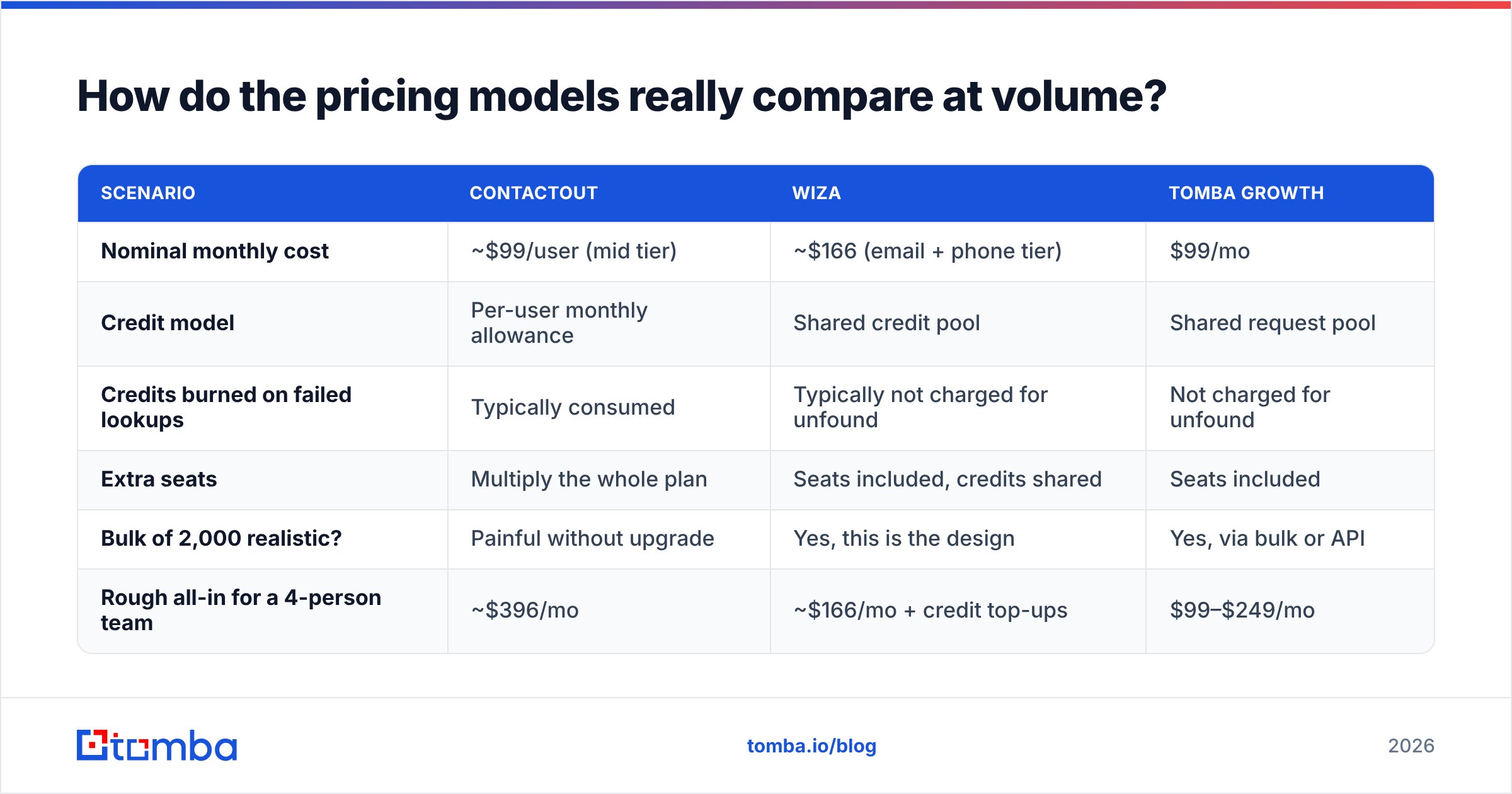
Run the math on a modest month — say you need 2,000 verified work emails for one campaign:
| Scenario | ContactOut | Wiza | Tomba Growth |
|---|---|---|---|
| Nominal monthly cost | ~$99/user (mid tier) | ~$166 (email + phone tier) | $99/mo |
| Credit model | Per-user monthly allowance | Shared credit pool | Shared request pool |
| Credits burned on failed lookups | Typically consumed | Typically not charged for unfound | Not charged for unfound |
| Extra seats | Multiply the whole plan | Seats included, credits shared | Seats included |
| Bulk of 2,000 realistic? | Painful without upgrade | Yes, this is the design | Yes, via bulk or API |
| Rough all-in for a 4-person team | ~$396/mo | ~$166/mo + credit top-ups | $99–$249/mo |
Wiza wins the seat argument outright — a shared credit pool is simply a better model for a sales team than per-seat licensing. ContactOut wins on data types nobody else carries. And an API-first finder wins whenever the work is systematic: enrichment on form fill, nightly CRM hygiene, a Clay or n8n table that runs itself.
Check Tomba pricing against the credit maths above before you assume any of the three is "the cheap one" — the answer genuinely depends on your volume curve.

When should you pick ContactOut?#
Pick ContactOut when the person, not the company, is the unit of work.
- You are recruiting. Personal emails and mobiles are the entire game. Wiza's work-email focus is the wrong shape for candidate outreach.
- You do low-volume, high-value sourcing. Executive search, founder-led hiring, a partnerships motion where you contact 30 carefully chosen humans a month.
- Your team lives on LinkedIn profile pages and will genuinely use a sidebar all day. Extension UX matters when it is your primary interface.
- You need an ATS handoff more than a CRM handoff.
Where ContactOut hurts: per-seat pricing scales badly, bulk work is awkward, and API access is gated to higher plans. If you find yourself exporting from ContactOut into a spreadsheet to do the real work, you bought the wrong tool. Teams in that position usually end up looking at a ContactOut alternative with a proper bulk path.
When should you pick Wiza?#
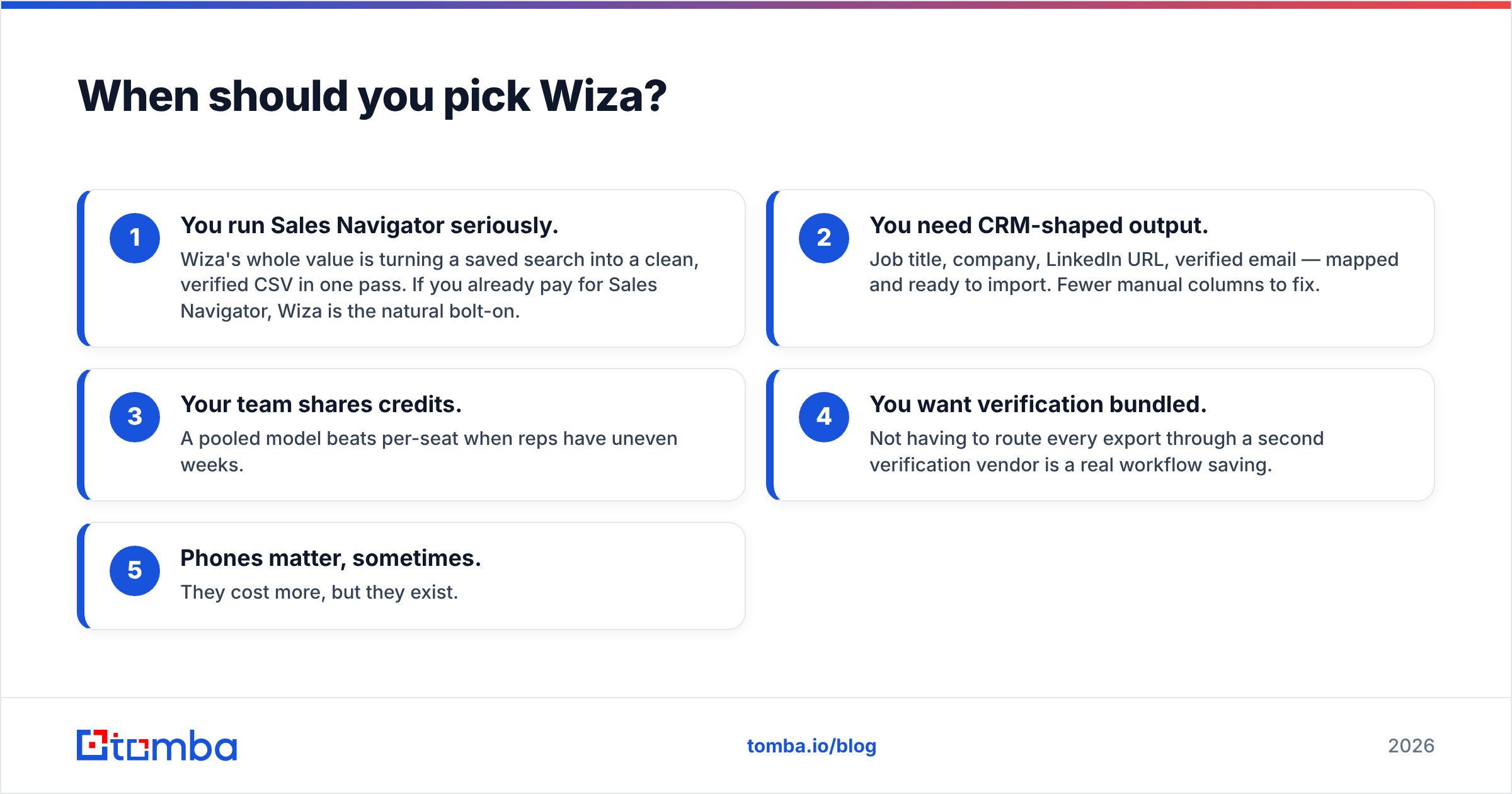
Pick Wiza when the list, not the person, is the unit of work.
- You run Sales Navigator seriously. Wiza's whole value is turning a saved search into a clean, verified CSV in one pass. If you already pay for Sales Navigator, Wiza is the natural bolt-on.
- You need CRM-shaped output. Job title, company, LinkedIn URL, verified email — mapped and ready to import. Fewer manual columns to fix.
- Your team shares credits. A pooled model beats per-seat when reps have uneven weeks.
- You want verification bundled. Not having to route every export through a second verification vendor is a real workflow saving.
- Phones matter, sometimes. They cost more, but they exist.
Where Wiza hurts: the higher tiers get expensive fast, the value proposition collapses if you are not a Sales Navigator shop, and — like ContactOut — you are one LinkedIn policy change away from a bad week. Teams that outgrow it typically want a Wiza alternative that starts from a domain list instead of a LinkedIn search.
Is there a third option most teams overlook?#
Yes — and it is the one that fits how modern GTM teams actually build lists.
Neither ContactOut nor Wiza helps you when your input is a list of 800 company domains from a funding database, an event attendee list, a Crunchbase pull, or your own website's visitor data. Both tools expect LinkedIn to be step one. If it isn't, you are paying a LinkedIn tax on a workflow that has nothing to do with LinkedIn.
That is the gap a domain-first email finder fills:

- Domain search — hand it a company domain, get back every discoverable role-based and named contact, with confidence scores. No LinkedIn tab required.
- API on every paid plan — enrichment that runs inside your product, your CRM, or your automation graph, not inside somebody's Chrome extension. That is the difference between a tool and infrastructure.
- Verification as a first-class step, including catch-all handling, so "valid" means something.
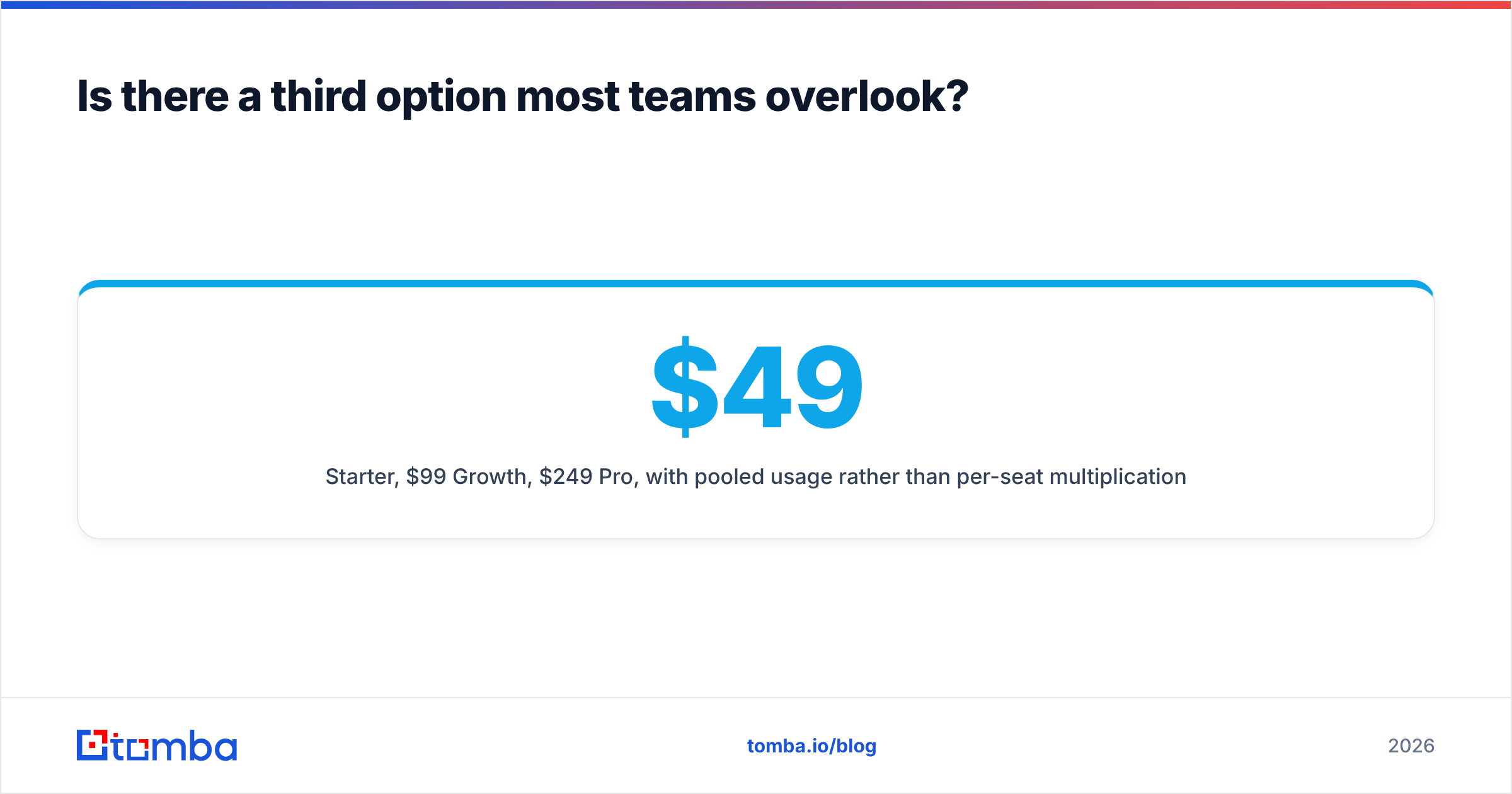
- $49/mo Starter, $99/mo Growth, $249/mo Pro, with pooled usage rather than per-seat multiplication.
To be clear about the trade-off: a domain-first finder will not give you a candidate's personal Gmail, and it will not export a Sales Navigator search. If those are your two core jobs, buy the tool built for them. The point is that a large share of teams evaluating "ContactOut vs Wiza" are actually evaluating the wrong axis — they need enrichment infrastructure, and they are shopping for browser extensions.
What do real users say?#
Read the reviews with a filter on. On G2, the recurring themes are consistent enough to be useful:
- ContactOut — praised for data no one else has (personal emails, mobiles); criticised for price at team scale and for credits that vanish faster than expected.
- Wiza — praised for export quality and time saved; criticised for cost per lead once you are past a few thousand contacts a month, and for dependence on a Sales Navigator seat you must also pay for.
- Both — occasional reports of LinkedIn-side breakage. This is structural, not a bug either vendor can permanently fix.
Notably, neither tool is really competing with the other in most buyers' heads. Recruiters compare ContactOut to SignalHire and Lusha. SDR teams compare Wiza to Apollo and Clay. The "ContactOut vs Wiza" question mostly comes from teams doing both jobs with one budget — and those teams are usually better served by a cheaper core finder plus one specialist tool than by paying full price for two overlapping platforms.
Final verdict: ContactOut vs Wiza in 2026#
| If you are... | Buy |
|---|---|
| A recruiter or executive searcher | ContactOut |
| An SDR team running Sales Navigator | Wiza |
| A growth/RevOps team enriching domains, forms, or CRM records | An API-first email finder |
| A solo founder testing outbound cheaply | Start on a free tier, verify before you send |
| Running both recruiting and sales outbound | ContactOut + a cheap bulk finder, not two premium seats |
The uncomfortable truth is that most of the money teams spend here is wasted on the wrong shape of tool, not on bad data. Match the tool to where your workflow actually begins, and your cost per meeting drops before your accuracy ever does.
Ready to stop paying a LinkedIn tax on your lead list?#
If your prospecting starts with companies rather than profiles, try the Tomba Email Finder. Give it a domain and a name — or just a domain — and get verified work emails with confidence scores, catch-all detection, and an API you can wire into your CRM in an afternoon. The free tier gives you 25 searches a month, Starter is $49/mo, and there is no per-seat penalty for adding your team. Run your next 100 prospects through it alongside ContactOut or Wiza and compare the usable-contact rate yourself — that is the only benchmark that pays your rent.
Related guides#
Ready to find emails that actually work?
Join 150,000+ professionals who stopped guessing and started sending. Free credits on signup — no credit card required.
Get the Tomba newsletter
Practical outbound tactics and product updates — once every two weeks.
About the author