ContactOut vs Xverum 2026: Which B2B Data Tool Wins?
ContactOut sells per-seat LinkedIn contact lookups. Xverum sells bulk B2B data feeds. They solve different problems — and picking the wrong one burns budget fast. Here is the honest breakdown.
TL;DR
- ContactOut and Xverum are not really competitors. ContactOut is a seat-based prospecting tool built around a Chrome extension that reveals emails and phone numbers on LinkedIn profiles. Xverum is a bulk B2B data provider that ships large datasets and feeds to your warehouse.
- Pick ContactOut if individual reps or recruiters need contact details one profile at a time, inside the browser, today.
- Pick Xverum if a data or RevOps team needs millions of company and professional records delivered on a schedule to S3, GCS, or a database — and you have engineers to model them.
- Neither is a great fit if what you actually need is programmatic, per-record email lookup and verification at a predictable price. That is the gap an API-first email finder fills.
- Cost shapes differ hard: ContactOut is priced per seat with credit caps; Xverum is quote-based annual data licensing. Comparing them on "price per email" is where most buyers go wrong.
What is ContactOut, exactly?#
ContactOut is a contact-data tool aimed at recruiters and sales reps who live inside LinkedIn. The product's center of gravity is its browser extension: you open a profile, the sidebar shows candidate personal and work emails plus phone numbers, and you push them into a list, an ATS, or a CRM.
Its public claims center on a very large stored index of professional profiles and emails, with accuracy figures in the high nineties for work email. Those numbers come from the vendor, not an independent audit — treat them the way you would treat any vendor-published accuracy claim. What is verifiable from user reviews on G2 is the shape of the tool: strong on LinkedIn, strong on personal emails (unusual and genuinely useful for recruiting), weaker when you step outside the LinkedIn workflow.
The tradeoffs that show up repeatedly in practice:
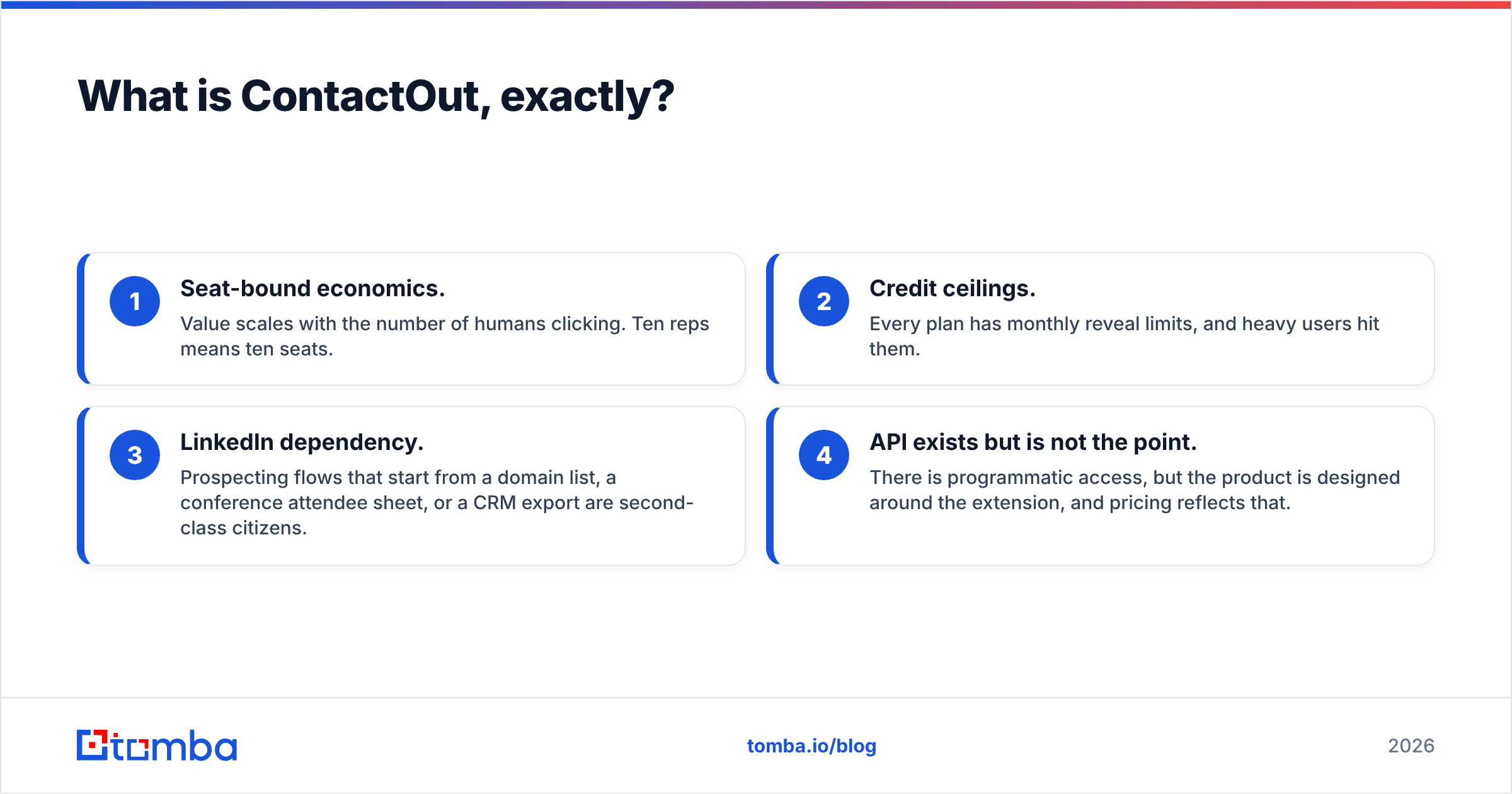
- Seat-bound economics. Value scales with the number of humans clicking. Ten reps means ten seats.
- Credit ceilings. Every plan has monthly reveal limits, and heavy users hit them.
- LinkedIn dependency. Prospecting flows that start from a domain list, a conference attendee sheet, or a CRM export are second-class citizens.
- API exists but is not the point. There is programmatic access, but the product is designed around the extension, and pricing reflects that.
What is Xverum, exactly?#
Xverum sits on the other end of the data supply chain. It is a data-as-a-service provider: company profiles, professional/people profiles, job postings, and local business data, sold as datasets and refreshed feeds rather than as a UI you log into.
You do not "search" Xverum the way a rep searches ContactOut. You define a slice — say, all software companies in the EU with 50-500 employees — and receive it as JSON or CSV on a delivery schedule, dropped into S3, Google Cloud Storage, an SFTP endpoint, or pulled through an API. Volume is the selling point: hundreds of millions of records, updated on a cadence.
That model implies things buyers routinely underestimate:
- You need an engineer. Someone has to ingest, dedupe, model, and maintain the pipeline.
- Contact-level email coverage is not the headline. People-profile data is not the same product as a verified work-email lookup. Coverage varies by geography and seniority, and you own the verification step.
- Contracts are annual and quoted. There is no $49 self-serve door.
- Time to first value is measured in weeks, not the twenty minutes it takes to install an extension.

ContactOut vs Xverum: how do they actually compare?#
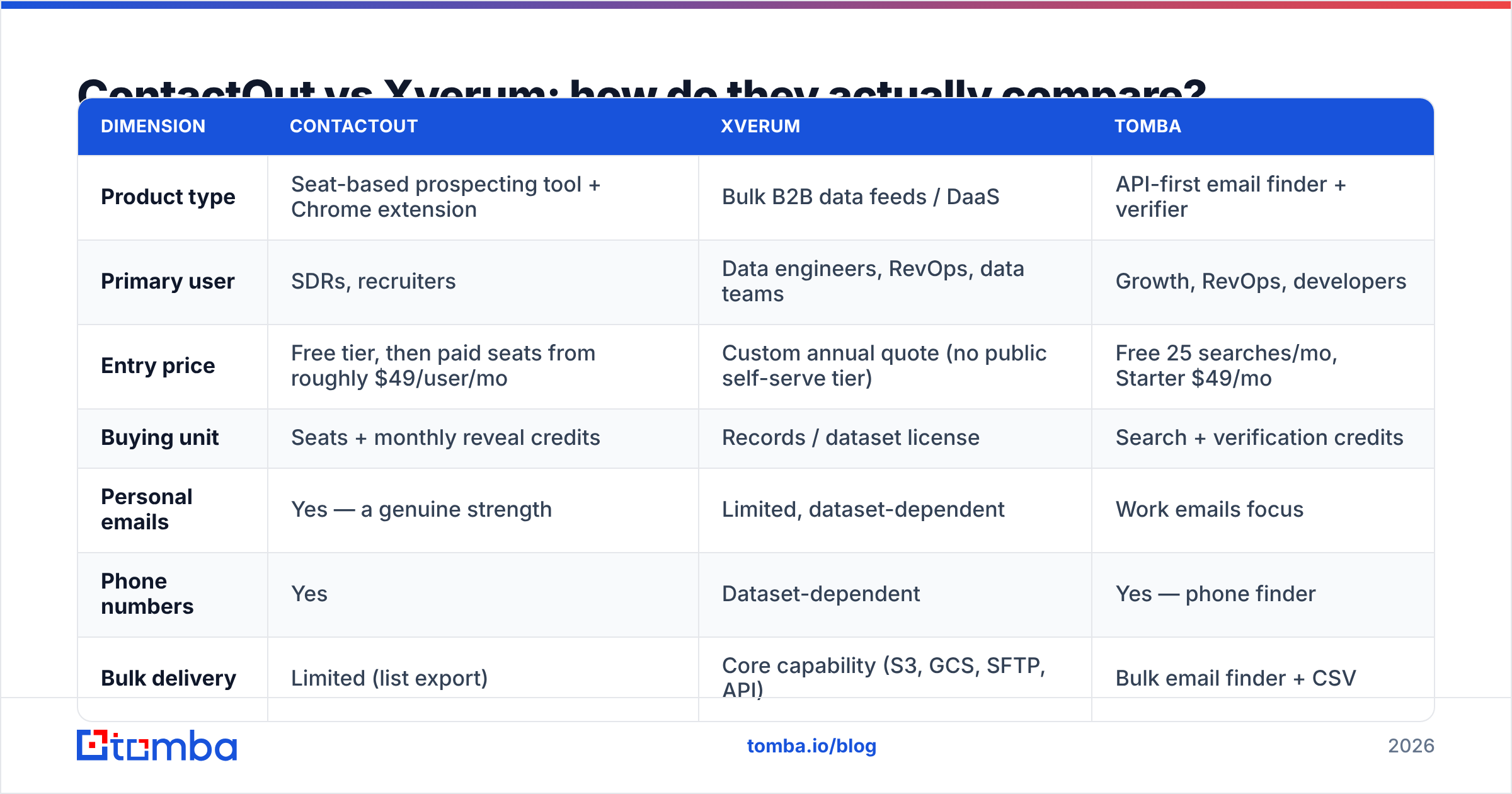
Here is the head-to-head on the dimensions that decide the purchase. Pricing figures reflect publicly listed tiers at the time of writing; both vendors negotiate, and Xverum is quote-only, so treat these as shape-of-cost rather than a quote.
| Dimension | ContactOut | Xverum | Tomba |
|---|---|---|---|
| Product type | Seat-based prospecting tool + Chrome extension | Bulk B2B data feeds / DaaS | API-first email finder + verifier |
| Primary user | SDRs, recruiters | Data engineers, RevOps, data teams | Growth, RevOps, developers |
| Entry price | Free tier, then paid seats from roughly $49/user/mo | Custom annual quote (no public self-serve tier) | Free 25 searches/mo, Starter $49/mo |
| Buying unit | Seats + monthly reveal credits | Records / dataset license | Search + verification credits |
| Personal emails | Yes — a genuine strength | Limited, dataset-dependent | Work emails focus |
| Phone numbers | Yes | Dataset-dependent | Yes — phone finder |
| Bulk delivery | Limited (list export) | Core capability (S3, GCS, SFTP, API) | Bulk email finder + CSV |
| Verification built in | Basic | You verify it yourself | Yes — email verifier with catch-all handling |
| Time to first value | Minutes | Weeks | Minutes (API key) |
| Works without LinkedIn | Weak | N/A | Yes — domain, name, or company |
The pattern is obvious once it is laid out: ContactOut optimizes for the person doing the clicking. Xverum optimizes for the pipeline doing the ingesting. They rarely appear on the same shortlist for a coherent reason. When they do, it usually means the buyer has not yet decided whether they are staffing a manual prospecting motion or building a data asset.

Which one has better data accuracy?#
Wrong question — or at least, an incomplete one. "Accuracy" means different things at each end of the supply chain.
For ContactOut, accuracy means: when the extension shows an email for this profile, does it bounce? That is a per-lookup, point-in-time question. Vendor claims sit in the high nineties. Real-world bounce rates depend heavily on the segment you're working — senior titles at large enterprises index well; SMB, non-US, and high-churn industries index worse.
For Xverum, accuracy means: how fresh and complete is this dataset slice, and how many records are duplicates or stale? You are buying breadth and recency, and you are inheriting the responsibility to check it. A record delivered in a January feed and used in April is three months of job changes away from truth.
Three things that matter more than any vendor's headline percentage:
- Verification recency. An email verified at the moment you send beats an email verified whenever the vendor last crawled. This is the single biggest driver of real bounce rates, and it is why an email verification API in the send path outperforms a fresh-looking CSV.
- Catch-all handling. A large slice of B2B domains accept everything at the SMTP layer. If your provider marks catch-alls as "valid," your reported accuracy is inflated and your reputation pays for it later. Look for an explicit catch-all verifier rather than a silent pass.
- Segment fit. Test on your ICP, not the vendor's demo list. A 200-record sample from your actual target segment tells you more than any published benchmark.

What does each one actually cost?#
This is where the comparison gets slippery, because the two products don't share a unit.
ContactOut's public pricing is per user, per month, with reveal credits attached. A free tier exists with a small monthly allowance. Paid personal plans start in the ~$49/user/month range, with sales and recruiter tiers stepping up from there and team/enterprise pricing on request. The failure mode is predictable: you buy five seats, three reps burn their credits by the third week, and you either upgrade or watch prospecting stall. Cost scales with headcount, not with output.
Xverum does not publish a self-serve price. Data licensing of this type is typically an annual contract, scoped by dataset, volume, refresh cadence, and delivery method. Expect a procurement cycle, a sample-data evaluation, and a number that only makes sense if the data is feeding something durable — a lead-scoring model, a TAM map, an enrichment layer behind your CRM.
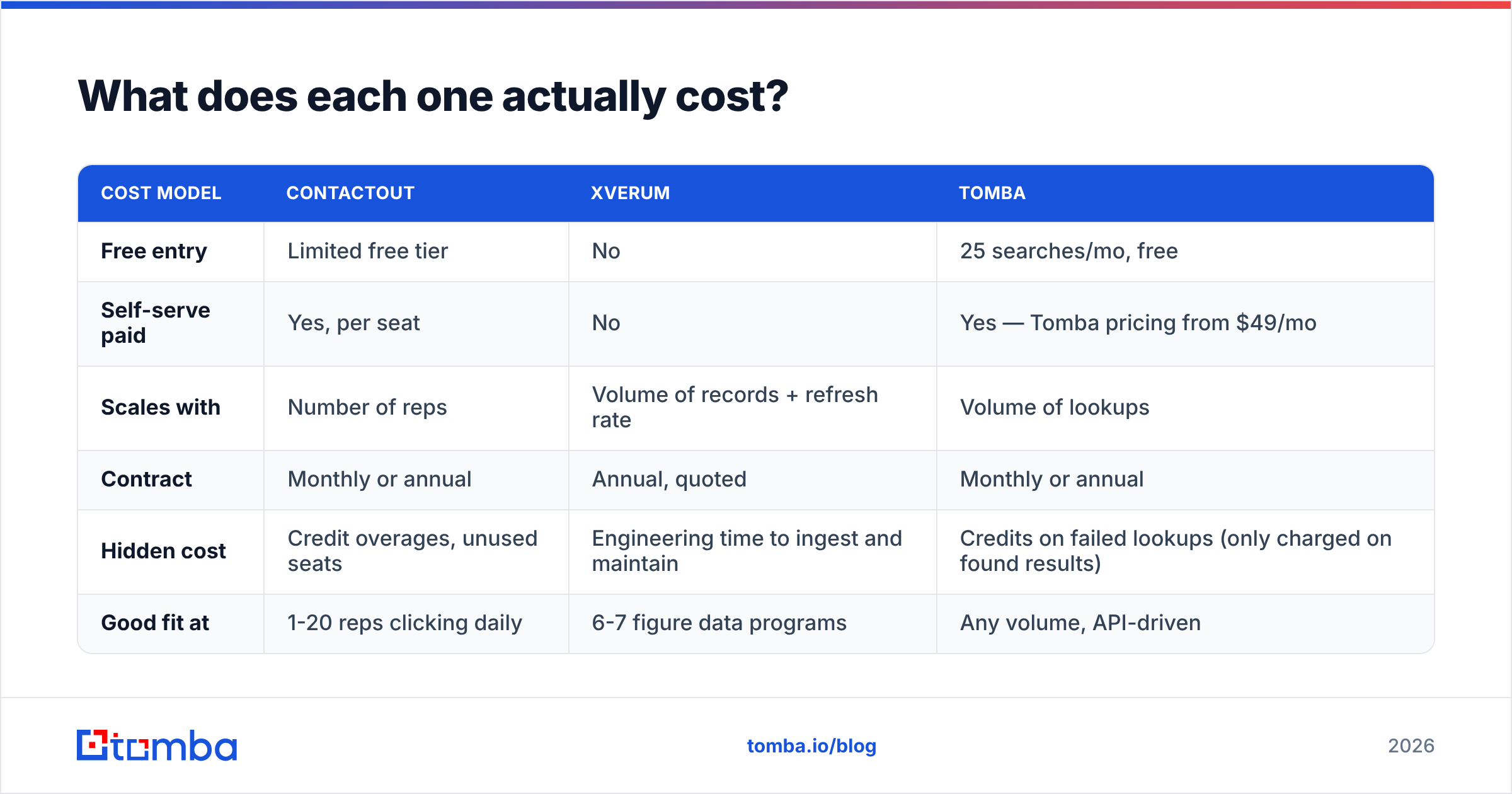
| Cost model | ContactOut | Xverum | Tomba |
|---|---|---|---|
| Free entry | Limited free tier | No | 25 searches/mo, free |
| Self-serve paid | Yes, per seat | No | Yes — Tomba pricing from $49/mo |
| Scales with | Number of reps | Volume of records + refresh rate | Volume of lookups |
| Contract | Monthly or annual | Annual, quoted | Monthly or annual |
| Hidden cost | Credit overages, unused seats | Engineering time to ingest and maintain | Credits on failed lookups (only charged on found results) |
| Good fit at | 1-20 reps clicking daily | 6-7 figure data programs | Any volume, API-driven |
The honest read: if you have five reps and a $500/month budget, Xverum is not a real option and ContactOut probably is. If you are building an enrichment layer for a 50,000-account database, ContactOut's seat model is an absurd way to buy it and Xverum starts to make sense. If you sit between those poles — most companies do — neither shape is quite right.
When should you use something else entirely?#
The middle of that spectrum is large and badly served. You need contact data programmatically, at volume, without hiring a data engineer or buying seats for people who don't exist yet.
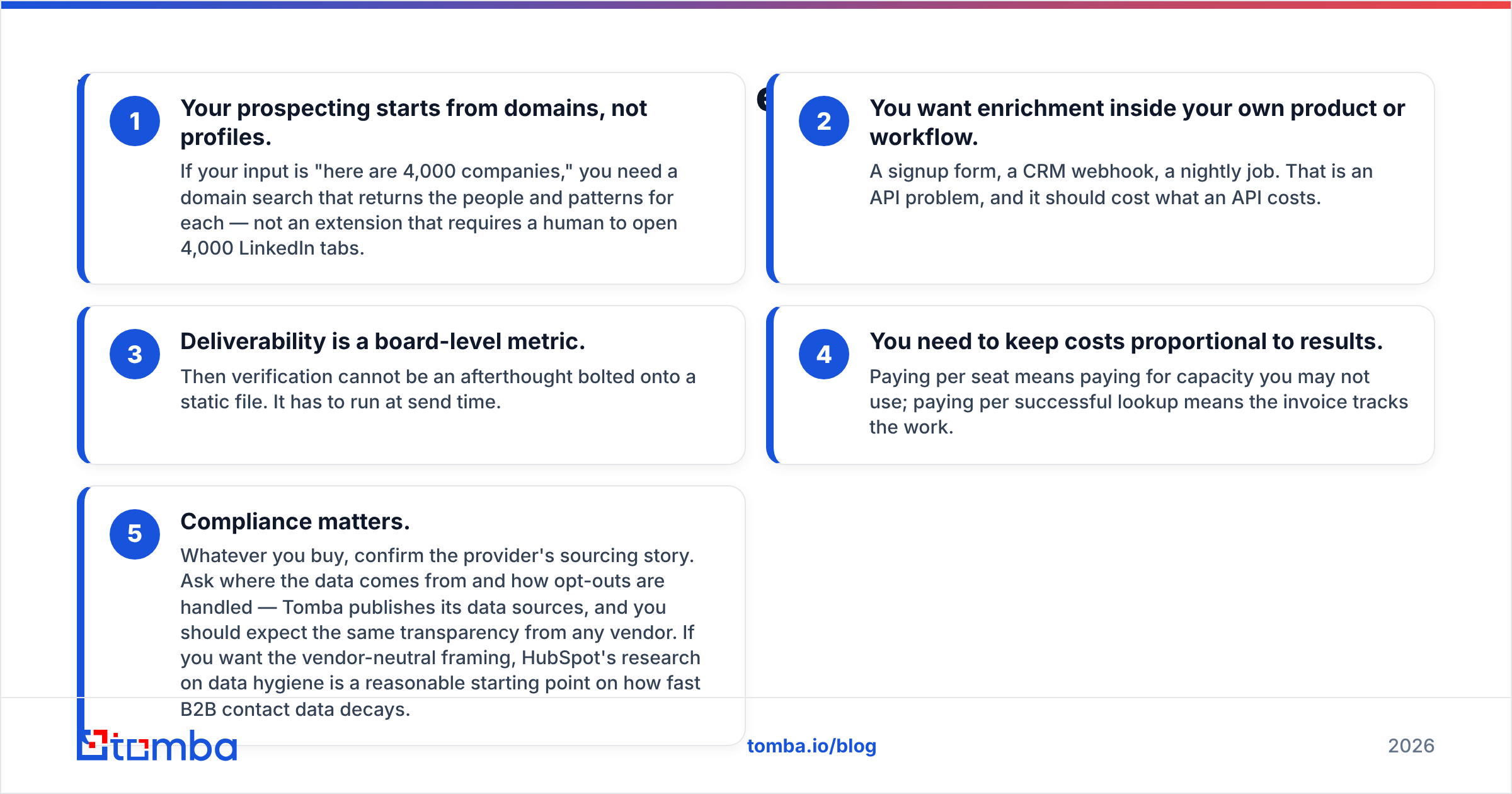
Concretely, look past both tools when:
- Your prospecting starts from domains, not profiles. If your input is "here are 4,000 companies," you need a domain search that returns the people and patterns for each — not an extension that requires a human to open 4,000 LinkedIn tabs.
- You want enrichment inside your own product or workflow. A signup form, a CRM webhook, a nightly job. That is an API problem, and it should cost what an API costs.
- Deliverability is a board-level metric. Then verification cannot be an afterthought bolted onto a static file. It has to run at send time.
- You need to keep costs proportional to results. Paying per seat means paying for capacity you may not use; paying per successful lookup means the invoice tracks the work.
- Compliance matters. Whatever you buy, confirm the provider's sourcing story. Ask where the data comes from and how opt-outs are handled — Tomba publishes its data sources, and you should expect the same transparency from any vendor. If you want the vendor-neutral framing, HubSpot's research on data hygiene is a reasonable starting point on how fast B2B contact data decays.
This is also why so many teams end up running a hybrid: a seat tool for the two reps who genuinely live in LinkedIn, and an API for everything else. That is a legitimate architecture, not an admission of failure — just make sure you are not paying enterprise data-licensing money for the part an API does better and cheaper.
Which should you choose in 2026?#
Decide by motion, not by feature list.
Choose ContactOut if: your team is small, LinkedIn-native, and needs personal emails and mobile numbers for recruiting or founder-led sales. The extension is genuinely good at what it does, and time-to-value is measured in minutes. Just model the credit ceilings honestly before you sign. If the seat math stops working, there are ContactOut alternatives that price on usage instead of headcount.
Choose Xverum if: you have a data team, a warehouse, and a use case that justifies owning a dataset rather than querying one — TAM modeling, ICP scoring, market intelligence, or feeding an internal product. Ask for a real sample, test it against your own ground truth, and budget the engineering time honestly. Feed ingestion is never a one-sprint project.
Choose an API-first email finder if: you want per-record lookups at scale without seats, without a warehouse, and without a procurement cycle. Verification, catch-all detection, and contact enrichment should be one call, not three vendors.
The mistake worth avoiding is buying the shape you like the demo of, rather than the shape your workflow already has. A recruiter who clicks profiles all day and a RevOps lead who runs nightly enrichment jobs are not shopping for the same product, even though both would describe their need as "contact data."
The bottom line#
ContactOut and Xverum both do their jobs. They just do very different jobs, and the "vs" framing hides that. ContactOut is a per-seat prospecting instrument. Xverum is a data supply contract. Neither is optimized for the most common real requirement in B2B: find a verified work email for this person at this company, programmatically, for a price that tracks results.
If that is your requirement, start with the Tomba Email Finder. Find emails by domain, name, or company; verify them before you send, with explicit catch-all handling instead of an optimistic "valid"; and run the whole thing through an API or in bulk. The free tier gives you 25 searches a month to test against your own list — which is the only benchmark that has ever mattered — and paid plans start at $49/month with no seat minimums and no annual data-licensing contract to negotiate first.
Run 200 of your own records through it. Compare the bounce rate to whatever you're using now. Let the number decide.
Related guides#
Ready to find emails that actually work?
Join 150,000+ professionals who stopped guessing and started sending. Free credits on signup — no credit card required.
Get the Tomba newsletter
Practical outbound tactics and product updates — once every two weeks.
About the author