ConvergeHub Pricing, Reviews, Pros and Cons (2026 Guide)
ConvergeHub sells itself as the cheap all-in-one CRM for small teams. Here is what the plans actually cost, where the limits bite, and who should walk away.
TL;DR#
- ConvergeHub pricing starts around $9/user/month (Starter, billed annually) and climbs through Pro (
$29) and Premium ($59) per user, with a white-label tier quoted in the four figures per month. Always confirm current numbers on the vendor's own page — SMB CRM pricing moves. - It is priced as a bundle, not a best-in-class tool. You get CRM + marketing + helpdesk + light billing in one login. Each module is "good enough," none of them is category-leading.
- The value case holds if you are replacing three tools. If you already run HubSpot or Pipedrive well, the switch rarely pays for itself.
- The real cost is not the seat price — it is the data. A CRM does not find or verify contacts. Empty records cost more than the license.
- Reviews are thin. ConvergeHub has a small review footprint on G2 and Capterra compared to Zoho or HubSpot, which raises your due-diligence burden.
What is ConvergeHub, and who is it actually for?#
ConvergeHub is an all-in-one CRM aimed at small and mid-sized businesses that are tired of paying for four subscriptions to do one job. The pitch: sales CRM, marketing automation, customer support, and billing in a single interface, at a per-seat price that undercuts the big players.
That positioning is the whole story. ConvergeHub is not competing with Salesforce on depth or with HubSpot on ecosystem. It is competing on total bill. A 5-person agency running a $9-to-$29 per-seat CRM that also sends campaigns and tracks tickets is spending less than the same agency stitching together Pipedrive + Mailchimp + Zendesk.
The buyer profile that gets real value:
- Teams of 2–20 who need one system of record and cannot justify a RevOps hire.
- Service businesses — agencies, consultancies, local B2B — where the deal cycle is relationship-driven, not volume-driven.
- Companies replacing spreadsheets, not companies migrating off a mature CRM.
- Buyers who want quoting and invoicing near the pipeline, which most cheap CRMs skip entirely.
- Teams who value a single vendor over best-of-breed integrations.
If you are a high-velocity outbound team pushing thousands of touches a month, ConvergeHub will feel underpowered fast. That is not a knock — it is a scope statement.
How much does ConvergeHub cost in 2026?#
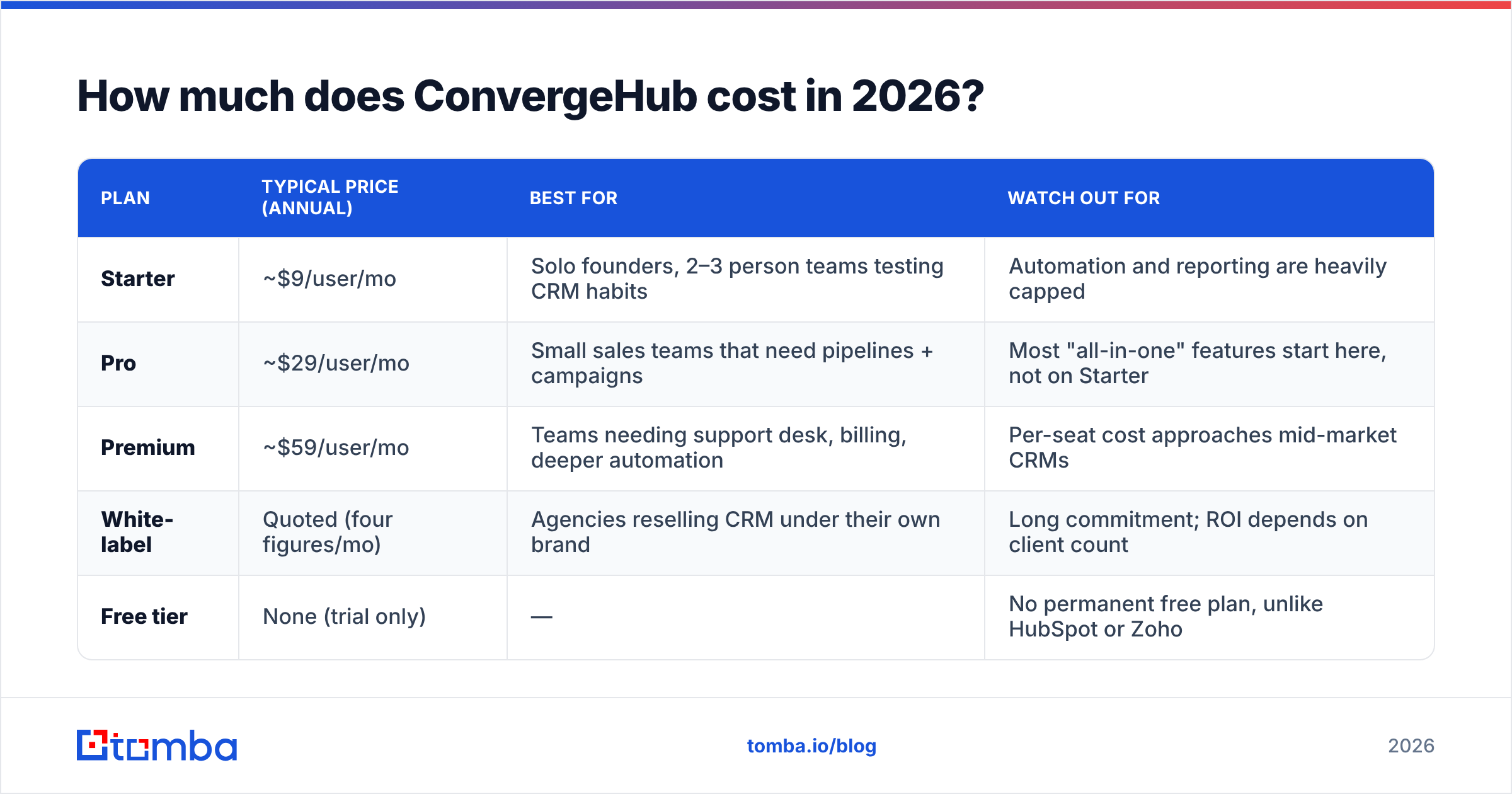
Here is the shape of the pricing, as published on convergehub.com. Treat these as reference points, not contract terms: verify on the vendor page before you budget.
| Plan | Typical price (annual) | Best for | Watch out for |
|---|---|---|---|
| Starter | ~$9/user/mo | Solo founders, 2–3 person teams testing CRM habits | Automation and reporting are heavily capped |
| Pro | ~$29/user/mo | Small sales teams that need pipelines + campaigns | Most "all-in-one" features start here, not on Starter |
| Premium | ~$59/user/mo | Teams needing support desk, billing, deeper automation | Per-seat cost approaches mid-market CRMs |
| White-label | Quoted (four figures/mo) | Agencies reselling CRM under their own brand | Long commitment; ROI depends on client count |
| Free tier | None (trial only) | — | No permanent free plan, unlike HubSpot or Zoho |
Two things matter more than the headline numbers.
First, the annual/monthly gap. Like most SMB SaaS, ConvergeHub's advertised prices assume an annual commitment. Month-to-month costs more. If you are unsure the tool will stick, price the monthly figure into your comparison — otherwise you are comparing an annual-locked price against a competitor's flexible one.
Second, the tier where the product actually becomes "all-in-one." The $9 entry point buys you contacts and a pipeline. The marketing automation, support ticketing, and billing that justify the bundle narrative live higher up. Budget from Pro if the bundle is your reason for buying.

Is ConvergeHub pricing better than the alternatives?#
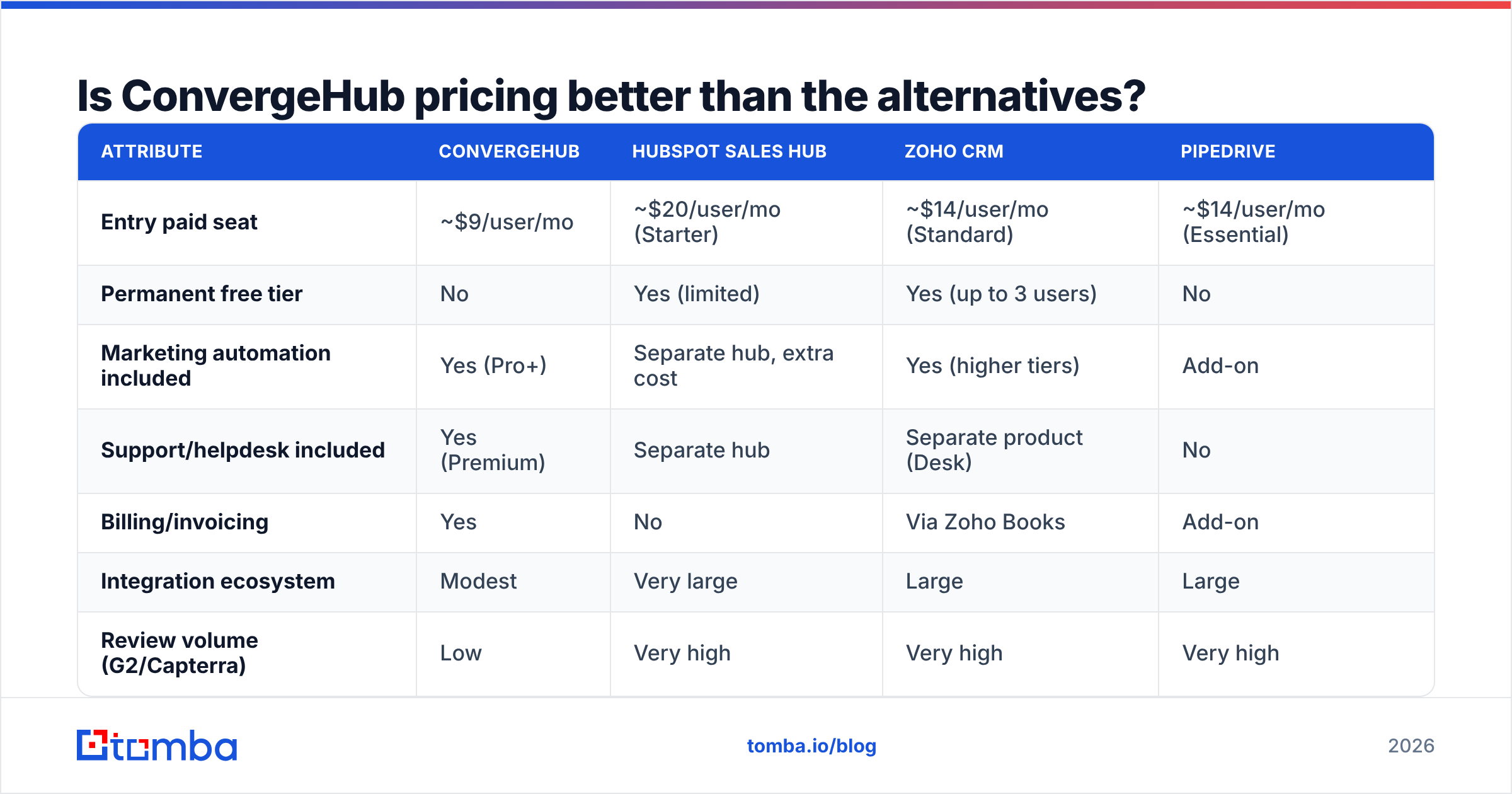
Cheap per seat is not the same as cheap in total. Here is how the economics compare across the SMB CRM shortlist most buyers actually run.
| Attribute | ConvergeHub | HubSpot Sales Hub | Zoho CRM | Pipedrive |
|---|---|---|---|---|
| Entry paid seat | ~$9/user/mo | ~$20/user/mo (Starter) | ~$14/user/mo (Standard) | ~$14/user/mo (Essential) |
| Permanent free tier | No | Yes (limited) | Yes (up to 3 users) | No |
| Marketing automation included | Yes (Pro+) | Separate hub, extra cost | Yes (higher tiers) | Add-on |
| Support/helpdesk included | Yes (Premium) | Separate hub | Separate product (Desk) | No |
| Billing/invoicing | Yes | No | Via Zoho Books | Add-on |
| Integration ecosystem | Modest | Very large | Large | Large |
| Review volume (G2/Capterra) | Low | Very high | Very high | Very high |
| Best for | Bundle-first SMBs | Growth teams wanting ecosystem | Cost-conscious teams wanting depth | Pipeline-first sales teams |
Read that table by column, not by row. ConvergeHub wins on "how many line items disappear from my invoice." HubSpot wins on ecosystem and hiring — you can find people who already know it. Zoho wins on depth-per-dollar. Pipedrive wins on pipeline clarity.
The honest conclusion: ConvergeHub's price advantage is real but narrow. It shows up when you genuinely consolidate. It evaporates the moment you keep your email tool, keep your helpdesk, and use ConvergeHub as "just a CRM" — at which point you are running a low-review-volume product against a market of well-supported alternatives for a difference of a few dollars a seat.
If you want an outside read on that trade-off, the SMB CRM grids on G2 and Capterra are the fastest way to see where each tool clusters on ease-of-use versus feature breadth.
What do ConvergeHub reviews actually say?#
Aggregate ratings for ConvergeHub tend to sit in respectable territory — but on a thin sample. That single fact should shape your evaluation more than any individual star rating.
What reviewers consistently praise:
- Consolidation. Users who came from a three-tool stack repeatedly cite the relief of one login and one contact record.
- Price-to-feature ratio at the Pro tier. For teams under 20 seats, the math works.
- Responsive support. Smaller vendors often out-serve large ones here, and reviews reflect that.
- Quote-to-invoice flow. Rare at this price point and genuinely useful for service businesses.
What reviewers consistently criticize:
- Dated UI. It works; it does not delight. Expect a learning curve that feels heavier than Pipedrive's.
- Shallow integrations. The native connector list is short. Zapier bridges a lot of it, but bridging costs you a subscription and a failure point.
- Reporting limits. Custom reporting is workable, not powerful. RevOps-minded buyers will hit a ceiling.
- Mobile experience. A recurring soft spot in reviews of budget CRMs generally, and ConvergeHub is not the exception.
The due-diligence rule: when a product has few public reviews, run a longer trial and demand two customer references in your size band. A 4.5 rating from 40 reviews carries a fraction of the signal of a 4.3 from 4,000.
What are the real pros and cons of ConvergeHub?#
Stripped of marketing language:
Pros
- Lowest realistic entry price among all-in-one CRMs — the Starter tier is genuinely cheap.
- Four tools, one bill — CRM, marketing, support, billing. For a 10-person shop, that is 3 fewer vendor relationships to manage.
- Built-in quoting and invoicing, which most CRMs at this price treat as an add-on.
- White-label option — a real differentiator for agencies that want to resell CRM under their own brand.
- Small-vendor support — you are more likely to reach a human who can act.
Cons
- No permanent free tier, unlike HubSpot and Zoho. Trial then pay.
- Every module is "good," none is "best." If one function is mission-critical, you will outgrow that module first.
- Small integration ecosystem — plan on Zapier or the API for anything non-obvious.
- Low review volume = higher unknown risk.
- No contact data included. This is the big one, and it deserves its own section.
Why does the CRM bill understate the real cost?#
Because a CRM is a filing cabinet, not a lead source. Whatever you pay ConvergeHub, HubSpot, or Zoho, you are paying for a place to put contacts — not for the contacts themselves.
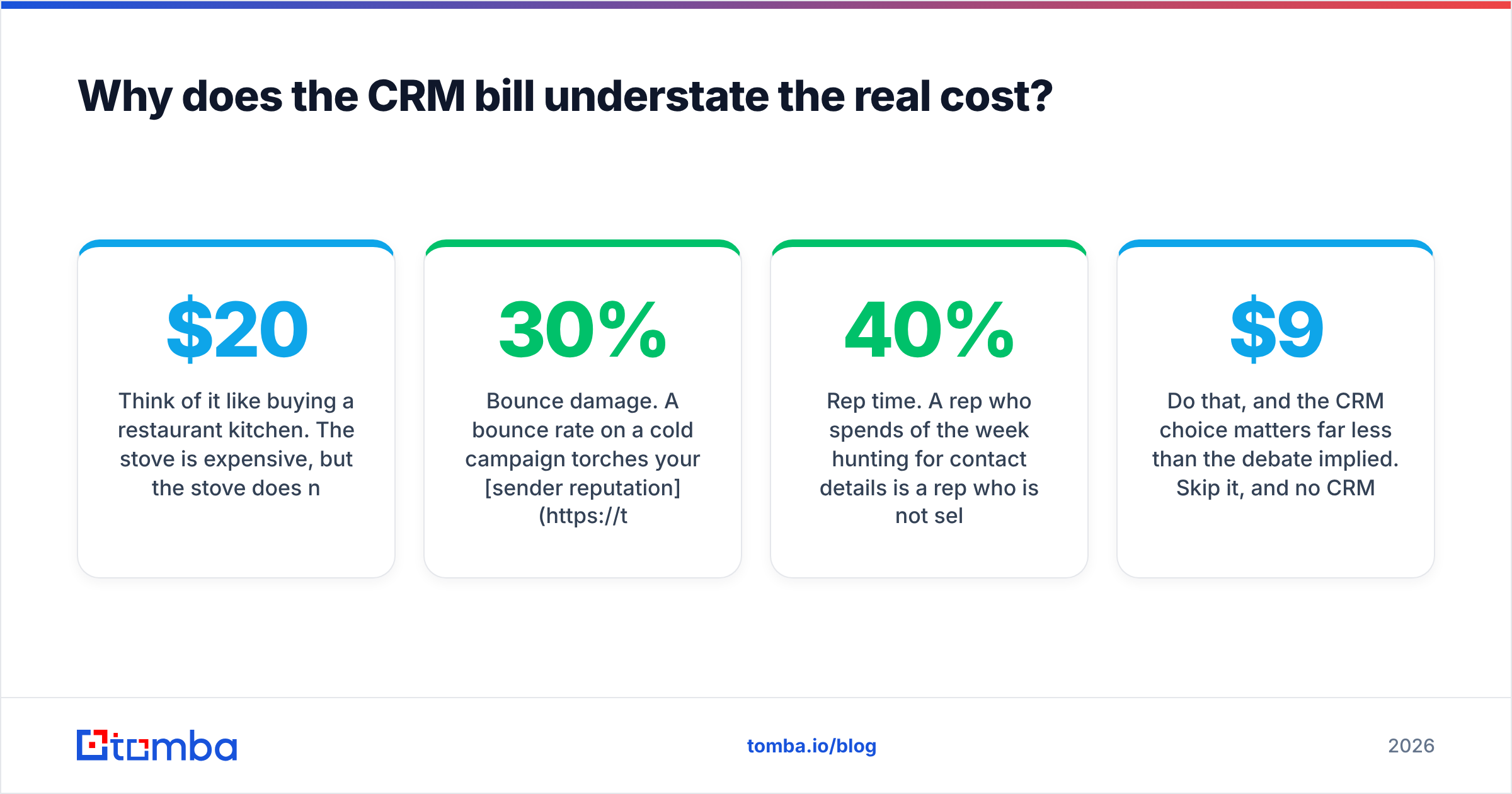
Think of it like buying a restaurant kitchen. The stove is expensive, but the stove does not produce food. The ingredients do. Teams routinely spend six months arguing over a $20/seat CRM difference, then feed the winning system a contact list scraped from a stale spreadsheet where a third of the emails bounce.
Here is what that actually costs:
- Bounce damage. A 30% bounce rate on a cold campaign torches your sender reputation and pushes future mail — including replies to warm leads — into spam. That is a CRM-independent tax on every future send.
- Rep time. A rep who spends 40% of the week hunting for contact details is a rep who is not selling. Your fully-loaded cost per rep dwarfs any CRM seat price.
- Rotten records. B2B contact data decays fast as people change jobs. A CRM does not refresh itself.
The fix is upstream of the CRM. You want a workflow where every record entering ConvergeHub already has a verified email and enriched company context attached:
- Find the contact — use an email finder to resolve names and domains into real professional addresses instead of guessing at
first.last@. - Verify before import — run an email verifier pass so bad addresses never reach your CRM or your sequencer.
- Enrich the record — attach title, company size, and firmographics via data enrichment so your segmentation is not built on blanks.
- Automate the handoff — push clean records into the CRM via the Tomba API or a Zapier step, rather than pasting CSVs by hand.

Do that, and the CRM choice matters far less than the debate implied. Skip it, and no CRM — at $9 or $90 a seat — will save you.
How should you decide?#
Run this sequence rather than a feature checklist.
Step 1 — Count the tools you would actually cancel. Write them down with their monthly cost. If the number is zero or one, ConvergeHub's core value proposition does not apply to you, and you should buy the best single-purpose CRM you can afford instead.
Step 2 — Price the Pro tier, not the Starter tier. Assume you need the bundle features. Multiply by seats, then by 12, then compare to your current stack's annual total. If the saving is under 20%, the migration cost eats it.
Step 3 — Stress-test integrations during the trial. Pick the three systems you cannot live without — your email sender, your accounting tool, your data source. Connect all three. If any requires a custom build, add that to the cost column.
Step 4 — Get two references. Given the thin review base, this is non-negotiable. Ask specifically about reporting limits and mobile use, since those are the recurring complaints.
Step 5 — Fix your data pipeline before you migrate. Importing a dirty list into a new CRM just relocates the problem. Clean, verify, and enrich first; the new system inherits quality instead of debt.
For a broader look at where CRMs sit in the modern go-to-market stack, HubSpot's CRM primer is a useful neutral reference — even if you never buy from them.
Who should skip ConvergeHub entirely?#
Be direct about the disqualifiers:
- High-volume outbound teams. You need deep sequencing, deliverability tooling, and reporting that ConvergeHub does not aim to provide.
- Teams already running HubSpot or Salesforce well. The migration cost — data, training, process rebuild — will exceed years of seat savings.
- Companies with complex, multi-object data models. You will hit the customization ceiling.
- Anyone who needs a permanent free tier to prove the concept internally. Zoho and HubSpot serve that need better.
Final verdict on ConvergeHub pricing#
ConvergeHub is a legitimate, honestly-priced consolidation play for small teams — and a poor fit for everyone else. The pricing is not a trick; the bundle is real. But the seat price is the smallest number in your go-to-market budget, and optimizing it hard while ignoring data quality is the most common expensive mistake in B2B sales ops.
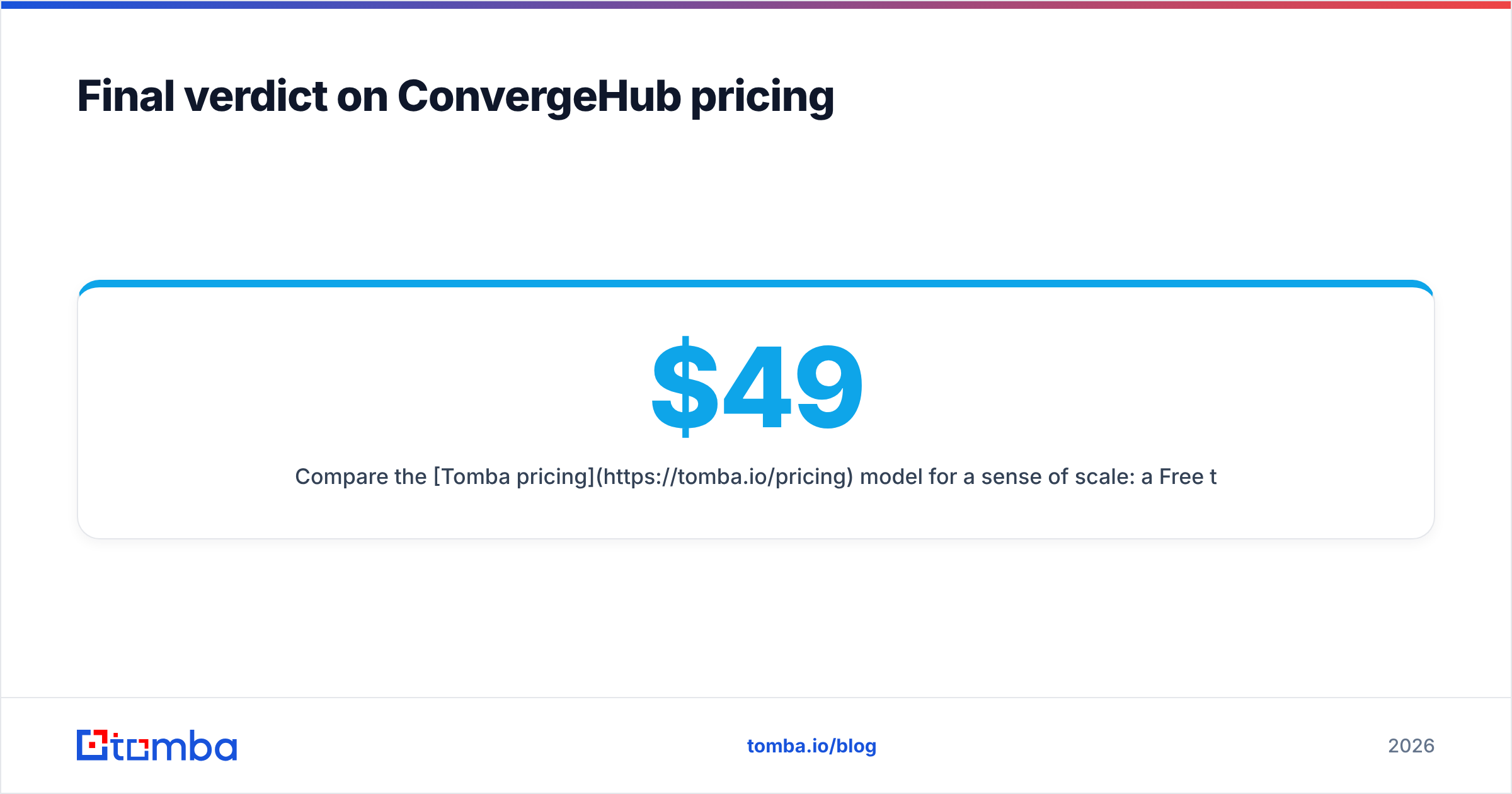
Compare the Tomba pricing model for a sense of scale: a Free tier with 25 searches a month, Starter at $49/mo, Growth at $99/mo, and Pro at $249/mo — that is your entire team's data layer, not a per-seat line item. Against the cost of a single bounced campaign or a rep spending Friday afternoons Googling email formats, it is not a close call.
Pick the CRM that removes the most tools from your invoice. Then feed it properly.
Start with the data, not the CRM. Whichever system you land on — ConvergeHub, HubSpot, Zoho, or a spreadsheet you are not ready to give up — the records inside it decide whether it earns its keep. Tomba Email Finder turns a name and a domain into a verified professional email address, with confidence scoring and sources you can audit, so every contact that lands in your pipeline is one you can actually reach. Try it free with 25 searches a month, then wire it into your CRM via the API when it proves itself.
Related guides#
Ready to find emails that actually work?
Join 150,000+ professionals who stopped guessing and started sending. Free credits on signup — no credit card required.
Get the Tomba newsletter
Practical outbound tactics and product updates — once every two weeks.
About the author