Conversica Pricing, Reviews, Pros and Cons: 2026 Breakdown
Conversica doesn't publish a price list, and that's the first thing you need to understand before you take the demo. Here's what buyers actually pay, what reviewers actually say, and when a cheaper stack wins.
TL;DR
- Conversica does not publish a public price list. Every deal is a custom, quote-based, usually annual contract — expect to negotiate, and expect a floor in the low-to-mid four figures per month.
- Buyers consistently report entry points in the $2,000–$3,000/month range, with mid-market and enterprise deployments landing between $35,000 and $100,000+ per year depending on conversation volume, assistant count, and integrations.
- Reviews on G2 and Capterra are generally positive on lead re-engagement and "dead lead" revival, and consistently critical on price, contract rigidity, and the ramp time needed to tune the AI.
- Conversica is a conversation layer, not a data layer. It nurtures the contacts you already have. It does not find new ones.
- If your bottleneck is "we don't have enough qualified contacts to talk to," a $49/month data stack solves more of your problem than a $36,000/year AI assistant.
What is Conversica, and who actually buys it?#
Conversica sells AI "Revenue Digital Assistants" — autonomous agents that email, text, and chat with your leads on your behalf, hold a multi-turn conversation, qualify interest, and hand a warm human back to your rep. Think of it as a tireless SDR who works your CRM's dormant records at 2am and never gets bored of following up seven times.
The core promise is simple: most B2B companies sit on tens of thousands of leads that a human team will never touch again. Conversica's assistants work that backlog. You can see the product positioning on conversica.com, and it's fair to say the category — autonomous conversational AI for revenue teams — is one they helped define.
Who buys it in practice:
- Mid-market and enterprise marketing teams with large, aging MAP/CRM databases and a real cost of inaction — every untouched MQL is money left on the table.
- Companies with long, human-heavy sales cycles (software, higher ed, automotive, healthcare, financial services) where a qualified conversation is worth thousands of dollars.
- Teams with an SDR capacity problem, not a lead-volume problem — they already have more inbound and dormant records than reps can call.
- Organizations with the ops muscle to tune it — someone has to own the conversation flows, the CRM sync, and the escalation rules.
- Buyers who can sign an annual contract — Conversica is not a swipe-your-card-and-go tool.
If you don't fit at least three of those, the pricing conversation below will feel painful — and that's the honest read.
How much does Conversica cost in 2026?#
Short answer: nobody knows exactly, because there is no published price list — and that's a deliberate strategy, not an oversight.
Conversica uses a fully quote-based, sales-led pricing motion. Pricing scales on some combination of: number of assistants, conversation/contact volume, the modules you enable (email, SMS, chat, website), the number of languages, and integration depth with your CRM and marketing automation platform.
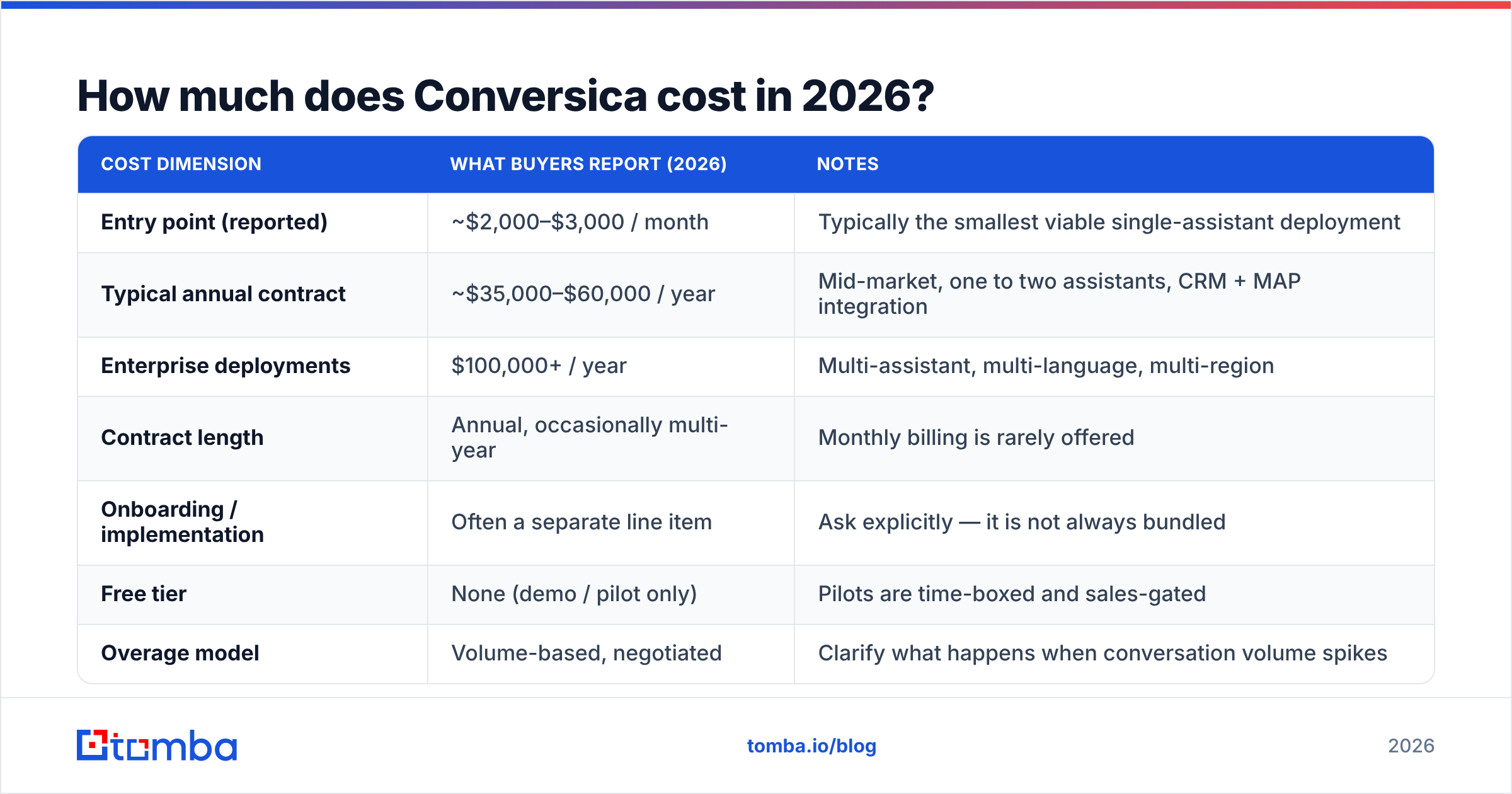
Here's what buyers and review sites consistently report. Treat every number below as a reported range, not a quoted price — get a real quote before you budget.
| Cost dimension | What buyers report (2026) | Notes |
|---|---|---|
| Entry point (reported) | ~$2,000–$3,000 / month | Typically the smallest viable single-assistant deployment |
| Typical annual contract | ~$35,000–$60,000 / year | Mid-market, one to two assistants, CRM + MAP integration |
| Enterprise deployments | $100,000+ / year | Multi-assistant, multi-language, multi-region |
| Contract length | Annual, occasionally multi-year | Monthly billing is rarely offered |
| Onboarding / implementation | Often a separate line item | Ask explicitly — it is not always bundled |
| Free tier | None (demo / pilot only) | Pilots are time-boxed and sales-gated |
| Overage model | Volume-based, negotiated | Clarify what happens when conversation volume spikes |
Three things to interrogate hard on the quote call:
- What counts as a "conversation"? A single lead who replies four times over three weeks — is that one conversation or four? This is the single biggest driver of overage surprises.
- Is onboarding included? Assistant tuning, message library setup, and CRM field mapping are real work. Some quotes bundle it; some don't.
- What's the auto-renewal clause? Multiple reviewers have flagged rigid renewal terms. Read it before you sign it, not eleven months later.
The pattern here is familiar in enterprise SaaS: value-based pricing means the vendor prices to your deal size, not to their cost. If your average contract value is $50,000, expect the quote to reflect that.
What do Conversica reviews actually say?#
Aggregated sentiment across G2 and Capterra is broadly favorable — Conversica generally sits in the 4.0–4.5 star band — but the review body splits cleanly into two piles.
What reviewers praise, repeatedly:
- Dead-lead revival. This is the headline use case and the one people rave about. Teams routinely describe pulling meetings out of leads that were written off 18 months ago.
- Persistence without awkwardness. The assistant follows up 5–8 times without a human feeling weird about it. That alone recovers replies most teams never see.
- Natural-sounding conversations. Prospects frequently don't realize they're talking to an AI — which reviewers report as both the biggest strength and the source of the occasional uncomfortable moment.
- Genuine SDR time savings. Reps stop chasing and start closing. That's the ROI story that gets renewals signed.
What reviewers criticize, repeatedly:
- Price. It is, by a wide margin, the most common complaint. "Great product, hard to justify" is practically a review template.
- Ramp time. Expect 4–8 weeks before conversation quality is where you want it. The AI needs tuning, and tuning needs an owner.
- Reporting depth. Several reviewers want more granular attribution than the native dashboards provide.
- Contract inflexibility. Annual terms and renewal friction come up often enough to be a pattern, not an outlier.
- Garbage-in, garbage-out. This is the one nobody markets and everybody discovers: the assistant is only as good as the contact data you feed it. Bounced, stale, or wrong-person records burn conversation credits and hurt your sending domain.
That last point matters more than its share of review text suggests, and we'll come back to it.
Conversica pros and cons — the honest ledger#
Pros
- Best-in-class at multi-touch, autonomous follow-up on a large existing database.
- Truly hands-off once tuned — it's not a template scheduler, it's a conversation engine.
- Strong CRM/MAP integrations (Salesforce, HubSpot, Marketo) that keep records clean.
- Clear ROI math when your average deal size is large. One recovered $60,000 deal pays for the year.
- Mature, category-defining vendor with real enterprise deployments behind it.
Cons
- Opaque, sales-led pricing with no self-serve entry and no free tier.
- Annual commitment before you've proven value in your own environment.
- Meaningful implementation lift — this is a program, not a plugin.
- Zero value if your database is small, stale, or thin. It amplifies your data; it doesn't create it.
- Overkill for SMB and early-stage teams doing net-new outbound.
How does Conversica compare to the alternatives?#
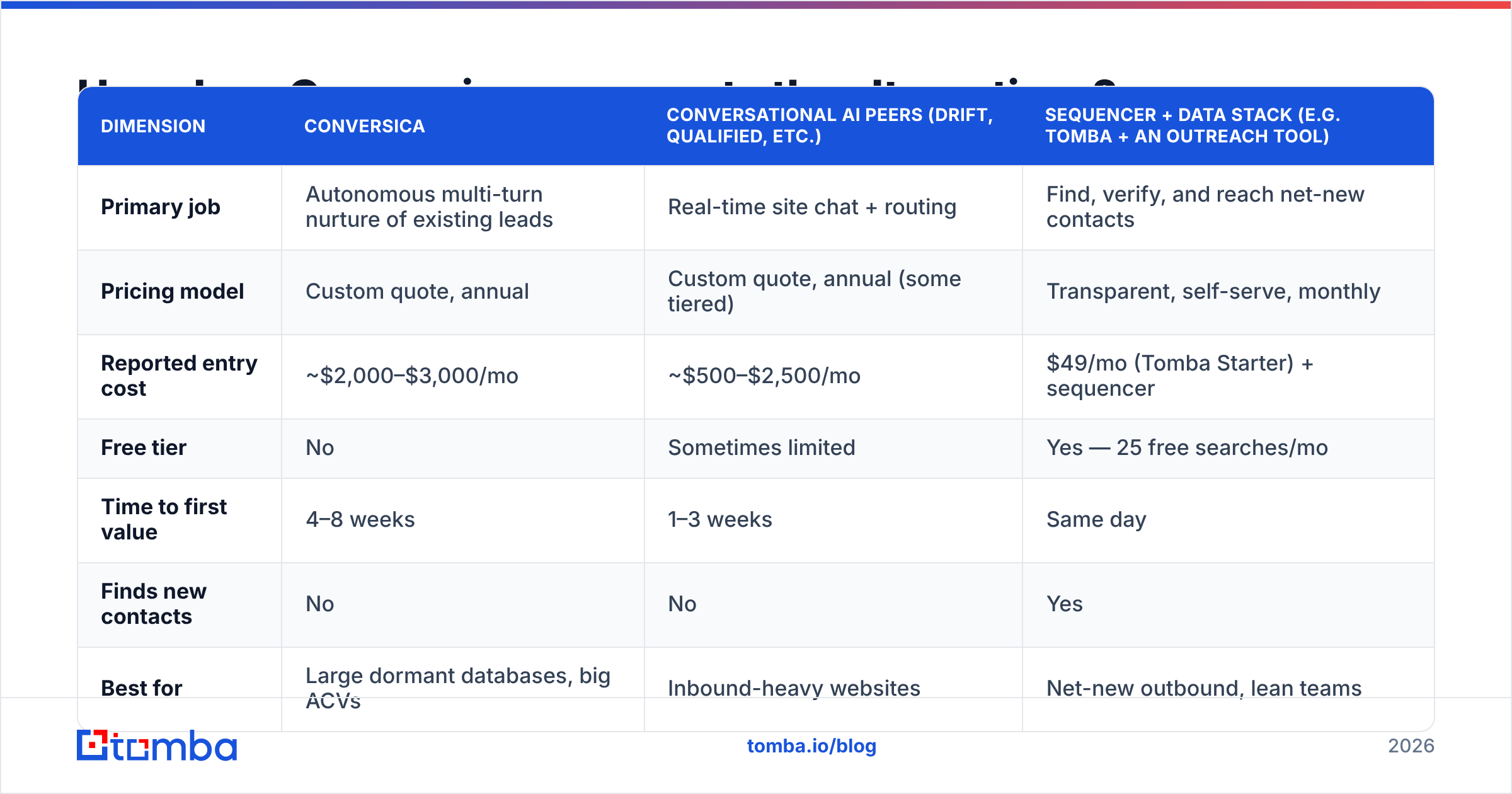
The key thing to understand is that Conversica is competing in two different buyer conversations, and most comparison articles muddle them. Some buyers are choosing between conversational AI vendors. Others are asking a much better question: "is a conversation layer even the right spend right now?"
| Dimension | Conversica | Conversational AI peers (Drift, Qualified, etc.) | Sequencer + data stack (e.g. Tomba + an outreach tool) |
|---|---|---|---|
| Primary job | Autonomous multi-turn nurture of existing leads | Real-time site chat + routing | Find, verify, and reach net-new contacts |
| Pricing model | Custom quote, annual | Custom quote, annual (some tiered) | Transparent, self-serve, monthly |
| Reported entry cost | ~$2,000–$3,000/mo | ~$500–$2,500/mo | $49/mo (Tomba Starter) + sequencer |
| Free tier | No | Sometimes limited | Yes — 25 free searches/mo |
| Time to first value | 4–8 weeks | 1–3 weeks | Same day |
| Finds new contacts | No | No | Yes |
| Best for | Large dormant databases, big ACVs | Inbound-heavy websites | Net-new outbound, lean teams |
| Worst for | Small lists, SMB budgets | Outbound-led motions | Teams with 100k dormant leads and no data gap |
Read that "Finds new contacts" row twice. It's the row that decides the purchase.
Is Conversica worth it for your team?#
Conversica is worth it if all four of these are true:
- You have a real database. 25,000+ contacts sitting in your CRM going cold. If you have 800 leads, an AI assistant has nothing to chew on.
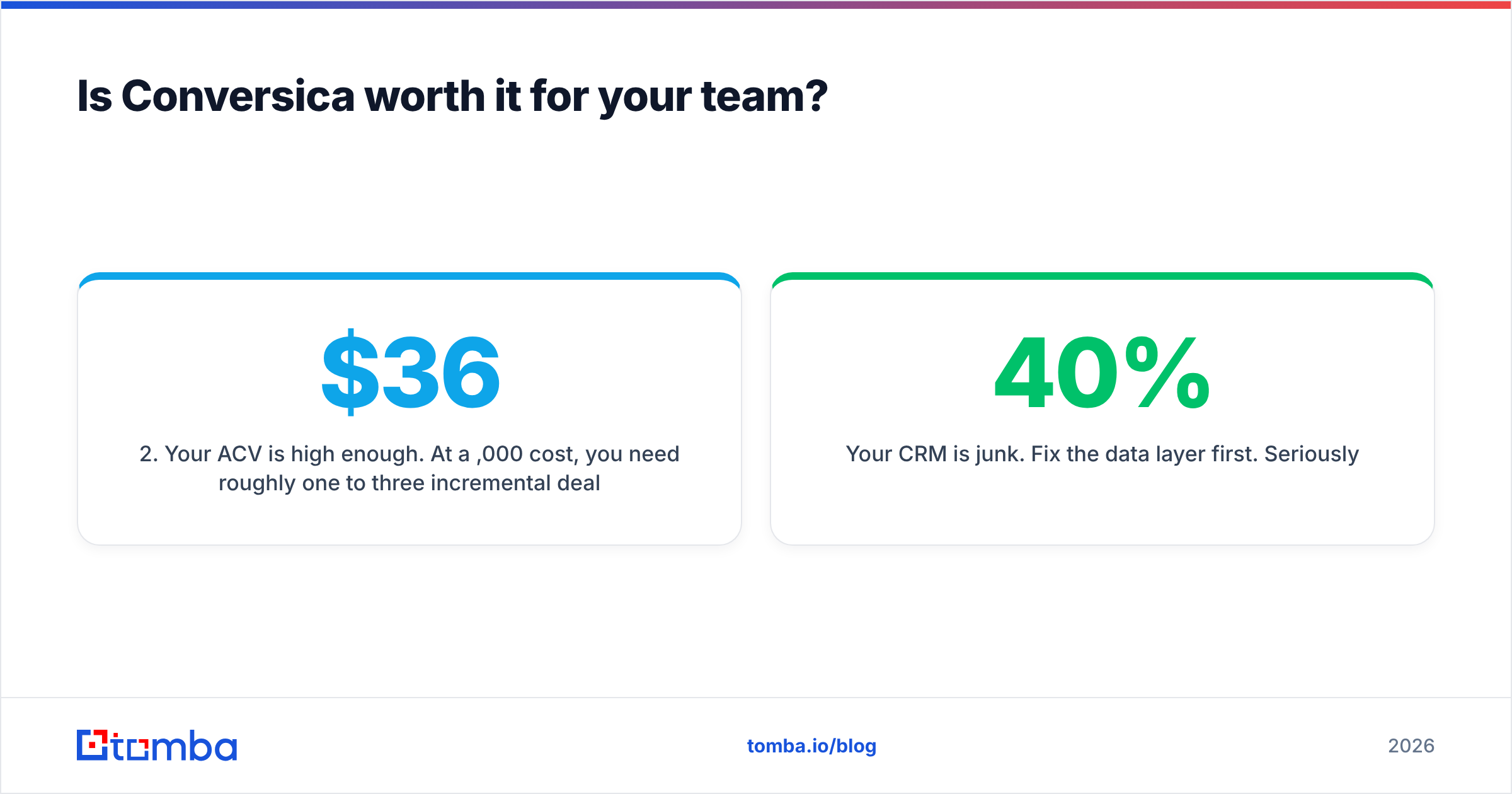
- Your ACV is high enough. At a $36,000/year cost, you need roughly one to three incremental deals to break even. If your average deal is $2,000, you need eighteen. Do that math before the demo, not after.
- You have an owner. Someone in marketing ops needs to own conversation tuning for the first quarter. Without that, you'll get generic output and blame the AI.
- Your contact data is clean. Every dead email the assistant emails is a wasted credit and a small hit to your sender reputation.
Conversica is not worth it if:
- You're an SMB doing net-new outbound. Your problem is finding prospects, not nurturing a backlog.
- You can't sign an annual deal without proving value first — and the pilot terms don't let you.
- Your CRM is 40% junk. Fix the data layer first. Seriously.
- You're hoping AI will fix a positioning or offer problem. It won't. A persistent assistant asking a bad question just gets told no more efficiently.
What should you fix before you buy a conversation layer?#
Here's the uncomfortable truth most AI-assistant vendors won't lead with: the assistant is a multiplier on your contact data, and multipliers work in both directions.
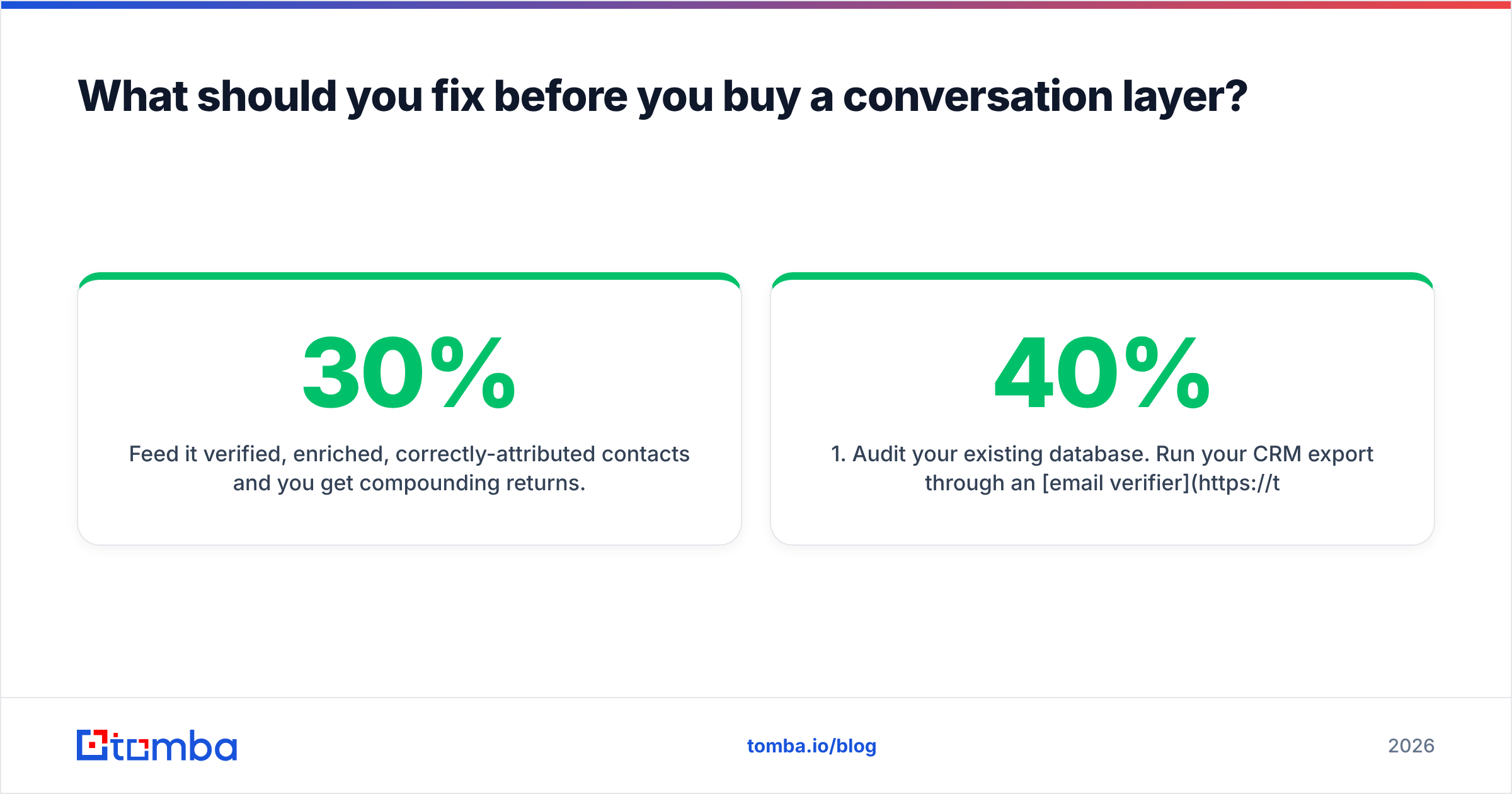
Feed it verified, enriched, correctly-attributed contacts and you get compounding returns. Feed it a list that's 30% bounced and 20% wrong-person and you get burned credits, a damaged domain, and a renewal conversation you don't want to have.
So the sequencing that actually works looks like this:
- Audit your existing database. Run your CRM export through an email verifier and find out what percentage is actually deliverable. Most teams are shocked. Assume 20–40% decay per year on a list you haven't touched.
- Fill the gaps. Half your records probably have a company and a name but no valid work email or a role that's changed. Data enrichment fixes that for a fraction of a conversation-AI seat.
- Add net-new volume. If your database is too small for an AI assistant to be economical, that's not an AI problem — it's a sourcing problem. A domain search across your ICP account list will build a targetable base faster than any nurture tool can revive one.
- Then, and only then, buy the conversation layer. Once your data is clean and your volume is real, Conversica's economics get dramatically better — because every dollar of conversation spend lands on a contact who exists.
Companies that skip step 1 and buy step 4 are the ones writing the "great product, couldn't justify the cost" reviews. The product wasn't the problem.
For a broader view on where conversational AI fits in a modern revenue stack, HubSpot's research on sales AI adoption is a useful neutral read, and it consistently shows the same thing: teams that see ROI from AI are the ones who cleaned their CRM first.
Frequently asked questions about Conversica pricing#
Does Conversica have a free trial? Not a self-serve one. You can get a demo and, in some cases, a time-boxed pilot, but both run through their sales team. There is no free tier you can sign up for with a credit card.
Is Conversica pricing negotiable? Yes. Quote-based enterprise pricing almost always is. Leverage comes from contract length, volume commitments, and end-of-quarter timing.
What's the cheapest way to get started with Conversica? A single assistant on a single use case (usually inbound MQL follow-up) with the smallest defensible conversation volume. Expand later — do not buy multi-assistant on day one.
Does Conversica find email addresses? No. It works with contacts already in your CRM or uploaded by you. Sourcing and verifying those contacts is a separate job — that's the data layer.
Is Conversica better than hiring an SDR? Different tools. An SDR does discovery, calls, and judgment. Conversica does relentless, scalable follow-up. Most teams that succeed with it use both — the assistant qualifies, the human closes.
Fix the data layer first — it's the cheaper half of the problem#
If you've read this far, you probably already know which side of the line you're on. If you have 50,000 dormant leads and a $50,000 ACV, book the Conversica demo and negotiate hard on conversation definitions and renewal terms.
But if the real gap is that you don't have enough verified, reachable, correctly-targeted contacts to justify a five-figure conversation platform — start there. Tomba Email Finder finds and verifies professional email addresses by name, domain, or company, so every contact you hand to an AI assistant, a sequencer, or a human rep is one that actually exists. It's free to try with 25 searches a month, and Tomba pricing starts at $49/month — roughly 1.5% of a reported Conversica entry quote, and it solves the problem that has to be solved first.
Clean data makes expensive AI look brilliant. Dirty data makes it look like a bad purchase. Choose your order of operations accordingly.
Related guides#
// get started
Find, verify and enrich your first contacts today
Start on the free plan with 25 searches a month, then scale when your team is ready.
Free plan · No credit card required · GDPR & CCPA
// about the author