Copper CRM Pricing 2026: Reviews, Pros and Cons Explained
Copper is the CRM that lives inside Gmail — but the per-seat math gets steep fast. Here is an honest breakdown of Copper pricing, real user reviews, and the pros and cons before you commit a team.
TL;DR
- Copper is a Google Workspace-native CRM. Its whole pitch is that reps never leave Gmail — and on that promise, it genuinely delivers.
- Pricing is per seat, billed annually, and climbs steeply: roughly $12/user/mo on Starter up to about $134/user/mo on Business. Monthly billing costs meaningfully more.
- Reviews on G2 and Capterra cluster around the same story: loved for Gmail integration and ease of onboarding, criticized for reporting depth, workflow limits, and price-to-value at the top tiers.
- The biggest hidden cost isn't the license — it's that Copper does not find or verify contact data. You still need a separate prospecting layer.
- Best fit: 5–30 person teams already living in Google Workspace who value speed over configurability. Worst fit: teams that need heavy custom objects, deep forecasting, or 100+ seats.
What is Copper CRM, and who is it actually for?#
Copper (formerly ProsperWorks) is a CRM built as a layer on top of Google Workspace. Instead of asking reps to open a separate tab and re-type what they just emailed, Copper sits inside Gmail as a sidebar: it logs threads, suggests contacts it found in your inbox, and lets you move a deal down the pipeline without leaving the message you're reading.
Think of it like a smart notebook clipped to the inside cover of the book you're already reading. It doesn't ask you to change where you work; it just quietly writes things down. Technically, it's a relationship-management database with native Gmail, Calendar, and Drive sync, plus pipelines, tasks, and automation on top.
That design choice defines the whole product — and both its pros and its cons:
- Adoption is the selling point. Copper's own positioning and most user reviews agree: reps actually use it because they don't have to remember to. That solves the number one reason CRMs fail.
- It's opinionated, not configurable. You get pipelines, people, companies, opportunities, projects. You do not get Salesforce-grade custom objects.
- It's Google-first, and everything else second. If your company runs on Microsoft 365, Copper is the wrong tool. Full stop.
- It's priced like a mid-market CRM but scoped like an SMB one. That tension is where most of the negative reviews come from.
- It assumes you already have the contacts. Copper organizes relationships; it does not source them. That's a real budget line you have to plan for separately.
If you're evaluating CRM options for a Google-native team of five to thirty, Copper belongs on your shortlist. If you're 150 reps with a RevOps function and custom forecasting models, this review will save you a demo.
How much does Copper cost in 2026?#
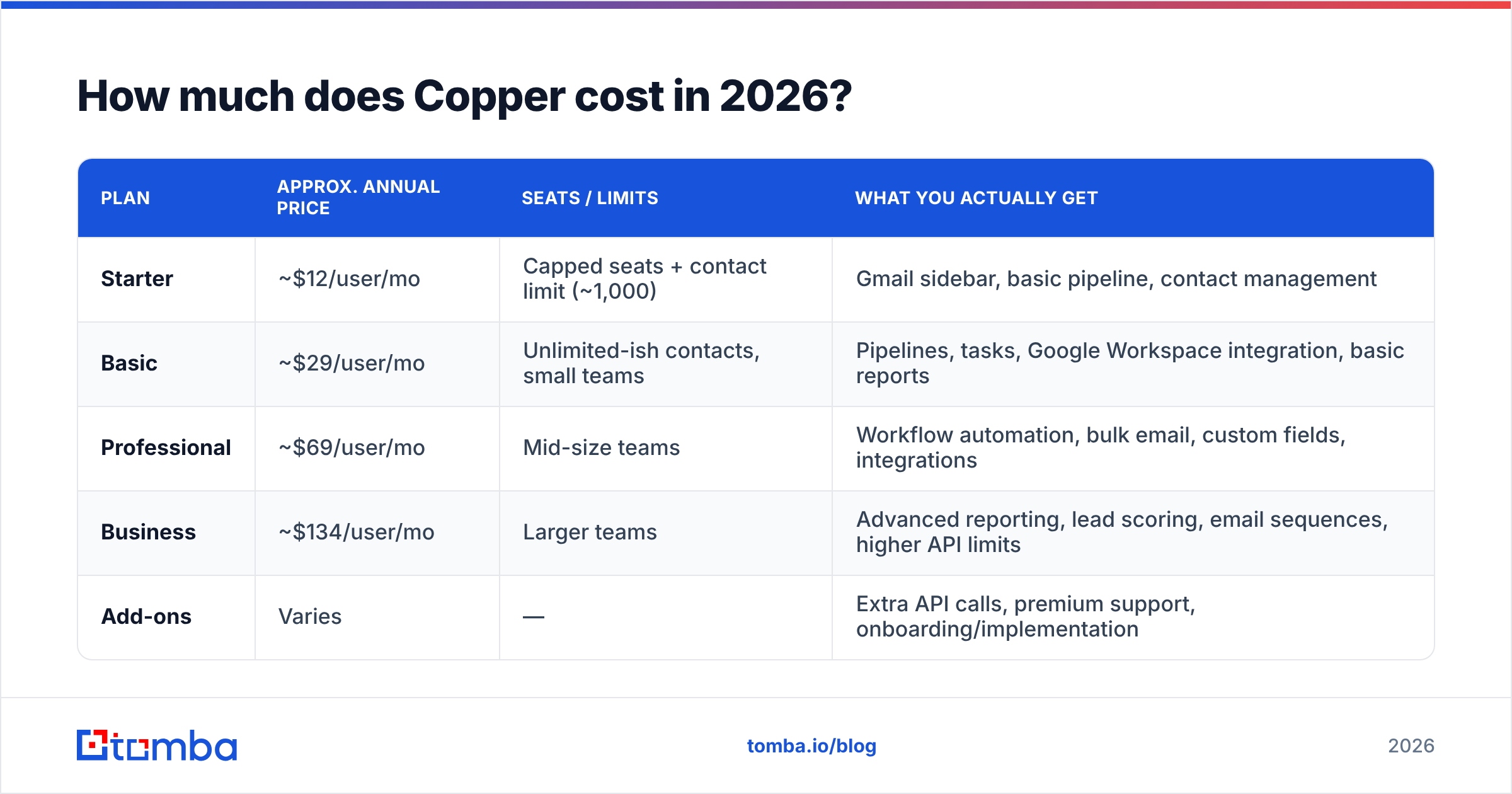
Copper prices per user, per month, and the discount for paying annually is significant — monthly billing typically runs 20–25% higher. Here are the published plans at the time of writing. Copper adjusts pricing periodically, so treat this as a planning baseline and confirm the current numbers on copper.com before you sign.
| Plan | Approx. annual price | Seats / limits | What you actually get |
|---|---|---|---|
| Starter | ~$12/user/mo | Capped seats + contact limit (~1,000) | Gmail sidebar, basic pipeline, contact management |
| Basic | ~$29/user/mo | Unlimited-ish contacts, small teams | Pipelines, tasks, Google Workspace integration, basic reports |
| Professional | ~$69/user/mo | Mid-size teams | Workflow automation, bulk email, custom fields, integrations |
| Business | ~$134/user/mo | Larger teams | Advanced reporting, lead scoring, email sequences, higher API limits |
| Add-ons | Varies | — | Extra API calls, premium support, onboarding/implementation |
A few things the table doesn't say out loud:
- The jump from Basic to Professional is where most teams land, because workflow automation and bulk email are on Professional — and those are the features people assume are in a CRM by default.
- Business is the price shock. At roughly $134/user/mo annually, ten reps costs about $16,000/year before you add a single other tool. That is Salesforce Sales Cloud territory, and reviewers say so.
- Annual commitment is the default. The advertised prices assume you pay 12 months up front. Month-to-month exists but erodes the value case quickly.
- API limits are tiered. If you plan to push enriched data into Copper programmatically, check the call ceiling on your plan before you build the integration.
What are the hidden costs nobody quotes you?#
The license is the visible number. These are the ones that show up in month three:
- Data acquisition. Copper does not include a contact database or an email finder. Every net-new prospect has to come from somewhere else.
- List hygiene. Bad emails poison your sender reputation and quietly wreck deliverability. Copper won't validate them — you need an email verifier in the stack.
- Implementation. Copper is easy for a five-person team to self-onboard. Above twenty seats, you'll likely pay for onboarding or burn internal RevOps hours.
- Middleware. Non-Google tools often connect through Zapier or Make, which is another subscription.
- Seat creep. Per-seat pricing punishes you for giving CS, marketing, or finance read access. Teams routinely underprovision seats and then share logins, which is its own mess.
What do Copper reviews actually say?#
Pull the review sites and the pattern is remarkably consistent. On G2 and Capterra, Copper sits in a solid-but-not-elite band — typically in the low-to-mid 4s out of 5 — with praise and complaints that barely vary from year to year.
What reviewers consistently praise:
- The Gmail sidebar. Rated as the single best thing about the product, over and over. Logging activity is nearly frictionless.
- Onboarding speed. Teams report being productive in days, not weeks. Compared to a Salesforce implementation, that's not a small thing.
- Clean UI. Copper looks like a Google product, which lowers the cognitive tax for anyone already in Workspace.
- Support responsiveness. Generally rated well on the paid tiers.
What reviewers consistently criticize:
- Reporting depth. The most common complaint by a mile. Reports are serviceable for pipeline snapshots and weak for cohort analysis, attribution, or custom forecasting. Many teams export to Sheets and rebuild there.
- Automation ceilings. Workflow automation exists on Professional and up, but it's rule-based and shallow compared to HubSpot or Pipedrive.
- Price-to-value at Business tier. Reviewers who moved up to Business frequently say they didn't get $134/user worth of extra product.
- Search and bulk editing. Recurring friction points in mid-size accounts with messy data.
- Non-Google workflows. If part of your org is on Outlook, half the value evaporates.
The fair summary: Copper is very good at the narrow job it chose, and average-to-below-average at everything a CRM is also expected to do. Whether that's a bug or a feature depends entirely on your team.
What are the real pros and cons of Copper?#
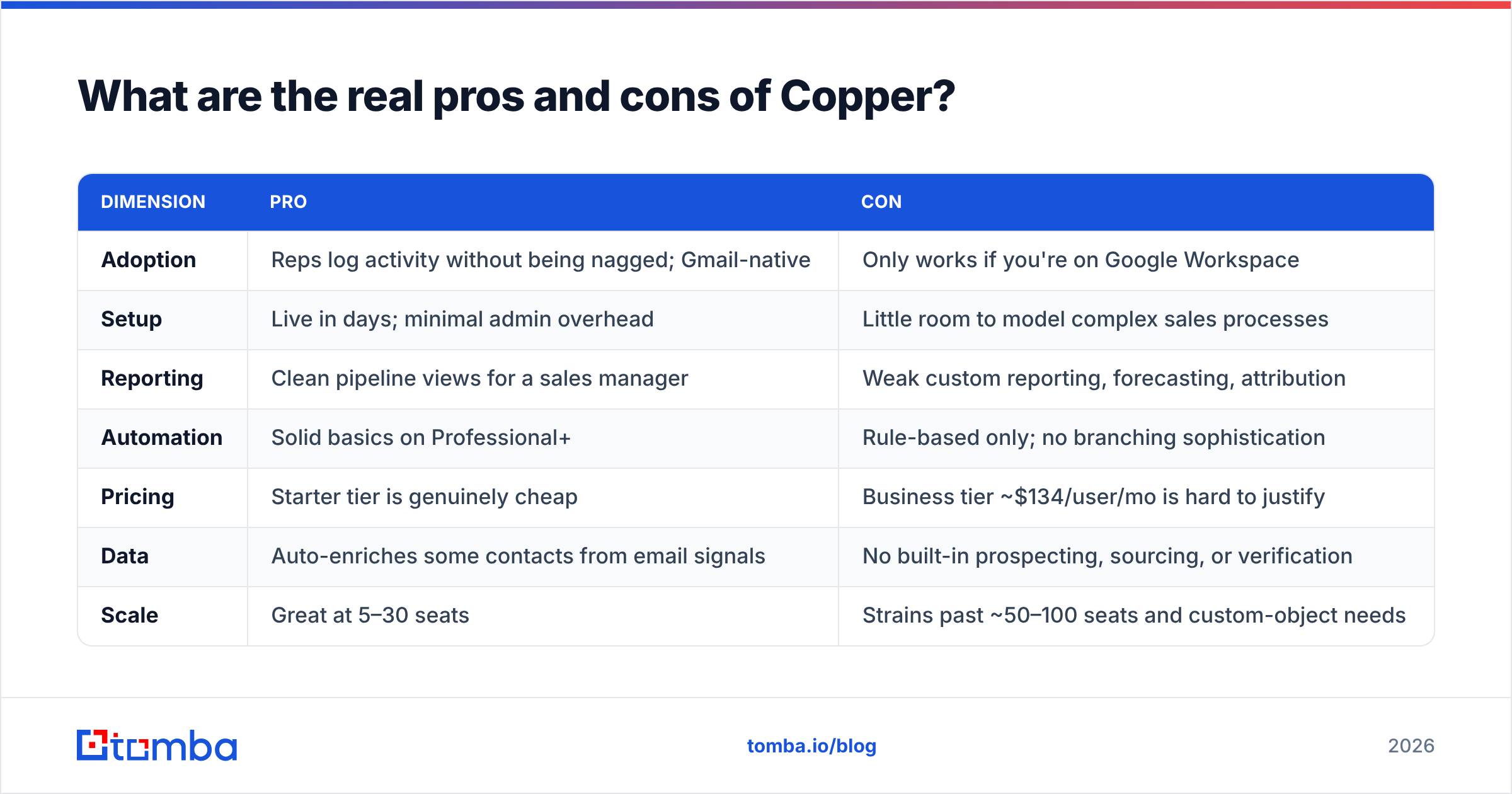
| Dimension | Pro | Con |
|---|---|---|
| Adoption | Reps log activity without being nagged; Gmail-native | Only works if you're on Google Workspace |
| Setup | Live in days; minimal admin overhead | Little room to model complex sales processes |
| Reporting | Clean pipeline views for a sales manager | Weak custom reporting, forecasting, attribution |
| Automation | Solid basics on Professional+ | Rule-based only; no branching sophistication |
| Pricing | Starter tier is genuinely cheap | Business tier ~$134/user/mo is hard to justify |
| Data | Auto-enriches some contacts from email signals | No built-in prospecting, sourcing, or verification |
| Scale | Great at 5–30 seats | Strains past ~50–100 seats and custom-object needs |
The honest read: Copper's ceiling is lower than its price suggests, and its floor is higher than most CRMs at the same tier. You're paying a premium for adoption, not for capability.
How does Copper compare to other CRMs in 2026?#
Nobody buys a CRM in a vacuum. Here's how Copper stacks up against the alternatives teams actually cross-shop it against.
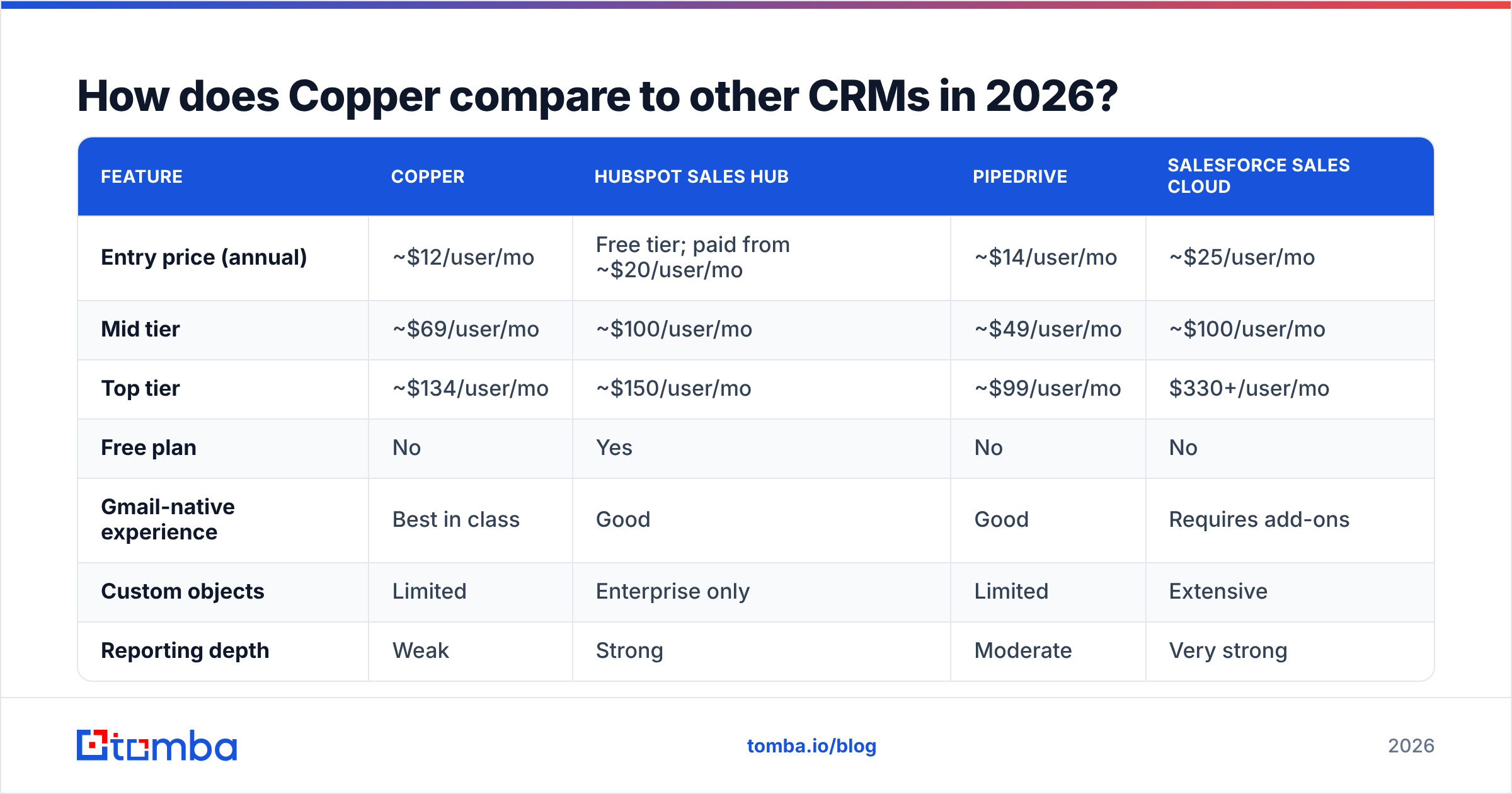
| Feature | Copper | HubSpot Sales Hub | Pipedrive | Salesforce Sales Cloud |
|---|---|---|---|---|
| Entry price (annual) | ~$12/user/mo | Free tier; paid from ~$20/user/mo | ~$14/user/mo | ~$25/user/mo |
| Mid tier | ~$69/user/mo | ~$100/user/mo | ~$49/user/mo | ~$100/user/mo |
| Top tier | ~$134/user/mo | ~$150/user/mo | ~$99/user/mo | $330+/user/mo |
| Free plan | No | Yes | No | No |
| Gmail-native experience | Best in class | Good | Good | Requires add-ons |
| Custom objects | Limited | Enterprise only | Limited | Extensive |
| Reporting depth | Weak | Strong | Moderate | Very strong |
| Built-in contact sourcing | No | Partial (Breeze data) | No | Partial (Data Cloud) |
| Best for | Google-first SMB teams | Marketing + sales alignment | Deal-flow simplicity | Complex enterprise orgs |
Read that table twice and the positioning gets obvious. Pipedrive undercuts Copper on price at almost every tier and matches it on core deal flow. HubSpot beats it on reporting, automation, and the free plan, but locks the good stuff behind steep upgrades. Salesforce beats everyone on power and loses on time-to-value.
Copper's only defensible moat is that Gmail sidebar. If you'd pay $50/user/mo for reps who actually update the CRM, buy it. If you wouldn't, buy Pipedrive.
Is Copper worth it for your team?#
Use this as a decision filter rather than a scorecard:
- You're on Google Workspace, 5–30 seats, and CRM adoption has failed before. Buy Copper. Basic or Professional. This is the case it was built for and it wins cleanly.
- You need forecasting, attribution, or custom objects. Skip Copper. You will export to Sheets within a quarter and resent the bill.
- You're price-sensitive and process-simple. Pipedrive does 90% of what Copper does for less, unless the Gmail integration is the whole point.
- You're on Microsoft 365. Don't even demo it.
- You're evaluating the Business tier. Get a hard side-by-side against HubSpot Professional first. At ~$134/user/mo, the comparison stops being flattering.
- You have no lead source yet. Fix that before you buy any CRM. An empty CRM is an expensive spreadsheet.
That last point deserves more than a bullet.
What does Copper not do — and what should you pair it with?#
A CRM is a filing cabinet, not a lead machine. Copper will organize, remind, and report on relationships you already have. It will not tell you who the VP of Engineering at your target account is, find her work email, or confirm that the address won't bounce.
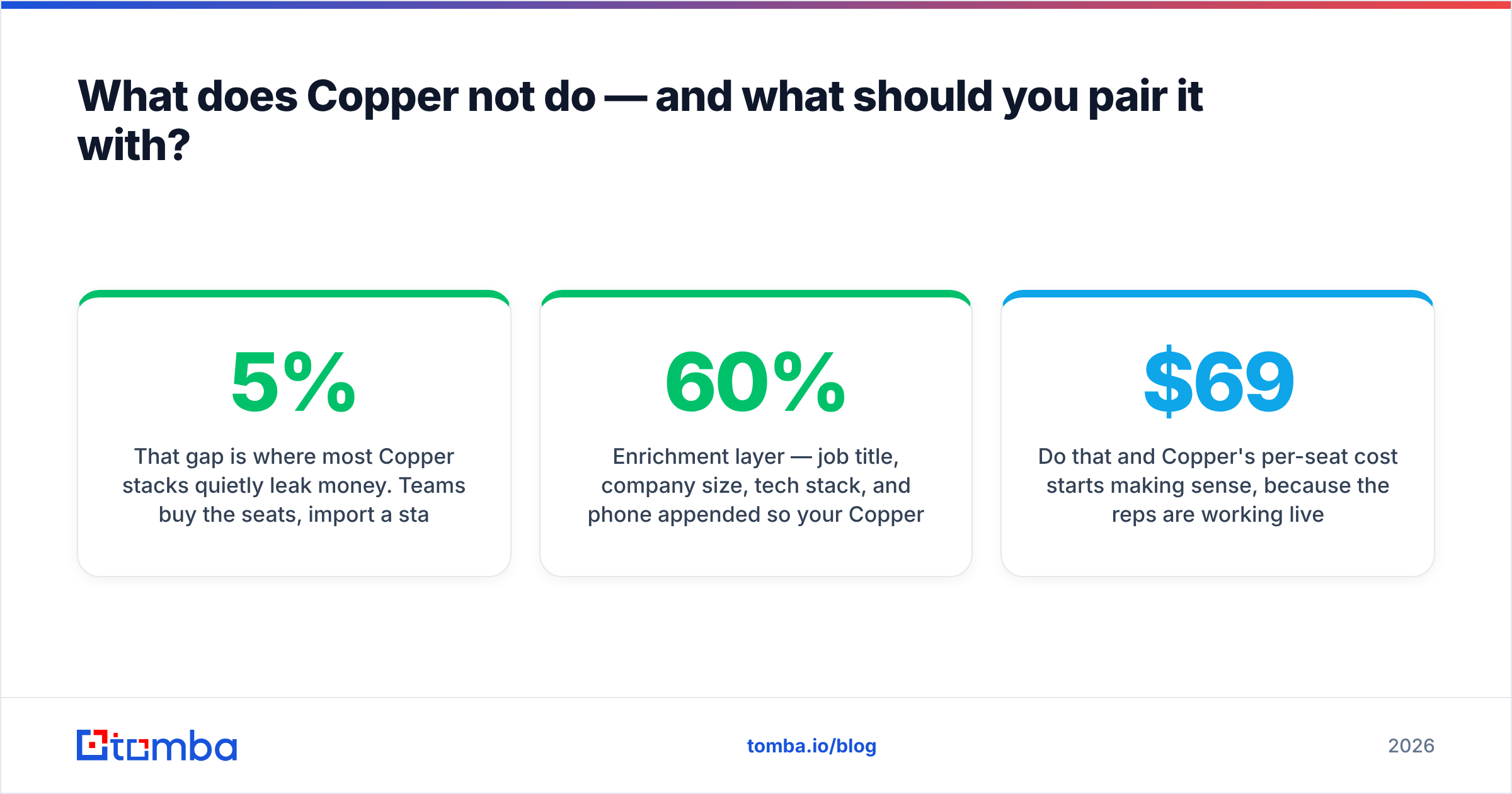
That gap is where most Copper stacks quietly leak money. Teams buy the seats, import a stale list, blast it, watch the bounce rate cross 5%, and then blame the CRM when the real problem was the data going in. Bad data doesn't just waste sends — it damages email deliverability for every future campaign from that domain.
A sane stack around Copper looks like this:
- Sourcing layer — a domain search to pull every reachable contact at a target company, plus an email finder for named prospects.
- Verification layer — validate before import, not after. Catch-all domains and role addresses need special handling.
- Enrichment layer — job title, company size, tech stack, and phone appended so your Copper fields aren't 60% empty.
- Sync layer — push clean records in via API or integration so nobody is copy-pasting into a Gmail sidebar at 11pm.
Do that and Copper's per-seat cost starts making sense, because the reps are working live pipeline instead of doing data entry. Skip it and you're paying $69/user/mo to store guesses.
Frequently asked questions about Copper pricing#
Does Copper have a free plan? No. There's a free trial (typically 14 days), but no permanently free tier. If a free CRM is a hard requirement, HubSpot's free plan is the obvious comparison.
Is annual billing required? No, but the advertised prices assume it. Monthly billing carries a meaningful premium, so the sticker price you saw on the pricing page is almost certainly the annual rate.
Can I mix plan tiers across users? Generally no — plans apply account-wide, which is what makes seat creep expensive. Budget for every person who needs any access, not just closers.
Does Copper include contact data? It enriches some records from email and public signals, but it is not a B2B database and it does not source new prospects. Plan a separate line item for that.
What's the real total cost for a 10-person team? On Professional at roughly $69/user/mo annually, that's about $8,300/year in licenses. Add a prospecting and verification layer, plus any middleware, and a realistic all-in figure lands north of $10,000.
The bottom line on Copper pricing, reviews, pros and cons#
Copper is a good CRM with one great feature and a price that outruns its capabilities at the top end. If your team lives in Gmail and your last CRM died of neglect, the Starter, Basic, or Professional tier is money well spent. If you're staring at the Business plan, run a real bake-off first — the market has caught up.
Whatever CRM you land on, the data going into it decides whether it's an asset or a very expensive contact list. Start with clean, verified, correctly-sourced contacts: use the Tomba Email Finder to find professional email addresses by name, company, or domain, verify them before they ever touch your pipeline, and push them into Copper with real confidence. The free tier gives you 25 searches a month to test the accuracy yourself, and paid plans start at $49/mo — see Tomba pricing for the full breakdown. Fill the CRM with contacts that actually exist, and every per-seat dollar you spend on Copper starts working harder.
Related guides#
Ready to find emails that actually work?
Join 150,000+ professionals who stopped guessing and started sending. Free credits on signup — no credit card required.
Get the Tomba newsletter
Practical outbound tactics and product updates — once every two weeks.
About the author