Coresignal vs GrowMeOrganic: Which B2B Data Tool Wins?
One sells raw B2B datasets by the million. The other sells a scrape-and-send workflow for one salesperson. Here is which one actually belongs in your stack in 2026, and where a dedicated email finder beats both.
TL;DR — Coresignal vs GrowMeOrganic in 60 seconds#
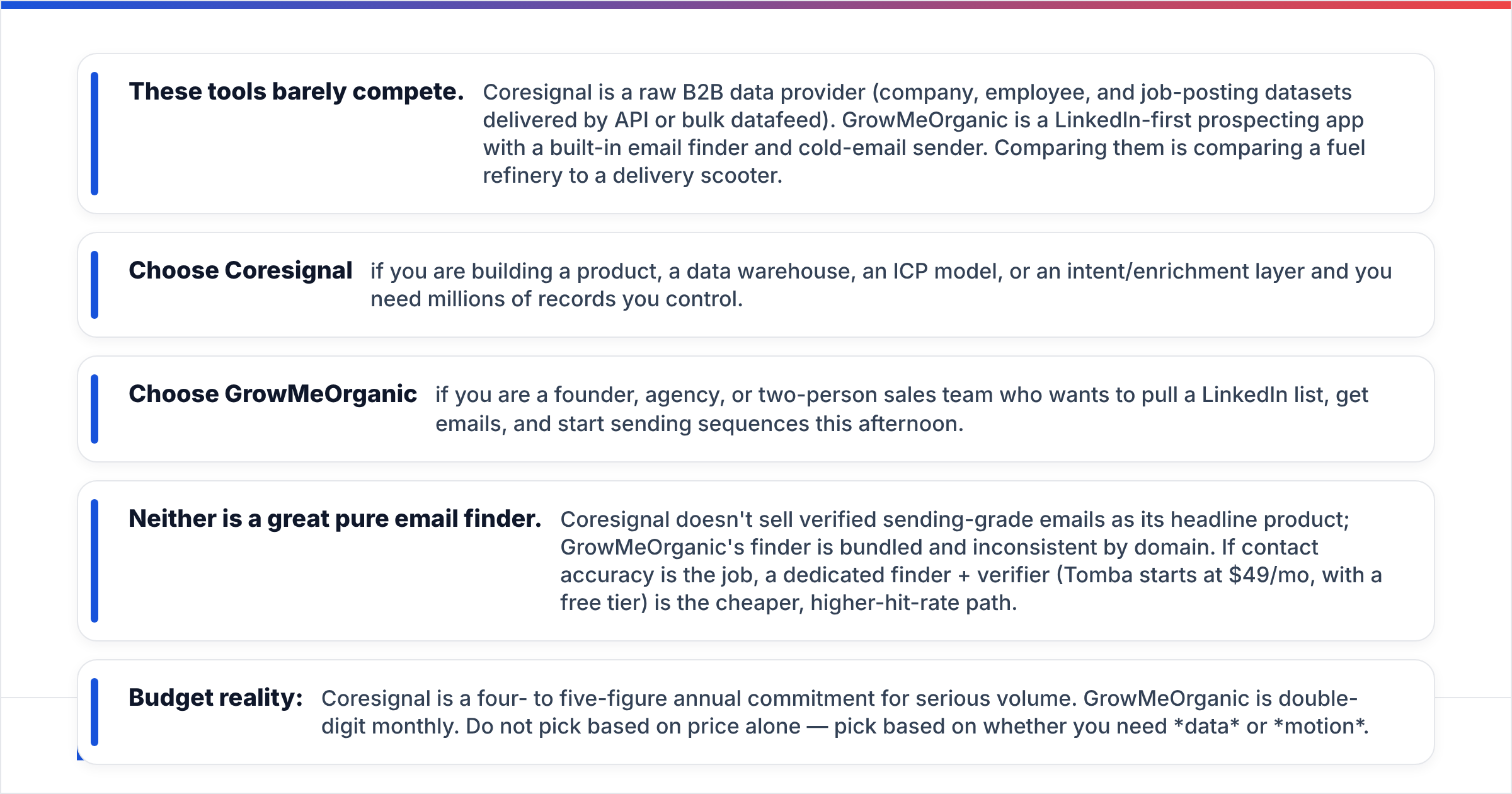
- These tools barely compete. Coresignal is a raw B2B data provider (company, employee, and job-posting datasets delivered by API or bulk datafeed). GrowMeOrganic is a LinkedIn-first prospecting app with a built-in email finder and cold-email sender. Comparing them is comparing a fuel refinery to a delivery scooter.
- Choose Coresignal if you are building a product, a data warehouse, an ICP model, or an intent/enrichment layer and you need millions of records you control.
- Choose GrowMeOrganic if you are a founder, agency, or two-person sales team who wants to pull a LinkedIn list, get emails, and start sending sequences this afternoon.
- Neither is a great pure email finder. Coresignal doesn't sell verified sending-grade emails as its headline product; GrowMeOrganic's finder is bundled and inconsistent by domain. If contact accuracy is the job, a dedicated finder + verifier (Tomba starts at $49/mo, with a free tier) is the cheaper, higher-hit-rate path.
- Budget reality: Coresignal is a four- to five-figure annual commitment for serious volume. GrowMeOrganic is double-digit monthly. Do not pick based on price alone — pick based on whether you need data or motion.
What is Coresignal, actually?#
Coresignal is a B2B data-as-a-service company. It licenses large, structured, refreshed datasets: company records, professional/employee profiles, job postings, and firmographic attributes, scraped and normalized from public web sources.
You consume it in one of two shapes:
- API access — query the datasets programmatically (search by filters, pull records by ID, enrich a domain or a profile URL).
- Bulk datafeeds — periodic dumps of entire datasets into your S3/warehouse, which is how data teams and product companies typically buy.
The customer profile is telling. Coresignal's buyers are engineers and data teams: HR-tech products building talent-intelligence features, investment firms tracking hiring signals, RevOps teams training ICP scoring models, and B2B tools that need a company graph under the hood. It is infrastructure, not an app. There is no sequence builder, no inbox, no Chrome extension for an SDR to click.
The important nuance for outbound teams: Coresignal is not primarily an email-finding tool. You get rich profile and firmographic data. Turning that into a deliverable, verified inbox address is a separate job — usually handled by an email finder and an email verifier sitting downstream in your pipeline.
What is GrowMeOrganic, actually?#
GrowMeOrganic sits at the opposite end. It's an all-in-one prospecting suite aimed at solo founders, agencies, and small sales teams. The pitch: scrape leads from LinkedIn (and Sales Navigator), find their emails, drip-send a cold sequence, all under one login, at a price a bootstrapper can absorb.
Its core loop:
- Install the Chrome extension, run a LinkedIn or Sales Navigator search.
- Export the profiles into a GrowMeOrganic list.
- Let the tool guess/find business emails for those profiles.
- Push the list straight into an email drip campaign from your connected mailbox.
That end-to-end loop is genuinely useful when your entire GTM is "find people on LinkedIn, email them." The trade-offs are the ones you'd expect from any bundled tool: the email-finding step is the weakest link, verification is thin, and the scraping side carries the usual LinkedIn account-safety risk that comes with any browser-based extractor.
Coresignal vs GrowMeOrganic: how do they compare feature by feature?#
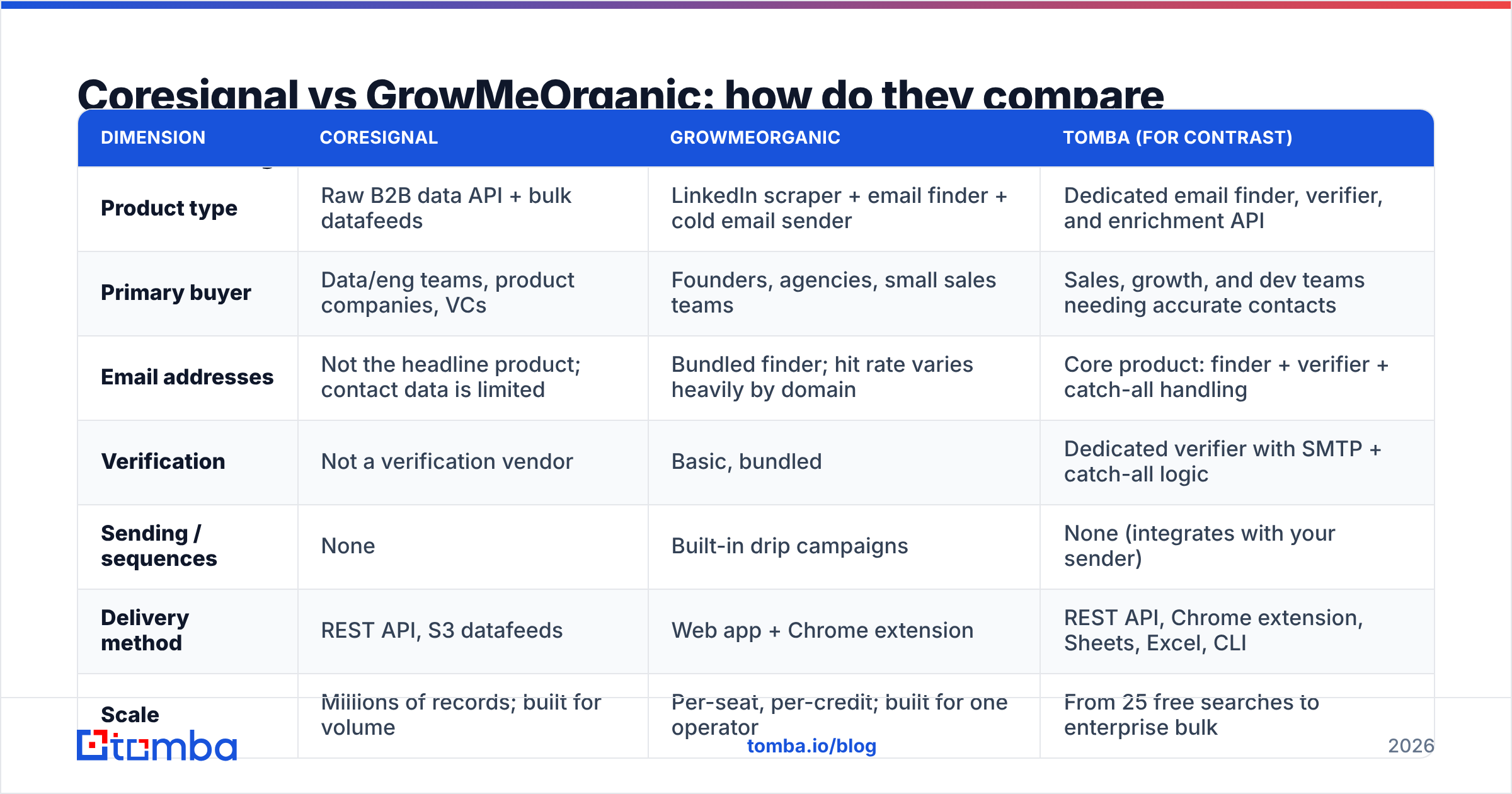
| Dimension | Coresignal | GrowMeOrganic | Tomba (for contrast) |
|---|---|---|---|
| Product type | Raw B2B data API + bulk datafeeds | LinkedIn scraper + email finder + cold email sender | Dedicated email finder, verifier, and enrichment API |
| Primary buyer | Data/eng teams, product companies, VCs | Founders, agencies, small sales teams | Sales, growth, and dev teams needing accurate contacts |
| Email addresses | Not the headline product; contact data is limited | Bundled finder; hit rate varies heavily by domain | Core product: finder + verifier + catch-all handling |
| Verification | Not a verification vendor | Basic, bundled | Dedicated verifier with SMTP + catch-all logic |
| Sending / sequences | None | Built-in drip campaigns | None (integrates with your sender) |
| Delivery method | REST API, S3 datafeeds | Web app + Chrome extension | REST API, Chrome extension, Sheets, Excel, CLI |
| Scale | Millions of records; built for volume | Per-seat, per-credit; built for one operator | From 25 free searches to enterprise bulk |
| Typical spend | Four to five figures per year (custom-quoted for datafeeds; check their pricing page for current self-serve tiers) | Double-digit monthly per seat | Free tier, then $49/mo → $99/mo → $249/mo |
| Setup effort | Engineering project (days to weeks) | Ten minutes | Minutes (UI) or one API call |
| LinkedIn account risk | None (no browser scraping on your account) | Real — browser-based extraction uses your session | None |
The table makes the split obvious. Coresignal is a supply decision. GrowMeOrganic is a workflow decision. If you are trying to answer "which should I buy," the honest first question is: do I have an engineer, or do I have a rep?
Is Coresignal better than GrowMeOrganic for lead generation?#
For most lead-gen teams under 20 people: no — and not because Coresignal is worse. It's because the value never reaches you.
Buying Coresignal for classic outbound means signing up for a project. You will need someone to model the schema, load the datafeed, dedupe it, keep it fresh, map it to your CRM, and then bolt on an email-finding and verification step because the dataset alone won't hand you sending-grade inboxes. That is the right call when the data becomes a durable asset — a scoring model, a product feature, a warehouse everything else queries. It is a terrible call when the "asset" is a 500-row list you'll burn through in three weeks.
Where Coresignal genuinely wins:
- Product-embedded data. You're building a tool that needs a company or people graph. GrowMeOrganic can't serve that at any price.
- Signal-based GTM. Job postings, headcount growth, and hiring velocity as triggers. Coresignal's job-posting dataset is one of its stronger assets.
- ICP modeling at scale. Training a fit score against tens of thousands of accounts rather than eyeballing 200.
- Vendor-independence. You own the raw records instead of renting a UI that could change its export limits next quarter.
Where GrowMeOrganic wins:
- Time to first email sent. Minutes, not sprints.
- Cost floor. A seat costs less than one hour of engineering time.
- Single-tool simplicity. No stitching a finder, verifier, and sender together.
- Non-technical operators. An agency VA can run it without a data model.
If you're evaluating this honestly, read real reviews for both on G2 rather than trusting either homepage — the review-level complaints (data freshness for one, email accuracy for the other) are the ones that will actually bite you.
What does each one really cost in 2026?#
Pricing is where the comparison stops being apples-to-oranges and starts being apples-to-forklift.
Coresignal sells self-service API plans plus custom-quoted datafeeds. The self-service entry point is affordable relative to enterprise data vendors, but any meaningful volume — the kind you'd need for real coverage — lands you in an annual contract. Treat it as a budget line, not a subscription, and always confirm current tiers on their pricing page before you plan around a number you read in a blog post (including this one).
GrowMeOrganic sells per-seat monthly plans in the double-digit range, with credit allowances that scale by tier. The headline is friendly. The hidden cost is bounce rate: credits spent on emails that never land are credits you paid for twice — once at purchase, once in sender reputation damage.
That second cost is the one nobody models. A 12% bounce rate on a 3,000-send month isn't "360 wasted emails." It's a mailbox that Google and Microsoft start filtering, which taxes every campaign you run afterward. Bundled finders in all-in-one tools are almost always the weakest component, because email finding is a hard, capital-intensive problem that nobody solves as a side feature.

Which one should you choose? A decision framework#
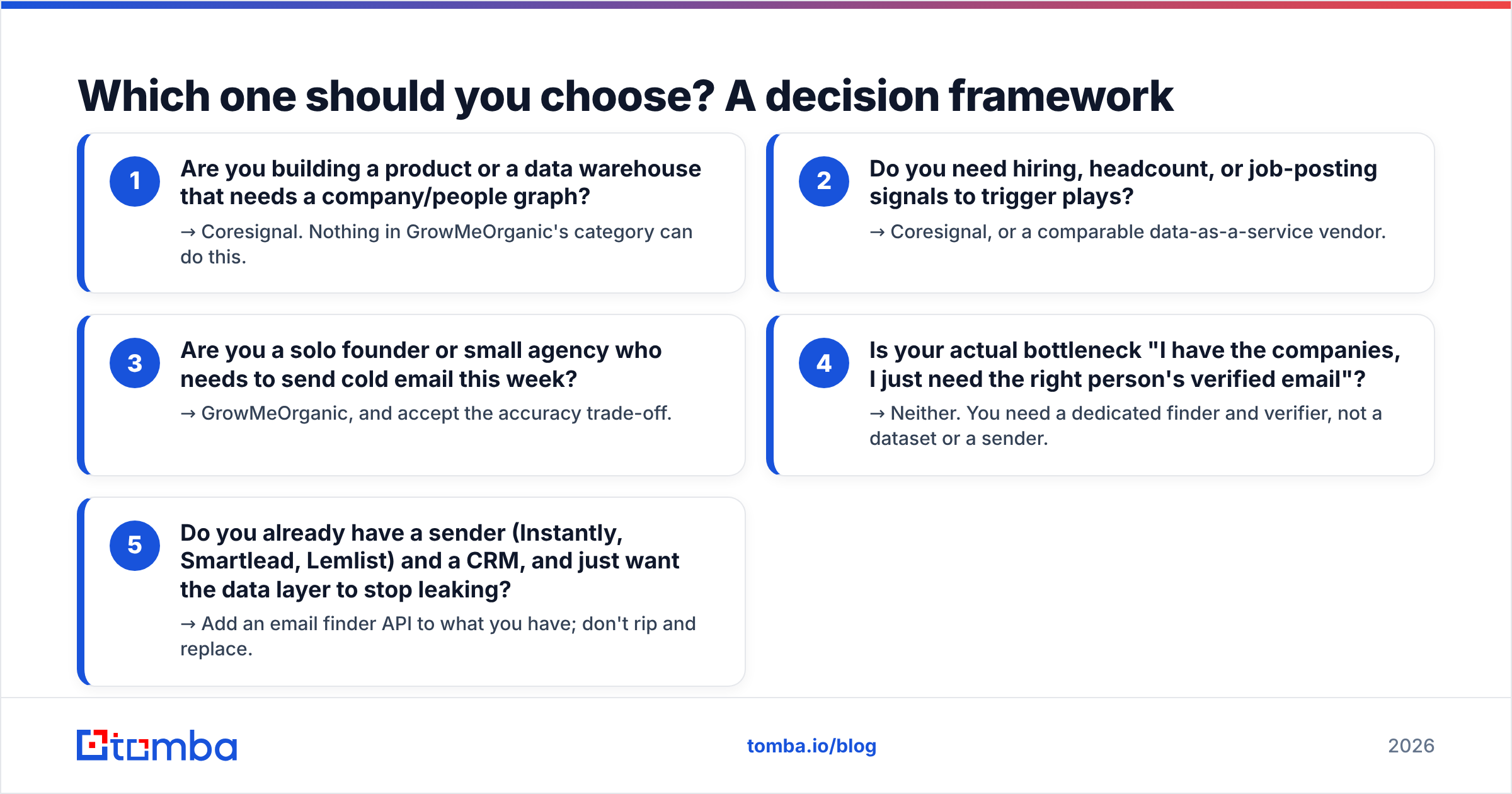
Run yourself through these five questions in order. The first "yes" is your answer.
- Are you building a product or a data warehouse that needs a company/people graph? → Coresignal. Nothing in GrowMeOrganic's category can do this.
- Do you need hiring, headcount, or job-posting signals to trigger plays? → Coresignal, or a comparable data-as-a-service vendor.
- Are you a solo founder or small agency who needs to send cold email this week? → GrowMeOrganic, and accept the accuracy trade-off.
- Is your actual bottleneck "I have the companies, I just need the right person's verified email"? → Neither. You need a dedicated finder and verifier, not a dataset or a sender.
- Do you already have a sender (Instantly, Smartlead, Lemlist) and a CRM, and just want the data layer to stop leaking? → Add an email finder API to what you have; don't rip and replace.
Most teams that land on this comparison page are actually in bucket 4 or 5 and don't realize it yet. They think they have a tool problem when they have a contact accuracy problem.
Where does a dedicated email finder fit between them?#
Here's the uncomfortable middle ground. Coresignal gives you breadth without deliverable inboxes. GrowMeOrganic gives you a workflow whose accuracy you can't fully trust. Both leave the same gap: the verified email address the whole motion depends on.
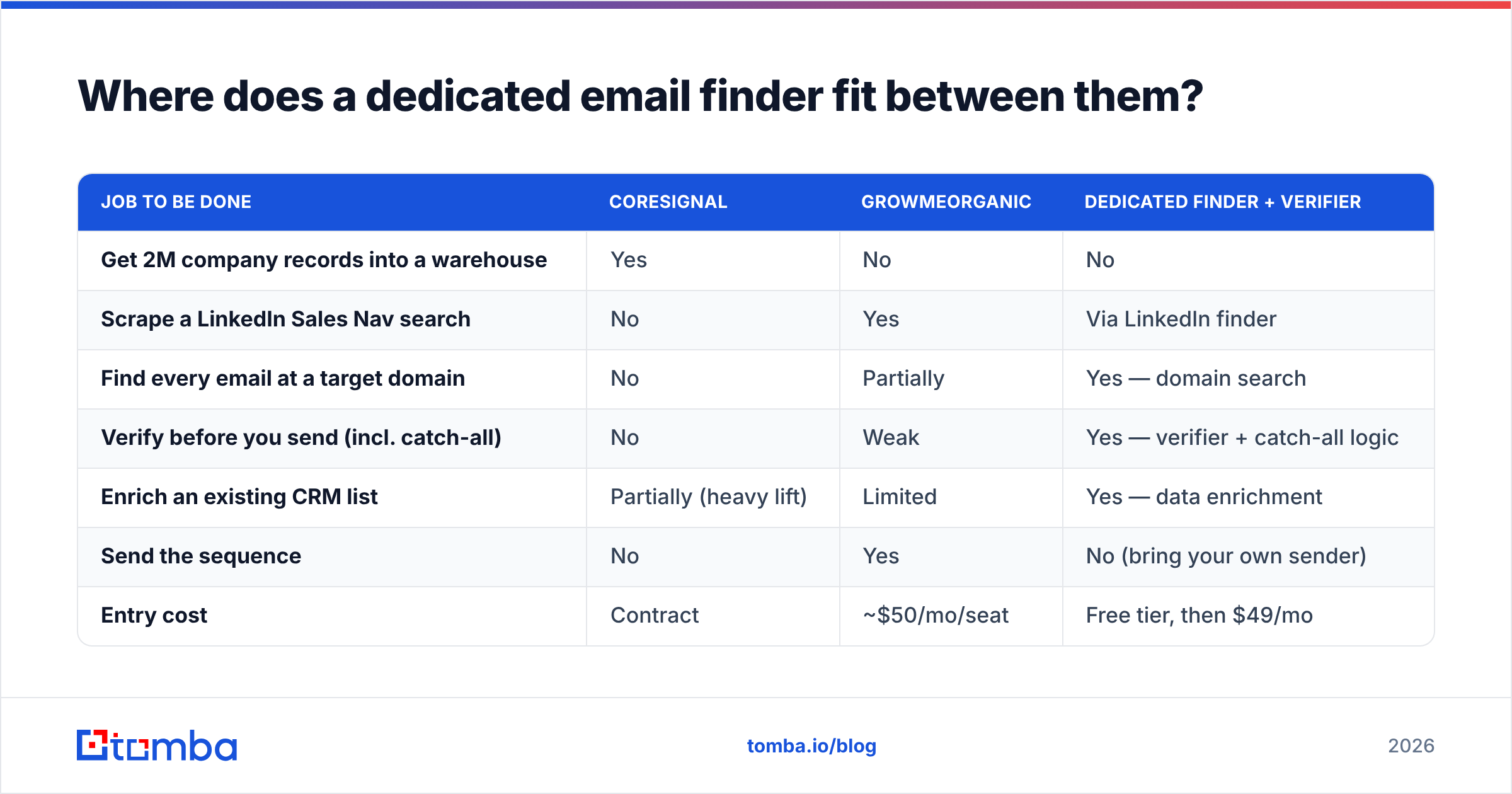
That gap is exactly what a purpose-built finder closes, and it's cheap to close. The comparison looks like this:
| Job to be done | Coresignal | GrowMeOrganic | Dedicated finder + verifier |
|---|---|---|---|
| Get 2M company records into a warehouse | Yes | No | No |
| Scrape a LinkedIn Sales Nav search | No | Yes | Via LinkedIn finder |
| Find every email at a target domain | No | Partially | Yes — domain search |
| Verify before you send (incl. catch-all) | No | Weak | Yes — verifier + catch-all logic |
| Enrich an existing CRM list | Partially (heavy lift) | Limited | Yes — data enrichment |
| Send the sequence | No | Yes | No (bring your own sender) |
| Entry cost | Contract | ~$50/mo/seat | Free tier, then $49/mo |
The stack that most efficient teams actually run in 2026 is not one tool. It's: a data source for accounts (a warehouse, a database, or a vendor like Coresignal or a list provider such as BookYourData, depending on whether you want raw records or ready-made lists) → a finder and verifier for contacts → a sender for the motion. GrowMeOrganic tries to be all three and is honestly decent at the third one. Coresignal is excellent at the first and doesn't pretend to do the others.
If you go that route, the finder layer should be measured on one number: valid-and-deliverable rate, not "emails returned." A tool that returns 90% of rows with 20% bounces is worse than one returning 65% with 1% bounces. Guessed patterns from a permutator inflate the first number and destroy the second. Run everything through verification before it touches a mailbox — that's the whole ballgame for email deliverability.
Frequently asked questions#
Is Coresignal a LinkedIn scraper? Not in the way GrowMeOrganic is. Coresignal builds datasets from public web sources and delivers them as licensed data — you never point a browser extension at your own LinkedIn account. That difference matters if account safety is a concern for your team.
Does GrowMeOrganic verify emails before sending? It includes basic validation, but it is not a dedicated verification vendor and shouldn't be treated as one. If you're sending at any volume, run an independent verification pass. Bounces are the single fastest way to torch a new sending domain.
Can I use Coresignal without engineers? Realistically, no. Even the self-serve API assumes someone comfortable with REST calls, pagination, and schema mapping. If your team's technical ceiling is a Google Sheet, buy something that ships with a UI.
Which has better data accuracy? Different accuracy. Coresignal is stronger on firmographics, headcount, and job-posting freshness. GrowMeOrganic is closer to the live LinkedIn profile at the moment of scrape but weaker on the derived email address. Neither is optimized for contact-level deliverability — which is why teams pair either one with a specialist finder.
What about the alternatives? Look at Apollo alternatives if you want an all-in-one closer to GrowMeOrganic's shape with a bigger database, or Clearbit alternatives if enrichment is the real need. The Coresignal-shaped decision (raw data licensing) has fewer substitutes and usually comes down to procurement.
The verdict#
Coresignal wins if data is your product. GrowMeOrganic wins if speed is your product. They are not really rivals; they're answers to different questions, and the fact that they show up on the same comparison list says more about how confusing the GTM tooling market has become than about either vendor.
But if your honest bottleneck is contact accuracy — you know who to reach, you just can't reliably get their inbox — neither one is the fix. Start with a tool built for exactly that job.
Tomba's Email Finder finds professional emails by domain, name, or company, runs them through a verifier with real catch-all handling, and exposes the whole thing over an API, a Chrome extension, Sheets, and bulk uploads. The free tier gives you 25 searches a month to test hit rate against your own list before spending anything; paid plans start at $49/mo. Test it against whatever you're using now on 100 real prospects, compare bounce rates, and let the numbers pick the winner. See Tomba pricing for the full breakdown.
Related guides#
Ready to find emails that actually work?
Join 150,000+ professionals who stopped guessing and started sending. Free credits on signup — no credit card required.
Get the Tomba newsletter
Practical outbound tactics and product updates — once every two weeks.
About the author