Corporate Email Structure: How Company Email Formats Work
Most B2B email addresses follow one of eight predictable patterns. Here's how corporate email structure actually works, how to detect a company's format, and where pattern-guessing quietly breaks.
TL;DR
- Roughly 8 patterns cover the overwhelming majority of corporate email addresses.
first.last@company.comandfirst@company.comalone account for most of what you'll encounter in B2B. - Corporate email structure is set at the mail-server level, not per-employee. Once you know a company's pattern, you know it for nearly every person on the payroll — with exceptions for collisions, acquisitions, and legacy staff.
- Guessing a pattern is not the same as knowing it. A permutator produces 8+ candidate addresses; only one is real, and sending to the other 7 damages your sender reputation.
- Catch-all domains accept every address you throw at them, which makes SMTP verification return "valid" for garbage. That's where most pattern-based prospecting quietly rots.
- The reliable workflow is: detect the pattern from known addresses → generate the candidate → verify it against a real source → only then send.
What Is Corporate Email Structure?#
Corporate email structure is the naming convention a company applies when it provisions mailboxes on its domain. It's a template, not a set of individual decisions. When IT sets up Google Workspace or Microsoft 365, someone picks a rule — "first initial plus last name," say — and every new hire gets an address stamped out of that rule.
Think of it like an apartment building's unit numbering. Once you learn that the third floor uses 301, 302, 303, you don't need a directory to guess where unit 305 sits. Corporate email works the same way: learn one employee's address and you've learned the blueprint for the building.
That predictability is why email finder tools exist at all. If every company assigned addresses randomly, prospecting would be impossible. Because they don't, a pattern plus a name plus a domain gets you very close to a working address — and a verification step gets you the rest of the way.
The structure itself has three parts:
- The local part — everything before the
@. This is where the naming convention lives (jane.doe,jdoe,jane). - The domain — the company's registered mail domain (
company.com, sometimesmail.company.comor a country-specific variant likecompany.co.uk). - The routing layer — MX records, catch-all rules, aliases, and distribution lists that determine what actually happens when mail arrives.
Most people stop at part one. Parts two and three are where deliverability problems hide.
What Are the 8 Most Common Corporate Email Formats?#
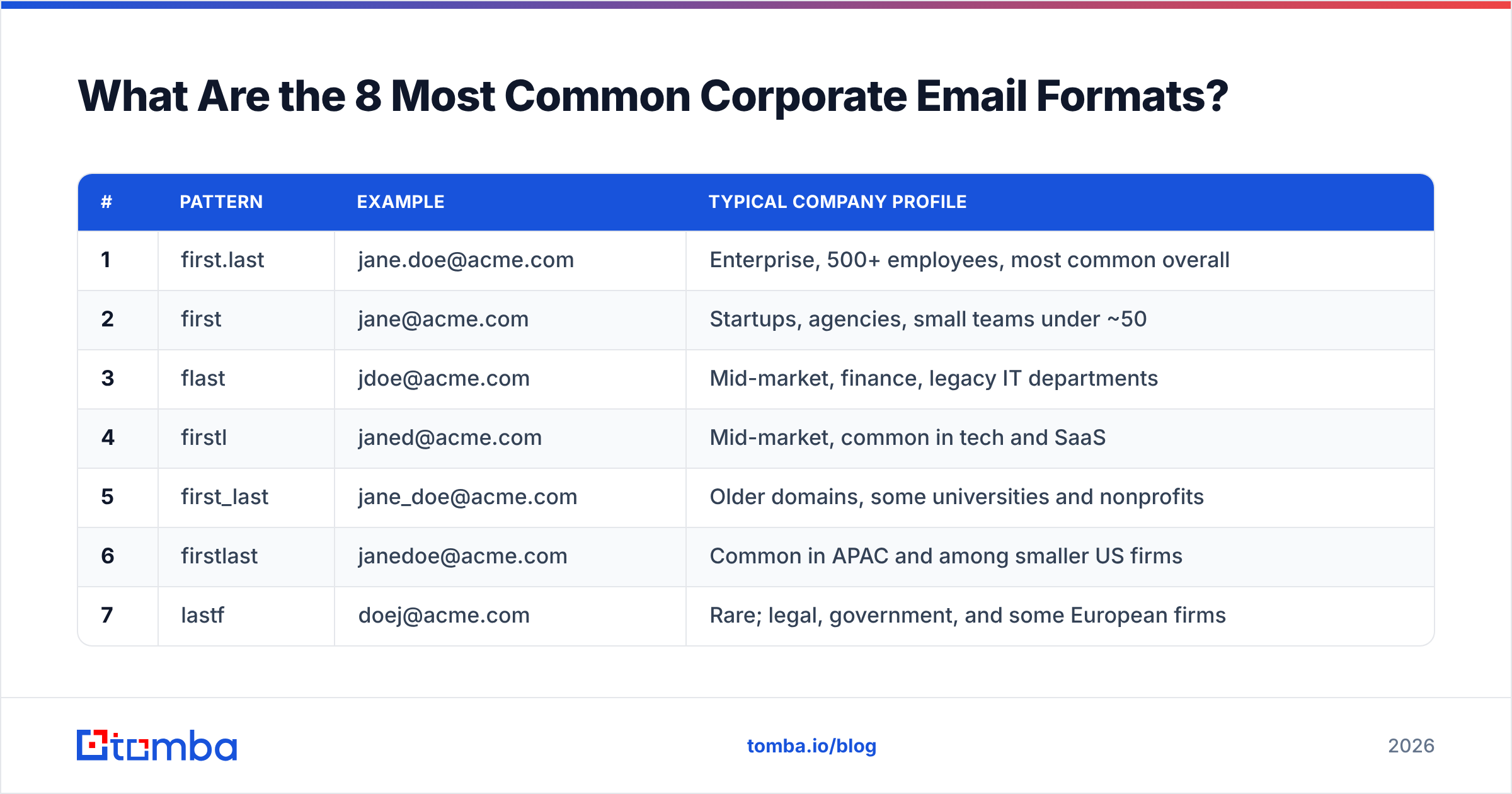
Here's the working set. Using "Jane Doe" at "acme.com" as the example:
| # | Pattern | Example | Typical company profile |
|---|---|---|---|
| 1 | first.last | jane.doe@acme.com | Enterprise, 500+ employees, most common overall |
| 2 | first | jane@acme.com | Startups, agencies, small teams under ~50 |
| 3 | flast | jdoe@acme.com | Mid-market, finance, legacy IT departments |
| 4 | firstl | janed@acme.com | Mid-market, common in tech and SaaS |
| 5 | first_last | jane_doe@acme.com | Older domains, some universities and nonprofits |
| 6 | firstlast | janedoe@acme.com | Common in APAC and among smaller US firms |
| 7 | lastf | doej@acme.com | Rare; legal, government, and some European firms |
| 8 | last.first | doe.jane@acme.com | Rare; academic institutions, some Nordic companies |
Two structural rules matter more than the exact ranking:
- Company size drives the pattern. A five-person agency uses
first@. It can afford to — there's only one Jane. A 5,000-person enterprise cannot, because it has four Janes and needs disambiguation, so it lands onfirst.lastorflast. - Founding era drives the separator. Domains provisioned before roughly 2005 skew toward underscores and no-separator formats. Modern Workspace/365 defaults skew heavily toward the dot.
There's a ninth category worth naming even though it isn't a pattern: role addresses. info@, sales@, support@, hello@, careers@. These are distribution lists, not people. They're valid mailboxes and they'll accept your mail, but they route to a shared inbox where cold outreach dies. Never count a role address as a contact — it inflates your list size and destroys your reply-rate math.
How Do You Detect a Company's Email Pattern?#
You need one confirmed address on the domain. From there, the pattern is deducible. Here are the sources, roughly in order of reliability:
- Existing addresses in your CRM. If anyone at your company has ever emailed anyone at the target domain, the pattern is already sitting in your own data. Check first. It's free and it's ground truth.
- The company website. Press pages, team pages, contact pages, PDF whitepapers, and job listings routinely expose real addresses. Legal and privacy pages often contain a named DPO contact.
- Public code and documents. Git commit histories (
git log --format='%ae'on a public repo), conference speaker lists, SEC filings, patent applications, and press releases all leak real corporate addresses. - Email header archives. Public mailing lists — LKML, Apache, W3C working groups — are full of corporate addresses from engineers at large companies.
- A domain search tool. Domain search inverts the problem: instead of guessing a pattern and testing it, you query the domain and get back the addresses that are already known to exist, plus the detected pattern with a confidence score.
Once you have two or three confirmed addresses on the same domain, cross-check them. If jane.doe@ and robert.chen@ both exist, the pattern is first.last and you can generate the rest with reasonable confidence. If you find jane.doe@ and rchen@ on the same domain, stop — you've hit a company with mixed conventions, usually from an acquisition, and pattern-guessing there is a coin flip.
For a quick manual check on a single domain, a company email pattern lookup will tell you the dominant format before you commit any credits to a bulk run.
Is Pattern Guessing Enough, or Do You Still Need Verification?#
Pattern guessing gets you a candidate. Verification gets you a contact. These are not the same thing, and conflating them is the single most expensive mistake in outbound.
Run the numbers. Say you're targeting 1,000 prospects and you guess the pattern correctly for 75% of domains. On the remaining 25%, you're wrong. If you send to all 1,000, you generate roughly 250 hard bounces. A 25% bounce rate will get your domain throttled by Google and Microsoft inside a single campaign, and it takes weeks of clean sending to recover.
The failure modes stack up:
- Name collisions. Two Jane Does at the same company. The second one gets
jane.doe2@orjane.m.doe@orjaned@. Your pattern generates the first Jane's address and you email a stranger. - Nicknames and legal names. LinkedIn says "Bob Chen." Payroll says "Robert Chen." The mailbox is
robert.chen@. Your guess ofbob.chen@bounces. - Non-ASCII names. Accents, umlauts, and hyphens get stripped, transliterated, or preserved depending on the mail system.
josé.garcía@might actually bejose.garcia@, or it might not. - Departed employees. The person left eight months ago. Their mailbox still exists as a forwarding alias. Your email technically delivers and is never read.
- Catch-all domains. The server accepts every address at the domain — including
asdfasdf@company.com. SMTP verification returns "valid." Your bounce rate looks great. Your reply rate is zero because the mail lands in a black hole.
Catch-all is the one that fools experienced teams, because it produces a clean-looking list that performs terribly. It requires a dedicated catch-all verifier that goes beyond a simple SMTP handshake and cross-references the address against known-good data.
Guessing vs. Finding vs. Verifying: What's the Difference?#
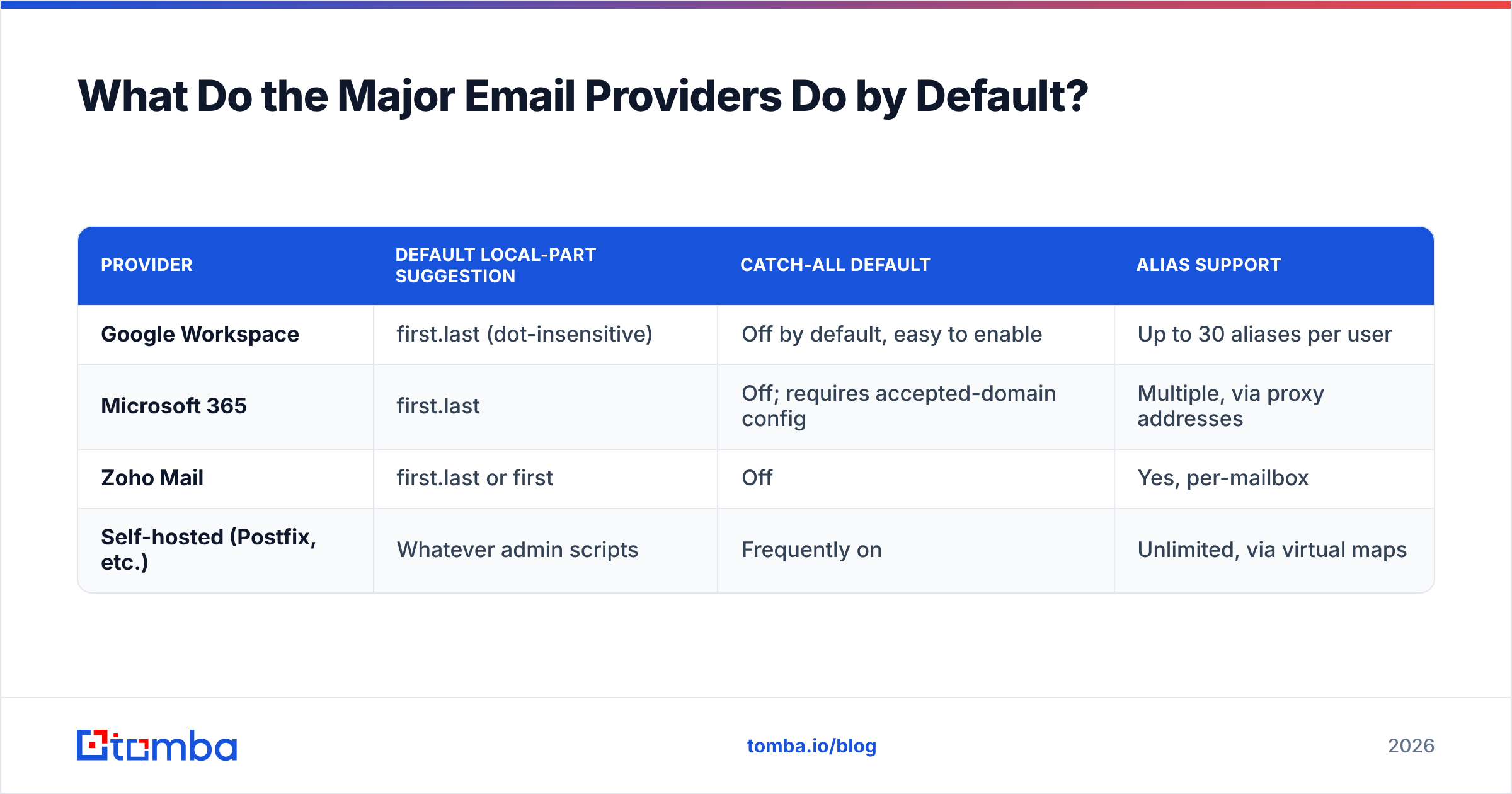
Three distinct operations, frequently confused:
| Permutator (guessing) | Email finder (finding) | Verifier (verifying) | |
|---|---|---|---|
| Input | Name + domain | Name + domain | A specific address |
| Output | 8-15 candidate addresses | One address + confidence score | Valid / invalid / catch-all / risky |
| Data source | Pure string manipulation | Crawled + indexed real addresses | SMTP handshake + reference data |
| Cost | Free | Per-search credit | Per-verification credit |
| Bounce risk if used alone | Very high | Low-moderate | N/A (it's the safety net) |
| Right use case | Manual research on one target | Bulk prospecting at scale | Final gate before every send |
An email permutator is a legitimate tool — it's just not a prospecting tool. Use it when you're researching a single high-value target and you're going to verify each candidate manually. Do not use it to build a 5,000-row list, because it multiplies one unknown into fifteen unknowns.
The finder-plus-verifier combination is what production outbound actually runs on. The finder returns the address the pattern and the indexed data agree on. The verifier confirms the mailbox exists before you spend a send on it.
What Do the Major Email Providers Do by Default?#
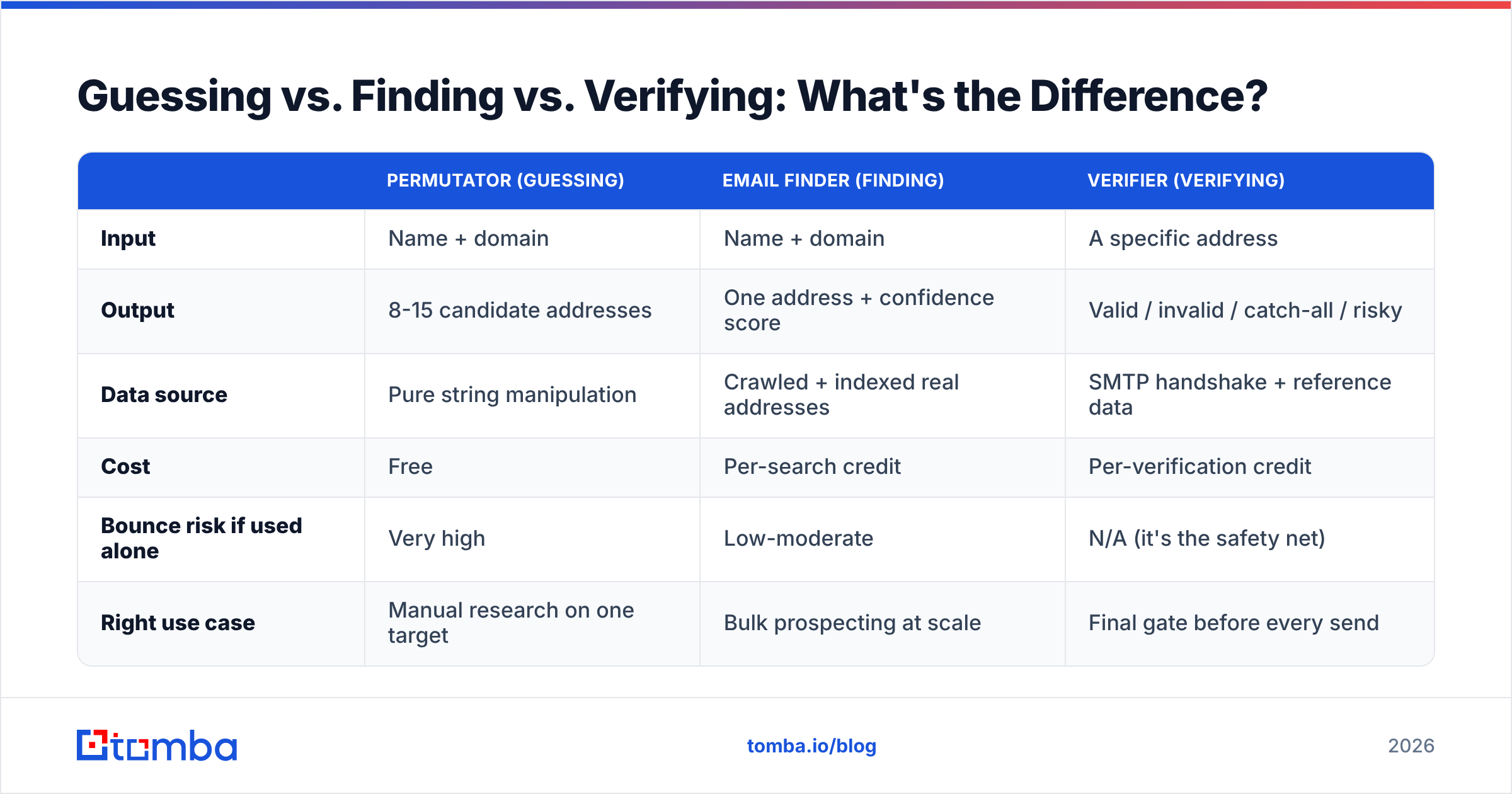
Worth knowing, because the default shapes the pattern more than any deliberate IT decision.
| Provider | Default local-part suggestion | Catch-all default | Alias support |
|---|---|---|---|
| Google Workspace | first.last (dot-insensitive) | Off by default, easy to enable | Up to 30 aliases per user |
| Microsoft 365 | first.last | Off; requires accepted-domain config | Multiple, via proxy addresses |
| Zoho Mail | first.last or first | Off | Yes, per-mailbox |
| Self-hosted (Postfix, etc.) | Whatever admin scripts | Frequently on | Unlimited, via virtual maps |
One quirk that trips people up: Google treats dots in the local part as insignificant for Gmail consumer accounts (jane.doe@gmail.com and janedoe@gmail.com are the same inbox) — but this does not apply to Google Workspace custom domains. On @acme.com running Workspace, jane.doe@ and janedoe@ are two different addresses, and only one of them exists. Do not assume dot-insensitivity carries over.
Self-hosted mail servers are where catch-all lives. If a domain's MX records point at something other than Google or Microsoft, raise your suspicion that catch-all is on, and route those domains through additional verification rather than trusting an SMTP "OK."
How Should You Build This Into a Prospecting Workflow?#
The sequence that survives contact with real deliverability:
- Start from the domain, not the person. Run a domain search to see what the company's pattern actually is and which addresses are already known. This is faster and cheaper than guessing person-by-person.
- Resolve the real name. Check LinkedIn and the company website. If the two disagree ("Bob" vs "Robert"), the company website usually reflects payroll, and payroll reflects the mailbox.
- Generate the candidate from the confirmed pattern. Not from a permutator. One candidate, from the pattern you verified against at least two known addresses on that domain.
- Verify before sending. Every address, every time. An email verifier run costs a fraction of a cent. A bounce costs you domain reputation, which is not purchasable.
- Flag catch-alls separately. Don't drop them and don't treat them as verified. Segment them into a lower-priority list, send at lower volume, and watch reply rates rather than bounce rates as your health signal.
- Re-verify quarterly. B2B contact data decays at roughly 2-3% per month as people change jobs. A list verified in January is meaningfully stale by July.
For anything above a few hundred rows, do steps 3-4 in a single pass with bulk email finder rather than one-at-a-time. The batch path is where the credit economics work out.
What Does This Cost Across the Main Tools?#
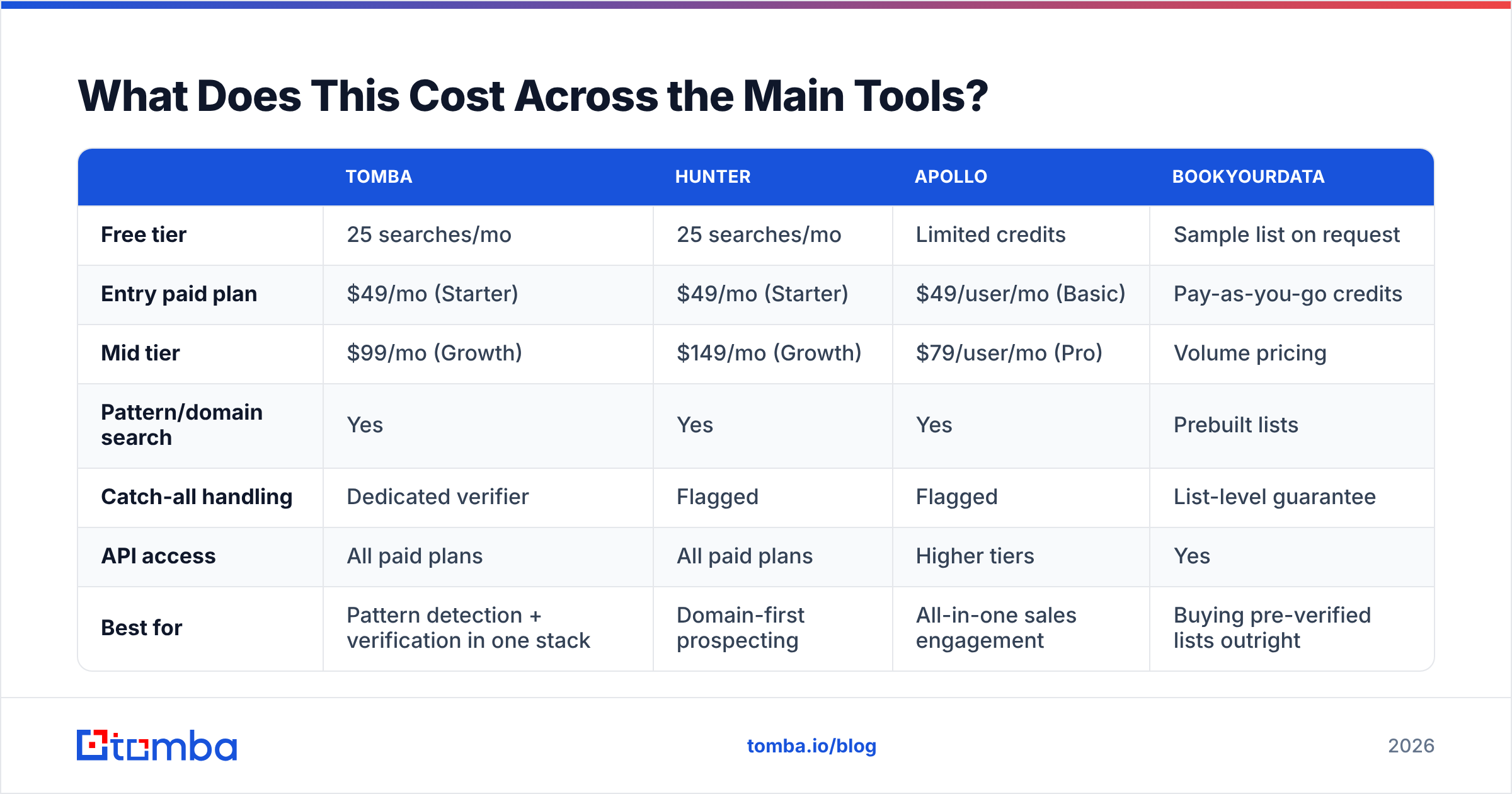
Pricing shapes the workflow more than most teams admit. If verification is priced as a premium add-on, teams skip it — and then wonder why their email deliverability collapsed.
| Tomba | Hunter | Apollo | BookYourData | |
|---|---|---|---|---|
| Free tier | 25 searches/mo | 25 searches/mo | Limited credits | Sample list on request |
| Entry paid plan | $49/mo (Starter) | $49/mo (Starter) | $49/user/mo (Basic) | Pay-as-you-go credits |
| Mid tier | $99/mo (Growth) | $149/mo (Growth) | $79/user/mo (Pro) | Volume pricing |
| Pattern/domain search | Yes | Yes | Yes | Prebuilt lists |
| Catch-all handling | Dedicated verifier | Flagged | Flagged | List-level guarantee |
| API access | All paid plans | All paid plans | Higher tiers | Yes |
| Best for | Pattern detection + verification in one stack | Domain-first prospecting | All-in-one sales engagement | Buying pre-verified lists outright |
BookYourData takes a genuinely different route: rather than deriving patterns, it sells pre-built, pre-verified lists with an accuracy guarantee. If your motion is "give me 2,000 CFOs in US manufacturing" and you don't want to run detection yourself, that's a legitimate fit. If your motion is "here are 300 named accounts I already researched, get me the right person at each," pattern detection plus verification is the cheaper and more precise path. Full Tomba pricing is public if you want to run the per-contact math yourself.
Independent user reviews on G2 and Capterra are the sanest way to sanity-check any vendor's own accuracy claims, since none of these tools publish a common benchmark. And if you want the specification-level truth about what a valid local part can even contain, RFC 5321 is the actual standard — it's more permissive than any real mail server, which is exactly why "syntactically valid" and "deliverable" are different questions.
What Are the Edge Cases That Break Pattern Logic?#
The last 10% of domains cause 90% of the pain:
- Post-acquisition domains. AcquiredCo's staff keep
flast@acquired.comaddresses that forward tofirst.last@parent.com. Both work. Only one is monitored. - Regional subdomains.
@uk.company.com,@de.company.com. The pattern may differ per region, and the root domain may not even accept mail. - Contractor and agency addresses.
jane.doe.contractor@orjane.doe-ext@. Common in enterprise IT and pharma. - Executives on separate rules. Some companies deliberately don't follow the pattern for C-level staff, precisely to make them harder to find.
jane.d@or an entirely private alias. - Hyphenated and compound surnames. "Jane Doe-Smith" becomes
jane.doe-smith@,jane.doesmith@, orjane.smith@depending on the provisioning script.
There is no algorithm for these. There is only data — real, observed addresses harvested from real sources. That's the practical argument for a finder built on an indexed corpus rather than a pure string-generation engine: when the pattern breaks, the index still knows the answer.
Put It Into Practice#
Corporate email structure is a solved problem for about 90% of B2B domains: pick the right one of eight patterns, apply it, and you've got a working address. The value is entirely in the last 10% — the catch-alls, the collisions, the acquisitions, the executives with private aliases — and in never sending to a guess.
Detect the pattern with a domain search. Generate one candidate, not fifteen. Verify before every send. Segment catch-alls instead of pretending they're clean. Re-verify on a quarterly cycle.
If you want that whole sequence in one place, start with the Tomba Email Finder. It detects the domain pattern, returns a single address with a confidence score instead of a permutation list, and hands off to the verifier before anything hits your sequencer. The free tier gives you 25 searches a month — enough to test the pattern detection on your own target accounts and see whether it matches what you already know to be true.
Related guides#
Ready to find emails that actually work?
Join 150,000+ professionals who stopped guessing and started sending. Free credits on signup — no credit card required.
Get the Tomba newsletter
Practical outbound tactics and product updates — once every two weeks.
About the author