CounterPath Bria Pricing, Reviews, Pros and Cons (2026)
A neutral breakdown of CounterPath Bria pricing in 2026 — every tier, the per-seat math, what reviewers actually complain about, and when a softphone is the wrong thing to buy.
TL;DR
- CounterPath Bria is a SIP softphone, not a phone system. It rides on top of a VoIP provider or PBX you already pay for — the license is an add-on cost, not a replacement.
- Public list pricing runs from a free Bria Solo tier up to roughly $2.95–$9.95 per user per month for Solo/Teams/Teams Pro, with Bria Enterprise quoted case by case. Nearly every tier is billed annually, which is where teams get surprised.
- Reviewers on G2 and Capterra consistently praise call quality, codec support, and cross-device sync; they consistently complain about the dated UI, licensing friction, and support response times.
- CounterPath was acquired by Alianza in 2021. Product velocity since then has been steady but conservative — expect stability, not innovation.
- Buying a dialer does not solve an empty pipeline. If your reps have seats but no verified numbers or emails to call, the softphone license is the cheapest line item in a broken stack.
What is CounterPath Bria, exactly?#
Bria is a softphone client: an app for Windows, macOS, iOS, and Android that turns a laptop or phone into a SIP endpoint. Think of it like a browser. A browser doesn't give you the internet — your ISP does. Bria doesn't give you phone service — your SIP provider or PBX does. Bria is the interface that makes the connection usable.
That distinction drives everything about how Bria is priced and reviewed. You are not buying minutes, DIDs, or a carrier relationship. You are buying a client, plus (on the higher tiers) a provisioning layer and some collaboration features on top.
CounterPath, the Vancouver company behind Bria, was acquired by Alianza in 2021. The product line survived the acquisition intact and still ships under the Bria name at counterpath.com. If you're evaluating in 2026, you're evaluating a mature, slow-moving, technically solid product — not a startup.
Who actually buys Bria:
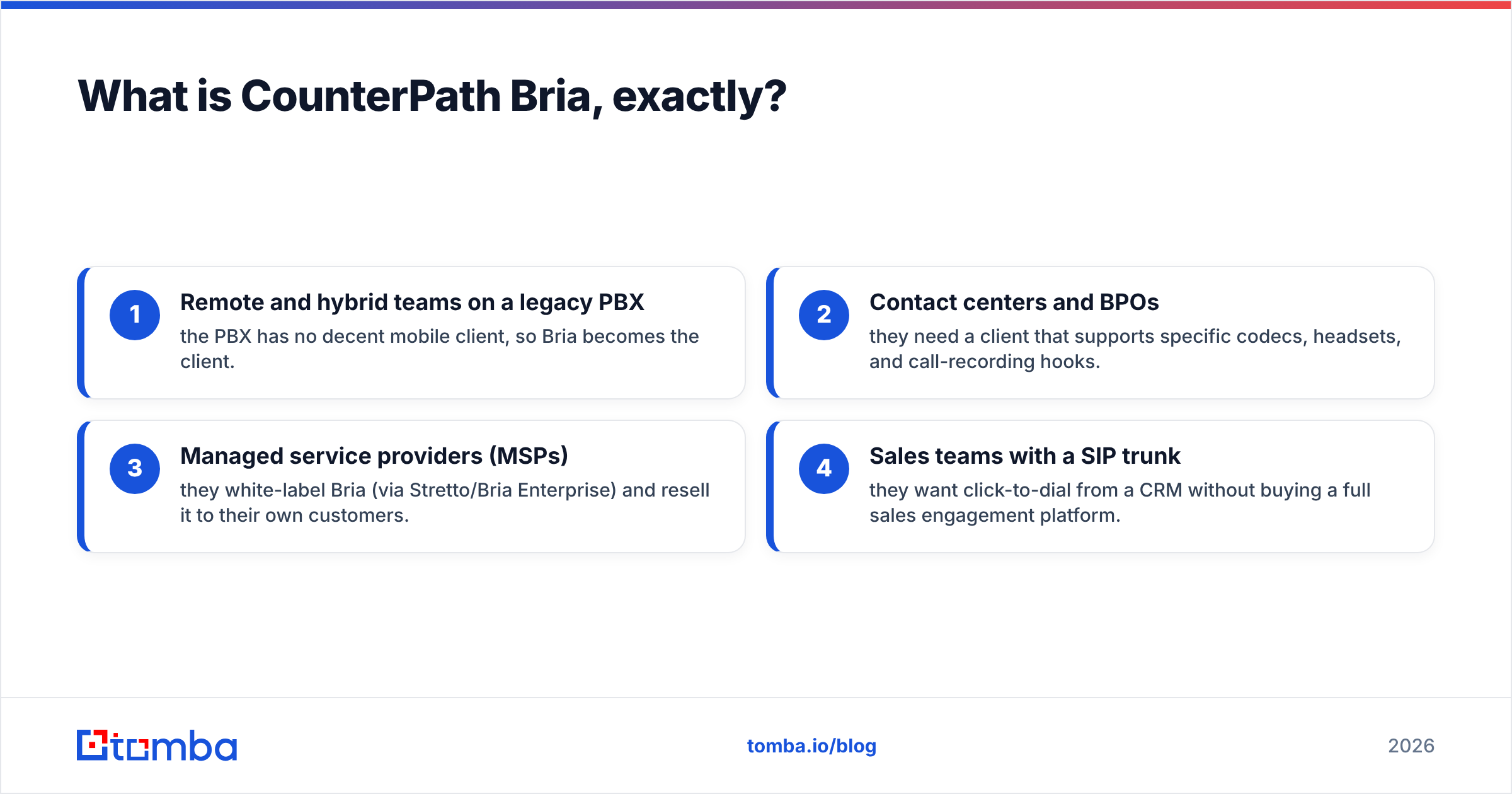
- Remote and hybrid teams on a legacy PBX — the PBX has no decent mobile client, so Bria becomes the client.
- Contact centers and BPOs — they need a client that supports specific codecs, headsets, and call-recording hooks.
- Managed service providers (MSPs) — they white-label Bria (via Stretto/Bria Enterprise) and resell it to their own customers.
- Sales teams with a SIP trunk — they want click-to-dial from a CRM without buying a full sales engagement platform.
If you don't already own or rent a SIP service, Bria is not your starting point. Start with the phone service.
How much does CounterPath Bria cost in 2026?#
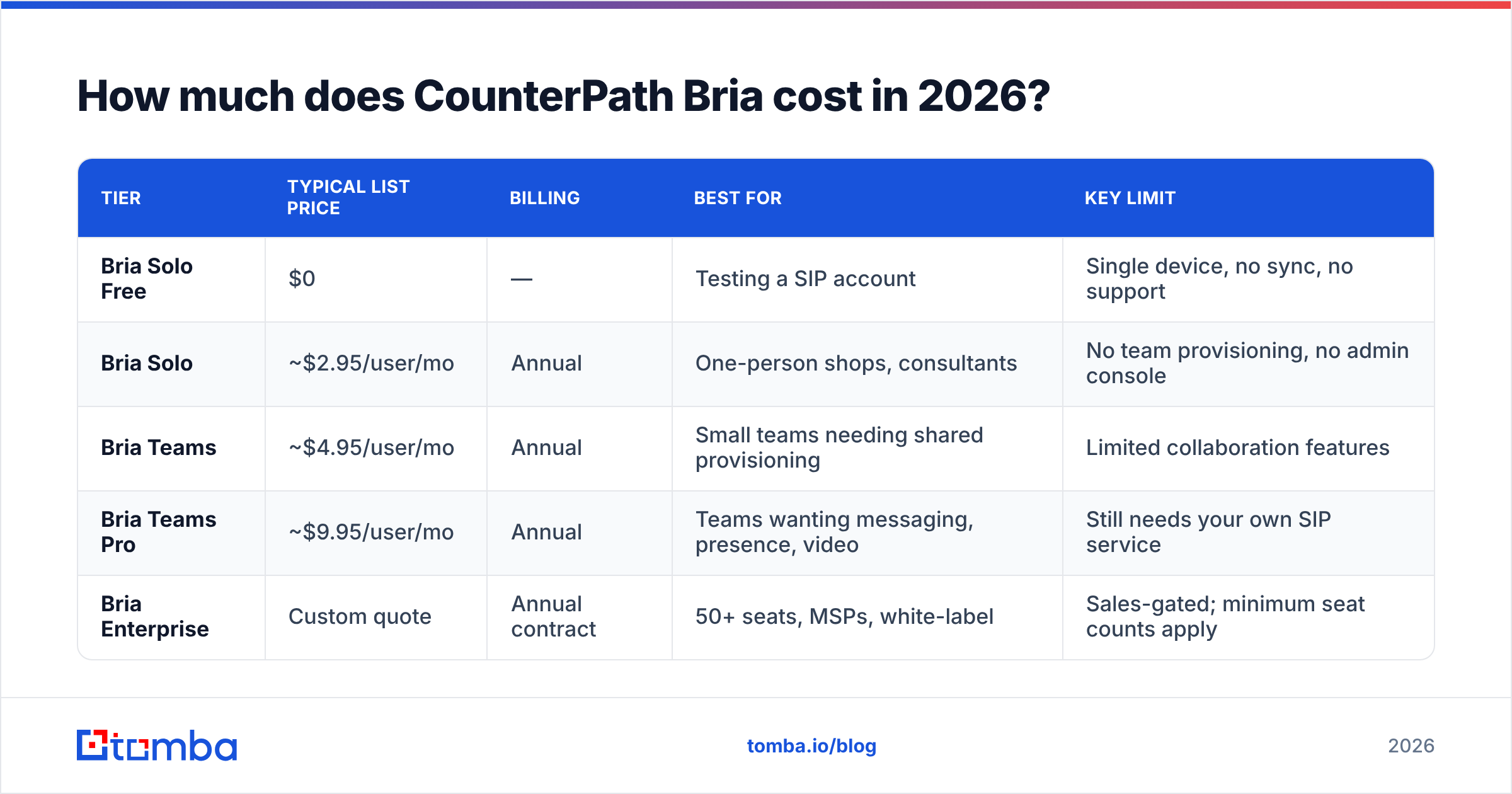
Here's the part everyone actually searches for. Bria's public tiers break down roughly like this. Prices are list, per user, and — this is the important bit — quoted at the annual-billing rate.
| Tier | Typical list price | Billing | Best for | Key limit |
|---|---|---|---|---|
| Bria Solo Free | $0 | — | Testing a SIP account | Single device, no sync, no support |
| Bria Solo | ~$2.95/user/mo | Annual | One-person shops, consultants | No team provisioning, no admin console |
| Bria Teams | ~$4.95/user/mo | Annual | Small teams needing shared provisioning | Limited collaboration features |
| Bria Teams Pro | ~$9.95/user/mo | Annual | Teams wanting messaging, presence, video | Still needs your own SIP service |
| Bria Enterprise | Custom quote | Annual contract | 50+ seats, MSPs, white-label | Sales-gated; minimum seat counts apply |
Two things to internalize before you take those numbers to a budget meeting.
First, the softphone is never the whole bill. A realistic 25-seat Bria Teams Pro deployment looks like this:
- Bria Teams Pro: 25 × $9.95 × 12 ≈ $2,985/year
- SIP trunking or hosted PBX seats: typically $15–$30/user/mo ≈ $4,500–$9,000/year
- DIDs, number porting, e911, taxes and regulatory fees: a few hundred to low thousands
- Optional: call recording storage, CRM connector, headset hardware
The softphone is often 20–30% of the true cost of the calling stack. Any "Bria vs. RingCentral" comparison that puts $9.95 next to $30 is comparing a steering wheel to a car.
Second, annual billing is the default. Monthly options exist on some tiers but at a premium, and mid-term seat reductions are generally not refundable. If you hire seasonally or run project-based teams, model a 12-month commitment, not a flexible headcount.
Is Bria worth it compared to the alternatives?#
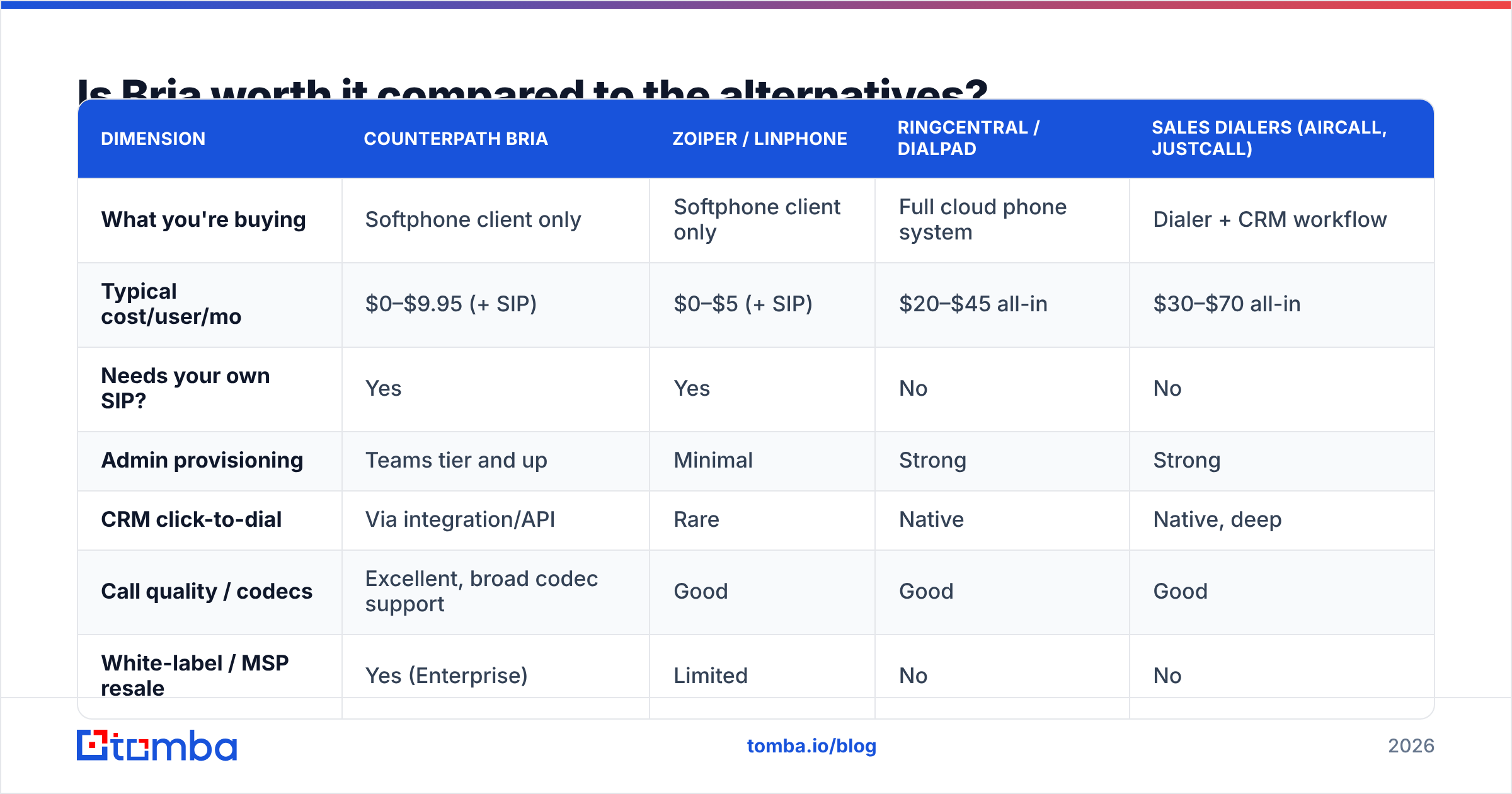
Depends entirely on what you already own. Bria competes in three different directions at once, and it wins in exactly one of them.
| Dimension | CounterPath Bria | Zoiper / Linphone | RingCentral / Dialpad | Sales dialers (Aircall, JustCall) |
|---|---|---|---|---|
| What you're buying | Softphone client only | Softphone client only | Full cloud phone system | Dialer + CRM workflow |
| Typical cost/user/mo | $0–$9.95 (+ SIP) | $0–$5 (+ SIP) | $20–$45 all-in | $30–$70 all-in |
| Needs your own SIP? | Yes | Yes | No | No |
| Admin provisioning | Teams tier and up | Minimal | Strong | Strong |
| CRM click-to-dial | Via integration/API | Rare | Native | Native, deep |
| Call quality / codecs | Excellent, broad codec support | Good | Good | Good |
| White-label / MSP resale | Yes (Enterprise) | Limited | No | No |
| Best fit | You already have a PBX | Hobby / low budget | You have no phone system | Outbound sales motion |
Bria wins when you already own the phone service and need a better client. That's a real, common, unglamorous situation — and Bria is genuinely the best answer to it. Its codec support (Opus, G.722, G.729, SILK), headset integration, and rock-solid registration behavior are why it's been the default recommendation from PBX vendors for over a decade.
Bria loses when you're buying a phone system from scratch, because you'd be assembling a stack from parts that a UCaaS vendor sells pre-assembled. And it loses when your actual problem is outbound sales throughput, because Bria has no cadences, no local presence dialing, no call scoring, and no lead management. It's a phone, not a sales engine.
What do real Bria reviews say?#
Pull the aggregate view from G2 and Capterra and a consistent shape emerges. Ratings hover in the 4.0–4.3 range across hundreds of reviews — respectable, not adored. The praise and the complaints are remarkably stable across years, which itself tells you something.
What reviewers consistently praise:
- Call stability. Reviewers repeatedly note that Bria stays registered and reconnects gracefully on flaky Wi-Fi and cellular handoffs — the single most important thing a softphone does.
- Audio quality. Wideband codec support plus decent echo cancellation and noise handling.
- Cross-platform parity. The desktop and mobile clients behave alike, and Teams tiers sync contacts and settings across devices.
- BYO-SIP flexibility. Works with almost any standards-compliant SIP provider. No vendor lock-in on the carrier side.
What reviewers consistently criticize:
- The interface looks its age. "Functional but dated" is the most common phrasing. Compared to a modern UCaaS client, Bria feels like a utility, not a product.
- Licensing friction. Moving a license between devices or users trips people up. Several reviewers describe a re-activation or seat-reassignment process that required a support ticket.
- Support responsiveness. The most common source of one- and two-star reviews. Response times on lower tiers frustrate people who expected enterprise-grade help at $2.95/seat.
- Setup complexity. You must know your SIP credentials, transport, NAT traversal, and codec preferences. If you can't answer "what's your STUN server?", budget for an IT hour or two.
- Feature gating. Video, screen share, and messaging live on Teams Pro. People who bought Solo expecting collaboration features feel upsold.
None of these are dealbreakers on their own. Together, they paint an honest picture: Bria is infrastructure, and it behaves like infrastructure. It's reliable and unsexy, and it expects competence from whoever configures it.
What are Bria's pros and cons for a sales team?#
Softphones get bought by sales orgs all the time, usually because someone wants click-to-dial without a $50/seat platform. Here's the honest ledger.
Pros
- Cheapest way to add a real dialer to an existing PBX — under $10/seat/month at list.
- Reps can work anywhere with parity between desktop and mobile.
- No carrier lock-in. Change SIP providers without changing the client, so you can shop for minute rates.
- API and provisioning hooks on Enterprise, so it can be scripted into an onboarding flow.
- Predictable audio quality, which matters more to connect rates than any dashboard.
Cons
- No cadence engine. No sequences, no task queues, no follow-up automation. Reps track their own callbacks.
- No native lead data. Bria dials numbers. It does not find them, verify them, or tell you who owns them.
- No local presence or power dialing out of the box — you'll bolt those on or do without.
- Reporting is thin. Call logs, not conversation analytics. No talk-time ratios, no keyword spotting.
- The stack gets fragmented. Bria + SIP provider + CRM + a data source is four vendors and three integration points.
That last point is the one to weigh hardest. Every extra vendor is an extra place your rep loses ten seconds per call — and ten seconds per call, at 60 dials a day, is an hour a week per rep.
Does a softphone actually fix your calling problem?#
Almost never. Here's the uncomfortable arithmetic.
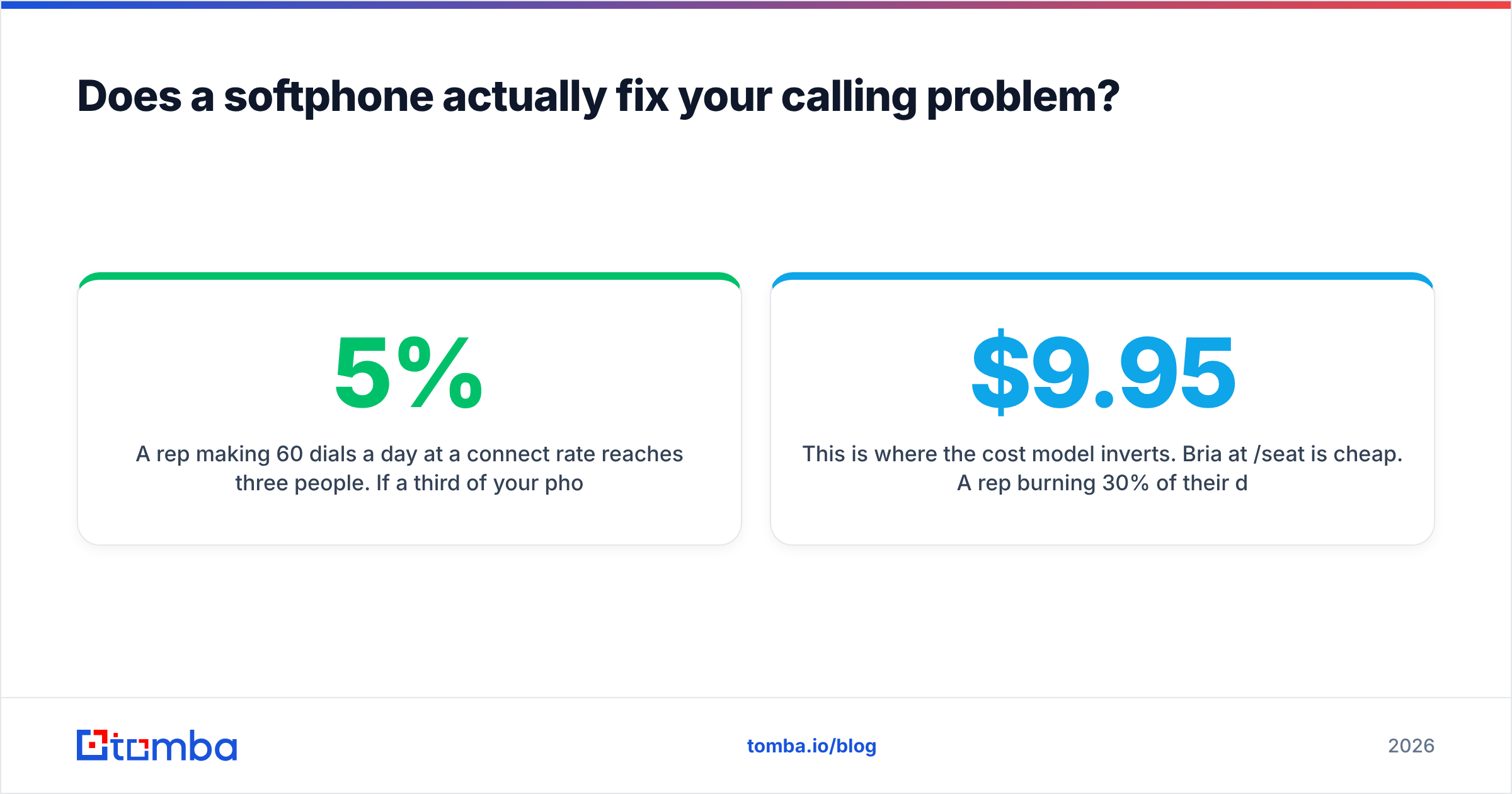
A rep making 60 dials a day at a 5% connect rate reaches three people. If a third of your phone numbers are wrong, stale, or belong to a switchboard nobody answers, that rep is really making 40 useful dials and reaching two people. No softphone license improves that number. You didn't have a client problem. You had a data problem.
This is where the cost model inverts. Bria at $9.95/seat is cheap. A rep burning 30% of their dial capacity on dead numbers is expensive — at a $70k base salary, that's roughly $21k of wasted capacity per rep per year. Fixing the list beats fixing the phone every time.
Practically, that means the layer upstream of the dialer deserves more attention than the dialer:
- Verify the number before it enters the dial queue. A phone validator check tells you whether a line is active, what type it is (mobile vs. landline vs. VoIP), and whether it's worth a rep's minute.
- Find direct numbers, not switchboards. Reaching a gatekeeper is not a connect. A phone finder that returns direct dials changes your connect rate more than any codec ever will.
- Enrich before you dial. Knowing the title, company size, and tech stack before the phone rings is the difference between a cold call and a warm one. Run leads through data enrichment first.
- Keep a working email channel in parallel. The overwhelming majority of prospects will not answer an unknown number on the first attempt. Your callback rate depends on a follow-up email landing — which means the address has to be right.
The teams that get real ROI from a softphone are the ones who did this work first. The teams that don't, buy Bria, dial garbage lists through it, and conclude the dialer didn't work.
Who should buy Bria — and who should skip it?#
Buy Bria if:
- You already run a PBX or SIP trunk and your current client is bad.
- You have IT capacity to configure SIP settings and manage licenses.
- Your calling is support-, service-, or relationship-driven rather than high-volume cold outbound.
- You're an MSP who wants to white-label a proven client.
Skip Bria if:
- You have no phone service yet — buy a UCaaS platform instead and get the client bundled.
- Your motion is high-volume outbound sales — a purpose-built sales dialer with cadences will pay for its premium.
- You need modern conversation intelligence, call scoring, or coaching features.
- You want month-to-month flexibility on seats.
And regardless of which way you go: decide your data layer before you decide your dialer. The client is a commodity. Accurate contact data is not.
The bottom line on CounterPath Bria pricing#
Bria is fairly priced for what it is — a reliable, codec-rich, cross-platform SIP client that costs between free and $9.95 per seat per month, billed annually, on top of a phone service you supply yourself. The reviews are honest: it works, it looks dated, and support is thin at the low tiers. There's no scandal here and no hidden trap beyond the annual commitment and the fact that the license is only ever a fraction of your true calling bill.
What Bria will not do is fill your pipeline. Give a rep a perfect softphone and a list of 2,000 unverified contacts and you've built a very high-fidelity way to hear a disconnected tone.
Fix the input first. Tomba's Email Finder gives your team verified professional emails by domain, name, or company — so every dial has a real follow-up channel behind it, and every no-answer turns into a sequence instead of a dead end. Start free with 25 searches a month, or scale into a paid plan from $49/mo; see Tomba pricing for the full breakdown. Buy the dialer if you need it — but buy the data first.
Related guides#
Ready to find emails that actually work?
Join 150,000+ professionals who stopped guessing and started sending. Free credits on signup — no credit card required.
Get the Tomba newsletter
Practical outbound tactics and product updates — once every two weeks.
About the author