Cratio CRM Pricing, Reviews, Pros and Cons (2026 Guide)
Cratio CRM sells itself on low per-user pricing and field-sales automation. Here is what the tiers really cost, what reviewers actually complain about, and when a cheaper stack beats it.
TL;DR
- Cratio CRM is a low-cost, India-built sales CRM aimed at field-sales and telecalling teams — lead capture, call tracking, mobile check-ins, and a rules engine for auto-assignment.
- Public Cratio CRM pricing sits in the roughly ₹700–₹1,500 per user/month band (about $8–$18), billed annually. That is genuinely cheap versus HubSpot or Salesforce — but the number on the page is rarely the number on the invoice.
- The real costs show up in implementation fees, per-user minimums, WhatsApp/SMS/IVR credits, and paid customization for anything outside the default workflow.
- Reviews are consistently positive on support responsiveness and mobile field tracking, and consistently mixed on UI polish, reporting depth, and third-party integrations.
- The CRM is not a data source. Whatever you pay Cratio, you still need verified contact data flowing in — that is where a dedicated finder and verifier pays for itself.
Cratio CRM keeps showing up on shortlists for one reason: the price. When a Salesforce quote lands at $165 per user per month and Cratio quotes a tenth of that, the spreadsheet does the arguing for you. But cheap CRMs fail in predictable ways, and the failure is expensive — a stalled rollout costs more than three years of license fees.
This is a neutral breakdown: what Cratio actually charges, what buyers say after twelve months, where it wins, where it does not, and what you should budget for alongside it.
What is Cratio CRM?#
Cratio CRM is a sales-focused CRM built by Cratio Software, a Chennai-based vendor that has been shipping since the early 2010s. Its centre of gravity is different from the Western SaaS CRMs most buyers compare it to. Where HubSpot optimises for marketing-led inbound and Salesforce optimises for enterprise process depth, Cratio optimises for high-volume lead handling by distributed, mobile sales teams.
That focus shows in the feature list:
- Lead capture from many channels — web forms, IndiaMART/JustDial-style marketplaces, email parsers, missed-call and IVR integrations, and bulk import.
- Automatic lead assignment — a rules engine that routes leads by territory, product, source, or round-robin, usually within seconds of capture.
- Mobile field-sales tracking — GPS check-ins, visit logs, beat plans, and daily activity reports pushed from an Android app.
- Call and telecalling workflows — click-to-call, call recording via telephony partners, disposition codes, and callback scheduling.
- Sales pipeline and quotation — stage-based pipeline, quotation generation, and basic invoicing on the higher tiers.
- Reports and dashboards — activity, funnel, and source-performance reports, plus scheduled email digests to managers.
If your revenue motion is a call centre feeding a field team — real estate, education, insurance, building materials, industrial equipment, healthcare devices — that shape fits. If your motion is product-led SaaS with a marketing automation layer and a dozen SaaS integrations, it fits far less well. Hold that distinction; it drives every verdict below.
You can confirm the current feature set on Cratio's own site, which is the only source that is ever fully up to date on tiers.
How much does Cratio CRM pricing actually cost in 2026?#
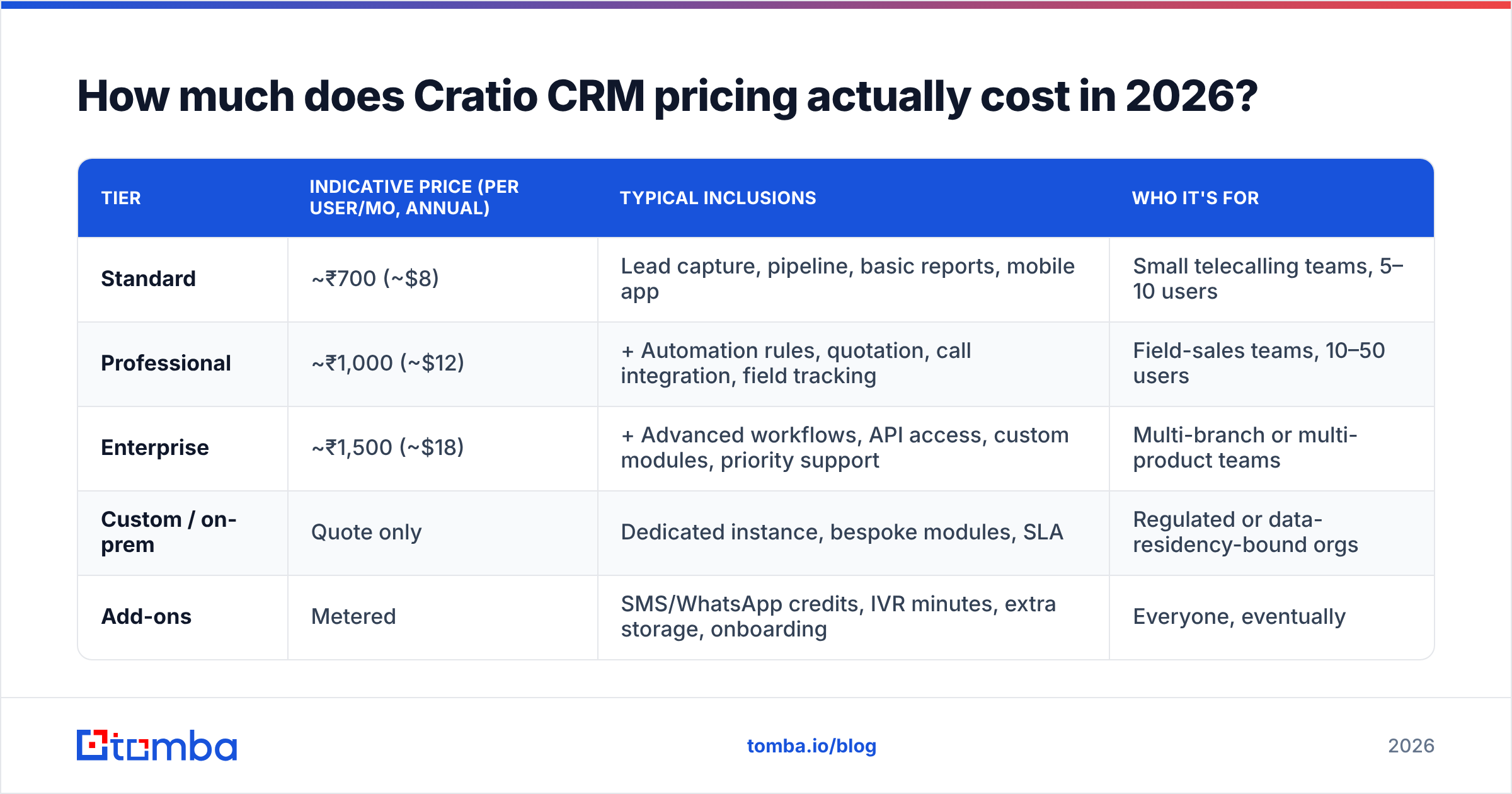
Short answer: budget roughly $8–$18 per user/month on license, then add 20–40% for the things the pricing page does not itemise.
Cratio publishes indicative per-user pricing rather than a self-serve checkout, and the quoted figure moves with seat count, contract length, and region. Treat the table below as the shape of the pricing, not a quote — always confirm current numbers with the vendor before you build a business case on them.
| Tier | Indicative price (per user/mo, annual) | Typical inclusions | Who it's for |
|---|---|---|---|
| Standard | Lead capture, pipeline, basic reports, mobile app | Small telecalling teams, 5–10 users | |
| Professional | + Automation rules, quotation, call integration, field tracking | Field-sales teams, 10–50 users | |
| Enterprise | + Advanced workflows, API access, custom modules, priority support | Multi-branch or multi-product teams | |
| Custom / on-prem | Quote only | Dedicated instance, bespoke modules, SLA | Regulated or data-residency-bound orgs |
| Add-ons | Metered | SMS/WhatsApp credits, IVR minutes, extra storage, onboarding | Everyone, eventually |
Where the invoice grows#
The license line is the honest part. The surprises live elsewhere:
- Minimum seats. Low per-user pricing is often gated behind a floor (commonly 5–10 users). A three-person team may pay for five.
- Annual prepay. The headline rate usually assumes a year up front. Monthly billing, where offered, costs more per seat.
- Implementation and onboarding. Configuring the rules engine, importing history, and mapping your stages is real work. Some deals include it; many quote it separately as a one-time fee.
- Communication credits. WhatsApp Business API, transactional SMS, and IVR minutes are pass-through costs. A 20-seat telecalling team can spend more on messaging credits than on CRM licenses.
- Customization. Anything outside the default object model — a custom module, a bespoke report, a non-standard integration — is typically scoped and billed as a project.

The pattern is not unique to Cratio. It is how almost every mid-market CRM in this price band sells. The mistake buyers make is comparing Cratio's license line to HubSpot's all-in line and declaring a 10x saving. Compare total first-year cost, including implementation and credits, or you are not comparing anything.
What do Cratio CRM reviews actually say?#
Public review volume for Cratio is thin compared to the giants — a few dozen reviews across G2 and Capterra rather than the thousands you'll find for Salesforce. Small samples skew, so read the themes, not the star average.
What reviewers consistently praise:
- Support responsiveness. This is the single most repeated positive. Buyers describe reaching a named person, not a ticket queue. For teams without an internal CRM admin, that matters more than any feature.
- Speed of deployment. Weeks, not quarters. The lead-capture-to-assignment loop is live fast because the product is opinionated about how it should work.
- Field-tracking accuracy. Managers who need to know whether a rep actually visited the site report that the GPS check-in and visit logs do the job.
- Price-to-value. Nobody says it's the best CRM. Many say it's the best CRM they could get for the money.
What reviewers consistently criticise:
- Interface feels dated. Functional, dense, not delightful. Reps coming from consumer-grade apps notice.
- Reporting depth. Fine for activity and funnel counts; limited for cohort analysis, attribution, or anything you'd want to hand a board.
- Integration ecosystem. This is the biggest structural gap. Compared to a platform with hundreds of native connectors, Cratio's integration list is short, and API-based work often means developer time.
- Documentation. Self-serve learning material is limited, which is partly why support gets praised — you have to ask.
The honest read: reviews describe a product that does its narrow job well and is a poor fit for anyone expecting a platform. That is a defensible position, not a flaw — as long as you buy it knowing that.
How does Cratio CRM compare to the alternatives?#
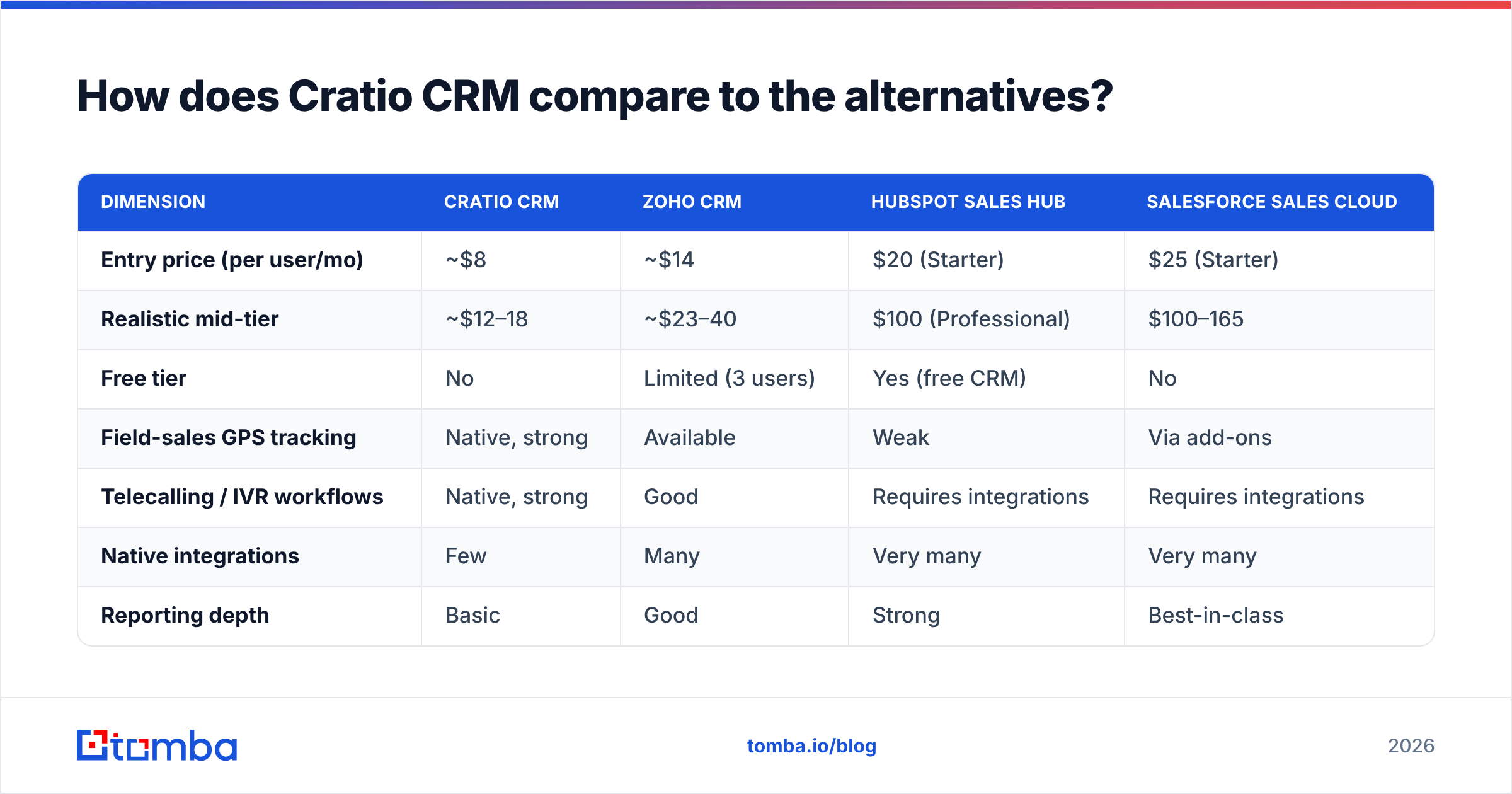
Price alone is a bad comparison axis. Here is the same set of tools compared on the dimensions that actually decide a rollout.
| Dimension | Cratio CRM | Zoho CRM | HubSpot Sales Hub | Salesforce Sales Cloud |
|---|---|---|---|---|
| Entry price (per user/mo) | ~$8 | ~$14 | $20 (Starter) | $25 (Starter) |
| Realistic mid-tier | ~$12–18 | ~$23–40 | $100 (Professional) | $100–165 |
| Free tier | No | Limited (3 users) | Yes (free CRM) | No |
| Field-sales GPS tracking | Native, strong | Available | Weak | Via add-ons |
| Telecalling / IVR workflows | Native, strong | Good | Requires integrations | Requires integrations |
| Native integrations | Few | Many | Very many | Very many |
| Reporting depth | Basic | Good | Strong | Best-in-class |
| Implementation effort | Low | Medium | Low–medium | High |
| Best fit | Field + telecalling teams | Cost-conscious generalists | Inbound / marketing-led | Enterprise process depth |
Two conclusions fall out of that table.
First, Cratio's competition is not Salesforce. It's Zoho, and it's the spreadsheet the team is currently using. Against Salesforce, Cratio loses on everything except price and speed — and Salesforce buyers were never choosing on price. Against a spreadsheet, Cratio wins outright.
Second, the integration gap is the real cost. If your stack has five other tools that need to talk to the CRM, the money you save on licenses gets spent on middleware and developer hours. Check whether the connectors you need exist before you sign — not after. This is the single most common source of buyer's remorse in this price band.
For reference on how the premium end prices the same job, HubSpot's published pricing is worth ten minutes; it makes the trade-off concrete.
What are the real pros and cons of Cratio CRM?#
Pros
- Genuinely low license cost. A 20-person team can run a real CRM for roughly the price of two HubSpot Professional seats.
- Purpose-built for field and phone sales. Beat plans, GPS check-ins, call dispositions, and marketplace lead capture are first-class, not bolt-ons.
- Fast automation setup. The rules engine handles source-based routing and SLA timers without a consultant.
- Human support. Named contacts and quick responses, repeatedly cited by reviewers.
- Low switching friction from spreadsheets. The mental model is close enough to a structured sheet that reps adopt it.
Cons
- Thin integration ecosystem. Expect API work for anything beyond the obvious.
- Reporting ceiling. You will export to a BI tool eventually.
- UI is utilitarian. Adoption risk with younger, consumer-app-trained reps.
- Opaque, quote-driven pricing. You cannot fully self-serve a total cost of ownership number from the website.
- No data layer. The CRM stores contacts; it does not find or validate them. That gap is yours to fill.
That last point deserves its own section, because it is the one buyers underestimate most.
Is a cheap CRM enough without a data layer?#
No — and this is where CRM ROI actually dies.
A CRM is a filing cabinet with rules. It is exceptional at telling you what happened to a lead after it arrived, and completely indifferent to whether the lead was real. Feed it 5,000 stale, unverified contacts and you get a beautifully organised record of 5,000 bounces.
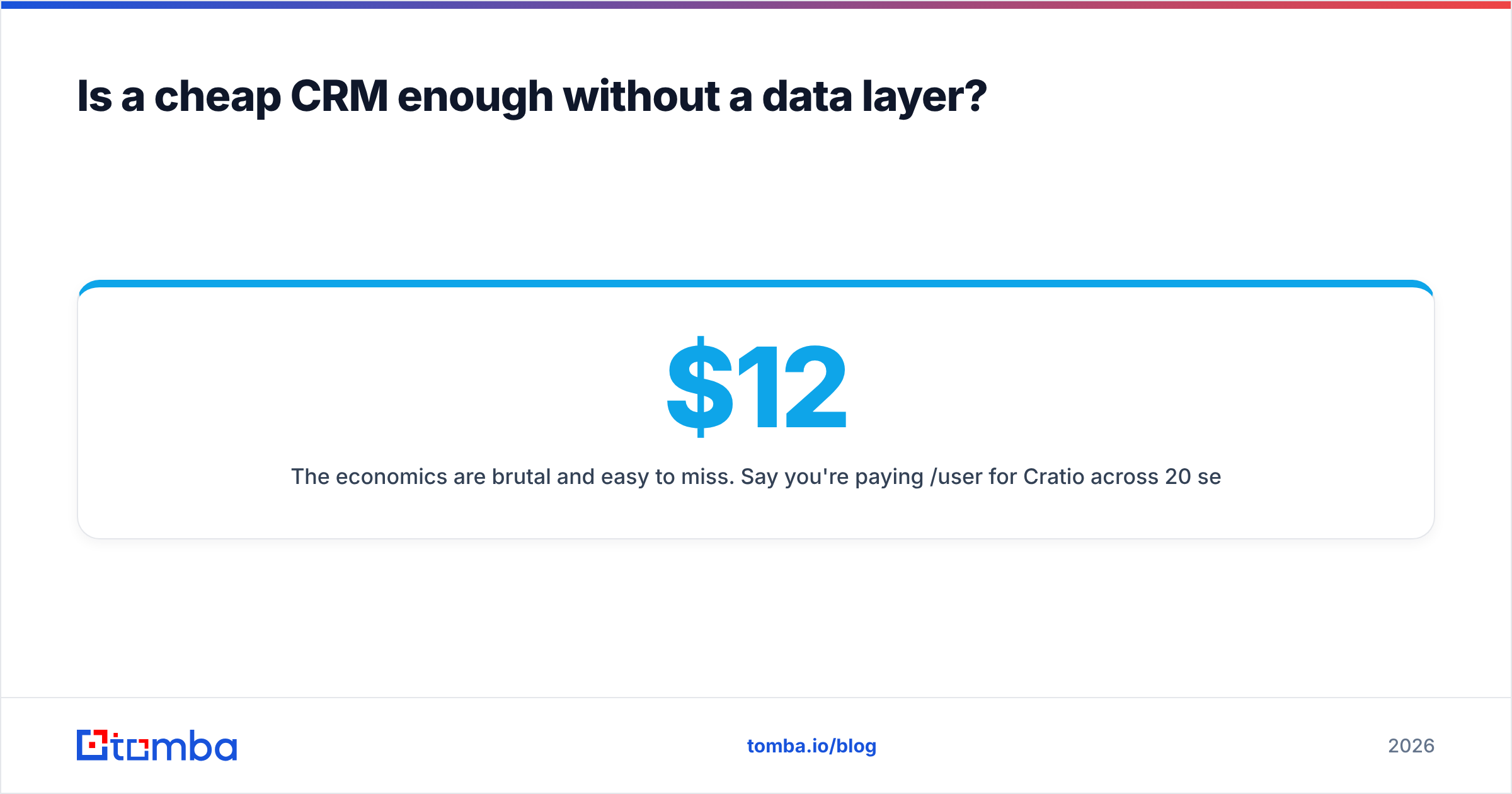
The economics are brutal and easy to miss. Say you're paying $12/user/month for Cratio across 20 seats — $2,880 a year. Now say 25% of your contact records have bad or outdated emails. Your reps burn a quarter of their outreach hours on dead addresses, your sender reputation degrades, and your domain starts landing in spam for the good contacts too. The wasted rep time in a single quarter dwarfs the annual CRM bill.

The fix is boring and cheap: put a verification and enrichment step in front of the CRM, not behind it.
- Use an email finder to source verified addresses from a name plus a company domain, instead of guessing patterns.
- Run every list through an email verifier before import, so bounce-prone records never reach a rep's queue.
- Use domain search when you're prospecting into a target account and need the whole buying committee, not one contact.
- Push clean records into the CRM via API or a spreadsheet sync so the pipeline stays current without manual re-keying.
Do that and the cheap CRM starts looking like a smart decision instead of a compromise. Skip it and you've paid for a very organised way to fail.
Who should buy Cratio CRM — and who should not?#
Buy it if:
- Your sales motion is outbound calling plus physical field visits, and you need visit accountability.
- Your team is 10–100 reps and your CRM budget is a genuine constraint.
- Your integration needs are modest — telephony, WhatsApp, and a spreadsheet or two.
- You want to be live in weeks and you don't have an in-house admin.
Look elsewhere if:
- You run marketing-led inbound and need attribution, lifecycle stages, and native ad-platform sync — that's HubSpot's territory.
- You have a complex, multi-object process with heavy approvals and forecasting — that's Salesforce's territory.
- Your stack has 8+ SaaS tools that all need to write to the CRM — the integration gap will eat your savings.
- Your board wants cohort and attribution reporting straight out of the CRM.
The middle case — a cost-conscious generalist team with moderate integration needs — is where Zoho usually wins, and it's fair to say so.
What should you pair with Cratio CRM?#
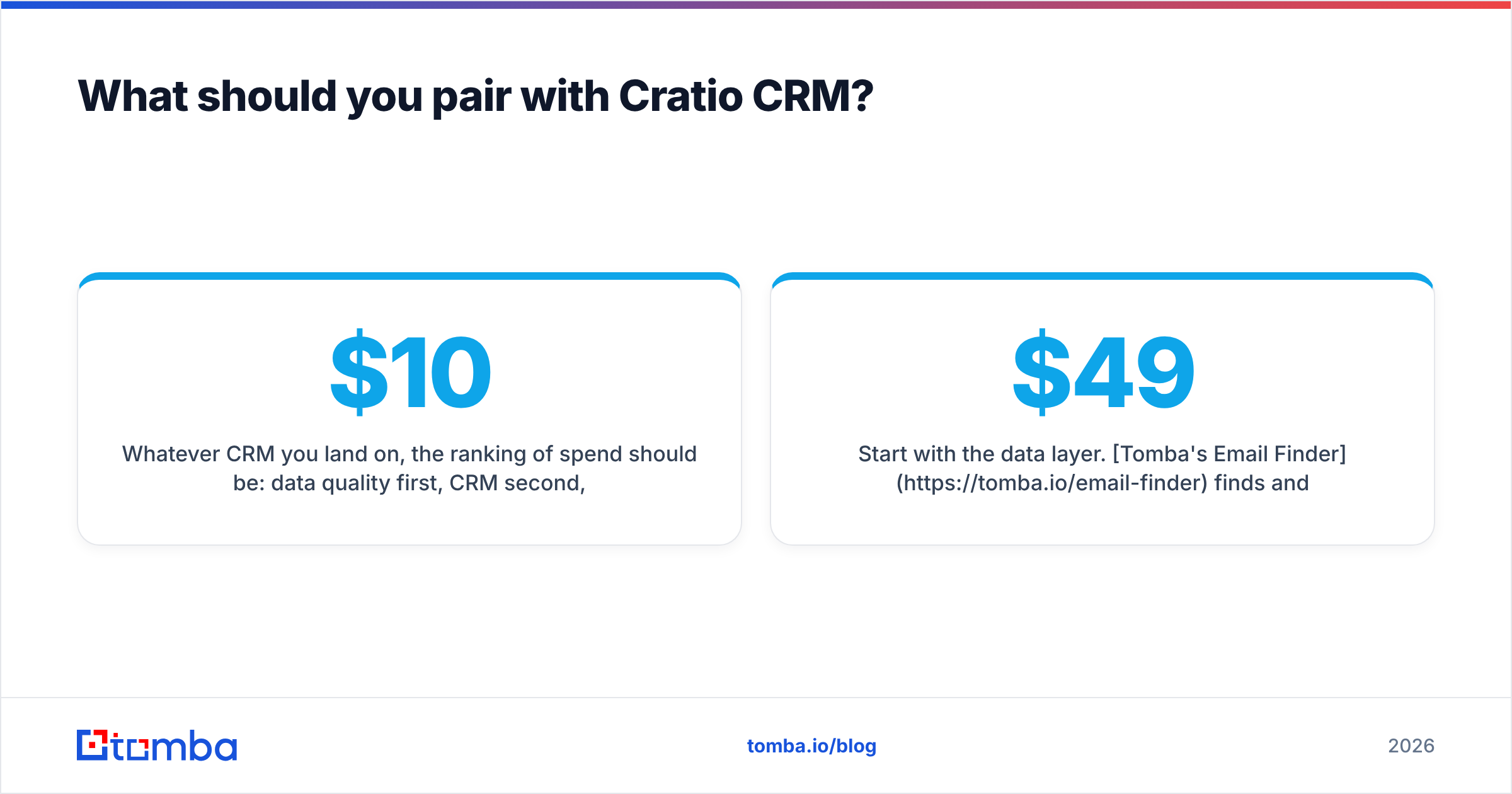
Whatever CRM you land on, the ranking of spend should be: data quality first, CRM second, everything else third. A $10/seat CRM with clean, verified contacts outperforms a $165/seat CRM fed on scraped junk, every single time.
Start with the data layer. Tomba's Email Finder finds and verifies professional email addresses by name, company, or domain, with a free tier of 25 searches a month so you can test accuracy against your own known-good list before you commit a rupee. Paid plans start at $49/mo — see Tomba pricing for the full breakdown — and every finder result runs through verification before it reaches you, so the records landing in your CRM are ones your reps can actually work.
Get the contacts right, and Cratio's low price stops being a compromise and starts being leverage.
Related guides#
Ready to find emails that actually work?
Join 150,000+ professionals who stopped guessing and started sending. Free credits on signup — no credit card required.
Get the Tomba newsletter
Practical outbound tactics and product updates — once every two weeks.
About the author