Creatio vs HubSpot (2026): Which CRM Actually Fits Your Team?
Creatio sells no-code flexibility. HubSpot sells speed and adoption. Here's an honest breakdown of pricing, workflow depth, data quality, and the hidden costs that decide which CRM you should actually buy in 2026.
TL;DR
- Creatio is a no-code composable platform: you build the CRM your process needs. Best for mid-market and enterprise teams with non-standard workflows, an ops person who enjoys building, and a 2–4 month implementation window.
- HubSpot is an opinionated, out-of-the-box CRM: fastest to adopt, best UX, biggest app ecosystem. Best for SMB and growth-stage teams that want to be selling next week, not next quarter.
- Sticker price misleads on both. Creatio's per-user cost looks low until you add product modules and implementation. HubSpot's Starter looks cheap until Professional seats, marketing contact tiers, and onboarding fees land.
- Neither one fixes the actual bottleneck for most outbound teams: the contacts inside the CRM are stale or missing. Pick the CRM for process fit, then solve data separately.
- Rough rule: under 30 reps and standard pipeline → HubSpot. Complex approvals, field service, banking/insurance logic, or heavy customization → Creatio.
What is Creatio and who actually uses it?#
Creatio is a no-code platform with CRM applications built on top of it — Sales, Marketing, and Service — plus Studio Creatio, the layer where you compose your own apps, objects, and business processes without writing code.
The pitch is composability. Instead of bending your process to fit a vendor's object model, you drag out a BPMN process diagram, define custom entities, and ship an app that mirrors how your company actually sells. That is why Creatio shows up disproportionately in banking, insurance, manufacturing, pharma, and field-service organisations — verticals where the sales motion involves approvals, compliance checkpoints, and handoffs that a generic pipeline can't model.
The trade-off is time. Composability means you have to compose. Creatio deployments typically run weeks to months, usually with a partner, and the platform assumes someone on your side owns configuration long-term. Analyst coverage from firms like Gartner has consistently positioned Creatio in the low-code/no-code application platform conversation as much as the CRM one — that's a fair read of what you're buying.
Who it fits:
- Mid-market and enterprise teams (50–5,000 employees) with a real ops function.
- Process-heavy industries where a deal passes through underwriting, legal, or engineering review.
- Companies replacing legacy CRM (older Dynamics, Siebel, homegrown) where "just use standard objects" was never going to work.
- Teams that want one platform for CRM plus internal ops apps, rather than five SaaS tools stitched together.
What is HubSpot and where does it win?#
HubSpot is the opposite philosophy: a highly opinionated CRM with a free tier, an excellent UI, and Hubs (Sales, Marketing, Service, Content, Operations, Commerce) you switch on as you grow. You can have a rep sending sequences the same afternoon you sign up.
Its real moat is adoption. Reps use it without being forced to, which is not a small thing — a CRM nobody updates is a very expensive spreadsheet. Add a marketplace of well over a thousand integrations and the best documentation in the category (hubspot.com), and you get a system that a five-person team and a 200-person team can both run without a dedicated admin.
Where HubSpot strains:
- Deep custom objects and branching approvals. It has custom objects on Enterprise, but modelling a 14-step underwriting workflow is fighting the tool.
- Pricing at scale. Professional and Enterprise seats plus marketing contact tiers compound quickly.
- Data residency and heavy compliance requirements where a self-hosted or highly configurable option is mandated.
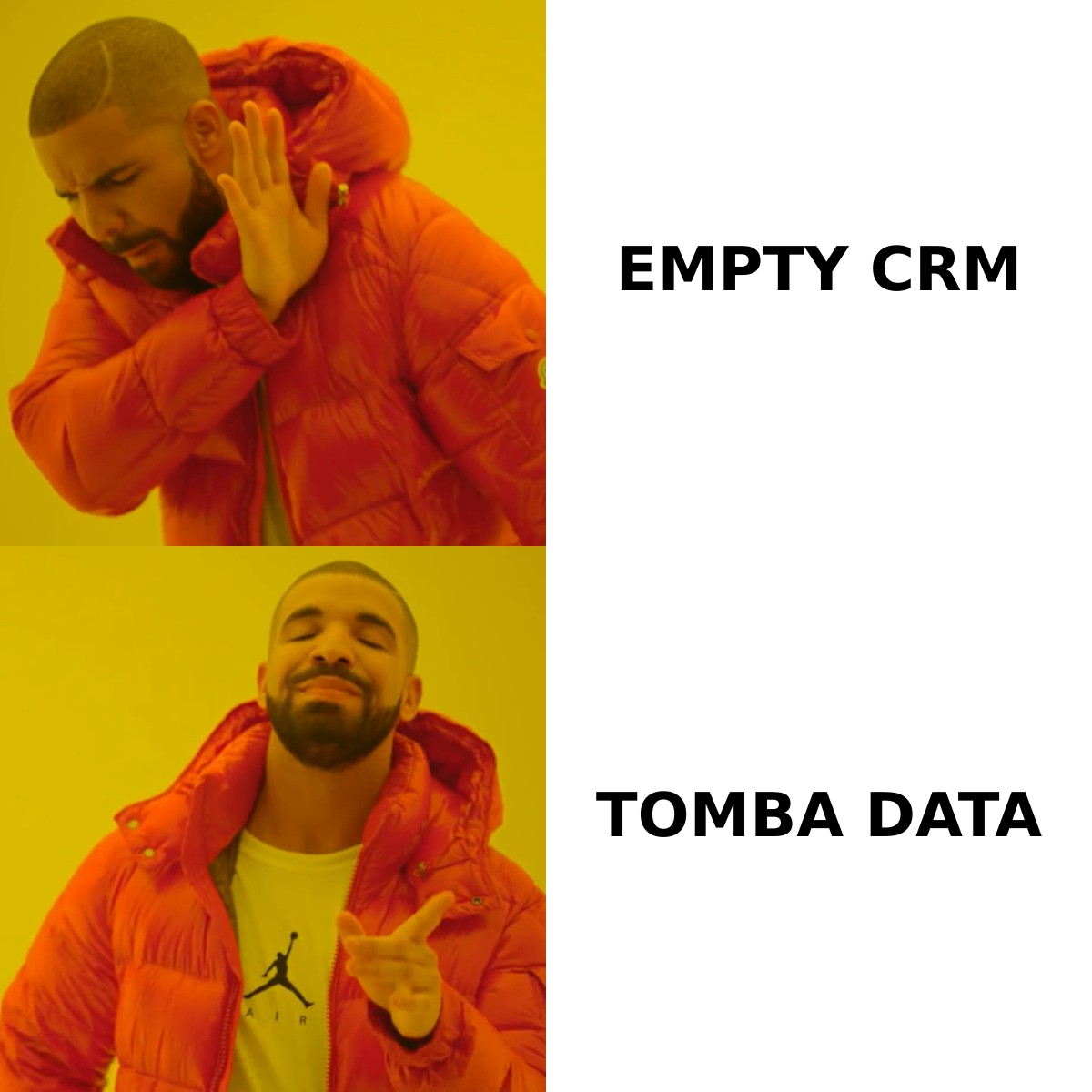
Creatio vs HubSpot: how do they compare head-to-head?#
Prices below are indicative list prices at the time of writing and exclude implementation, add-ons, and negotiated discounts. Always confirm on the vendor's own pricing page — both companies repackage regularly.
| Dimension | Creatio | HubSpot |
|---|---|---|
| Core model | No-code composable platform + CRM apps | Opinionated all-in-one CRM with Hubs |
| Free tier | No (free trial only) | Yes — free CRM, unlimited users, limited features |
| Entry paid pricing | ~$25/user/mo platform (Growth) + product modules | ~$20/seat/mo Sales Hub Starter |
| Mid tier | ~$55/user/mo (Enterprise) + modules | ~$100/seat/mo Sales Hub Professional |
| Top tier | ~$85/user/mo (Unlimited) + modules | ~$150/seat/mo Sales Hub Enterprise |
| Time to first value | Weeks to months (usually partner-led) | Hours to days (self-serve) |
| Workflow engine | BPMN process designer, best in class | Workflows tool, strong but linear-biased |
| Custom objects | Unlimited, core to the platform | Enterprise tier only, capped |
| Marketing automation | Marketing Creatio module | Marketing Hub — deeper, contact-tier priced |
| Integrations | ~700 marketplace items, strong API | 1,700+ marketplace apps, best-in-class ecosystem |
| Admin burden | High — expects an owner | Low — reps self-serve |
| Reporting | Highly configurable dashboards | Excellent standard reports, weaker on custom joins |
| Best for | Complex, regulated, non-standard processes | Fast-moving SMB/mid-market with standard pipeline |
| Worst for | Small teams who need value this month | Enterprises with heavy branching logic |
The single most useful line in that table is time to first value. It's the one prospects consistently underweight. A CRM that goes live in four months has burned two quarters of pipeline hygiene before anyone logs a call.
Is Creatio cheaper than HubSpot?#
On paper yes, in practice it depends entirely on team size and how much you customise.
Creatio's per-user platform fee is genuinely lower than HubSpot Professional. But Creatio's pricing is modular — you pay a platform fee plus the products (Sales, Marketing, Service) you enable, and most companies pay a partner for implementation. That implementation line is where budgets get interesting: a modest Creatio rollout can carry an implementation cost comparable to a full year of licences.
HubSpot's cost curve is different. It starts near zero (the free CRM is a real product, not a demo) and stays cheap through Starter. Then it steps hard: Professional seats, a required one-time onboarding fee on Pro and Enterprise, and marketing contact tiers that scale with your database size, not your headcount. Teams routinely get surprised by the contact-tier bill after they import a big list — a strong argument for verifying emails before they ever enter the CRM, since you pay to store dead contacts either way.
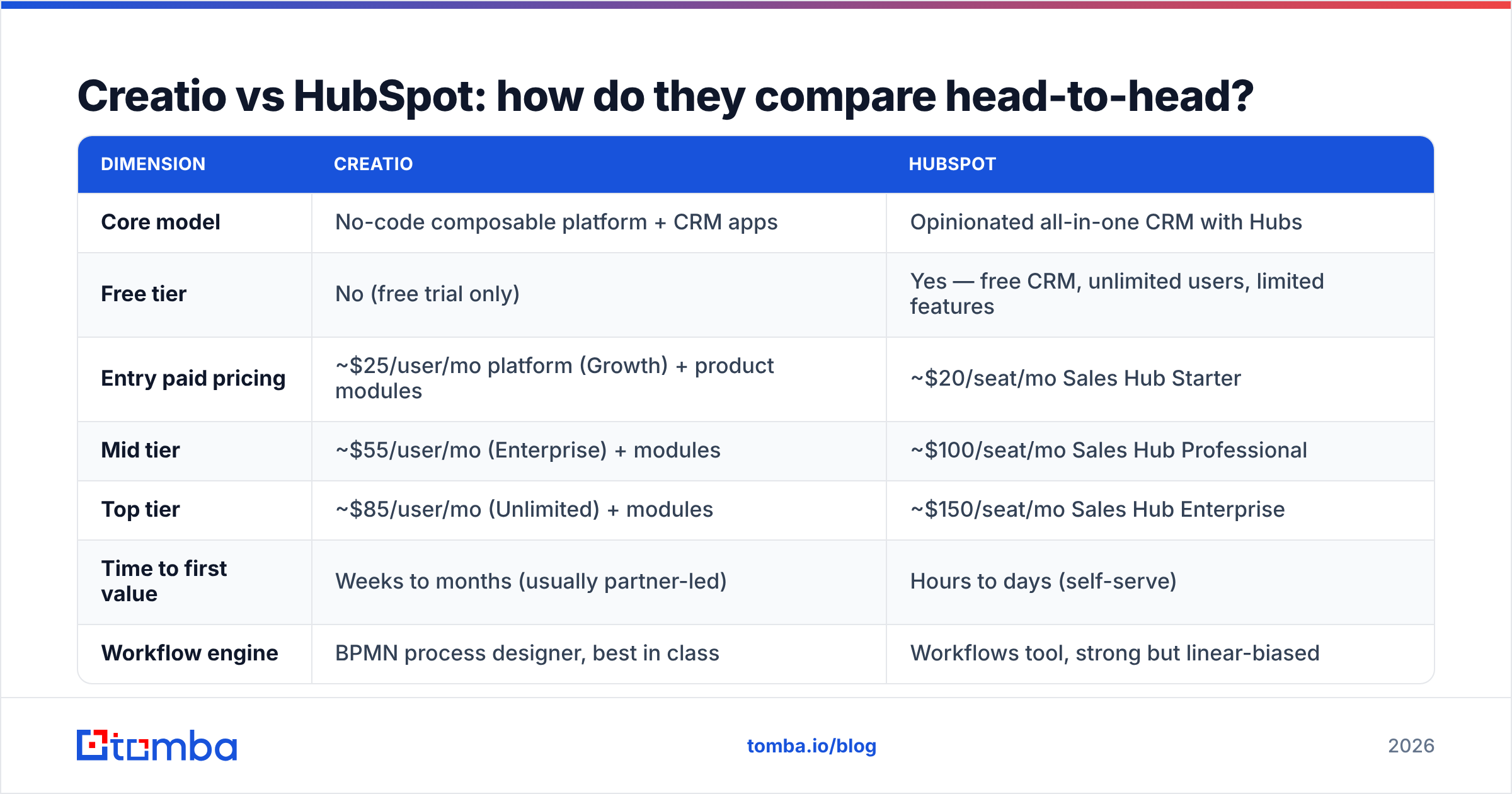
A quick three-year sketch for a 20-seat sales team, order-of-magnitude only:
| Cost line | Creatio (typical) | HubSpot (typical) |
|---|---|---|
| Year 1 licences | $18k–$30k | $24k–$36k (Sales Hub Pro) |
| Implementation / onboarding | $15k–$60k+ (partner-led) | $3k one-time onboarding fee |
| Internal admin time | 0.5–1 FTE ongoing | 0.1–0.25 FTE |
| Year 2–3 licences | Similar, scales with modules | Scales with seats + contact tiers |
| Realistic 3-year TCO | $80k–$150k | $85k–$140k |
The headline: total cost converges. Creatio front-loads it into build; HubSpot spreads it into seats and contact tiers. Choose on fit, not on the per-user number, and read both Creatio's pricing and HubSpot's current tiers before you model anything.
Which one handles complex sales processes better?#
Creatio, and it isn't close.
The BPMN process designer is the product. You can model a deal that pauses for credit approval, forks based on contract value, assigns a legal reviewer, waits for an external webhook, and then rejoins the main path — visually, with versioning, and with an audit trail. If your process description contains the words "and then it goes to committee," Creatio is speaking your language.
HubSpot's workflow tool is genuinely good — enrolment triggers, if/then branches, delays, actions across objects. It handles 90% of B2B SaaS motions perfectly. It struggles when the process is a graph rather than a funnel: multi-party approvals, long-running states, and objects that don't map to contact/company/deal/ticket.
A practical test: sketch your messiest deal on a whiteboard. If the sketch is a line with a couple of branches, HubSpot will model it in an afternoon. If the sketch looks like a subway map, budget for Creatio.
Which CRM is easier to adopt?#
HubSpot, decisively. Three reasons that matter more than feature lists:
- Reps log activity voluntarily. The interface is fast and the email/calendar sync is invisible. Data quality flows from usage, not enforcement.
- Self-serve configuration. A sales manager can build a pipeline, a report, and a sequence without filing a ticket.
- Onboarding surface. HubSpot Academy, the community, and the sheer volume of third-party expertise mean you're never the first person to hit your problem. Compare the review volume for both products on G2 and the gap in community scale is obvious.
Creatio's UI has improved considerably, but it's a platform UI — powerful, configurable, and unmistakably built for someone whose job title contains "operations." That's a feature if you have that person and a liability if you don't.
What neither Creatio nor HubSpot will fix#
Here's the uncomfortable part: your CRM problem is usually a data problem wearing a CRM costume.
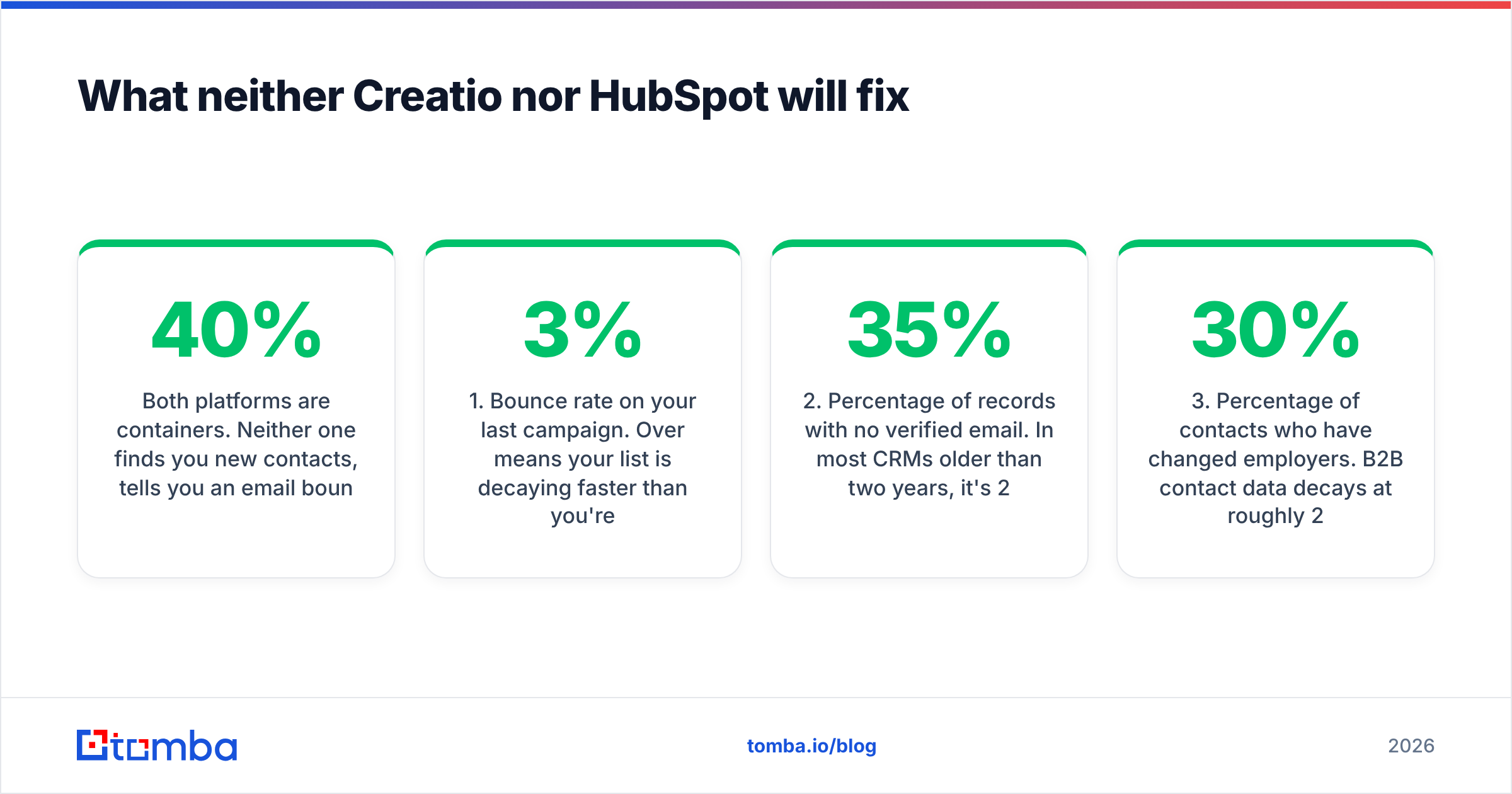
Both platforms are containers. Neither one finds you new contacts, tells you an email bounced last quarter, or notices that your champion changed jobs in March. Companies migrate CRMs hoping the new system will fix pipeline stagnation, then discover 40% of their contact records are unreachable and the pipeline never moved because nobody was actually reaching anyone.
Before you sign either contract, run this audit on your existing database:
- Bounce rate on your last campaign. Over 3% means your list is decaying faster than you're adding to it.
- Percentage of records with no verified email. In most CRMs older than two years, it's 20–35%.
- Percentage of contacts who have changed employers. B2B contact data decays at roughly 25–30% per year — that's an industry-wide reality, not a vendor-specific one.
- Number of accounts with only one contact. Single-threaded accounts die when that one person leaves.
- Duplicate rate. If you've imported lists from multiple sources, expect 5–15%.
Whatever you find here is what your CRM migration will faithfully carry into its shiny new home. Fix data at the source instead: use a bulk email finder to fill in the gaps, an email verifier as a gate before import, and data enrichment to keep records current after they land. Both Creatio and HubSpot expose clean APIs, so this can be a scheduled job rather than a quarterly panic.
Creatio vs HubSpot: which should you choose?#
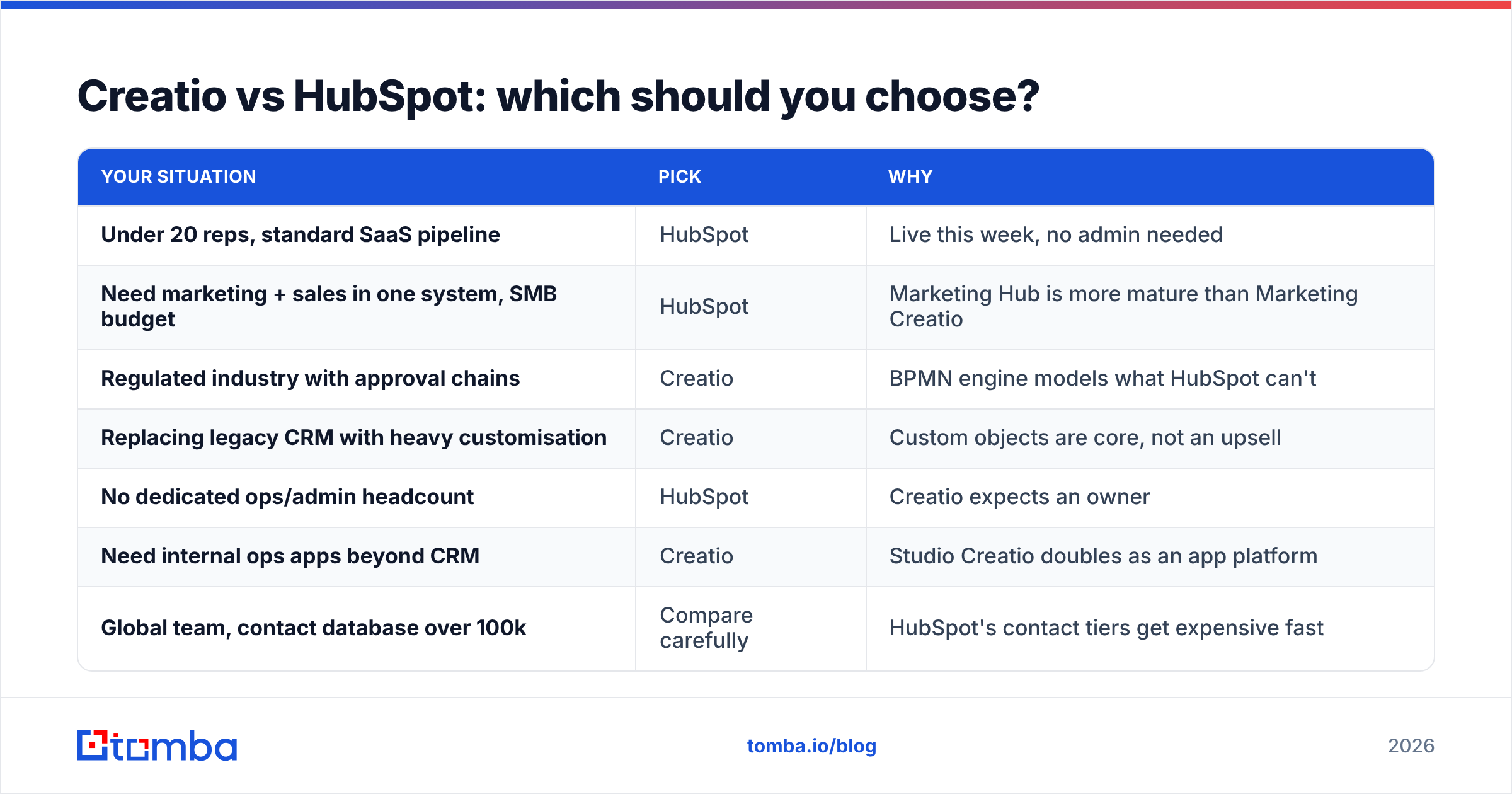
Decision table — find your row.
| Your situation | Pick | Why |
|---|---|---|
| Under 20 reps, standard SaaS pipeline | HubSpot | Live this week, no admin needed |
| Need marketing + sales in one system, SMB budget | HubSpot | Marketing Hub is more mature than Marketing Creatio |
| Regulated industry with approval chains | Creatio | BPMN engine models what HubSpot can't |
| Replacing legacy CRM with heavy customisation | Creatio | Custom objects are core, not an upsell |
| No dedicated ops/admin headcount | HubSpot | Creatio expects an owner |
| Need internal ops apps beyond CRM | Creatio | Studio Creatio doubles as an app platform |
| Global team, contact database over 100k | Compare carefully | HubSpot's contact tiers get expensive fast |
| Under $50k total first-year budget | HubSpot | Creatio implementation alone can exceed it |
And a caveat worth stating plainly: if your evaluation is really about "our CRM is a graveyard," switching vendors won't resurrect it. Migrate the process problem, and it follows you. Both of these are good products. The one that fails is the one nobody feeds with accurate contact data.
How do you keep either CRM full of contacts worth calling?#
Wire contact discovery and verification into the CRM instead of bolting it on later.
- On account creation, run a domain search to pull every reachable contact at that company, so accounts start multi-threaded instead of single-threaded.
- Before import, verify every address. Bad addresses cost you sender reputation on the way out and contact-tier dollars on the way in.
- On a schedule, re-enrich records older than six months. Job changes are the single biggest source of silent pipeline rot.
- Through the API, not by hand. Both CRMs support it; the Tomba API is designed to sit in exactly that loop.
The teams who get value from Creatio or HubSpot aren't the ones who picked "correctly." They're the ones whose CRM contains people who exist, work where the record says they work, and can actually receive an email.
Ready to make whichever CRM you choose actually worth the licence fee? Start with the Tomba Email Finder — find verified professional email addresses by domain, name, or company, then push them straight into Creatio or HubSpot via API. The free tier gives you 25 searches a month to test the accuracy on your own accounts; paid plans start at $49/mo. Check Tomba pricing and fill your pipeline with contacts that are real before you spend six figures on a container to store them in.
Related guides#
Ready to find emails that actually work?
Join 150,000+ professionals who stopped guessing and started sending. Free credits on signup — no credit card required.
Get the Tomba newsletter
Practical outbound tactics and product updates — once every two weeks.
About the author