CRM Business Development: How to Build a Pipeline That Scales
Business development lives or dies by what's in your CRM. Here's how to turn scattered contacts into a repeatable pipeline, which workflows matter, and the data that keeps it accurate in 2026.
Business development is a relationship game, but relationships at scale are a data game. The moment you go past a handful of accounts, your memory stops being the system of record and your CRM has to take over. Get that handoff right and business development becomes repeatable. Get it wrong and you're running a spreadsheet with extra steps.
This guide covers what CRM business development actually means in practice, how to structure the workflow, and where clean contact data fits — because a CRM full of stale records is worse than no CRM at all.
TL;DR#
- CRM business development is the practice of running your BD motion — sourcing, qualifying, nurturing, and converting new relationships — inside a CRM so the process is repeatable instead of dependent on one rep's memory.
- The CRM is only as good as the data in it. Enrichment and verification are not optional add-ons; they're the fuel.
- A working setup needs three things: clean stage definitions, a single source of truth for contacts, and automation that removes manual data entry.
- Most BD teams don't have a CRM problem — they have a data hygiene problem. Bad emails and duplicate records quietly kill pipeline.
- Tools like Tomba's email finder and data enrichment plug the biggest gap: getting accurate contact records into the CRM before a rep ever touches them.
What is CRM business development?#
CRM business development is using a customer relationship management system as the operating layer for your entire business development function — not just as a contact address book.
Think of it like a kitchen. A talented chef can improvise one great meal from memory. But a restaurant serving 300 covers a night needs recipes, a prep line, and inventory tracking, or the whole thing collapses. Your CRM is that prep line for BD: it standardizes how every opportunity moves from "we found them" to "they signed."
The difference between "we have a CRM" and "we do CRM business development" is intent. In the first, the CRM is a place data goes to die. In the second, every stage, field, and automation is designed around one question: how does a new relationship become revenue, and how do we repeat it?
Business development, unlike straight sales, is weighted toward the top of the funnel — partnerships, new market entry, early-stage outreach, and relationship-building that may not convert for months. That long time horizon is exactly why a CRM matters. You will not remember what you discussed with a prospect eight months ago. The system will.
Why does CRM matter for business development?#
Because BD without a system doesn't scale, and unscalable BD is just expensive luck.
Here's what a CRM-centered BD motion gives you that ad-hoc outreach can't:
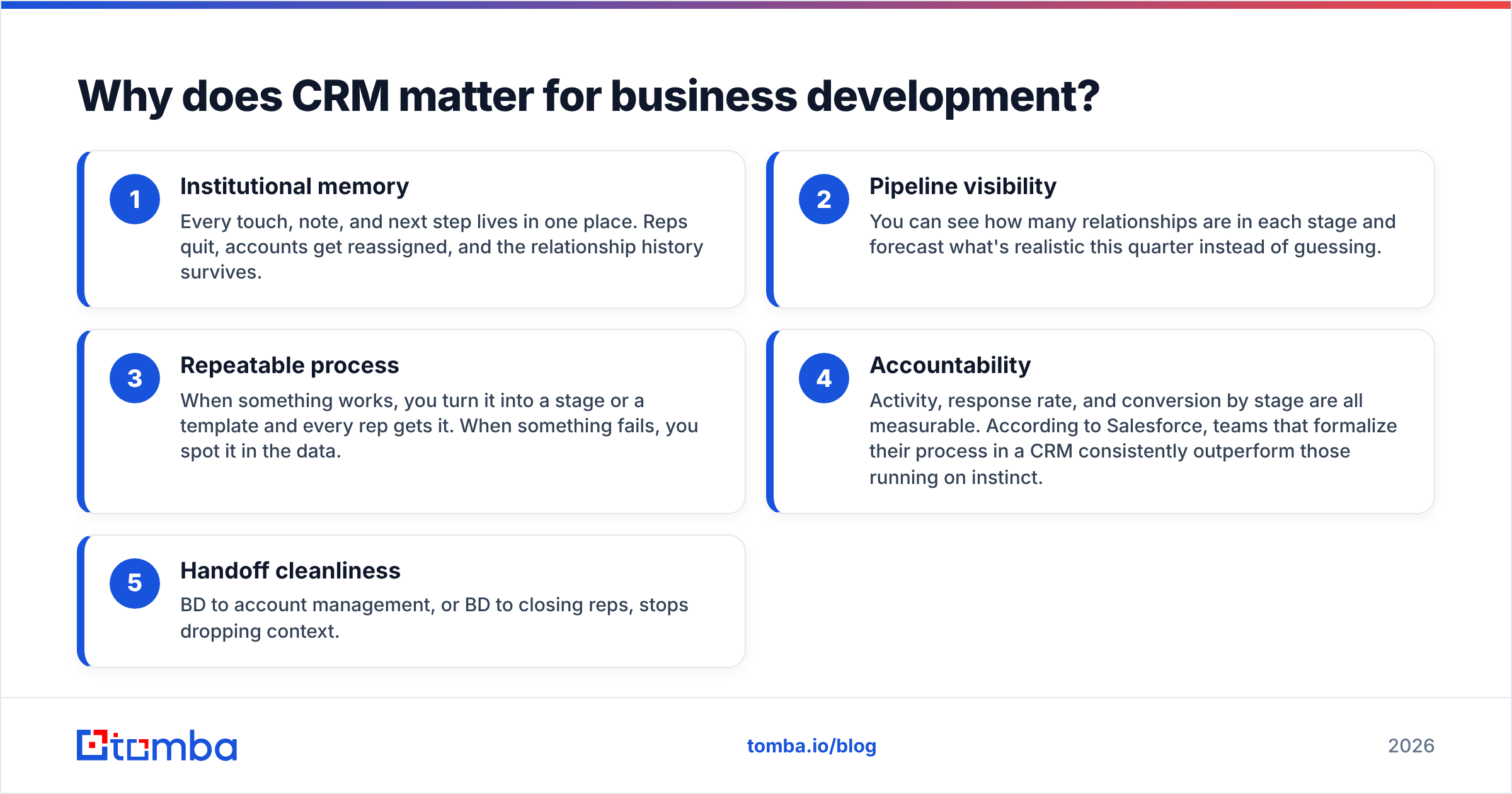
- Institutional memory — Every touch, note, and next step lives in one place. Reps quit, accounts get reassigned, and the relationship history survives.
- Pipeline visibility — You can see how many relationships are in each stage and forecast what's realistic this quarter instead of guessing.
- Repeatable process — When something works, you turn it into a stage or a template and every rep gets it. When something fails, you spot it in the data.
- Accountability — Activity, response rate, and conversion by stage are all measurable. According to Salesforce, teams that formalize their process in a CRM consistently outperform those running on instinct.
- Handoff cleanliness — BD to account management, or BD to closing reps, stops dropping context.
The catch: all five of those benefits assume the underlying data is good. A CRM with a 30% bounce rate on its email fields isn't giving you visibility — it's giving you confident-looking noise. This is the part most teams underestimate.
How do you structure the CRM business development workflow?#
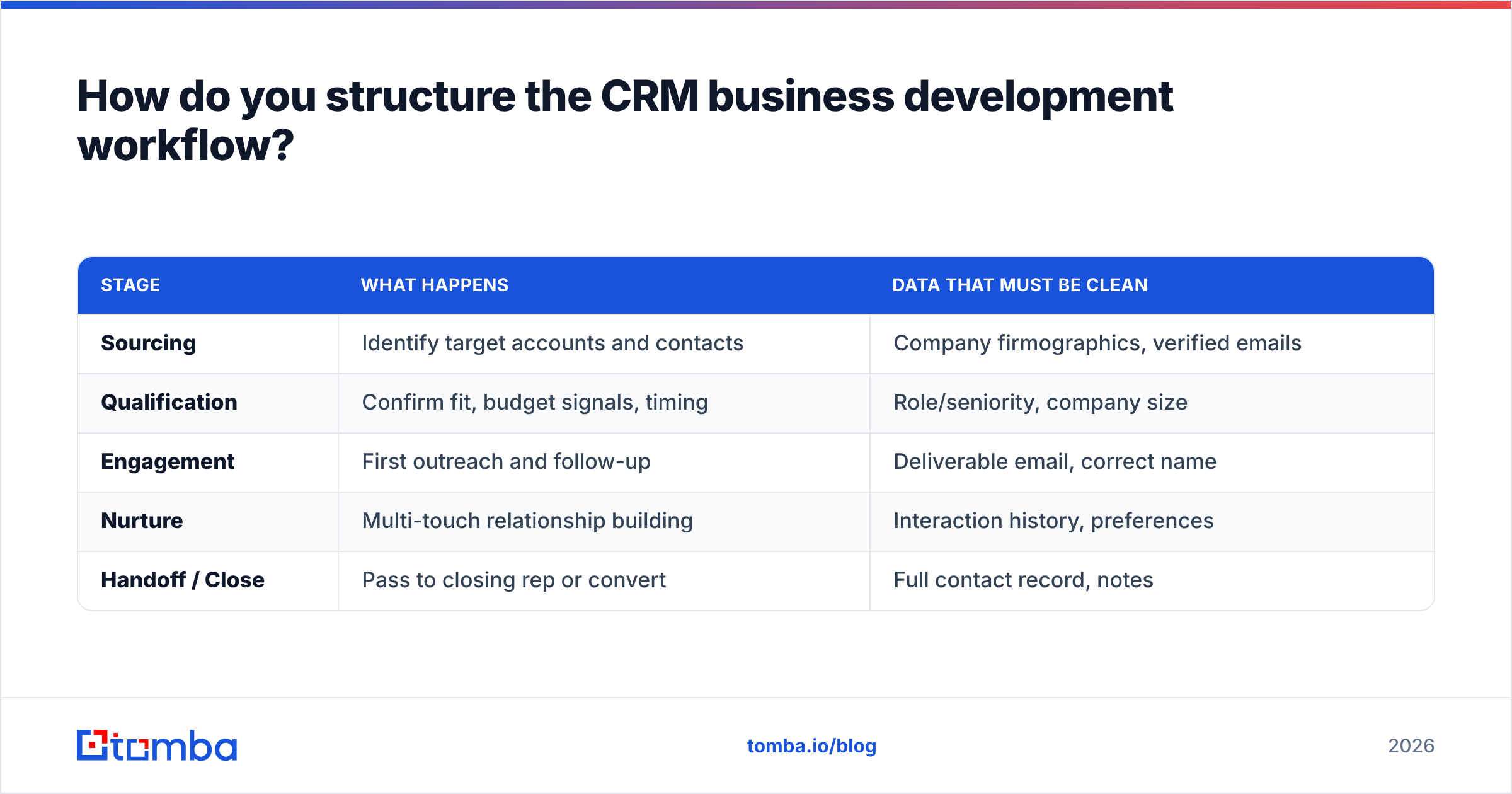
A clean BD workflow inside a CRM breaks into a handful of stages, each with a clear entry and exit condition. The exact names vary, but the shape is consistent:
| Stage | What happens | Data that must be clean |
|---|---|---|
| Sourcing | Identify target accounts and contacts | Company firmographics, verified emails |
| Qualification | Confirm fit, budget signals, timing | Role/seniority, company size |
| Engagement | First outreach and follow-up | Deliverable email, correct name |
| Nurture | Multi-touch relationship building | Interaction history, preferences |
| Handoff / Close | Pass to closing rep or convert | Full contact record, notes |
Notice that every stage has a data dependency in the right column. That's the theme of this entire article: the workflow is only as strong as the records flowing through it. A beautiful pipeline built on guessed email addresses produces a beautiful chart and zero revenue.
A few principles that keep the workflow honest:
- Define exit criteria, not just stage names. "Qualified" should mean something specific — a confirmed decision-maker, a budget signal, a timeline — not "the rep feels good about it."
- One record per contact. Duplicate contacts are the silent killer of CRM reporting. Deduplicate on entry, not once a quarter.
- Log activity automatically. If reps have to manually log every email, they won't, and your data decays. Use native email sync and integrations that push data in without human effort.
- Keep custom fields minimal. Every field a rep has to fill by hand is a field that will be left blank. Enrich automatically where you can.
Which CRM approach fits business development?#
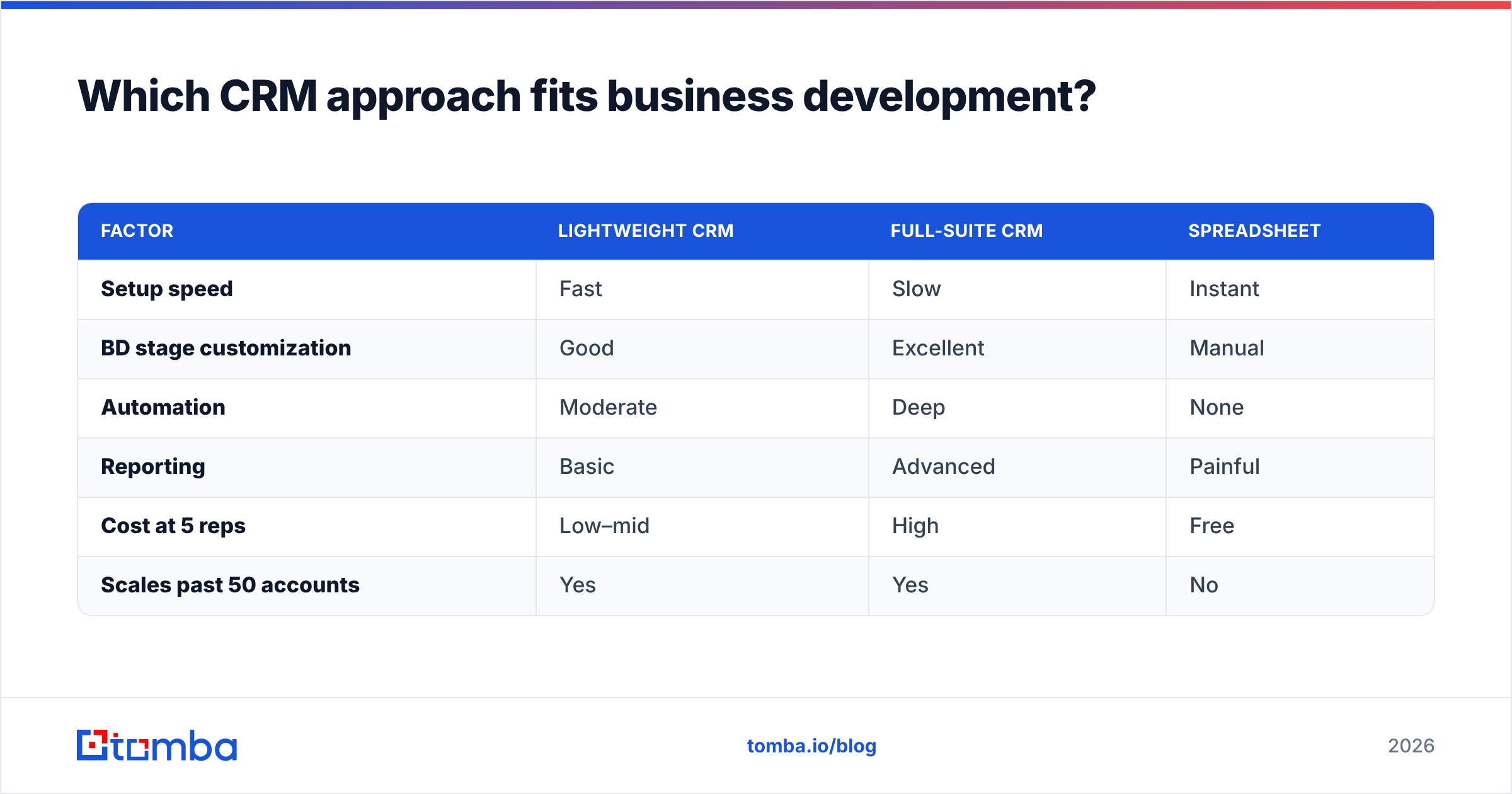
Not every CRM is built for BD. Some are optimized for high-volume transactional sales, others for long relationship cycles. Here's how the common approaches compare for a business development motion specifically:
| Factor | Lightweight CRM | Full-suite CRM | Spreadsheet |
|---|---|---|---|
| Setup speed | Fast | Slow | Instant |
| BD stage customization | Good | Excellent | Manual |
| Automation | Moderate | Deep | None |
| Reporting | Basic | Advanced | Painful |
| Cost at 5 reps | Low–mid | High | Free |
| Scales past 50 accounts | Yes | Yes | No |
The honest verdict: a spreadsheet is fine for your first 20 relationships and a trap after that. Full-suite platforms like HubSpot or Salesforce win once you need automation and cross-team handoffs, but they're overkill — and overpriced — for a two-person BD team just getting started. Match the tool to your stage, and plan to graduate.
Whatever you pick, the CRM is the container. What goes into it determines whether any of this works.
What data actually powers CRM business development?#
Accurate, enriched, verified contact data. This is where most BD engines stall, and it's the part a CRM can't fix on its own.
Here's the failure mode. A rep finds a promising company. They guess the email format — maybe first.last@company.com, maybe firstinitiallast@ — send outreach, and hear nothing. Was the message bad? The timing? Or did the email just bounce into the void? Without verified data, you can't tell, so you can't improve. You're optimizing blind.
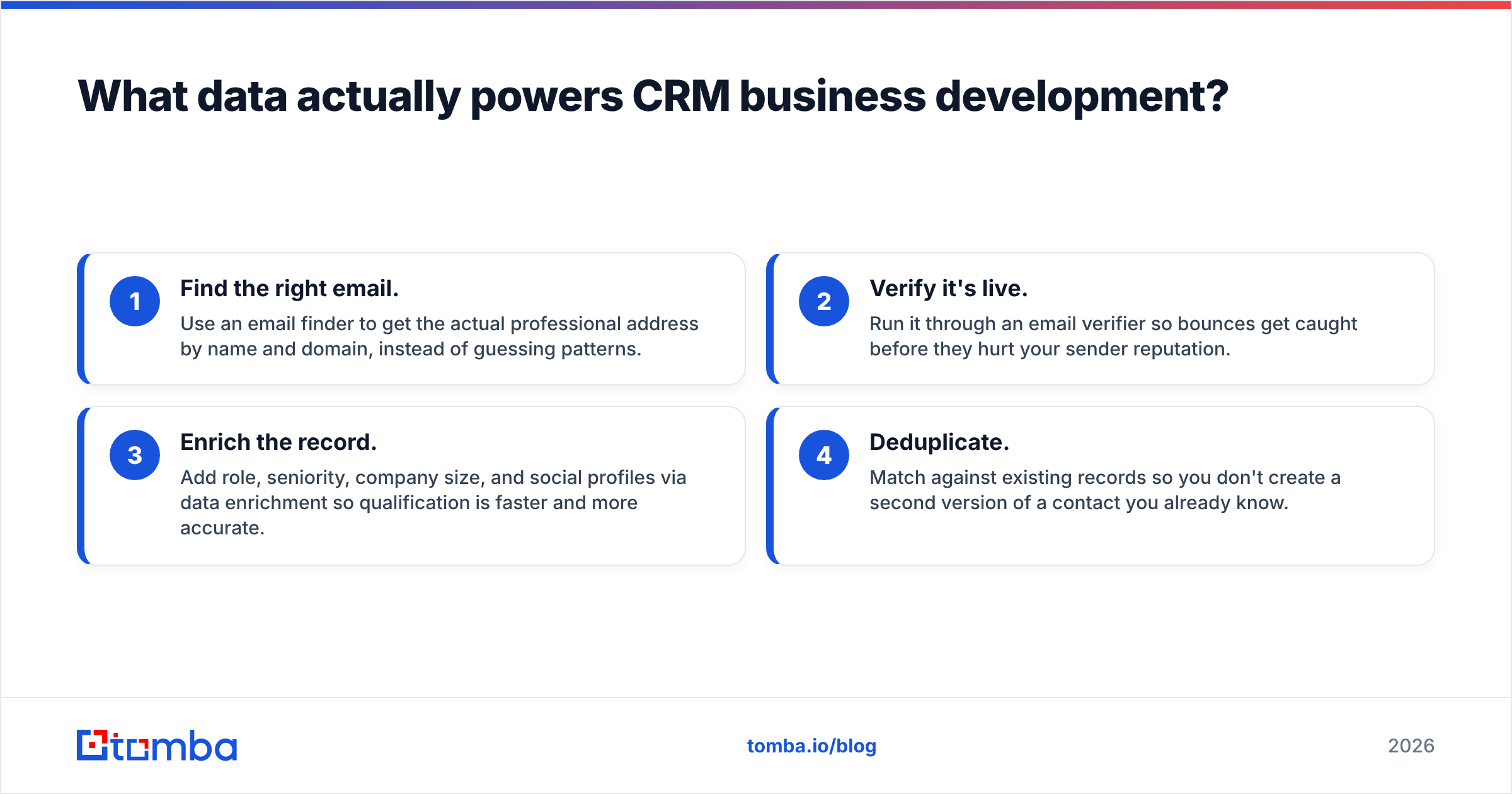
A data-first BD workflow flips this. Before a contact ever enters the pipeline, you:
- Find the right email. Use an email finder to get the actual professional address by name and domain, instead of guessing patterns.
- Verify it's live. Run it through an email verifier so bounces get caught before they hurt your sender reputation.
- Enrich the record. Add role, seniority, company size, and social profiles via data enrichment so qualification is faster and more accurate.
- Deduplicate. Match against existing records so you don't create a second version of a contact you already know.
Do this at the point of entry and your CRM stays clean by design. Do it never, and you'll spend every quarter running "data cleanup projects" that undo the mess the previous quarter created.
A useful benchmark: Gartner has long noted that B2B data decays at roughly 20–30% per year as people change jobs, companies rebrand, and domains shift. That means a contact list you built 18 months ago is now closer to half wrong. Enrichment isn't a one-time import — it's ongoing maintenance, and a B2B database that refreshes matters more than a static one that was perfect on day one.
How do you build a CRM business development process step by step?#
Start small and make each step non-negotiable before adding the next.
- Define your stages and exit criteria. Write them down. If two reps would disagree on what "qualified" means, you're not done.
- Pick your source of truth. One CRM, one record per contact. Everything else feeds into it.
- Wire up data entry to be automatic. Connect your email finder and enrichment tools so new contacts arrive complete, not as a name and a blank form.
- Verify before you engage. Make email verification a gate — no outreach to unverified addresses. This one rule protects your deliverability more than any subject-line trick.
- Automate activity logging. Email sync, call logging, meeting capture. Reps should spend time on relationships, not data entry.
- Build one report you'll actually look at. Stage conversion and time-in-stage are the two most useful. Review them weekly.
- Review and prune. Kill dead relationships, merge duplicates, and re-enrich stale records on a schedule.
The order matters. Teams that buy the fanciest CRM first and figure out process later almost always end up with an expensive spreadsheet. Process and data hygiene come first; the tool amplifies whatever you already do.
What are the most common CRM business development mistakes?#
- Treating the CRM as storage, not a workflow. If your reps only open it to "update the system" after the fact, it's dead weight.
- Skipping verification. Unverified emails tank your sender reputation and pollute your reporting with false negatives.
- Over-engineering stages. Twelve pipeline stages with vague criteria is worse than four clear ones.
- Manual everything. Every manual step is a step that decays. Automate data in, automate activity capture.
- Ignoring data decay. A clean import in January is dirty by summer. Budget for ongoing enrichment.
- No single source of truth. When BD, marketing, and closing reps each keep their own list, no one's data is trustworthy.
Most of these trace back to one root cause: treating contact data as a one-time setup task instead of a living asset. The teams that win at CRM business development are, boringly, the ones who keep their data clean.
Frequently asked questions#
Is business development different from sales in the CRM? Yes. BD sits earlier and longer in the funnel — sourcing, partnerships, and relationship-building that may not convert for months — so your CRM needs stages and activity tracking tuned for a long horizon, not just a fast close.
Do I need a separate CRM for business development? Usually not. Most modern CRMs can run a BD pipeline alongside a sales pipeline. What you need is distinct stages and clean data, not a separate tool.
How often should I clean my CRM data? Continuously at the point of entry, plus a scheduled re-enrichment pass every quarter. With 20–30% annual data decay, anything less means you're always working from partly-wrong records.
What's the fastest way to fill a new CRM with accurate contacts? Use an email finder and enrichment tool to pull verified, complete records in bulk, then import them deduplicated. Guessing email formats by hand is the slowest and least accurate path.
Start with the data, not the tool#
The best CRM in the world can't save a business development motion built on bad contact records. Before you obsess over stages, automations, and dashboards, fix the input: get accurate, verified, enriched contacts into your system from day one.
That's exactly the gap Tomba's Email Finder closes. Find the right professional email by name and domain, verify it's deliverable, and enrich the record before it ever enters your pipeline — so your CRM business development process runs on data you can actually trust. Start on the free tier (25 searches a month), and when you're ready to scale, plans begin at $49/mo. Clean data first, and the rest of the machine finally works.
Related guides#
// get started
Find, verify and enrich your first contacts today
Start on the free plan with 25 searches a month, then scale when your team is ready.
Free plan · No credit card required · GDPR & CCPA
// about the author