CRM Business Intelligence: The 2026 Guide to Data-Driven Sales
CRM business intelligence turns raw pipeline data into decisions your reps can act on. Here's how it works, what it costs, and how to build it without a data team.
Your CRM is full of data. That is not the same as your CRM being useful. Most sales teams sit on years of deal history, activity logs, and contact records — and still forecast on gut feel because nobody can turn that pile into a straight answer to "which deals will actually close this quarter?"
That gap is what CRM business intelligence closes. This guide explains what it is, how the stack fits together, what it costs, and the one thing that quietly breaks every BI project before it starts: dirty data.
TL;DR#
- CRM business intelligence (BI) is the practice of pulling data out of your CRM, modeling it, and presenting it as dashboards and forecasts people actually use to make decisions.
- It sits on four layers: source data → enrichment → warehouse/model → visualization. Skip enrichment and the rest produces confident, wrong answers.
- The biggest failure mode is data quality, not tooling. Duplicate contacts, missing emails, and stale titles corrupt every metric downstream.
- You do not need a data team to start. A clean CRM, one BI tool, and a weekly report cadence beats a $200k warehouse full of garbage.
- Enrich and verify records at the point of entry — an email verifier and contact enrichment step keep the pipeline data your BI layer depends on trustworthy.
What is CRM business intelligence?#
CRM business intelligence is the process of converting the raw records in your customer relationship management system into insight you can act on. Think of your CRM as a warehouse and BI as the forklift, the inventory system, and the shipping manifest combined — the goods were always there, but without BI you can't find, count, or move them.
Concretely, CRM BI answers questions like:
- Which lead sources produce deals that actually close, not just deals that open?
- Where in the pipeline do deals stall, and for which segments?
- What's the real sales cycle length by rep, region, and deal size?
- Which accounts are showing buying signals right now?
A plain CRM report tells you what happened ("32 deals closed last month"). Business intelligence tells you what it means and what to do ("SMB deals from paid search close 3x faster than enterprise referrals, so shift spend"). The difference is modeling, context, and trend — not just a bigger table.
Why does CRM data alone fail without BI?#
Because a CRM is optimized for recording interactions, not analyzing them. Three structural problems show up the moment you try to report on raw CRM data:
- It's transactional, not analytical. CRMs store one row per contact or deal and update it in place. Ask "how did pipeline coverage change week over week?" and there's no history to query — the old value was overwritten.
- It's incomplete. Reps skip fields. Titles go stale. Emails bounce. According to Gartner research on data quality, poor data costs organizations millions annually in wasted effort and bad decisions.
- It's siloed. Marketing automation, product usage, billing, and support each hold a piece of the customer. Your CRM sees only its slice.
BI fixes all three by extracting CRM data on a schedule, snapshotting it for trends, joining it to other sources, and enriching the gaps. The output is a single, current, complete view.
What are the layers of a CRM BI stack?#
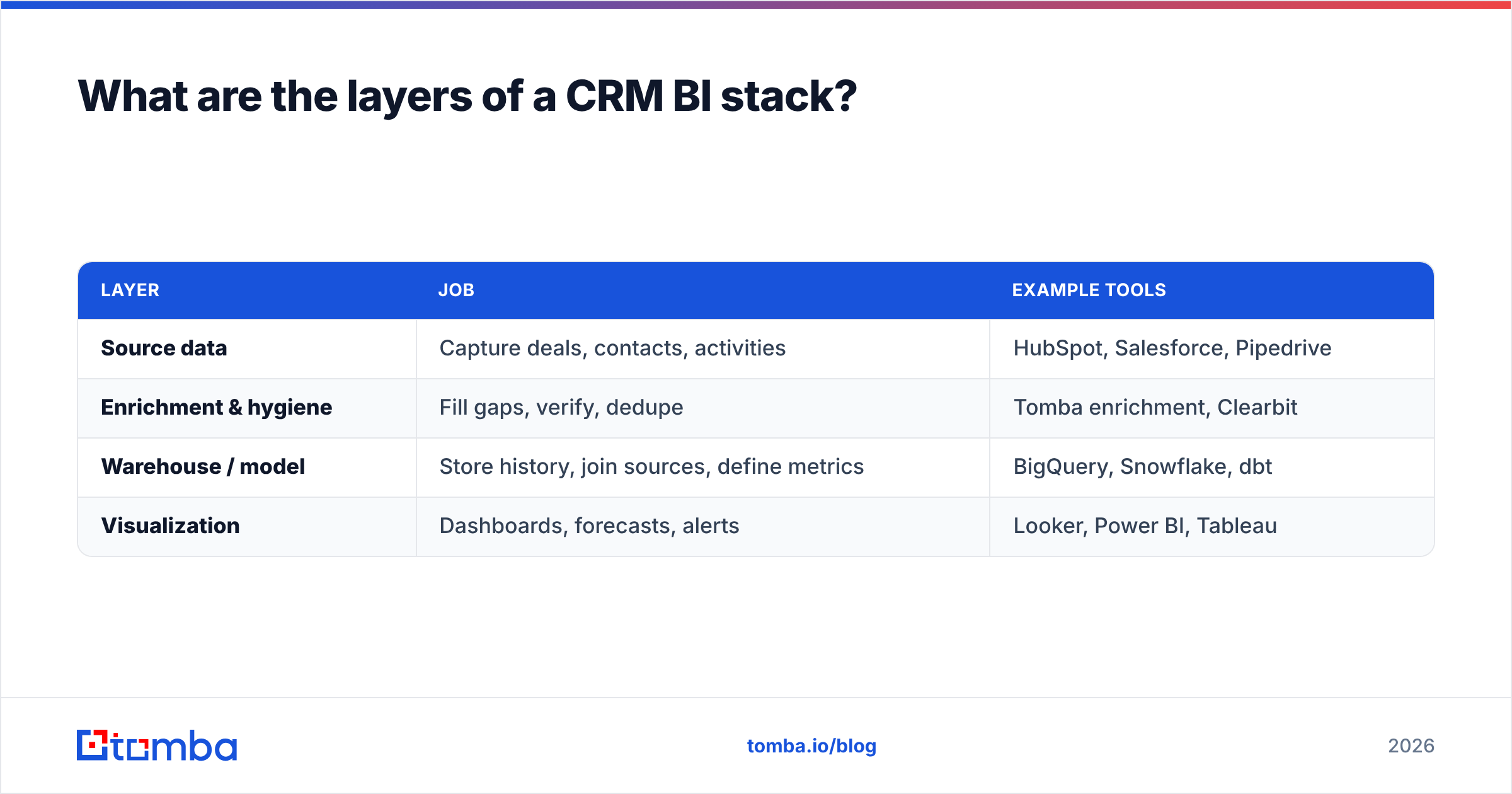
A working CRM business intelligence stack has four layers. You can run all four in one tool for a small team, or split them across specialized systems at scale.
| Layer | Job | Example tools |
|---|---|---|
| Source data | Capture deals, contacts, activities | HubSpot, Salesforce, Pipedrive |
| Enrichment & hygiene | Fill gaps, verify, dedupe | Tomba enrichment, Clearbit |
| Warehouse / model | Store history, join sources, define metrics | BigQuery, Snowflake, dbt |
| Visualization | Dashboards, forecasts, alerts | Looker, Power BI, Tableau |
The layer teams skip most often is the second one — enrichment and hygiene — because it feels optional. It isn't. Everything above it inherits its errors. A duplicate account inflates your logo count; a missing email breaks attribution; a stale title mis-routes a lead-scoring model. Clean inputs are the whole game.
If you already use a major CRM, the Salesforce integration and HubSpot integration let you push verified, enriched records straight into the source layer, so hygiene happens before the data ever reaches your BI tool.
Which metrics should CRM business intelligence track?#
Start with metrics that change a decision. A dashboard nobody acts on is decoration. These six earn their place:
- Pipeline coverage — open pipeline divided by quota for the period. Below 3x and you're likely to miss; BI shows this per rep, weekly, with trend.
- Stage conversion rates — the percent of deals that move from each stage to the next. Reveals exactly where deals die.
- Sales cycle length — median days from creation to close, segmented. Averages lie; medians by segment don't.
- Win rate by source — closed-won divided by all closed, split by lead source. Kills your worst channels.
- Forecast accuracy — predicted vs. actual, tracked over time. The metric that tells you whether to trust the other metrics.
- Data completeness — the percent of records with a verified email, title, and company. Your leading indicator for every metric above.
That last one is the tell. If completeness is at 60%, treat every other number as a rough estimate until you fix it.
How does data quality make or break CRM BI?#
Garbage in, confident garbage out. This is the single most important section in this guide, so here it is plainly: your CRM business intelligence is only as accurate as the records feeding it.
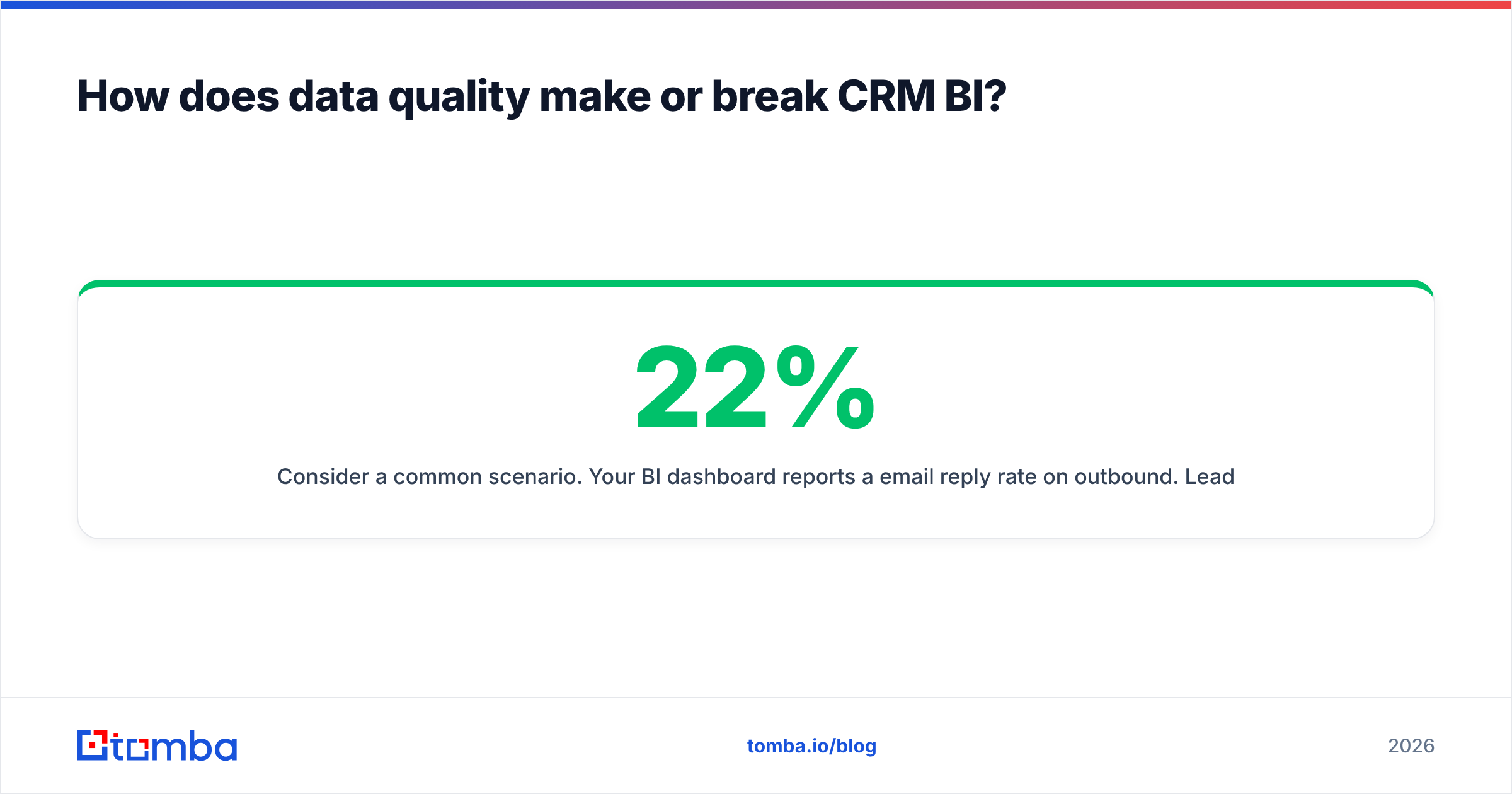
Consider a common scenario. Your BI dashboard reports a 22% email reply rate on outbound. Leadership loves it. But 30% of your contact emails are unverified guesses that bounced silently — they never reached anyone, and they're excluded from the "sent" denominator by your email tool's bounce handling. Your real reply rate against valid contacts is lower, and your real reachable audience is 30% smaller than the CRM claims. Every projection built on that number is wrong.
The fix is hygiene at the point of entry, not a cleanup project every six months:
- Verify emails on capture. A record with a bounced email is worse than a blank field — it looks complete but poisons deliverability and metrics. Run new contacts through an email verification step before they land.
- Enrich missing fields. Blank titles and companies break segmentation. Contact enrichment backfills them from a verified B2B database.
- Deduplicate ruthlessly. Two records for one account double-counts revenue and splits activity history.
- Snapshot for trends. Store weekly copies so "change over time" is answerable.
Teams that treat data quality as a continuous process — not a quarterly panic — get BI they can actually forecast on. As HubSpot has documented across its own research, clean, complete CRM data is the strongest predictor of whether reporting gets used at all.
Build vs. buy: how should you assemble a CRM BI stack?#
Two paths, and most teams pick wrong by over-building too early.
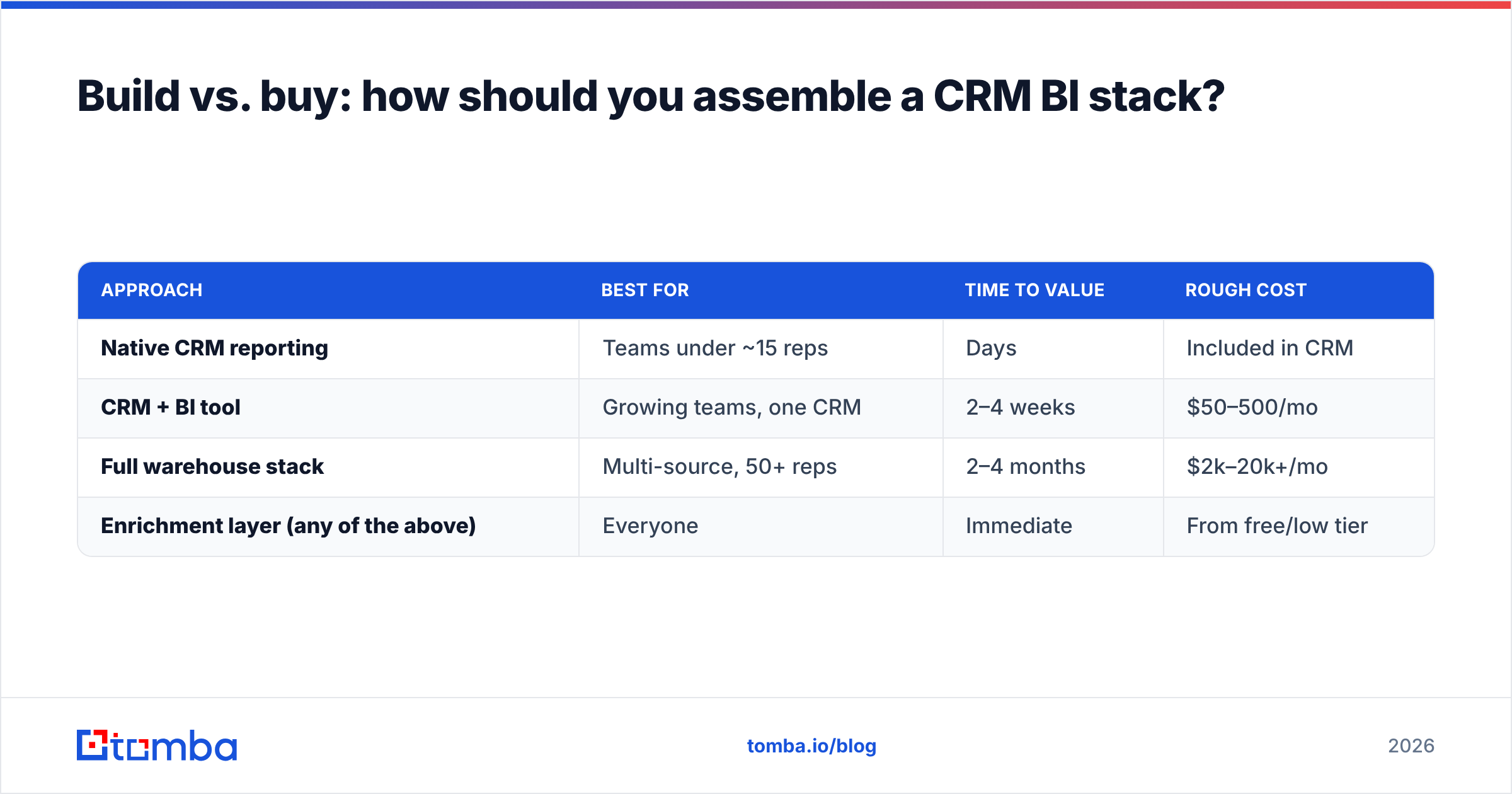
| Approach | Best for | Time to value | Rough cost |
|---|---|---|---|
| Native CRM reporting | Teams under ~15 reps | Days | Included in CRM |
| CRM + BI tool | Growing teams, one CRM | 2–4 weeks | $50–500/mo |
| Full warehouse stack | Multi-source, 50+ reps | 2–4 months | $2k–20k+/mo |
| Enrichment layer (any of the above) | Everyone | Immediate | From free/low tier |
The mistake is jumping to a full warehouse stack because it's what mature companies use. If your CRM data is dirty, a $15k/month Snowflake-and-Looker setup just renders your bad data faster and more beautifully. Start with native reporting plus a hygiene and enrichment layer, prove which decisions BI changes, then invest in the warehouse when a single CRM genuinely can't hold your sources.
Compare BI and analytics vendors on an independent source like G2 before committing — pricing and integration depth vary far more than the marketing suggests.
What does a practical CRM BI rollout look like?#
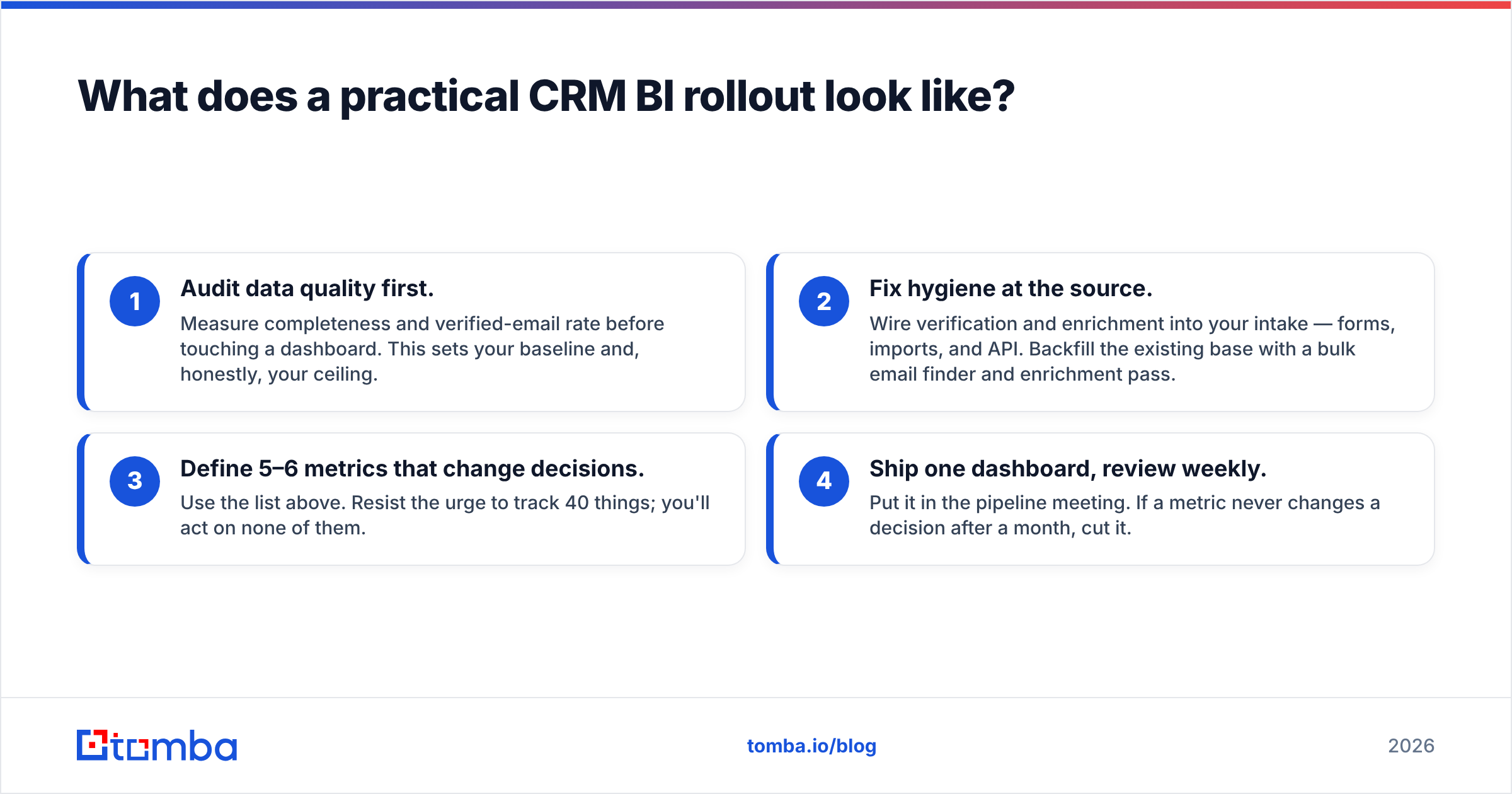
You can stand up useful CRM business intelligence in four steps, in this order:
- Audit data quality first. Measure completeness and verified-email rate before touching a dashboard. This sets your baseline and, honestly, your ceiling.
- Fix hygiene at the source. Wire verification and enrichment into your intake — forms, imports, and API. Backfill the existing base with a bulk email finder and enrichment pass.
- Define 5–6 metrics that change decisions. Use the list above. Resist the urge to track 40 things; you'll act on none of them.
- Ship one dashboard, review weekly. Put it in the pipeline meeting. If a metric never changes a decision after a month, cut it.
Notice steps 1 and 2 come before any BI tool. That ordering is the whole point of this guide.
How do you keep CRM data clean at scale?#
Automate hygiene so it happens without anyone remembering to do it. Manual cleanup always loses to the daily flood of new records.
- Verify at capture via API so every new contact is checked in real time. The Tomba API handles verification and enrichment programmatically.
- Enrich in bulk on a schedule to catch decay — titles and companies change constantly.
- Alert on completeness drops so a broken form or bad import surfaces in days, not quarters.
- Reconcile duplicates weekly with a dedupe pass keyed on verified email plus domain.
Do this and your BI layer stops being a source of arguments and starts being a source of decisions.
The bottom line#
CRM business intelligence isn't a tool you buy — it's a stack you assemble on top of data you can trust. The visualization layer gets all the attention, but the enrichment and hygiene layer decides whether any of it is true. Get the data right first, keep it right automatically, and even a modest BI setup will outforecast a team with a lavish warehouse full of stale records.
Start where the leverage is: clean, complete, verified contact data. Tomba's Email Finder finds and verifies professional email addresses by domain, name, or company, and its enrichment tools backfill the titles and companies your dashboards depend on — so your CRM business intelligence rests on records that are actually real. Try it free with 25 searches, and see how much your forecast tightens when the underlying data stops lying to you.
Related guides#
Ready to find emails that actually work?
Join 150,000+ professionals who stopped guessing and started sending. Free credits on signup — no credit card required.
Get the Tomba newsletter
Practical outbound tactics and product updates — once every two weeks.
About the author