CRM Data Cleansing Services in 2026: A Practical Buyer's Guide
Dirty CRM data quietly wastes rep time and torches deliverability. Here's how CRM data cleansing services actually work, what they cost, and how to choose one.
Your CRM is only as good as the data inside it. And right now, some meaningful slice of that data is wrong — duplicate contacts, dead email addresses, people who changed jobs eighteen months ago, and companies that merged, rebranded, or shut down. CRM data cleansing services exist to fix exactly that, either as a one-time cleanup or an ongoing hygiene program.
This guide breaks down what these services actually do, what they cost in 2026, when to hire one versus doing it yourself, and how to pick a provider that pays for itself instead of just re-selling you the same bad records.
TL;DR#
- CRM data cleansing services deduplicate, standardize, verify, and enrich the records in your CRM so reps stop wasting time on bad data.
- Dirty data is expensive: analysts have long pegged the cost of poor data quality in the millions per year for large orgs, and even a 20-person sales team feels it in bounced emails and missed follow-ups.
- You have three real options: DIY with tools, outsourced managed service, or a hybrid (tools + a periodic pro cleanse). Most teams land on hybrid.
- Expect one-time cleanses to run roughly $0.10–$1.00 per record, with managed monthly programs priced by volume or seat.
- The highest-leverage fix is usually email verification + deduplication first, then enrichment. Clean before you enrich.
What are CRM data cleansing services?#
CRM data cleansing services are companies or software platforms that take the contact and account records in your CRM and make them accurate, complete, and consistent. Think of it like a dentist's cleaning versus brushing at home: you handle daily upkeep, but every so often a professional removes the buildup you can't reach.
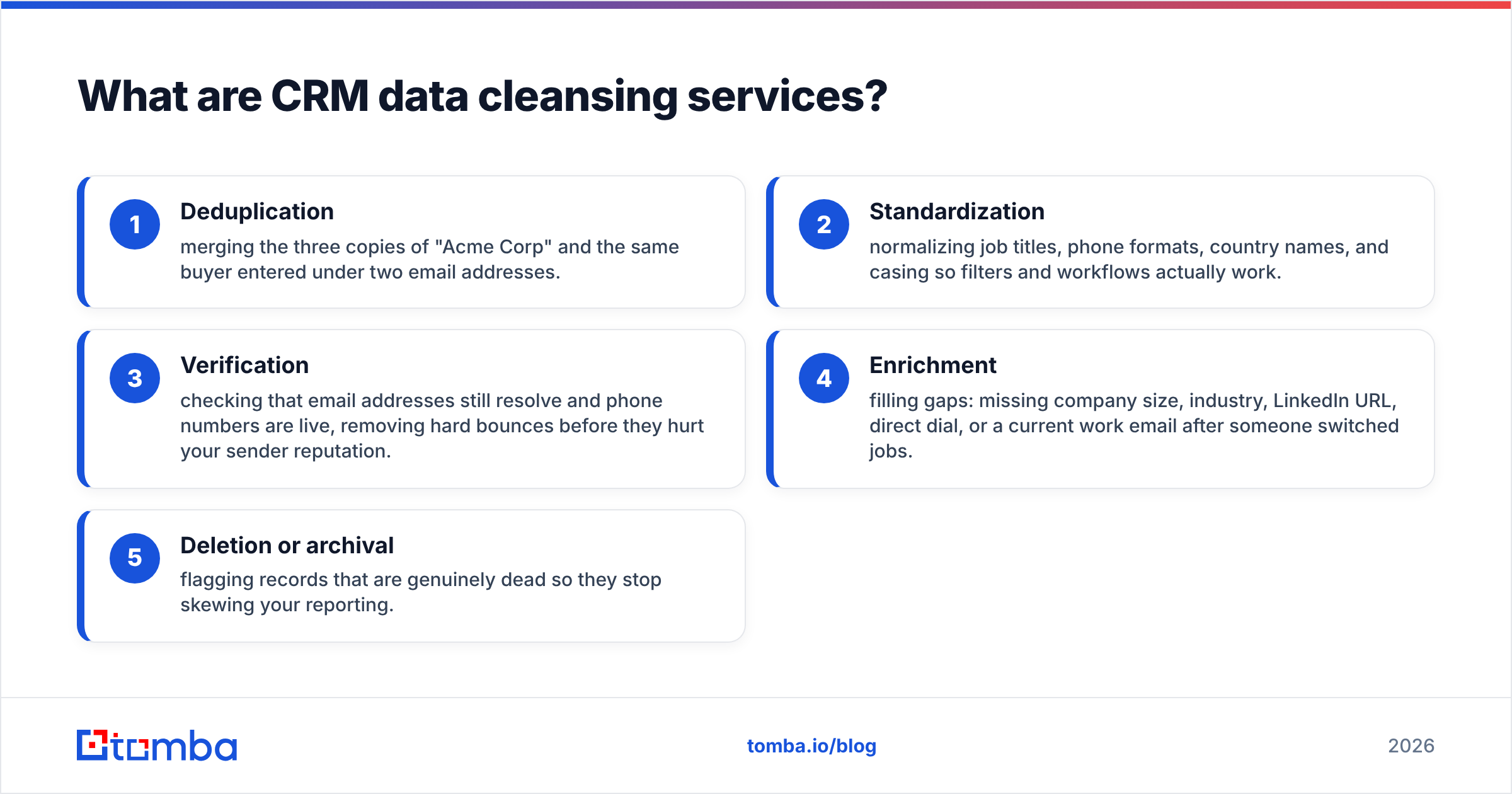
A typical engagement touches five areas:
- Deduplication — merging the three copies of "Acme Corp" and the same buyer entered under two email addresses.
- Standardization — normalizing job titles, phone formats, country names, and casing so filters and workflows actually work.
- Verification — checking that email addresses still resolve and phone numbers are live, removing hard bounces before they hurt your sender reputation.
- Enrichment — filling gaps: missing company size, industry, LinkedIn URL, direct dial, or a current work email after someone switched jobs.
- Deletion or archival — flagging records that are genuinely dead so they stop skewing your reporting.
Good providers do this against source data they trust and hand you back an audit trail: what changed, why, and how confident they are.
Why does dirty CRM data cost so much?#
Bad data doesn't announce itself — it leaks value quietly. A rep emails a contact who left the company; the message bounces; your domain's sender reputation drops a notch. Multiply that across a quarter and your genuinely-good emails start landing in spam.
The damage shows up in four places:
- Wasted rep hours. Sales teams routinely burn a chunk of every week just correcting or hunting for contact info. That's selling time you paid for and didn't get.
- Deliverability decay. High bounce rates train inbox providers to distrust you. Once email deliverability slips, every campaign underperforms — not just the one with bad addresses.
- Broken forecasting. Duplicate accounts inflate pipeline counts; stale close dates make the forecast fiction. Leadership can't steer with a foggy windshield.
- Marketing spend leakage. Retargeting and email nurture aimed at dead records is money set on fire.
Gartner and other analysts have estimated the average organization loses millions annually to poor data quality. You don't need the exact figure to feel it — you just need to look at your bounce rate.
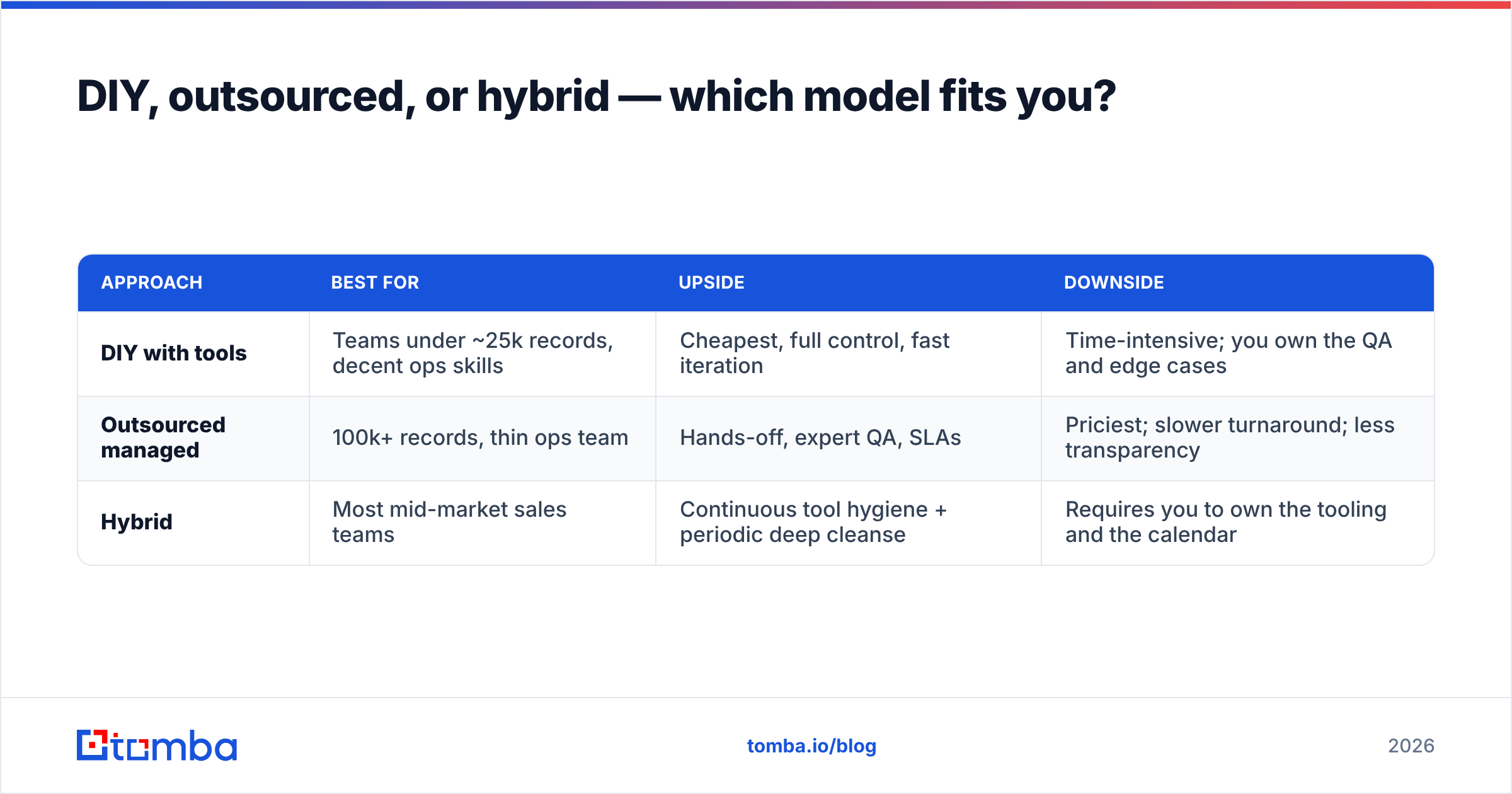
DIY, outsourced, or hybrid — which model fits you?#
There's no single right answer; it depends on volume, in-house skill, and how often your data goes stale. Here's the honest trade-off.
| Approach | Best for | Upside | Downside |
|---|---|---|---|
| DIY with tools | Teams under ~25k records, decent ops skills | Cheapest, full control, fast iteration | Time-intensive; you own the QA and edge cases |
| Outsourced managed | 100k+ records, thin ops team | Hands-off, expert QA, SLAs | Priciest; slower turnaround; less transparency |
| Hybrid | Most mid-market sales teams | Continuous tool hygiene + periodic deep cleanse | Requires you to own the tooling and the calendar |
Most growing sales orgs land on hybrid: run automated verification and dedup continuously with software, then commission a heavier cleanse-and-enrich pass once or twice a year, or before a big campaign or a CRM migration.
If you go DIY or hybrid, the workhorse tools are an email verifier for hygiene, a bulk email finder for gap-filling, and a data enrichment layer for the missing firmographics. Wiring them together through integrations with your CRM is what makes it "continuous" instead of a quarterly fire drill.
How much do CRM data cleansing services cost in 2026?#
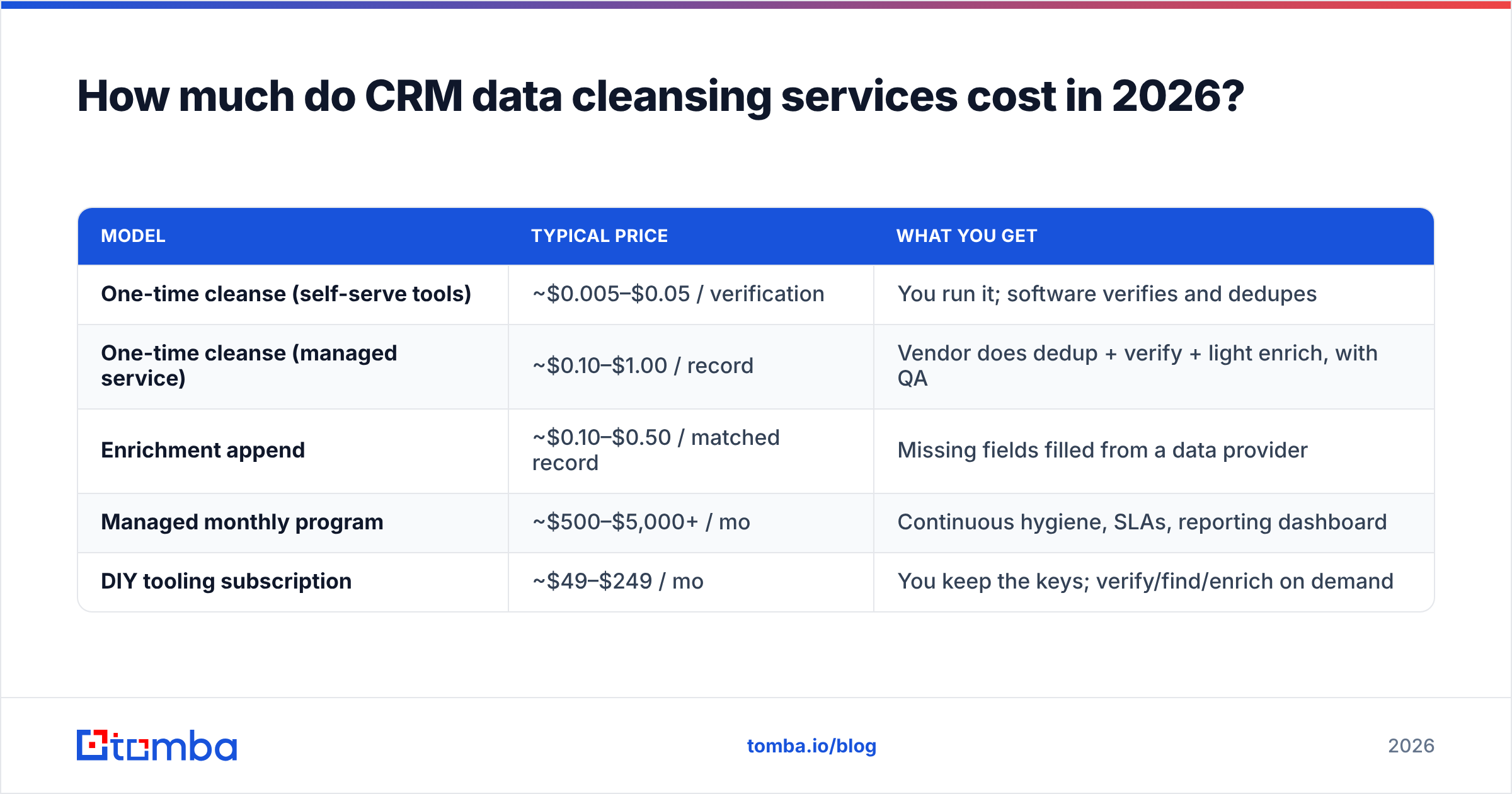
Pricing splits into two shapes: per-record one-time projects and ongoing programs. Here's a realistic 2026 range.
| Model | Typical price | What you get |
|---|---|---|
| One-time cleanse (self-serve tools) | ~$0.005–$0.05 / verification | You run it; software verifies and dedupes |
| One-time cleanse (managed service) | ~$0.10–$1.00 / record | Vendor does dedup + verify + light enrich, with QA |
| Enrichment append | ~$0.10–$0.50 / matched record | Missing fields filled from a data provider |
| Managed monthly program | ~$500–$5,000+ / mo | Continuous hygiene, SLAs, reporting dashboard |
| DIY tooling subscription | ~$49–$249 / mo | You keep the keys; verify/find/enrich on demand |
For reference, Tomba pricing runs a Free tier (25 searches/mo), Starter at $49/mo, Growth at $99/mo, and Pro at $249/mo — which is the DIY-tooling end of that table, giving you verification, finding, and enrichment without a per-record managed markup.
A quick way to sanity-check a managed quote: if a vendor charges $0.50/record to "clean" 200,000 rows but half of those rows are dead accounts you should simply delete, you're paying $50,000 to polish garbage. Scope the deletion pass first.
What does a good cleansing workflow actually look like?#
Order matters. Enriching before you dedup means you pay to enrich duplicates. Here's the sequence that wastes the least money.
- Profile the data. Count duplicates, blanks, and obvious junk before touching anything. This becomes your before/after scorecard.
- Deduplicate. Merge on a stable key — company domain for accounts, verified email for contacts. Never merge on name alone.
- Verify contactability. Run every email through verification and drop or quarantine hard bounces. Use a catch-all verifier for domains that accept everything, so you don't over-trust them.
- Standardize. Normalize titles, phone formats, countries, and industries against a controlled vocabulary.
- Enrich the survivors. Only now fill gaps — company size, direct dials, current work email for job-changers.
- Re-verify what you enriched. New data is still data; a fresh append can carry stale addresses.
- Set a cadence. B2B data decays roughly 2–3% per month as people change jobs. A cleanse is a snapshot, not a cure. Schedule the next one.
That job-change problem is the sneaky one. Someone you verified in January is a bounce by July. Continuous verification through the email finder API or a scheduled bulk job is how you stay ahead of decay instead of re-buying the same cleanse every year.
How do you choose a CRM data cleansing provider?#
Score candidates on six criteria, weighted for your situation:
- Data sourcing transparency. Ask where the data comes from and how it's refreshed. A provider that explains its data sources is one you can audit; one that won't is a black box.
- Verification depth. Does it catch catch-all domains, role accounts (info@, sales@), and disposable addresses — or just syntax-check? Syntax-only "verification" is theater.
- Match and coverage rate. High enrichment coverage sounds great until you learn 30% of the "matches" are low-confidence guesses. Ask for confidence scores, not just a coverage percentage.
- CRM fit. Native HubSpot integration, Salesforce integration, or a solid API beats CSV round-trips that break your automations.
- Compliance. GDPR and CCPA handling, opt-out honoring, and a clear data-processing agreement are non-negotiable for B2B in 2026.
- Auditability. You should get a record-level log of what changed. "Trust us, it's cleaner" is not a deliverable.
A useful vendor-comparison habit: pull independent reviews on G2 or Capterra and read the 3-star reviews specifically. The 5-star and 1-star reviews are noise; the 3-star ones tell you where a tool actually strains.
Should you cleanse before a CRM migration?#
Yes — and it's the single highest-ROI time to do it. Migrating dirty data just moves the mess into a more expensive system and doubles your duplicate problem when the import fuzzy-matches poorly.
Before any Salesforce or HubSpot migration, run the full dedup-verify-standardize pass on the source system, delete the genuinely dead records, and only migrate what's contactable and current. You'll pay for fewer seats, import faster, and start the new CRM with a clean baseline instead of importing a decade of drift.
The same logic applies before a big outbound push. There's no point warming up a new domain and writing great copy if a third of your list bounces on send.
Common mistakes to avoid#
- Enriching before deduping. You pay twice and merge conflicting appended fields.
- Treating verification as one-and-done. Decay is continuous; your process should be too.
- Deleting nothing. Cleansing isn't only about fixing — sometimes the right move is to remove. Keep an archive, but get dead records out of active reporting.
- Over-trusting catch-all domains. They accept everything, so a "valid" result means little without deeper checks.
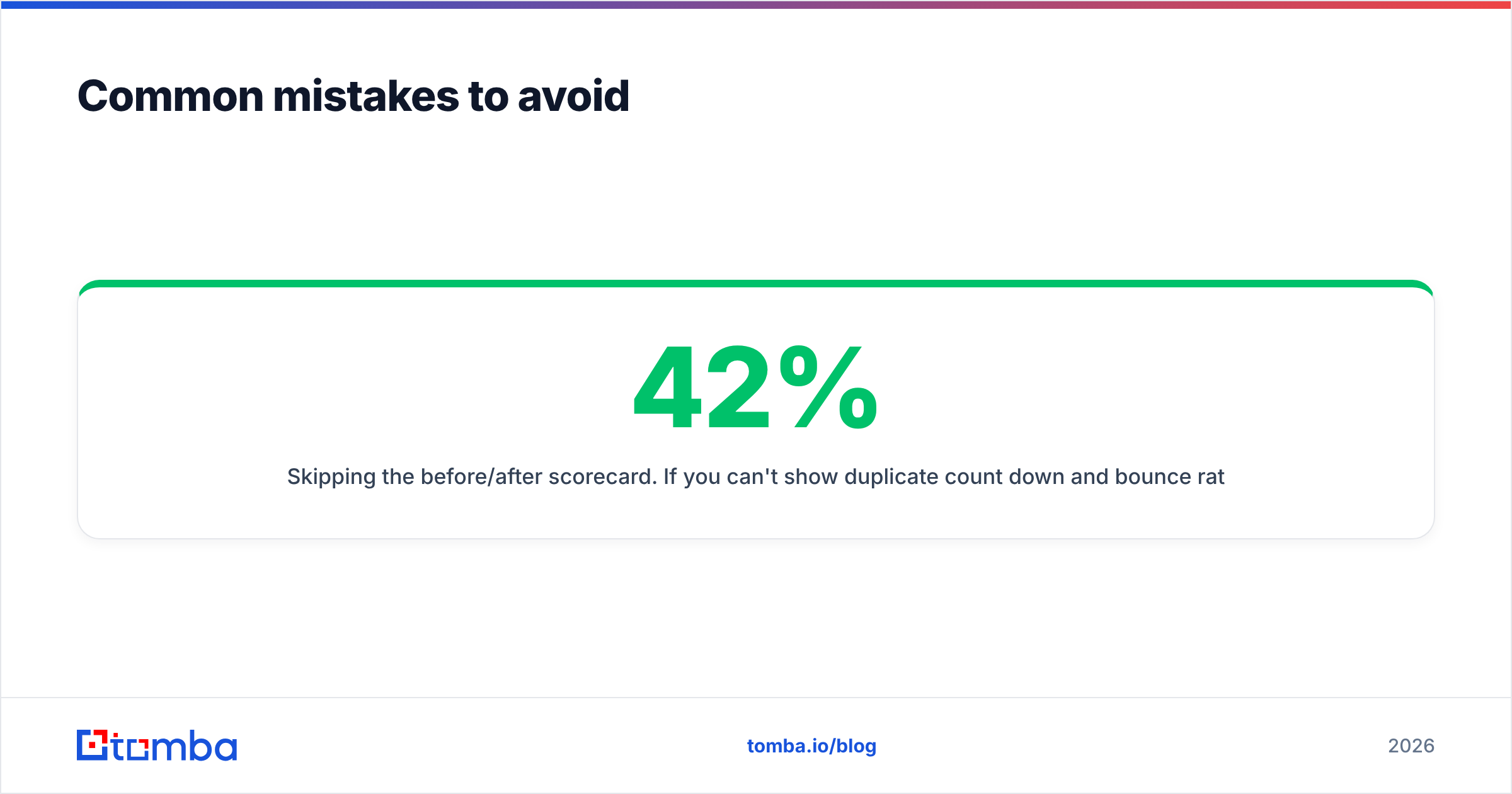
- Skipping the before/after scorecard. If you can't show duplicate count down 42% and bounce rate down from 9% to 1.4%, you can't prove the spend worked.
The bottom line#
CRM data cleansing services are worth it when the cost of your dirty data — wasted rep hours, blown deliverability, foggy forecasts — exceeds the cost of the cleanse. For most sales teams that threshold is crossed long before they admit it. The smart play is hybrid: continuous automated hygiene, plus a heavier periodic pass around migrations and major campaigns.
Start with the two cheapest, highest-impact moves — verify your list and fill the gaps — before you spend a dollar on a managed program. Run your existing contacts through the Tomba Email Verifier to strip out bounces, then use the Tomba Email Finder to recover the current work emails of everyone who changed jobs. Clean data in, clean pipeline out — and a sender reputation that keeps your good emails landing where they belong.
Related guides#
Ready to find emails that actually work?
Join 150,000+ professionals who stopped guessing and started sending. Free credits on signup — no credit card required.
Get the Tomba newsletter
Practical outbound tactics and product updates — once every two weeks.
About the author