CRM for Outbound Sales: Build a Pipeline That Actually Converts
Most CRMs are built to manage inbound deals, not run cold outbound at scale. Here's how to pick and configure a CRM for outbound sales that keeps reps selling instead of updating fields.
Outbound sales lives or dies on two things: how fast your reps can reach the right people, and how cleanly your system tracks every touch without eating their selling time. A CRM built for inbound — waiting for demo requests to roll in — usually fails at both. This guide shows you what a CRM for outbound sales actually needs to do, which tools fit which team, and how to wire in the contact data that makes the whole engine run.
TL;DR#
- A CRM for outbound sales must optimize for activity, not just deal storage — sequences, dialer logs, and reply tracking matter more than fancy forecasting dashboards.
- The best fit depends on team size: Pipedrive and Close for lean SMB teams, HubSpot for mid-market, Salesforce for complex enterprise motions.
- Data quality beats CRM features. A perfect pipeline full of bounced emails converts nothing — pair your CRM with a strong email finder and verification layer.
- Automation should remove admin, not add rules nobody follows. Auto-log activity, auto-enrich new contacts, and auto-advance stages on real signals.
- Watch the total cost. Seat pricing plus enrichment add-ons plus dialer minutes can triple the sticker price — budget for the stack, not the logo.
What makes a CRM "for outbound" instead of just a CRM?#
The short answer: an outbound CRM is measured by how many quality conversations it helps a rep start each day, not by how neatly it stores closed-won deals.
Think of a generic CRM as a filing cabinet — great for keeping records once a deal exists. An outbound CRM is more like a kitchen line during a dinner rush: everything is optimized for throughput, so reps can prep, cook, and plate (research, call, email) without walking across the room for every ingredient. When you evaluate tools, you're really asking whether the software fights the rep's momentum or protects it.
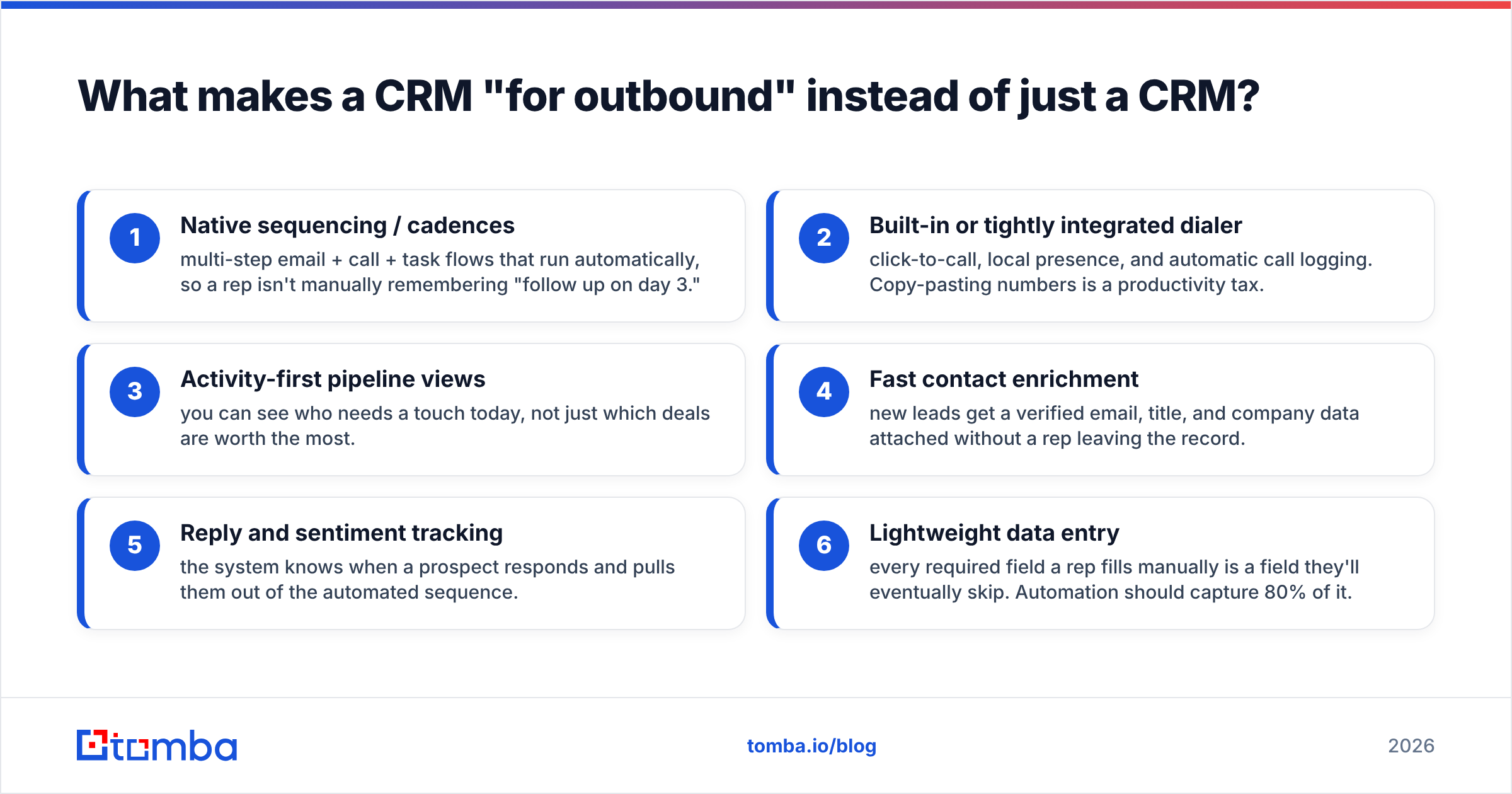
Here's what separates an outbound-ready CRM from a passive record-keeper:
- Native sequencing / cadences — multi-step email + call + task flows that run automatically, so a rep isn't manually remembering "follow up on day 3."
- Built-in or tightly integrated dialer — click-to-call, local presence, and automatic call logging. Copy-pasting numbers is a productivity tax.
- Activity-first pipeline views — you can see who needs a touch today, not just which deals are worth the most.
- Fast contact enrichment — new leads get a verified email, title, and company data attached without a rep leaving the record.
- Reply and sentiment tracking — the system knows when a prospect responds and pulls them out of the automated sequence.
- Lightweight data entry — every required field a rep fills manually is a field they'll eventually skip. Automation should capture 80% of it.
If a CRM nails records but makes reps do research and outreach in five other tabs, it's an inbound tool wearing an outbound costume.
Which CRM is best for outbound sales in 2026?#
The best CRM for outbound sales is the one that matches your team's complexity without drowning reps in configuration. Below is an honest side-by-side of the four platforms most outbound teams shortlist.
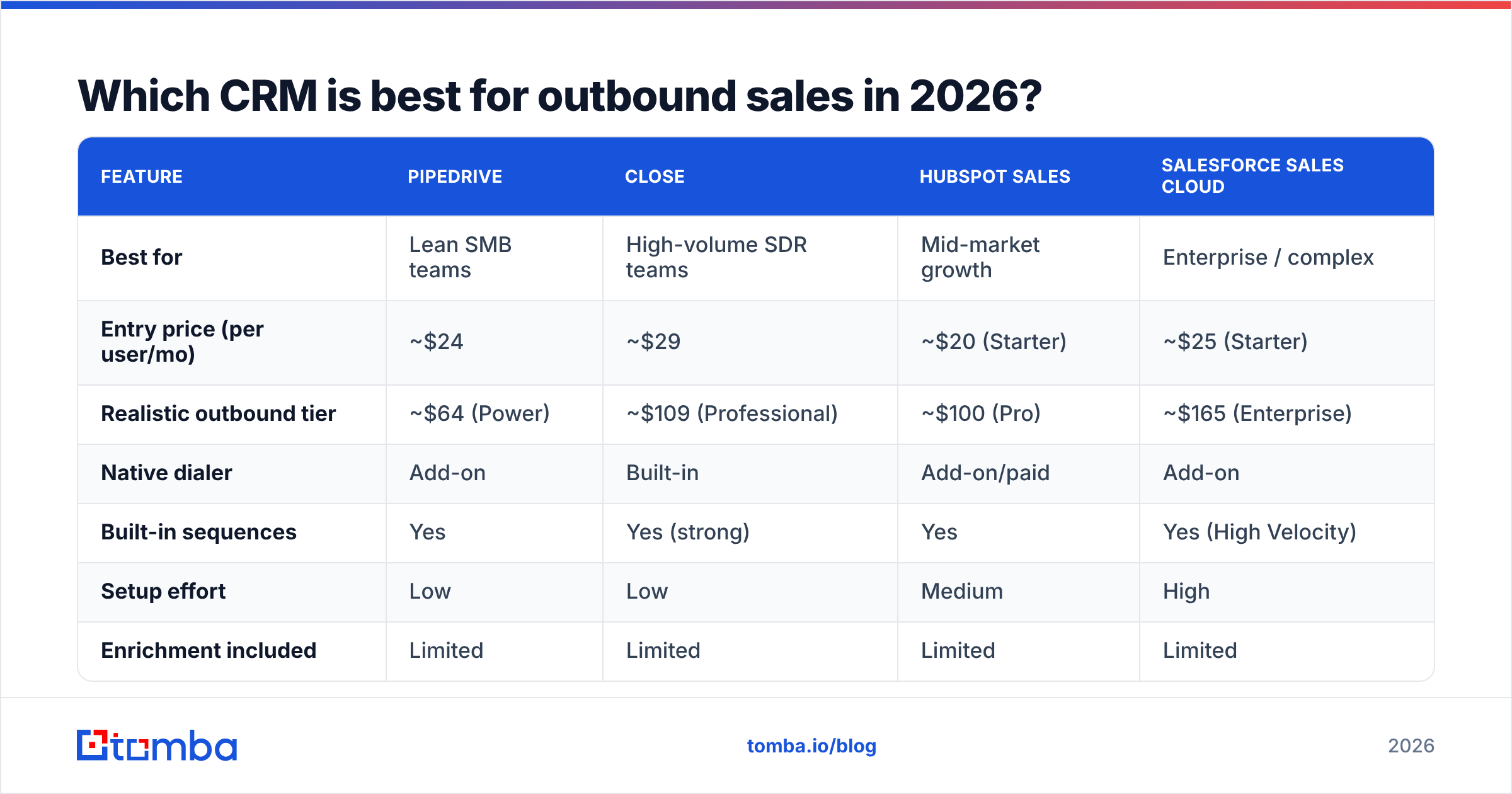
| Feature | Pipedrive | Close | HubSpot Sales | Salesforce Sales Cloud |
|---|---|---|---|---|
| Best for | Lean SMB teams | High-volume SDR teams | Mid-market growth | Enterprise / complex |
| Entry price (per user/mo) | ~$24 | ~$29 | ~$20 (Starter) | ~$25 (Starter) |
| Realistic outbound tier | ~$64 (Power) | ~$109 (Professional) | ~$100 (Pro) | ~$165 (Enterprise) |
| Native dialer | Add-on | Built-in | Add-on/paid | Add-on |
| Built-in sequences | Yes | Yes (strong) | Yes | Yes (High Velocity) |
| Setup effort | Low | Low | Medium | High |
| Enrichment included | Limited | Limited | Limited | Limited |
A few takeaways that the pricing pages won't say out loud:
- Close is the most outbound-native of the four. It was built around the dialer and cadence, so SDR teams making 60+ dials a day feel the least friction.
- Pipedrive wins on simplicity and price for small teams that mostly email and want a visual pipeline without a six-week rollout.
- HubSpot is the safe mid-market pick, especially if marketing already lives there — but the "free CRM" gets expensive fast once you add Sales Hub Pro seats and sequences.
- Salesforce is unmatched for complex, multi-team enterprise motions and reporting, at the cost of admin overhead. You will need someone to own it.
Notice the last row: none of them include serious contact enrichment. That's the gap that quietly kills outbound pipelines, and it's where your data layer decides your results. Check current numbers on each vendor's own site and cross-reference reviews on G2 before committing — pricing tiers shift every year.
Why does data quality matter more than CRM features?#
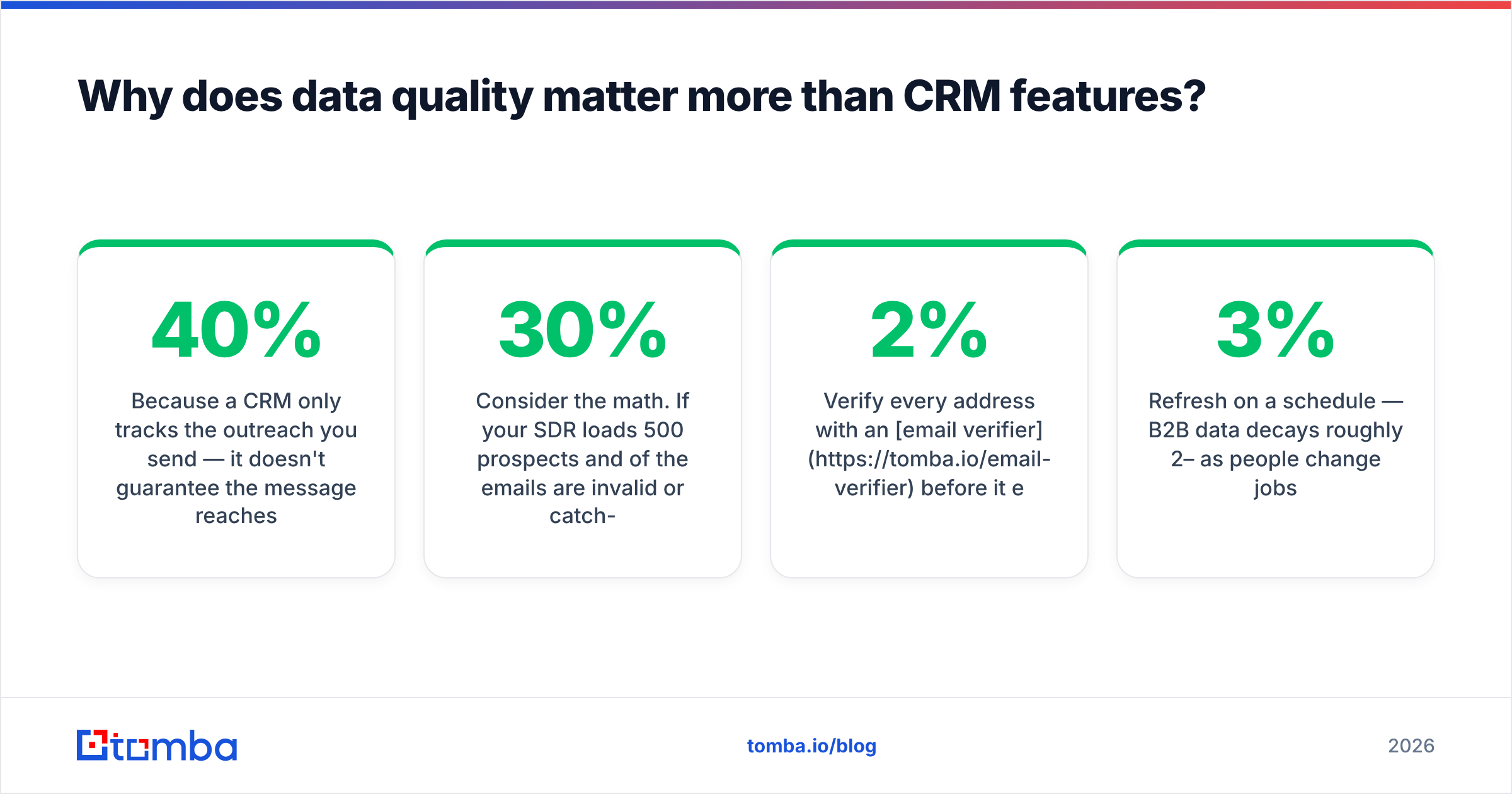
Because a CRM only tracks the outreach you send — it doesn't guarantee the message reaches a real inbox. You can buy the most powerful CRM on the market and still get a 40% bounce rate if the underlying contacts are stale.
Consider the math. If your SDR loads 500 prospects and 30% of the emails are invalid or catch-all guesses, that's 150 sends that never land, mailbox-provider spam flags climbing, and a sender reputation slowly torching your deliverability. The CRM will happily log all 500 as "contacted." Your dashboard looks busy. Your reply rate quietly collapses.
This is why serious outbound teams treat contact data as a separate, first-class layer:
- Find the right email with a domain- and name-based email finder instead of guessing patterns.
- Verify every address with an email verifier before it enters a sequence, so bounces stay under 2%.
- Enrich each record with title, company, and phone via data enrichment so reps personalize without manual research.
- Refresh on a schedule — B2B data decays roughly 2–3% per month as people change jobs.
For teams that also want to buy verified lists, providers like BookYourData offer prebuilt B2B contacts you can import and then re-verify inside your workflow — a reasonable complement to a self-serve finder when you need volume fast. The point isn't one source over another; it's that your CRM should never be the system of record for whether an email is deliverable. That job belongs to a dedicated verification step.
How do you set up an outbound pipeline that actually converts?#
Design the pipeline around rep actions and prospect signals, not around internal wishful thinking. A stage should only exist if a rep can objectively tell when a deal enters or leaves it.
A clean outbound pipeline usually has five to seven stages:
- New / Enriched — contact imported and verified; email, phone, and title attached automatically.
- Sequenced — prospect is in an active cadence (email + call steps running).
- Engaged — a real reply, click-to-book, or answered call moved them out of automation.
- Discovery Booked — meeting scheduled; this is your first true conversion metric.
- Qualified Opportunity — need, timeline, and authority confirmed.
- Proposal / Negotiation — commercial terms in play.
- Closed Won / Lost — with a mandatory loss reason.
Two rules keep this pipeline honest:
- Stages advance on signals, not vibes. "Engaged" means a logged reply, not a rep's optimism. Wire your CRM automation to move records only when the trigger fires.
- Every stage has an exit SLA. If a prospect sits in "Sequenced" for 21 days with no reply, they auto-route to nurture. Stale deals inflate your pipeline and hide your real conversion math.
For the mechanics of stage design and forecasting, HubSpot's own sales pipeline guide is a solid, vendor-neutral reference — and worth reading even if you use a different CRM. If you want to go deeper on definitions, Tomba's CRM glossary entry breaks down the core terms.
What should you automate — and what should you leave alone?#
Automate the admin that steals selling time; leave the judgment calls to humans. The failure mode isn't too little automation — it's rules so rigid that reps route around them and the data rots anyway.
Automate these safely:
- Contact enrichment on create. When a lead lands, trigger a lookup to attach a verified email and firmographics. A bulk email finder or the Tomba API can enrich records in the background before a rep ever opens them.
- Activity logging. Calls, opens, clicks, and replies should log themselves. Manual logging is where CRM accuracy goes to die.
- Task creation from cadences. The sequence generates the "call this person today" task; the rep just executes.
- Stage rot alerts. Auto-flag deals with no activity past the SLA.
- Deduplication. Merge duplicate records automatically so two reps don't work the same account.
Keep human:
- Qualification and disqualification. No automation should mark a deal "not a fit" — that's a conversation.
- Personalization of the first line. Enrichment gives the raw material; the rep or a reviewed AI draft writes the hook.
- Escalation to management. A stuck six-figure deal needs a person, not a workflow.
The test for any automation: does it remove a keystroke a rep resents, or add a rule a rep will quietly ignore? Build the former, delete the latter.
What does an outbound CRM stack cost in reality?#
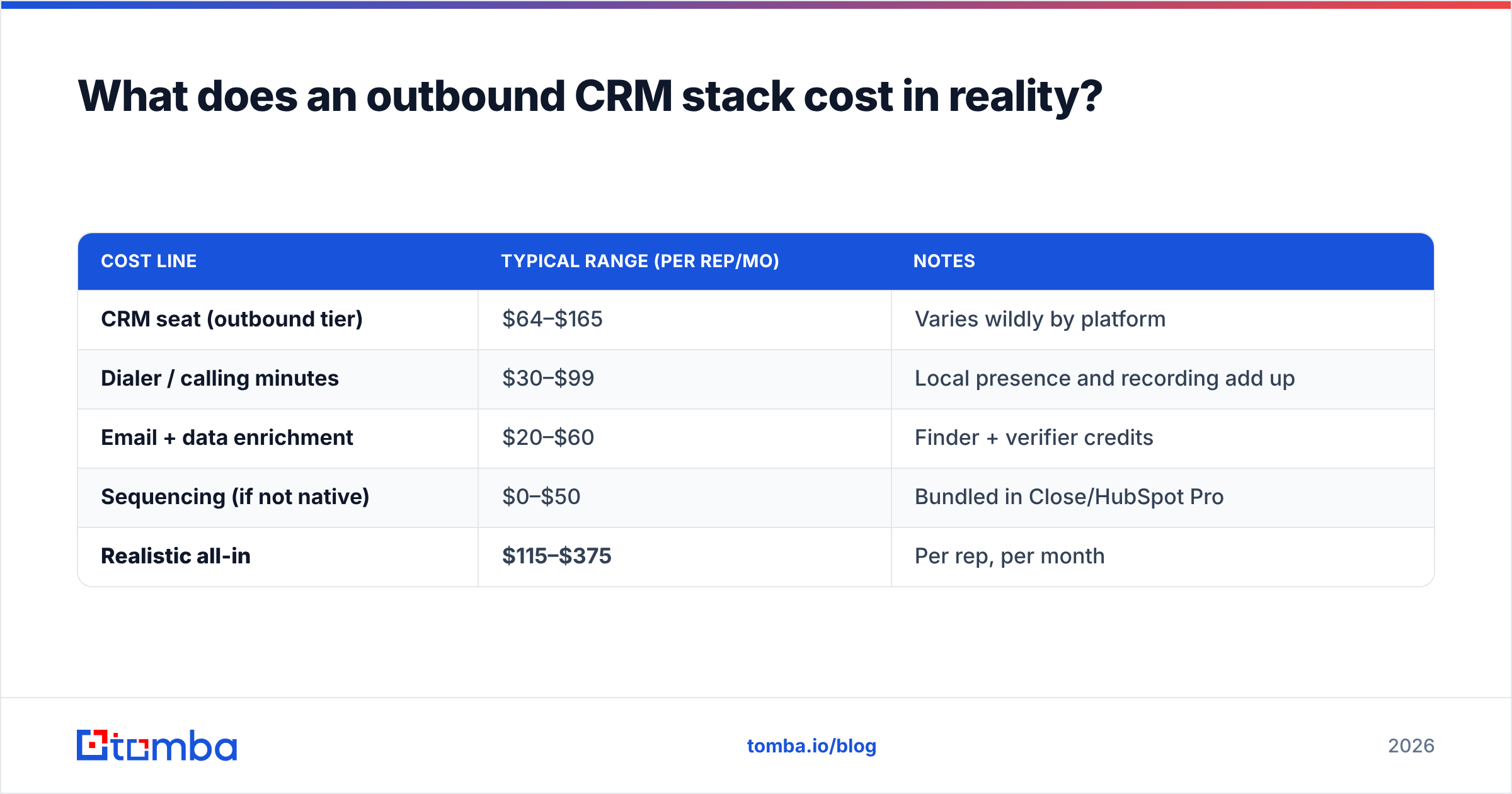
More than the CRM seat — usually two to three times more once you add the outbound essentials. Budgeting for just the CRM license is the most common planning mistake outbound leaders make.
| Cost line | Typical range (per rep/mo) | Notes |
|---|---|---|
| CRM seat (outbound tier) | $64–$165 | Varies wildly by platform |
| Dialer / calling minutes | $30–$99 | Local presence and recording add up |
| Email + data enrichment | $20–$60 | Finder + verifier credits |
| Sequencing (if not native) | $0–$50 | Bundled in Close/HubSpot Pro |
| Realistic all-in | $115–$375 | Per rep, per month |
The takeaway: a $24 CRM sticker price can become a $200+ per-rep reality once the stack is complete. That's not a reason to skimp — a rep who books two extra meetings a month pays for the whole stack — but it is a reason to consolidate. Every tool you can fold into your finder-plus-CRM combination is one fewer integration to maintain and one fewer bill to reconcile. You can compare Tomba's own credit-based tiers on the Tomba pricing page to slot the data layer into your budget.
How do you keep CRM data clean over time?#
Treat data hygiene as a recurring process, not a one-time import. Even a perfect launch decays: contacts change jobs, companies get acquired, and email formats shift after rebrands.
A sustainable hygiene loop looks like this:
- Re-verify before every campaign. Run the target segment through verification the day you launch, not the day you built the list.
- Enrich on a schedule. Refresh titles and companies quarterly so "VP of Sales" isn't actually someone who left 8 months ago.
- Suppress hard bounces immediately. One bounce should auto-tag the record and pull it from active sequences.
- Audit duplicates monthly. Merge overlapping accounts so pipeline value isn't double-counted.
- Sync through your integrations. Push enriched data straight into your CRM via the HubSpot or Salesforce connectors so reps never re-key it.
Clean data is a compounding advantage. Deliverability improves, reps trust the system, and forecasts stop lying to your board.
The bottom line#
A CRM for outbound sales isn't about the biggest feature list — it's about throughput. Pick the platform that matches your team's complexity (Pipedrive or Close for lean teams, HubSpot for mid-market, Salesforce for enterprise), design a signal-driven pipeline, automate the admin, and — most important — feed it verified, enriched contact data so every logged touch actually reaches a human.
That data layer is the piece most teams underinvest in and the one with the highest return. Before you obsess over pipeline stages, make sure the emails in those stages are real. Start with the Tomba Email Finder to source and verify accurate professional emails by domain, name, or company, then push them straight into your CRM. Your reps get to spend their day selling — not cleaning up bounces. Spin up the free tier (25 searches a month) and see how much cleaner your outbound engine runs when the data underneath it is right.
Related guides#
// get started
Find, verify and enrich your first contacts today
Start on the free plan with 25 searches a month, then scale when your team is ready.
Free plan · No credit card required · GDPR & CCPA
// about the author