CRM in Marketing: How It Powers Campaigns and Growth in 2026
CRM in marketing turns scattered contact data into segmented, personalized campaigns. Here's what it does, how to use it, and how to keep the data clean enough to matter.
Your CRM is not just a sales tool. Used well, it is the single most valuable marketing asset you own — the record of who your audience actually is, what they did, and what they want next. Used badly, it is an expensive spreadsheet full of stale emails.
This guide explains what CRM in marketing really means in 2026, how marketing teams use it day to day, and the unglamorous data work that separates campaigns that convert from campaigns that bounce.
TL;DR#
- CRM in marketing means using your customer relationship management system to segment audiences, personalize campaigns, automate nurture, and attribute revenue — not just to log sales calls.
- The payoff is targeting: a clean, enriched CRM lets you message the right person with the right offer instead of blasting one email to everyone.
- Segmentation, lifecycle stages, and behavioral triggers are the three features marketers lean on most.
- Garbage in, garbage out — bad contact data quietly kills deliverability and personalization. Verification and enrichment are non-negotiable.
- Platform choice matters less than data discipline. HubSpot, Salesforce, and Pipedrive all work; a dirty database in any of them does not.
What is CRM in marketing?#
A CRM (customer relationship management) system is a database that stores every interaction a person has with your company — form fills, email opens, purchases, support tickets, sales calls. In a marketing context, that database becomes the engine for who you talk to and what you say.
Think of your CRM like a restaurant's regulars book. A good host does not greet every guest with the same script. They remember who orders the same dish every Friday, who is celebrating an anniversary, and who complained last time. Marketing works the same way: the CRM remembers, so your campaigns can act like they remember too.
Technically, CRM sits at the center of your marketing stack. Your email platform, ad tools, landing pages, and analytics all read from and write to it. When someone downloads a whitepaper, the CRM records it. When that behavior crosses a threshold, the CRM can trigger a nurture sequence or hand the lead to sales as a marketing qualified lead.
Why does marketing need a CRM at all?#
Because relevance is the whole game, and relevance requires memory.
Without a CRM, marketing runs blind. You send the same newsletter to a first-time visitor and a 3-year customer. You retarget people who already bought. You email addresses that stopped existing two jobs ago. Every one of those mistakes costs money and, worse, costs sender reputation.
With a CRM, marketing gets four capabilities that are impossible otherwise:
- Segmentation — split your audience by industry, role, deal stage, or behavior so each group gets messaging that fits.
- Personalization at scale — merge fields, dynamic content, and behavioral triggers make a 50,000-person send feel one-to-one.
- Lifecycle automation — move contacts through defined stages (subscriber → lead → MQL → SQL → customer) with the right touch at each step.
- Attribution — tie closed revenue back to the campaign, channel, and content that started it, so you stop guessing what works.
The Gartner marketing technology research has consistently shown that the teams getting ROI from martech are the ones that unify data first and buy tools second. The CRM is where that unification happens.
What does a CRM actually do for a marketing team?#
Here is the day-to-day. A marketer using a CRM well is doing some mix of these:
- Building lists based on live criteria (all VP-level contacts in SaaS who opened the last two emails).
- Scoring leads so sales spends time on the warmest ones — see lead scoring models.
- Triggering workflows — a demo request kicks off a reminder sequence; a cart abandon fires a discount.
- Syncing to ad platforms to build lookalike audiences and suppress existing customers.
- Reporting on pipeline influenced, not just leads generated.
The common thread: none of it works if the underlying contact records are incomplete or wrong.
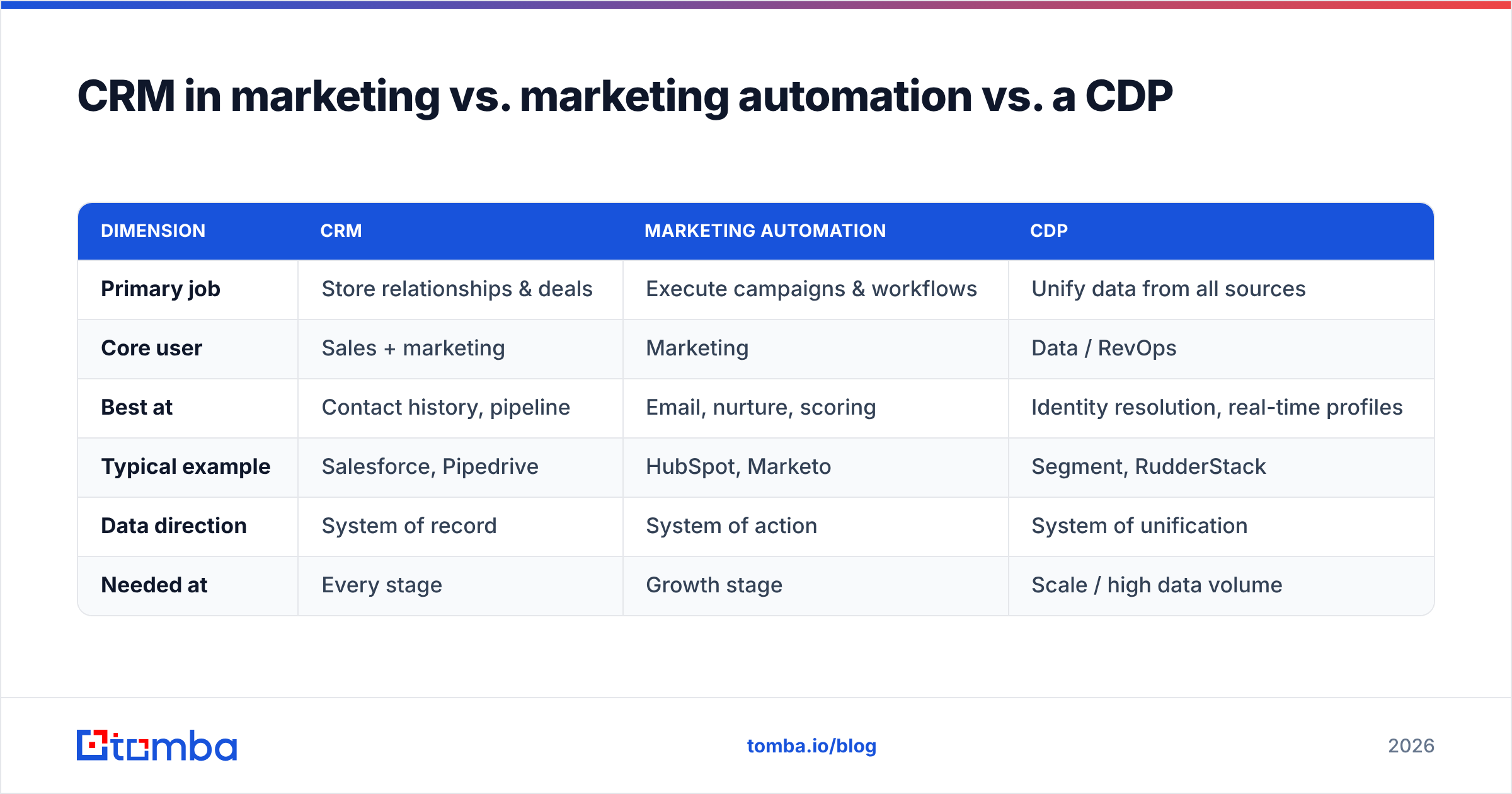
CRM in marketing vs. marketing automation vs. a CDP#
These three get conflated constantly. They overlap, but they solve different problems.
| Dimension | CRM | Marketing Automation | CDP |
|---|---|---|---|
| Primary job | Store relationships & deals | Execute campaigns & workflows | Unify data from all sources |
| Core user | Sales + marketing | Marketing | Data / RevOps |
| Best at | Contact history, pipeline | Email, nurture, scoring | Identity resolution, real-time profiles |
| Typical example | Salesforce, Pipedrive | HubSpot, Marketo | Segment, RudderStack |
| Data direction | System of record | System of action | System of unification |
| Needed at | Every stage | Growth stage | Scale / high data volume |
In practice most mid-market teams start with a CRM that has marketing automation bolted on (HubSpot is the obvious example) and only add a CDP once data sprawl becomes unmanageable. You almost never need all three on day one. You always need the CRM.
How do you use a CRM for marketing, step by step?#
A repeatable loop, not a one-time setup:
- Capture — collect contacts from forms, events, imports, and website reveal. Every entry point must write to the CRM.
- Clean and verify — remove duplicates, fix formatting, and confirm emails are deliverable before they ever get a send.
- Enrich — fill the gaps. A name and email is not enough; you want title, company, industry, and size to segment properly. This is where data enrichment earns its keep.
- Segment — group contacts by the attributes that change your message.
- Activate — launch campaigns, nurtures, and ad audiences off those segments.
- Measure and recycle — track what converted, feed learnings back, and re-engage or sunset the rest.
Skip steps 2 and 3 and everything downstream degrades. You cannot personalize by industry if half your records have no industry. You cannot protect email deliverability if you never verified the addresses.
Why is data quality the make-or-break factor?#
Because your CRM decays whether you touch it or not. B2B contact data goes stale fast — people change jobs, companies rebrand, domains lapse. Industry benchmarks put annual B2B data decay around 22–30%. That means roughly a quarter of your database is wrong within twelve months if you do nothing.
The symptoms of a dirty CRM show up as marketing problems:
- Hard bounces climb, and mailbox providers start throttling you.
- Personalization breaks — "Hi {FirstName}," goes out as "Hi ,".
- Reporting lies — inflated contact counts hide how small your reachable audience really is.
- Sales trust erodes — reps stop working leads because too many are dead ends.
The fix is boring and effective: verify at capture, re-verify on a schedule, and enrich the gaps. Running new emails through an email verifier before they hit a campaign keeps bounce rates low and reputation intact. When you inherit a list or import an old export, a bulk pass matters even more.
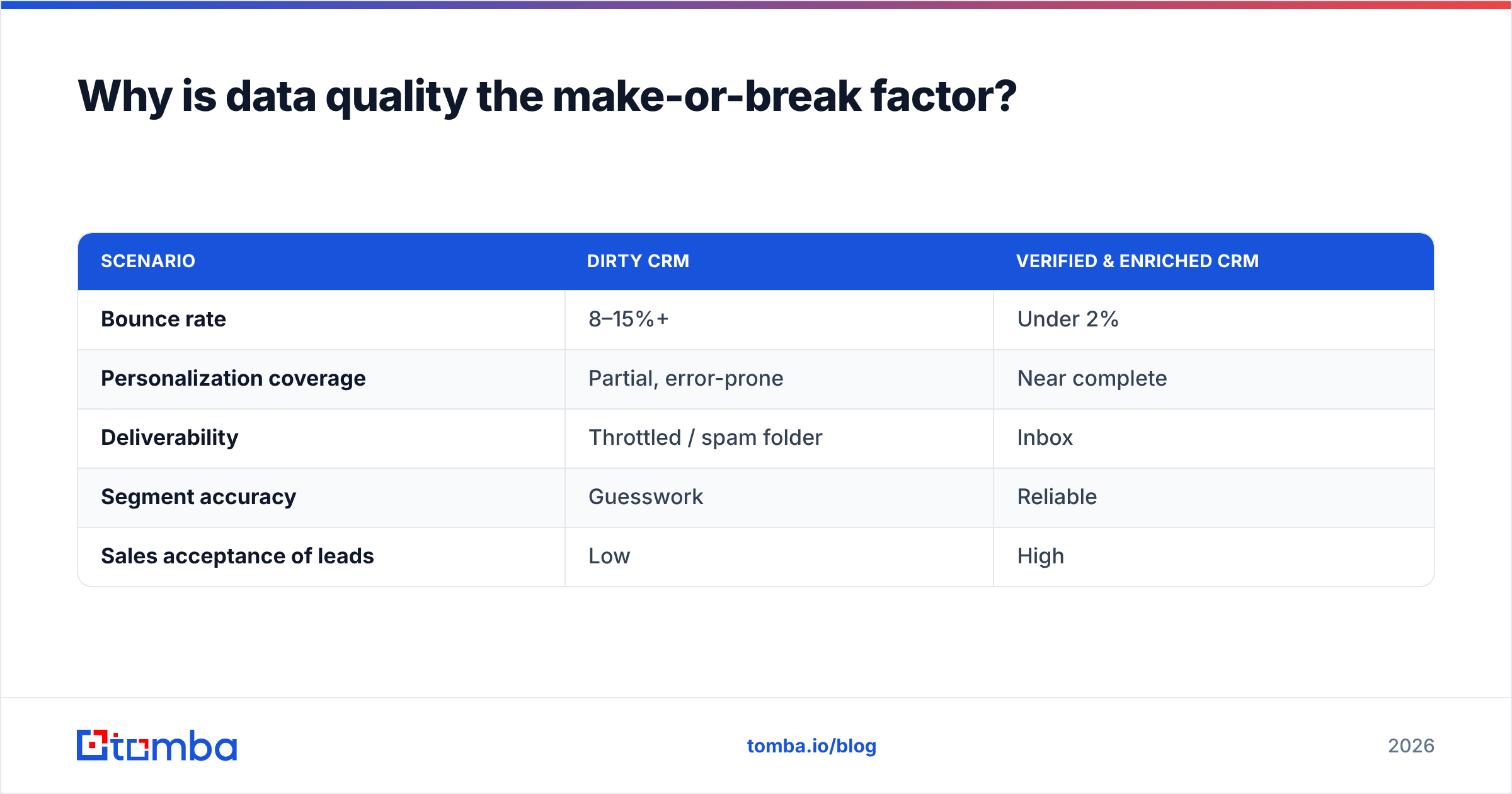
Here is how the two failure modes compare against a maintained database:
| Scenario | Dirty CRM | Verified & Enriched CRM |
|---|---|---|
| Bounce rate | 8–15%+ | Under 2% |
| Personalization coverage | Partial, error-prone | Near complete |
| Deliverability | Throttled / spam folder | Inbox |
| Segment accuracy | Guesswork | Reliable |
| Sales acceptance of leads | Low | High |
Which CRM should a marketing team choose?#
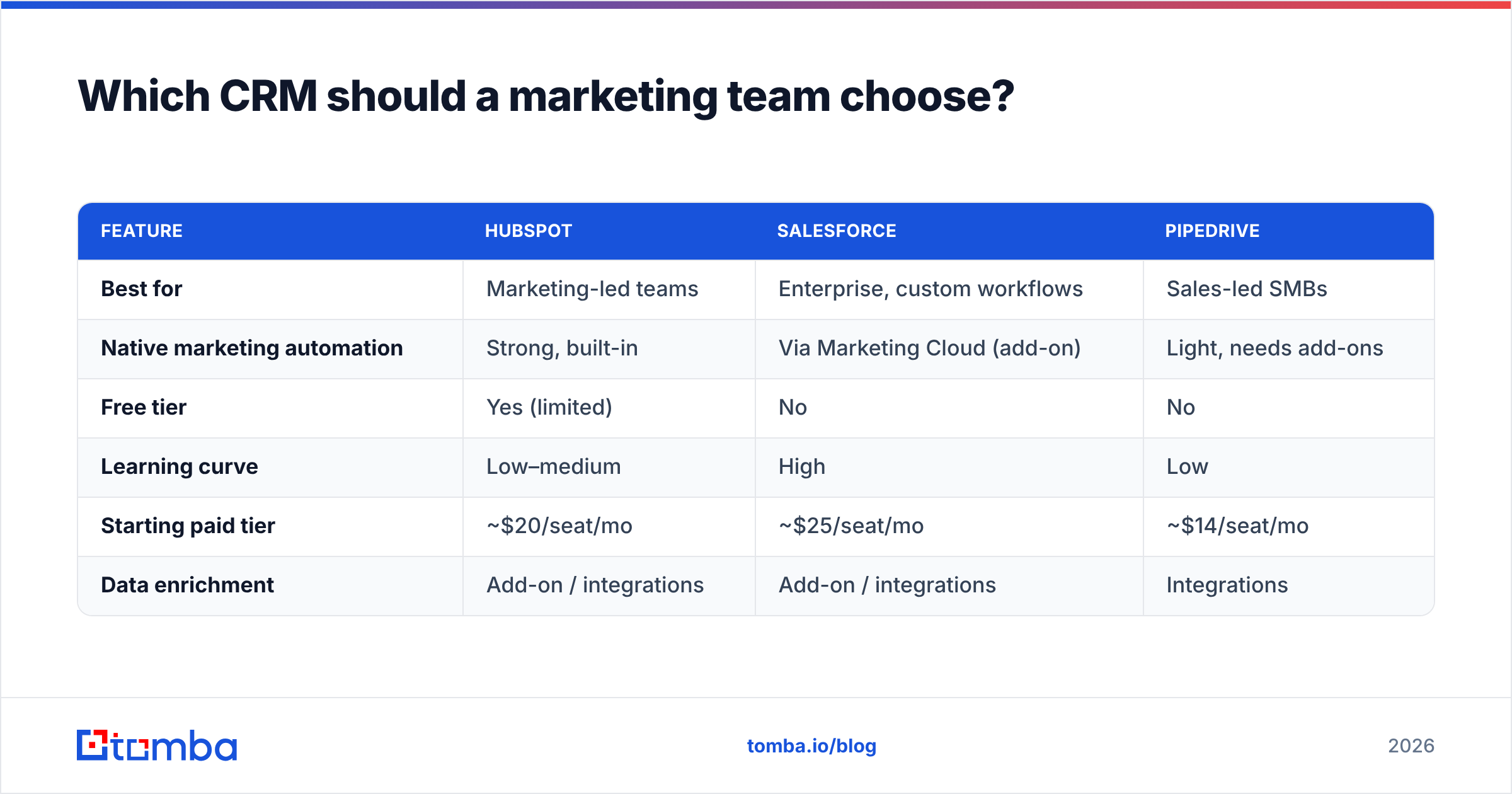
The honest answer: the one your team will actually keep clean and use. Feature lists matter less than adoption. That said, three cover most of the market.
| Feature | HubSpot | Salesforce | Pipedrive |
|---|---|---|---|
| Best for | Marketing-led teams | Enterprise, custom workflows | Sales-led SMBs |
| Native marketing automation | Strong, built-in | Via Marketing Cloud (add-on) | Light, needs add-ons |
| Free tier | Yes (limited) | No | No |
| Learning curve | Low–medium | High | Low |
| Starting paid tier | ~$20/seat/mo | ~$25/seat/mo | ~$14/seat/mo |
| Data enrichment | Add-on / integrations | Add-on / integrations | Integrations |
You can dig into each vendor directly — HubSpot leads on the all-in-one marketing experience, while Salesforce wins on customization and enterprise scale. Whichever you pick, plan for how contacts get in and how they stay accurate. That is the part no platform solves for you out of the box.
How does Tomba fit into CRM-driven marketing?#
Tomba sits at the top of the funnel — the capture and clean-and-enrich steps — and feeds accurate contacts straight into whatever CRM you run.
Concretely, that looks like:
- Finding the right contacts. Use the email finder or domain search to build target lists by company, then push them to your CRM instead of buying a stale list.
- Verifying before you sync. Run every new address through verification so your CRM only ingests deliverable contacts.
- Enriching thin records. Fill in company, role, and other attributes so your segments actually hold up.
- Connecting directly. Native paths into HubSpot and Salesforce mean the data lands where marketing works, no CSV shuffle.
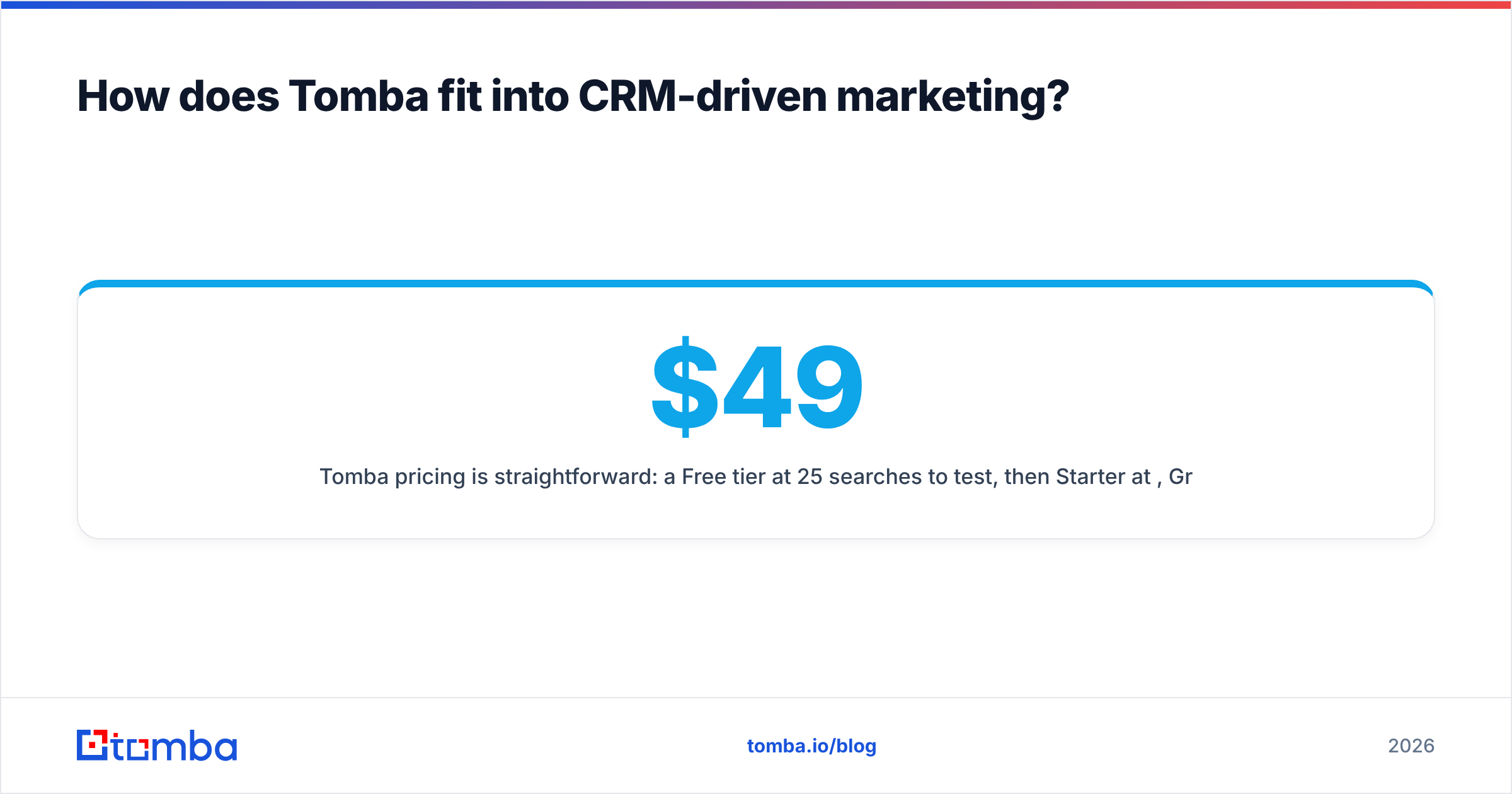
Tomba pricing is straightforward: a Free tier at 25 searches/month to test, then Starter at $49/mo, Growth at $99/mo, and Pro at $249/mo as your volume grows. See full Tomba pricing for credit breakdowns.
What mistakes should you avoid?#
The recurring ones, in order of how often they burn teams:
- Treating the CRM as sales-only. Marketing that ignores the CRM ends up with a shadow list in a separate email tool — and two versions of the truth.
- Never verifying imports. Every bought or scraped list should be verified before a single send.
- Over-segmenting. Fifty micro-segments you cannot maintain are worse than five you can. Start broad.
- Automating on bad triggers. A workflow firing off incomplete data sends the wrong message at scale.
- Ignoring decay. Set a quarterly hygiene routine or watch performance quietly slide.
Frequently asked questions#
Is a CRM the same as email marketing software? No. Email software sends and tracks messages; a CRM stores the relationships and history that make those messages relevant. Modern platforms like HubSpot bundle both, which blurs the line, but they are distinct jobs.
Do small teams need a CRM for marketing? Yes, earlier than most think. Even a solo founder benefits from one place that remembers every contact and interaction. Start with a free tier and grow into paid features.
How often should I clean my marketing CRM? Verify at the point of capture, then run a full hygiene and enrichment pass at least quarterly. High-volume senders should do it monthly.
Can I use a CRM without marketing automation? You can, but you leave most of the value on the table. The automation is what turns stored data into timely campaigns.
The bottom line#
CRM in marketing is not a tool you buy — it is a discipline you practice. The platform stores the data; your process keeps it accurate, segmented, and activated. Teams that win treat their CRM as the marketing system of record and guard its quality relentlessly.
That guard starts before a contact ever enters the database. If your funnel depends on reaching real people at real companies, build your lists from verified, enriched data. Start free with the Tomba Email Finder, find the contacts that fit your ICP, verify them, and push clean records straight into your CRM — so every campaign you run starts from truth instead of guesswork.
Related guides#
Ready to find emails that actually work?
Join 150,000+ professionals who stopped guessing and started sending. Free credits on signup — no credit card required.
Get the Tomba newsletter
Practical outbound tactics and product updates — once every two weeks.
About the author