What Are CRM Systems? Meaning, Types, and How They Work
CRM systems meaning, explained without the jargon: what a CRM actually does, the three core types, real costs, and how clean contact data decides whether it works.
TL;DR
- A CRM system is software that stores every customer and prospect interaction in one place so your team stops losing deals to sticky notes, inbox chaos, and memory.
- "CRM" means Customer Relationship Management — the term covers a business strategy and the software that runs it. Most people mean the software.
- There are three core types: operational (day-to-day sales/service), analytical (reporting and forecasting), and collaborative (shared context across teams).
- Pricing ranges from free to $150+ per user per month. The tool is rarely the problem — dirty, incomplete contact data is what actually kills CRM ROI.
- A CRM is only as good as the data you feed it. Verified emails, phone numbers, and enrichment on entry are what turn a database into revenue.
What is the meaning of a CRM system?#
A CRM system is a single source of truth for every relationship your business has with customers and prospects. Think of it as the shared memory of your revenue team: instead of each rep keeping deals in their own head, inbox, or spreadsheet, everything lives in one searchable place — contacts, emails, calls, meetings, deal stages, and notes.
"CRM" stands for Customer Relationship Management. The phrase describes two things people use interchangeably:
- The strategy — how a company deliberately manages relationships to win, keep, and grow customers.
- The software — the platform that stores and automates that strategy.
When someone says "we just bought a CRM," they mean the software. When a VP says "we need better CRM," they usually mean the discipline. Both matter, but this guide focuses on the systems — what they do, how they differ, and what makes them actually work.
The simplest way to understand a CRM is by the problem it removes. Without one, a lead emails you Monday, a rep calls Wednesday with no idea that email existed, and by Friday the deal is cold because nobody followed up. A CRM makes that impossible: the whole timeline is visible to anyone who opens the record.
What does a CRM system actually do?#
A good CRM does five jobs. If a tool can't do these, it's a contact list, not a CRM.
- Store contacts and companies — every person and account, with fields for role, email, phone, and history.
- Track interactions — logged emails, calls, meetings, and notes attached to each record automatically.
- Manage the pipeline — deals move through named stages (New → Qualified → Proposal → Won) so forecasting is real, not guesswork.
- Automate busywork — follow-up reminders, task assignment, email sequences, and stage-based triggers.
- Report and forecast — dashboards showing win rate, pipeline value, activity, and where deals stall.
Here's the honest part most vendor pages skip: none of that works if the underlying contact data is wrong. A pipeline built on bounced emails and disconnected phone numbers produces confident-looking forecasts from fiction. That's why teams pair their CRM with a verified data layer — finding the right contact, confirming the email is deliverable, and enriching the record before it ever enters a stage.
What are the main types of CRM systems?#
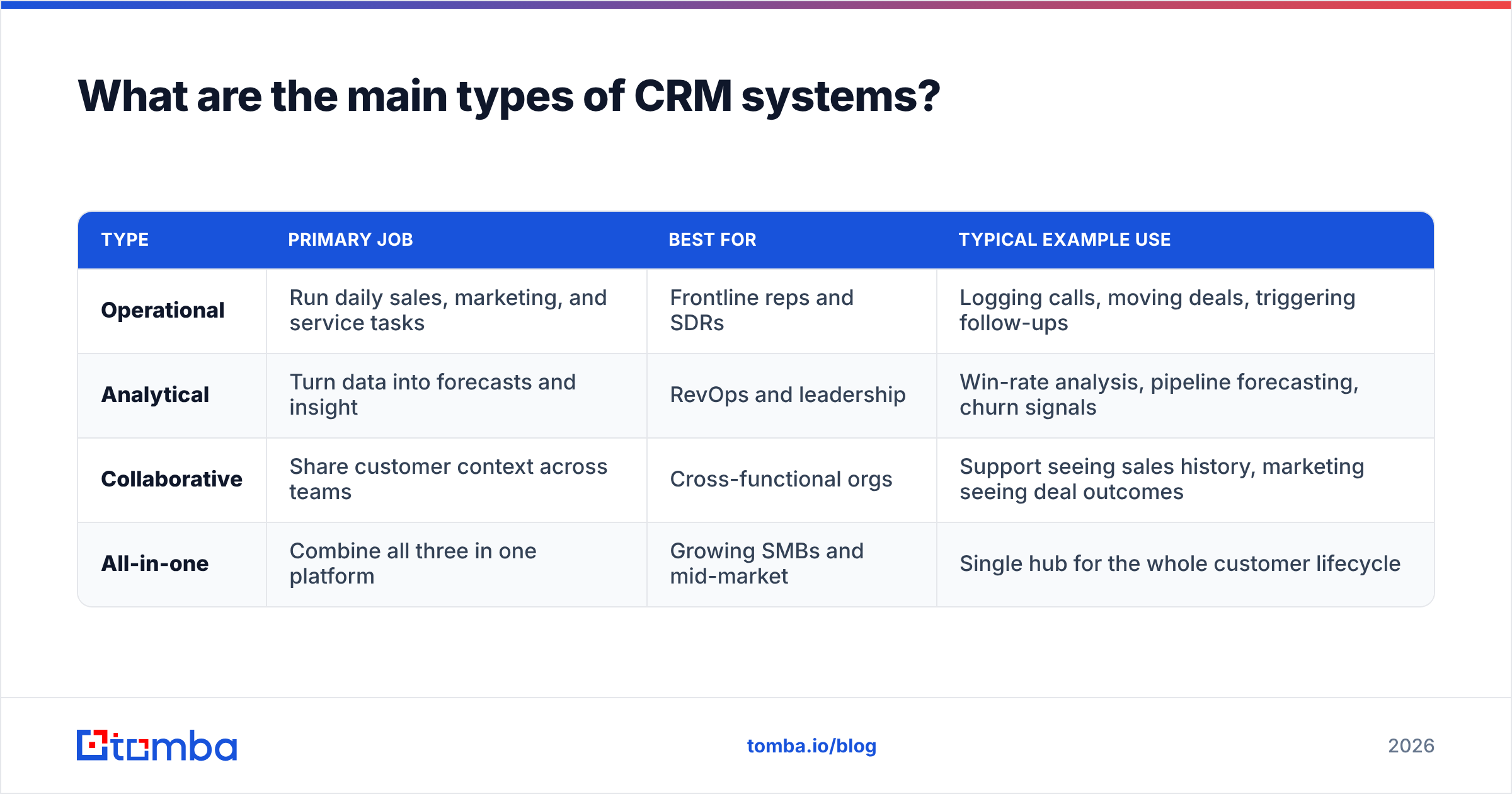
CRMs are usually grouped into three types based on their primary job. Most modern platforms blend all three, but knowing the categories helps you spot what a tool is really built for.
| Type | Primary job | Best for | Typical example use |
|---|---|---|---|
| Operational | Run daily sales, marketing, and service tasks | Frontline reps and SDRs | Logging calls, moving deals, triggering follow-ups |
| Analytical | Turn data into forecasts and insight | RevOps and leadership | Win-rate analysis, pipeline forecasting, churn signals |
| Collaborative | Share customer context across teams | Cross-functional orgs | Support seeing sales history, marketing seeing deal outcomes |
| All-in-one | Combine all three in one platform | Growing SMBs and mid-market | Single hub for the whole customer lifecycle |
Operational CRMs are what most salespeople picture — the workspace where you live all day. Analytical CRMs lean on the data warehouse and BI, answering "why are we winning or losing?" Collaborative CRMs exist to kill silos, so a support agent can see that the angry customer on the line is a $200k account mid-renewal.
You rarely buy one pure type. You buy a platform that emphasizes one and does the others adequately. The trap is buying a heavy analytical suite when your five-person team just needs operational speed — or vice versa.
How much do CRM systems cost in 2026?#
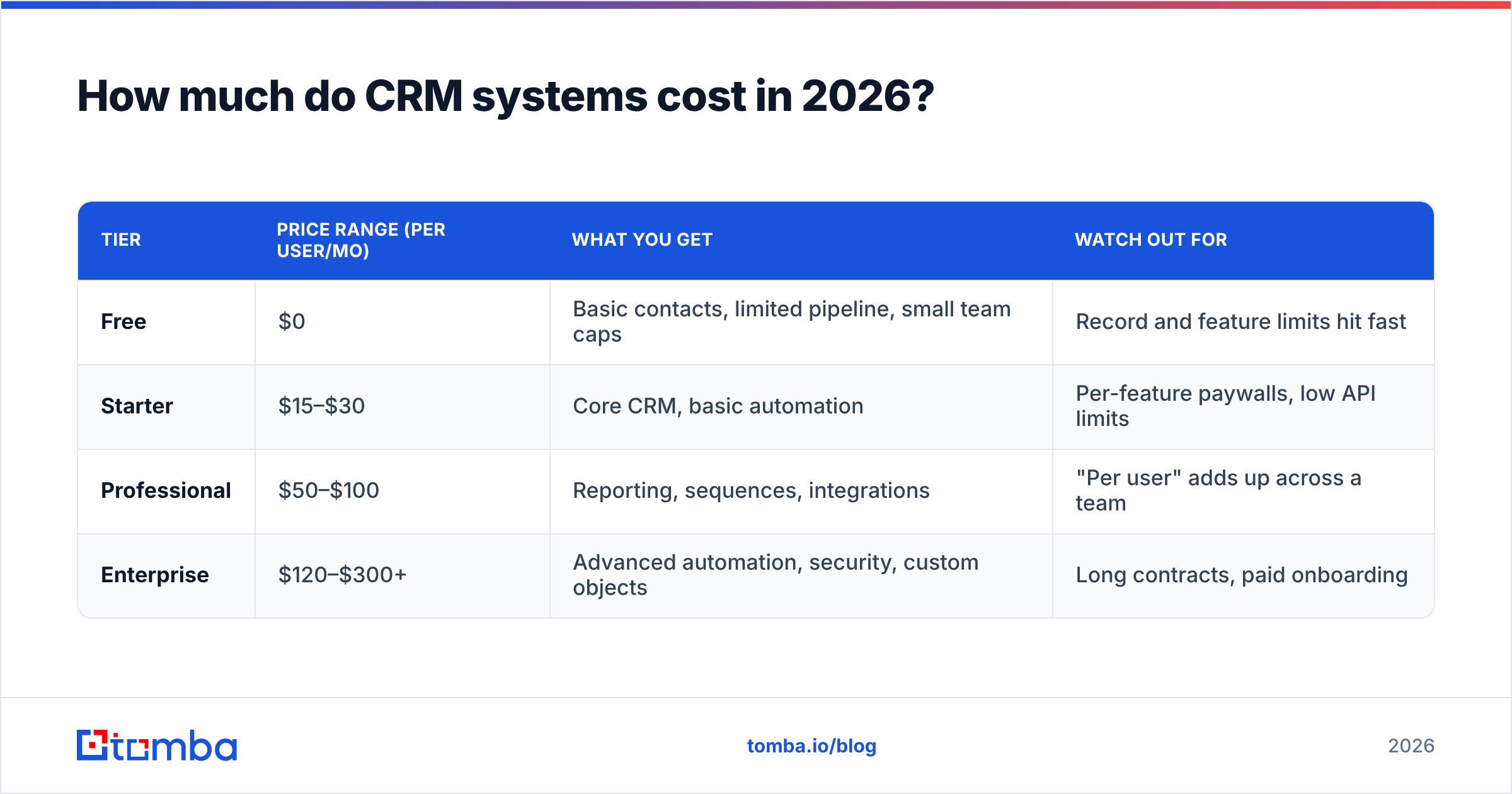
CRM pricing spans from genuinely free to enterprise contracts north of $150 per user per month. The sticker price is only half the story — implementation, data cleanup, and add-ons often cost more than the licenses.
| Tier | Price range (per user/mo) | What you get | Watch out for |
|---|---|---|---|
| Free | $0 | Basic contacts, limited pipeline, small team caps | Record and feature limits hit fast |
| Starter | $15–$30 | Core CRM, basic automation | Per-feature paywalls, low API limits |
| Professional | $50–$100 | Reporting, sequences, integrations | "Per user" adds up across a team |
| Enterprise | $120–$300+ | Advanced automation, security, custom objects | Long contracts, paid onboarding |
A five-person sales team on a $90/user professional plan spends over $5,400 a year — before data and integrations. That math is why so many teams obsess over squeezing ROI from the platform. And the fastest lever on ROI isn't a pricier tier; it's cleaner data going in. HubSpot's own research and years of Gartner coverage both point to the same conclusion: poor data quality is the leading reason CRM projects underdeliver.
Why do CRM systems fail? The data problem nobody mentions#
Most CRM failures are blamed on adoption — "reps won't use it." That's real, but it's downstream of a deeper issue: reps stop trusting a CRM full of bad data. When half the emails bounce and phone numbers ring the wrong person, the system feels like a chore instead of a weapon, and adoption collapses.
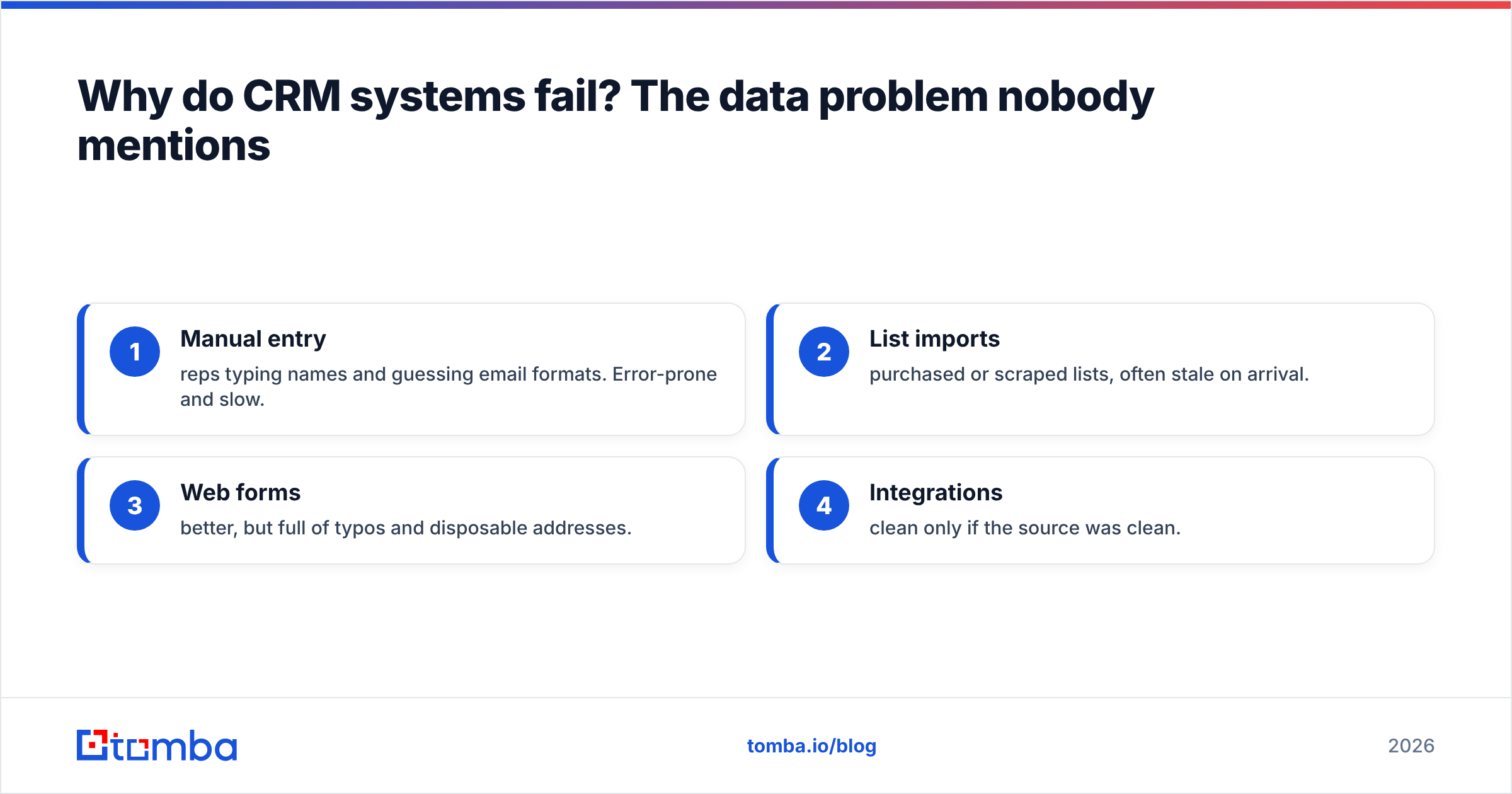
Consider what typically enters a CRM:
- Manual entry — reps typing names and guessing email formats. Error-prone and slow.
- List imports — purchased or scraped lists, often stale on arrival.
- Web forms — better, but full of typos and disposable addresses.
- Integrations — clean only if the source was clean.
Every one of those paths leaks bad records unless something verifies them. That's the gap a dedicated data layer fills. Before a contact becomes a "deal," you can confirm the person, find their real work email, verify it's deliverable, and enrich the record with company and role data.
This is where a tool like Tomba fits alongside — not instead of — your CRM. Using the email finder to source verified addresses, an email verifier to confirm deliverability, and data enrichment to fill missing fields means the records hitting your pipeline are real. Feed that into any CRM and the forecasts finally mean something. G2's buyer reviews on CRM platforms repeatedly echo the same lesson: the software rarely disappoints teams that maintain clean data.
How do you choose the right CRM system?#
Pick the CRM that matches how your team actually sells, not the one with the longest feature list. Run every candidate through five questions.
- Team size and stage — a 3-person startup and a 300-rep org need different tools. Don't buy enterprise complexity you'll never configure.
- Sales motion — high-volume transactional sales reward automation; complex enterprise deals reward custom objects and relationship mapping.
- Integrations — does it connect to your email, calendar, and data stack? Check for native integrations rather than brittle custom builds.
- Data hygiene — how easily can you verify, deduplicate, and enrich records? This is the make-or-break feature people forget to evaluate.
- Total cost — add licenses, onboarding, add-ons, and the hours spent cleaning data over a year.
A useful sequence: shortlist two or three platforms, run a real 30-day trial with live deals, and measure adoption and data quality — not demo polish. The winner is the one your reps open without being told to.
CRM system vs. spreadsheet: when do you need one?#
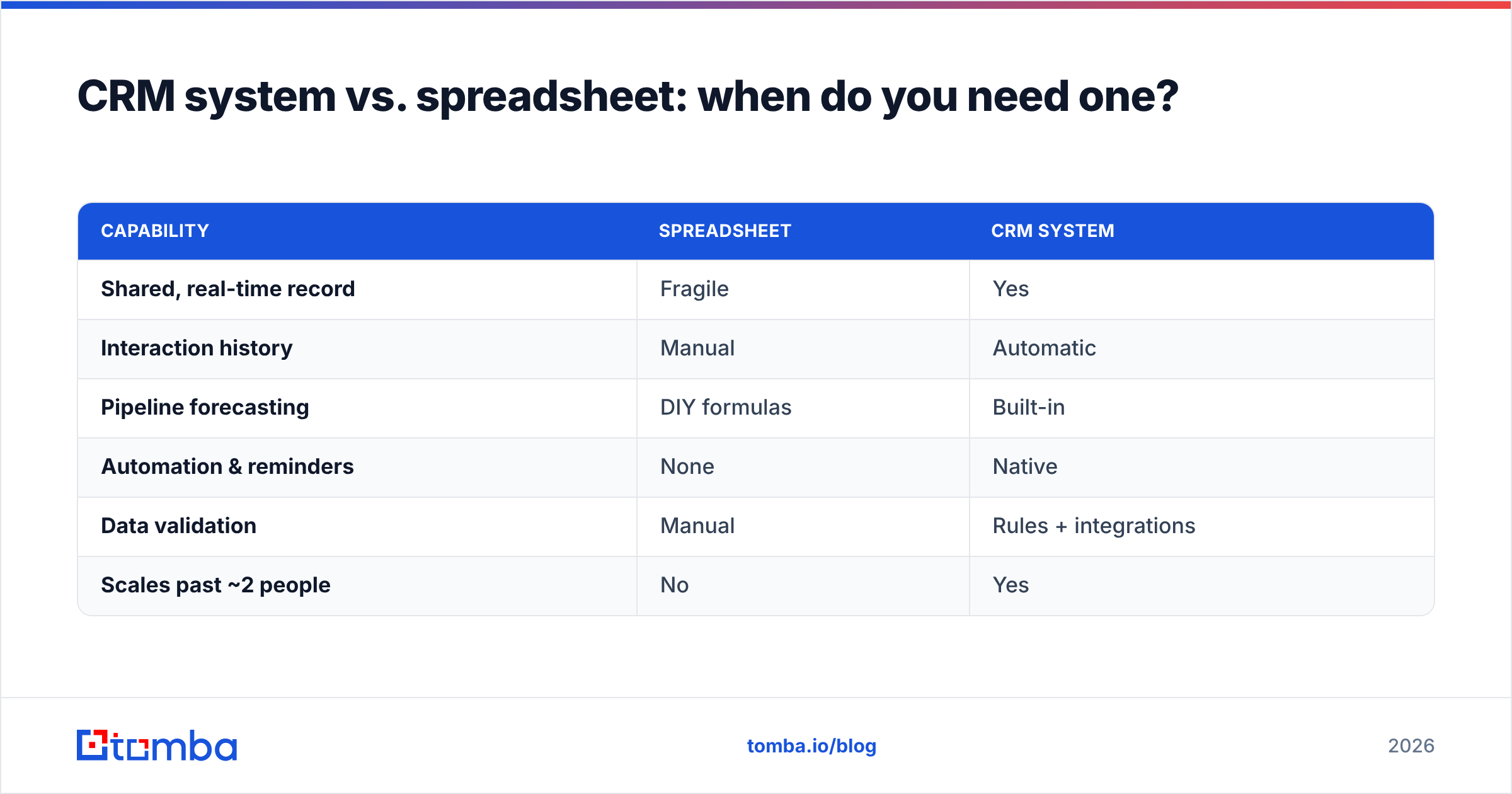
Plenty of small teams run on spreadsheets, and that's fine — until it isn't. A spreadsheet has no interaction history, no automation, no permissions, and no forecasting. It works for a solo founder tracking 20 leads. It breaks the moment two people need the same up-to-date view.
| Capability | Spreadsheet | CRM system |
|---|---|---|
| Shared, real-time record | Fragile | Yes |
| Interaction history | Manual | Automatic |
| Pipeline forecasting | DIY formulas | Built-in |
| Automation & reminders | None | Native |
| Data validation | Manual | Rules + integrations |
| Scales past ~2 people | No | Yes |
The signal to switch is usually pain: deals slipping through cracks, no idea what's in the pipeline, or two reps emailing the same prospect. If you're feeling that, you've outgrown the spreadsheet.
Frequently asked questions#
What does CRM stand for? CRM stands for Customer Relationship Management — both the business strategy for managing customer relationships and the software that runs it.
Is a CRM system only for sales? No. Sales uses it most visibly, but marketing (campaign tracking), customer service (ticket history), and leadership (forecasting) all rely on the same shared data.
Do small businesses need a CRM? Once you have more than a couple of people touching the same prospects, yes. Below that, a well-kept spreadsheet can survive — but only briefly.
What's the difference between a CRM and a contact database? A contact database just stores names. A CRM adds interaction history, pipeline stages, automation, and reporting on top of those contacts.
Why do CRM projects fail? Most fail from low adoption caused by bad data. When records are wrong, reps stop trusting the system. Verifying and enriching data on entry is the fix.
The bottom line: your CRM is only as good as its data#
A CRM system means one thing in practice: a shared, trustworthy record of every customer relationship. Get that right and forecasting, automation, and follow-up all fall into place. Get the data wrong and even the most expensive platform becomes an expensive spreadsheet.
Before you obsess over which CRM to buy, fix what goes into it. Use the Tomba Email Finder to source verified professional emails by name, domain, or company, confirm they're deliverable, and enrich each record with real company data — so the contacts entering your pipeline are people who actually exist and actually reply. Start free with 25 searches a month, and check Tomba pricing when you're ready to scale. A clean database is the cheapest CRM upgrade you'll ever make.
Related guides#
Ready to find emails that actually work?
Join 150,000+ professionals who stopped guessing and started sending. Free credits on signup — no credit card required.
Get the Tomba newsletter
Practical outbound tactics and product updates — once every two weeks.
About the author