Crustdata vs GetProspect: B2B Data and Email Tools Compared
Crustdata sells real-time data via API; GetProspect is a LinkedIn email finder for SDRs. Here is an honest, side-by-side breakdown of which one fits your GTM stack in 2026.
Crustdata and GetProspect get lumped together in "B2B data tool" roundups, but they solve different problems. Crustdata is a real-time data API for engineering and RevOps teams who want to pipe company and people signals into their own systems. GetProspect is a LinkedIn-first email finder built for SDRs who want a list of verified contacts fast. Picking wrong means either paying API money for a job a browser extension does, or hitting a wall the moment you need programmatic scale.
This is a neutral, hands-on comparison: data freshness, email accuracy, pricing, integrations, and the exact buyer each one is built for.
TL;DR: Crustdata vs GetProspect at a glance#
- Crustdata is an API-first, real-time data platform. Best for engineering, RevOps, and data teams building enrichment or signal-tracking directly into their stack.
- GetProspect is a LinkedIn email finder and prospecting tool. Best for SDRs and founders who want quick, exported contact lists without writing code.
- Data freshness: Crustdata leans on real-time pulls and headcount/funding signals; GetProspect relies on a large stored database plus on-demand LinkedIn extraction.
- Pricing model: Crustdata is quote-driven and enterprise-flavored; GetProspect has transparent self-serve tiers with a free plan.
- If you want both accuracy and API access without enterprise pricing, a focused email finder like Tomba is worth benchmarking against both before you commit.
What is Crustdata and who is it for?#
Crustdata is a B2B data provider that ships data primarily through an API and flat-file delivery rather than a point-and-click app. Its pitch is real-time and signal-rich: headcount growth, job-opening trends, funding events, web traffic, and technographics that a sales or product team can use to time outreach or score accounts.
The typical Crustdata buyer is technical. You are comfortable calling an endpoint, mapping a JSON response into your warehouse, and building alerts on top of it. Common use cases:
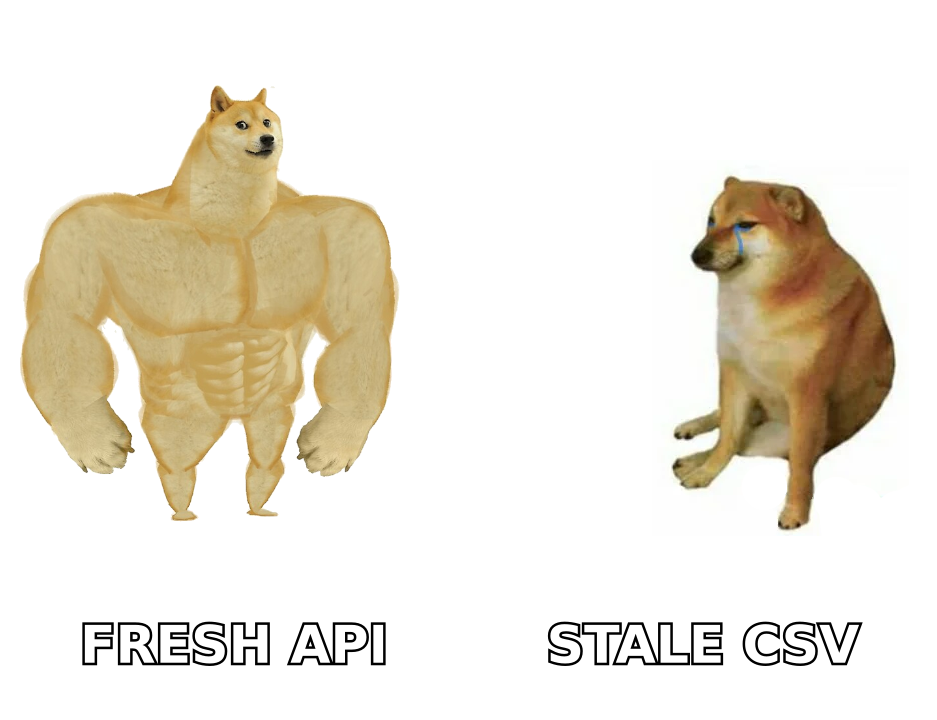
- Signal-based prospecting — trigger outreach when a target account grows engineering headcount or raises a round.
- Account scoring for RevOps — feed growth and technographic signals into a lead score inside your CRM.
- Product data feeds — power an internal dashboard or a customer-facing feature with company data.
- Investor and market research — track private-company momentum across a portfolio or a market map.
Crustdata is less about "give me this one person's email" and more about "give my system a stream of accounts and signals to act on." That framing matters because it explains most of the pricing and packaging differences below. You can review their positioning directly on crustdata.com.
What is GetProspect and who is it for?#
GetProspect is an email finder and lead-generation tool built around LinkedIn. You install the Chrome extension, browse LinkedIn or Sales Navigator, and pull contact details — name, company, role, and a verified business email — into lists you can export or push to your CRM. It also offers a searchable B2B database and a bulk email finder for uploading domains or names.
The typical GetProspect buyer is a seller or founder doing outbound by hand. You want a list of qualified contacts this afternoon, not an integration project. Common use cases:
- LinkedIn prospecting — build a targeted list from a Sales Navigator search.
- Bulk email finding — upload a CSV of names and companies, get emails back.
- List enrichment — fill missing emails and job titles on an existing spreadsheet.
- Lightweight CRM sync — push contacts to HubSpot or Pipedrive without engineering help.
GetProspect competes in the same lane as Hunter, Apollo, and similar self-serve finders. It is rated across review sites like G2, and you can see current plans on getprospect.com. The core promise is accessibility: no code, transparent pricing, a free tier to test.
Crustdata vs GetProspect: side-by-side comparison#
Here is the head-to-head on the attributes that actually change your buying decision.
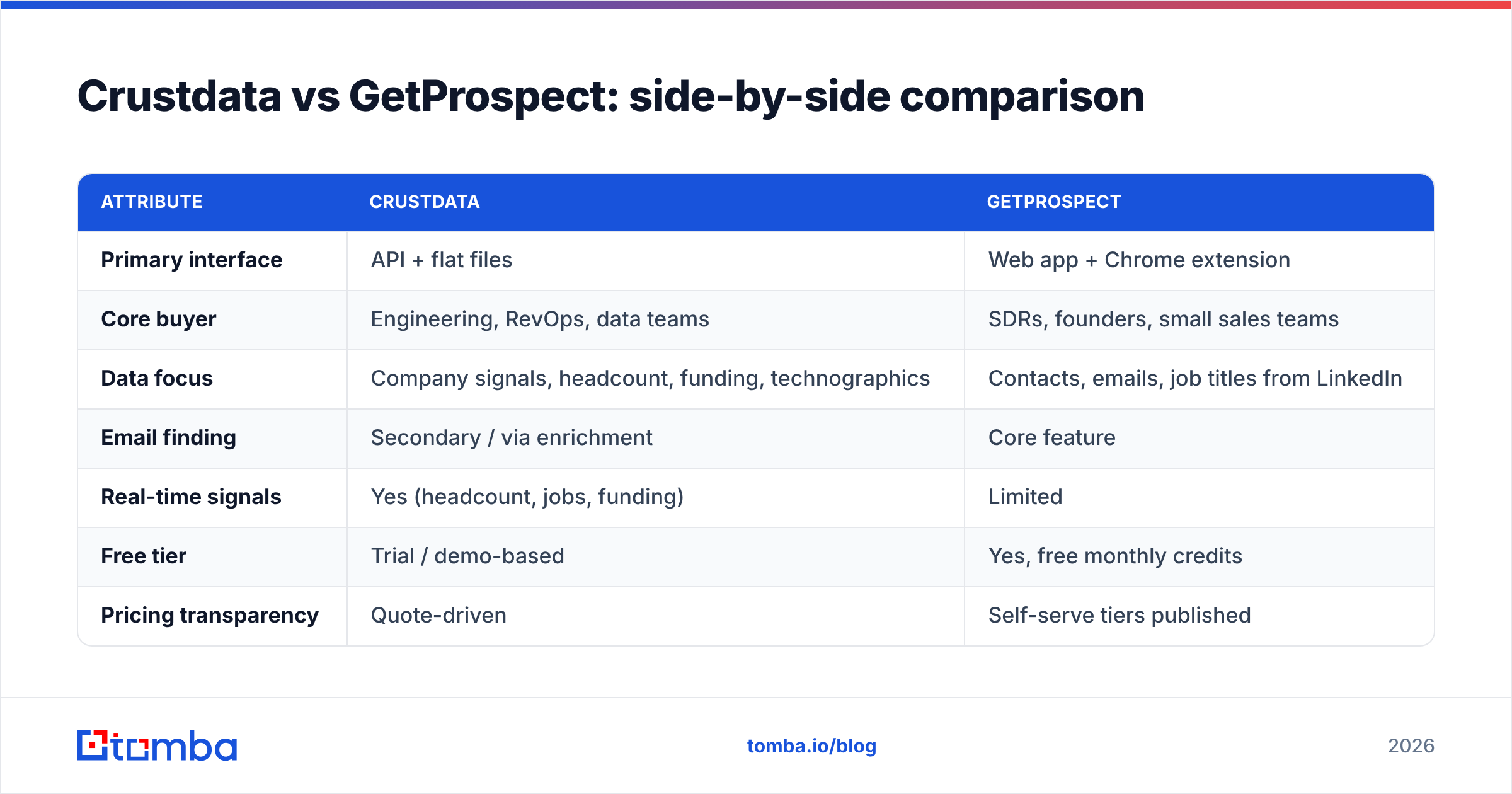
| Attribute | Crustdata | GetProspect |
|---|---|---|
| Primary interface | API + flat files | Web app + Chrome extension |
| Core buyer | Engineering, RevOps, data teams | SDRs, founders, small sales teams |
| Data focus | Company signals, headcount, funding, technographics | Contacts, emails, job titles from LinkedIn |
| Email finding | Secondary / via enrichment | Core feature |
| Real-time signals | Yes (headcount, jobs, funding) | Limited |
| Free tier | Trial / demo-based | Yes, free monthly credits |
| Pricing transparency | Quote-driven | Self-serve tiers published |
| Best for | Building data into your own product/stack | Manual outbound list-building |
| Learning curve | High (developer-oriented) | Low (no code) |
The one-line read: Crustdata is infrastructure, GetProspect is a tool. If your job is to build a data pipeline, Crustdata is closer to what you need. If your job is to email 200 prospects this week, GetProspect fits your hands better.
Which one has better email accuracy?#
Different jobs, so measure accuracy differently. GetProspect's whole product is finding and verifying a specific person's email, so it invests heavily in verification and publishes accuracy claims typical of the finder category (high-90s deliverability on verified results). Crustdata treats email as one enrichment field among many; its strength is the breadth of account-level signals rather than person-level email precision.

Two things to keep in mind whichever tool you choose:
- "Verified" is not one standard. A tool that marks catch-all domains as "valid" inflates its accuracy number. If you send to a lot of catch-all domains, run them through a dedicated catch-all verifier before you trust the status.
- Every database decays. Roughly a quarter to a third of B2B contact data goes stale each year as people change jobs. A tool that finds emails in real time from a live profile will usually beat a static database on freshness — but you should still re-verify before a big send with a standalone email verifier.
If email accuracy is the single most important factor for you, don't take any vendor's marketing number at face value. Run the same list of 100 known contacts through each tool and measure the bounce rate yourself. That test costs an hour and settles the argument.
How do Crustdata and GetProspect compare on pricing?#
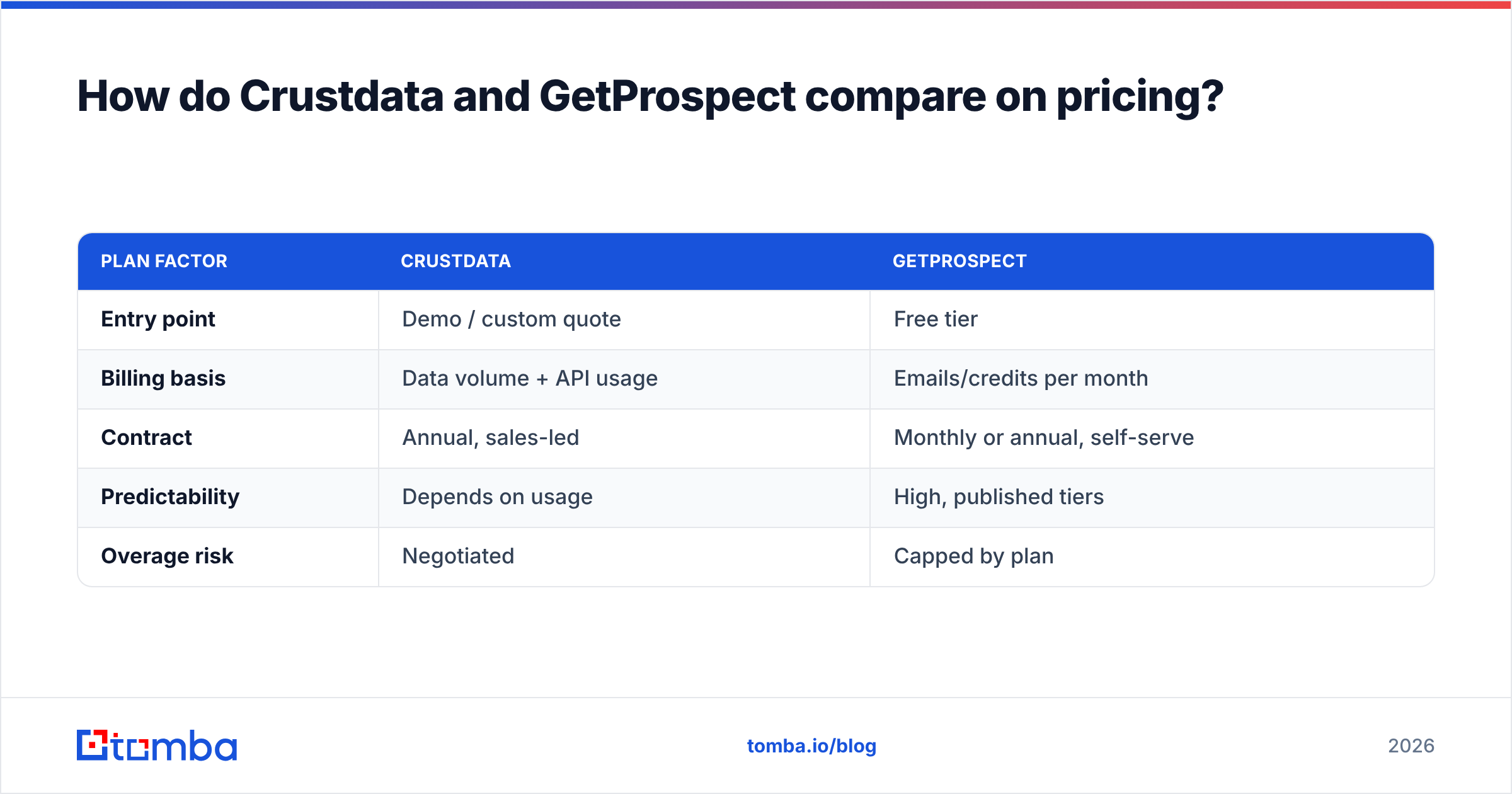
Crustdata and GetProspect price on opposite philosophies.
GetProspect publishes self-serve tiers with a free plan (a modest number of verified emails per month), then paid plans that scale by the volume of emails or credits you need, with separate limits for verification. You can start free, upgrade with a card, and predict your bill. This is the standard SaaS finder model.
Crustdata is quote-driven. Pricing depends on data volume, endpoints, refresh frequency, and delivery method, and typically lands in enterprise-contract territory. That is normal for a real-time data API — you are paying for infrastructure and freshness, not a seat.
| Plan factor | Crustdata | GetProspect |
|---|---|---|
| Entry point | Demo / custom quote | Free tier |
| Billing basis | Data volume + API usage | Emails/credits per month |
| Contract | Annual, sales-led | Monthly or annual, self-serve |
| Predictability | Depends on usage | High, published tiers |
| Overage risk | Negotiated | Capped by plan |
How to think about cost. If you only need person-level emails, an API-priced data platform is usually overkill — you would pay for signals you never query. If you need real-time company signals feeding an app, a per-credit finder can't deliver that shape of data at all. Match the pricing model to the job, not the sticker price.
For reference, a focused finder like Tomba publishes flat Tomba pricing — Free (25 searches/mo), Starter $49/mo, Growth $99/mo, and Pro $249/mo — with the same API available on every paid tier. That gives you a transparent middle option if GetProspect feels too list-focused and Crustdata feels too heavy.

Do they offer an API and integrations?#
This is where the two split hardest.
Crustdata is API-native. The API is the product. You get endpoints for company data, people data, and signals, plus flat-file delivery for bulk. Integration means engineering work, but the ceiling is high — you can build almost anything on top of it.
GetProspect is app-native with an API bolt-on. It offers native integrations (HubSpot, Pipedrive, Zapier, and similar) and a public API for developers, but the center of gravity is the web app and the LinkedIn extension. Most users never touch the API.
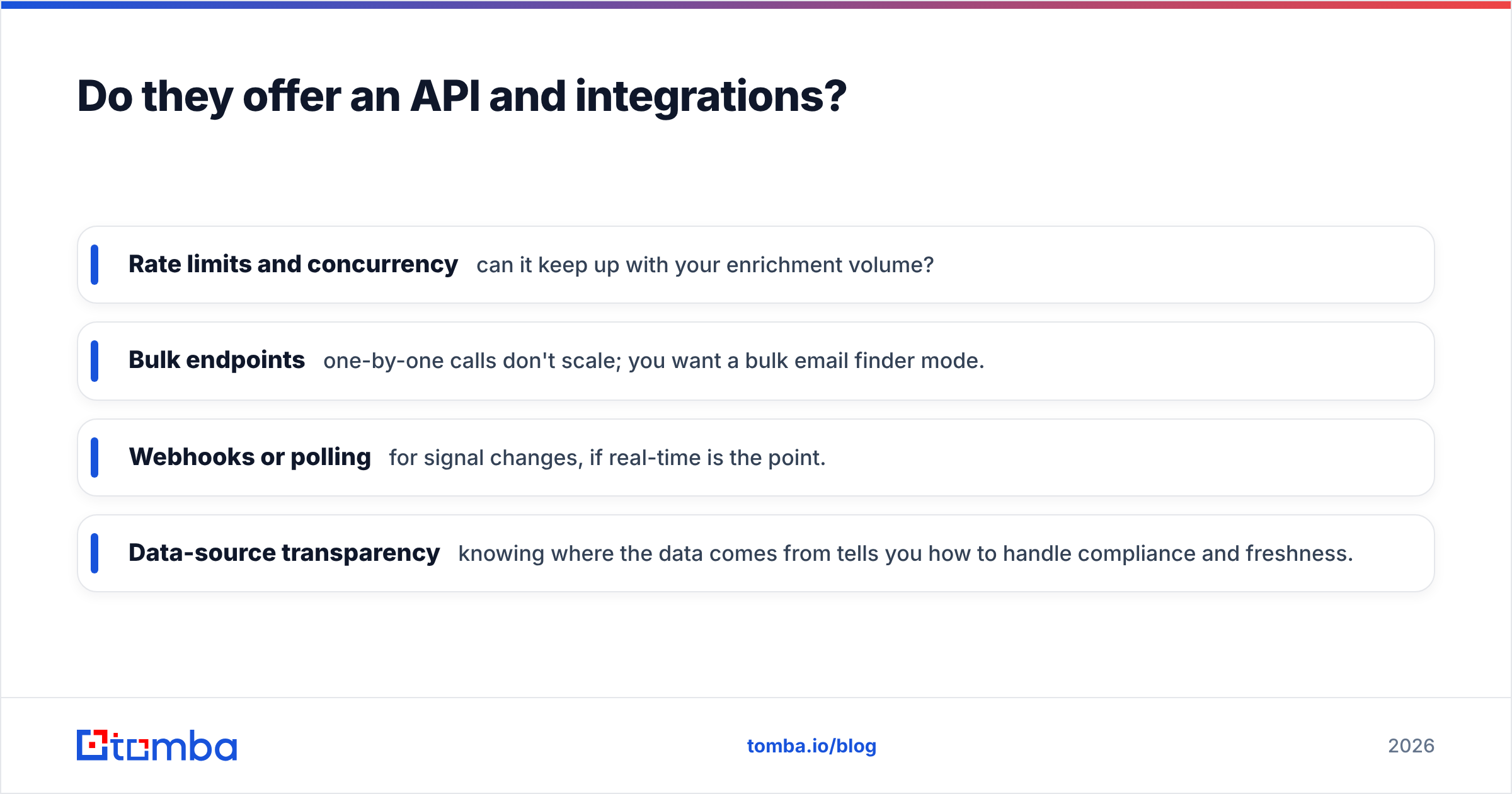
If your team lives in code, evaluate the developer experience directly. A clean email finder API with clear rate limits, a bulk endpoint, and SDKs will save you weeks versus wrestling a data feed into shape. When you compare, look for:
- Rate limits and concurrency — can it keep up with your enrichment volume?
- Bulk endpoints — one-by-one calls don't scale; you want a bulk email finder mode.
- Webhooks or polling for signal changes, if real-time is the point.
- Data-source transparency — knowing where the data comes from tells you how to handle compliance and freshness.
When should you pick Crustdata over GetProspect?#
Choose Crustdata when:
- You have engineering resources and want data inside your own product, warehouse, or scoring model.
- Real-time signals (headcount, funding, hiring) drive your go-to-market timing.
- You're doing account-based work at the company level more than person-level list-building.
- An enterprise contract and sales-led onboarding are acceptable.
Choose GetProspect when:
- Your sellers build lists from LinkedIn and Sales Navigator by hand.
- You want transparent, self-serve pricing and a free tier to test.
- Verified person-level emails are the main deliverable.
- You don't have (or don't want to spend) engineering time on integration.
There's also a large middle where neither is a clean fit — teams that want verified emails and a real API and predictable pricing without an enterprise commitment. That's the exact gap a dedicated finder fills. If that's you, benchmark a third option before deciding.

What's the smarter workflow either way?#
Regardless of which platform you land on, the winning motion is the same: find, verify, then enrich — in that order.
- Find the contact from the source you trust most (a live LinkedIn profile, a domain search against the company site, or an API pull).
- Verify every email before it enters a sequence. This is the step most teams skip and the reason their bounce rates creep up and their sender reputation erodes. Read up on email deliverability if that connection isn't obvious yet.
- Enrich with the extra context — role, seniority, technographics — that makes the message relevant. A quick pass through data enrichment turns a bare email into a personalized opener.
Do those three steps well and the specific vendor matters less than you'd think. Skip verification, and even the most accurate database on earth will still tank your deliverability the week after you buy it.
The verdict: Crustdata vs GetProspect#
There's no single winner because they aren't really competing for the same buyer. Crustdata wins for technical teams building real-time data and signals into their own stack. GetProspect wins for sellers who want verified LinkedIn emails without writing code. Map the tool to the job and the choice is usually obvious within one demo.
If your core need is simply accurate business emails, at a predictable price, with a real API you can grow into, put a focused finder next to both before you sign anything. Tomba's Email Finder does exactly that — search by domain, name, or company, verify in the same flow, and call the same API on every plan from the free tier up. Start with 25 free searches, run your own 100-contact bounce test against Crustdata and GetProspect, and let the numbers pick the winner instead of the marketing pages.
Related guides#
Ready to find emails that actually work?
Join 150,000+ professionals who stopped guessing and started sending. Free credits on signup — no credit card required.
Get the Tomba newsletter
Practical outbound tactics and product updates — once every two weeks.
About the author