Cufinder vs Goava: Which B2B Data Tool Wins in 2026?
Cufinder sells global contact data at volume. Goava sells Nordic account intelligence with a scoring engine on top. They barely compete — and picking the wrong one wastes a year of budget. Here's the honest breakdown.
TL;DR
- Cufinder is a global B2B contact database and enrichment engine — 26+ lookup tools, bulk CSV workflows, an API, and pricing that starts free and scales by credits. It optimizes for volume of contacts.
- Goava is a Swedish sales-intelligence platform built for the Nordics — company signals, financial data, ICP scoring, and CRM-native recommendations. It optimizes for which account to call next, not for finding a stranger's inbox.
- They are not really competitors. If you're comparing them side by side, you probably haven't decided whether your bottleneck is data volume or account prioritization.
- Goava is effectively unusable outside Sweden, Norway, Denmark, and Finland. Cufinder is global but its accuracy varies hard by region and seniority.
- If your actual job is "get verified email addresses for a list of people at a list of companies," neither is the cheapest or most accurate route — a dedicated email finder with a real verification layer usually is.
What are Cufinder and Goava, actually?#
The two products get compared because both show up under "B2B data" on G2. That's where the similarity stops.
Cufinder is a contact-data platform. You give it a company name, a domain, a LinkedIn URL, or a person's name, and it returns emails, phone numbers, company firmographics, or technographics. It ships as a web app, a Chrome extension, a bulk uploader, and an API. The pitch is breadth: one credit pool, dozens of lookup endpoints, a claimed database in the hundreds of millions of contacts. Its center of gravity is enrichment at scale — you already have a list, and you want fields filled in.
Goava is a sales-intelligence platform out of Stockholm. It ingests Nordic company registry data, financials, hiring signals, web technology, and news, then scores accounts against your closed-won history and pushes recommendations into your CRM. The pitch is judgment: not "here are 40,000 companies," but "call these 30 this week, here's why." Its center of gravity is account prioritization inside a defined market.
So the honest framing of Cufinder vs Goava isn't "which is better." It's: do you need more rows, or do you need better ordering of the rows you already have?
How do Cufinder and Goava compare head-to-head?#
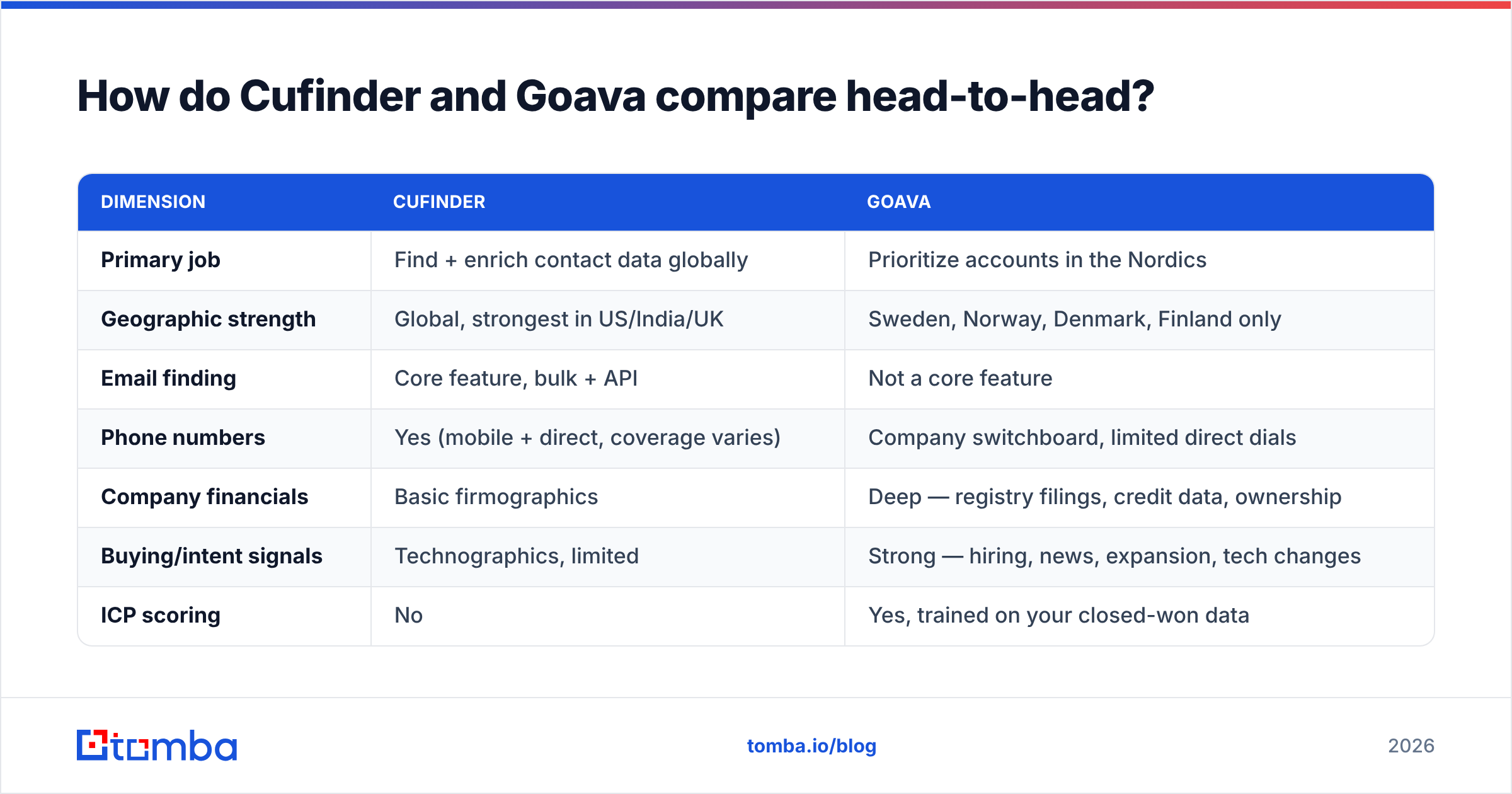
| Dimension | Cufinder | Goava |
|---|---|---|
| Primary job | Find + enrich contact data globally | Prioritize accounts in the Nordics |
| Geographic strength | Global, strongest in US/India/UK | Sweden, Norway, Denmark, Finland only |
| Email finding | Core feature, bulk + API | Not a core feature |
| Phone numbers | Yes (mobile + direct, coverage varies) | Company switchboard, limited direct dials |
| Company financials | Basic firmographics | Deep — registry filings, credit data, ownership |
| Buying/intent signals | Technographics, limited | Strong — hiring, news, expansion, tech changes |
| ICP scoring | No | Yes, trained on your closed-won data |
| CRM integration | Zapier/Make, API, HubSpot | Native HubSpot, Salesforce, Pipedrive, Upsales, Lime |
| Pricing model | Credit-based, self-serve, free tier | Seat-based, quote-only, annual contract |
| Entry price | Free tier, paid from roughly $49/mo | Typically four figures/year, sales-led |
| Time to first value | Minutes | Weeks (onboarding + ICP calibration) |
| Best for | SDR teams, agencies, growth ops, developers | Nordic mid-market AEs and field sales |
The table makes the real decision visible. Cufinder is a self-serve utility you can evaluate on a Tuesday afternoon. Goava is a system you buy, implement, and calibrate — and it only pays back if your entire addressable market sits inside four countries.

Which one has better data coverage?#
Depends entirely on what you mean by coverage.
For contact-level coverage — a named person's email and mobile — Cufinder wins by default, because Goava doesn't really play there. Goava surfaces company records and decision-maker names, but you'll frequently end up guessing the email pattern or bouncing over to LinkedIn. That's a workflow tax on every single prospect.
For account-level depth in the Nordics, Goava wins decisively and it isn't close. Swedish company data is unusually rich — Bolagsverket filings, annual accounts, board composition, ownership chains — and Goava has built its whole pipeline around ingesting it. If you sell to Swedish manufacturers with 50-500 employees and rising headcount, Goava will tell you things Cufinder simply does not know.
For everything outside the Nordics, Goava is a non-starter. There's no polite way to say it. If you have a German, French, or US segment, Goava covers zero percent of it and you'll be buying a second tool anyway.
Cufinder's global coverage comes with a real caveat: hit rate is not uniform. Expect strong results on US tech companies with public email patterns, mediocre results on European SMBs behind catch-all domains, and weak results on C-suite mobile numbers anywhere. That's not a Cufinder-specific flaw — it's the physics of B2B data — but it means "300M+ contacts" on a pricing page and "emails I can actually send to" are different numbers.
This is where a lot of teams get burned. A raw enrichment result is a guess with a confidence label. Unless it passes SMTP validation, catch-all detection, and a role-account filter, you're gambling with your sender reputation. Run everything through an email verifier before it touches a sequence, and treat catch-all domains as a separate bucket with their own catch-all verifier pass rather than mixing them into your main list.
How does pricing compare?#
Two completely different commercial models, which is itself the clearest signal that these tools solve different problems.
Cufinder is credit-based and self-serve. There's a free tier to test the waters, then paid tiers that scale by monthly credits. Every lookup type consumes credits from one pool — a phone lookup costs more than a company-name lookup. The good news: you can start today, spend under $100, and know within a week whether the hit rate works for your ICP. The bad news: credit math gets murky at volume, and failed lookups can still burn credits depending on the endpoint. Read the credit table before you commit to an annual plan.
Goava is seat-based, quote-only, and typically annual. You'll talk to a rep, run a scoping call, and get a number that usually lands in the four-to-five-figure range per year depending on seats and modules. There is no free tier and no credit card checkout. That's not a criticism — it's consistent with the product. Goava is only worth it if a full sales team uses it daily, and a full sales team needs onboarding.
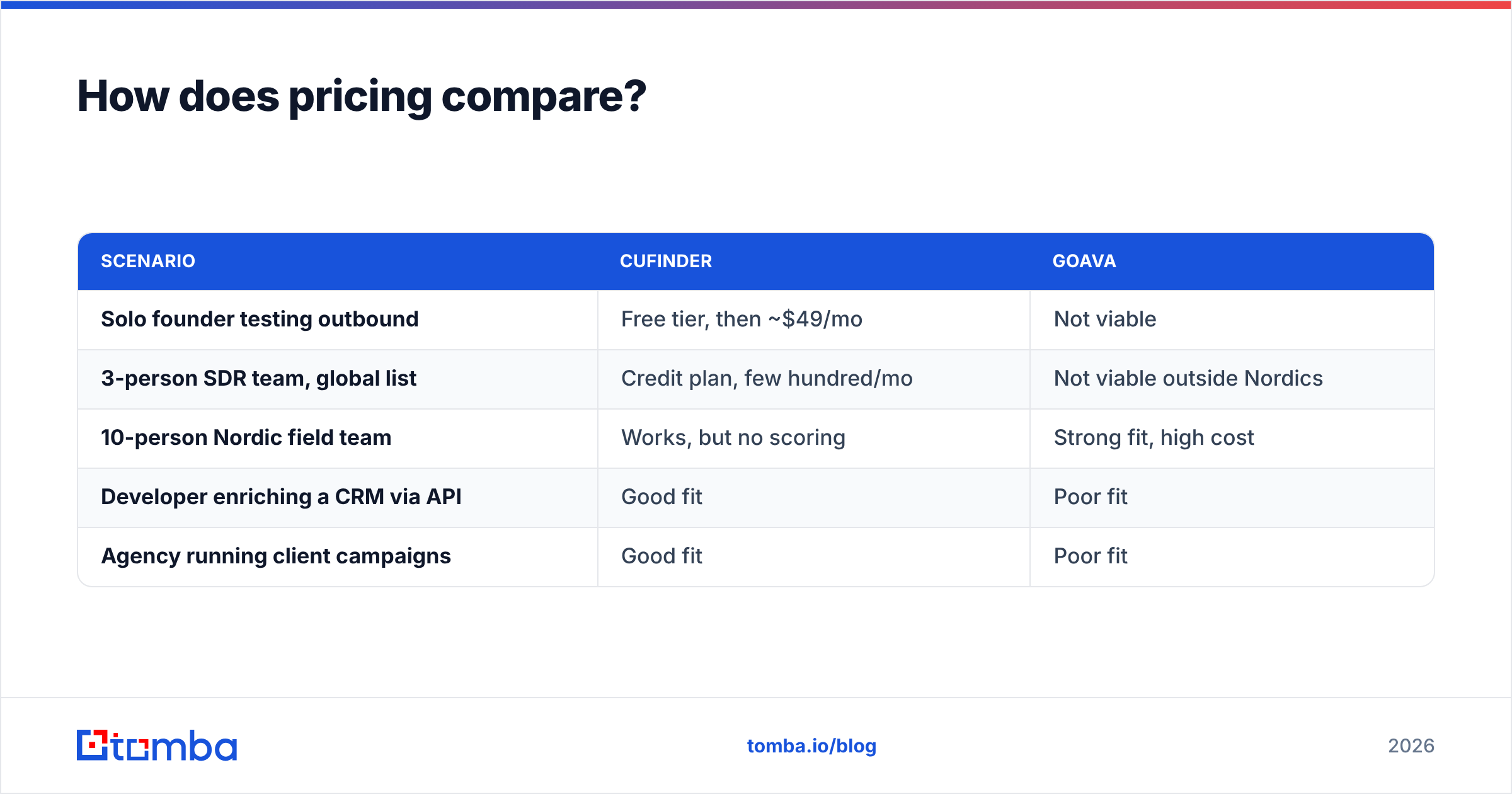
Here's the practical cost comparison most buyers actually care about:
| Scenario | Cufinder | Goava |
|---|---|---|
| Solo founder testing outbound | Free tier, then ~$49/mo | Not viable |
| 3-person SDR team, global list | Credit plan, few hundred/mo | Not viable outside Nordics |
| 10-person Nordic field team | Works, but no scoring | Strong fit, high cost |
| Developer enriching a CRM via API | Good fit | Poor fit |
| Agency running client campaigns | Good fit | Poor fit |
If you're a Nordic-only mid-market team with a big ACV, Goava's price is defensible — one extra closed deal covers the year. If you're anyone else, the math is rough.
What are the honest weaknesses of each?#
Cufinder's weak points:
- Verification is bolted on, not foundational. You get a status label, but the depth of SMTP-level checking is thinner than a dedicated verifier. Teams routinely see bounce rates that would have been caught by a proper second pass.
- Credit opacity. Different endpoints cost different amounts and the multipliers aren't always obvious until you've spent them.
- Support latency. Reviews on G2 and Capterra repeatedly flag slow response times on data-quality disputes.
- Uneven European coverage. GDPR-driven data scarcity hits every provider, but Cufinder's EU hit rate lags its US numbers noticeably.
Goava's weak points:
- Nordics or nothing. This is the whole ballgame. Any expansion plan outside Scandinavia makes Goava a partial solution on day one.
- No contact-level email finding. You'll still need a separate tool to actually reach the humans Goava tells you to call.
- Slow time to value. ICP scoring needs enough closed-won history to be meaningful. New teams with thin CRM data get generic recommendations for months.
- Sales-led pricing. You can't self-evaluate. Every test requires a rep, a demo, and a procurement cycle.

Is there a third option that beats both?#
For most teams, the honest answer is: you're comparing the wrong two things.
Break the job into its parts and it becomes obvious:
- Deciding who to target — this is ICP work, and it's mostly a strategy problem, not a software problem. Goava automates it well if you're Nordic. Everyone else does it with a spreadsheet, CRM reporting, and a conversation with the AEs about which deals actually closed.
- Finding the contact data — this is a pure execution problem, and it should be cheap, fast, and verifiable.
- Keeping the data clean — this is ongoing, and it's where deliverability lives or dies.
Cufinder tries to own part two. Goava owns part one for one region. Neither owns part three properly.
If part two and part three are your bottleneck — and for the large majority of outbound teams, they are — the better shape is a focused data tool with real verification underneath. That means: find emails by domain or by name, verify them at SMTP level, flag catch-alls separately, enrich the record with firmographics, and expose all of it through an API so it runs inside your existing workflow instead of as a CSV round-trip.
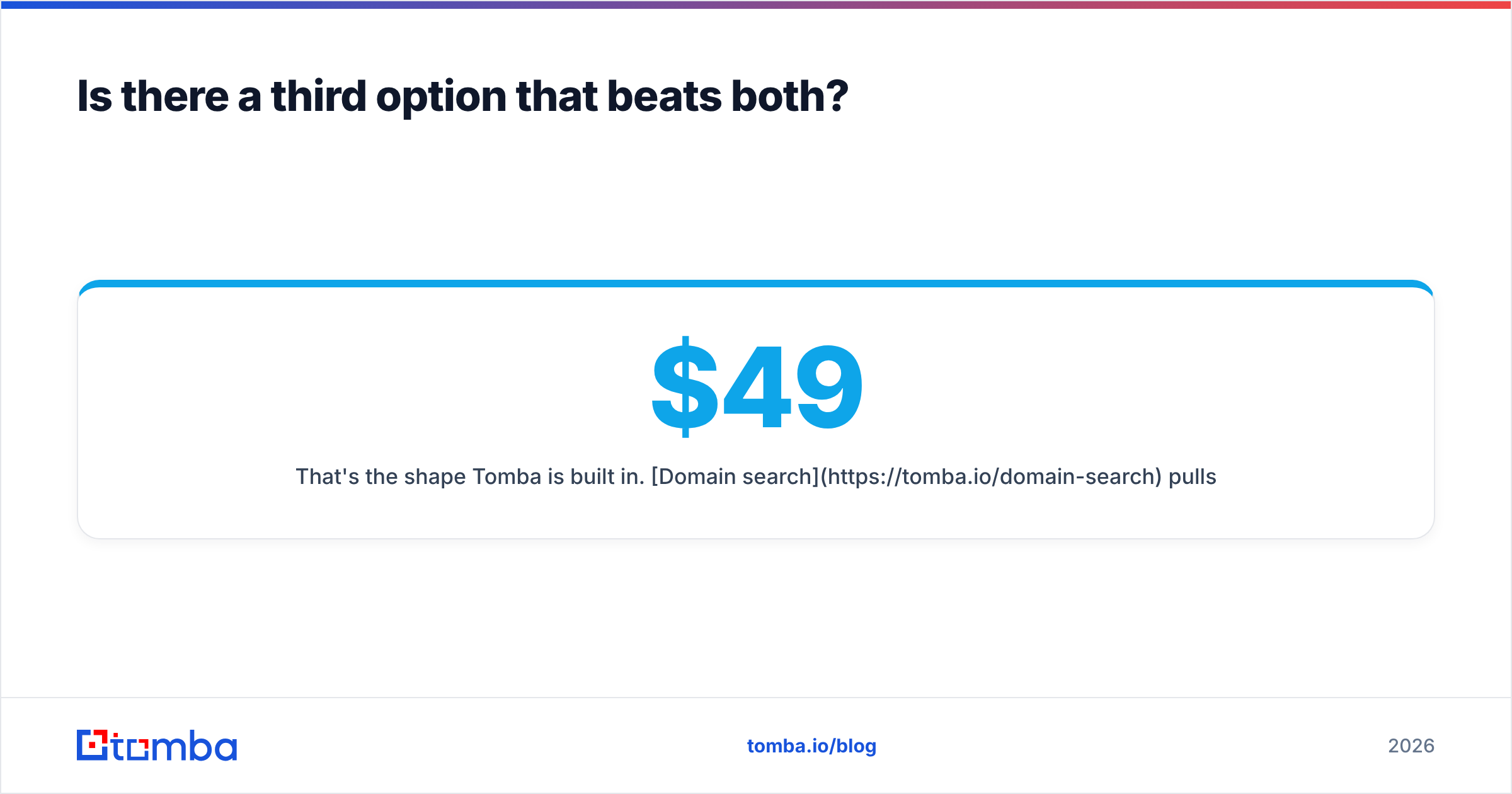
That's the shape Tomba is built in. Domain search pulls every public email pattern at a company. The email finder resolves a specific person. The verifier and catch-all logic run as first-class steps rather than a status column. Data enrichment fills the firmographic gaps. And Tomba pricing is transparent enough to model before you buy: free tier at 25 searches/month, Starter at $49/mo, Growth at $99/mo, Pro at $249/mo, Enterprise custom — no scoping call required to find out the number.
Which should you choose?#
Use this decision path:
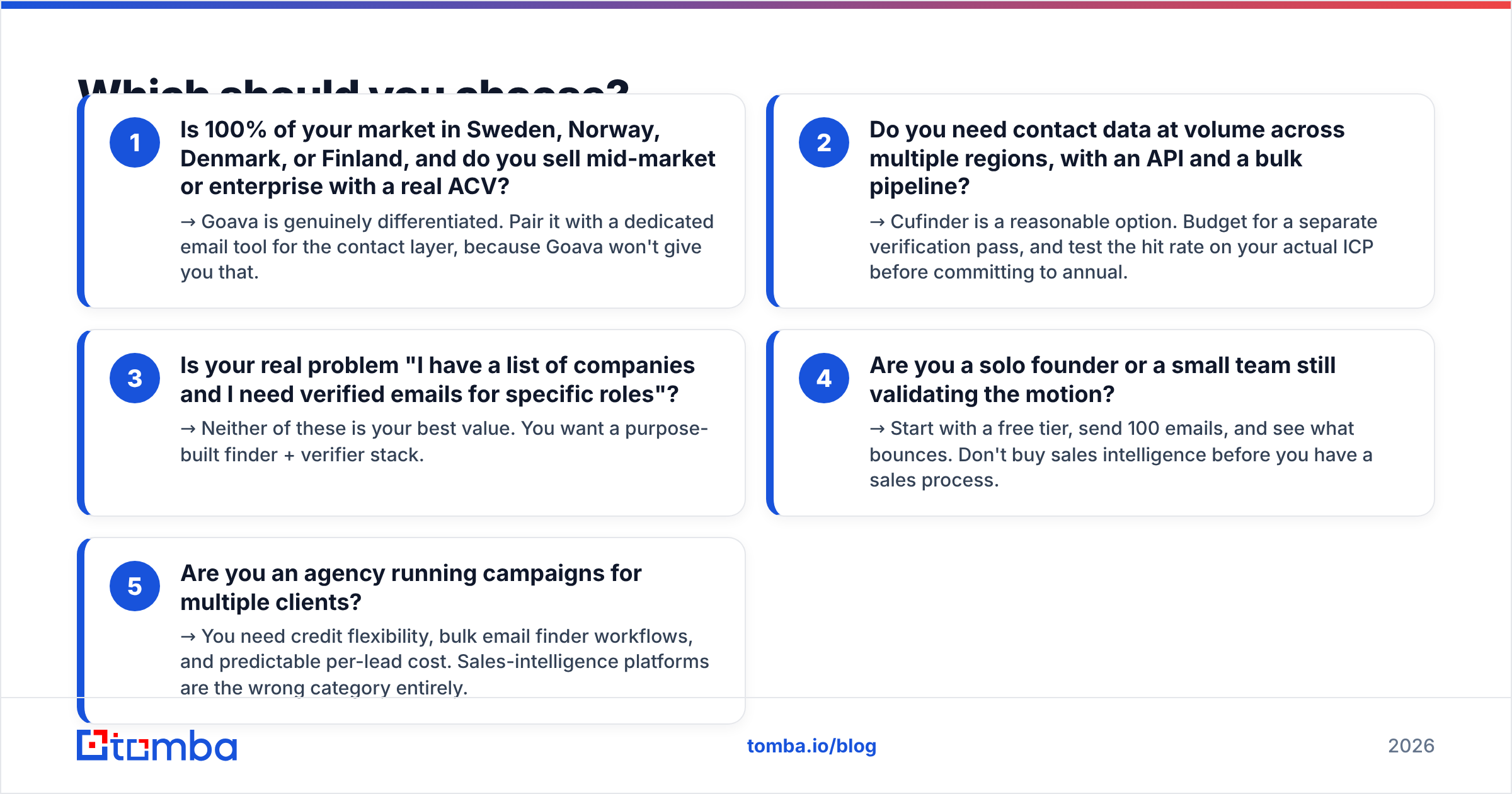
- Is 100% of your market in Sweden, Norway, Denmark, or Finland, and do you sell mid-market or enterprise with a real ACV? → Goava is genuinely differentiated. Pair it with a dedicated email tool for the contact layer, because Goava won't give you that.
- Do you need contact data at volume across multiple regions, with an API and a bulk pipeline? → Cufinder is a reasonable option. Budget for a separate verification pass, and test the hit rate on your actual ICP before committing to annual.
- Is your real problem "I have a list of companies and I need verified emails for specific roles"? → Neither of these is your best value. You want a purpose-built finder + verifier stack.
- Are you a solo founder or a small team still validating the motion? → Start with a free tier, send 100 emails, and see what bounces. Don't buy sales intelligence before you have a sales process.
- Are you an agency running campaigns for multiple clients? → You need credit flexibility, bulk email finder workflows, and predictable per-lead cost. Sales-intelligence platforms are the wrong category entirely.
The failure mode to avoid: buying an expensive intelligence platform to fix a data-quality problem. Scoring bad data faster just gets you to the wrong conclusion sooner. Fix the contact layer first — verified emails, clean lists, catch-alls handled — and only then invest in prioritization tooling.
Ready to fix the data layer first?#
If you're on this page because your bounce rate is embarrassing or your reps are hand-guessing email patterns, the answer isn't a bigger platform — it's a better finder. Tomba Email Finder resolves professional email addresses by domain, name, or company, verifies them at SMTP level before they reach your sequence, and exposes the whole thing through an API so it runs where your workflow already lives. Start on the free tier with 25 searches, run it against a list you already know the answers to, and compare the hit rate honestly against whatever you're paying for now. That test takes twenty minutes and will tell you more than any comparison post — including this one.
Related guides#
Ready to find emails that actually work?
Join 150,000+ professionals who stopped guessing and started sending. Free credits on signup — no credit card required.
Get the Tomba newsletter
Practical outbound tactics and product updates — once every two weeks.
About the author