Customer Relationship Management CRM System: 2026 Guide
A CRM system is the single source of truth for every customer relationship your team owns. Here is how a customer relationship management CRM system works, what it costs, and how to choose one in 2026 without overbuying.
A customer relationship management CRM system is the database and workflow layer that stores every interaction your company has with prospects and customers. It turns those records into revenue. If your deals live in someone's inbox, a shared spreadsheet, and three people's memories, you don't have a system. You have a liability. This guide breaks down what a CRM does, what it costs in 2026, and how to choose one without paying for seats and modules you'll never touch.
TL;DR#
- A CRM system centralizes contacts, deals, activities, and communication history so sales, marketing, and support work from one source of truth.
- The three main types are operational (automate sales/marketing/service), analytical (report and forecast), and collaborative (share context across teams).
- Real cost is more than the sticker price: seats, add-on modules, data enrichment, onboarding, and integrations often double the quoted number.
- A CRM is only as good as the data inside it. Garbage contacts in means garbage pipeline out — enrichment and verification are non-negotiable.
- For most small-to-mid B2B teams, start lean, connect a reliable data source, and expand modules as adoption proves out.
What is a customer relationship management CRM system?#
A customer relationship management CRM system is software that records and organizes every touchpoint between your business and the people you sell to. Think of it as the shared memory of your revenue team. Instead of each rep keeping notes in a private notebook, everyone reads and writes to the same file. When a prospect replies to an email, books a call, or churns, the record updates for the whole company.
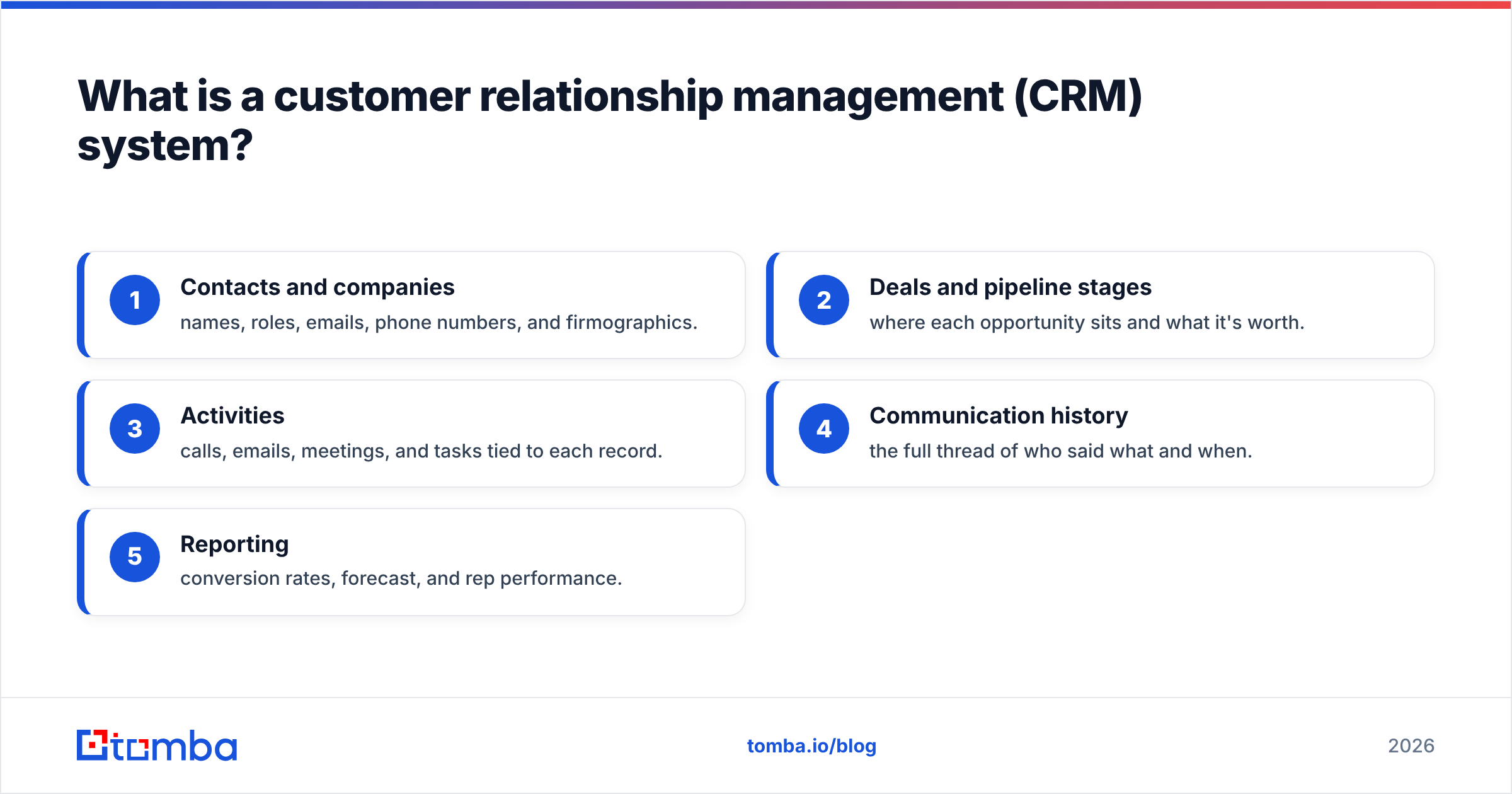
At a minimum, a modern CRM tracks:
- Contacts and companies — names, roles, emails, phone numbers, and firmographics.
- Deals and pipeline stages — where each opportunity sits and what it's worth.
- Activities — calls, emails, meetings, and tasks tied to each record.
- Communication history — the full thread of who said what and when.
- Reporting — conversion rates, forecast, and rep performance.
The concept isn't new. Salesforce popularized cloud CRM in the early 2000s, and the category has since grown into one of the largest software markets on earth. For a plain-language definition of the term, see Tomba's CRM glossary entry, and for market context, Gartner's CRM research tracks how the discipline keeps expanding into service and commerce.
Why do B2B teams need a CRM instead of spreadsheets?#
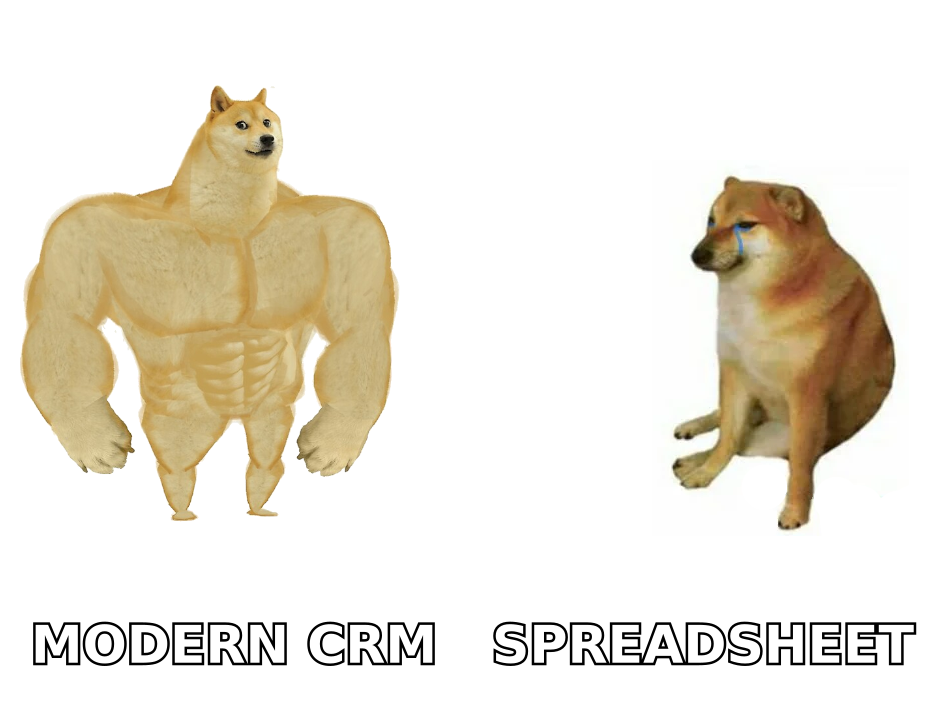
Because spreadsheets don't scale past one person. A single rep with 30 accounts can white-knuckle a Google Sheet. Add a second rep, a marketing hand-off, and a support queue, and the sheet quietly rots. You get duplicate rows, stale emails, no audit trail, and a forecast nobody trusts.
A CRM system fixes the structural problems a spreadsheet can't:
- Accountability — every activity is timestamped and attributed. You know who touched a deal last and when it went cold.
- Continuity — when a rep leaves, the relationship history stays. No knowledge walks out the door.
- Automation — follow-up reminders, lead routing, and sequence enrollment fire on rules instead of memory.
- Forecasting — weighted pipeline and stage conversion give leadership a number they can defend to the board.
The payoff is measurable. Vendor and analyst studies tie CRM adoption to higher win rates and shorter cycles. The main reason is simple: reps stop losing deals to disorganization. You can dig into how that translates to closed revenue in Tomba's breakdown of sales win rate.
What are the three types of CRM systems?#
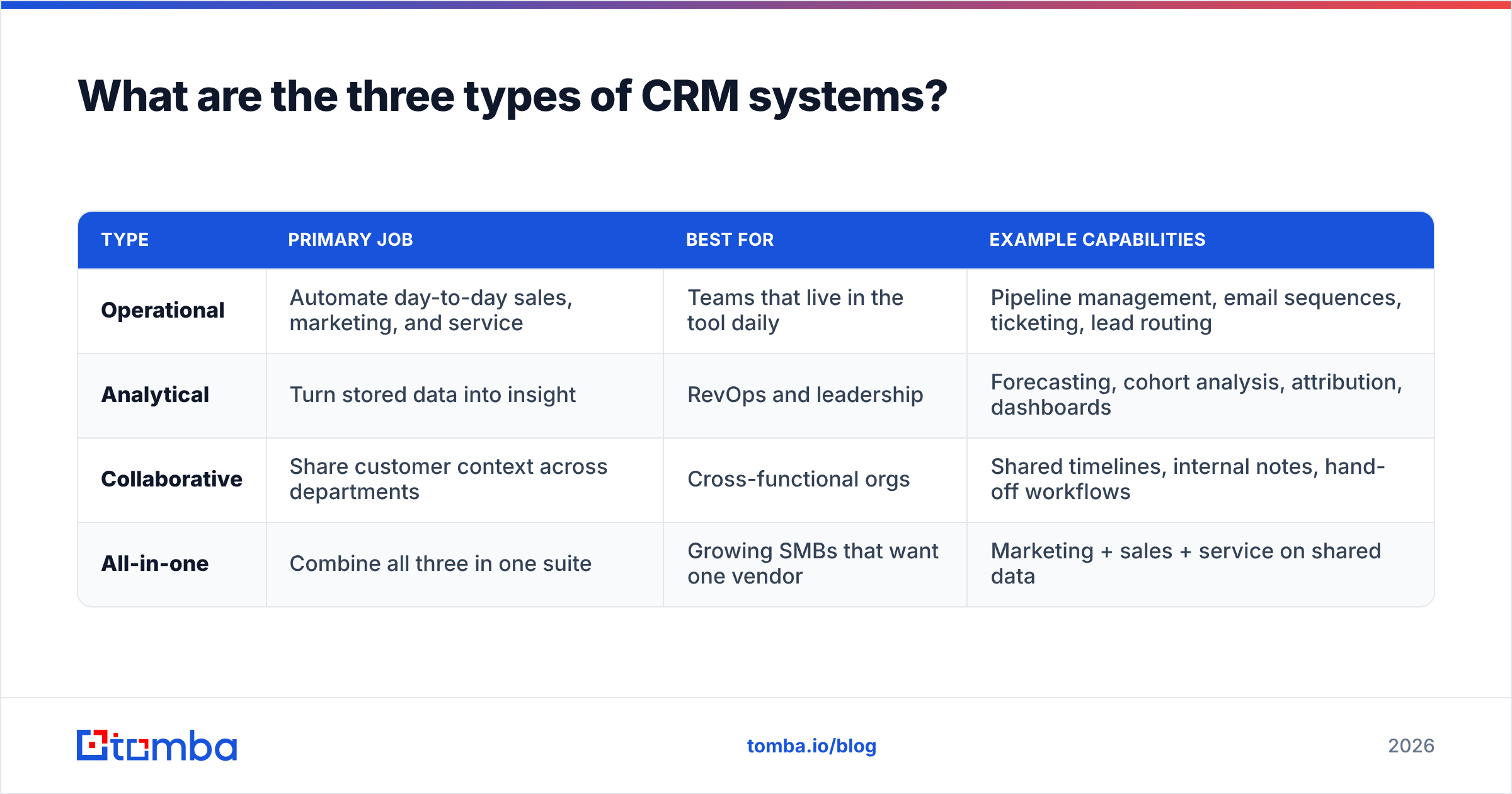
Most tools blend all three, but understanding the categories tells you what a given platform is really optimized for.
| Type | Primary job | Best for | Example capabilities |
|---|---|---|---|
| Operational | Automate day-to-day sales, marketing, and service | Teams that live in the tool daily | Pipeline management, email sequences, ticketing, lead routing |
| Analytical | Turn stored data into insight | RevOps and leadership | Forecasting, cohort analysis, attribution, dashboards |
| Collaborative | Share customer context across departments | Cross-functional orgs | Shared timelines, internal notes, hand-off workflows |
| All-in-one | Combine all three in one suite | Growing SMBs that want one vendor | Marketing + sales + service on shared data |
If you're a lean outbound team, an operational CRM does 90% of the work. If you're a RevOps leader answering "why did we miss quota," you'll lean on the analytical layer. Most platforms — HubSpot and Salesforce chief among them — market themselves as all-in-one, which is powerful but also where costs balloon.
What features actually matter when choosing a CRM?#
Ignore the feature-count arms race. A CRM with 400 features you'll never configure is worse than a focused one your team actually updates. Prioritize in this order:
- Ease of data entry — if logging a call takes six clicks, reps won't do it, and your data dies. Adoption beats capability every time.
- Native integrations — your CRM must talk to your email, calendar, and enrichment tools without brittle middleware. Check for a real Zapier integration or native connectors.
- Data quality tooling — deduplication, validation, and enrichment built in or easily bolted on.
- Reporting you'll trust — customizable dashboards and an exportable forecast.
- API access — so you can push and pull records programmatically as you grow.
Here's the uncomfortable truth most vendor demos skip: the CRM is a container, not a data source. It stores whatever you put in, and it will happily store wrong phone numbers, bounced emails, and contacts who left the company two years ago. That's the next section.
How much does a CRM system really cost in 2026?#
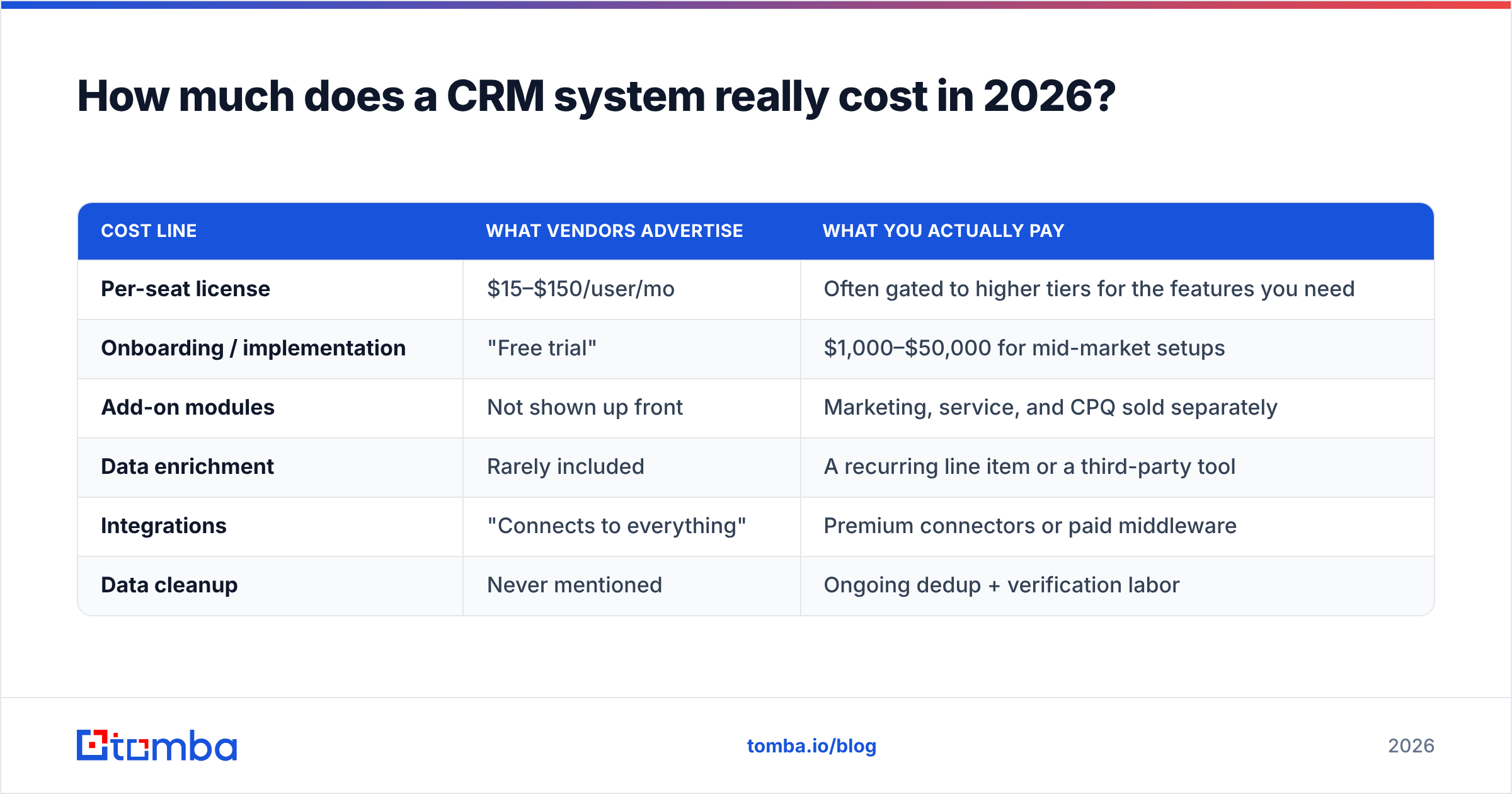
More than the per-seat price on the pricing page. The sticker number is the down payment. The total cost of ownership includes the parts vendors bury in footnotes.
| Cost line | What vendors advertise | What you actually pay |
|---|---|---|
| Per-seat license | $15–$150/user/mo | Often gated to higher tiers for the features you need |
| Onboarding / implementation | "Free trial" | $1,000–$50,000 for mid-market setups |
| Add-on modules | Not shown up front | Marketing, service, and CPQ sold separately |
| Data enrichment | Rarely included | A recurring line item or a third-party tool |
| Integrations | "Connects to everything" | Premium connectors or paid middleware |
| Data cleanup | Never mentioned | Ongoing dedup + verification labor |
Budget for the full stack, not the login. A team of five on a mid-tier plan can quote at $500/month and land near $1,500 once enrichment, onboarding, and a couple of premium integrations are counted. Compare that honestly against what the tool returns in closed pipeline before you sign an annual contract. If you want a clean baseline on affordable, transparent data tooling, Tomba's pricing starts with a free tier (25 searches/month) and a $49/month Starter plan — useful as a reference point for what data services should cost.
Why is CRM data quality the make-or-break factor?#
Because a CRM system is a mirror: it reflects the quality of the data you feed it. Industry research pegs B2B data decay at roughly 30% per year. People change jobs, companies rebrand, and emails get deprecated. A CRM you populated in January is measurably wrong by summer if nothing refreshes it.
Bad data produces three expensive failures:
- Wasted rep time — SDRs burn hours dialing dead numbers and emailing addresses that bounce.
- Deliverability damage — sending to invalid emails tanks your sender reputation and lands good messages in spam.
- Broken forecasting — duplicate and stale records inflate pipeline counts and mislead leadership.
The fix is a data hygiene loop that runs continuously, not a one-time import:
- Find verified contacts at the accounts you target.
- Verify every email before it enters the CRM.
- Enrich thin records with role, company, and phone data.
- Deduplicate on a schedule so the same person doesn't appear five times.
This is exactly where a dedicated data layer earns its keep alongside — not instead of — your CRM. Tomba's data enrichment fills the gaps in existing records, while the email verifier keeps invalid addresses out before they poison deliverability. Feed clean, verified contacts in, and the CRM's reporting and automation finally tell the truth.
How do you roll out a CRM without killing adoption?#
The graveyard of failed CRM projects is full of powerful tools nobody used. Roll-out is a change-management problem, not a software problem. A pragmatic sequence:
- Start with one team and one workflow. Prove value on outbound pipeline before you drag support and marketing in.
- Import clean data only. Don't migrate a decade of spreadsheet rot. Verify and enrich the list first; a smaller clean database beats a huge dirty one.
- Automate the boring parts. Auto-log emails and calls so reps don't have to. Manual data entry is where adoption goes to die.
- Connect your data source early. Wire enrichment and verification into the intake path so new records land complete.
- Report weekly from day one. When reps see the dashboard drive real decisions, they keep the data current.
For teams already committed to a suite, native connectors matter. Tomba plugs into the big platforms directly — see the HubSpot integration and Salesforce integration — so verified contacts flow into the CRM without copy-paste. You can compare capabilities and real user reviews on a neutral marketplace like G2's CRM category before you commit.
CRM system vs. all-in-one sales platform: which do you need?#
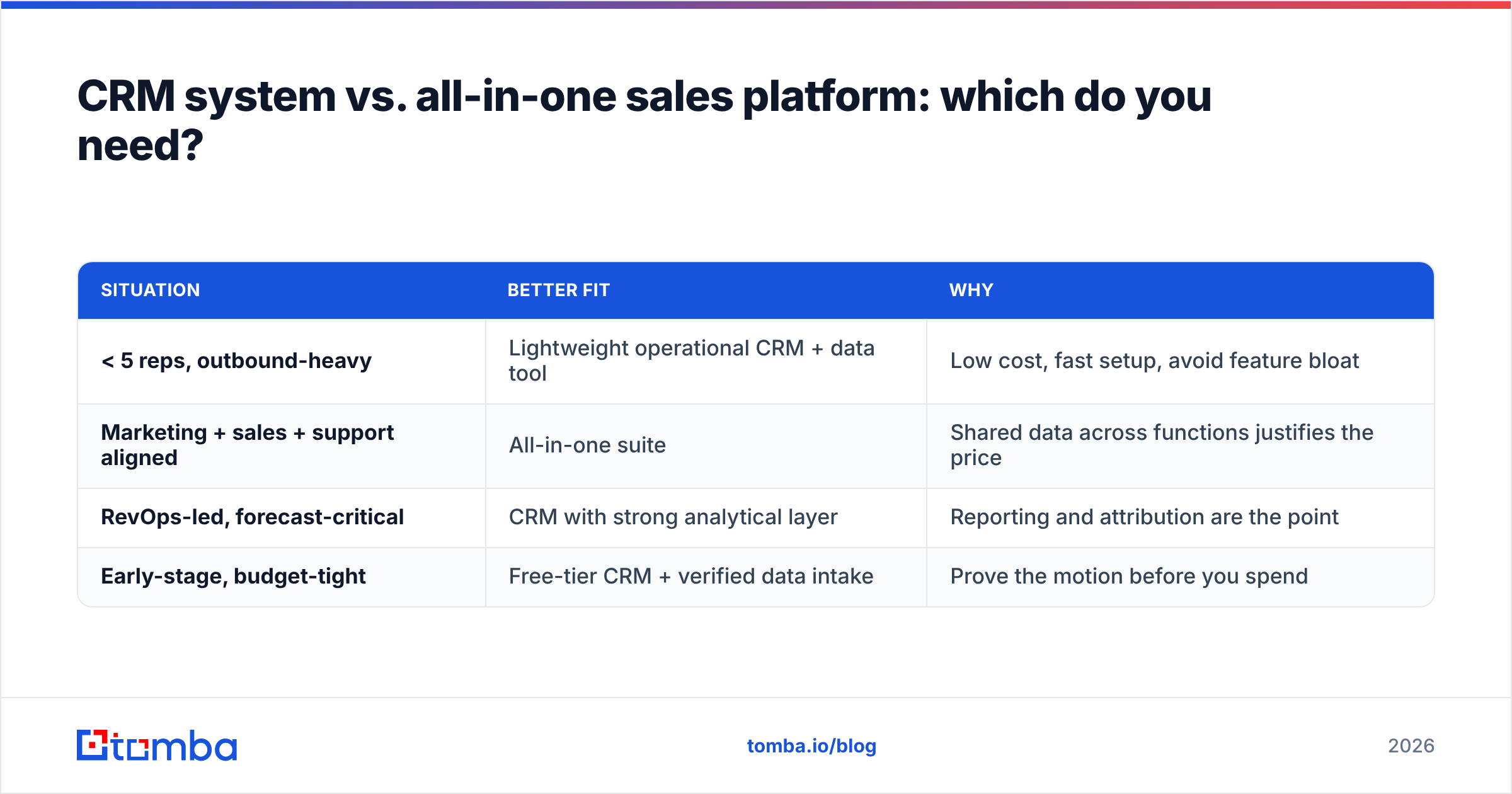
A quick decision framework:
| Situation | Better fit | Why |
|---|---|---|
| < 5 reps, outbound-heavy | Lightweight operational CRM + data tool | Low cost, fast setup, avoid feature bloat |
| Marketing + sales + support aligned | All-in-one suite | Shared data across functions justifies the price |
| RevOps-led, forecast-critical | CRM with strong analytical layer | Reporting and attribution are the point |
| Early-stage, budget-tight | Free-tier CRM + verified data intake | Prove the motion before you spend |
The through-line: the CRM choice matters less than the data discipline around it. A modest CRM fed verified, enriched contacts outperforms an enterprise suite full of stale records every quarter.
Frequently asked questions#
What does CRM stand for? Customer relationship management — both the business strategy of managing customer relationships and the software that supports it.
Is a CRM only for sales? No. Marketing uses it for segmentation and campaigns, support uses it for ticketing and history, and leadership uses it for forecasting. Sales is just the most common entry point.
Can a small business use a CRM? Yes, and it should. Free and low-cost tiers make CRM accessible to teams of one. The bigger question is data quality, not affordability.
How is a CRM different from an email finder? An email finder sources and verifies contact data; a CRM stores and manages the relationship over time. They're complementary — one fills the pipe, the other manages what flows through it.
The bottom line#
A customer relationship management CRM system is the backbone of any serious revenue operation, but it's only as valuable as the data inside it. Choose a tool your team will actually update, budget for the full cost, and treat data hygiene as an ongoing loop rather than a one-time import.
Whatever CRM you land on, start by feeding it verified, accurate contacts. Tomba's Email Finder surfaces professional email addresses by domain, name, or company — and pairs with verification and enrichment so every record entering your CRM is clean from day one. Spin up the free tier, connect it to your CRM, and let your pipeline reflect reality instead of guesswork.
Related guides#
Ready to find emails that actually work?
Join 150,000+ professionals who stopped guessing and started sending. Free credits on signup — no credit card required.
Get the Tomba newsletter
Practical outbound tactics and product updates — once every two weeks.
About the author