Data Standardization in 2026: The Complete B2B Guide
Messy B2B records quietly wreck routing, reporting, and outreach. Here's how data standardization turns inconsistent data into clean, usable records — with rules, formats, and tools that actually work.
Your CRM says "USA," "U.S.A.," "United States," and "us" — and your team treats them as four different countries. That is what missing data standardization looks like in practice, and it silently breaks routing, reporting, and revenue.
TL;DR#
- Data standardization is the process of forcing every record into one agreed format, unit, and vocabulary so machines and people read it the same way every time.
- It is not the same as cleansing or enrichment: standardization fixes format and consistency, cleansing fixes errors, and enrichment adds missing fields.
- Unstandardized B2B data quietly wrecks lead routing, deduplication, segmentation, and reporting — Gartner pegs the cost of poor data quality in the millions per year for the average enterprise.
- A repeatable workflow (audit → define rules → transform → validate → automate) beats one-off spreadsheet cleanups every time.
- The fastest wins come from standardizing at the point of entry — validating and formatting emails, phones, and company names before they hit your database.
What is data standardization?#
Data standardization is the practice of converting data into a single, consistent format so every value of the same type looks and behaves the same way. Think of it like a shared language for your database: instead of ten people spelling a country, a date, or a job title ten different ways, everyone agrees on one canonical form.
Here is the everyday analogy. Imagine a warehouse where every worker labels boxes in their own handwriting, their own units, and their own abbreviations. Nothing is technically wrong — but nobody can find anything, and the inventory count is fiction. Standardization is the label printer that forces "kg," "kilograms," and "Kilo" into one machine-readable tag.
In a B2B context, standardization typically covers:
- Formats — dates as
YYYY-MM-DD, phone numbers in E.164 (+14155550100), currency with a consistent symbol and decimal rule. - Casing and spelling — "VP of Sales" not "vp sales," "v.p. Sales," or "Vice-President, Sales."
- Controlled vocabularies — a fixed picklist for industry, country, and lead status instead of free text.
- Units and encoding — one measurement system, UTF-8 across the board, no stray Latin-1 characters.
- Entity naming — "International Business Machines," "IBM," and "I.B.M." resolved to one canonical company name.
The goal is not aesthetics. Standardized data is what makes deduplication, matching, segmentation, and automation actually work.
Why does messy data cost you real money?#
Because every downstream system assumes your data is consistent — and quietly fails when it is not.
When country is stored five different ways, your territory routing sends the same account to three reps. When job titles are free text, your "VP+" filter misses half the decision-makers. When phone numbers lack a country code, your dialer refuses them. None of these throw an error. They just leak pipeline.
The numbers back this up. Gartner has estimated that poor data quality costs organizations an average of $12.9M per year, and industry surveys routinely find that sales and marketing teams distrust 25–30% of the records in their CRM. Bad data does not announce itself; it shows up as low match rates, bounced emails, and dashboards nobody believes.
Standardization is the cheapest lever you have here, because it prevents the compounding errors that cleansing and enrichment later have to untangle. A record entered clean stays cheap. A record entered messy gets copied, merged, and reported on — multiplying the cost every time it moves.
What does data standardization actually standardize?#
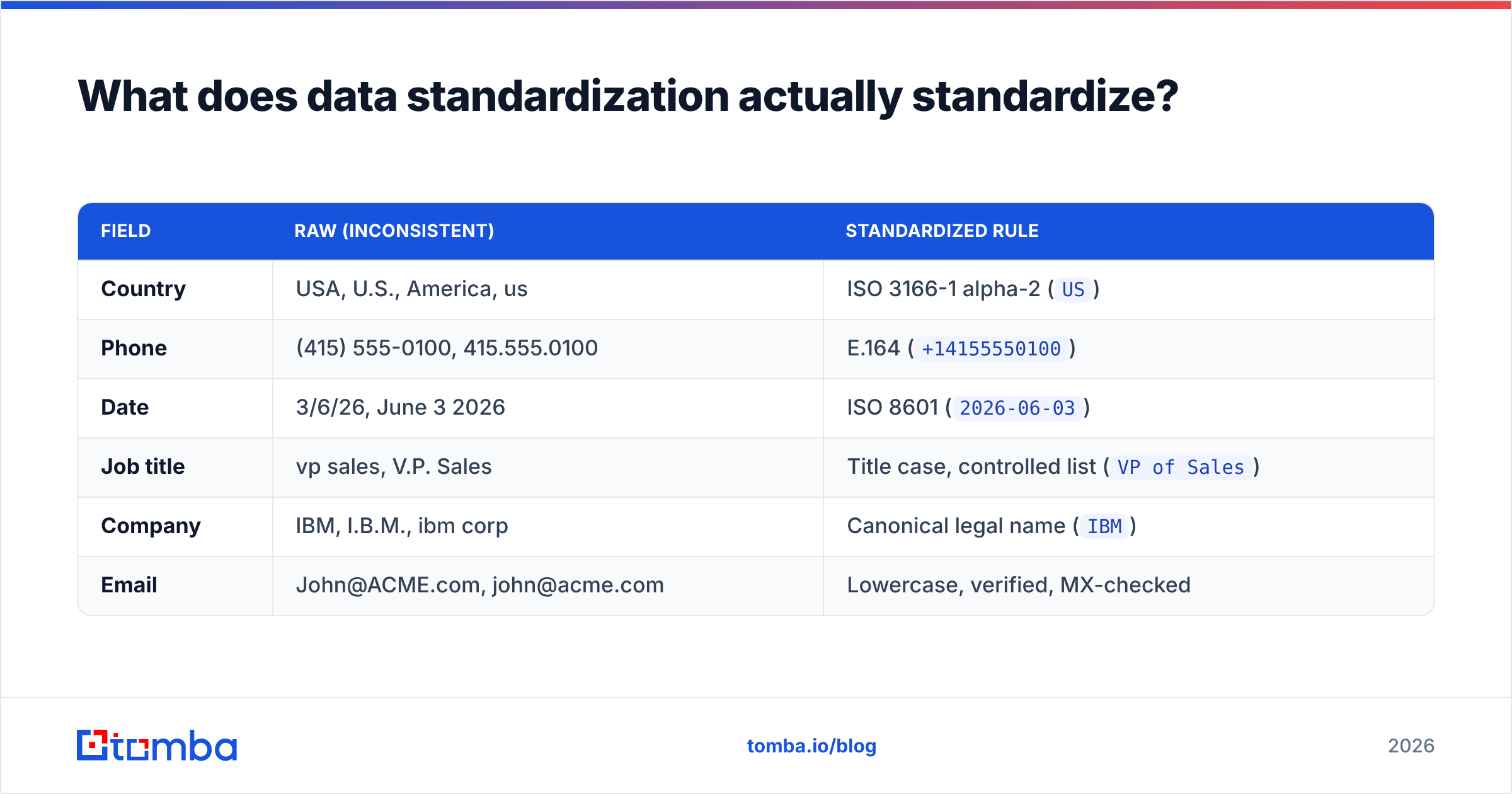
The core of any standardization project is a written standard — a rulebook that says, field by field, what "correct" looks like. Here is a practical starter set for B2B records:
| Field | Raw (inconsistent) | Standardized rule |
|---|---|---|
| Country | USA, U.S., America, us | ISO 3166-1 alpha-2 (US) |
| Phone | (415) 555-0100, 415.555.0100 | E.164 (+14155550100) |
| Date | 3/6/26, June 3 2026 | ISO 8601 (2026-06-03) |
| Job title | vp sales, V.P. Sales | Title case, controlled list (VP of Sales) |
| Company | IBM, I.B.M., ibm corp | Canonical legal name (IBM) |
| John@ACME.com, john@acme.com | Lowercase, verified, MX-checked |
Notice the pattern: each rule names one canonical form and a validation method. Without the validation step, a "standard" is just a suggestion. This is why teams pair formatting rules with an email verifier and phone validation — the format is enforced and the value is confirmed real.
The other half of the standard is scope. Decide which fields are mission-critical (email, phone, company, country, status) and standardize those ruthlessly before you touch the long tail of optional attributes. Perfect consistency on 8 fields beats mediocre consistency on 80.
Data standardization vs cleansing vs normalization vs enrichment?#
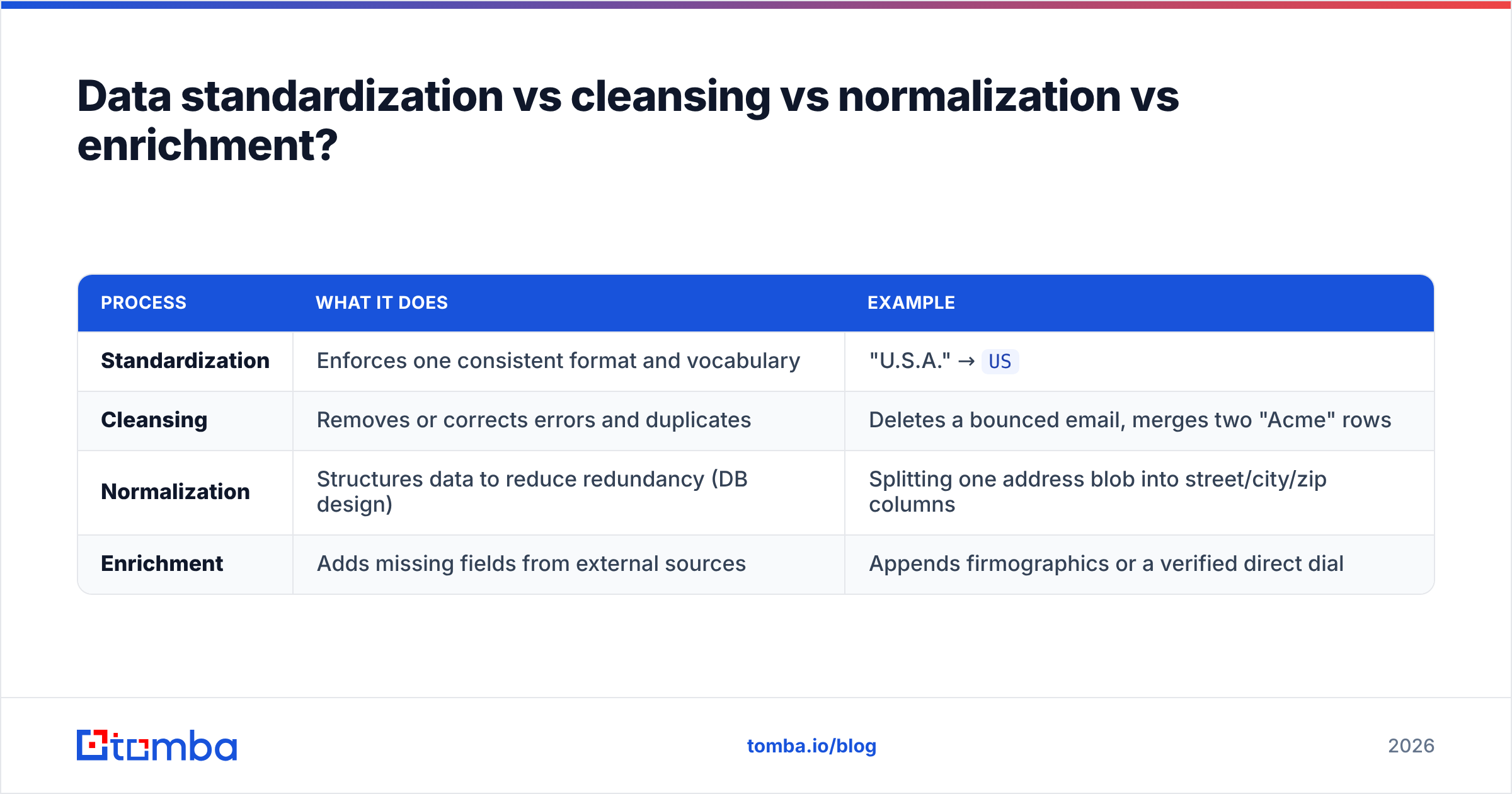
These four terms get used interchangeably, and that confusion causes botched projects. They are related but distinct stages of a single data-quality pipeline.
| Process | What it does | Example |
|---|---|---|
| Standardization | Enforces one consistent format and vocabulary | "U.S.A." → US |
| Cleansing | Removes or corrects errors and duplicates | Deletes a bounced email, merges two "Acme" rows |
| Normalization | Structures data to reduce redundancy (DB design) | Splitting one address blob into street/city/zip columns |
| Enrichment | Adds missing fields from external sources | Appends firmographics or a verified direct dial |
The sequence matters. You standardize before you deduplicate, because a matcher can only spot that "IBM" and "I.B.M." are the same company once both are in canonical form. You enrich after standardizing, because data enrichment tools match on clean keys — a messy company name returns a bad match or none at all. Skip the order and you pay for enrichment that lands on the wrong record.
For a deeper reference on the broader discipline, the Wikipedia entry on data cleansing covers where standardization fits inside data quality management.
How do you standardize B2B data step by step?#
A repeatable workflow beats heroic spreadsheet sessions. Here is the loop that scales.
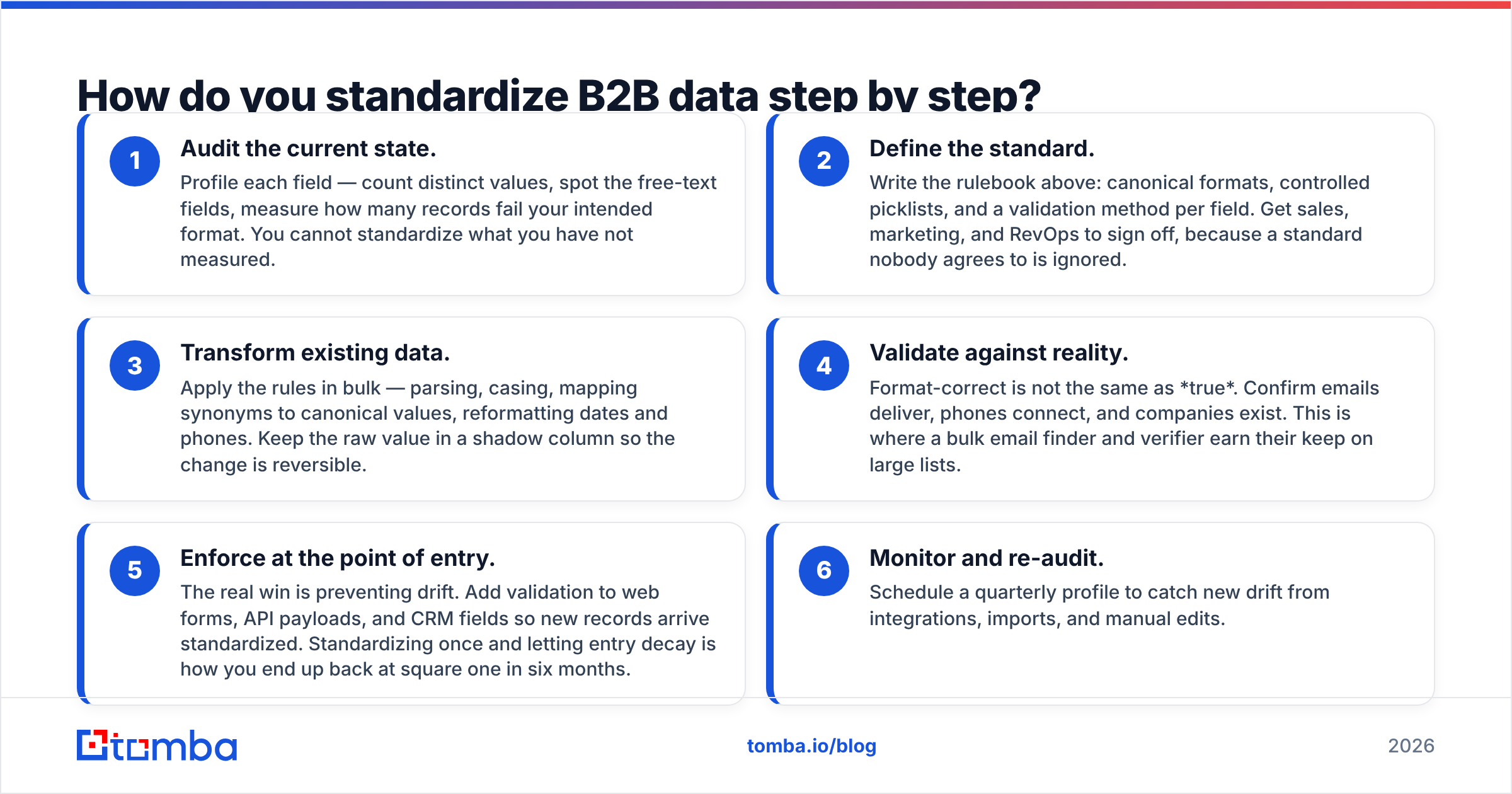
- Audit the current state. Profile each field — count distinct values, spot the free-text fields, measure how many records fail your intended format. You cannot standardize what you have not measured.
- Define the standard. Write the rulebook above: canonical formats, controlled picklists, and a validation method per field. Get sales, marketing, and RevOps to sign off, because a standard nobody agrees to is ignored.
- Transform existing data. Apply the rules in bulk — parsing, casing, mapping synonyms to canonical values, reformatting dates and phones. Keep the raw value in a shadow column so the change is reversible.
- Validate against reality. Format-correct is not the same as true. Confirm emails deliver, phones connect, and companies exist. This is where a bulk email finder and verifier earn their keep on large lists.
- Enforce at the point of entry. The real win is preventing drift. Add validation to web forms, API payloads, and CRM fields so new records arrive standardized. Standardizing once and letting entry decay is how you end up back at square one in six months.
- Monitor and re-audit. Schedule a quarterly profile to catch new drift from integrations, imports, and manual edits.
The teams who win treat step 5 as the priority. Cleaning history is finite work; controlling intake is what keeps the database clean for good.
What tools help with data standardization?#
Your toolchain depends on volume and where the mess originates. Small, one-time cleanups live fine in a spreadsheet. Ongoing B2B intake needs validation baked into the pipeline.
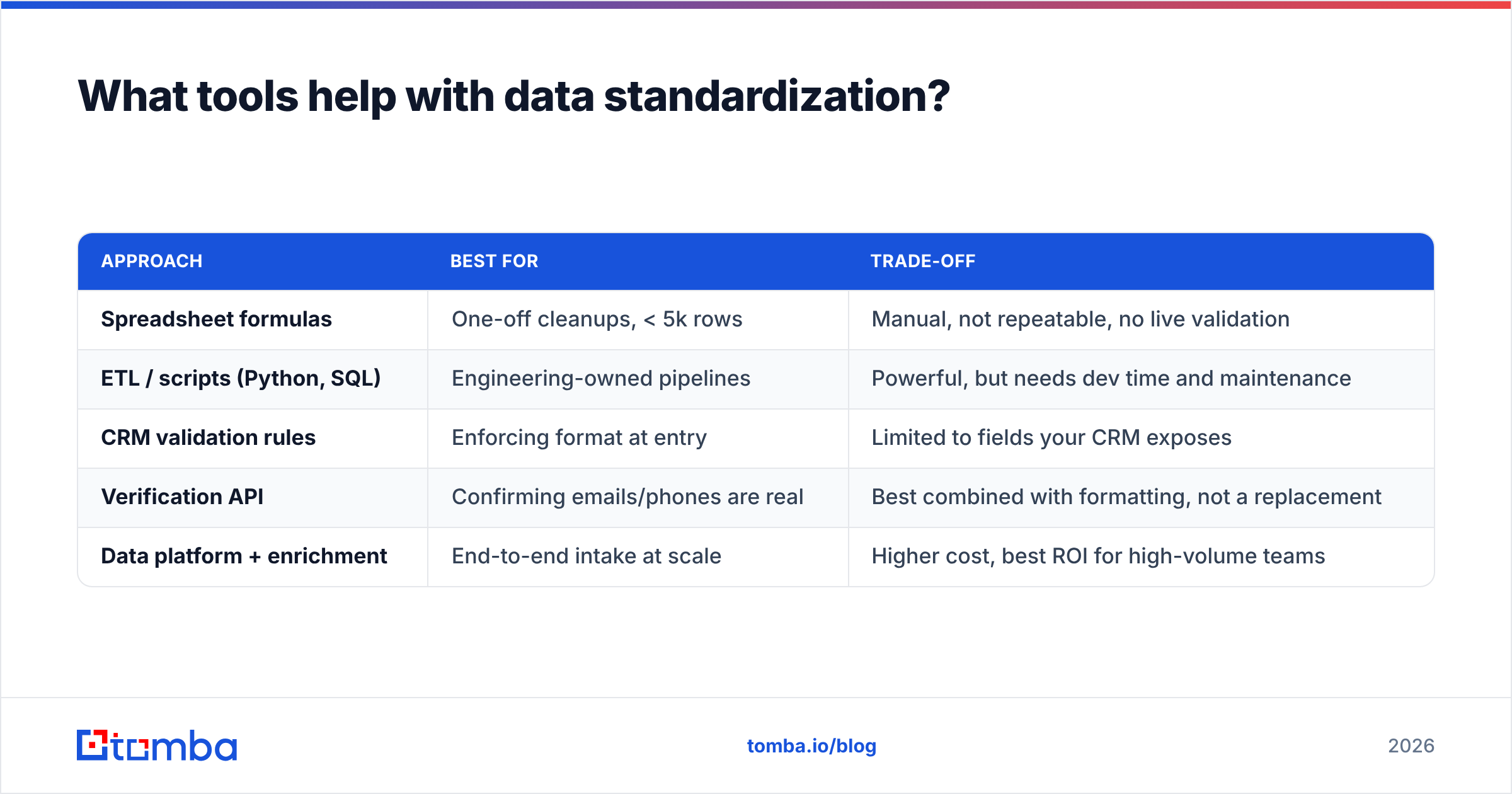
| Approach | Best for | Trade-off |
|---|---|---|
| Spreadsheet formulas | One-off cleanups, < 5k rows | Manual, not repeatable, no live validation |
| ETL / scripts (Python, SQL) | Engineering-owned pipelines | Powerful, but needs dev time and maintenance |
| CRM validation rules | Enforcing format at entry | Limited to fields your CRM exposes |
| Verification API | Confirming emails/phones are real | Best combined with formatting, not a replacement |
| Data platform + enrichment | End-to-end intake at scale | Higher cost, best ROI for high-volume teams |
A pragmatic B2B stack combines two layers: a format layer (rules and transforms that enforce canonical shapes) and a truth layer (validation that confirms the value is real and current). Formatting an email into lowercase is worthless if the mailbox does not exist — which is why standardization and verification belong together.
Tomba sits in that truth layer. When you pull contacts from a domain, the domain search returns emails already in a consistent, verified shape, and the underlying data sources are matched against real signals rather than guessed patterns. That means fewer format exceptions to fix downstream, because the data arrives clean. For teams pushing standardized records into a CRM, tools like HubSpot's data quality features and native CRM validation rules close the loop at the point of entry.
What are the most common data standardization mistakes?#
Even well-run teams trip on the same handful of errors:
- Standardizing without a written rulebook. If "correct" lives only in one analyst's head, the standard dies when they leave. Document it.
- Formatting without validating. A perfectly formatted email that bounces is still bad data. Pair every format rule with a truth check.
- Cleaning history but not intake. One-time cleanups feel great for a month, then drift returns through unguarded forms and imports.
- Over-standardizing edge cases. Do not spend a week collapsing every possible job-title variant. Standardize the fields that drive routing and segmentation first.
- Destroying the raw value. Always keep the original in a shadow column. When a mapping rule turns out wrong, you need a way back.
- Ignoring encoding. Mixed character sets (smart quotes, accented names mangled into gibberish) break matching in ways that are painful to trace. Standardize on UTF-8 early.
Avoid these and standardization shifts from a recurring fire drill to a quiet, automated background process.
Frequently asked questions#
Is data standardization a one-time project or ongoing? Ongoing. The initial cleanup is a project, but without enforcement at the point of entry, new records reintroduce the same inconsistencies within months. Treat it as a process, not a task.
Should I standardize before or after enrichment? Before. Enrichment tools match on your existing keys — a messy company name or malformed email returns a poor match. Clean, standardized keys get you far higher match rates and cheaper enrichment.
What is the single highest-impact field to standardize first? Email, in most B2B stacks. It is the primary key for dedup, the channel for outreach, and the join key for enrichment. Standardize casing, then verify deliverability. Phone and country come next.
Can I standardize data inside my CRM directly? Partially. Most CRMs support validation rules and picklists that enforce format at entry, which handles new records well. Bulk-fixing legacy data usually needs an external transform or API pass first.
Standardize at the source with Tomba#
The cheapest standardized record is the one that arrives clean. Instead of fixing formats after the fact, pull contacts that are already consistent and verified: the Tomba Email Finder returns professional emails in a normalized, deliverability-checked format by domain, name, or company — so your CRM stays clean instead of accumulating another round of mess to untangle. Start on the free tier (25 searches a month), and if you scale, Tomba pricing runs from $49/mo Starter to Growth and Pro tiers built for bulk intake. Standardize once, enforce at the source, and stop paying the messy-data tax.
Related guides#
Ready to find emails that actually work?
Join 150,000+ professionals who stopped guessing and started sending. Free credits on signup — no credit card required.
Get the Tomba newsletter
Practical outbound tactics and product updates — once every two weeks.
About the author