Datanyze vs LeadGibbon (2026): Which Email Finder Wins?
Datanyze and LeadGibbon both promise clean B2B contact data, but they solve different problems. Here's an honest, side-by-side breakdown of accuracy, pricing, and the best fit for your outbound team in 2026.
Datanyze vs LeadGibbon: Which Email Finder Actually Wins in 2026?
You're choosing between Datanyze and LeadGibbon because you need real email addresses for real prospects — and you're tired of bouncing half your list. Both tools promise that. Neither is a perfect fit for every team, and the honest answer to "which is better" depends on how you prospect.
This is a neutral, side-by-side look at what each tool does well, where each falls short, and which one earns the money. We'll also show where a purpose-built alternative beats both on the metric that matters most: accuracy per dollar.
TL;DR — The Short Version#
- Datanyze is a technographics-first tool (owned by ZoomInfo) with a Chrome extension for grabbing contact info while you browse LinkedIn and company sites. Strong for account research, weaker as a bulk email engine.
- LeadGibbon is a lightweight LinkedIn-to-email list builder. Fast for one-off list pulls, thin on verification and enrichment depth.
- Accuracy is the real battleground. Neither tool leads the market on verified-email hit rate, and both charge in ways that get expensive at scale.
- Pricing: Datanyze pushes toward annual commitments; LeadGibbon sells credit packs. Watch the per-verified-email math, not the sticker price.
- Our pick for most outbound teams: a dedicated email finder with real-time SMTP verification and transparent Tomba pricing will out-perform both on cost per usable contact.
What Is Datanyze and Who Is It For?#
Datanyze started life as a technographics company — its original claim to fame was telling you what software a website runs (CRM, analytics, hosting, chat widgets). ZoomInfo acquired it, and today Datanyze is positioned as a lightweight prospecting sidekick: a Chrome extension that surfaces business email addresses and direct-dial numbers while you're on a LinkedIn profile or a company website.
That heritage matters. Datanyze is at its best when your outbound motion is account-led — you're researching a target company, checking its tech stack, and grabbing a contact or two per account as you go. The extension workflow is genuinely convenient for reps doing manual, high-touch research.
Where it gets awkward: Datanyze is not built to spit out thousands of verified emails from a filtered search. If your motion is volume-based list building, you'll feel the friction quickly — and you'll notice the data freshness varies by industry and seniority.

What Is LeadGibbon and Who Is It For?#
LeadGibbon is the more focused of the two: it's a LinkedIn email finder and list-builder. You run a LinkedIn (or Sales Navigator) search, and LeadGibbon pulls the matching contacts into a downloadable list with emails attached. Simple, fast, and cheap for small pulls.
LeadGibbon's sweet spot is the founder or solo SDR who needs a couple hundred leads for a campaign this week and doesn't want a heavyweight platform. You point it at a search, you get a spreadsheet, you load it into your sequencer.
The trade-offs show up as you scale. LeadGibbon's enrichment is shallow compared to a full data platform — you get the essentials (name, title, company, email) but not the deep firmographic and intent layers that a RevOps team wants. Verification is also lighter than a dedicated email verifier, so you'll want to run pulled lists through a second cleaning pass before sending.
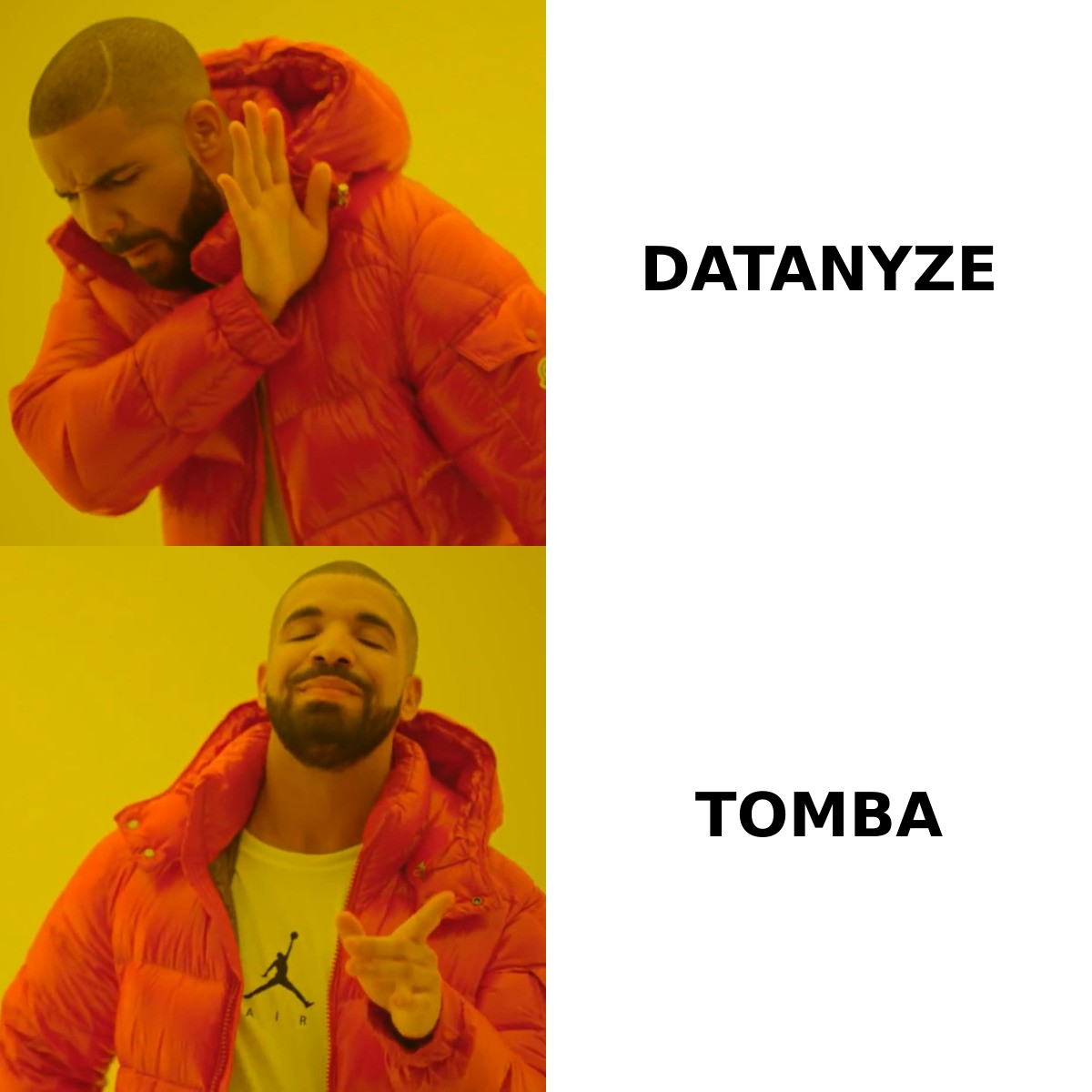
Datanyze vs LeadGibbon: Feature-by-Feature Comparison#
Here's the head-to-head on the attributes that actually change your results.
| Feature | Datanyze | LeadGibbon |
|---|---|---|
| Core strength | Technographics + contact lookup | LinkedIn list building |
| Primary workflow | Chrome extension, per-profile | Search → bulk list export |
| Email verification | Basic | Basic |
| Technographic data | Strong (its origin) | Minimal |
| Bulk export | Limited | Yes (list-first) |
| Direct-dial / phone | Yes | Limited |
| CRM integrations | Via ZoomInfo ecosystem | CSV + core CRMs |
| Free trial | Limited free credits | Limited free credits |
| Best-fit user | Account-led AEs | Solo SDRs, founders |
| Pricing model | Annual-leaning | Credit packs |
The pattern is clear: Datanyze is a research companion, LeadGibbon is a list machine. Neither is trying to be a complete, accuracy-obsessed data platform, and that's the gap most growing teams eventually run into.
Which Tool Is More Accurate?#
Accuracy is where deals are won or lost, so treat every vendor's "95% accurate" claim as marketing until you test it on your target segments. Accuracy is never one global number — it swings hard by geography, seniority, and company size. A tool that nails US mid-market VPs can whiff on European SMB founders.
In practice:
- Datanyze leans on the ZoomInfo data backbone, which helps for well-covered US enterprise contacts but thins out for smaller companies and non-US regions.
- LeadGibbon derives emails largely from LinkedIn-driven matching, which is fast but more prone to guessed-pattern addresses that were never verified against a live mail server.
- Both ship "basic" verification — meaning you should not send to a raw export without a second verification pass, or you risk your sender reputation and inbox placement.
The single most important test: pull 100 contacts from each tool for your exact ICP, then run them through an independent verifier and measure the verified, deliverable rate — not the raw "found" rate. The gap between "found" and "safe to send" is where budgets quietly leak.

How Do Datanyze and LeadGibbon Price Compare?#
Neither vendor makes apples-to-apples pricing easy, so compare on cost per verified email, not headline plan price.
- Datanyze historically nudges buyers toward annual plans and bundles into the broader ZoomInfo ecosystem. That's fine if you're already in that world; it's overkill (and over-budget) if you just need emails.
- LeadGibbon sells credit packs, which feels cheaper up front. But once you factor the re-verification pass you'll need, the effective cost per usable contact rises.
Two rules keep you honest:
- Divide by deliverable emails, not credits. A cheaper credit that returns a dead address costs you more than a pricier one that lands.
- Watch for annual lock-in. A monthly-cancelable tool you can pressure-test beats a 12-month contract you signed on a demo.
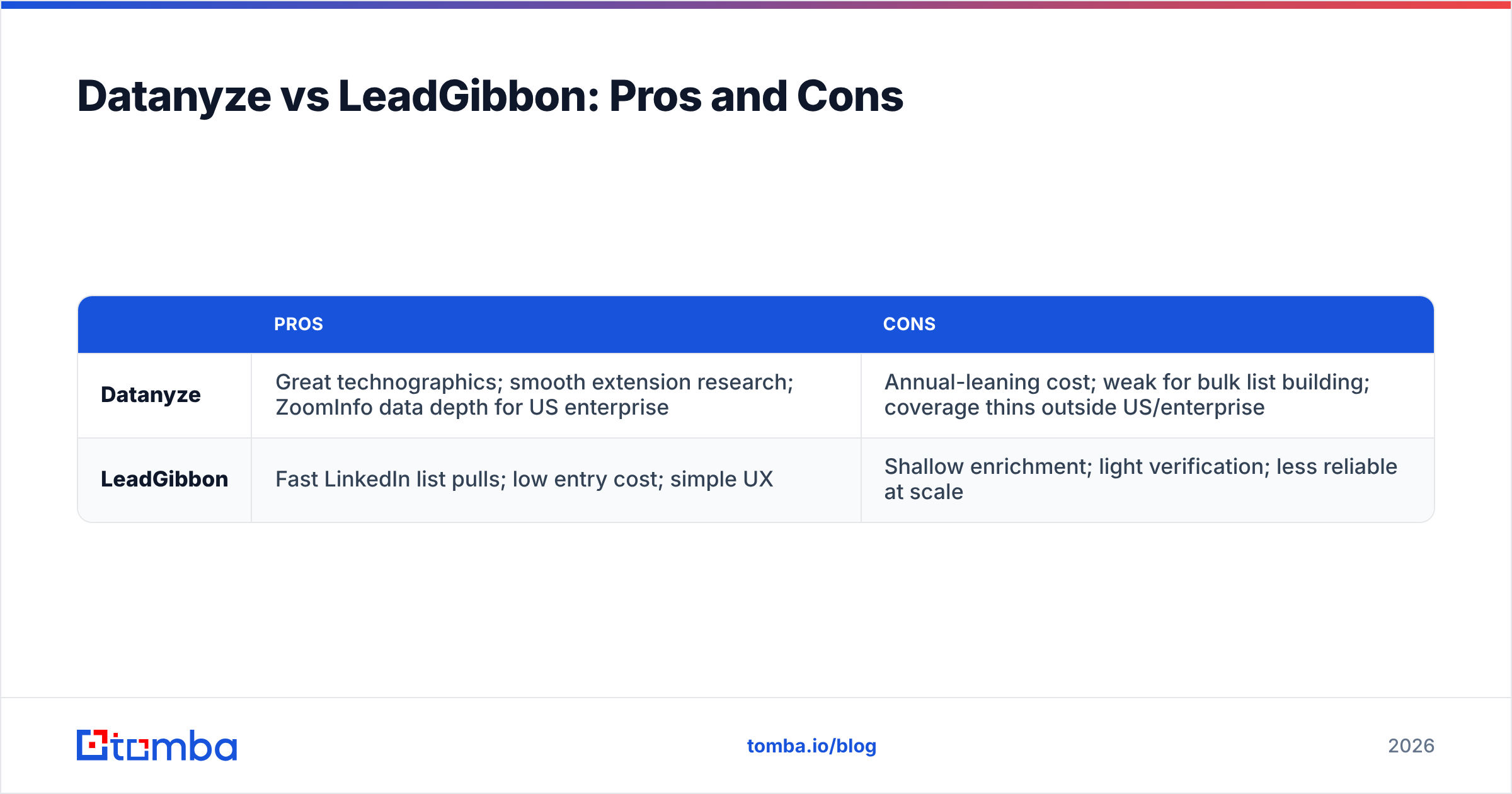
Datanyze vs LeadGibbon: Pros and Cons#
| Pros | Cons | |
|---|---|---|
| Datanyze | Great technographics; smooth extension research; ZoomInfo data depth for US enterprise | Annual-leaning cost; weak for bulk list building; coverage thins outside US/enterprise |
| LeadGibbon | Fast LinkedIn list pulls; low entry cost; simple UX | Shallow enrichment; light verification; less reliable at scale |
If your job is researching accounts one at a time, Datanyze's workflow wins. If your job is building a list this afternoon, LeadGibbon's speed wins. But if your job is filling a sequencer every week with contacts that actually deliver, both leave real accuracy and cost on the table.

When Should You Consider an Alternative to Both?#
Consider a dedicated email-finding platform the moment your bottleneck becomes cost per verified contact at volume — which, for most scaling outbound teams, arrives fast.
Datanyze and LeadGibbon are each optimized for one slice of the funnel. A purpose-built finder-plus-verifier stack is optimized for the whole thing: find the address, verify it live, enrich it, and push it into your CRM without a manual cleanup step in the middle.
That's where Tomba fits. It's not trying to be a technographics tool or a LinkedIn scraper — it's built around one job done accurately: getting you a verified professional email, then everything around it.
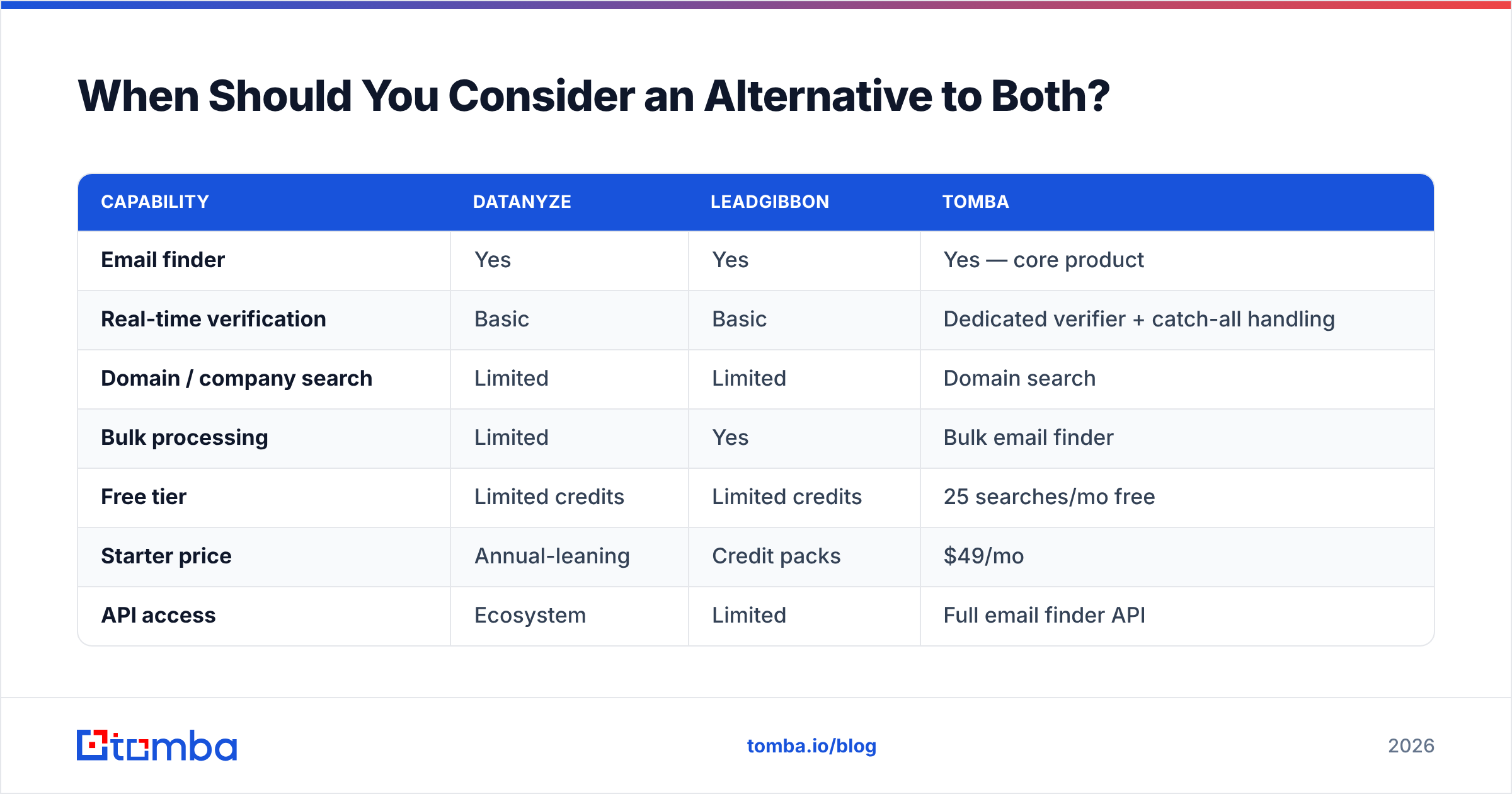
| Capability | Datanyze | LeadGibbon | Tomba |
|---|---|---|---|
| Email finder | Yes | Yes | Yes — core product |
| Real-time verification | Basic | Basic | Dedicated verifier + catch-all handling |
| Domain / company search | Limited | Limited | Domain search |
| Bulk processing | Limited | Yes | Bulk email finder |
| Free tier | Limited credits | Limited credits | 25 searches/mo free |
| Starter price | Annual-leaning | Credit packs | $49/mo |
| API access | Ecosystem | Limited | Full email finder API |
The point isn't that Tomba wins every category by default — Datanyze still owns technographics, and LeadGibbon is still a quick LinkedIn pull. The point is that if the outcome you actually care about is deliverable emails per dollar, a finder-plus-verifier built for that outcome tends to beat two tools that treat verification as an afterthought.
How to Choose: A Simple Decision Framework#
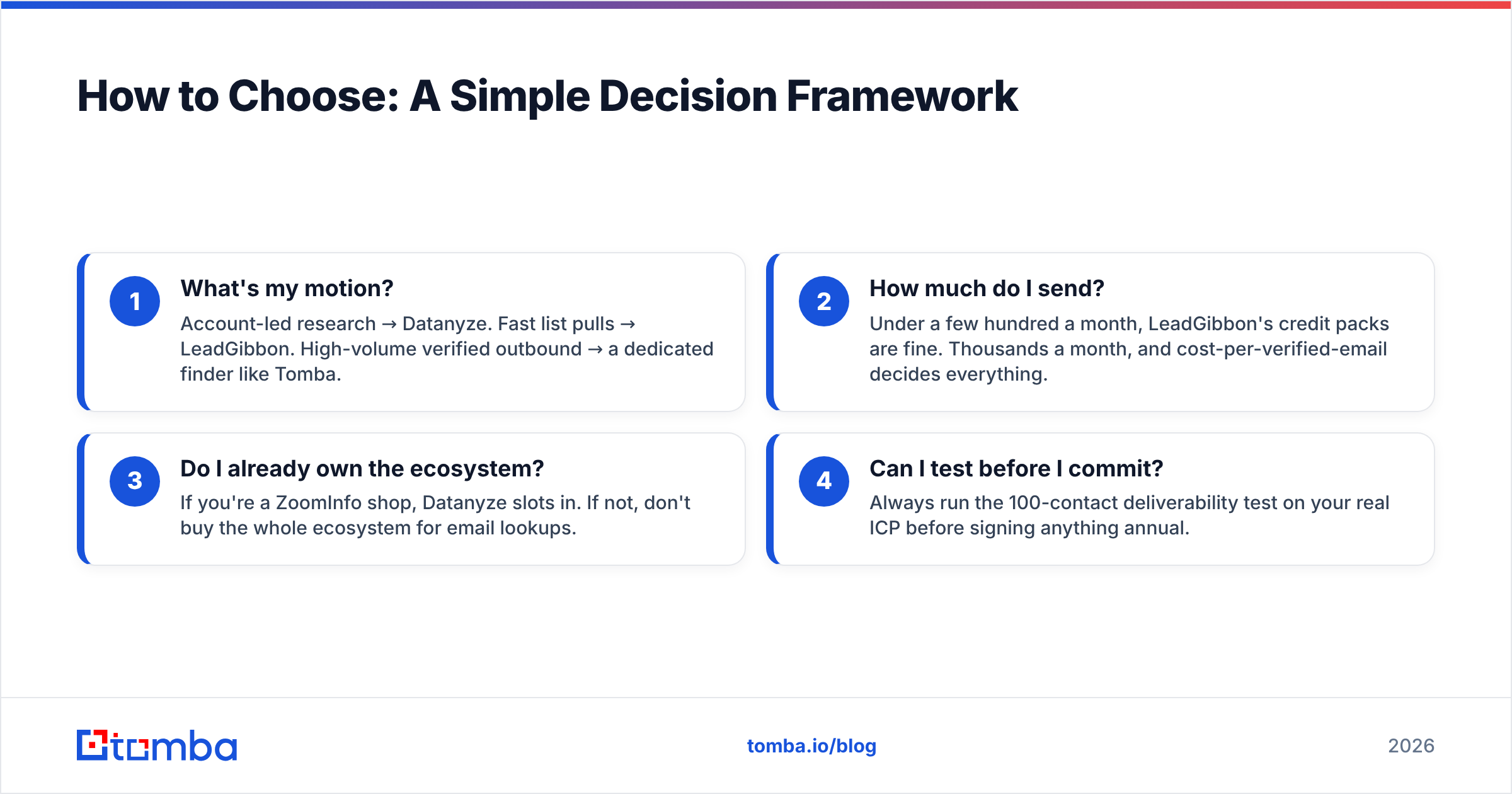
Use these four questions to settle it in five minutes:
- What's my motion? Account-led research → Datanyze. Fast list pulls → LeadGibbon. High-volume verified outbound → a dedicated finder like Tomba.
- How much do I send? Under a few hundred a month, LeadGibbon's credit packs are fine. Thousands a month, and cost-per-verified-email decides everything.
- Do I already own the ecosystem? If you're a ZoomInfo shop, Datanyze slots in. If not, don't buy the whole ecosystem for email lookups.
- Can I test before I commit? Always run the 100-contact deliverability test on your real ICP before signing anything annual.
Whatever you pick, never send from a raw export. Run every list through verification first — it's the cheapest insurance against a torched domain and one of the fastest ways to protect email deliverability.
The Verdict#
Datanyze wins for account-led research; LeadGibbon wins for quick LinkedIn lists; but most outbound teams optimizing for cost per deliverable email will do better with a dedicated finder-and-verifier. Both incumbents are competent at their niche and weaker outside it, and both treat verification as "basic" — the exact thing that determines whether your campaign lands or bounces.
Do the test. Pull the same 100 prospects through each option, verify them independently, and let the deliverable rate — divided by what you paid — pick the winner. Data quality is not a spec sheet; it's a measurement.
If you'd rather skip the two-tool juggling act, start with the free tier of the Tomba Email Finder: 25 searches a month, no annual lock-in, real-time verification built in, and a clean path from a name and domain to a verified inbox. Find the emails, verify them in the same flow, and spend your budget on contacts that actually reply.
Sources & further reading: compare user reviews on G2, review Datanyze's parent platform at ZoomInfo, and check independent tool ratings on Capterra before you commit.
Related guides#
Ready to find emails that actually work?
Join 150,000+ professionals who stopped guessing and started sending. Free credits on signup — no credit card required.
Get the Tomba newsletter
Practical outbound tactics and product updates — once every two weeks.
About the author