Datanyze vs Salesbot (2026): Which Sales Tool Wins?
Datanyze finds contact data; Salesbot automates conversations. Here's an honest 2026 breakdown of what each does well, where each falls short, and which one your sales team actually needs.
Picking between Datanyze and Salesbot feels harder than it should, because the two tools barely play the same sport. One digs up contact data so you can start a conversation; the other automates the conversation once it starts. This guide cuts through the confusion, shows where each tool earns its price, and tells you which to buy first if you can only fund one.
TL;DR: Datanyze vs Salesbot in 30 Seconds#
- Datanyze is a sales intelligence and prospecting tool — a Chrome extension plus a database that surfaces emails, phone numbers, and technographic data as you browse LinkedIn and company sites.
- Salesbot is a conversational automation layer — an AI chatbot that qualifies inbound leads, books meetings, and routes replies inside your CRM or website.
- They solve different problems: Datanyze feeds the top of your funnel with contacts, Salesbot works the middle by responding to people who already raised a hand.
- If your bottleneck is finding people to email, start with a data tool. If your bottleneck is handling inbound volume, start with a bot.
- Neither one verifies deliverability deeply, so pair whichever you choose with a dedicated email verifier before you send at scale.
What Is Datanyze and Who Is It For?#
Datanyze is a lightweight prospecting tool built around a browser extension. You land on a prospect's LinkedIn profile or company website, click the icon, and Datanyze returns a best-guess business email, direct-dial or mobile number, and firmographic details like company size and revenue. It made its name years ago on technographics — detecting which technologies a website runs — and still leans on that angle for account targeting.
Its buyer is the individual rep or small team that wants contact data without a heavyweight platform. There's no complex sequencing engine, no dialer, no reporting suite. You find a contact, export it, and move on. You can check current plans on the Datanyze site directly, and its reviews sit on G2 if you want peer feedback.
The trade-off is depth. Datanyze's database is smaller than enterprise data vendors, coverage outside North America thins out fast, and the "guessed" emails need verification before they're safe to send. It's a fast on-ramp, not a system of record.
What Is Salesbot and Who Is It For?#
Salesbot is the name used by several conversational-automation products (Kommo's built-in bot being the best known), and the category behaves the same way regardless of vendor: it's a no-code chatbot that talks to leads for you. It greets website visitors, asks qualifying questions, captures contact details into a CRM, answers FAQs, and can hand off to a human when the conversation gets serious.
Its buyer is the team drowning in inbound. If your site, ads, or social channels generate more chats and form-fills than reps can answer in minutes, a bot buys back response time — and speed-to-lead is one of the few metrics that reliably moves win rates. HubSpot's own research on lead response times has hammered this point for a decade.
The catch: Salesbot only works with traffic you already have. It does not go find new prospects. Point it at an empty funnel and it has nothing to do. It's a conversion multiplier, not a demand generator.
Datanyze vs Salesbot: Side-by-Side Comparison#
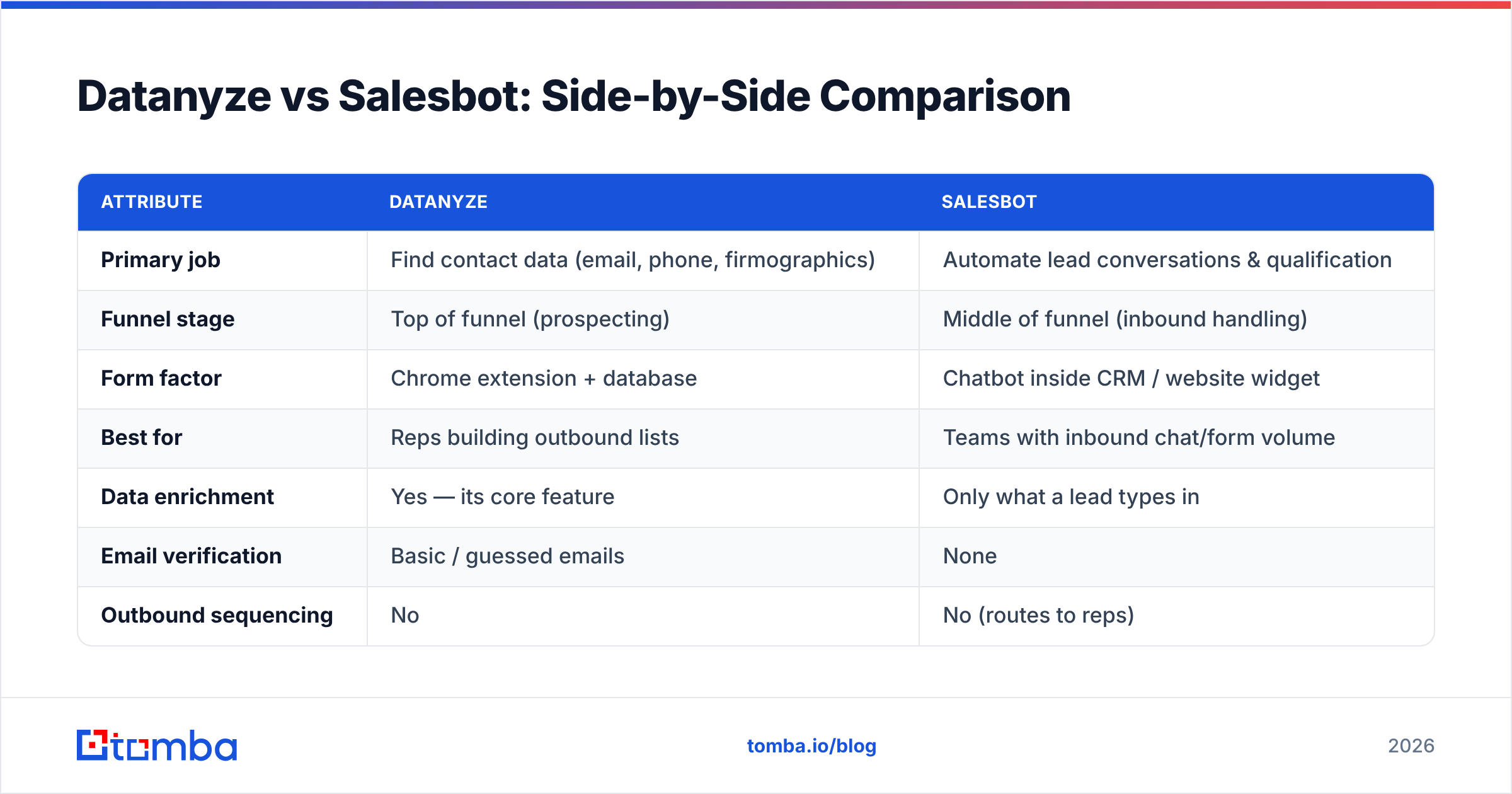
Here's the honest head-to-head. Read the "Primary job" row first — it explains every other difference.
| Attribute | Datanyze | Salesbot |
|---|---|---|
| Primary job | Find contact data (email, phone, firmographics) | Automate lead conversations & qualification |
| Funnel stage | Top of funnel (prospecting) | Middle of funnel (inbound handling) |
| Form factor | Chrome extension + database | Chatbot inside CRM / website widget |
| Best for | Reps building outbound lists | Teams with inbound chat/form volume |
| Data enrichment | Yes — its core feature | Only what a lead types in |
| Email verification | Basic / guessed emails | None |
| Outbound sequencing | No | No (routes to reps) |
| Typical starting price | ~$29–$55/user/mo | Bundled into CRM tiers |
| Learning curve | Low | Medium (flow building) |
The pattern is clear: these aren't competitors so much as neighbors. You could run both — Datanyze fills the list, your reps send, and Salesbot catches the replies that come back through your site.
Which One Solves Your Actual Bottleneck?#
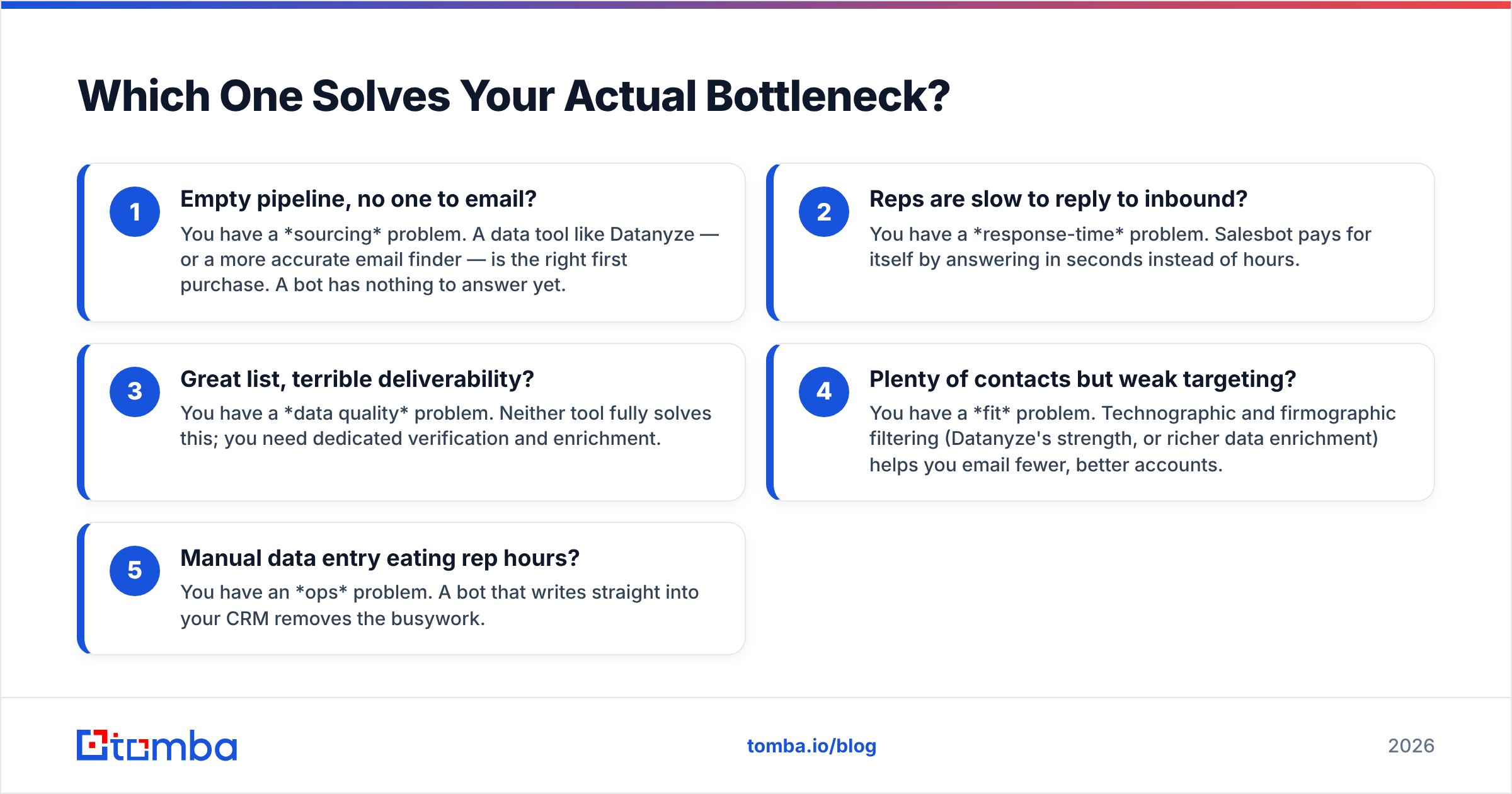
Conclusion first: buy the tool that fixes your narrowest constraint, not the one with the longer feature list. Diagnose before you spend.
- Empty pipeline, no one to email? You have a sourcing problem. A data tool like Datanyze — or a more accurate email finder — is the right first purchase. A bot has nothing to answer yet.
- Reps are slow to reply to inbound? You have a response-time problem. Salesbot pays for itself by answering in seconds instead of hours.
- Great list, terrible deliverability? You have a data quality problem. Neither tool fully solves this; you need dedicated verification and enrichment.
- Plenty of contacts but weak targeting? You have a fit problem. Technographic and firmographic filtering (Datanyze's strength, or richer data enrichment) helps you email fewer, better accounts.
- Manual data entry eating rep hours? You have an ops problem. A bot that writes straight into your CRM removes the busywork.
Most teams misdiagnose this and buy the flashier tool. Match the purchase to the constraint and the ROI decision makes itself.
Where Both Tools Leave a Gap: Deliverability#
Here's what neither Datanyze nor Salesbot will tell you on their pricing page: the email address is only useful if it lands. Datanyze returns emails that are often pattern-guessed, and Salesbot captures whatever a lead types into a form — typos, throwaway Gmail accounts, and all. Send to those unchecked and you'll watch your bounce rate climb and your sender reputation sink.
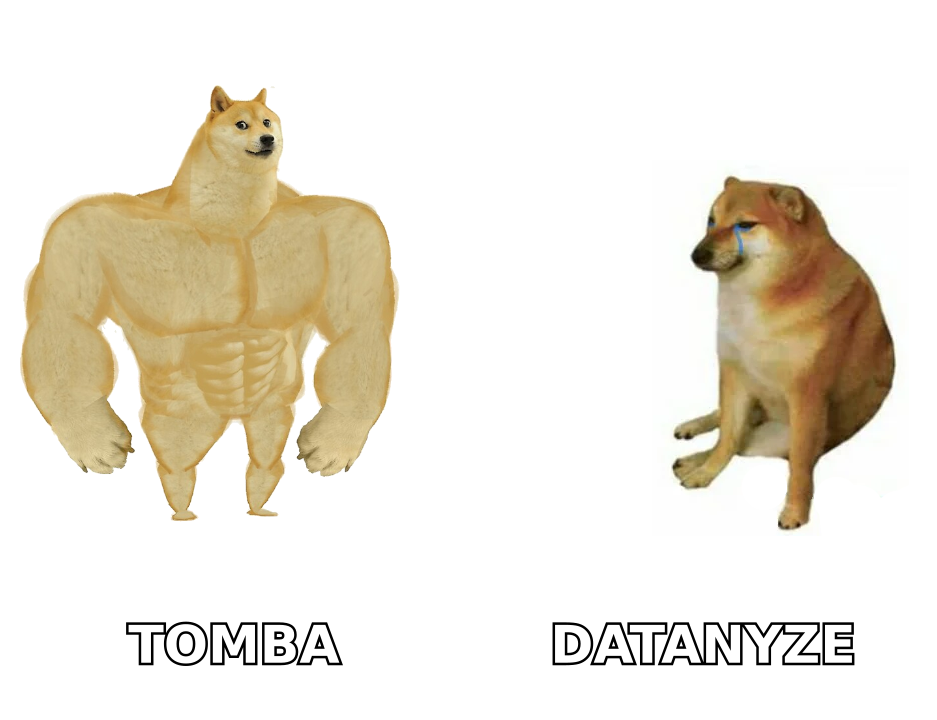
That's why a verification and finding layer belongs in the stack no matter which side of this comparison you pick. The workflow that actually protects your domain looks like this:
- Find the contact — via Datanyze, a bot capture, or a dedicated finder.
- Verify every address against live SMTP checks before it enters a sequence, using an email verifier that flags catch-alls and disposables.
- Enrich the thin records so reps aren't personalizing blind.
- Add phone as a fallback — a phone finder gives you a second channel when email stalls.
Skip the verify step and you're spending on data tools only to burn the deliverability that makes them worth anything.
How Does Tomba Fit Into This Comparison?#
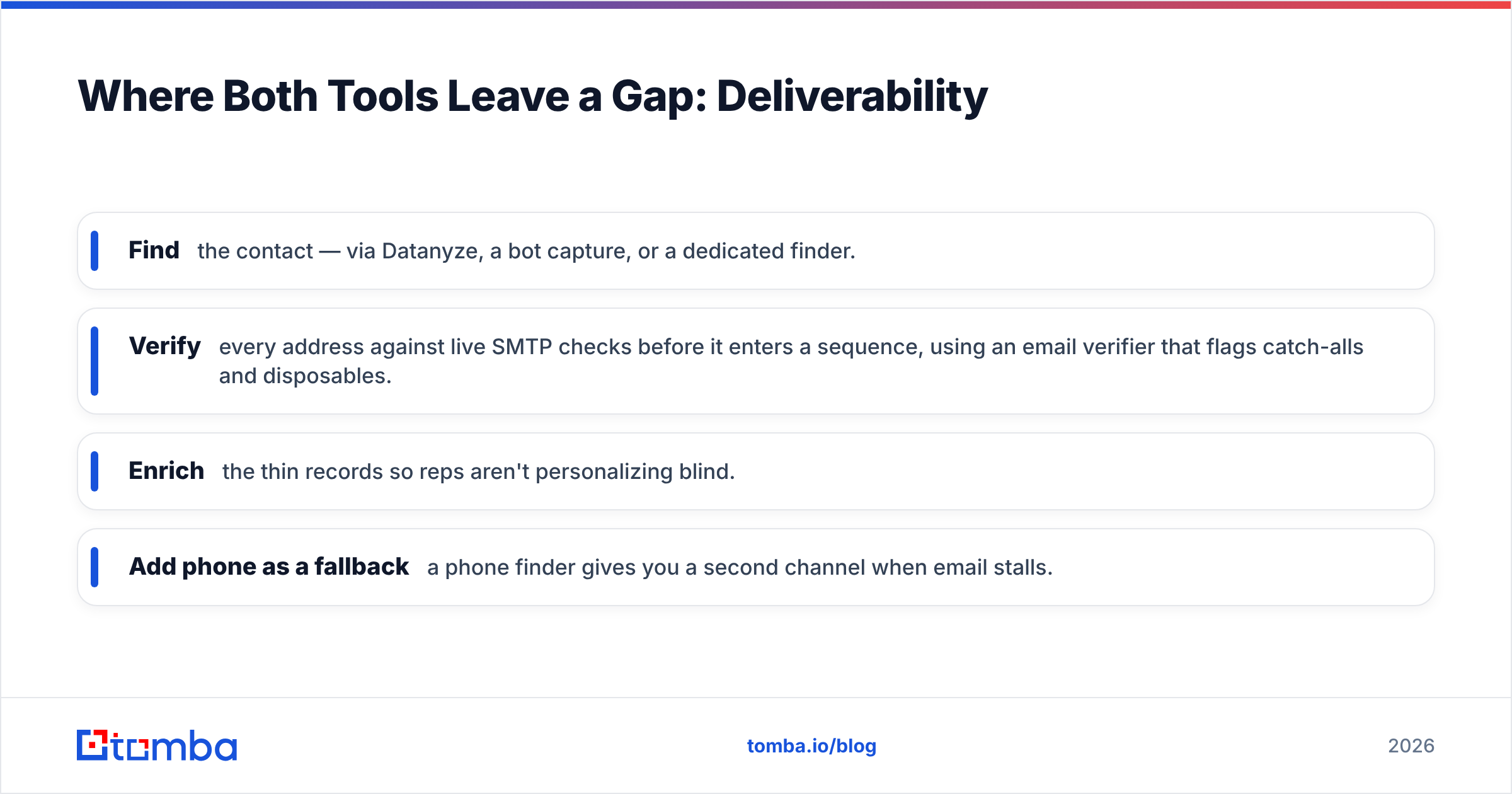
Fairly: Tomba isn't a chatbot, so it doesn't replace Salesbot. What Tomba does is the sourcing and data-quality job that Datanyze does — and it's built specifically for accuracy at that job rather than as a bolt-on to a browsing extension.
| Feature | Datanyze | Tomba |
|---|---|---|
| Free tier | Limited trial | 25 searches/mo, free |
| Starter price | ~$29–$55/user/mo | $49/mo |
| Email finder | Yes (guessed) | Yes, SMTP-verified |
| Domain search | Limited | Full domain search |
| Bulk processing | Basic | Bulk finder + verifier |
| Catch-all handling | Minimal | Dedicated catch-all verifier |
| API access | Limited | Full REST API |
| Integrations | Extension-first | CRM, Sheets, Zapier, API |
Where Datanyze gives you a quick guess from a browser tab, Tomba backs each result with verification and a domain search that maps an entire company's email pattern in one query. Pricing is transparent — see the full Tomba pricing breakdown — with a genuine free tier so you can test accuracy on your own list before paying. For teams whose real problem is finding people who actually reply, that verification-first design matters more than a technographic filter.
Can You Use Datanyze and Salesbot Together?#
Yes — and for a well-funded team it's a reasonable stack. Datanyze (or a stronger finder) builds the outbound list, your reps run sequences, and Salesbot mans the website to catch the inbound interest those campaigns stir up. The two never overlap because they own different funnel stages.
The practical friction is data hygiene between them. A contact Datanyze exports and a lead Salesbot captures can collide as duplicates in your CRM, with mismatched or stale fields. Standardize on one enrichment and verification source so both feeds resolve to clean, deduplicated records. Otherwise you've bought two tools and manufactured a third problem.
Datanyze vs Salesbot: The Verdict#
There's no universal winner because there's no shared category — but there is a right first purchase for your situation:
- Choose Datanyze if your gap is finding contacts fast while you browse, you work North-American accounts, and you'll verify emails downstream anyway.
- Choose Salesbot if your gap is answering inbound chats and forms quickly, and you already have traffic to convert.
- Choose a verification-first finder like Tomba if your real problem is that the emails you already collect keep bouncing — accuracy is the constraint most teams underestimate until their domain reputation tanks.
Diagnose the bottleneck, buy for that, and layer verification underneath whichever you pick.
Start With Data You Can Trust#
If your pipeline is thin, no chatbot can fill it — you need real, deliverable contacts first. Tomba's Email Finder surfaces professional email addresses by name, company, or domain and verifies each one against live SMTP checks, so your list is ready to send instead of ready to bounce. Start free with 25 searches a month, test it against your current data tool, and only scale up when the accuracy proves itself. Find the right people, reach them the first time, and let your reps — or your bot — do the rest.
Related guides#
Ready to find emails that actually work?
Join 150,000+ professionals who stopped guessing and started sending. Free credits on signup — no credit card required.
Get the Tomba newsletter
Practical outbound tactics and product updates — once every two weeks.
About the author