Datanyze vs Startup Tracker: B2B Data Tools Compared (2026)
Datanyze and Startup Tracker solve different sides of B2B prospecting—technographics versus startup discovery. Here's an honest breakdown of data depth, accuracy, pricing, and which one your team actually needs in 2026.
Choosing between Datanyze and Startup Tracker feels like an apples-to-oranges problem because it mostly is. One is a technographics and contact-data platform built for outbound sales teams. The other is a startup discovery and monitoring tool built to surface early-stage companies before they hit everyone's radar. Yet both keep landing on the same shortlist because both promise the same end result: a list of accounts worth prospecting.
This comparison cuts through the overlap. You'll see where each tool genuinely wins, where the data thins out, what you actually pay, and when a leaner email-finding stack beats paying for either one.
TL;DR#
- Datanyze is best if you sell to companies based on the technology they use (technographics) and need direct contact data attached to those accounts.
- Startup Tracker is best if you sell to startups and need to catch funding rounds, new launches, and hiring signals early.
- Data accuracy is the deciding factor for both, and both degrade on smaller or non-US companies where records are sparse.
- Pricing is opaque on both sides; Datanyze skews toward per-credit contact reveals, Startup Tracker toward monitoring seats.
- If your real goal is verified emails for the accounts you already identified, a focused email finder often does that job cheaper and cleaner than either platform.
What is Datanyze and who is it for?#
Datanyze is a sales-intelligence platform best known for technographics — data about the software and technologies a company runs. If you sell a Shopify app, you want a list of Shopify stores. If you compete with Salesforce, you want companies running Salesforce. That's Datanyze's core pitch, and it's a legitimately useful angle that most contact databases don't cover well.
On top of technographics, Datanyze layers standard B2B contact data: company firmographics, employee counts, and business emails and direct-dial numbers surfaced through a Chrome extension. You browse a company or a LinkedIn profile, click the extension, and it reveals contact details on a credit-based model. You can read more on the official Datanyze site.
The honest caveat: Datanyze's contact accuracy is inconsistent, and independent reviews on G2 frequently flag stale emails and missing direct dials, especially outside large US enterprises. It's a data enrichment and targeting tool first, and a contact-finder second.
What is Startup Tracker and who is it for?#
Startup Tracker is a different animal. It's built to discover and monitor early-stage companies — tracking funding announcements, new product launches, founder moves, hiring spikes, and other growth signals. The buyer here isn't someone selling to the Fortune 500. It's someone whose ideal customer is a Seed-to-Series-B startup that just raised money and is about to start spending it.
The value is timing. A startup that closed a funding round three days ago is a warmer prospect than one you cold-email at random, because budget and urgency just appeared. Startup Tracker aggregates those signals so you don't have to manually watch funding databases and press feeds.
What it is not: a deep contact database. Startup Tracker tells you which companies are heating up and why, but you'll usually still need a separate tool to find and verify the actual email addresses of the founders or hiring managers you want to reach. That gap matters, and we'll come back to it.
Datanyze vs Startup Tracker: the core differences#
Here's the fastest way to see how they diverge. The two tools answer different questions, so "which is better" depends entirely on which question you're asking.
| Dimension | Datanyze | Startup Tracker |
|---|---|---|
| Primary job | Technographic targeting + contact reveal | Startup discovery + growth-signal monitoring |
| Best-fit buyer | Teams selling by tech stack | Teams selling to funded startups |
| Core data | Software usage, firmographics, emails | Funding, launches, hiring, founder moves |
| Contact emails | Yes, credit-based (variable accuracy) | Limited / not the focus |
| Real-time signals | Weak | Strong (funding + growth alerts) |
| Chrome extension | Yes | Varies |
| Ideal deal timing | Ongoing, stack-based | Event-triggered, time-sensitive |
| Learning curve | Moderate | Low |
The pattern is clear: Datanyze is a targeting-and-data play; Startup Tracker is a timing-and-signal play. Neither one fully replaces the other, and neither one is a complete outbound stack on its own.
Which one has better data accuracy?#
Accuracy is where most B2B data tools quietly fall apart, and it's the single question you should stress-test before buying either.
For Datanyze, technographic data tends to be more reliable than its contact data. Detecting that a website loads a particular script or tag is a mechanical check, so tech-stack signals hold up reasonably well. The weak spot is the human layer — emails and direct dials — where records age fast and bounce rates climb, particularly for non-enterprise and non-US contacts.
For Startup Tracker, "accuracy" means something different: are the signals fresh and complete? A funding-tracking tool is only as good as its coverage of announcement sources and how fast it ingests them. It generally does well on well-publicized rounds and worse on quiet, unannounced raises or bootstrapped growth that never hits a press feed.
Regardless of which platform you lean toward, you should never send to an unverified address. Run any list through an email verifier before your first send. It's the cheapest insurance against a wrecked sender reputation, and it neutralizes the accuracy gap that both of these tools carry.
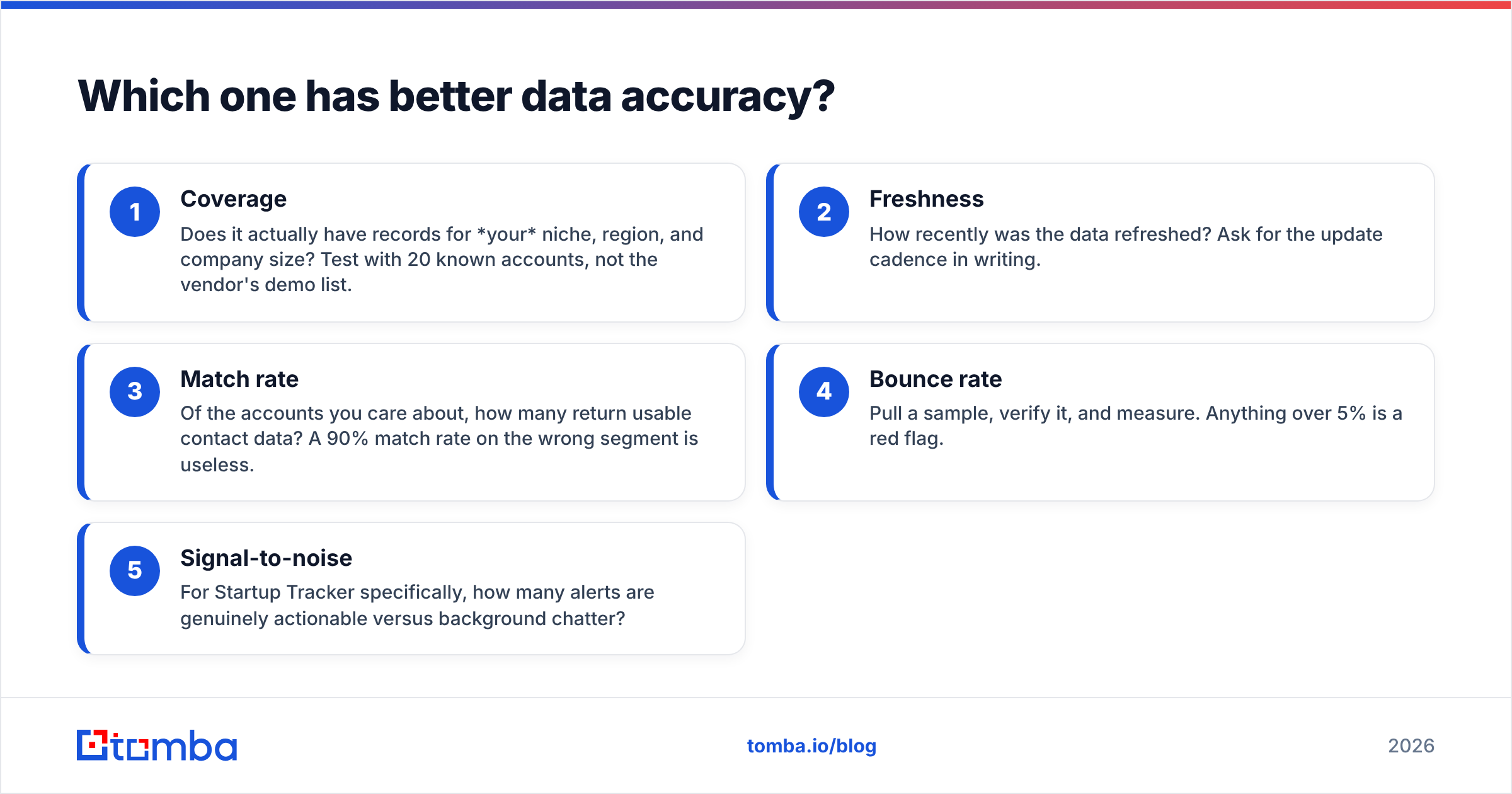
Here's the practical framework for evaluating either tool's data:
- Coverage — Does it actually have records for your niche, region, and company size? Test with 20 known accounts, not the vendor's demo list.
- Freshness — How recently was the data refreshed? Ask for the update cadence in writing.
- Match rate — Of the accounts you care about, how many return usable contact data? A 90% match rate on the wrong segment is useless.
- Bounce rate — Pull a sample, verify it, and measure. Anything over 5% is a red flag.
- Signal-to-noise — For Startup Tracker specifically, how many alerts are genuinely actionable versus background chatter?
How do Datanyze and Startup Tracker price their plans?#
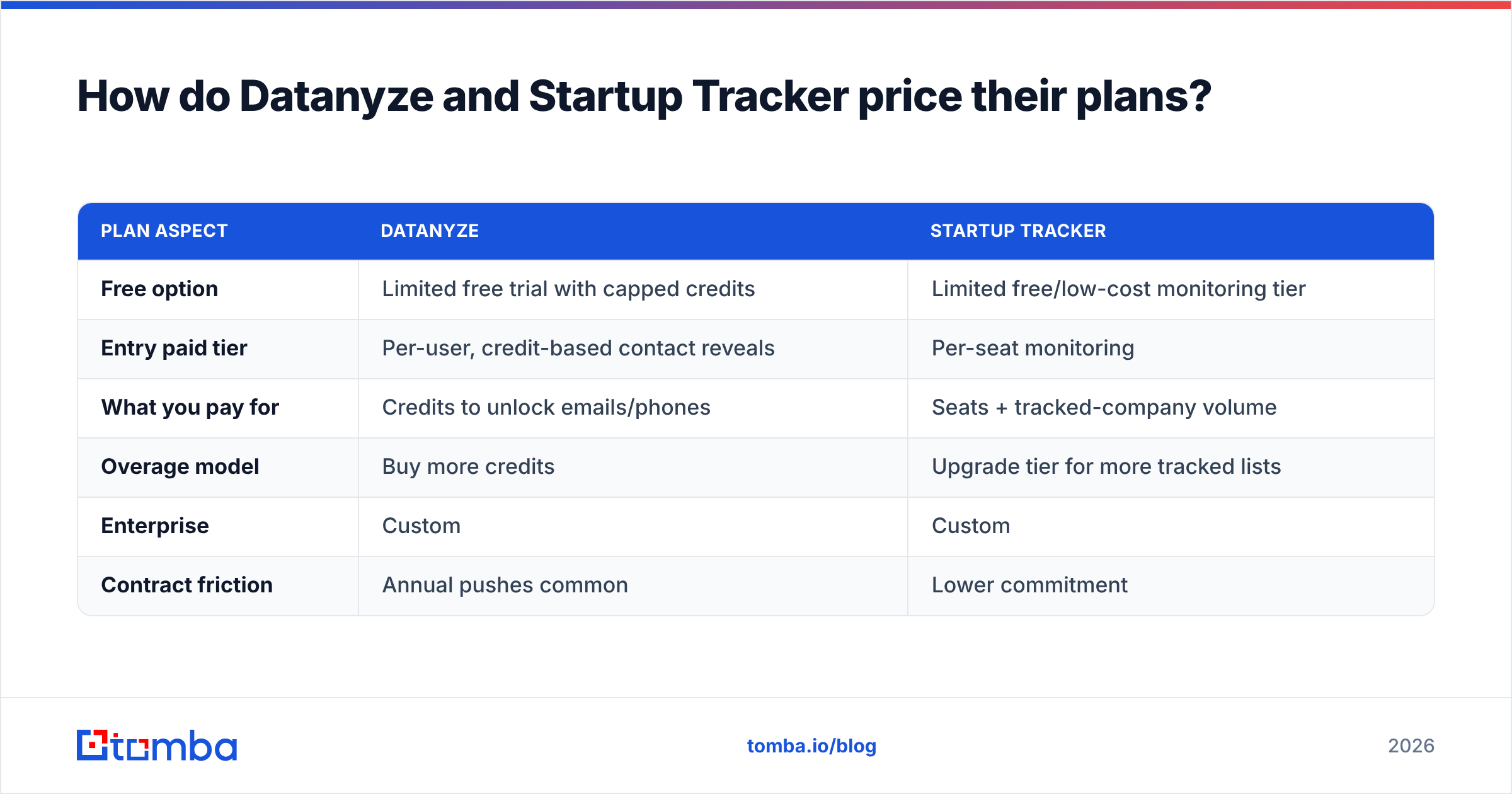
Both platforms keep pricing behind a "contact sales" wall for their serious tiers, which makes true side-by-side comparison harder than it should be. Below is a representative shape of how each tends to charge — always confirm current numbers directly, since B2B data pricing shifts often.
| Plan aspect | Datanyze | Startup Tracker |
|---|---|---|
| Free option | Limited free trial with capped credits | Limited free/low-cost monitoring tier |
| Entry paid tier | Per-user, credit-based contact reveals | Per-seat monitoring |
| What you pay for | Credits to unlock emails/phones | Seats + tracked-company volume |
| Overage model | Buy more credits | Upgrade tier for more tracked lists |
| Enterprise | Custom | Custom |
| Contract friction | Annual pushes common | Lower commitment |
The important insight isn't the exact dollar figure — it's the cost model. Datanyze charges you to reveal contacts, so heavy prospecting can get expensive per usable email once you factor in bounces. Startup Tracker charges you to watch companies, so your cost scales with how much of the market you monitor, not how many contacts you extract.
That distinction is why a lot of teams end up pairing either tool with a dedicated contact-finding layer. You use Datanyze or Startup Tracker to decide who to target, then use something purpose-built and transparently priced — like Tomba's pricing tiers starting free and moving to $49/mo — to actually get the verified emails without burning credits on stale records.

When should you choose Datanyze?#
Pick Datanyze if most of these describe you:
- You sell by technology. Your ICP is "companies running X platform," and technographic filtering is central to your targeting.
- You want data plus contacts in one place. You'd rather not stitch together a separate enrichment tool if you can avoid it.
- Your market is US-heavy and mid-to-enterprise. That's where Datanyze's contact coverage is strongest.
- You do steady, ongoing outbound rather than event-triggered bursts.
Skip it if your prospects are early-stage startups, if you sell heavily outside the US, or if per-credit contact costs make your unit economics ugly.
When should you choose Startup Tracker?#
Pick Startup Tracker if:
- Startups are your customer. You sell tooling, services, or infrastructure that newly funded companies buy.
- Timing is your edge. Reaching out within days of a funding round beats a generic cold email, and you want those triggers surfaced automatically.
- You already have a contact-finding workflow. You're comfortable using a separate tool to get the actual emails once Startup Tracker points you at the right company.
- You want low commitment. Its lighter pricing and learning curve make it easy to trial.
Skip it if you need deep contact records inside the same tool, or if your ICP is established companies that rarely generate funding or launch signals.
Is there a better approach than either tool?#
For a lot of teams, yes — and it comes down to separating two jobs that these platforms bundle awkwardly.
Job one is finding the right accounts. That's genuinely what Datanyze (by tech stack) and Startup Tracker (by growth signal) are good at. Use them for that.
Job two is getting verified contact data for those accounts. This is where both tools underdeliver, and where a focused stack wins. Once you know the target company, a domain search pulls every discoverable email pattern and named contact at that company in seconds. Layer in data enrichment to fill in roles and firmographics, then verify before you send.
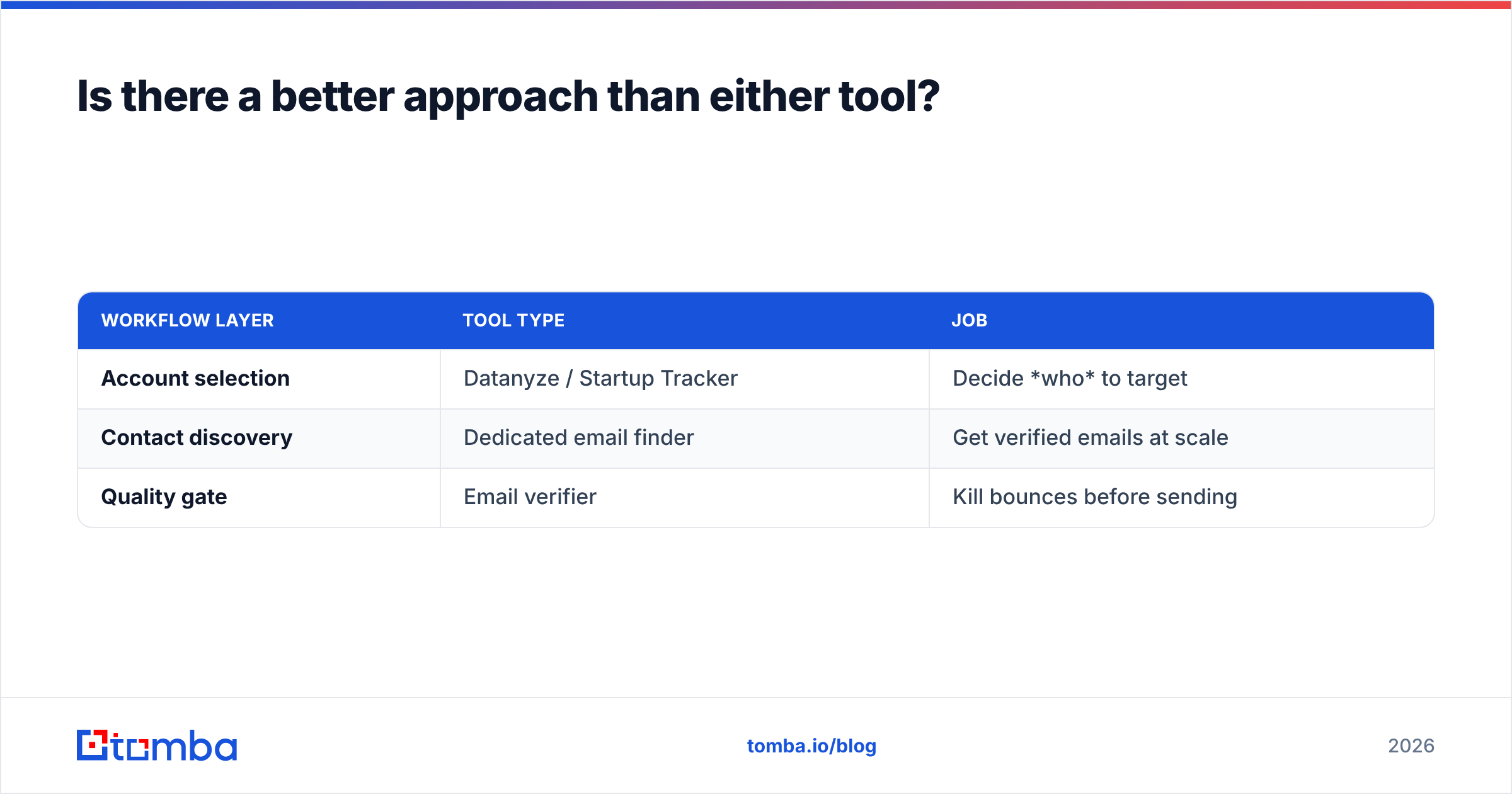
The result is a two-layer workflow that beats paying premium prices for a single tool's mediocre contact layer:
| Workflow layer | Tool type | Job |
|---|---|---|
| Account selection | Datanyze / Startup Tracker | Decide who to target |
| Contact discovery | Dedicated email finder | Get verified emails at scale |
| Quality gate | Email verifier | Kill bounces before sending |
This modular approach also protects you from lock-in. If Startup Tracker's signals stop matching your ICP, or Datanyze's credits get too expensive, you swap the selection layer without rebuilding your entire outbound engine. Your contact-finding layer stays constant and reliable. Industry buyer guides on Capterra consistently show that teams who separate these concerns report cleaner data and lower per-lead costs than those betting everything on one all-in-one platform.
Datanyze vs Startup Tracker: the verdict#
There's no single winner because they're not really competing — they're complementary tools that happen to share a shortlist. Choose Datanyze when your targeting is technographic. Choose Startup Tracker when your targeting is signal-based and startup-focused. Both are defensible picks for the account-selection half of prospecting.
But be clear-eyed about the other half. Neither tool reliably solves verified contact data, and that's the part that actually determines whether your emails land and convert. Don't let a strong targeting feature paper over a weak contact layer — measure bounce rates on real samples before you commit budget.
If your bottleneck is turning a list of target companies into verified, ready-to-send email addresses, that's exactly what the Tomba Email Finder is built for. Find professional emails by domain, name, or company, verify them in the same workflow, and skip the per-credit gamble on aging records. Start free with 25 searches a month, scale to the $49/mo Starter plan when you're ready, and keep your account-selection tool — Datanyze, Startup Tracker, or anything else — focused on what it does best. Try it against your next target list and compare the match rate yourself.
Related guides#
// get started
Find, verify and enrich your first contacts today
Start on the free plan with 25 searches a month, then scale when your team is ready.
Free plan · No credit card required · GDPR & CCPA
// about the author