DealJourney Pricing, Reviews, Pros and Cons: 2026 Buyer's Guide
A neutral breakdown of how DealJourney prices its plans, what real buyers praise and complain about, where the hidden costs sit, and which cheaper stack covers the same job for most small B2B teams.
This DealJourney pricing reviews pros and cons guide answers three questions. What does the platform really cost? What do buyers praise and complain about? And who should skip it? Here is the short version first.
TL;DR
- DealJourney sells like most modern deal-management platforms: per-seat, annual-first, and quote-based. There is no public self-serve checkout. Expect a demo call before you see a number.
- The sticker price is rarely the real price. Onboarding fees, minimum seat counts, CRM sync add-ons, and contact-data credits are where budgets quietly double.
- Reviews cluster around the same two themes: the pipeline visibility is genuinely good, and the setup effort is genuinely heavy.
- If your real bottleneck is finding and verifying contacts rather than managing deals you already have, a platform like this solves the wrong problem at 5-10x the cost.
- For most teams under 20 reps, a lean stack wins on both cost and time-to-value: the CRM you already pay for, plus a dedicated data layer starting at $49/mo.
What is DealJourney, and who is it for?#
DealJourney sits in the deal-management and pipeline-intelligence category. It tracks opportunities from first touch to closed-won, surfaces stalled deals, and gives sales leaders a forecast they can defend in a board meeting. Think of it as air-traffic control for your pipeline. The CRM is the runway log — a record of what happened. A deal platform is the radar screen. It tells you which flights are drifting off course right now.
That distinction matters for pricing, because it decides who signs the contract. Runway logs get bought by ops. Radar screens get bought by VPs of Sales with a forecast-accuracy problem, and VP-level buyers are quoted VP-level prices.
The typical fit profile:
- Team size 10-100 reps. Below that, a spreadsheet and a well-configured CRM cover it. Above that, you're usually looking at enterprise revenue-intelligence suites instead.
- Deal cycles longer than 30 days. Short transactional cycles don't create enough signal for stage-based analytics to be useful.
- Multi-threaded deals. The value shows up when five stakeholders are involved and you need to know which ones have gone quiet.
- An existing CRM you're keeping. These tools layer on top of Salesforce or HubSpot. They don't replace them, which means you pay for both.
- A leader who is measured on forecast accuracy, not just on activity volume.
If you read that list and thought "that's not my problem — my problem is that reps run out of people to email," stop here. You need a data layer, not a deal layer. That's a different purchase, and the rest of this post explains why the price gap is so wide.
How does DealJourney pricing actually work?#
Short answer: per-seat, annual-first, and negotiated. DealJourney does not publish a full self-serve price list today. That's standard for this category. Roughly two-thirds of mid-market sales platforms gate pricing behind a demo. It's a deliberate choice, not an oversight: it lets the vendor price by company size and urgency rather than by feature tier.
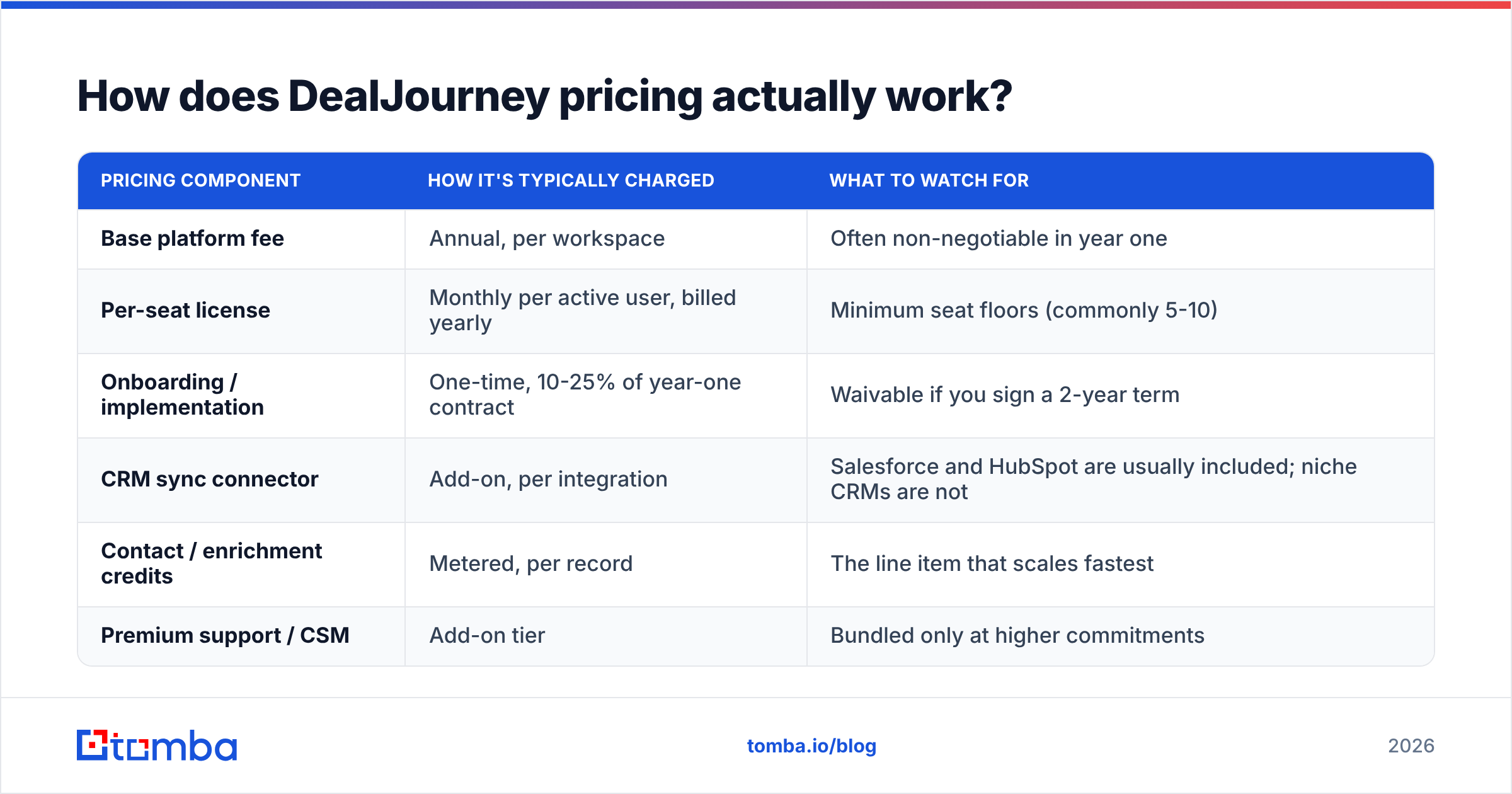
Here's how quote-based platforms in this bracket are almost always structured. Treat the ranges below as category benchmarks to sanity-check your quote against, not as confirmed vendor list prices. Always check the current numbers with the vendor before you budget.
| Pricing component | How it's typically charged | What to watch for |
|---|---|---|
| Base platform fee | Annual, per workspace | Often non-negotiable in year one |
| Per-seat license | Monthly per active user, billed yearly | Minimum seat floors (commonly 5-10) |
| Onboarding / implementation | One-time, 10-25% of year-one contract | Waivable if you sign a 2-year term |
| CRM sync connector | Add-on, per integration | Salesforce and HubSpot are usually included; niche CRMs are not |
| Contact / enrichment credits | Metered, per record | The line item that scales fastest |
| Premium support / CSM | Add-on tier | Bundled only at higher commitments |
The lesson from that table: the seat price is the smallest number in your contract. Buyers who benchmark only on "cost per user per month" underestimate year-one spend by 40-60%, because implementation and metered data credits aren't in the comparison.
Three practical negotiation notes:
- Ask for the ramp. If you're hiring, negotiate seats that step up quarterly rather than paying for headcount you don't have yet.
- Cap the data overage. Metered enrichment with no ceiling is how a $12k contract becomes a $19k invoice.
- Get the exit terms in writing. Auto-renew windows of 60-90 days are common. Miss one and you've bought another year.

What do DealJourney reviews say?#
Aggregate review sentiment for tools in this category is remarkably consistent, and DealJourney's feedback follows the same pattern you'll see on G2 and Capterra. Read reviews as a distribution, not a verdict. The same feature gets 5 stars from a 40-rep team with an ops hire and 2 stars from a 6-rep team without one.
What reviewers consistently praise:
- Pipeline visibility. Stage-by-stage deal health, with stalled-deal alerts that fire before the quarter ends rather than after.
- Forecast defensibility. Leaders report fewer "where did that number come from" conversations, which is the entire reason this category exists.
- Activity capture. Emails and meetings log themselves against the right opportunity. Reps hate manual CRM hygiene, and this removes most of it.
- Reporting depth. Cohort views by segment, source, and rep that most native CRM reporting can't produce without a BI tool.
What reviewers consistently complain about:
- Implementation drag. Four to eight weeks before the data is trustworthy is normal. Your pipeline history has to be clean first, and it usually isn't.
- Per-seat economics for mixed teams. You often end up buying licenses for SDRs and CS folks who only need read access.
- Contract inflexibility. Mid-term seat reductions are rarely allowed. If you cut headcount, you keep paying.
- Thin top-of-funnel. This is the big one. Deal platforms assume you already have contacts. They are not built to source them, and the bolt-on enrichment is usually resold third-party data at a markup.
That last complaint is worth sitting with. A tool that tells you a deal is stalling is only useful if you have enough deals for the pattern to matter. If your pipeline is thin, better analytics on a thin pipeline is just a sharper description of the problem.
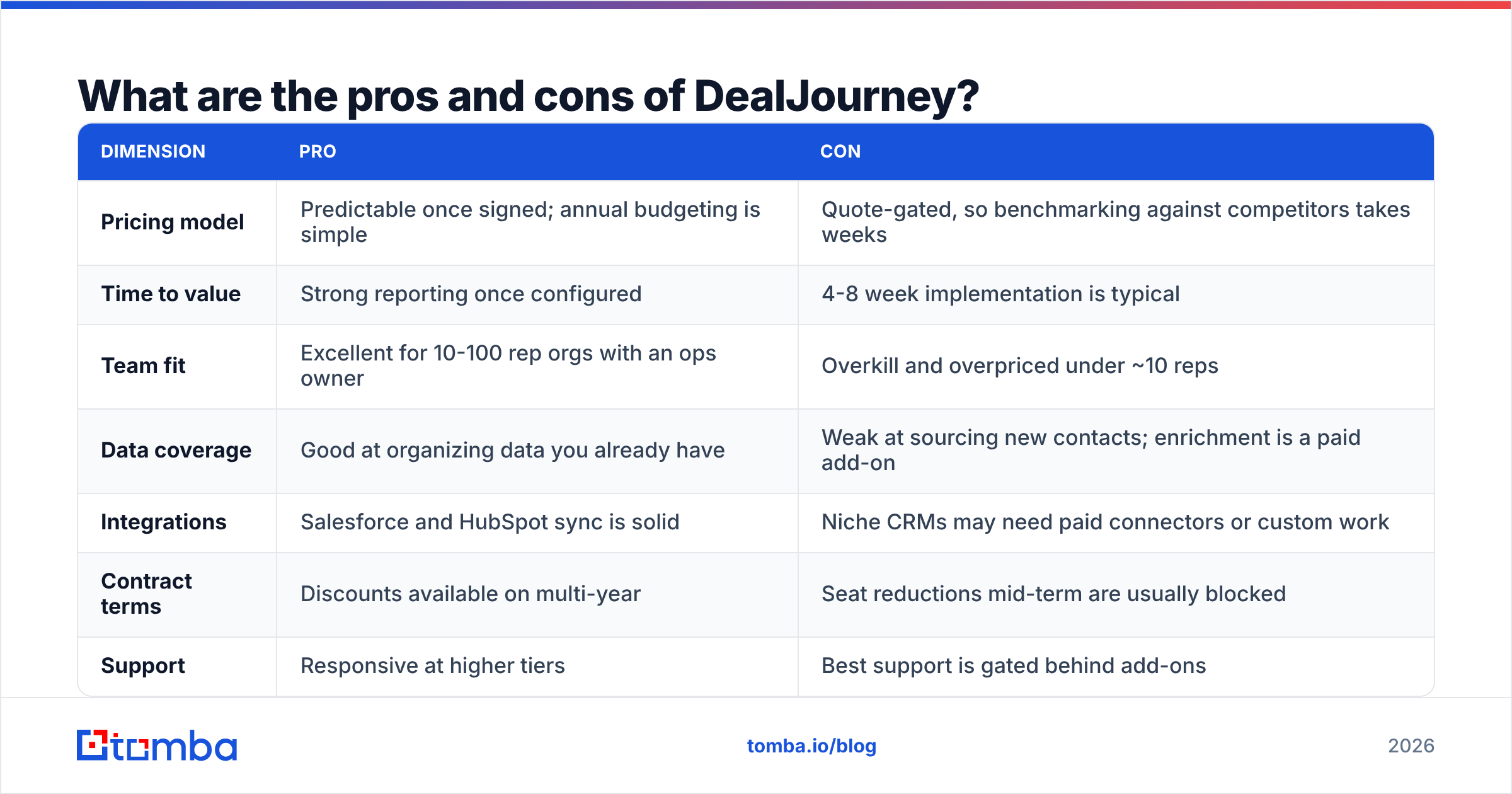
DealJourney pricing reviews pros and cons: the scorecard#
| Dimension | Pro | Con |
|---|---|---|
| Pricing model | Predictable once signed; annual budgeting is simple | Quote-gated, so benchmarking against competitors takes weeks |
| Time to value | Strong reporting once configured | 4-8 week implementation is typical |
| Team fit | Excellent for 10-100 rep orgs with an ops owner | Overkill and overpriced under ~10 reps |
| Data coverage | Good at organizing data you already have | Weak at sourcing new contacts; enrichment is a paid add-on |
| Integrations | Salesforce and HubSpot sync is solid | Niche CRMs may need paid connectors or custom work |
| Contract terms | Discounts available on multi-year | Seat reductions mid-term are usually blocked |
| Support | Responsive at higher tiers | Best support is gated behind add-ons |
What hidden costs should you budget for?#
Four line items that don't appear on any comparison page:
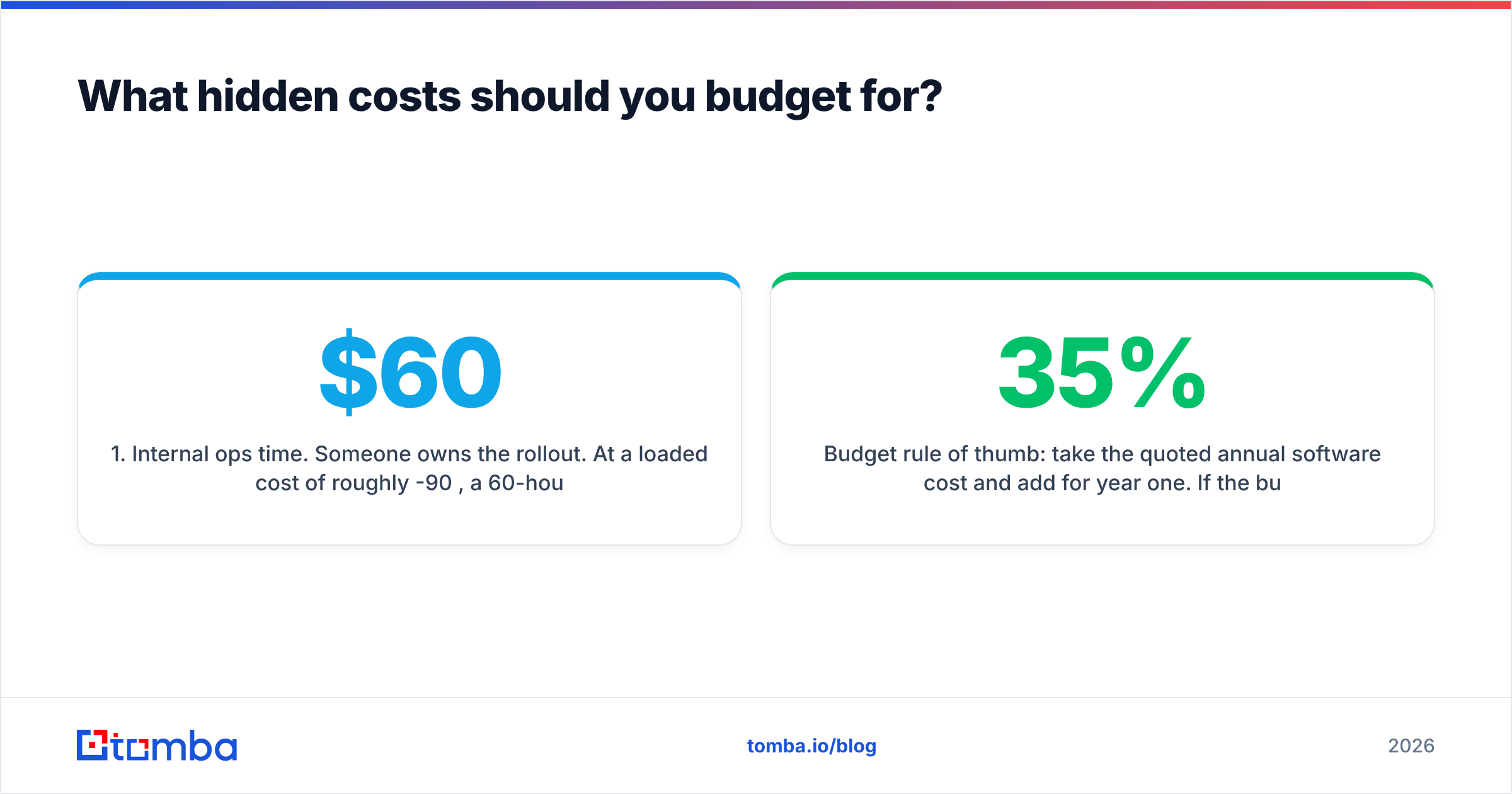
- Internal ops time. Someone owns the rollout. At a loaded cost of roughly $60-90/hour, a 60-hour implementation is $4-5k of real money that never shows up in the software budget.
- Data cleanup before go-live. Deal analytics inherit your CRM's garbage. Deduplication, stage normalization, and contact validation are prerequisites, not optional polish. Running your existing contact list through an email verifier before migration is the cheapest hour you'll spend all quarter.
- Seat creep. Marketing wants a dashboard. Finance wants the forecast. Each read-only viewer is often a full-price seat.
- Enrichment overage. Bundled credits run out around month four for any team doing real outbound, and per-record top-up pricing is where the margin lives.
Budget rule of thumb: take the quoted annual software cost and add 35% for year one. If the business case still works at that number, the purchase is sound. If it only works at the sticker price, you're going to have an uncomfortable conversation in Q2.
How does DealJourney compare to the alternatives?#
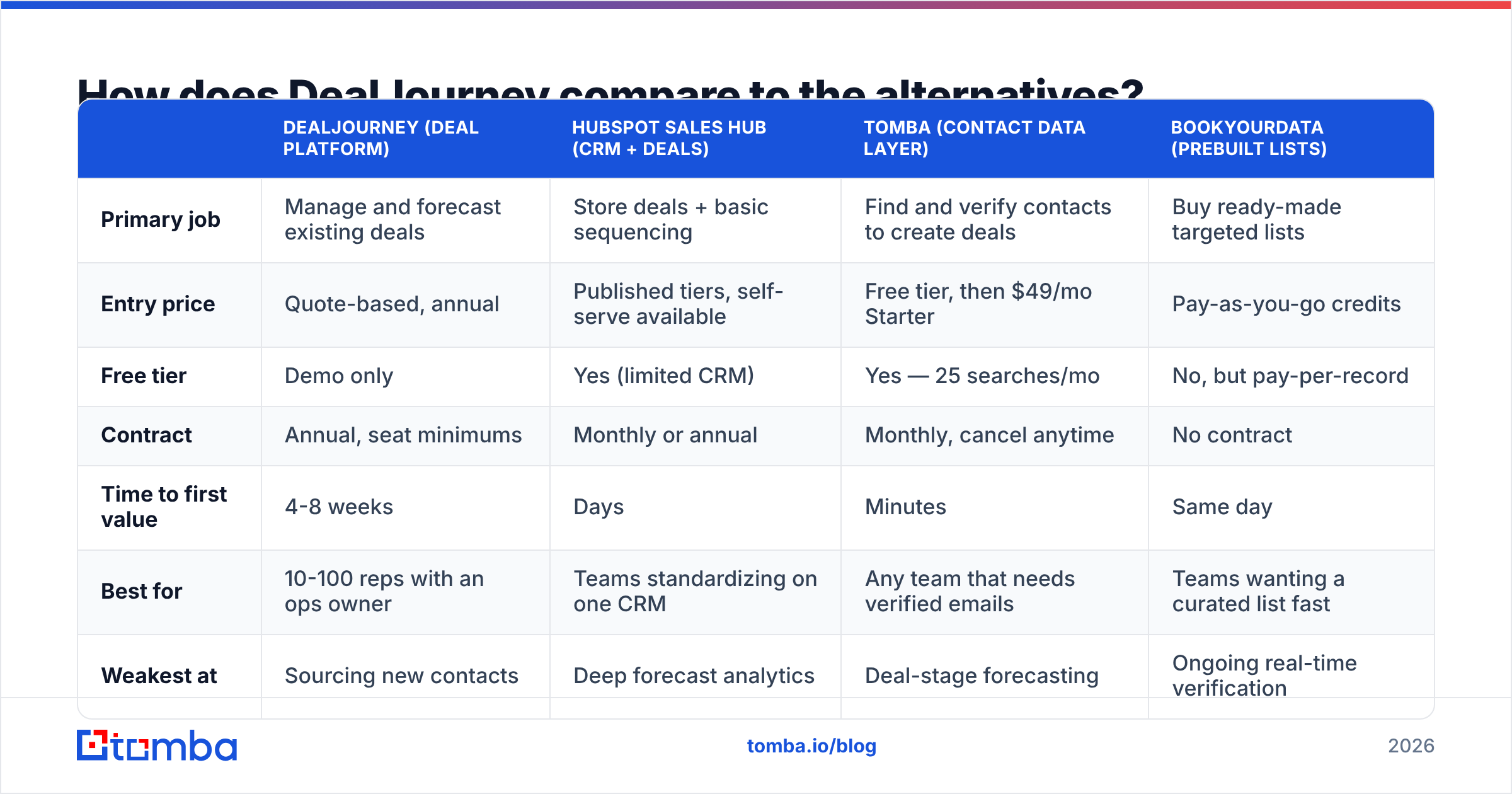
The honest comparison isn't DealJourney versus another deal platform. It's DealJourney versus the job you're actually trying to do. Three different jobs, three different price points:
| DealJourney (deal platform) | HubSpot Sales Hub (CRM + deals) | Tomba (contact data layer) | BookYourData (prebuilt lists) | |
|---|---|---|---|---|
| Primary job | Manage and forecast existing deals | Store deals + basic sequencing | Find and verify contacts to create deals | Buy ready-made targeted lists |
| Entry price | Quote-based, annual | Published tiers, self-serve available | Free tier, then $49/mo Starter | Pay-as-you-go credits |
| Free tier | Demo only | Yes (limited CRM) | Yes — 25 searches/mo | No, but pay-per-record |
| Contract | Annual, seat minimums | Monthly or annual | Monthly, cancel anytime | No contract |
| Time to first value | 4-8 weeks | Days | Minutes | Same day |
| Best for | 10-100 reps with an ops owner | Teams standardizing on one CRM | Any team that needs verified emails | Teams wanting a curated list fast |
| Weakest at | Sourcing new contacts | Deep forecast analytics | Deal-stage forecasting | Ongoing real-time verification |
A few notes on reading that table fairly.
HubSpot publishes its numbers openly, which makes it the easiest benchmark. You can check current Sales Hub tiers in thirty seconds. That transparency helps when you're building a business case under time pressure.
BookYourData solves a different problem well. When you know exactly which segment you want and you want the list today, buying a curated, pay-as-you-go list beats building one. It's a strong complement to a deal platform, not a competitor to it.
Tomba sits at the data layer. It doesn't forecast your quarter. It makes sure the pipeline has something in it. The email finder turns names and domains into verified addresses, domain search pulls every discoverable contact at a target account, and data enrichment fills in the fields your CRM is missing. Tomba pricing is public: free tier at 25 searches/mo, Starter $49/mo, Growth $99/mo, Pro $249/mo, Enterprise custom. No demo call required to see a number.

Is DealJourney worth it in 2026?#
Yes — if you have a forecasting problem and the headcount to justify it. No — if you have a pipeline-volume problem. That is the whole DealJourney pricing reviews pros and cons verdict in one line.
Run this test before you take the demo call. Pull your last two quarters and answer one question: did you lose more revenue to deals that stalled, or to not having enough deals at all?
- Stalled deals dominate? A deal platform earns its keep. Better stage visibility on a full pipeline compounds fast, and the 35% hidden-cost premium is worth paying.
- Not enough deals? No amount of analytics fixes an empty funnel. Spend the same money on contact data, sending infrastructure, and rep time. You'll see the difference in six weeks instead of six months.
- Both? Fix the volume first. Deal analytics need volume to produce a signal. Buy them in the wrong order and you pay for a year of software that spends two quarters describing a problem you already knew about.
There's also a sequencing argument that gets ignored. A deal platform's value scales with the quality of the records flowing into it. Feed it unverified contacts and half-complete company data, and you get confident-looking forecasts built on noise. Clean the inputs first — verify addresses, standardize company records, remove duplicates — and the same platform is far more accurate on day one. Teams that run a bulk email finder pass over their database before migration report shorter implementations, because there's less to reconcile.
Who should skip DealJourney entirely?#
Skip it if you match two or more of these:
- Fewer than 10 reps. Your CRM's native pipeline view plus a weekly call covers 90% of the value at 0% of the cost.
- Deal cycles under 21 days. Not enough stage dwell time for the analytics to say anything a dashboard doesn't.
- No dedicated ops owner. Without someone accountable for setup, the tool becomes expensive shelfware within two quarters. This is the most common failure mode.
- Founder-led sales. You already have perfect deal visibility. It's in your head.
- Outbound-first motion where sourcing is the constraint. Put the budget where the bottleneck is.
For that last group, the practical alternative stack is unglamorous and cheap. Keep your existing CRM, add a verified data source, and spend the difference on rep time. A team running 2,000 verified contacts a month through a $99/mo plan spends less per year than the implementation fee alone on most quote-based platforms.
What should you do next?#
Use this DealJourney pricing reviews pros and cons checklist before you sign anything. Get two quotes, not one. Ask both vendors for total year-one cost in writing, including implementation, minimum seats, and metered overage. Any vendor that won't put those three numbers in an email is telling you how the renewal conversation will go.
Then audit the inputs. If your contact data is stale, no deal platform on the market will forecast your quarter accurately. It'll just be wrong with better charts.
Start there. Tomba Email Finder gives you verified professional email addresses by name, company, or domain. The free tier covers 25 searches per month, and the $49/mo Starter plan needs no demo call, no annual commitment, and no implementation project. Fill the pipeline first. Then decide whether you need a radar screen to watch it.
Related guides#
Ready to find emails that actually work?
Join 150,000+ professionals who stopped guessing and started sending. Free credits on signup — no credit card required.
Get the Tomba newsletter
Practical outbound tactics and product updates — once every two weeks.
About the author