Dealroom vs Kaspr: Which B2B Data Tool Wins in 2026?
Dealroom maps markets and funding rounds. Kaspr pulls phone numbers off LinkedIn profiles. They solve different halves of the same problem — here is how they compare on data, pricing, compliance, and where each one quietly fails.
TL;DR
- Dealroom and Kaspr are not competitors. Dealroom is a company and market intelligence database (funding rounds, valuations, investor graphs). Kaspr is a contact-data extension that pulls phone numbers and emails off LinkedIn profiles.
- Pick Dealroom if your job is finding which companies to target — VC deal flow, market maps, competitive landscapes, TAM sizing.
- Pick Kaspr if your job is reaching a specific person you already found on LinkedIn, and mobile numbers matter more than volume.
- Neither is a good bulk email layer. Dealroom rarely exposes verified work emails at scale; Kaspr charges per seat and throttles credits, which breaks the moment you want 5,000 contacts from a list of domains.
- The common stack in 2026: Dealroom (or a free equivalent) for targeting → a dedicated email finder and verifier for contact data → Kaspr only where a dialer-ready mobile is worth the credit.
What are Dealroom and Kaspr, exactly?#
They get compared because both sell "B2B data." That is where the similarity ends.
Dealroom is a market intelligence platform built originally for venture capital. It tracks startups, funding rounds, investors, valuations, headcount growth, and sector taxonomies across global markets. Governments and VC funds use it to map ecosystems. Sales teams use it as a targeting layer: "show me European fintechs that raised a Series A in the last 9 months and grew headcount 30%+."
Kaspr is a prospecting tool built around a Chrome extension. You open a LinkedIn profile, Sales Navigator search, or group member list, hit the extension, and Kaspr returns phone numbers, email addresses, and basic company data. It also ships a lightweight CRM-ish workflow with lead lists, LinkedIn sequences, and integrations to HubSpot, Pipedrive, and Salesforce.
The distinction matters because buying the wrong one is expensive. A rep who buys Dealroom expecting mobile numbers gets a beautiful company graph and no way to call anyone. A founder who buys Kaspr expecting market-level company filtering gets a great extension and no market map.
How do Dealroom and Kaspr compare on data?#
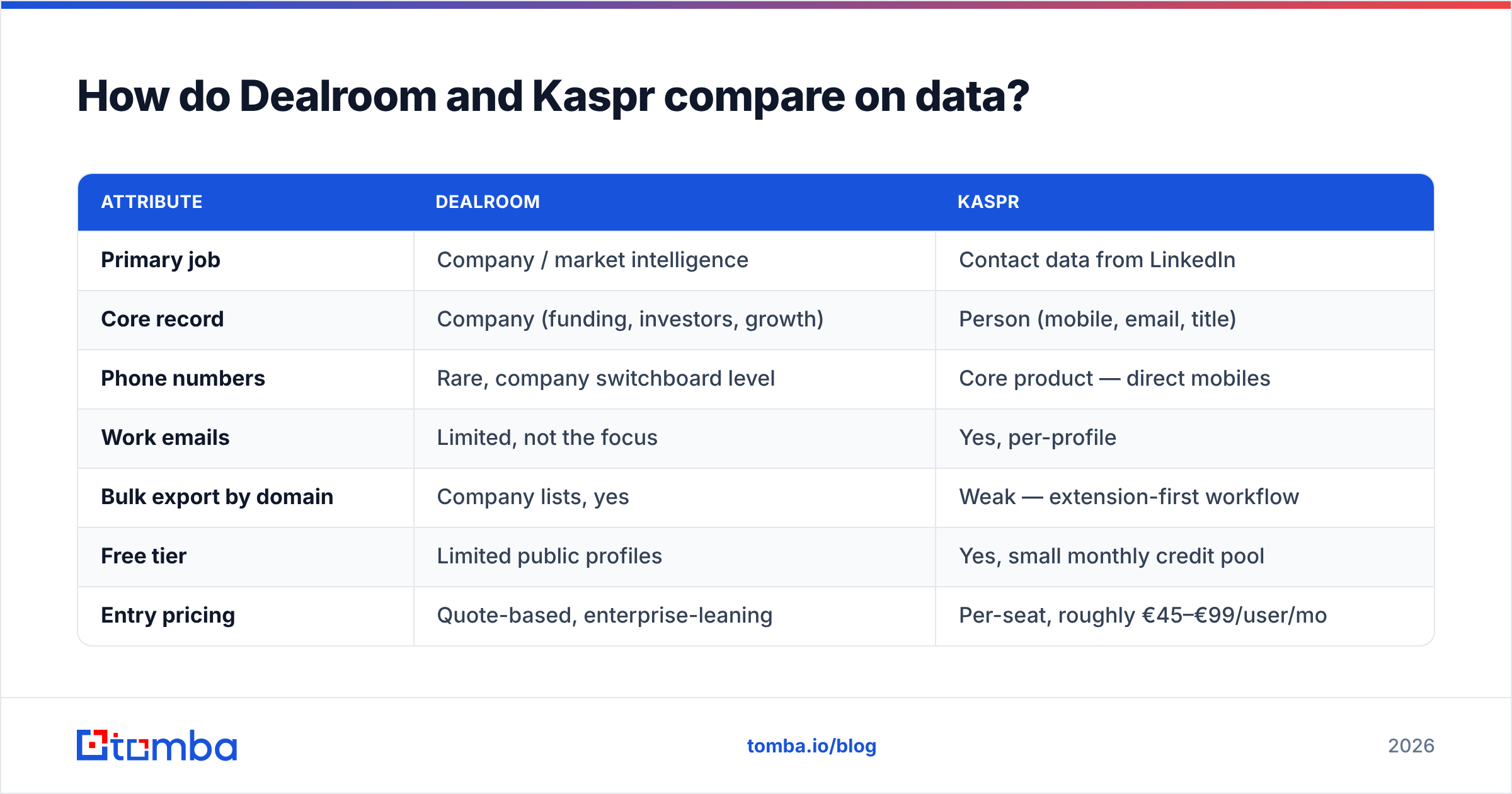
Here is the honest side-by-side. Treat pricing as directional — both vendors change list prices and Dealroom quotes most deals individually.
| Attribute | Dealroom | Kaspr |
|---|---|---|
| Primary job | Company / market intelligence | Contact data from LinkedIn |
| Core record | Company (funding, investors, growth) | Person (mobile, email, title) |
| Phone numbers | Rare, company switchboard level | Core product — direct mobiles |
| Work emails | Limited, not the focus | Yes, per-profile |
| Bulk export by domain | Company lists, yes | Weak — extension-first workflow |
| Free tier | Limited public profiles | Yes, small monthly credit pool |
| Entry pricing | Quote-based, enterprise-leaning | Per-seat, roughly €45–€99/user/mo |
| Buyer | VC, corp dev, strategy, RevOps | SDRs, recruiters, founders |
| Geography strength | Strong Europe coverage | Strong Europe, GDPR-forward |
| API | Yes (higher tiers) | Yes (higher tiers) |
Read that table as a division of labour, not a scoreboard. Dealroom answers who is worth contacting. Kaspr answers how do I reach this one person right now.

Is Dealroom better than Kaspr for prospecting?#
For the targeting half of prospecting, yes. For the contacting half, no — and it is not close.
Dealroom's edge is signal quality on the company side. Funding events, investor syndicates, headcount trajectories, and sector tags let you build trigger-based lists that actually convert. "Raised Series A in the last quarter" is a far better filter than "50–200 employees in SaaS," because it implies budget, urgency, and a hiring cycle. If you sell to venture-backed companies — dev tools, fintech infrastructure, HR software — that is real alpha.
What Dealroom does not do is hand you 300 verified addresses for the decision-makers at those companies. You get the company; you still need the people. That gap is where most teams bolt on an email finder that takes a domain plus a name and returns a deliverable address.
Kaspr's edge is the opposite: it is the fastest path from "I see this person on LinkedIn" to "I have their mobile." For SDRs running LinkedIn-first motions and for recruiters, that is genuinely valuable. The extension is fast, the UI is not fussy, and the GDPR posture is more conservative than several US-based competitors — Kaspr publishes a data-subject process and is explicit about its European compliance stance, which matters if your legal team reads DPAs.
Kaspr's limits are structural:
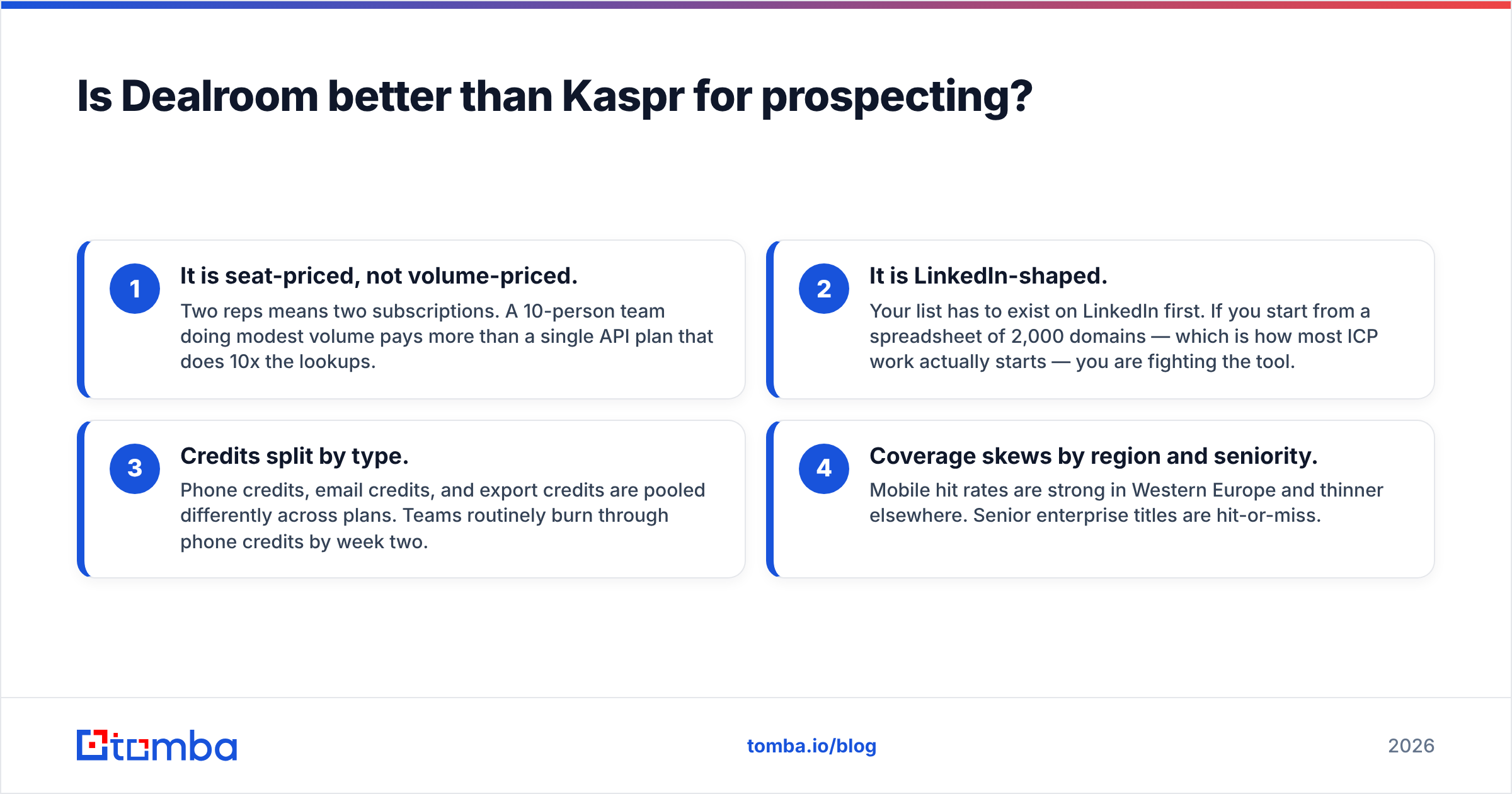
- It is seat-priced, not volume-priced. Two reps means two subscriptions. A 10-person team doing modest volume pays more than a single API plan that does 10x the lookups.
- It is LinkedIn-shaped. Your list has to exist on LinkedIn first. If you start from a spreadsheet of 2,000 domains — which is how most ICP work actually starts — you are fighting the tool.
- Credits split by type. Phone credits, email credits, and export credits are pooled differently across plans. Teams routinely burn through phone credits by week two.
- Coverage skews by region and seniority. Mobile hit rates are strong in Western Europe and thinner elsewhere. Senior enterprise titles are hit-or-miss.
What does each one actually cost?#
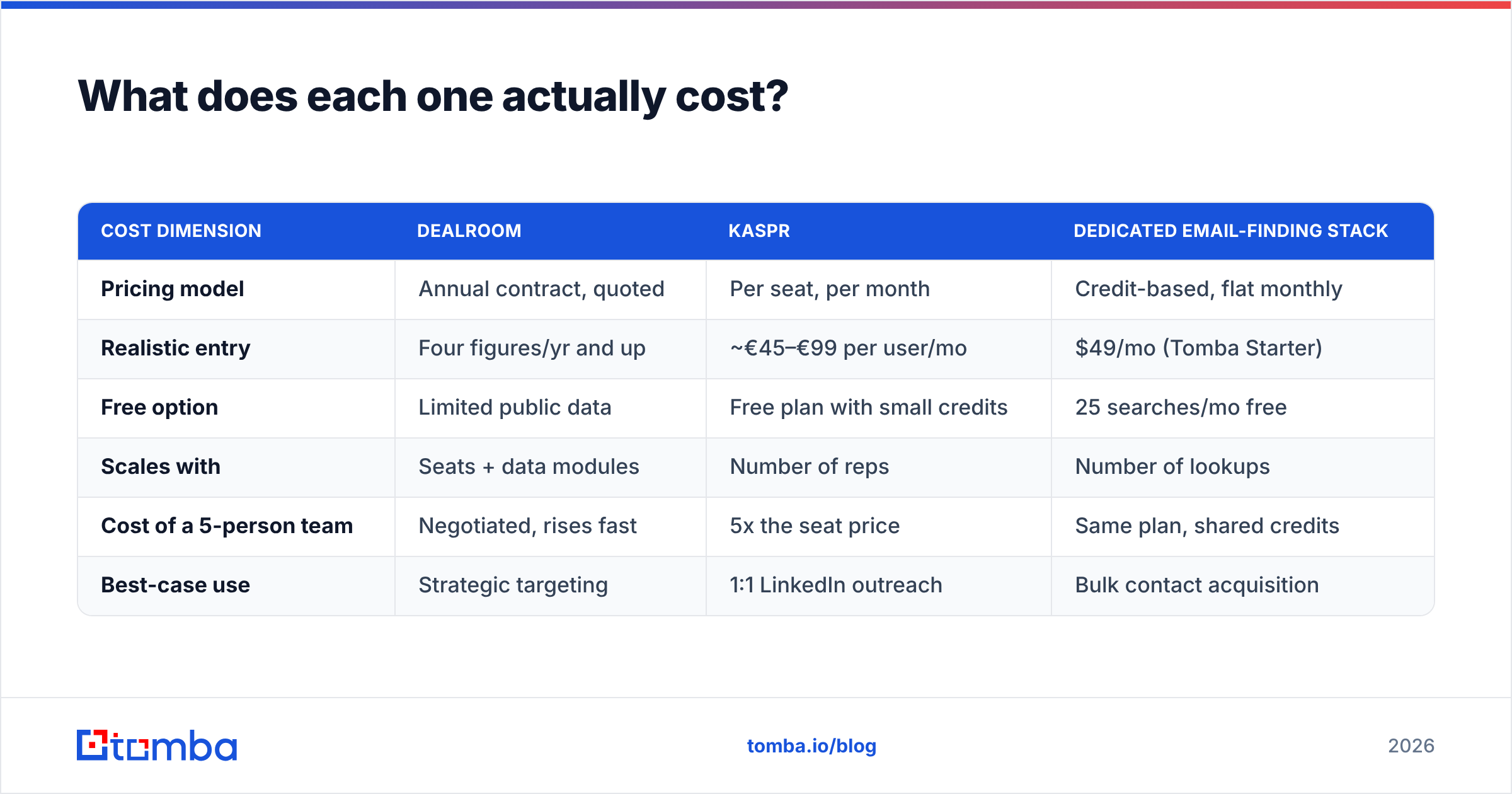
This is where the comparison gets uncomfortable, because the two tools price on different axes entirely.
| Cost dimension | Dealroom | Kaspr | Dedicated email-finding stack |
|---|---|---|---|
| Pricing model | Annual contract, quoted | Per seat, per month | Credit-based, flat monthly |
| Realistic entry | Four figures/yr and up | ~€45–€99 per user/mo | $49/mo (Tomba Starter) |
| Free option | Limited public data | Free plan with small credits | 25 searches/mo free |
| Scales with | Seats + data modules | Number of reps | Number of lookups |
| Cost of a 5-person team | Negotiated, rises fast | 5x the seat price | Same plan, shared credits |
| Best-case use | Strategic targeting | 1:1 LinkedIn outreach | Bulk contact acquisition |
The pattern is predictable. Dealroom is a strategy line item — you justify it once a year to a VP. Kaspr is a rep tool — it scales linearly with headcount, which is fine at 3 reps and painful at 15. Credit-based finders are an ops line item that scales with volume, not people, which is why RevOps teams tend to end up there. Tomba's pricing follows that third model: Free (25 searches/mo), Starter $49/mo, Growth $99/mo, Pro $249/mo, Enterprise custom — shared across the whole team rather than per seat.
None of this makes one tool "cheaper." It makes them budgetable in different ways. Ask your finance team which model they hate less.
Where do both tools leave a gap?#
Deliverability. Neither Dealroom nor Kaspr is primarily a verification company, and it shows in the outcomes.
Contact data decays at roughly 25–30% per year — people change jobs, companies rebrand domains, catch-all servers accept everything and then bounce silently. If you export a list on Monday and blast it on Friday without a verification pass, you will find out the hard way. A bounce rate above 3–4% starts damaging sender reputation, and once inbox providers throttle your domain, no amount of great targeting saves the campaign.
The practical fix is boring and effective: run everything through an email verifier before it touches a sequence. Syntax check, MX record check, SMTP handshake, disposable-domain flag, role-account flag. Then handle catch-all domains separately — they are the single biggest source of "verified" addresses that still bounce, which is why a dedicated catch-all verifier exists as its own step rather than a checkbox.
The second gap is bulk. Both tools are excellent at their unit of work — one company, one profile. Neither is designed for "here are 3,000 domains and the roles I want, go." That is a bulk email finder job, or an API job if you are wiring it into your own enrichment pipeline.

Which should you choose for your team?#
Use this as a decision shortcut rather than reading another 20 reviews on G2.
Choose Dealroom if:
- You sell to funded startups. Funding-round triggers are the whole reason to pay for it.
- You need market maps, not contact lists. Board decks, TAM sizing, competitive landscapes, ecosystem reports.
- You have a separate contact-data layer already. Dealroom slots in above it, not instead of it.
- Your buying committee includes strategy or corp dev. They will use it more than your SDRs will.
Choose Kaspr if:
- Your motion starts on LinkedIn. Sales Navigator lists, event attendee lists, group members.
- Phone matters more than email. Cold calling in Europe is Kaspr's home turf.
- You have a small team. Two to four seats is the sweet spot before per-seat math turns against you.
- Compliance is scrutinised. Its European data posture is a defensible answer in a procurement review.
Choose a dedicated email finder if:
- You start from domains or company lists, not from LinkedIn profiles.
- You need volume without adding seats. Credits shared across the team beat per-rep licensing.
- Deliverability is the bottleneck. Finding plus verifying in one pipeline removes a hand-off.
- You want it in your own systems. A documented email finder API beats a Chrome extension when the work is automated.
Can you use Dealroom and Kaspr together?#
Yes, and that combination is coherent — but most teams over-buy on both sides. Here is a stack that actually holds up:
- Targeting layer. Dealroom (or a cheaper funding-data source, if you are pre-revenue) generates the account list. Output: a list of domains with a reason-to-reach-out attached.
- Contact discovery layer. Feed those domains into domain search to pull every discoverable address at the company along with the detected email pattern. This is the step that scales, and it does not care whether the person maintains a LinkedIn profile.
- Verification layer. Verify before sending. Drop role accounts, flag catch-alls for a slower manual path, and keep bounce rate under 2%.
- Phone layer, selectively. Use Kaspr — or a phone finder — only for accounts worth calling. Mobile numbers are the most expensive record type in B2B data; spending them on tier-3 accounts is how credit pools evaporate.
- Enrichment and routing. Push the enriched records into your CRM via data enrichment so ownership, scoring, and sequencing happen automatically instead of via CSV.
The failure mode to avoid: buying Dealroom seats for people who will never open it, and Kaspr seats for reps who mostly work from spreadsheets. Audit actual usage at 60 days. Seat-priced tools are where quiet budget waste lives.
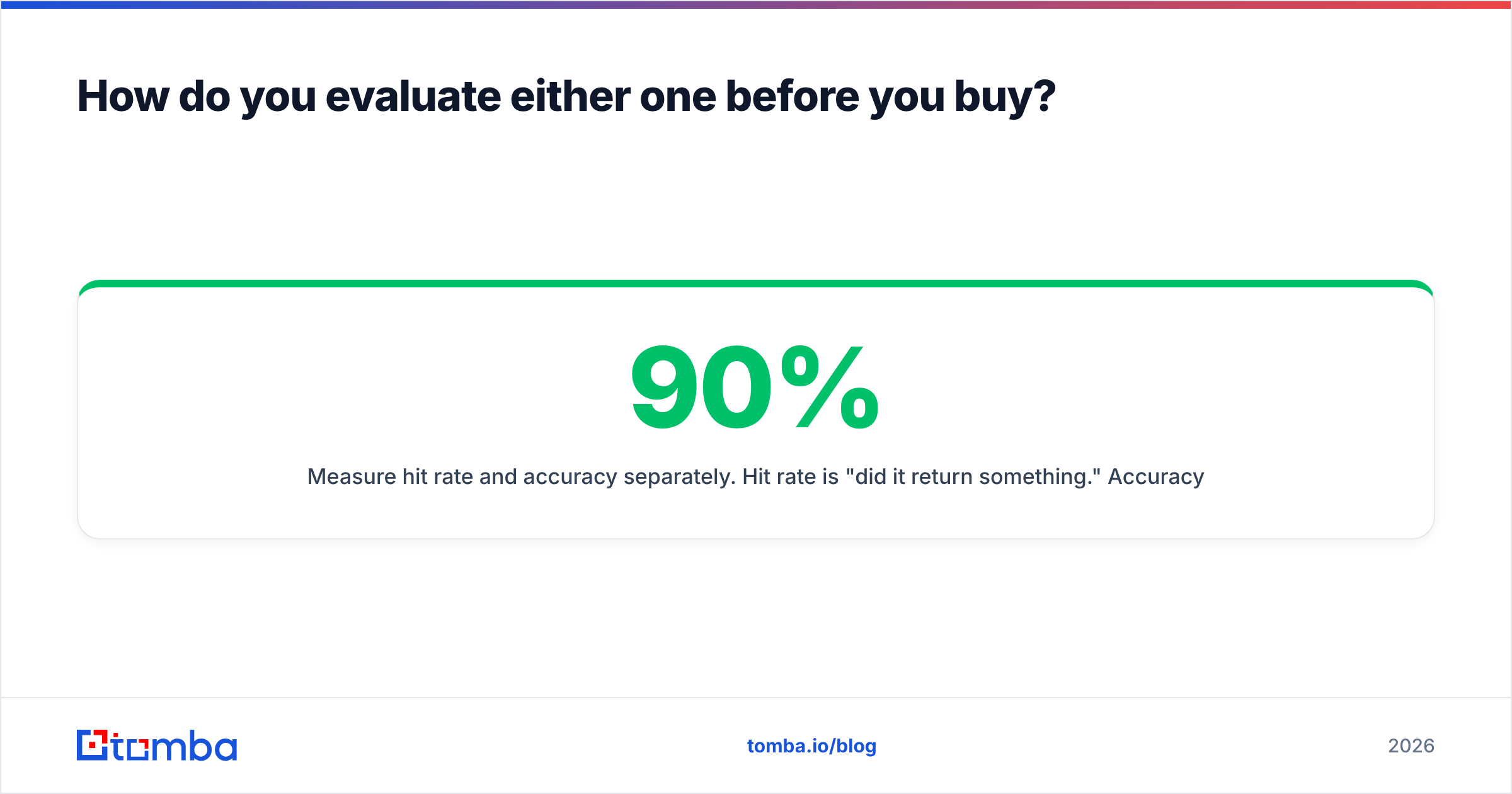
How do you evaluate either one before you buy?#
Run the same test on both, with your own data. Vendor-published accuracy numbers are marketing; your ICP is the only benchmark that counts.
- Build a 50-record truth set. Pick 50 people you can independently confirm — customers, past colleagues, people who replied to you last quarter. You know their real email and, ideally, their real number.
- Measure hit rate and accuracy separately. Hit rate is "did it return something." Accuracy is "was it right." A tool with 90% hit rate and 60% accuracy is worse than one with 60% hit rate and 95% accuracy, because the first one poisons your domain.
- Test your worst geography. Every provider looks good on US SaaS. Test the region where you actually struggle.
- Test catch-all domains deliberately. Include five known catch-all companies. See whether the tool admits uncertainty or confidently returns a guess.
- Check the exit. Can you export? Does the API have rate limits you can live with? What happens to your data on cancellation?
Both Dealroom and Kaspr offer trials or free tiers sufficient for this exercise. So does Tomba's free plan — 25 searches is enough to run a truth-set test before spending anything.
The verdict on Dealroom vs Kaspr#
If someone forces a single answer: Dealroom wins for deciding who to target, Kaspr wins for reaching one person on LinkedIn today, and neither wins for building contact lists at scale. The teams that consistently hit outbound numbers treat targeting, email discovery, verification, and phone data as four separate purchases and refuse to pay enterprise prices for the layer they use least.
Start with the layer that is actually blocking you. If you have accounts but no addresses, the market-intelligence spend is not your problem — the contact layer is. Run your target domains through the Tomba Email Finder, verify the output before it reaches a sequence, and keep the per-seat tools for the handful of reps who genuinely live in LinkedIn. The free tier gives you 25 searches to test it against your own truth set, and Starter is $49/mo shared across the team — not per rep, not per quarter, not quote-on-request.
Related guides#
Ready to find emails that actually work?
Join 150,000+ professionals who stopped guessing and started sending. Free credits on signup — no credit card required.
Get the Tomba newsletter
Practical outbound tactics and product updates — once every two weeks.
About the author