DealSignal vs GetProspect: Which B2B Data Tool Wins in 2026
DealSignal sells enterprise-grade, on-demand verified B2B records. GetProspect sells self-serve email finding at prospector prices. Here's an honest breakdown of coverage, accuracy, pricing, and which one your team should actually buy in 2026.
TL;DR
- DealSignal is an enterprise B2B data platform. Pricing is quote-based and contracts run yearly. Records are verified on demand. It fits ABM and RevOps teams.
- GetProspect is a self-serve email finder. It ships a LinkedIn extension, a free tier, and credit plans. An SDR can expense it in a minute.
- DealSignal vs GetProspect is not really one race. DealSignal competes with ZoomInfo-class vendors. GetProspect competes with Hunter-class tools.
- Accuracy claims on both sites are directional, not audited. Test each one on your own ICP first. A 200-record sample beats any vendor benchmark.
- Want verified emails without a demo call or a five-figure minimum? A credit-based finder like Tomba does the same job for $49/mo.
What are DealSignal and GetProspect?#
DealSignal (dealsignal.com) is a B2B data platform for demand gen and revenue teams. Its pitch is freshness. Most vendors serve records from a static warehouse. DealSignal re-checks each contact when you request it. You get contact and account data with firmographic, technographic, and intent fields layered on top. You buy it from a rep, usually on a yearly deal.
GetProspect (getprospect.com) is a lead tool built around email finding. You search a B2B database by job title, company, location, and headcount. You can also run its Chrome extension over LinkedIn results and export the enriched list. There is a free plan, self-serve upgrades, and a light CRM layer for organizing lists.
Put plainly: DealSignal is a data contract. GetProspect is a data utility. That one split drives most of the DealSignal vs GetProspect differences below.
How do DealSignal and GetProspect source their data?#
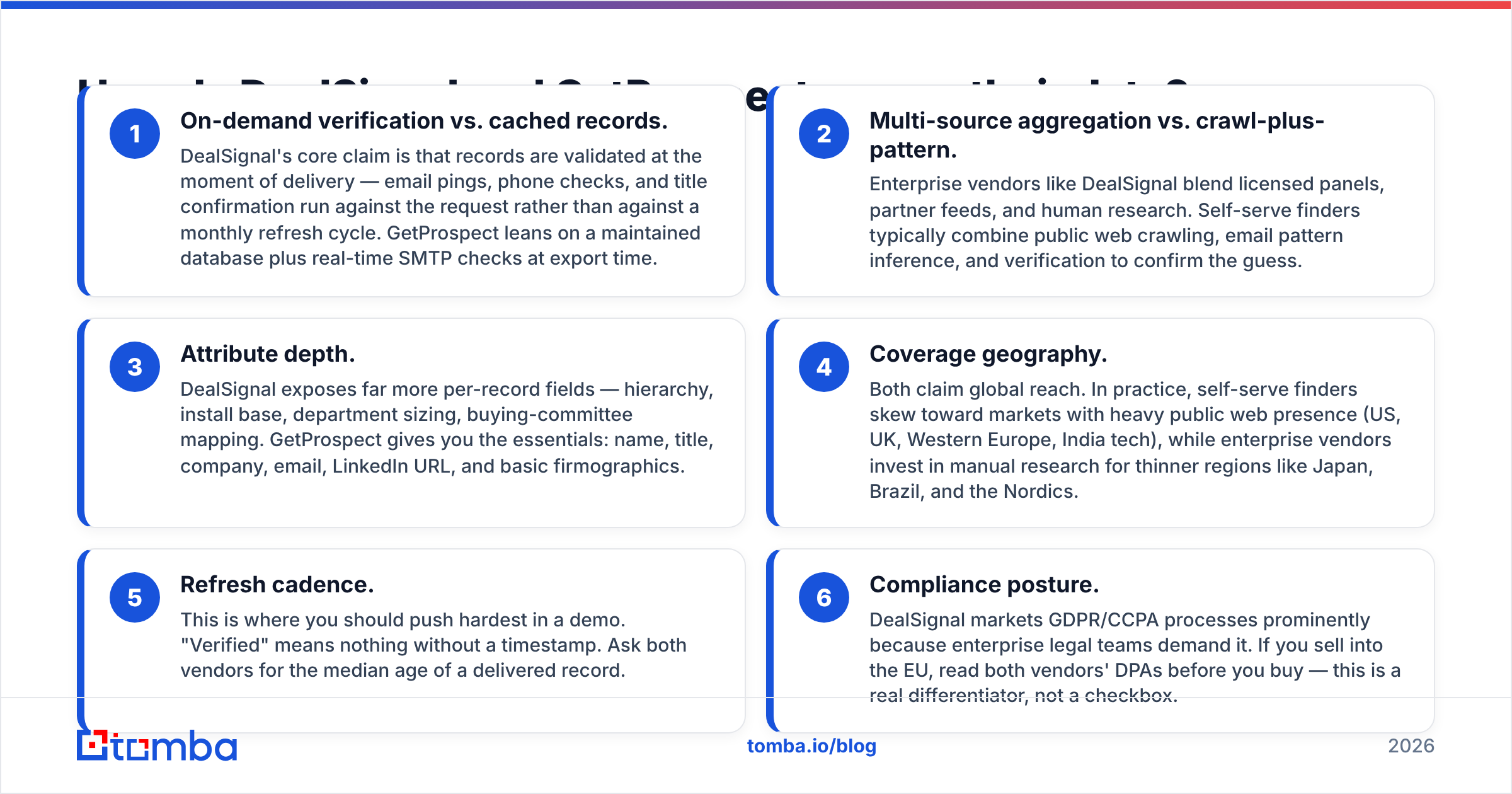
Sourcing explains the biggest price gap in DealSignal vs GetProspect. One tool can cost 10-40x more per record. Here is where the two models part ways.
1. On-demand checks vs. cached records. DealSignal validates a record at delivery. It pings the email, checks the phone, and confirms the title. GetProspect leans on a stored database, then runs an SMTP check at export time.
2. Many sources vs. crawl and pattern. DealSignal blends licensed panels, partner feeds, and human research. Self-serve finders crawl the public web, infer the email pattern, then verify the guess.
3. Field depth. DealSignal exposes far more fields per record: org hierarchy, install base, department size, buying-committee maps. GetProspect gives you the basics. Name, title, company, email, LinkedIn URL, and simple firmographics.
4. Coverage by region. Both claim global reach. Finders skew toward markets with a heavy public web presence, such as the US, UK, Western Europe, and Indian tech. Enterprise vendors pay researchers to fill thin regions like Japan, Brazil, and the Nordics.
5. Refresh cadence. Push hard here on the demo. "Verified" means nothing without a date. Ask each vendor for the median age of a delivered record.
6. Compliance. DealSignal markets GDPR and CCPA process hard, because legal teams ask for it. If you sell into the EU, read both DPAs before you sign. This is a real difference, not a checkbox.
Which one has better data accuracy?#
Accuracy is the first question in any DealSignal vs GetProspect comparison. Neither company publishes audited numbers. So treat every percentage on both sites as a claim, not a fact. DealSignal advertises high-nineties accuracy on the back of its on-demand checks. GetProspect bills you only for emails that pass its checks. That promise is different, and it is more honest than a headline number.

Here is the part vendors skip: accuracy depends on your ICP, not on the tool. A platform that hits 97% on US SaaS VPs may hit 60% on German plant managers. Two things follow.
- Run the same 200-contact list through both tools. Same accounts, same titles. Compare match rate and bounce rate together. Match rate on its own is a vanity metric.
- Split out catch-all domains. Both tools return addresses on catch-all servers, and no SMTP check can confirm those. If many target accounts use catch-all, add a catch-all verifier to the stack. Skip it and your "verified" list will quietly burn your sender reputation.
One more note. Enterprise deals often make you pay for records even when they bounce. Credit tools that charge only for valid hits move that risk back to the vendor. Ask about credit refunds for bounces. The answer separates confident vendors from hopeful ones.
DealSignal vs GetProspect: how do they compare feature by feature?#
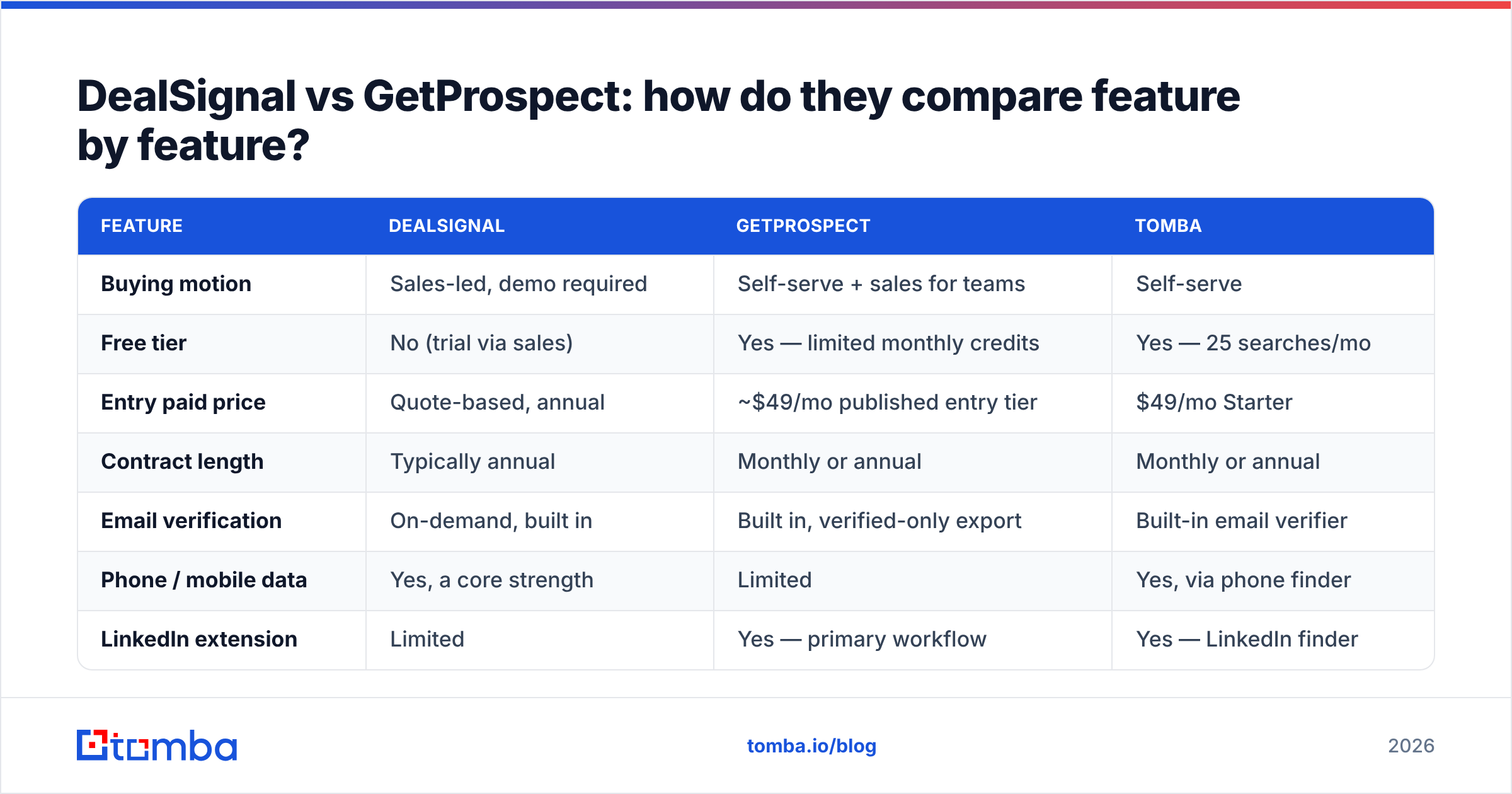
| Feature | DealSignal | GetProspect | Tomba |
|---|---|---|---|
| Buying motion | Sales-led, demo required | Self-serve + sales for teams | Self-serve |
| Free tier | No (trial via sales) | Yes — limited monthly credits | Yes — 25 searches/mo |
| Entry paid price | Quote-based, annual | ~$49/mo published entry tier | $49/mo Starter |
| Contract length | Typically annual | Monthly or annual | Monthly or annual |
| Email verification | On-demand, built in | Built in, verified-only export | Built-in email verifier |
| Phone / mobile data | Yes, a core strength | Limited | Yes, via phone finder |
| LinkedIn extension | Limited | Yes — primary workflow | Yes — LinkedIn finder |
| Bulk enrichment | Yes, large-scale | Yes, list-based | Yes, bulk email finder |
| Public API | Yes | Yes | Yes — Tomba API |
| Attribute depth | Very high (100+ fields) | Moderate | Moderate + enrichment |
| Best for | RevOps, ABM, enterprise | SDRs, agencies, founders | SDRs, agencies, dev teams |

The table makes the split obvious. DealSignal wins on depth, phone coverage, and data governance. A 500-person revenue org needs all three. GetProspect wins on speed to value. You can export a verified list ten minutes after signup, with no procurement call.
How does pricing actually compare?#
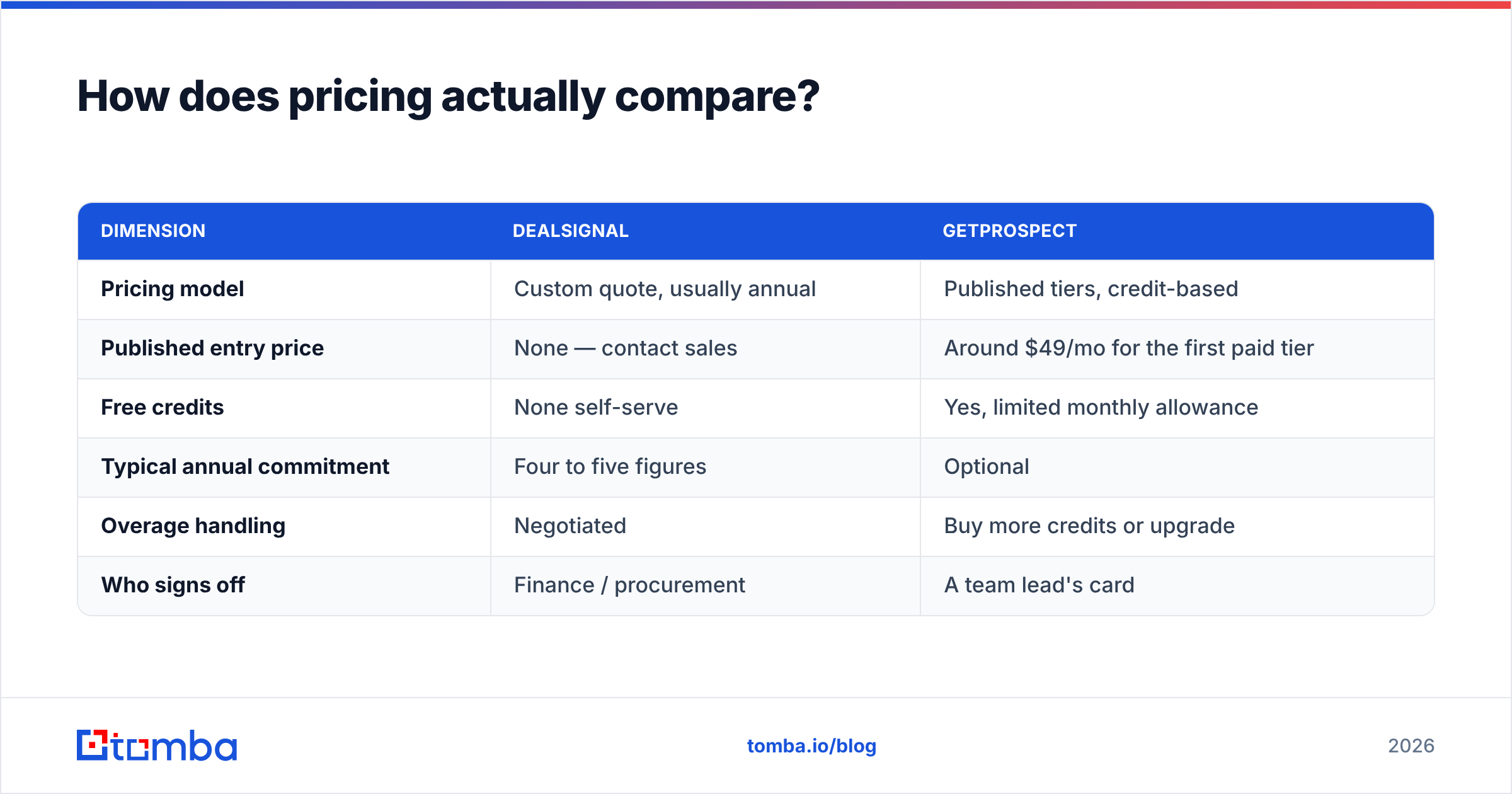
Pricing is the least even part of the DealSignal vs GetProspect matchup. Confirm the current numbers on each vendor's site before you budget.
| Dimension | DealSignal | GetProspect |
|---|---|---|
| Pricing model | Custom quote, usually annual | Published tiers, credit-based |
| Published entry price | None — contact sales | Around $49/mo for the first paid tier |
| Free credits | None self-serve | Yes, limited monthly allowance |
| Typical annual commitment | Four to five figures | Optional |
| Overage handling | Negotiated | Buy more credits or upgrade |
| Who signs off | Finance / procurement | A team lead's card |
Two things matter more than the sticker price.
Cost per usable record. Say Tool A charges $0.30 per record and lands 60% of sends. Tool B charges $0.12 and lands 85%. Tool B is about three times cheaper in real terms. Run that math on your own test sample.
Utilization. Data contracts are famous for unused credits at renewal. Say your team pulls 3,000 contacts a month. A plan sized for 100,000 becomes a line item you have to defend. Credit-based pricing scales down as easily as it scales up, so that trap goes away.

Which tool should your team choose?#
Choose DealSignal if:
- You run account-based marketing and need buying-committee maps, not just a contact list.
- You need mobile numbers at scale for a phone-heavy outbound motion.
- You have a data ops team to integrate, dedupe, and govern a large feed.
- You have budget for an annual contract and legal time for a DPA.
Choose GetProspect if:
- Your team is one to twenty people and buys tools on a corporate card.
- LinkedIn Sales Navigator is where your prospecting really happens.
- You want a free tier to test the tool before you spend.
- You need emails and basic firmographics, not a 100-field schema.
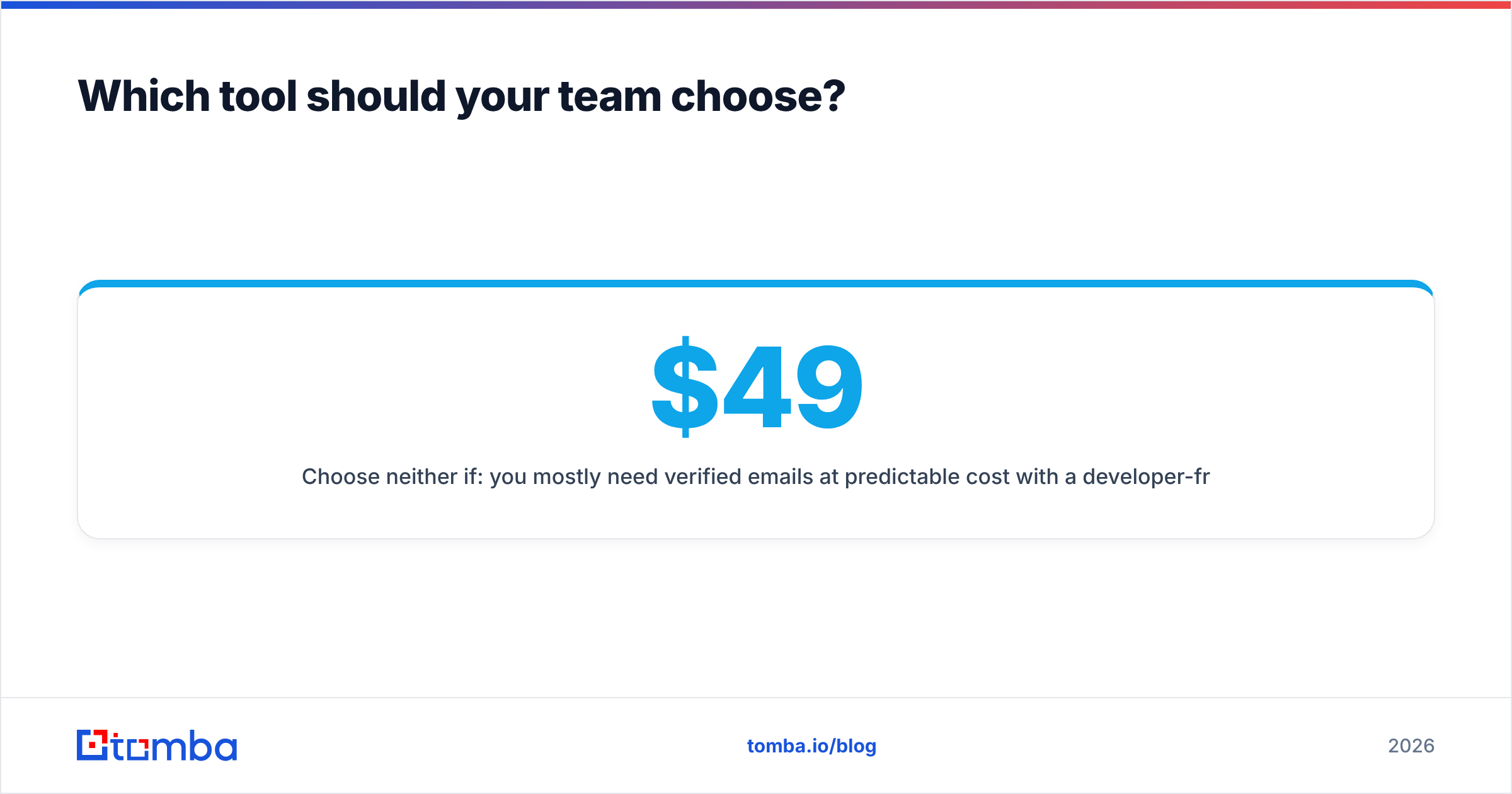
Choose neither if: you mostly need verified emails at a steady cost. Add a developer-friendly API and no minimum commitment, and you are in a third category. That is where credit-based finders live. Tomba's domain search and data enrichment cover the same core job. Find the person, confirm the address, push it into the CRM. Plans run $49/mo Starter, $99/mo Growth, and $249/mo Pro. The free tier gives you 25 searches to test coverage on your own accounts first.
How do they fit into an existing sales stack?#
Data is only as good as the pipe it runs through. Check three points before you sign.
CRM sync. DealSignal connects natively to Salesforce and marketing automation tools. That helps if enrichment must fire on record creation without middleware. GetProspect works through Zapier and its API. That covers most SMB stacks, but you own the plumbing. Tomba supports both paths via HubSpot, Salesforce, and Zapier.
Sequencer handoff. The list still has to reach Instantly, Smartlead, or Outreach. Check that exports carry the custom fields your templates use. Nothing kills a campaign faster than Hi {{first_name}}, rendering blank.
Verification at send time. Records decay about 2-3% per month as people change jobs. Re-verify anything older than 60 days before it enters a sequence. Do this no matter which accuracy number a vendor quoted you at signing.
Want a wider view? G2's lead intelligence category has enough recent reviews to show patterns in support and billing. That is usually more useful than a feature grid.
What do real buyers complain about?#
Public reviews in this category repeat the same few themes.
- Enterprise platforms: slow onboarding, unused credits at renewal, and coverage gaps outside core regions that never came up in the sales cycle.
- Self-serve finders: shaky match rates on small companies, catch-all domains counted as valid, and extensions that break when LinkedIn ships a redesign.
- Both: support quality drops fast below the top pricing tier.
None of these are dealbreakers. They are the questions to ask on the call. They are also why a paid pilot beats a spreadsheet of feature checkmarks.
The verdict: DealSignal vs GetProspect#
DealSignal vs GetProspect has no single winner, because the two tools serve different companies. DealSignal is right for a RevOps team that needs governed, deeply attributed, phone-inclusive data. That team also needs the budget and headcount to run it. GetProspect is right for an SDR, founder, or agency that needs verified emails today, with no procurement call.
There is a third answer too. Most teams weighing DealSignal vs GetProspect are over-buying. Your real need may be simple: find the right person at 500 target companies and get an address that lands. If so, you do not need a 100-field schema or an annual contract. You need a reliable finder, a verifier, and an API.
That is what Tomba Email Finder does. Start free with 25 searches. Run it against the same 200-account test list you give DealSignal and GetProspect. Compare bounce rates, not brochures. If the numbers hold up, Starter is $49/mo, and you can cancel without a renewal negotiation.
Related guides#
Ready to find emails that actually work?
Join 150,000+ professionals who stopped guessing and started sending. Free credits on signup — no credit card required.
Get the Tomba newsletter
Practical outbound tactics and product updates — once every two weeks.
About the author