DeBounce vs Kipplo: Which Email Data Tool Wins in 2026?
DeBounce cleans lists. Kipplo builds them. We break down accuracy, credit pricing, catch-all handling and real cost per 1,000 contacts so you can pick the right side of the stack.
TL;DR
- DeBounce and Kipplo are not really competitors — DeBounce is a dedicated email verification service, while Kipplo positions itself as a broader B2B prospecting and outreach suite. Comparing them head-to-head only makes sense if you are deciding where in your stack to spend budget.
- If you already have lists and just need bounce rates under 2%, DeBounce is the cheaper, simpler tool. Its pay-as-you-go credits and no-expiry model suit teams that clean in bursts.
- If you have no lists yet, verification alone solves nothing. You need a sourcing layer first — that is where Kipplo, Tomba, and similar platforms compete.
- The real cost comparison is not per-credit, it is cost per usable contact. A $0.002 verification credit spent on a badly sourced address is still wasted money.
- Our pick for most outbound teams: source and verify in one pipeline rather than stitching two vendors together. That is the workflow argument, not a brand argument.
What is DeBounce, and who actually uses it?#
DeBounce is a single-purpose email verification service. You upload a list (CSV, XLS, or via API), it runs syntax checks, domain and MX record lookups, disposable-domain detection, role-account flagging, and SMTP-level mailbox checks, then hands back a scored file: deliverable, invalid, accepted-all (catch-all), unknown, disposable, role.
That is the whole product, and the narrowness is deliberate. DeBounce has built its reputation on being cheap, fast, and boring — three qualities that matter a lot when your only job is to stop a 40,000-row list from torching your sending domain.
Typical DeBounce users:
- Email marketers with legacy lists. Someone inherits a 5-year-old Mailchimp audience and needs it scrubbed before the next campaign.
- Agencies cleaning client data. Pay-as-you-go credits mean no monthly commitment when client volume is lumpy.
- Developers wiring verification into signup forms. The real-time API blocks junk addresses at registration.
- Cold email teams as a final gate. They source elsewhere, then run everything through a verifier before it touches a sequencer.
Note that fourth use case. It tells you something important: DeBounce is almost never the only data tool in a stack. It is the last step, not the first.
What is Kipplo, and how is it different?#
Kipplo sits in a different category. It markets itself as a B2B lead generation and outreach platform — contact discovery, company data, list building, and campaign sending bundled together, rather than a standalone verification utility.
The pitch is consolidation: instead of paying one vendor to find contacts, another to verify them, and a third to send sequences, you do all three in one dashboard with one bill. That is a genuinely attractive proposition for a small team, and it is the same pitch Apollo, Lusha, and a dozen others make.
The trade-off is also the same one those platforms face. All-in-one suites tend to be adequate at every layer and excellent at none. Verification bundled into a prospecting suite is usually a lighter-weight check than what a dedicated verifier runs, because the suite's engineering budget is spread across sourcing, enrichment, sending, and reporting.
Before you commit, check Kipplo directly for current plan limits and read recent reviews on G2 — pricing and feature scope in this category change quarterly, and any comparison article (including this one) ages fast.

How accurate are DeBounce and Kipplo in practice?#
Accuracy claims in this space are close to meaningless without defining the metric. Vendors quote three different numbers and call them all "accuracy":
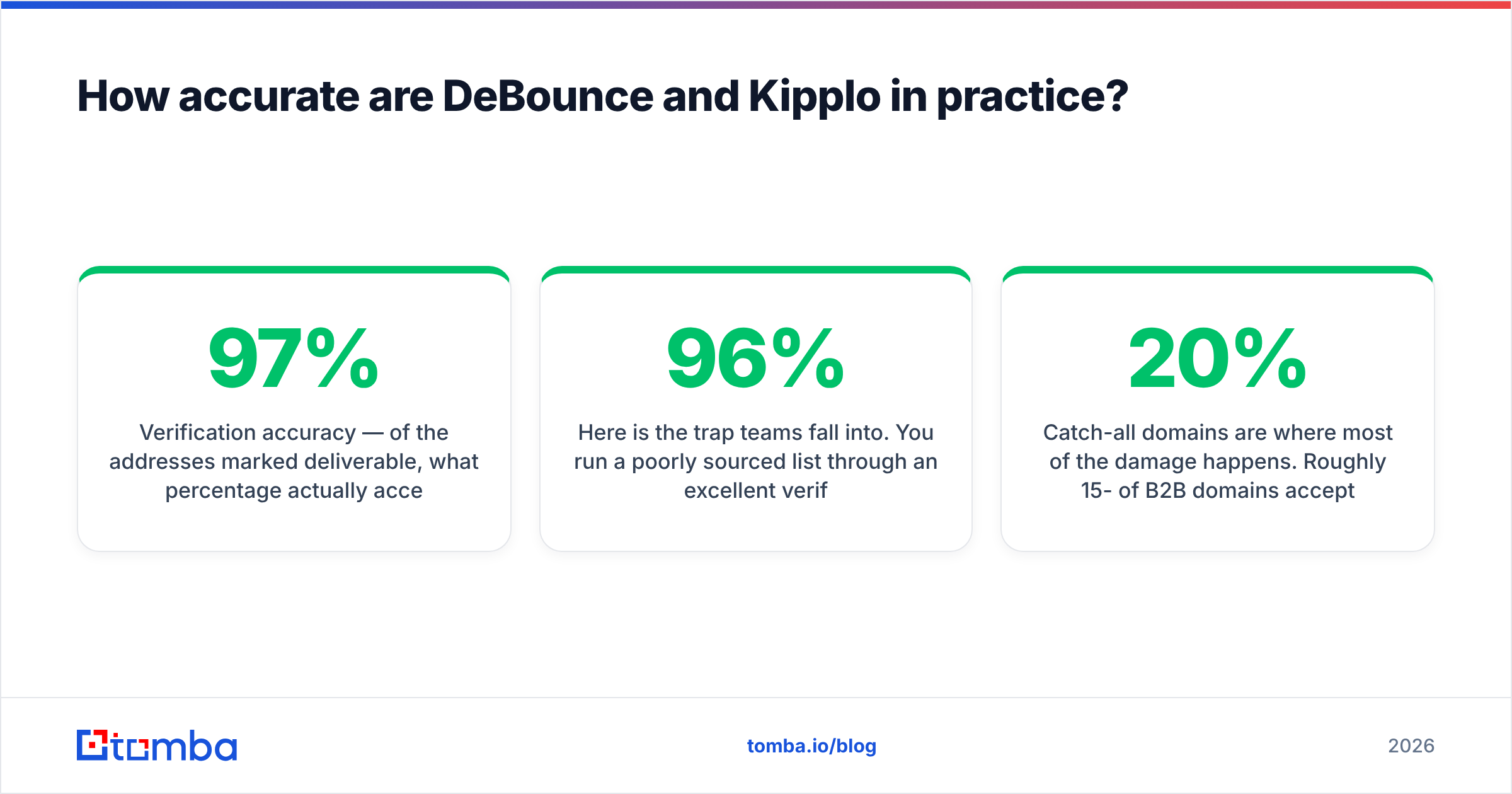
- Verification accuracy — of the addresses marked deliverable, what percentage actually accept mail? This is what DeBounce optimises for. Anything above 97% is competitive; the differences between top verifiers are measured in fractions of a percent.
- Discovery rate (hit rate) — of the prospects you searched for, what percentage returned any email at all? This is a sourcing metric. A verifier has no discovery rate because it never finds anything.
- End-to-end deliverability — of the contacts that went into your sequencer, what percentage landed in an inbox? This is the only number that affects revenue, and it depends on sourcing quality, verification quality, and your sending setup.

Here is the trap teams fall into. You run a poorly sourced list through an excellent verifier, get a clean 96%-deliverable file, and still see a 9% bounce rate three weeks later. Why? Because verification confirms a mailbox exists — it does not confirm the person still works there, that the address is monitored, or that the domain is a catch-all masking a dead inbox.
Catch-all domains are where most of the damage happens. Roughly 15-20% of B2B domains accept mail for any local part, which means SMTP verification returns "accepted" for definitely.not.real@company.com. A verifier that simply passes catch-alls through as "risky" and lets you decide is being honest. One that marks them deliverable is inflating its own accuracy number. This is exactly why a dedicated catch-all verifier exists as a separate discipline — pattern inference plus historical signal beats a raw SMTP handshake on those domains.
When you evaluate either tool, run the same 500-row control list through both and compare bounce outcomes after sending, not the label counts in the export.
DeBounce vs Kipplo: how do they compare head-to-head?#
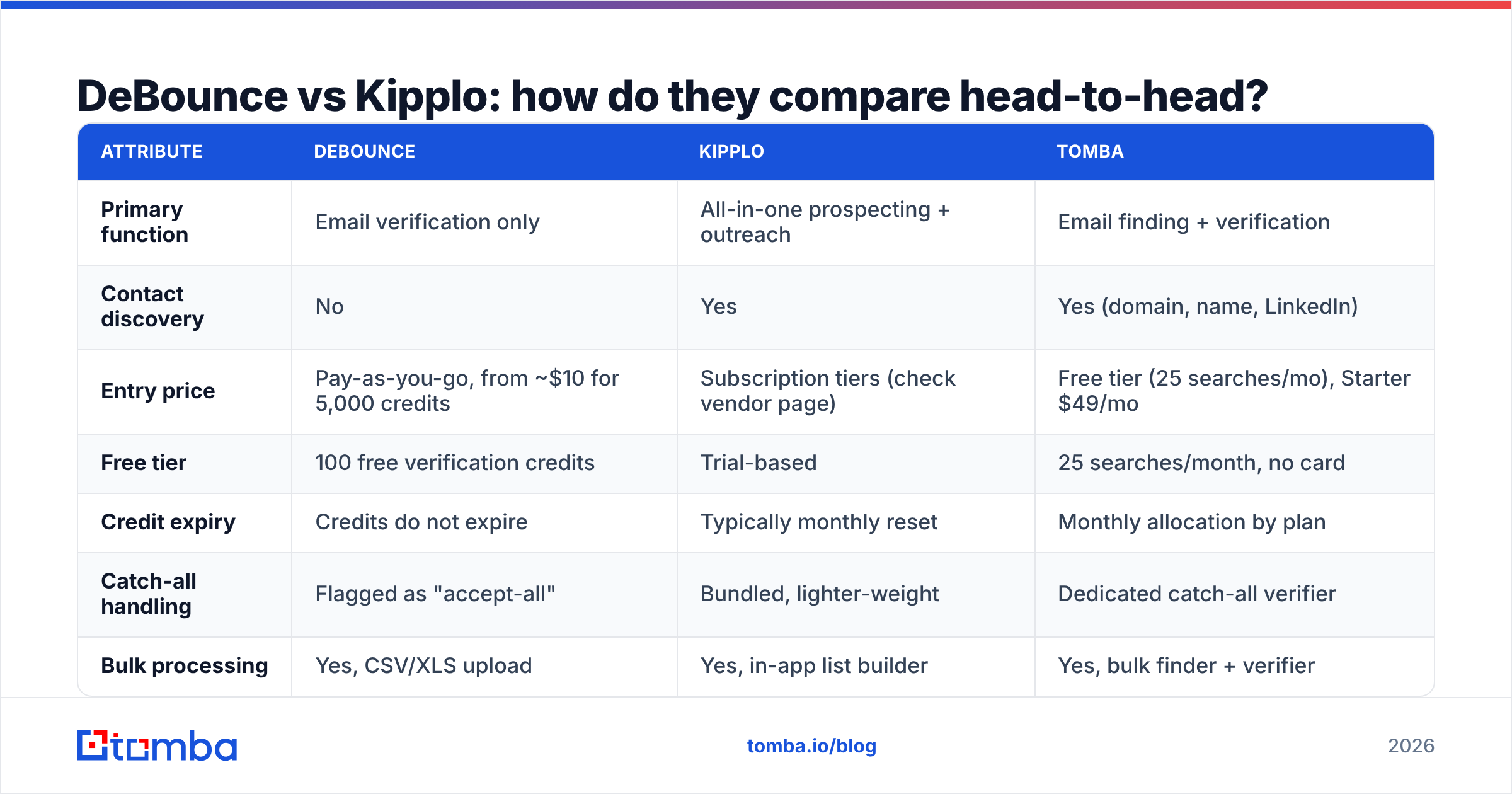
Treat the table below as a category map rather than a spec sheet. Verify current pricing on each vendor's own page before you buy — all three of these companies have changed plan structures within the last year.
| Attribute | DeBounce | Kipplo | Tomba |
|---|---|---|---|
| Primary function | Email verification only | All-in-one prospecting + outreach | Email finding + verification |
| Contact discovery | No | Yes | Yes (domain, name, LinkedIn) |
| Entry price | Pay-as-you-go, from ~$10 for 5,000 credits | Subscription tiers (check vendor page) | Free tier (25 searches/mo), Starter $49/mo |
| Free tier | 100 free verification credits | Trial-based | 25 searches/month, no card |
| Credit expiry | Credits do not expire | Typically monthly reset | Monthly allocation by plan |
| Catch-all handling | Flagged as "accept-all" | Bundled, lighter-weight | Dedicated catch-all verifier |
| Bulk processing | Yes, CSV/XLS upload | Yes, in-app list builder | Yes, bulk finder + verifier |
| API | Yes, real-time + batch | Yes | Yes, documented REST API |
| Native integrations | Mailchimp, HubSpot, Zapier, and similar | Built-in sequencer + CRM sync | HubSpot, Salesforce, Pipedrive, Sheets, Zapier |
| Best for | Cleaning lists you already own | Teams wanting one bill for everything | Teams that need accurate sourcing then verification |

The table makes the structural point clearly: DeBounce has a blank cell where discovery should be. That is not a criticism — it is a product decision — but it means "DeBounce vs Kipplo" is only a real decision for teams who have not yet worked out which problem they are solving.
What does each option actually cost per 1,000 usable contacts?#
Per-credit pricing is the wrong unit. Model it end to end instead.
Say you need 1,000 contacts you can safely email.
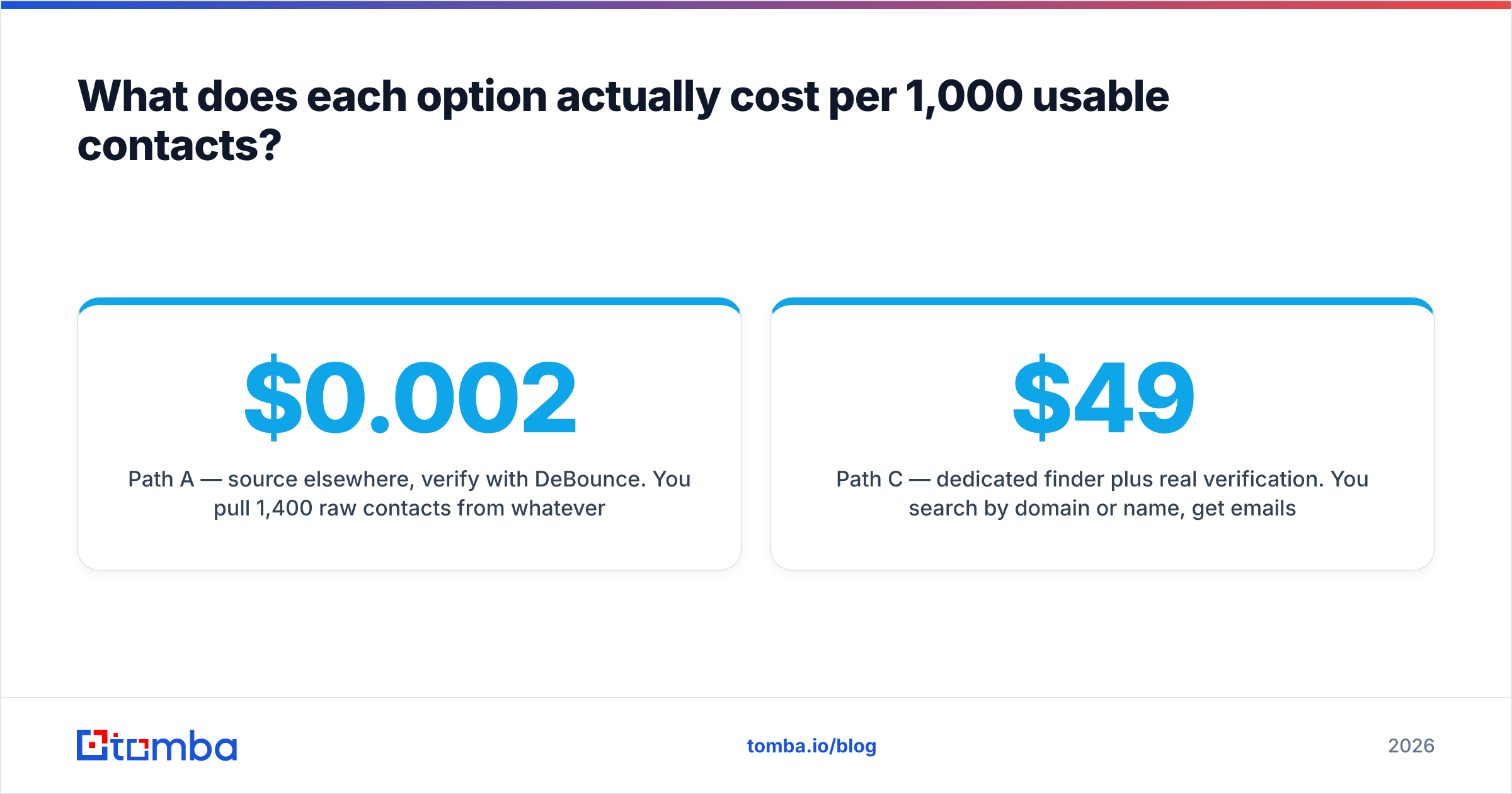
Path A — source elsewhere, verify with DeBounce. You pull 1,400 raw contacts from whatever source you have (scraped, exported, purchased). Verification at roughly $0.002-$0.004 per credit costs $3-$6. But if your source quality is mediocre, 30-40% get rejected or flagged risky, so you burn credits on 400 addresses you throw away, and you still need to backfill. Total cash cost is low; total time cost is high.
Path B — all-in-one suite. You build a list of 1,200 inside the platform, use bundled verification, export 1,000. One bill, one workflow, no CSV shuffling. You are trusting the suite's verification depth, and you are usually paying for a sequencer whether or not you use it.
Path C — dedicated finder plus real verification. You search by domain or name, get emails with confidence scores, then verify. On Tomba pricing, Starter is $49/mo and Growth is $99/mo, with a free tier of 25 searches to test hit rate before paying anything. The cost per usable contact is higher than a raw verification credit and lower than a full outreach suite seat.
The decision rule is simple:
- You have lists and no sourcing problem — buy verification credits. DeBounce is genuinely hard to beat on price for this.
- You have no lists and a small team — an all-in-one suite reduces coordination overhead, and Kipplo is a reasonable candidate in that bracket.
- You have no lists and already own a sequencer — do not pay for a second sequencer. Buy a finder with a strong email verifier attached and feed your existing tool.
- You are running high volume across many domains — you want a bulk email finder and an API, not a dashboard you have to click through.

Where does each tool break down?#
Every tool in this category has a failure mode. Knowing them in advance saves a wasted quarter.
DeBounce's limits. It cannot help you if the underlying list is bad. Verification is a filter, not a generator — run 10,000 junk addresses through it and you get a clean report about junk. It also can't tell you whether a person changed jobs last month; the mailbox still exists, the human is gone. And for catch-all domains, no SMTP-only verifier can give you a definitive answer, which is why "unknown" and "accept-all" buckets exist at all.
Kipplo's limits. Bundled everything means bundled compromise. If the sourcing layer is thinner in your niche — say, European mid-market manufacturing or non-English domains — you will feel it immediately in hit rate, and the bundled verification won't rescue coverage it never had. All-in-one suites also create lock-in: your lists, sequences, and reporting live in one place, which makes switching expensive later.
The generic all-in-one problem. Suites optimise for the median customer. If your ICP is unusual, a specialist beats a generalist on the one metric you care about. That is why plenty of teams run a specialist finder into a specialist sequencer and accept two invoices.
For a fuller side-by-side of dedicated verifiers, our DeBounce alternative breakdown goes deeper on credit models, catch-all policy, and API rate limits than fits here.
How should you test both before committing?#
Do not buy on a feature list. Run a 60-minute bake-off.
- Build a control set of 300-500 contacts you can independently verify — customers, past leads, people whose addresses you already know are live. Include at least 50 from catch-all domains and 30 that you know are stale.
- Run the identical file through each tool. Note not just the deliverable count, but how each one labels your known-bad and known-catch-all rows. A tool that marks your 30 known-dead addresses as valid has just disqualified itself.
- Measure discovery separately. For sourcing tools, take 100 named prospects at 100 companies and count how many return an email at all. That hit rate matters more than any accuracy claim.
- Send a small real campaign. 200 contacts, warmed domain, plain text. The bounce rate after 72 hours is the only number that settles the argument.
- Check the export format and API docs. You will live with these daily. A clean CSV schema and a documented email verification API save more hours over a year than a 0.4% accuracy edge.
Also read HubSpot's guidance on list hygiene or similar vendor documentation on suppression and re-engagement before you delete anything permanently. Some addresses your verifier flags as risky are recoverable with a re-permission campaign rather than a purge.
Is there a better option than choosing between them?#
Often, yes — because the two products answer different questions.
If your bottleneck is dirty lists, you want a verifier and DeBounce does that job at a fair price. If your bottleneck is not having enough of the right contacts, no amount of verification credits fixes it, and an all-in-one suite may be more platform than you need.
The middle path most outbound teams settle on: a sourcing tool that finds addresses and verifies them in the same pass, then hands off to whatever sequencer you already trust. You skip the CSV round-trip, you skip paying for a second sending tool, and you get one confidence score per contact instead of two disconnected labels.
That is the architecture behind Tomba's stack — domain search to map every reachable contact at a target company, the email finder to resolve individuals by name, and verification plus catch-all handling before anything leaves the system. Free tier is 25 searches a month, Starter is $49/mo, Growth is $99/mo, Pro is $249/mo.
The verdict: DeBounce vs Kipplo in 2026#
Choose DeBounce if you own your lists, verification is your only gap, and you want the cheapest credible way to get bounce rates under 2%. The pay-as-you-go model with non-expiring credits is genuinely well-suited to agencies and seasonal senders.
Choose Kipplo if you are a small team starting from zero, you value one bill and one login over best-in-class depth at each layer, and its coverage tests well in your specific vertical. Run the 100-prospect discovery test before you sign anything annual.
Choose neither if your real problem is that you are stitching together three tools to do one job. Source and verify in the same pipeline, then send from the tool your team already knows.
Ready to test the sourcing half of the equation? Start with the Tomba Email Finder — 25 free searches a month, no card required, so you can measure hit rate on your own ICP before you spend a dollar. Run your control list through it, compare the bounce outcomes against whatever you use today, and let the numbers decide.
Related guides#
Ready to find emails that actually work?
Join 150,000+ professionals who stopped guessing and started sending. Free credits on signup — no credit card required.
Get the Tomba newsletter
Practical outbound tactics and product updates — once every two weeks.
About the author