Debounce vs Salesbot (2026): Which B2B Email Tool Wins?
Debounce cleans lists. Salesbot runs outbound. They solve different halves of the same problem — and picking the wrong one costs you either bounces or budget. Here's the honest breakdown.
TL;DR
- Debounce is a list-cleaning specialist. You upload emails you already have, it tells you which ones will bounce. It does not find contacts for you.
- Salesbot sits on the other end of the funnel — an AI-assisted outbound layer that sources contacts, drafts messages, and pushes sequences. Verification is a feature, not the product.
- They are not really substitutes. Comparing them like-for-like is the most common mistake buyers make. Pick based on which half of your pipeline is broken.
- Pricing models differ fundamentally: Debounce is pay-as-you-go per email checked; Salesbot-style outbound platforms charge per seat or per contact, per month.
- If you need finding and verification in one place, a dedicated data platform like Tomba covers both from a single credit pool starting at $49/mo, with a free tier to test on your own domains.
What are Debounce and Salesbot, exactly?#
Debounce is an email verification service. You hand it a list — a CSV export, a CRM sync, an API call — and it runs syntax checks, MX record lookups, SMTP handshakes, disposable-domain detection, and role-account flagging. Out the other end comes a scored list: deliverable, invalid, risky, catch-all, unknown. That's the whole job, and Debounce has been doing it since 2018 with a pay-as-you-go model that never expires.
Salesbot is a different animal. The name gets used for a few products, but the category is consistent: an AI-assisted outbound engine. You define an ideal customer profile, the platform surfaces matching contacts from its own data layer, generates or templates the messaging, and runs the sending sequence. Verification happens somewhere inside that machine, usually as a pre-send filter you don't directly control.
So the honest framing of debounce vs salesbot is not "which tool is better." It's: do you have a list problem or a pipeline problem?
If your bounce rate is 8% and your domain reputation is sliding, you have a list problem. Debounce fixes that in an afternoon. If you have clean deliverability but only 40 prospects a month and no sequencing, you have a pipeline problem, and no amount of verification will help.

How do Debounce and Salesbot compare head-to-head?#
Here's the comparison most buyers actually need — not feature-count bingo, but where each tool sits in the stack.
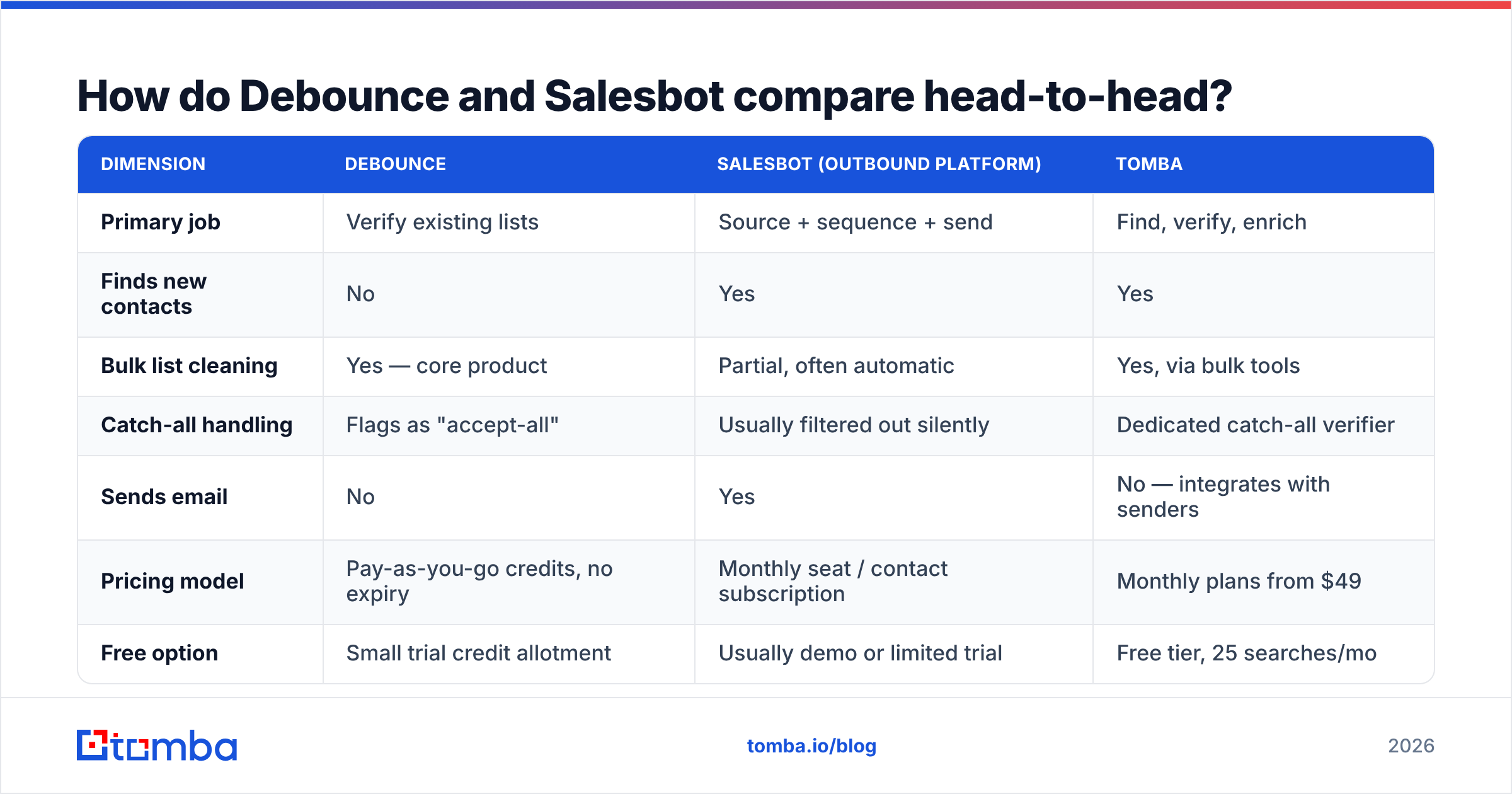
| Dimension | Debounce | Salesbot (outbound platform) | Tomba |
|---|---|---|---|
| Primary job | Verify existing lists | Source + sequence + send | Find, verify, enrich |
| Finds new contacts | No | Yes | Yes |
| Bulk list cleaning | Yes — core product | Partial, often automatic | Yes, via bulk tools |
| Catch-all handling | Flags as "accept-all" | Usually filtered out silently | Dedicated catch-all verifier |
| Sends email | No | Yes | No — integrates with senders |
| Pricing model | Pay-as-you-go credits, no expiry | Monthly seat / contact subscription | Monthly plans from $49 |
| Free option | Small trial credit allotment | Usually demo or limited trial | Free tier, 25 searches/mo |
| API access | Yes | Varies by plan | Yes, on all paid plans |
| Best for | Marketers with big existing lists | Small teams wanting outbound in one box | Teams building lists from scratch |
The row that matters most is "finds new contacts." Debounce genuinely cannot do it — and doesn't claim to. If you buy Debounce expecting prospecting, you'll be disappointed by a product that is excellent at the thing it actually does.
How accurate is each tool in practice?#
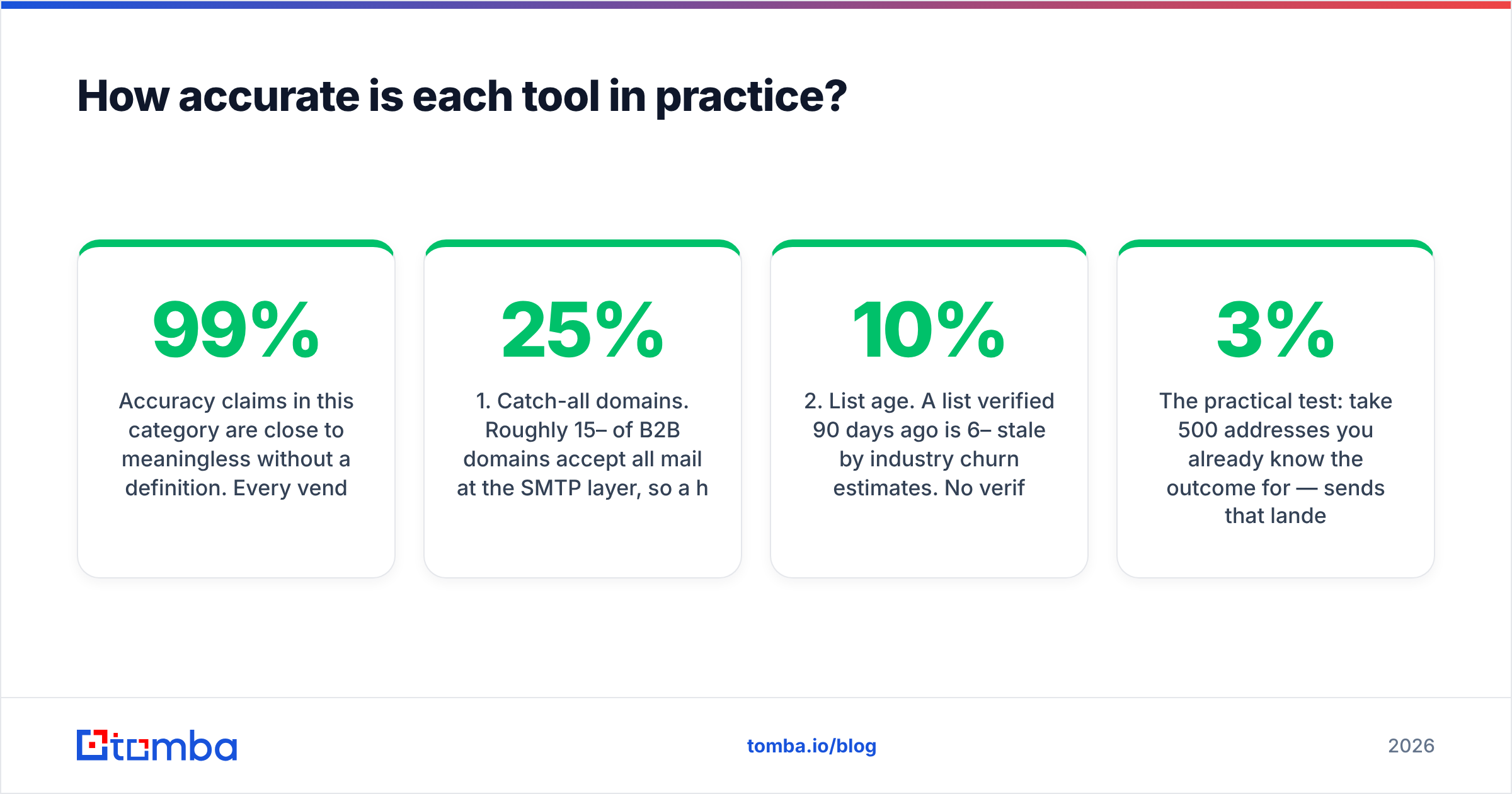
Accuracy claims in this category are close to meaningless without a definition. Every vendor quotes 97–99%. The number that matters is bounce rate on the sends that follow, measured on your domains, with your list composition.

Three things distort accuracy scores across every vendor in this space:
- Catch-all domains. Roughly 15–25% of B2B domains accept all mail at the SMTP layer, so a handshake proves nothing. Debounce marks these "accept-all" and leaves the decision to you — honest, but it means a chunk of your list stays unresolved. Outbound platforms often just drop them, quietly shrinking your addressable market. A dedicated catch-all verifier resolves a meaningful share of these using pattern and behavioral signals rather than SMTP alone.
- List age. A list verified 90 days ago is 6–10% stale by industry churn estimates. No verifier can fix a list you don't re-run.
- Sample bias. Vendors benchmark on lists that look like their typical customer's. A tool tuned for e-commerce consumer lists behaves differently on enterprise B2B domains.
The practical test: take 500 addresses you already know the outcome for — sends that landed, sends that hard-bounced — and run them through each candidate. Anything above 3% false-deliverable on that control set is a problem, regardless of the marketing page.
Salesbot-style platforms are harder to benchmark this way because verification is bundled and you rarely see the raw verdict. That opacity is the trade you accept for convenience.
What does each one actually cost?#
Pricing is where the two models diverge hardest, and where most of the buyer regret lives.
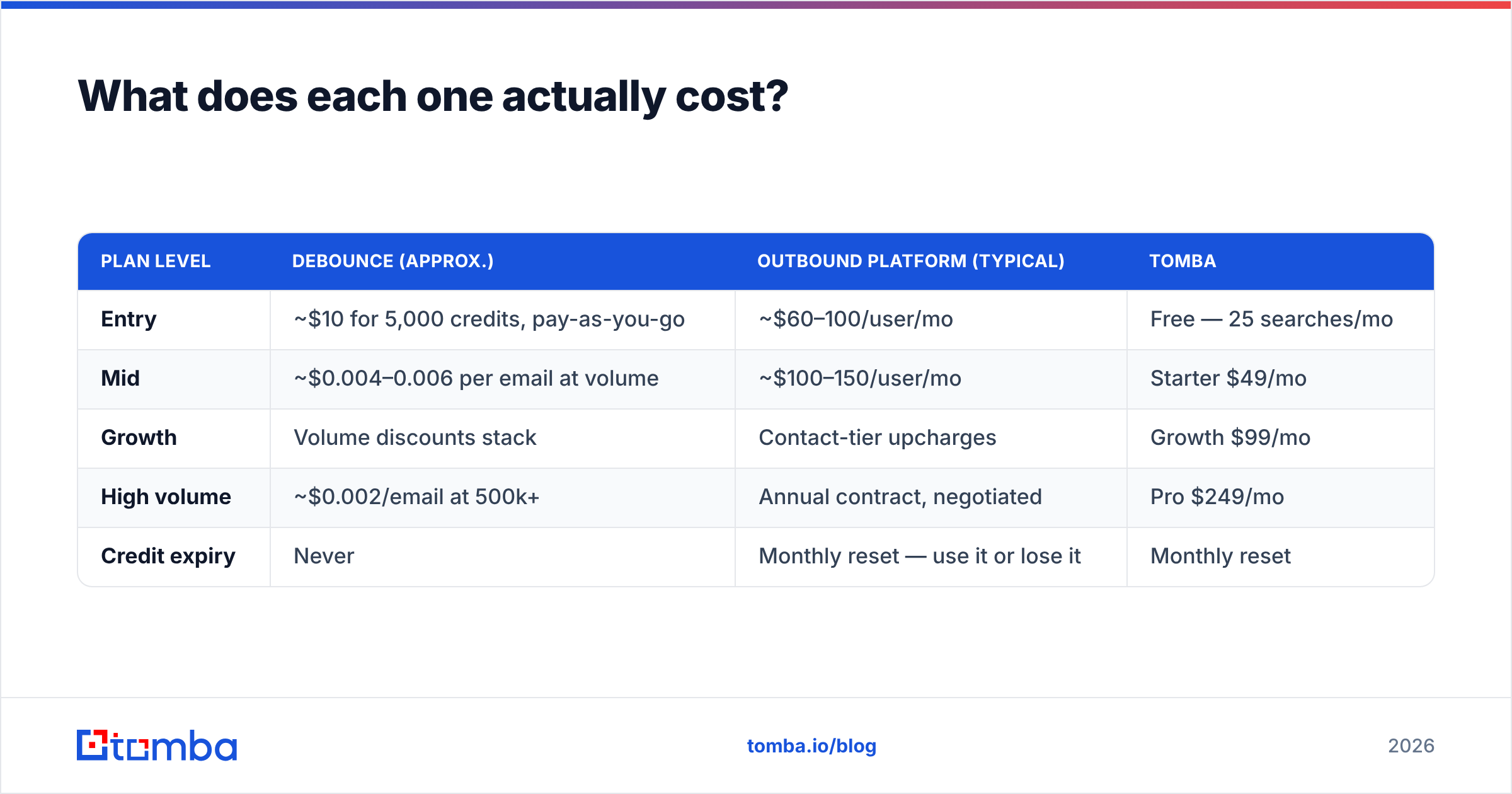
| Plan level | Debounce (approx.) | Outbound platform (typical) | Tomba |
|---|---|---|---|
| Entry | ~$10 for 5,000 credits, pay-as-you-go | ~$60–100/user/mo | Free — 25 searches/mo |
| Mid | ~$0.004–0.006 per email at volume | ~$100–150/user/mo | Starter $49/mo |
| Growth | Volume discounts stack | Contact-tier upcharges | Growth $99/mo |
| High volume | ~$0.002/email at 500k+ | Annual contract, negotiated | Pro $249/mo |
| Credit expiry | Never | Monthly reset — use it or lose it | Monthly reset |
Debounce and outbound-platform figures are indicative ranges; check current vendor pricing pages before you buy. Tomba pricing is fixed and published.
Two cost traps worth naming:
The pay-as-you-go illusion. Debounce credits never expiring sounds cheaper than a subscription, and for occasional list hygiene it genuinely is. But if you verify continuously — every new inbound lead, every enrichment run — per-credit costs add up faster than a flat plan, and you lose the finding capability entirely, which you then buy separately.
The seat trap. Outbound platforms price per user. A three-person SDR team on a $99/seat tool is $297/mo before you've sent anything, and adding a contractor for a quarter means a fourth seat. Data-first tools price on volume, not headcount, which scales differently as your team grows and shrinks.
Which one fits your workflow?#
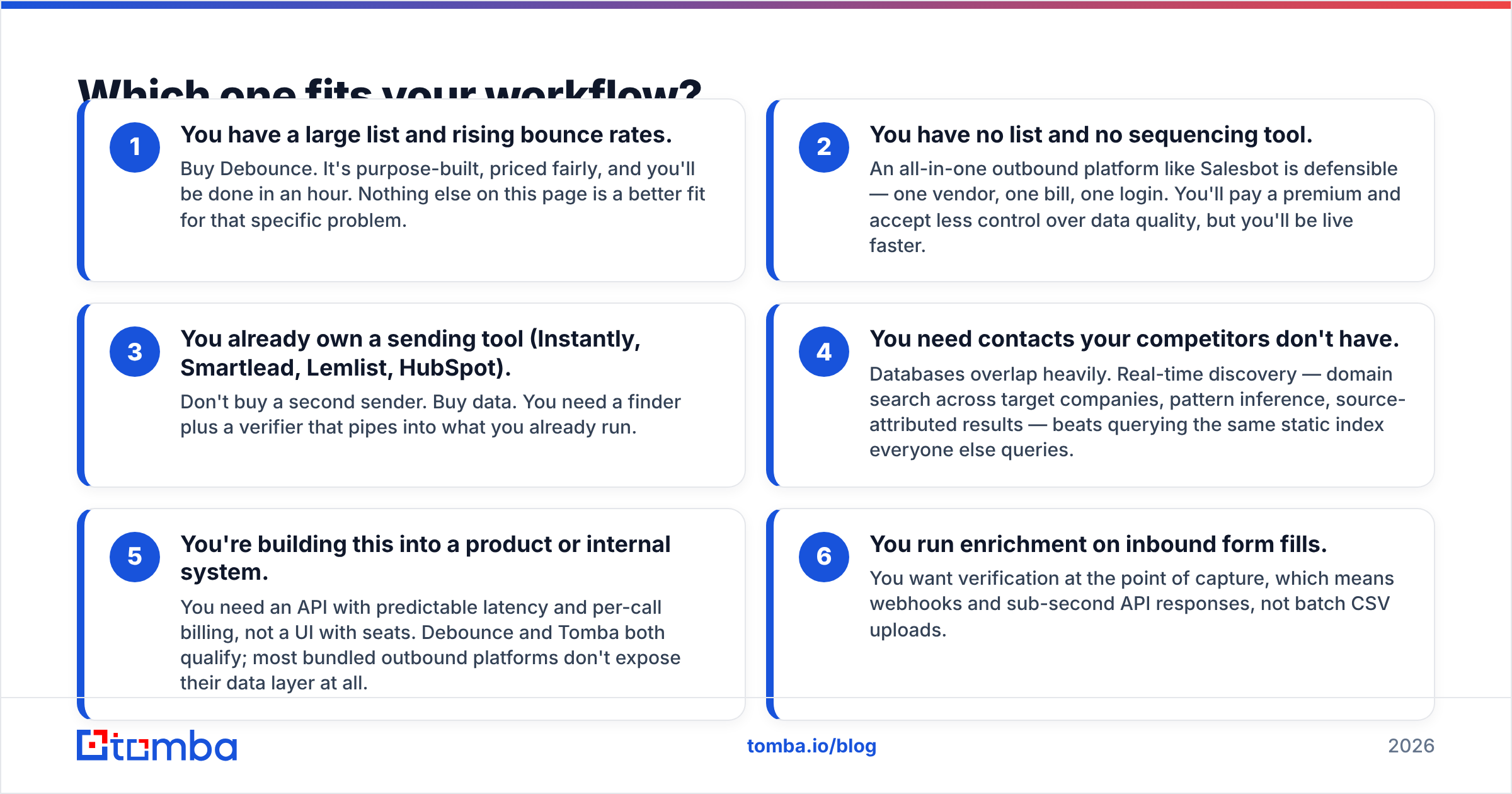
Work through these in order. The first one that matches is your answer.
- You have a large list and rising bounce rates. Buy Debounce. It's purpose-built, priced fairly, and you'll be done in an hour. Nothing else on this page is a better fit for that specific problem.
- You have no list and no sequencing tool. An all-in-one outbound platform like Salesbot is defensible — one vendor, one bill, one login. You'll pay a premium and accept less control over data quality, but you'll be live faster.
- You already own a sending tool (Instantly, Smartlead, Lemlist, HubSpot). Don't buy a second sender. Buy data. You need a finder plus a verifier that pipes into what you already run.
- You need contacts your competitors don't have. Databases overlap heavily. Real-time discovery — domain search across target companies, pattern inference, source-attributed results — beats querying the same static index everyone else queries.
- You're building this into a product or internal system. You need an API with predictable latency and per-call billing, not a UI with seats. Debounce and Tomba both qualify; most bundled outbound platforms don't expose their data layer at all.
- You run enrichment on inbound form fills. You want verification at the point of capture, which means webhooks and sub-second API responses, not batch CSV uploads.

Where does each tool fall short?#
Debounce's limits are structural, not quality-related. It verifies. It does not find, enrich, or tell you a person's title, LinkedIn profile, or phone number. Its catch-all handling is conservative by design — you get an honest "unknown" rather than a confident guess, which is the right call ethically but leaves work on your desk. And the UI is functional rather than delightful; it's a utility, and it behaves like one.
Salesbot-style platforms fall short on transparency and lock-in. When one vendor sources, verifies, writes, and sends, you lose the ability to diagnose which layer failed. Reply rate down? Is that the data, the copy, or the deliverability? Bundled tools make that attribution genuinely hard. Export policies also vary — some platforms make it awkward to take your enriched contacts elsewhere, which matters a great deal on the day you decide to switch.
There's also a category-wide issue neither vendor controls: bounce handling at the mailbox-provider level got stricter through 2024–2026. Google and Microsoft both tightened bulk-sender requirements, and a 2% hard-bounce rate that was survivable three years ago now materially damages placement. Verification stopped being optional. Reviews on G2 reflect this shift — the loudest complaints about outbound platforms are almost always deliverability, not features.
What if you need finding and verification together?#
This is the case neither tool covers cleanly, and it's the most common one.
Most teams don't have a list to clean or a blank slate. They have a target account list, a rough idea of the roles they want, and a sending tool they already pay for. What's missing is the middle: turning "VP of Engineering at these 300 companies" into verified, deliverable addresses.
That's a finder-plus-verifier job. Tomba's email finder resolves a name and domain into an address with a confidence score and source attribution, and the email verifier validates it before it ever reaches your sequencer — same credit pool, same API, one bill. For batch work, bulk lead generation handles CSV in, enriched CSV out.
The practical difference versus a two-vendor setup: no reconciliation. You're not exporting from a finder, importing to a verifier, matching rows, and hoping nothing dropped. The verification verdict is attached to the record at discovery time.
Where the honest answer is still "use Debounce": if your problem is a 200,000-row legacy list from a webinar three years ago, a pay-as-you-go verifier is the cheaper, faster tool. Nobody should pay a monthly subscription for a one-time cleanup.
Which should you pick in 2026?#
Choose Debounce if your only job is list hygiene, you verify in bursts rather than continuously, and you want per-credit pricing that never expires. It's a well-built utility that does exactly what it says.
Choose a Salesbot-style outbound platform if you're a small team with no existing sending infrastructure, you value one vendor over best-of-breed, and you're willing to trade data transparency for setup speed.
Choose a combined data platform if you're building lists rather than cleaning them, you already own a sender, or you need API access for something you're engineering yourself.
Whatever you pick, run the 500-address control test before you commit to an annual plan. Every vendor in this space quotes a similar accuracy number, and the only one that means anything is the one you measure on your own data.
If your actual bottleneck is finding the contacts in the first place — not cleaning a list you already have — start with the Tomba Email Finder. Search by domain, name, or company, get source-attributed results with confidence scores, and verify them in the same workflow before they hit your sequencer. The free tier gives you 25 searches a month, which is enough to benchmark it against whatever you're using today. Paid plans start at $49/mo with no per-seat charge.
Related guides#
Ready to find emails that actually work?
Join 150,000+ professionals who stopped guessing and started sending. Free credits on signup — no credit card required.
Get the Tomba newsletter
Practical outbound tactics and product updates — once every two weeks.
About the author