Debounce vs Tomba: Which Email Data Tool Wins in 2026?
Debounce cleans the list you already have. Tomba builds the list and then cleans it. Here's an honest breakdown of accuracy, pricing, API limits, and which one your outbound stack actually needs in 2026.
Debounce vs Tomba is a choice between two different jobs. DeBounce cleans a list you already own. Tomba builds the list first, then cleans it. Here is the short version.
TL;DR
- They solve different halves of one problem. DeBounce is a dedicated email checker. You bring a list, and it tells you which addresses are safe to mail. Tomba finds the addresses first, then checks them.
- If you already have a list, DeBounce credits are cheap. They are hard to beat for a one-off clean-up.
- If you have no list, DeBounce leaves you at square one. You still need a finder or a database to feed it.
- The pricing works in different ways. DeBounce sells credits that do not expire. Tomba sells monthly plans from $49/mo, with a free tier of 25 searches.
- The verdict on Debounce vs Tomba: buy DeBounce if verification is your only gap. Buy Tomba if you need to find, enrich, and verify contacts behind one API.
What do DeBounce and Tomba actually do?#
Think of a restaurant kitchen. DeBounce is the quality-control station. Every ingredient that arrives gets inspected, and spoiled stock gets thrown out. Tomba is the sourcing team plus that station. It goes out, finds the ingredients, and checks them before they hit the line.
DeBounce is a bulk email checker. You upload a CSV or push addresses through its API. It runs syntax checks, MX record lookups, and SMTP handshakes. It also spots throwaway domains, role accounts (info@, sales@), and catch-all servers.
Each address comes back with a status. You drop the risky ones before your sequence goes out. DeBounce also ships a few extras: a free single-email checker, blacklist alerts, and links to the main email platforms.
Tomba starts one step earlier. Its core product is the email finder. Give it a name and a domain, or just a domain. It returns work addresses with a confidence score and the sources behind each one.
Around that sit a domain search for every contact at a company, an email verifier, and a catch-all verifier for domains that say yes to everything. Phone lookup and data enrichment round it out.
So the real question in Debounce vs Tomba is not "which tool is better." It is "which gap am I filling?"

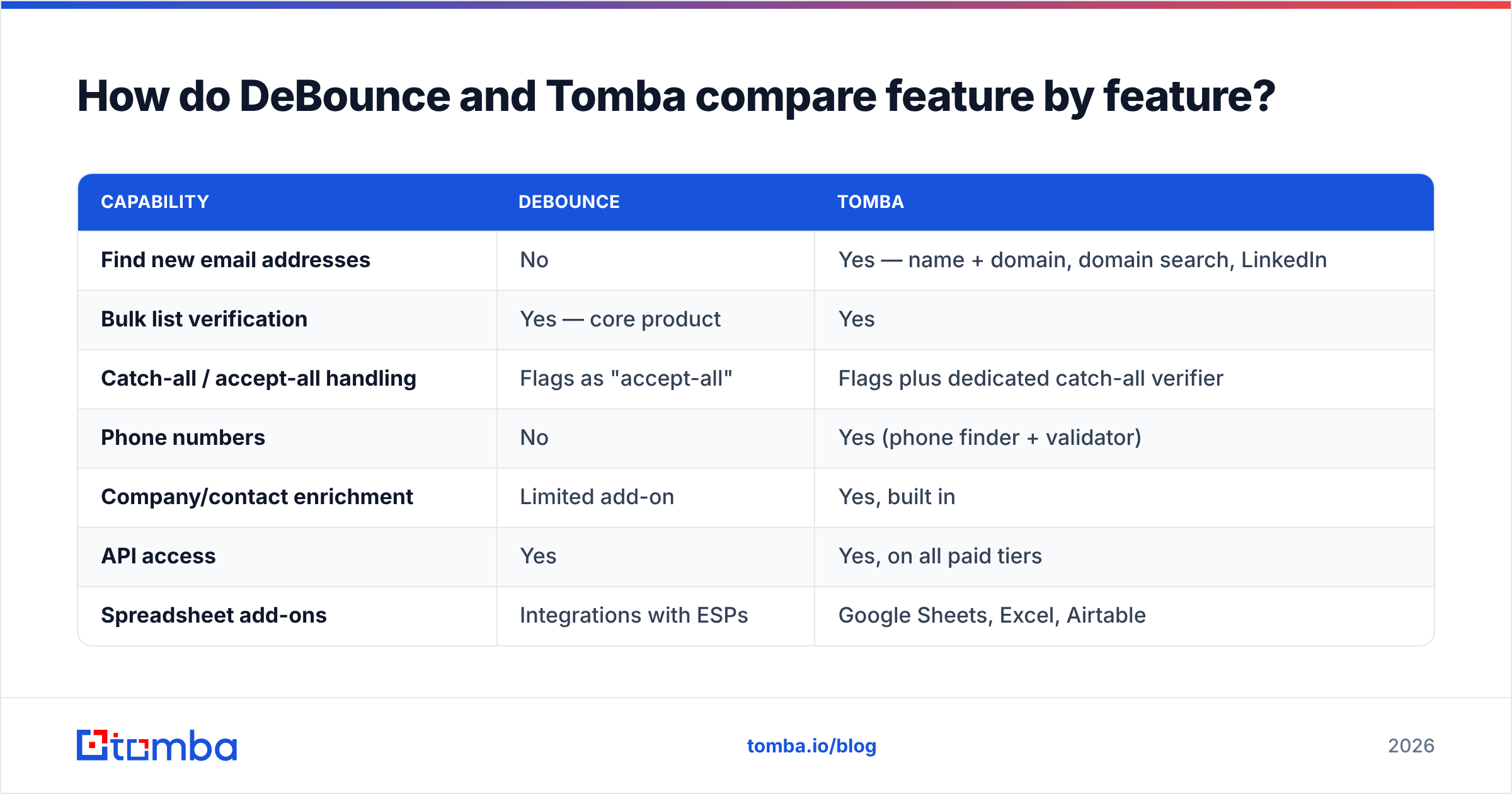
How do DeBounce and Tomba compare feature by feature?#
Here is the side-by-side, based on what each vendor documents in public today. Check the live plan pages before you buy. Both ship changes often.
| Capability | DeBounce | Tomba |
|---|---|---|
| Find new email addresses | No | Yes — name + domain, domain search, LinkedIn |
| Bulk list verification | Yes — core product | Yes |
| Catch-all / accept-all handling | Flags as "accept-all" | Flags plus dedicated catch-all verifier |
| Phone numbers | No | Yes (phone finder + validator) |
| Company/contact enrichment | Limited add-on | Yes, built in |
| API access | Yes | Yes, on all paid tiers |
| Spreadsheet add-ons | Integrations with ESPs | Google Sheets, Excel, Airtable |
| Browser extension | No | Yes (Chrome/Firefox) |
| Free tier | 100 free verification credits | 25 searches/mo, no card |
| Entry paid price | Pay-as-you-go credits from roughly $10 | $49/mo Starter |
| Credit expiry | Credits generally don't expire | Monthly allowance resets |
| Best for | Cleaning lists you already own | Building and cleaning lists end to end |
The pattern is clear. DeBounce goes deep on one job and does it well. Tomba goes wide across the whole prospecting workflow. Neither call is wrong. They are simply priced for different buyers.

How does email verification actually work under the hood?#
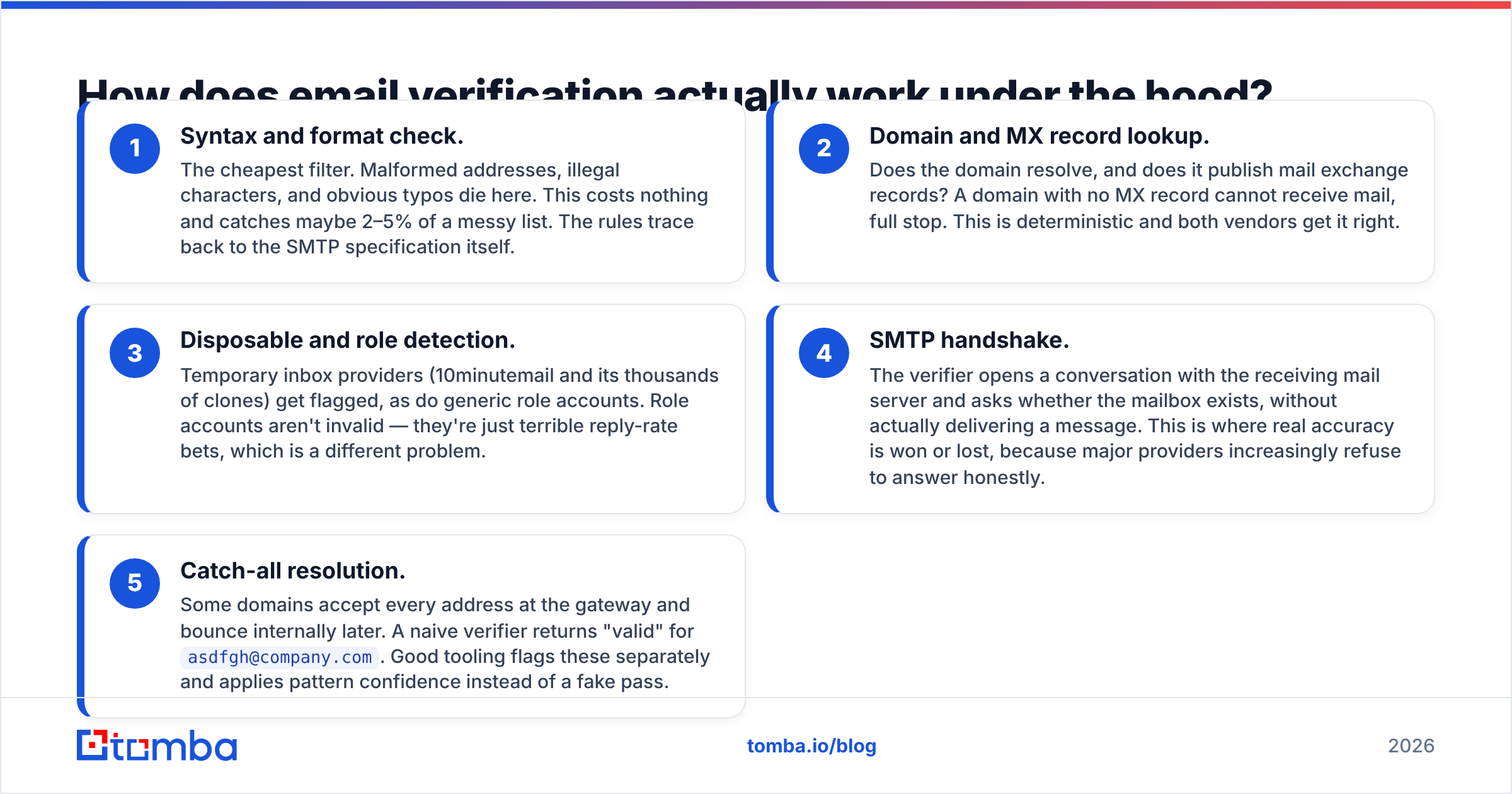
Both tools run the same basic pipeline. Once you see it, you know why no vendor can honestly promise 100% accuracy.
- Syntax check. The cheapest filter. Broken addresses, odd characters, and plain typos die here. It costs nothing and catches maybe 2–5% of a messy list. The rules come from the SMTP specification.
- Domain and MX lookup. Does the domain resolve? Does it publish mail records? A domain with no MX record cannot receive mail at all. This step is black and white, and both tools get it right.
- Throwaway and role checks. Temporary inbox sites get flagged, and so do generic role accounts. Role accounts are not invalid. They are just poor bets for a reply.
Those three steps are commodity work. The next two are where tools split apart.
- SMTP handshake. The tool opens a chat with the mail server. It asks if the mailbox exists, but never sends a message. Real accuracy is won or lost here, because big providers often refuse to answer.
- Catch-all check. Some domains accept every address at the door, then bounce it later. A lazy tool returns "valid" for
asdfgh@company.com. A good one flags the domain and scores the pattern instead.
Steps 4 and 5 are the ones to test in any Debounce vs Tomba trial.
Which one is more accurate?#
Ignore every vendor accuracy claim, including ours. Accuracy depends on your list. Ten thousand Gmail addresses and ten thousand corporate Microsoft 365 addresses bounce in very different ways.

What holds up in testing:
- On normal domains, the gap is small. DeBounce, Tomba, and most solid rivals land within a few points of each other. If a vendor claims a 20-point lead, be sceptical.
- On catch-all domains, the gap is wide. Up to a quarter of B2B domains accept everything. What a tool does next — "unknown," "risky," or a real score — decides how much of your list you can safely mail.
- On found-but-unchecked addresses, only Tomba plays. DeBounce does not create addresses. Tomba's score shows how many sources back a pattern. You can read where the data comes from.
The best test is free. Take 500 addresses whose outcome you already know from a past send. Run them through both free tiers and compare. DeBounce gives you 100 credits. Tomba gives you 25 searches a month. That beats any third-party benchmark, this one included.
One caveat applies to both tools. Verification cuts bounces, but it does not create replies. If your sender reputation is already hurt, a clean list will not save the campaign.
What does each one cost in 2026?#
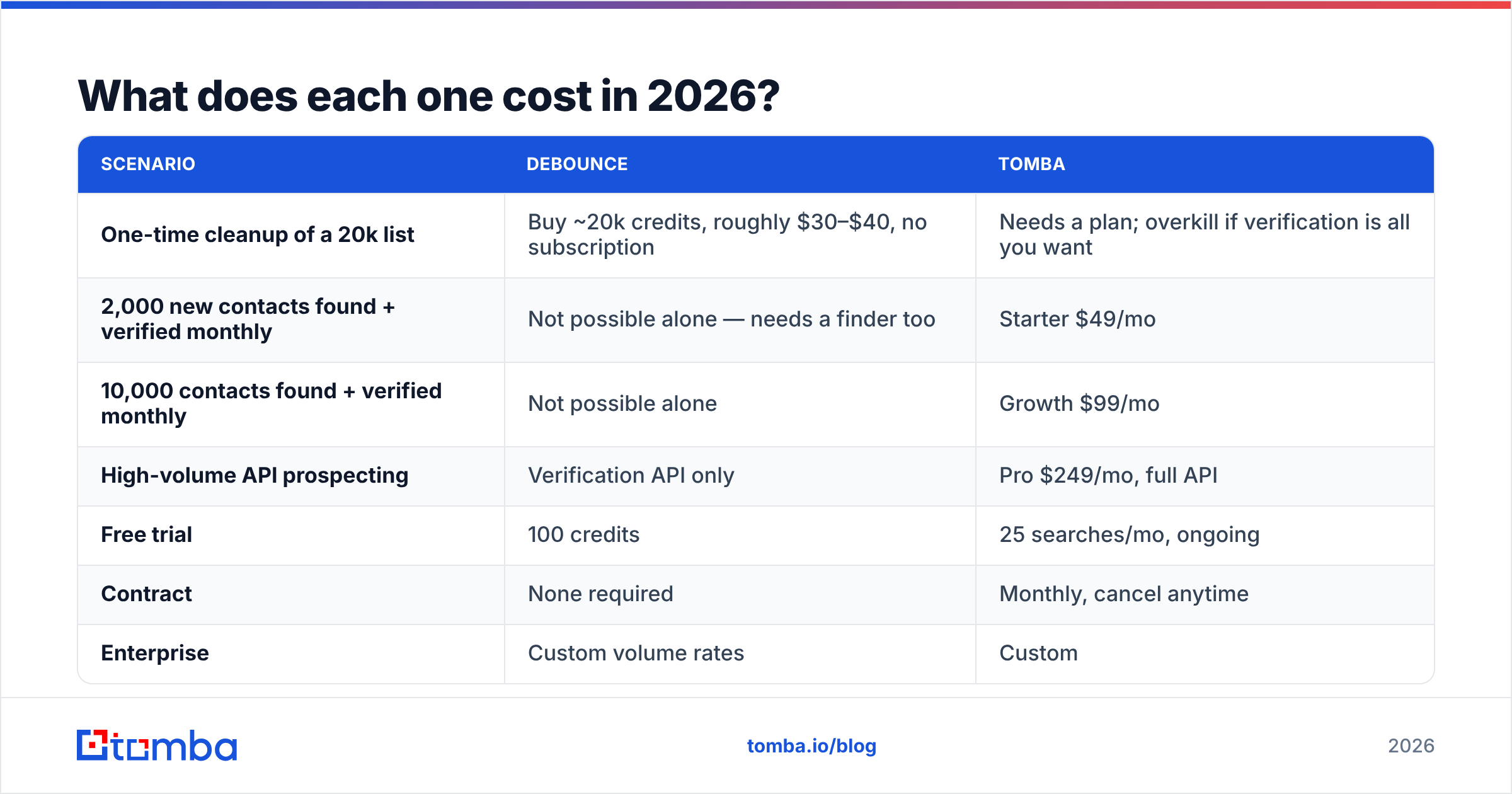
Debounce vs Tomba pricing works in two different ways. A flat monthly compare will mislead you. Normalise by what you actually need.
| Scenario | DeBounce | Tomba |
|---|---|---|
| One-time cleanup of a 20k list | Buy ~20k credits, roughly $30–$40, no subscription | Needs a plan; overkill if verification is all you want |
| 2,000 new contacts found + verified monthly | Not possible alone — needs a finder too | Starter $49/mo |
| 10,000 contacts found + verified monthly | Not possible alone | Growth $99/mo |
| High-volume API prospecting | Verification API only | Pro $249/mo, full API |
| Free trial | 100 credits | 25 searches/mo, ongoing |
| Contract | None required | Monthly, cancel anytime |
| Enterprise | Custom volume rates | Custom |
Full current tiers sit on the Tomba pricing page. DeBounce rates drop as volume rises, so check their page for today's numbers. Credit vendors change rates more often than subscription ones.
Here is the honest math. If verification is your only need, DeBounce is cheaper. Nobody should pay $49/mo when a $30 credit top-up covers the job.
The sums flip once you count the second vendor. A finder plus a checker usually costs more than $100/mo together. At that point one platform at $49–$99/mo looks like the cheaper bill.

That is the trap teams walk into. They buy a checker, build a clean pipeline, then find nothing flowing through it. A checker run on an empty list returns an empty list, very accurately.
Who should choose DeBounce?#
Pick DeBounce if any of these sound like you:
- You inherited a database. A 200k-record CRM that nobody touched for three years needs one scrub, not a monthly plan.
- Your list comes from inbound. Sign-ups, webinars, and form fills arrive on their own. You need hygiene, not discovery.
- You are an agency reselling hygiene. Credits that never expire suit lumpy client volume.
- Budget is tight and verification is the whole ask. Pay-as-you-go beats a plan you use twice a year.
DeBounce has been around a long time. It has solid reviews on G2, and it does what it says. For pure list hygiene it is a fair buy.
Who should choose Tomba?#
Pick Tomba if:
- You need contacts your CRM does not have yet. This is the deciding factor in Debounce vs Tomba. No amount of verification helps an empty list.
- You want one API, not three. Finding, verifying, enriching, and phone lookup run through a single Tomba API. That removes a lot of glue code.
- You run outbound at team scale. Bulk email finder jobs, Sheets and Excel add-ons, and a Chrome extension keep the team moving.
- You are cutting down on tools. Teams that merged their finder and checker stacks cite simpler billing and fewer broken integrations.
If you are weighing both, our DeBounce alternative page maps out the switch.
Can you use both together?#
Yes. For some teams that is the right answer.
A common setup looks like this. Tomba handles discovery and the first check on new prospects. DeBounce handles bulk hygiene on the old CRM database. The volumes differ enough that credits win the second job.
The waste comes from double-checking the same records. If Tomba returns a deliverable status on a fresh address, a second check that week adds cost and almost no information. Save the second pass for aged data, say anything over 90 days. B2B contact data decays about 2–3% a month as people move jobs.
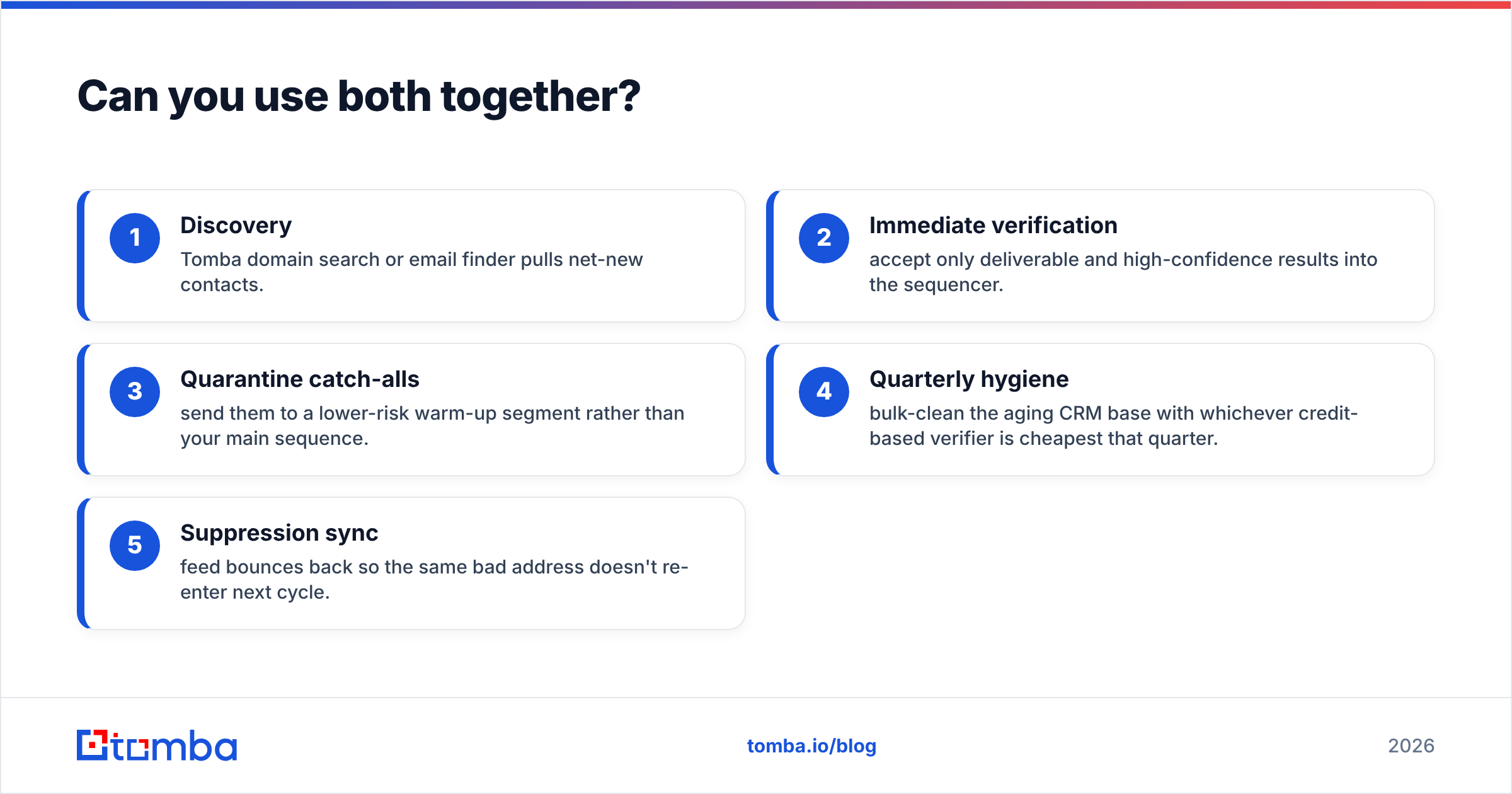
A sane workflow:
- Discovery — Tomba domain search or email finder pulls new contacts.
- Instant verification — accept only deliverable, high-confidence results into the sequencer.
- Quarantine catch-alls — send them to a warm-up segment, not your main sequence.
- Quarterly hygiene — bulk-clean the ageing CRM with whichever credit tool is cheapest.
- Suppression sync — feed bounces back so bad addresses do not return.
What's the verdict on Debounce vs Tomba?#
DeBounce wins on cost for pure list cleaning. Tomba wins on scope, and on cost once you count the second vendor you would otherwise need.
Someone hands you a list and asks which addresses are safe to mail. DeBounce answers that well and cheaply. But your real job may be bigger: build a pipeline of contacts at 500 target accounts and mail them without burning the domain. A verifier alone will not get you there.
So test it. Run both free tiers against 500 addresses whose outcome you already know. Whichever tool matches your own data wins, whatever any comparison post claims.
Ready to stop buying lists and start building them? Start with the Tomba Email Finder — 25 free searches a month, no card required. Every result ships with verification and a confidence score. If it holds up on your target accounts, Starter is $49/mo and covers discovery, verification, and enrichment in one bill.
Related guides#
Ready to find emails that actually work?
Join 150,000+ professionals who stopped guessing and started sending. Free credits on signup — no credit card required.
Get the Tomba newsletter
Practical outbound tactics and product updates — once every two weeks.
About the author