Default Pricing Reviews Pros and Cons: What Every B2B Model Costs
Default pricing reviews pros and cons, model by model: credit packs, per-seat seats, pay-as-you-go, and flat rate. Every B2B data vendor defaults to one, and each one hides a different cost. Here's how the four compare in 2026.
Every B2B data vendor pushes one default plan before you ever talk to sales. This default pricing reviews pros and cons guide breaks down the four models they use, what each one really costs, and where the overage traps hide.
TL;DR
- "Default pricing" is the plan a vendor pushes before you negotiate: a credit pack, a per-seat license, a flat-rate tier, or pay-as-you-go. Each one fails in a different way.
- Credit plans look cheap and punish misses. You burn credits on bounced or unfound contacts unless the vendor bills only for verified hits.
- Per-seat is the priciest default for teams over five people, and the most misleading in headline comparisons, because vendors quote per user, per month, billed annually.
- The real cost drivers are overage rates, credit expiry, API gating, and export caps — not the number on the pricing page.
- For most sub-20-person outbound teams, a flat-rate finder plan in the $49–$99 band (Tomba Starter at $49/mo, Growth at $99/mo) covers prospecting without seat math.
What does "default pricing" actually mean?#
Default pricing is the packaging a vendor shows you first. It is the tier grid on the public pricing page, the one you see before sales gets involved. It is a product decision, not a cost decision. The vendor picks whichever model makes their unit economics look best and their rivals look expensive.
That matters because every default pricing model is built for a different customer. Credit packs favor light, bursty users. Per-seat favors vendors with sticky CRM-style workflows. Flat rate favors predictable, high-volume operators. Pay-as-you-go favors people who buy once a quarter and skip the subscription.
Reviewing pricing badly is the most common way B2B teams overspend on data. You compare two headline numbers — $49 versus $79 — and stop there. You miss that one is per user while the other includes API access. You miss that one expires credits monthly while the other rolls them over.

Which pricing models do vendors default to?#
There are four, and almost every B2B data or email finder vendor uses one of them or a hybrid.
- Credit-based — You buy a monthly allowance of lookups. One search, one credit. Sometimes verification costs an extra credit, sometimes enrichment costs five. Best for teams whose volume swings month to month. Worst when credits expire and unfound contacts still bill.
- Per-seat (per-user) — You pay a license fee per rep, often with a credit allowance attached to each seat. Best for teams where every rep needs daily access. Worst for ops-led motions, where one analyst pulls lists for the whole team but you still pay for ten logins.
- Flat-rate tiers — One monthly price, one bundle of volume, all features included at that level. Best for predictable outbound with a stable list-building cadence. Worst if your volume is tiny: you pay for headroom you never touch.
Two more models show up at the edges of the market, one above the four and one blended across them.
- Pay-as-you-go / credit packs — No subscription. Buy a block, use it whenever. Best for agencies, one-off campaigns, and event lists. Worst for steady prospecting, where per-unit cost beats a subscription's effective rate.
- Enterprise / quote-only — No published price at all. Best when you need contracts, SSO, seat counts above 25, and procurement leverage. Worst for evaluation: you cannot compare what you cannot see, and the first quote is rarely the floor.
- Hybrid — Now common: a flat tier plus metered overage, or seats plus a shared credit pool. Read the overage rate before the base price. That number decides your real annual spend.
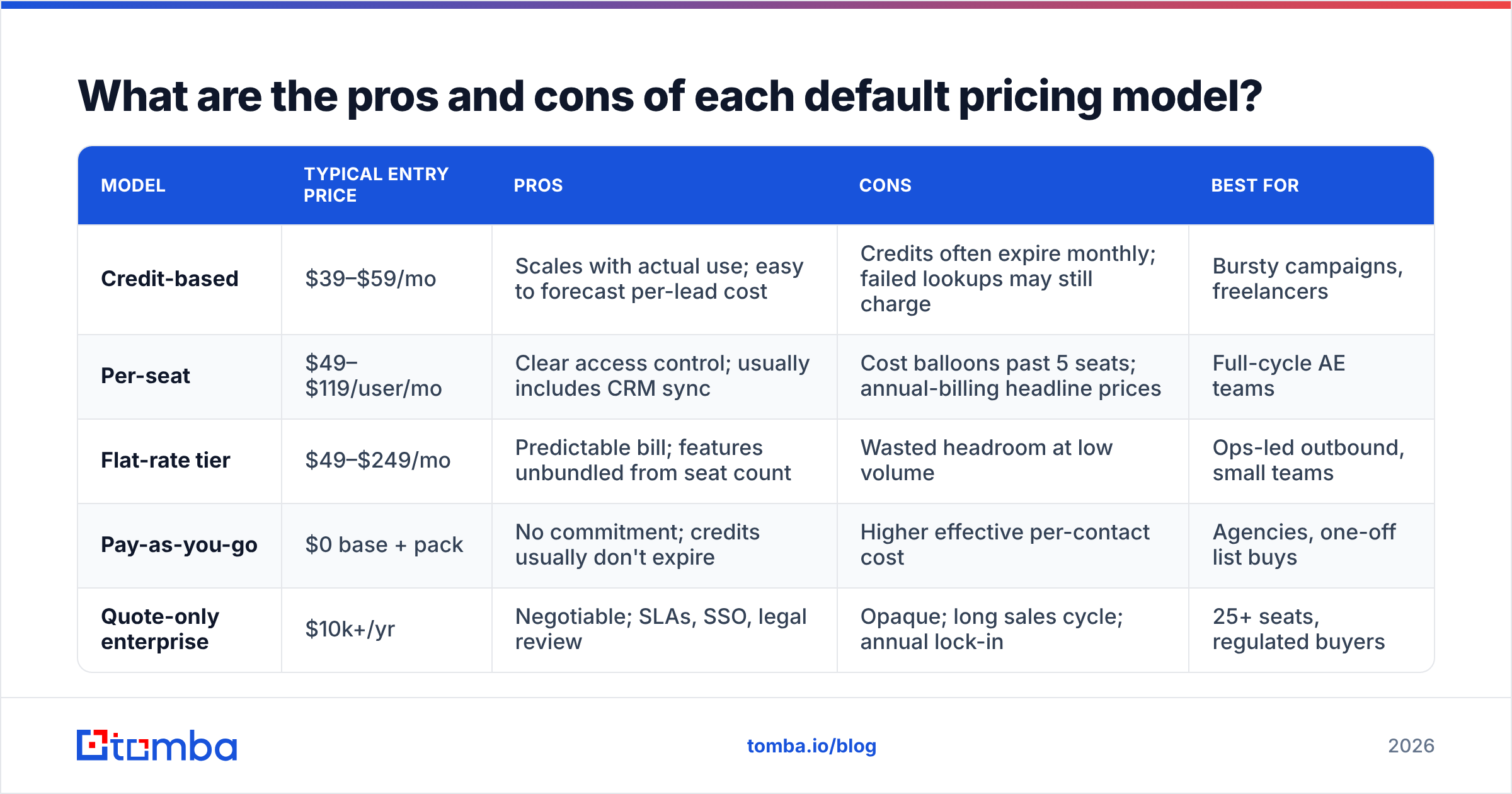
Default pricing reviews pros and cons: how the four models compare#
| Model | Typical entry price | Pros | Cons | Best for |
|---|---|---|---|---|
| Credit-based | $39–$59/mo | Scales with actual use; easy to forecast per-lead cost | Credits often expire monthly; failed lookups may still charge | Bursty campaigns, freelancers |
| Per-seat | $49–$119/user/mo | Clear access control; usually includes CRM sync | Cost balloons past 5 seats; annual-billing headline prices | Full-cycle AE teams |
| Flat-rate tier | $49–$249/mo | Predictable bill; features unbundled from seat count | Wasted headroom at low volume | Ops-led outbound, small teams |
| Pay-as-you-go | $0 base + pack | No commitment; credits usually don't expire | Higher effective per-contact cost | Agencies, one-off list buys |
| Quote-only enterprise | $10k+/yr | Negotiable; SLAs, SSO, legal review | Opaque; long sales cycle; annual lock-in | 25+ seats, regulated buyers |
That table is the real takeaway of any default pricing reviews pros and cons comparison: the model decides who overpays. A five-person team on per-seat pricing pays about the same as a 100k-credit flat plan, while using a fraction of the volume. A solo founder on a $249 flat tier is buying insurance, not data.
How do email finder vendors price in 2026?#
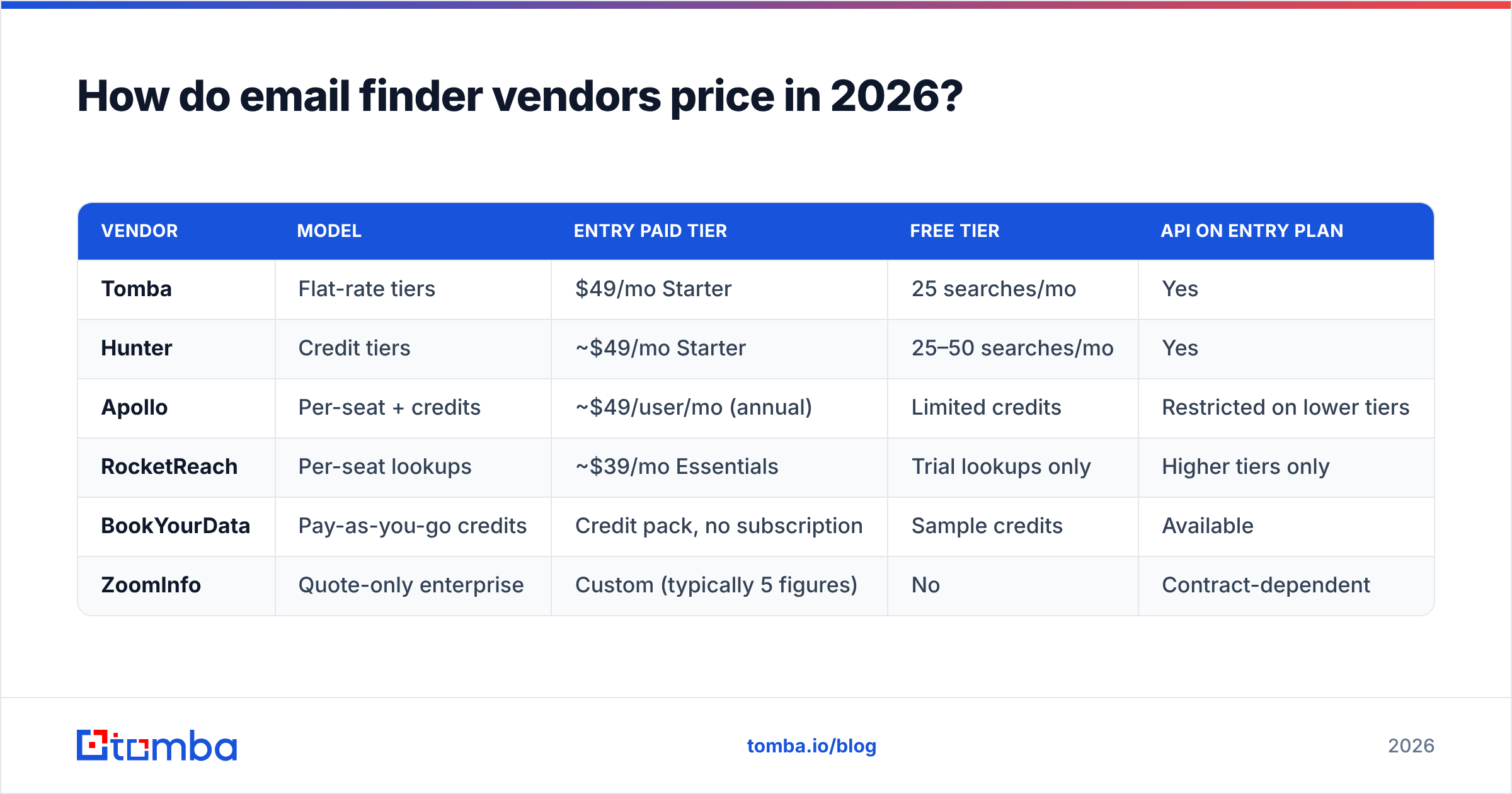
Email finders show these models most clearly. The product is nearly the same everywhere: a lookup returns an address or it doesn't. The packaging is what varies wildly.

| Vendor | Model | Entry paid tier | Free tier | API on entry plan |
|---|---|---|---|---|
| Tomba | Flat-rate tiers | $49/mo Starter | 25 searches/mo | Yes |
| Hunter | Credit tiers | ~$49/mo Starter | 25–50 searches/mo | Yes |
| Apollo | Per-seat + credits | ~$49/user/mo (annual) | Limited credits | Restricted on lower tiers |
| RocketReach | Per-seat lookups | ~$39/mo Essentials | Trial lookups only | Higher tiers only |
| BookYourData | Pay-as-you-go credits | Credit pack, no subscription | Sample credits | Available |
| ZoomInfo | Quote-only enterprise | Custom (typically 5 figures) | No | Contract-dependent |
These are list prices as published at the time of writing. Always re-check the vendor's own page before you budget, because entry tiers move quarterly. It also helps to cross-reference user-reported pricing on G2 and Capterra, where buyers often document the gap between the quoted price and the renewal price.
Two structural differences matter more than the entry number:
API access on the entry tier. Several vendors gate their API behind the second or third plan. If you plan to enrich inside a workflow rather than a dashboard, a $49 plan without API access is really a $149 plan. Tomba includes API access from the paid entry tier, which is the main reason it shows up in ops-driven stacks.
What counts as a billable event. Some vendors charge for every query. Others charge only when a verified result comes back. Over 10,000 lookups at a 60% hit rate, that gap is 4,000 wasted credits — often more than the price gap between two plans.
Does a higher price actually mean better data?#
No, and this is where most pricing reviews go wrong. Price tracks feature breadth and enterprise packaging. It does not track match rate on your specific target list.

Accuracy varies by segment. A vendor with strong coverage of US mid-market SaaS may be thin on European manufacturing or APAC logistics. A five-figure contract does not fix that. It only adds seats and support on top of the same index.
The only test that matters: take 100 real target accounts from your ICP, run them through each tool's trial or free tier, and measure three things.
- Match rate — how many contacts returned an address at all.
- Verified rate — how many passed an independent email verifier, not just the vendor's own confidence score.
- Bounce rate on send — the only number your email deliverability actually cares about.
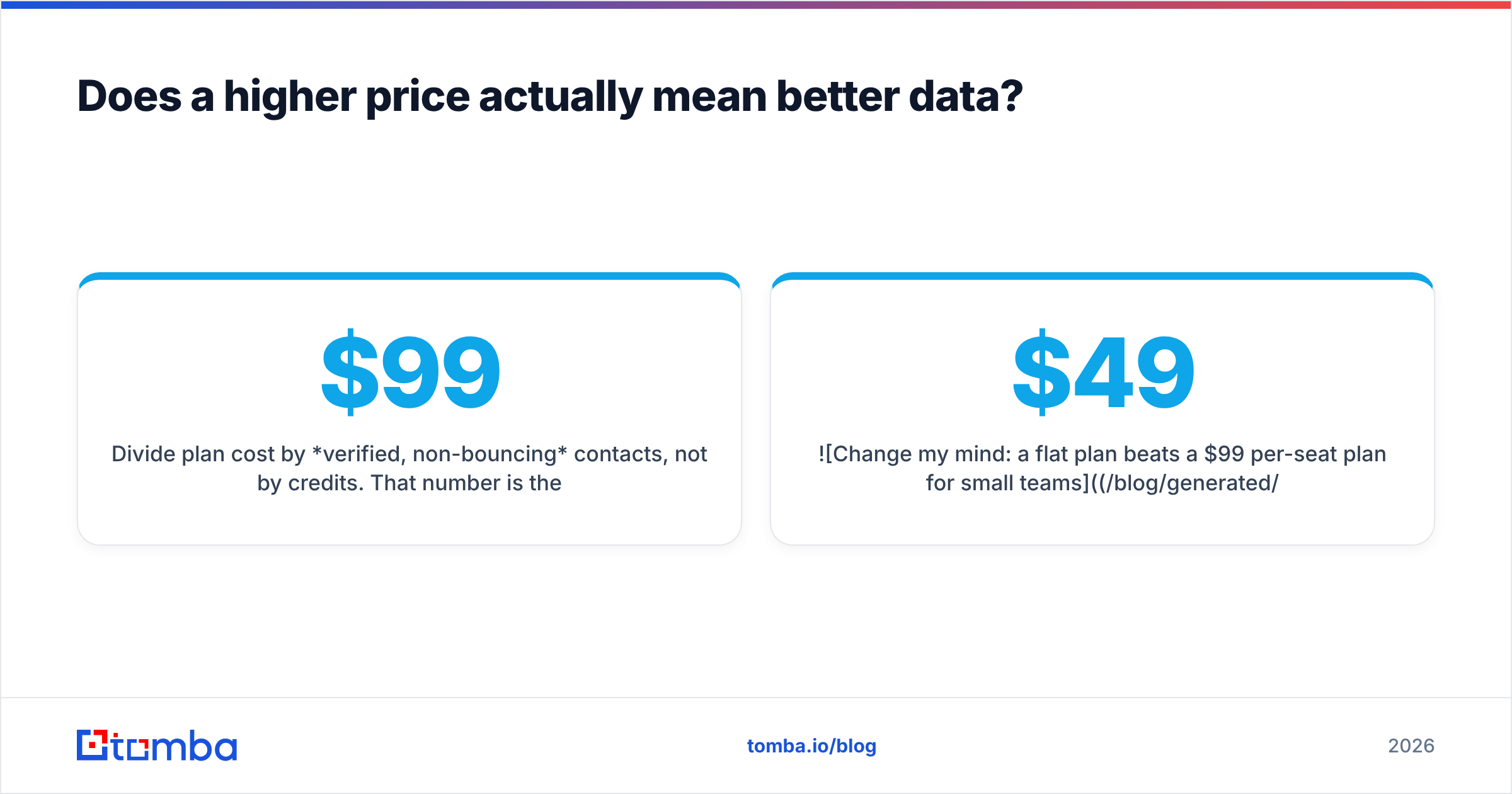
Divide plan cost by verified, non-bouncing contacts, not by credits. That number is the real price. It often reorders the ranking you built from the pricing page. A $99 plan at an 80% verified rate beats a $49 plan at a 35% verified rate on cost per usable contact. The reverse is just as often true.

Where do default plans quietly cost more than advertised?#
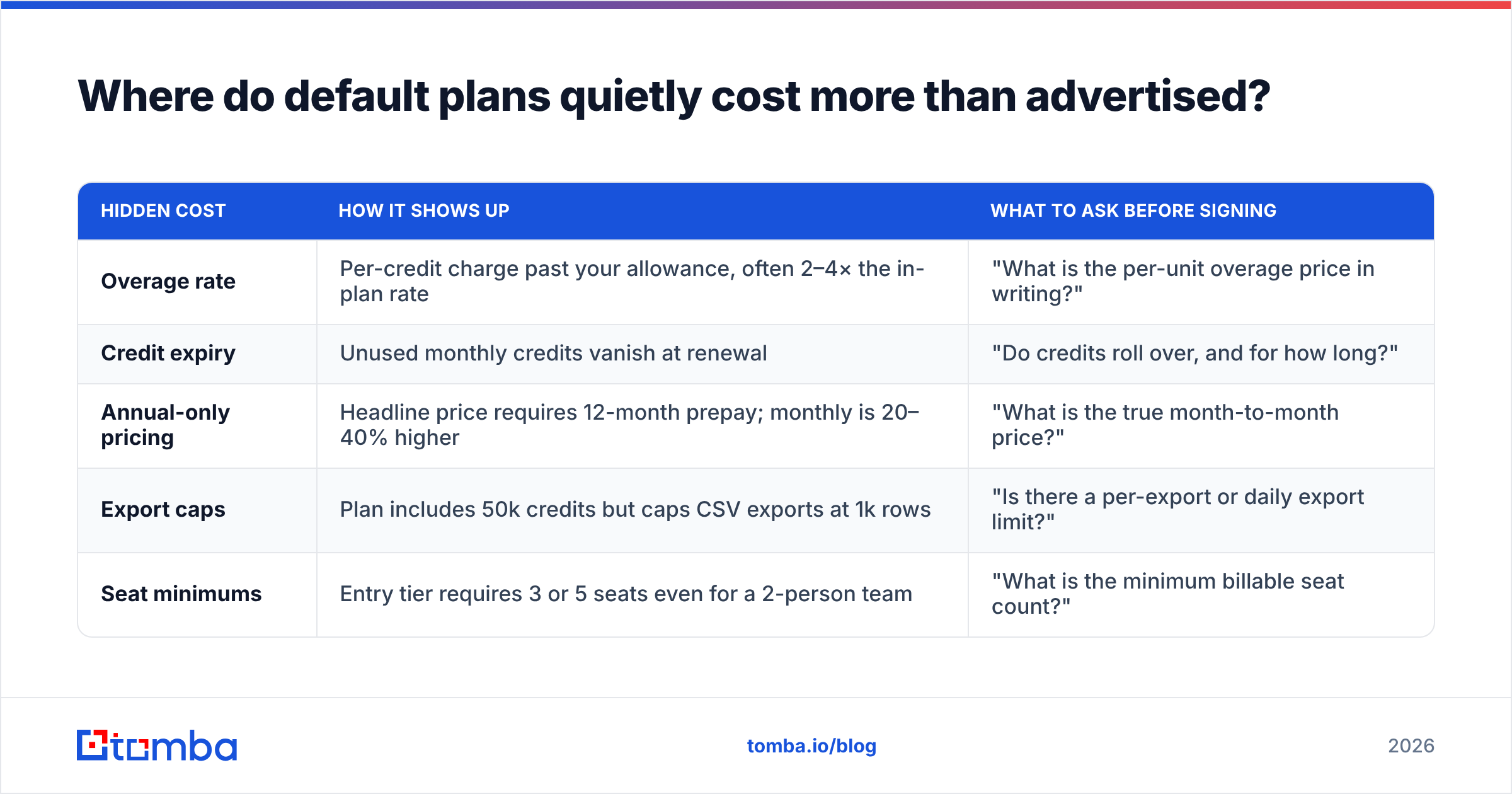
Five line items account for most of the gap between quoted price and actual invoice.
| Hidden cost | How it shows up | What to ask before signing |
|---|---|---|
| Overage rate | Per-credit charge past your allowance, often 2–4× the in-plan rate | "What is the per-unit overage price in writing?" |
| Credit expiry | Unused monthly credits vanish at renewal | "Do credits roll over, and for how long?" |
| Annual-only pricing | Headline price requires 12-month prepay; monthly is 20–40% higher | "What is the true month-to-month price?" |
| Export caps | Plan includes 50k credits but caps CSV exports at 1k rows | "Is there a per-export or daily export limit?" |
| Seat minimums | Entry tier requires 3 or 5 seats even for a 2-person team | "What is the minimum billable seat count?" |
Vendors do not hide these on purpose. They live in the FAQ under the pricing table. But they are the difference between a $588 year and a $2,400 year on the same "$49/mo" plan. You do not need a procurement team to catch them. One email asking those five questions is enough, and any vendor that dodges them in writing has answered you anyway.
Also budget for the tools that sit around the finder. Verification, data enrichment, and sending infrastructure are usually separate line items. Bundling them under one vendor is often cheaper than three point solutions, but only if you use all three. A bundled feature you never touch is the most expensive kind of discount. HubSpot's own pricing documentation shows how fast bundle tiers climb once seat minimums and add-ons stack.
How should you review a pricing page before you buy?#
Work through it in this order. It takes about fifteen minutes per vendor and prevents nearly every common overspend.
- Identify the model first. Credit, seat, flat, or PAYG. Everything else follows from this. If the page says "per user, per month, billed annually," multiply by seats and by 12 before you compare anything.
- Find the billable event. Query or result? Search or verification? Are enrichment fields charged on their own? This one definition can change effective cost by 2–3×.
- Locate the overage rate. If it isn't published, that's a data point.
- Check feature gating. API, bulk upload, CRM sync, team seats, and export limits are the four things most often withheld from entry tiers.
- Run the 100-account test. Free tiers exist for this. Tomba's free tier gives 25 searches per month, and most rivals offer something similar. Use them all in the same week on the same list.
- Price the year, not the month. Include overage at your realistic volume, not your optimistic one.
For teams running bulk lead generation rather than one-off lookups, add a seventh step. Check whether bulk jobs burn credits at the same rate as single searches. Some vendors discount bulk, some charge more for it, and a few quietly cap concurrency so a 50k-row job takes a week.
Which default plan fits your team size?#
- Solo founder or freelancer (< 500 lookups/mo): free tier plus a pay-as-you-go pack. Do not subscribe yet. BookYourData's no-subscription credit model and Tomba's 25-search free tier both work here without lock-in.
- 2–10 person outbound team (1k–10k lookups/mo): flat-rate tier in the $49–$99 band. Tomba Starter at $49/mo or Growth at $99/mo covers this range with API access included — see Tomba pricing for current tier limits.
- 10–30 person team with RevOps (10k–50k lookups/mo): flat-rate Pro tier ($249/mo) or a negotiated credit contract. At this size, per-seat pricing becomes the most expensive option by a wide margin.
- 30+ seats, regulated or procurement-heavy: quote-only enterprise, but bring benchmark data from a flat-rate vendor to the table. Nothing moves an enterprise quote like a documented cost-per-verified-contact from a $249 plan.
The honest conclusion of any default pricing reviews pros and cons roundup: there is no cheap model, only a model that fits your usage shape. Bursty volume wants credits. Predictable volume wants flat rate. Daily access for everyone wants seats. Buying against your own usage shape is what makes software feel overpriced.
What's the fastest way to test this yourself?#
Pick your 100 target accounts. Run them through the Tomba Email Finder free tier alongside the two rivals you are seriously weighing. Measure match rate, verify the results yourself, and divide each annual plan cost by verified contacts. If Tomba's flat $49/mo Starter lands lowest on cost per usable contact for your ICP — API included, no seat minimums, no per-user math — you have proof instead of a pricing-page impression. If it doesn't, you just saved a year on the wrong contract. Either way beats guessing.
Related guides#
// get started
Find, verify and enrich your first contacts today
Start on the free plan with 25 searches a month, then scale when your team is ready.
Free plan · No credit card required · GDPR & CCPA
// about the author