Deskera Pricing Reviews Pros and Cons: An Honest 2026 Guide
A neutral look at what Deskera actually costs in 2026, where its all-in-one suite shines, and the limits reviewers keep flagging—so you can decide before you commit.
Deskera markets itself as the "all-in-one" business suite. It replaces your accounting, CRM, HR, and inventory tools with one login. That pitch is attractive when you are tired of paying for five subscriptions. But does it hold up once you are past the demo? This is a neutral guide to Deskera pricing reviews pros and cons for 2026. We cover the real numbers, the friction points reviewers keep raising, and who should look elsewhere.
TL;DR#
- Deskera is a bundled ERP-lite suite (Books, CRM, People) aimed at SMBs that want accounting, sales, and HR under one roof.
- Pricing starts around $9–$15 per user/month on entry tiers but climbs fast once you add users, modules, and the mid-market "Deskera ERP" plan (custom-quoted).
- Biggest strength: genuine consolidation — one vendor, one data layer, fewer integrations to babysit.
- Biggest complaints in reviews: per-user costs that balloon, a learning curve on setup, and support that slows down outside business hours.
- Deskera does not find or verify B2B contact data — for accurate prospecting emails you still need a dedicated tool like Tomba Email Finder.
What is Deskera and who is it for?#
Think of Deskera like a Swiss Army knife for running a small business: one handle, several tools folded in. Instead of buying QuickBooks for books, HubSpot for CRM, and a separate HR app, you get Deskera Books, Deskera CRM, and Deskera People from a single vendor with shared data.
Technically, Deskera is a cloud business suite covering accounting and invoicing, inventory and order management, a sales CRM with email campaigns, and HR/payroll. It targets small and mid-sized businesses — especially owner-operators and lean finance teams — that value one bill and one support contact over best-in-class depth in any single category.
That framing matters for this review. Deskera is not competing head-to-head with a dedicated CRM or a dedicated prospecting stack. It competes with the pain of running many subscriptions. Judge it on consolidation, not on whether its CRM out-features a specialist.

How much does Deskera cost in 2026?#
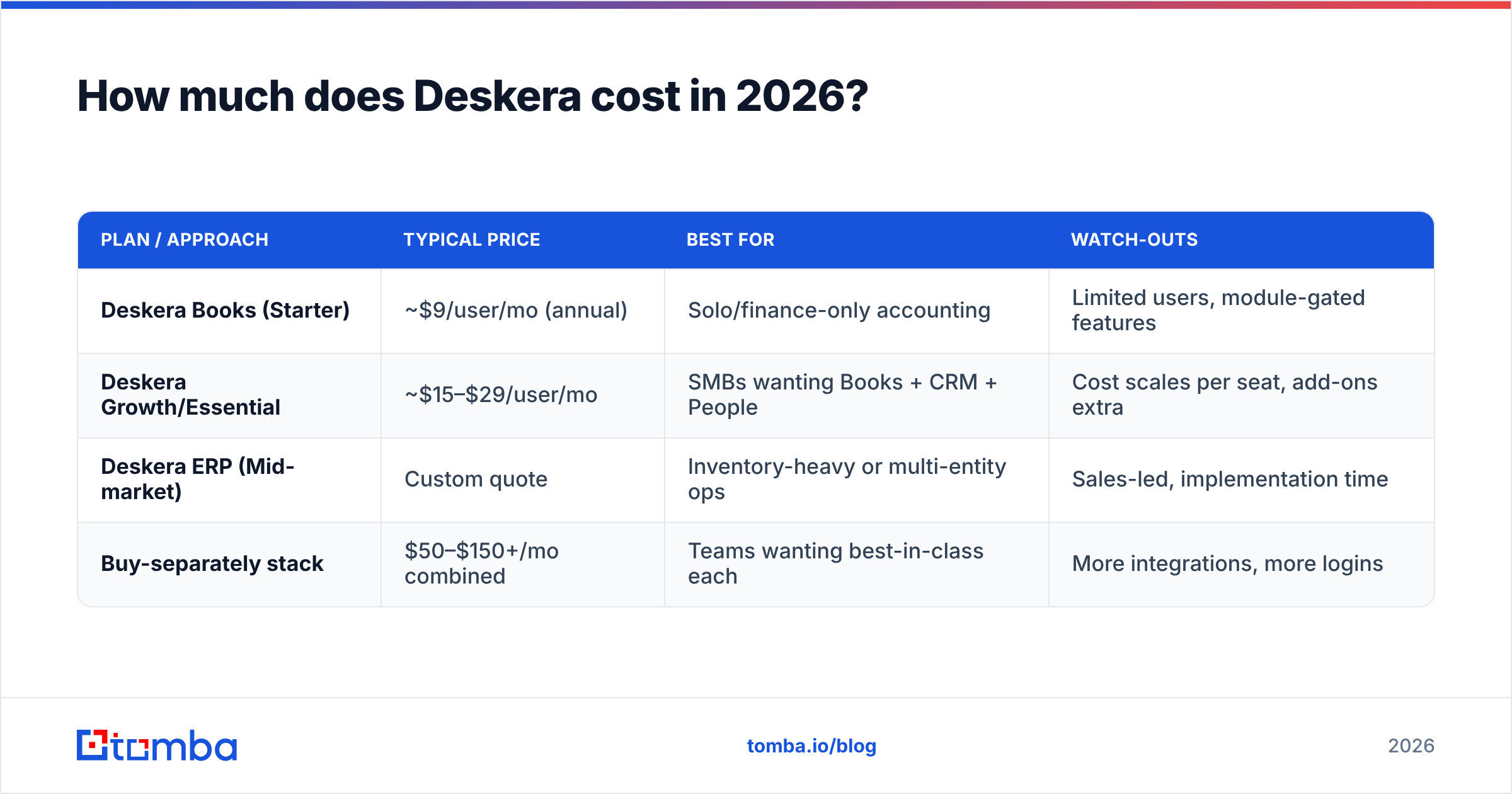
Deskera uses a per-user, per-module subscription model. Annual billing gets a discount. The headline prices look cheap. But the real cost depends on your seat count and which modules you turn on. Always confirm current numbers on Deskera's own pricing page before you buy, because tiers shift and regional pricing varies.
Here is the shape of it, based on Deskera's published plans and how they typically stack up against buying tools separately:
| Plan / approach | Typical price | Best for | Watch-outs |
|---|---|---|---|
| Deskera Books (Starter) | ~$9/user/mo (annual) | Solo/finance-only accounting | Limited users, module-gated features |
| Deskera Growth/Essential | ~$15–$29/user/mo | SMBs wanting Books + CRM + People | Cost scales per seat, add-ons extra |
| Deskera ERP (Mid-market) | Custom quote | Inventory-heavy or multi-entity ops | Sales-led, implementation time |
| Buy-separately stack | $50–$150+/mo combined | Teams wanting best-in-class each | More integrations, more logins |
The pattern reviewers flag is simple: the entry price is per user. A three-person finance team on a mid tier is manageable. But once sales, ops, and HR all need seats, the monthly bill grows fast. What looked like "$15" starts to look like a real line item. Compare that mentally to something like Tomba pricing, where a Starter plan is a flat $49/mo no matter how many teammates log in to run searches — a different model, and worth understanding before you assume "per user" is normal.
Where the money actually goes with Deskera:
- Base seats — every active user on every module counts.
- Module expansion — turning on People or advanced inventory can move you up a tier.
- The ERP jump — outgrowing the self-serve plans pushes you into custom, sales-led pricing.
- Implementation time — not a line item, but real cost in staff hours during setup.
What do Deskera reviews say — the pros?#
Across public review sites like G2 and Capterra, a consistent set of positives shows up. Filtered for signal:
- True consolidation. Users who moved from three or four tools praise having invoices, contacts, and payroll in one place with shared data. No more exporting a CSV from one app to import into another.
- Value at the low end. For micro-businesses, getting accounting plus a light CRM for the price of one mid-tier SaaS tool is a legitimate win.
- Decent mobile apps. Deskera's mobile experience gets called out more often than most ERP-adjacent products — useful for owners approving invoices on the go.
- Straightforward invoicing and books. The accounting core is generally described as clean and sufficient for non-accountants.
The through-line in the positive reviews is simplicity of ownership, not feature supremacy. People like paying one vendor and having one dashboard.
What are the cons reviewers keep raising?#
No suite this broad is uniformly deep. The recurring criticisms:
- Per-user cost creep. The single most common complaint. What starts cheap gets expensive as headcount grows, and some reviewers feel nickel-and-dimed by module gating.
- Learning curve and setup. Because it touches accounting, inventory, CRM, and HR, initial configuration takes real effort. A few reviewers describe onboarding as slower than expected without hands-on help.
- Support responsiveness. Timezone gaps and slower ticket resolution come up, especially for teams outside Deskera's core support hours.
- Shallow depth per module. The CRM works, but power users comparing it to a dedicated platform notice missing automation and reporting nuance. Same story for advanced inventory or payroll edge cases.
- No contact data or prospecting. Deskera manages the contacts you already have. It does not source new B2B emails, verify them, or enrich records — a gap if outbound sales is part of your motion.
That last point is the one buyers underestimate. A CRM is only as good as the data flowing into it, and Deskera assumes you bring your own.

Is Deskera worth it, or should you build a stack?#
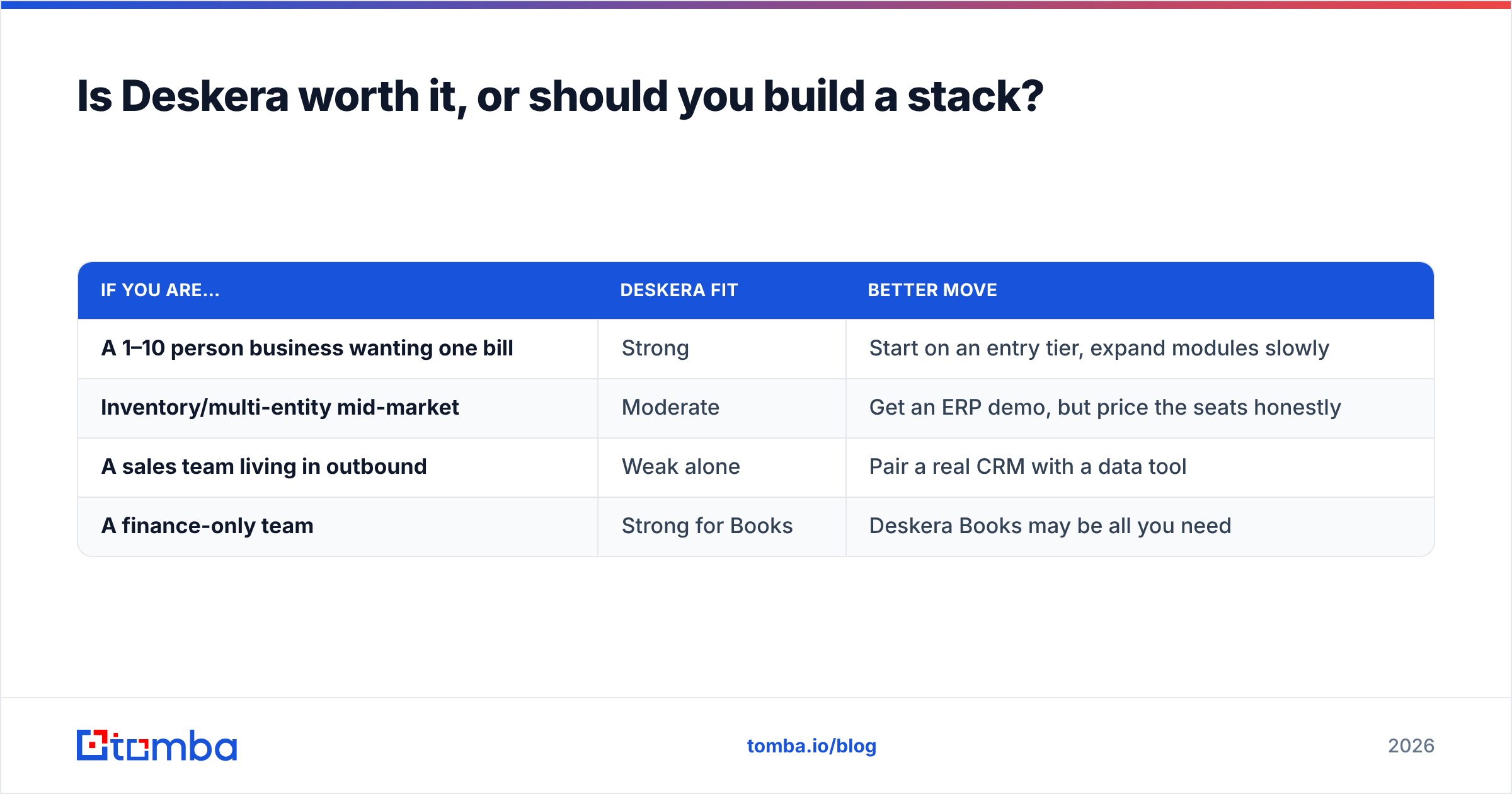
Short answer: Deskera is worth it if consolidation is your top priority and your team is small enough that per-user pricing stays reasonable. If you need best-in-class depth in any single area — or if outbound prospecting is core to revenue — a focused stack usually wins.
Here is a practical decision frame:
| If you are… | Deskera fit | Better move |
|---|---|---|
| A 1–10 person business wanting one bill | Strong | Start on an entry tier, expand modules slowly |
| Inventory/multi-entity mid-market | Moderate | Get an ERP demo, but price the seats honestly |
| A sales team living in outbound | Weak alone | Pair a real CRM with a data tool |
| A finance-only team | Strong for Books | Deskera Books may be all you need |
The mistake is treating "all-in-one" as "all-you-need." Deskera closes the gap between your finance, HR, and contact-management tools. It does not close the gap between no leads and pipeline. For that, you need a way to find and verify decision-maker contact information — which brings us to the piece Deskera intentionally leaves out.
Where does Deskera fall short for sales prospecting?#
Deskera's CRM is a system of record. It stores deals and contacts you feed it. It has no engine to answer the two questions every outbound team asks first: who do I contact, and is this email real?
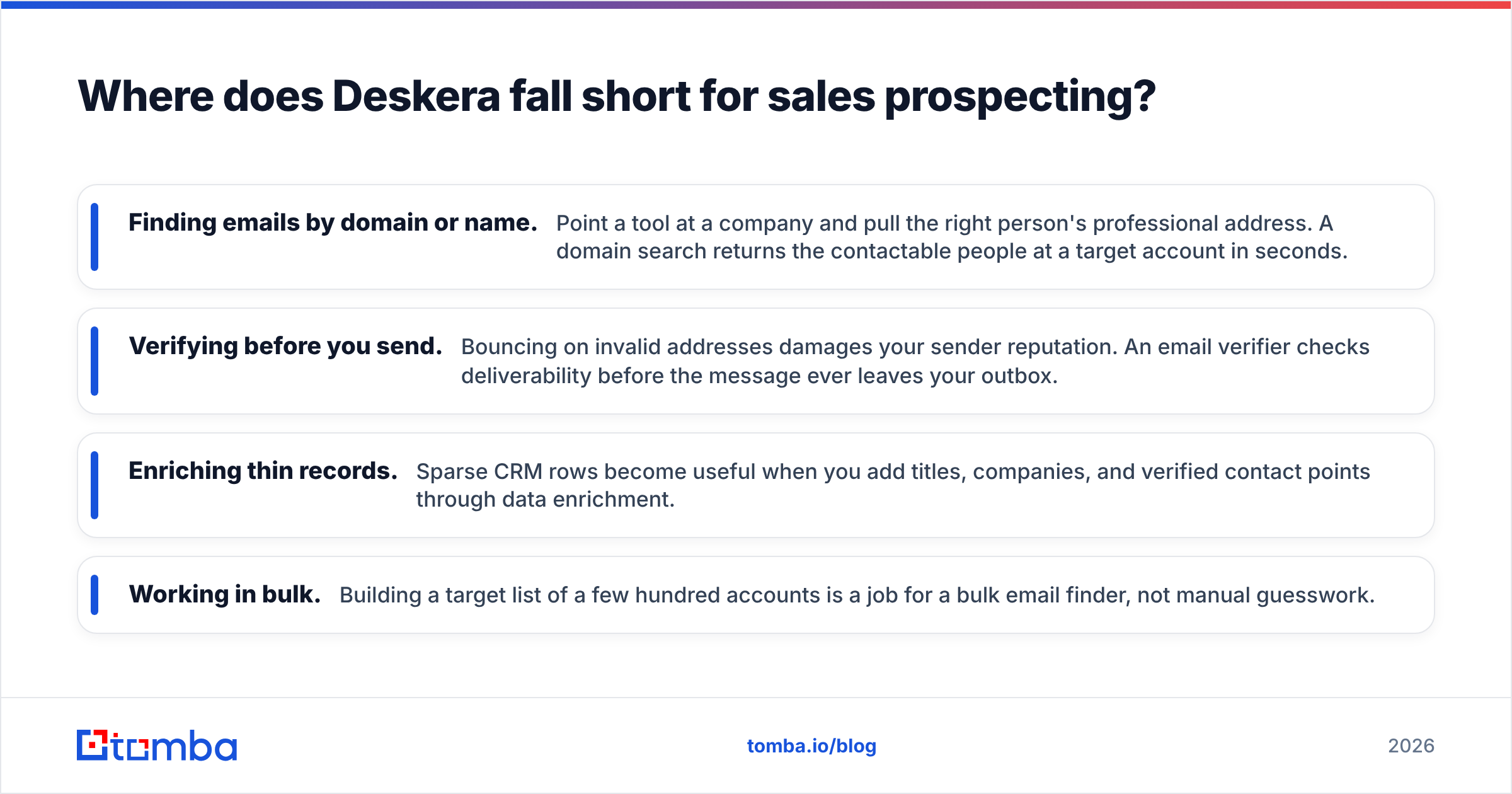
That is a data problem, not a CRM problem, and it is where a dedicated finder earns its place next to any suite:
- Finding emails by domain or name. Point a tool at a company and pull the right person's professional address. A domain search returns the contactable people at a target account in seconds.
- Verifying before you send. Bouncing on invalid addresses damages your sender reputation. An email verifier checks deliverability before the message ever leaves your outbox.
- Enriching thin records. Sparse CRM rows become useful when you add titles, companies, and verified contact points through data enrichment.
- Working in bulk. Building a target list of a few hundred accounts is a job for a bulk email finder, not manual guesswork.
You can run all of that alongside Deskera. Find and verify contacts with a specialist tool, then push clean records into Deskera's CRM as your system of record. The suite handles the paperwork; the finder handles the pipeline.
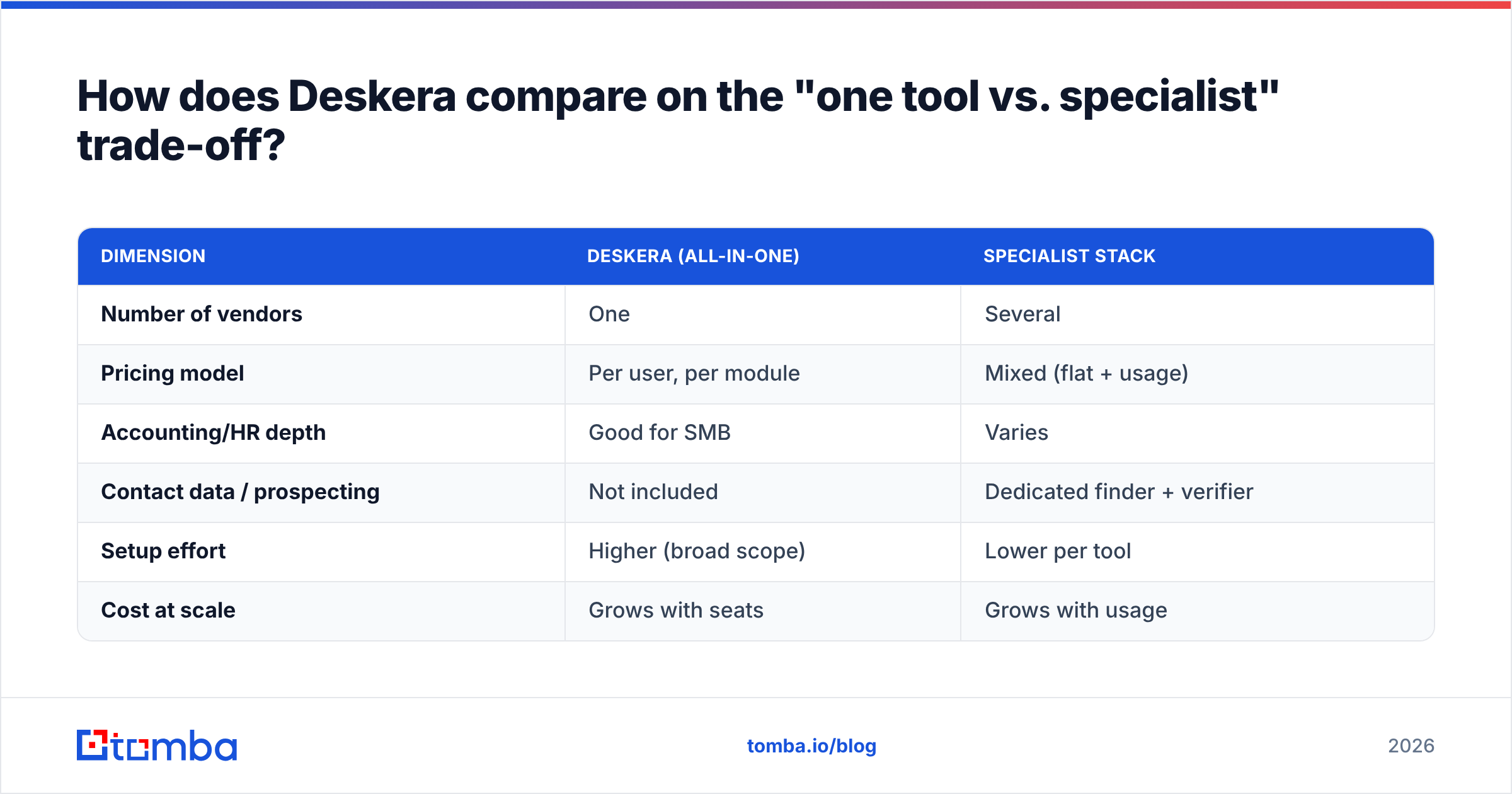
How does Deskera compare on the "one tool vs. specialist" trade-off?#
This is the real Deskera pros and cons in one table — bundled convenience against focused depth:
| Dimension | Deskera (all-in-one) | Specialist stack |
|---|---|---|
| Number of vendors | One | Several |
| Pricing model | Per user, per module | Mixed (flat + usage) |
| Accounting/HR depth | Good for SMB | Varies |
| Contact data / prospecting | Not included | Dedicated finder + verifier |
| Setup effort | Higher (broad scope) | Lower per tool |
| Cost at scale | Grows with seats | Grows with usage |
Neither column is universally "right." A five-person services firm that mostly needs books and invoicing will be happy inside Deskera. A ten-person sales org that lives and dies by outbound will get more from a lean CRM plus a data tool, because the bottleneck is leads, not ledgers.
If you want to sanity-check where any vendor sources its records before trusting them, it is reasonable to ask about data sources — accuracy is the whole game in contact data, and it is exactly the layer bundled suites do not provide.
Deskera pricing reviews pros and cons — the verdict#
Here is our Deskera pricing reviews pros and cons summary. Deskera delivers on its core promise: fewer tools, one bill, and shared data for small teams that value simplicity over specialization. The accounting core is solid. The low-end pricing is genuinely competitive. And the consolidation is real.
The honest caveats are equally real. Per-user pricing rewards small teams and punishes growing ones. Setup demands more patience than a single-purpose app. Support can lag. And critically, Deskera does nothing to fill your pipeline — it organizes contacts, it does not find them.
So treat Deskera as the back-office and record-keeping layer it is, and pair it with a purpose-built data tool for the front of the funnel. That combination — a suite for operations, a finder for prospecting — beats forcing either one to do the other's job.
If prospecting is where your growth actually comes from, start there. Use Tomba Email Finder to find and verify decision-maker emails by domain, name, or company, then feed those clean, verified contacts straight into Deskera's CRM. The free tier gives you 25 searches a month to test the workflow, and paid plans start at $49/mo — a small, flat cost to keep the one thing no all-in-one suite includes: real, contactable pipeline.
Related guides#
Ready to find emails that actually work?
Join 150,000+ professionals who stopped guessing and started sending. Free credits on signup — no credit card required.
Get the Tomba newsletter
Practical outbound tactics and product updates — once every two weeks.
About the author