Dialpad vs Zoom (2026): Which Business Phone System Wins?
Dialpad vs Zoom, compared head-to-head for 2026: AI features, call quality, pricing tiers, and which platform actually fits a revenue-driven sales team.
Dialpad vs Zoom (2026): Which Business Phone System Wins?
Choosing between Dialpad and Zoom in 2026 usually comes down to one question: do you want a communications suite that was built around AI-powered calling, or one that was built around video and later grew a phone system onto it? Both can run your entire team's calls, meetings, and messaging. But they optimize for different things, and the wrong pick quietly taxes your sales team every single day.
This is a neutral, hands-on comparison for teams that live on the phone — SDRs, account executives, support reps, and the RevOps folks who have to defend the bill.
TL;DR: Dialpad vs Zoom at a Glance#
- Dialpad wins for outbound sales teams that want real-time AI transcription, live coaching, and call intelligence baked into the base plan instead of billed as an add-on.
- Zoom wins for video-first organizations that already run meetings, webinars, and events on Zoom and want a phone system that lives in the same window.
- Pricing is close at the entry tier, but the "true cost" diverges fast once you add AI, contact-center seats, and international calling.
- Call quality is comparable on modern connections; the real differentiator is what the platform does with the call after it ends.
- Neither replaces your prospecting stack — you still need accurate contact data to have anyone to dial in the first place.
What Is Dialpad and What Is Zoom, Exactly?#
Dialpad is an AI-native business communications platform. Its calling product (Dialpad Connect, formerly Dialpad Talk) was designed from the start around "Ai" — live transcription, real-time sentiment analysis, automated call notes, and AI-driven agent coaching. It also sells a full contact-center product (Dialpad Support / Ai Contact Center) for teams that scale into inbound support and sales.
Zoom is the video-conferencing category leader that expanded outward. Zoom Phone is its cloud PBX, sitting alongside Zoom Meetings, Team Chat, Zoom Contact Center, and the AI Companion assistant. If your company already treats "Zoom" as a verb, Zoom Phone's appeal is obvious: one login, one app, one vendor.
Here's the core distinction in plain terms. Dialpad is a phone system that happens to do meetings. Zoom is a meetings platform that happens to do phone. That heritage shows up in every feature decision below.
How Do Dialpad and Zoom Compare Feature by Feature?#
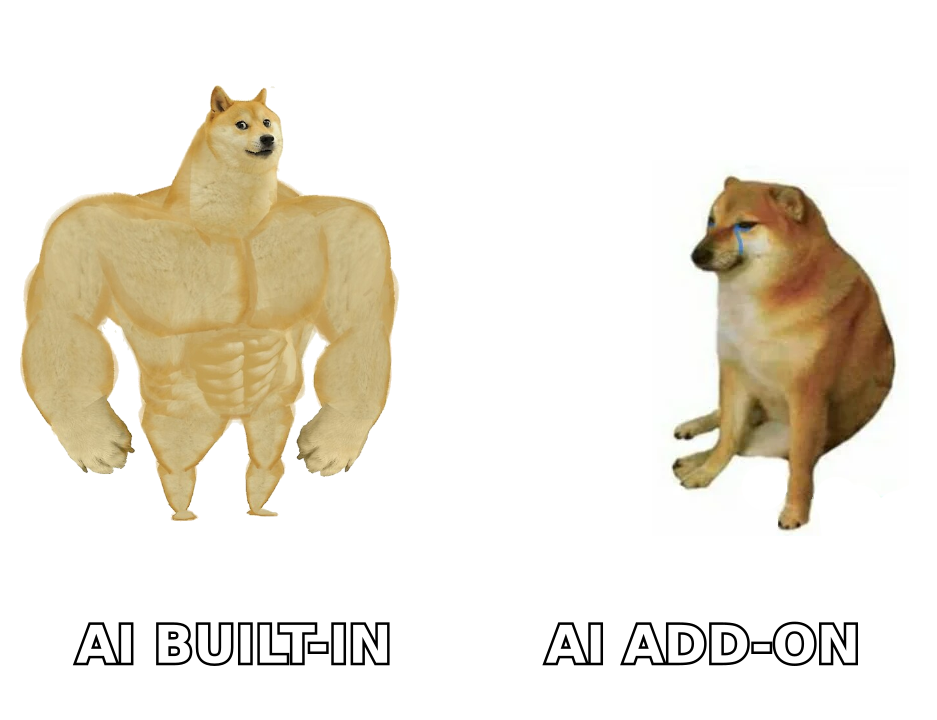
The fastest way to see the split is a side-by-side. Prices reflect standard published list rates in 2026 and are billed per user, per month on annual terms; verify current numbers on each vendor's pricing page before you sign.
| Feature | Dialpad | Zoom Phone |
|---|---|---|
| Entry price (annual) | ~$15/user/mo (Connect Standard) | ~$10–15/user/mo (US/CA Metered or Unlimited) |
| Built-in AI transcription | Yes, on base plan | Via AI Companion (bundled on paid plans, tiered) |
| Real-time call coaching | Yes (Ai Coaching, live) | Limited; stronger in Contact Center tier |
| Video meetings included | Yes, up to 10 participants on Standard | Yes — Zoom's core strength |
| Contact center option | Dialpad Ai Contact Center | Zoom Contact Center |
| International calling | Add-on / higher tiers | Add-on / metered |
| Native CRM integrations | Salesforce, HubSpot, Zoho, more | Salesforce, HubSpot, more |
| Best-fit buyer | Outbound & blended sales teams | Video-heavy orgs standardizing on Zoom |
A few of these rows deserve unpacking, because the table flattens some real nuance.
Which Platform Has Better AI for Sales Calls?#
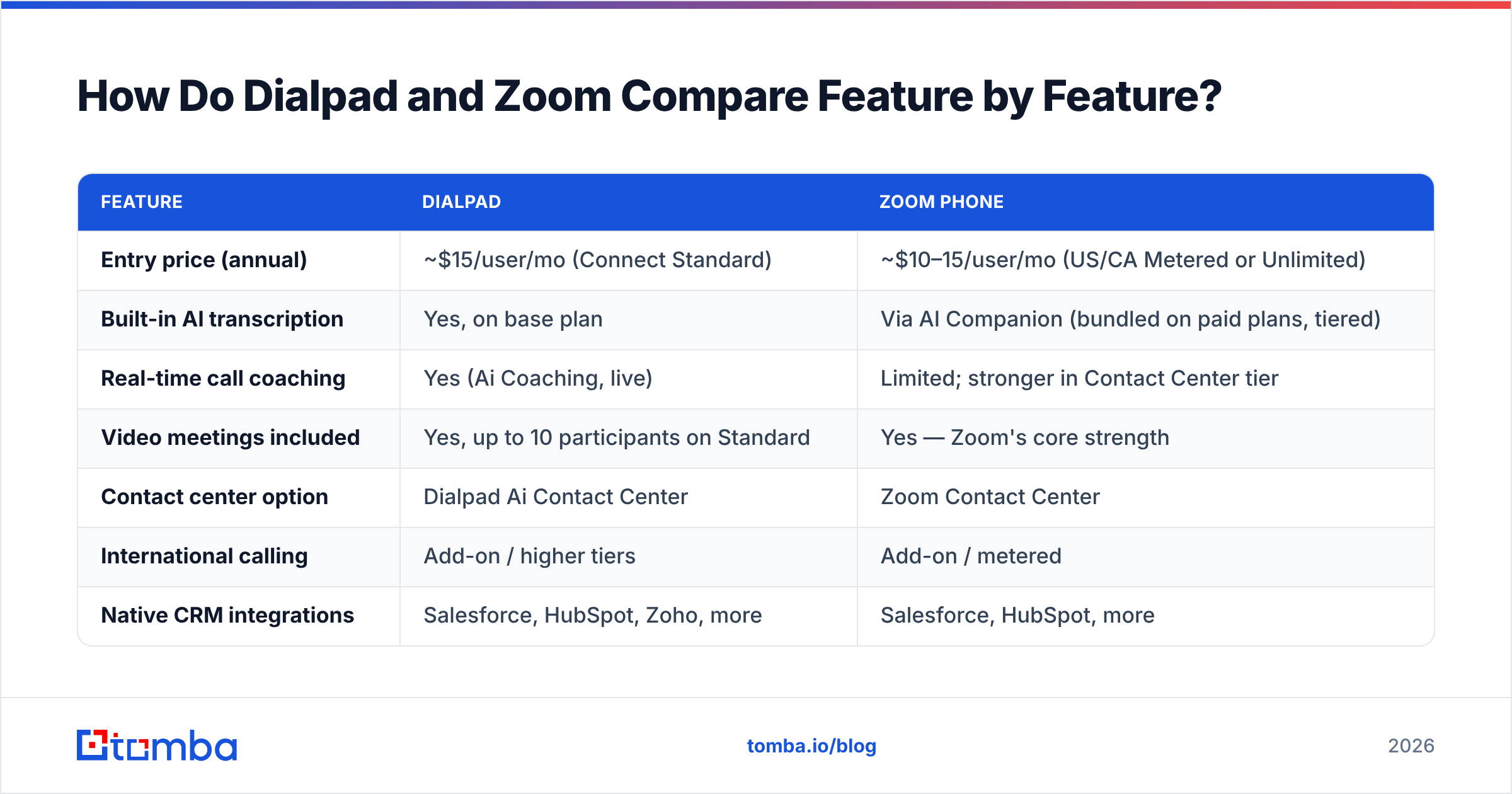
Dialpad has the edge on AI that touches the live call, and it's not especially close in 2026.
The differentiators that matter for a quota-carrying team:
- Real-time transcription — Dialpad transcribes as the call happens, so reps see the conversation on screen live, not after hanging up. Zoom's AI Companion is strong on post-call summaries but historically leans toward after-the-fact processing.
- Live coaching cards — Dialpad surfaces suggested answers and objection-handling prompts mid-call when a prospect says a trigger phrase. This is a genuine ramp accelerator for new SDRs.
- Automatic call notes and action items — Both platforms now auto-summarize. Dialpad pushes these into the CRM with less configuration; Zoom's summaries are excellent but often require the higher AI tiers or Contact Center to unlock coaching depth.
- Sentiment analysis — Dialpad scores caller sentiment in real time, giving managers a live "which calls are going sideways right now" view.
Zoom is catching up quickly, and AI Companion is included rather than sold as a separate line item on most paid plans — a real advantage over vendors that nickel-and-dime AI. But if the AI's job is to make reps better during the call, Dialpad's product was architected for exactly that.
The tradeoff cuts the other way for meetings. Zoom's video is more reliable at scale, has deeper webinar and events tooling, and simply has fewer "can you hear me?" moments on a 40-person call. If most of your "calls" are actually large internal or customer video meetings, that reliability is worth more than live coaching cards.
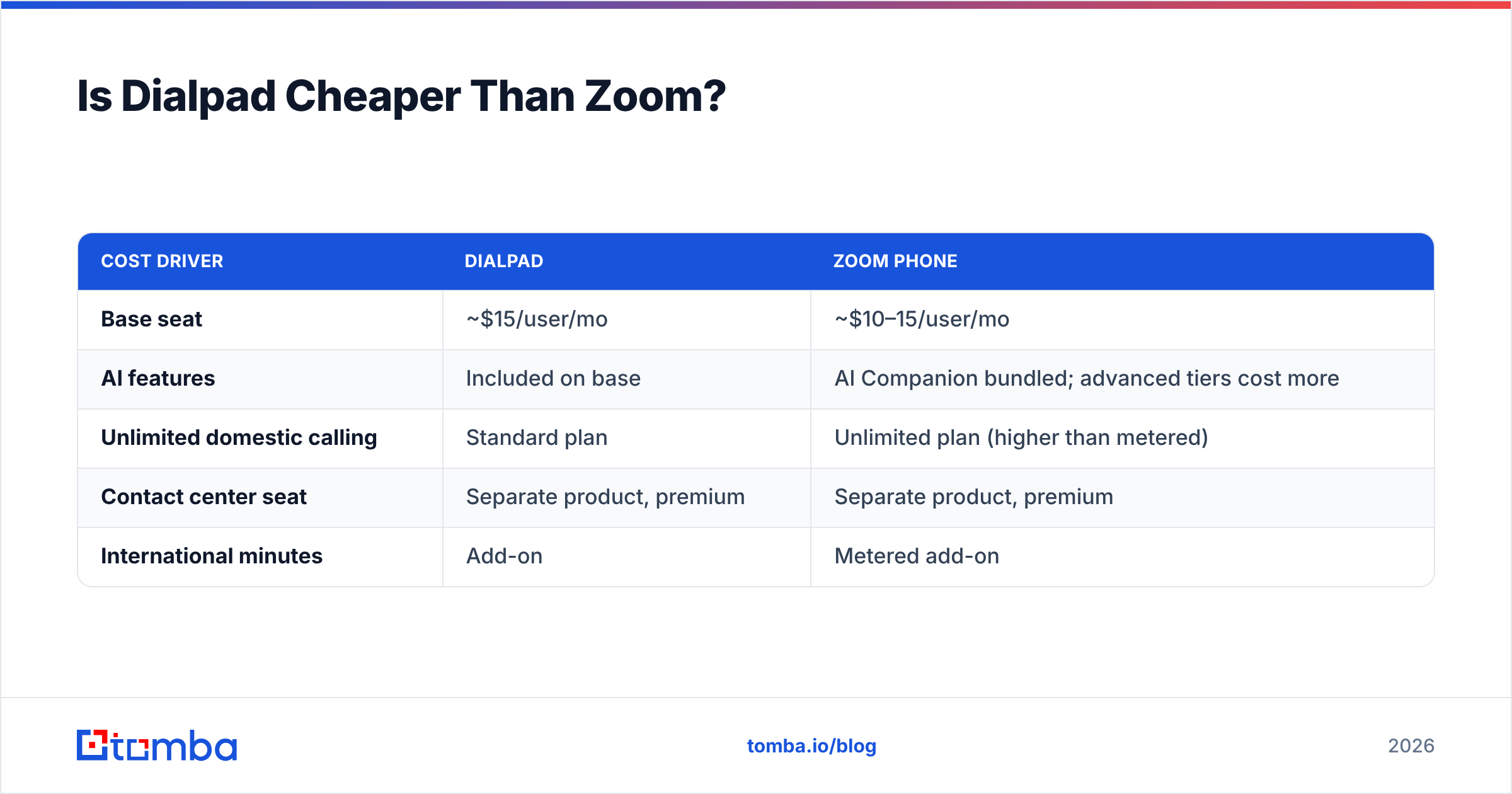
Is Dialpad Cheaper Than Zoom?#
At the entry tier they're within a few dollars of each other; the gap opens once you add the features sales teams actually use. Sticker price is a trap here, so compare total cost of ownership.
| Cost driver | Dialpad | Zoom Phone |
|---|---|---|
| Base seat | ~$15/user/mo | ~$10–15/user/mo |
| AI features | Included on base | AI Companion bundled; advanced tiers cost more |
| Unlimited domestic calling | Standard plan | Unlimited plan (higher than metered) |
| Contact center seat | Separate product, premium | Separate product, premium |
| International minutes | Add-on | Metered add-on |
The honest read: if you only need a barebones dial tone for a handful of users, Zoom's metered plan can be the cheapest way in. If your reps depend on AI transcription and coaching, Dialpad tends to be cheaper for the capability you're actually buying, because you'd have to climb Zoom's tiers to match it. Model it against your seat count and call volume — not the headline number.
What About Call Quality and Reliability?#
Call quality is close enough that it should rarely be the deciding factor in 2026.
Both platforms run on mature global carrier networks with redundancy, HD voice codecs, and published uptime SLAs on business tiers. On a stable connection you will not hear a meaningful difference. Where problems show up is the same for both: bad Wi-Fi, oversubscribed home networks, and cheap headsets. Fix those before blaming the vendor.
Two practical notes:
- Zoom's scale means its infrastructure is battle-tested by enormous concurrent video load, which some IT teams read as a reliability signal.
- Dialpad's split-second AI processing happens without audible latency in normal use, but it's doing more per call, so a very constrained network can feel it slightly more than a plain SIP call would.
For a distributed sales team, invest in the endpoints and the network. The platform choice barely moves call quality.

Dialpad vs Zoom: Pros and Cons#
Dialpad — strengths
- AI transcription, sentiment, and live coaching on the base plan
- Purpose-built for outbound and blended sales motions
- Clean CRM write-back for call notes and outcomes
- Strong contact-center path when you scale support
Dialpad — weaknesses
- Video is capable but not the reason anyone buys it
- Some advanced features and international calling push you up-tier
- Smaller brand footprint than Zoom in non-sales departments
Zoom — strengths
- Best-in-class video, webinars, and events
- One vendor for meetings, chat, and phone reduces tool sprawl
- AI Companion bundled rather than a surprise add-on
- Massive integration and device ecosystem
Zoom — weaknesses
- Phone is a strong add-on, not the platform's center of gravity
- Deepest real-time sales-coaching AI lives in pricier tiers
- Metered pricing can get confusing across regions
Which Should Your Team Choose?#
Pick based on where your team spends its day, not on which brand you recognize.
- Choose Dialpad if you run a high-volume outbound or inbound sales floor, you want AI coaching to shorten ramp time, and the phone is your primary revenue channel.
- Choose Zoom if your organization already standardizes on Zoom for meetings, video is your dominant communication mode, and you want phone as a tidy extension of a stack everyone already knows.
- Consider running both only if you have distinct teams with distinct needs — a sales org on Dialpad and a broad company on Zoom is a defensible, if pricier, split.
Whichever you land on, the platform is only half the equation. A phone system with world-class AI is worthless if your reps are dialing wrong numbers or emailing addresses that bounce. That's a data problem, not a telephony problem — and it's where most outbound programs actually leak.
Where Does Your Contact Data Come From?#
Neither Dialpad nor Zoom finds your prospects for you. They connect the call; you still have to source the person, the direct dial, and the verified email. This is the quiet dependency behind every phone-system comparison.
Before a single call goes out, a healthy outbound motion needs:
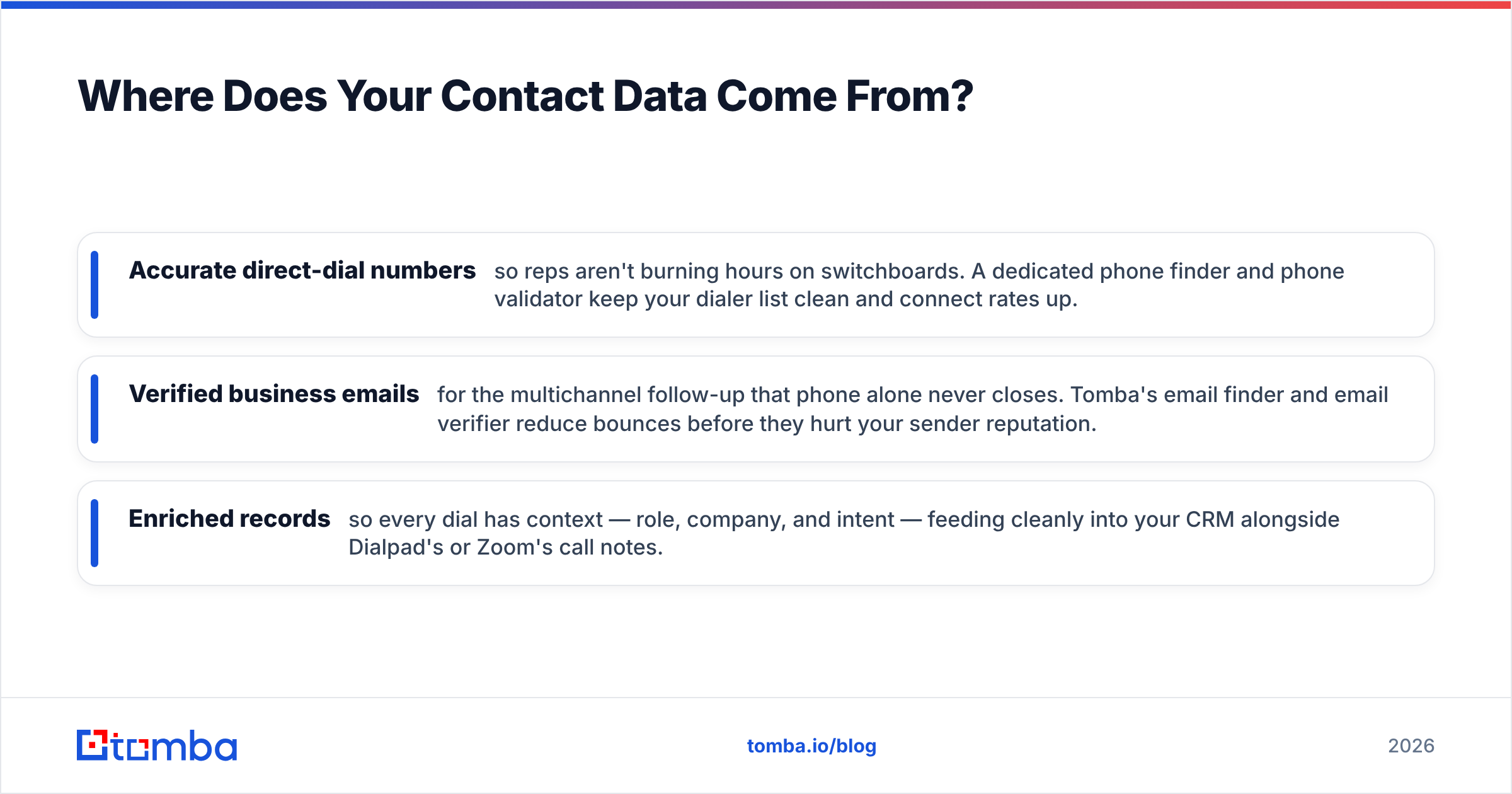
- Accurate direct-dial numbers so reps aren't burning hours on switchboards. A dedicated phone finder and phone validator keep your dialer list clean and connect rates up.
- Verified business emails for the multichannel follow-up that phone alone never closes. Tomba's email finder and email verifier reduce bounces before they hurt your sender reputation.
- Enriched records so every dial has context — role, company, and intent — feeding cleanly into your CRM alongside Dialpad's or Zoom's call notes.
Do this well and your shiny new phone platform actually earns its price. Skip it and you've bought a very sophisticated way to reach voicemail.
For a broader look at how communication tools stack up, G2's category pages for Dialpad and vendor documentation at dialpad.com and zoom.us are worth reading alongside this comparison. Reviews there echo the same split we found: Dialpad for AI-driven calling, Zoom for video-first everything.
Frequently Asked Questions#
Is Dialpad better than Zoom for cold calling? For pure outbound cold calling, yes — Dialpad's live transcription, coaching prompts, and CRM write-back are built for reps making dozens of dials a day. Zoom Phone can do cold calling well, but its AI coaching depth typically lives in higher tiers.
Can Zoom Phone replace a dedicated sales dialer? For lower-volume or blended teams, Zoom Phone is enough, especially if you already run Zoom. High-velocity SDR floors usually prefer Dialpad's sales-native features or a purpose-built power dialer layered on top.
Do Dialpad and Zoom integrate with my CRM? Both integrate with Salesforce, HubSpot, and other major CRMs, logging calls and syncing notes. Dialpad's automatic call-note write-back tends to need less setup for sales-specific fields.
Which has better video? Zoom, clearly. If video meetings, webinars, and events are central to your business, Zoom's core product outclasses Dialpad's included video.
The Bottom Line#
Dialpad and Zoom are both excellent — they just optimize for different centers of gravity. Dialpad is the sales-team phone platform with AI built into the call. Zoom is the video giant whose phone system is a strong, convenient extension of a stack you may already run. Match the tool to your dominant motion and you'll be happy either way.
Just remember the part no phone vendor sells you: the contacts. Before you obsess over dial tone and transcription, make sure the numbers and emails feeding your team are real. Start with the Tomba Email Finder to build a verified, ready-to-dial pipeline — then let Dialpad or Zoom handle the conversation. Compare plans on the Tomba pricing page and give your new phone system something worth calling.
Related guides#
Ready to find emails that actually work?
Join 150,000+ professionals who stopped guessing and started sending. Free credits on signup — no credit card required.
Get the Tomba newsletter
Practical outbound tactics and product updates — once every two weeks.
About the author