DiscoverOrg vs Finder.io in 2026: Honest Comparison
One of these tools no longer exists under its own name, and the other costs less than a team lunch. Here's how DiscoverOrg (now ZoomInfo) and Finder.io actually compare on data, pricing, and fit in 2026.
DiscoverOrg vs Finder.io is an odd matchup. One tool no longer exists under its own name. The other costs less than a team lunch. Here is how the two compare on data, pricing, and fit in 2026.
TL;DR
DiscoverOrg is not a standalone product anymore. It merged with ZoomInfo in 2019, and the brand was gone by 2021. Shop for "DiscoverOrg" today and you are shopping ZoomInfo, on ZoomInfo's enterprise contract terms.
Finder.io is an email-finder app inside the 500apps bundle. It is cheap, and it is aimed at small teams with modest volume. It is not built for enterprise account intelligence.
The two tools barely compete. One sells org charts, intent data, and technographics to enterprise sales teams on annual contracts. The other sells email lookups for the price of two coffees per user per month.
The real answer is often a third tool. If you need verified contact data without a five-figure annual commitment, a focused email finder like Tomba fills the gap for $49/mo.
Pick by budget structure, not by feature checklist. Annual commit and a procurement cycle? ZoomInfo. Self-serve, cancel anytime, credits you actually use? A dedicated finder. That is the short version of DiscoverOrg vs Finder.io.
What happened to DiscoverOrg?#
DiscoverOrg was acquired by ZoomInfo — or rather the reverse. DiscoverOrg bought ZoomInfo in 2019 and then took the ZoomInfo name. That is why the history reads backwards. By 2021 the DiscoverOrg platform, login, and product pages were retired into ZoomInfo. If a vendor page or affiliate blog still sells you "DiscoverOrg pricing," it is out of date.
That matters here in three concrete ways:
You cannot buy DiscoverOrg on its own. Any quote you get is a ZoomInfo SalesOS quote. It is priced per seat, with credit allocations layered on top.
The old DiscoverOrg strengths survived. Deep org charts, IT technographics, and human-verified enterprise contacts set DiscoverOrg apart. They are still the strongest part of ZoomInfo's data today.
The pricing model survived too. Annual contract, seat minimums, sales-led buying, and credit caps that reset once a year rather than monthly.
So the honest framing of "DiscoverOrg vs Finder.io" in 2026 is simple. It is an enterprise revenue-intelligence platform against a bundled email-lookup tool. Two different problems, two different buyers, and a price gap of roughly 100x.
What is Finder.io and who is it for?#
Finder.io is one app in the 500apps suite. The suite bundles roughly 50 business apps — CRM, helpdesk, project management, and so on — for one low per-user price. Finder.io itself does email lookup by name and domain, domain-level search, bulk uploads, and basic verification.
The pitch is simple. You already pay for the bundle, so email finding is close to free. That is a real draw for a two-person startup that sends 200 emails a month and also wants a light CRM.
The trade-offs are just as simple. Bundled tools rarely lead their category. Finder.io does not publish database size, refresh cadence, or catch-all handling in the detail that dedicated data vendors do. Support is spread across 50 products instead of one. Reviews on G2 and similar directories tend to land on "good value, inconsistent hit rate." That is what you expect from a bundle app.
DiscoverOrg vs Finder.io: how do they compare feature by feature?#
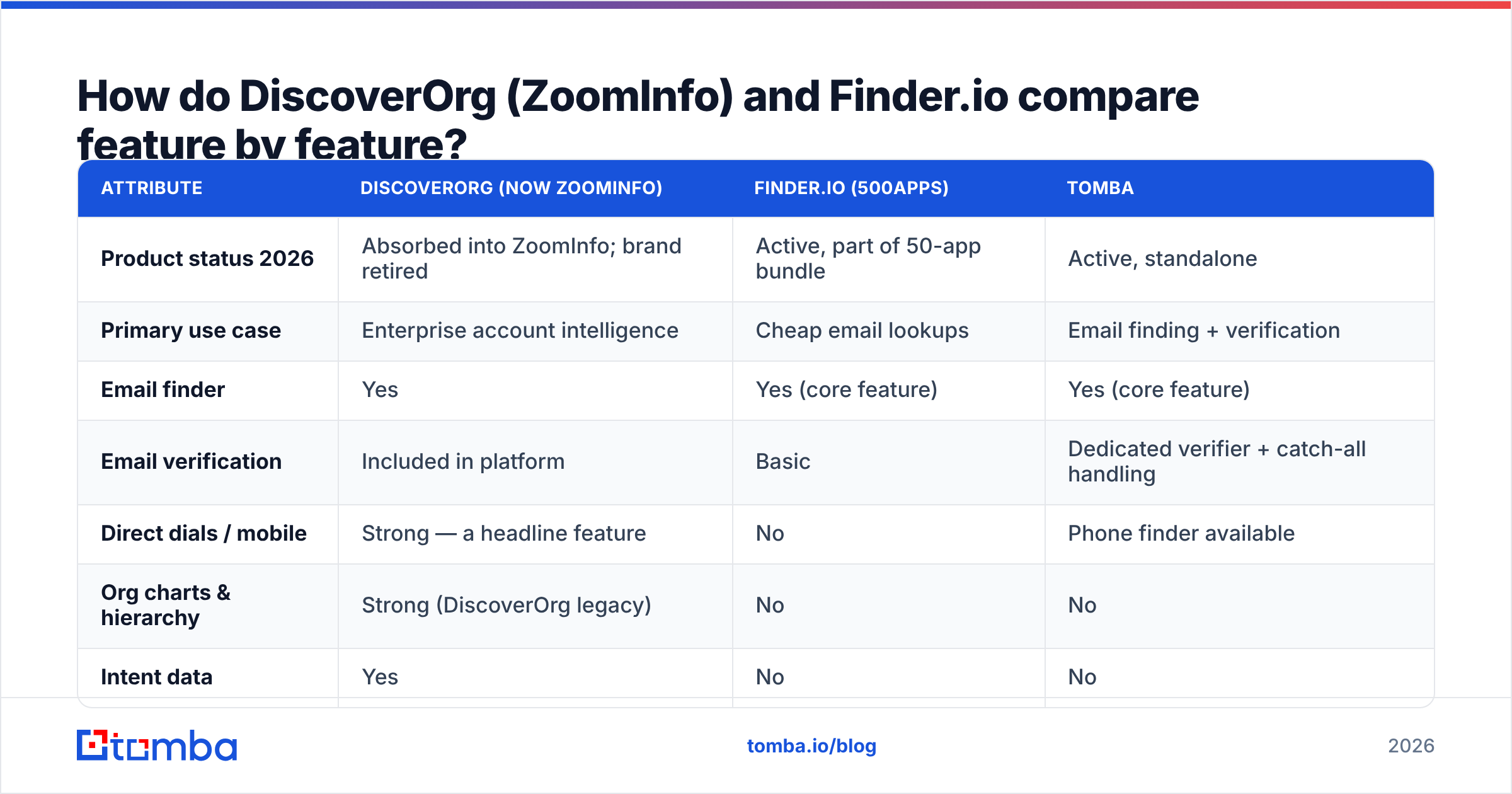
Here is the side-by-side. Tomba is included as the middle option most teams end up testing.
| Attribute | DiscoverOrg (now ZoomInfo) | Finder.io (500apps) | Tomba |
|---|---|---|---|
| Product status 2026 | Absorbed into ZoomInfo; brand retired | Active, part of 50-app bundle | Active, standalone |
| Primary use case | Enterprise account intelligence | Cheap email lookups | Email finding + verification |
| Email finder | Yes | Yes (core feature) | Yes (core feature) |
| Email verification | Included in platform | Basic | Dedicated verifier + catch-all handling |
| Direct dials / mobile | Strong — a headline feature | No | Phone finder available |
| Org charts & hierarchy | Strong (DiscoverOrg legacy) | No | No |
| Intent data | Yes | No | No |
| Technographics | Yes | Limited | Website tech lookup tool |
| API access | Yes, enterprise tier | Yes | Yes, on all paid plans |
| Chrome extension | Yes | Yes | Yes |
| Free tier | No — demo only | Trial via bundle | 25 searches/mo |
| Entry price | Quote-only, typically five figures/yr | ~$15/user/mo for the whole bundle | $49/mo |
| Contract | Annual, seat minimums | Monthly or annual | Monthly, cancel anytime |
| Buying process | Sales call + demo + procurement | Self-serve | Self-serve |
The pattern is clear. ZoomInfo wins every "does it have X" question. It loses every "can I start today for under $100" question. Finder.io is the reverse. That is the core of DiscoverOrg vs Finder.io. Neither one is wrong. Each is priced for the buyer it was built for.
Which one has better data accuracy?#
Accuracy is where the price gap earns its keep. It is also where marketing claims get loosest. Every vendor quotes a number in the nineties. Those numbers come from the vendor's own sample, and that sample usually leaves out catch-all domains. Catch-alls are exactly where real bounces come from.

What actually drives your bounce rate:
Recency of the record. A correct email from 2023 is a wrong email in 2026 if the person changed jobs. Enterprise vendors refresh often. Bundle apps refresh less.
Catch-all handling. Some domains accept every address, so naive SMTP checks return "valid." A tool that marks catch-alls as valid inflates its own accuracy. A catch-all verifier is the only honest way to handle them.
Pattern guessing vs sourced records. Guessing
first.last@domain.comis easy, and every tool does it. The real question is whether the tool confirms the guess against an observed record.Segment coverage. ZoomInfo's legacy DiscoverOrg data is strongest in North American mid-market and enterprise IT. Coverage thins on SMBs, non-US markets, and new companies. Cheaper tools often do better on long-tail domains, because they scrape more widely.
There is a free test that settles DiscoverOrg vs Finder.io for your own list. Take 100 known-good contacts from your CRM. Run them through each tool. Count exact matches. Do this before you sign anything annual. Then run the winner's output through an independent email verifier. Even good finders benefit from a second check before a send.
What does each one actually cost?#
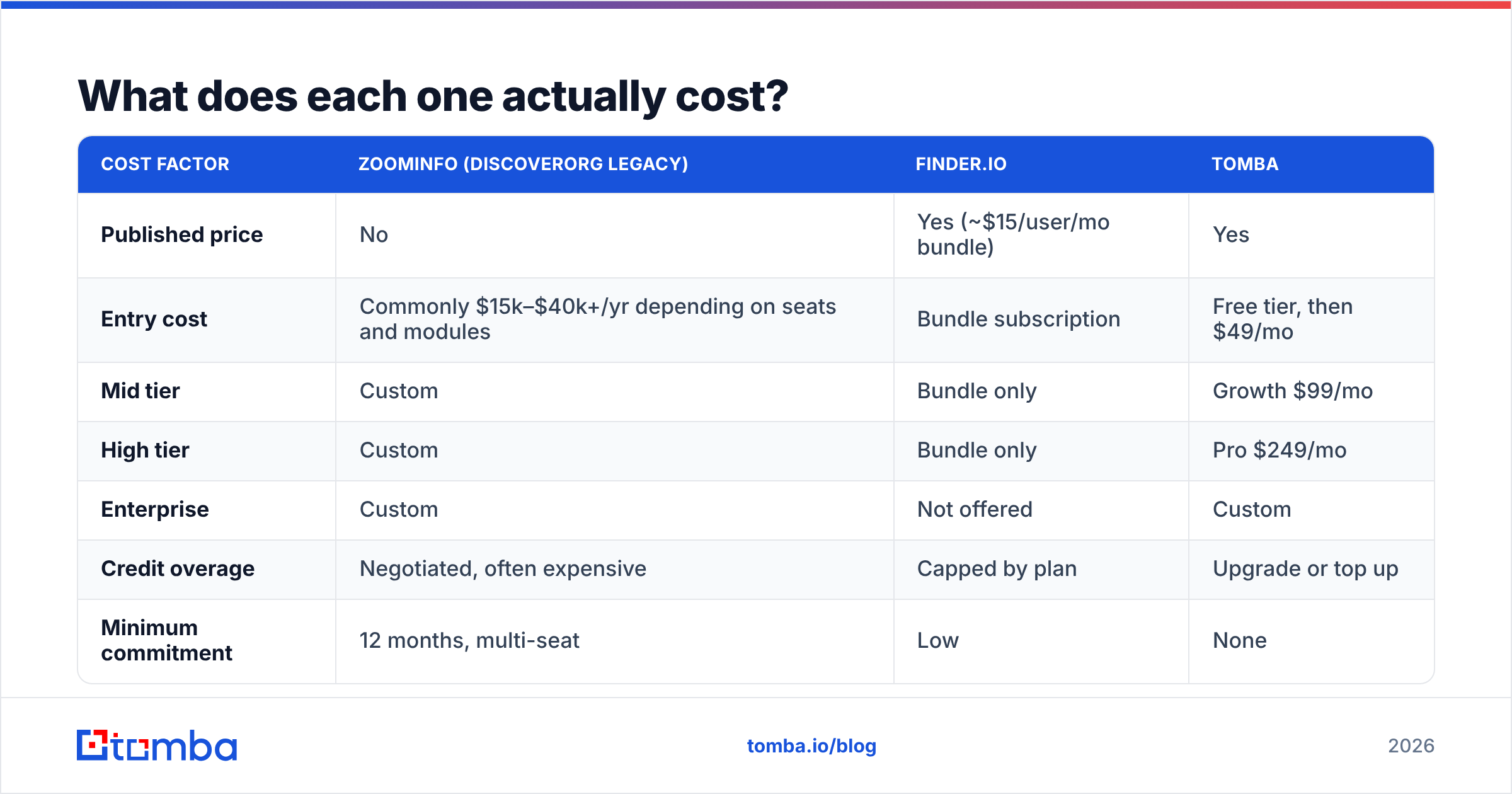
| Cost factor | ZoomInfo (DiscoverOrg legacy) | Finder.io | Tomba |
|---|---|---|---|
| Published price | No | Yes (~$15/user/mo bundle) | Yes |
| Entry cost | Commonly $15k–$40k+/yr depending on seats and modules | Bundle subscription | Free tier, then $49/mo |
| Mid tier | Custom | Bundle only | Growth $99/mo |
| High tier | Custom | Bundle only | Pro $249/mo |
| Enterprise | Custom | Not offered | Custom |
| Credit overage | Negotiated, often expensive | Capped by plan | Upgrade or top up |
| Minimum commitment | 12 months, multi-seat | Low | None |
Two caveats. ZoomInfo does not publish list prices. Any figure you read, including the range above, comes from user-reported contracts. It will swing with seat count, modules, and negotiation. And 500apps prices the bundle, not Finder.io on its own. So your real cost per email found depends on how much of the other 49 apps you use.
On cost, DiscoverOrg vs Finder.io is not a close call. One needs a discovery call. The other is a card payment. If you want a number you can plan against today, transparent Tomba pricing starts free at 25 searches per month. Paid plans run $49/mo for Starter, $99/mo for Growth, and $249/mo for Pro.
Who should choose which tool?#
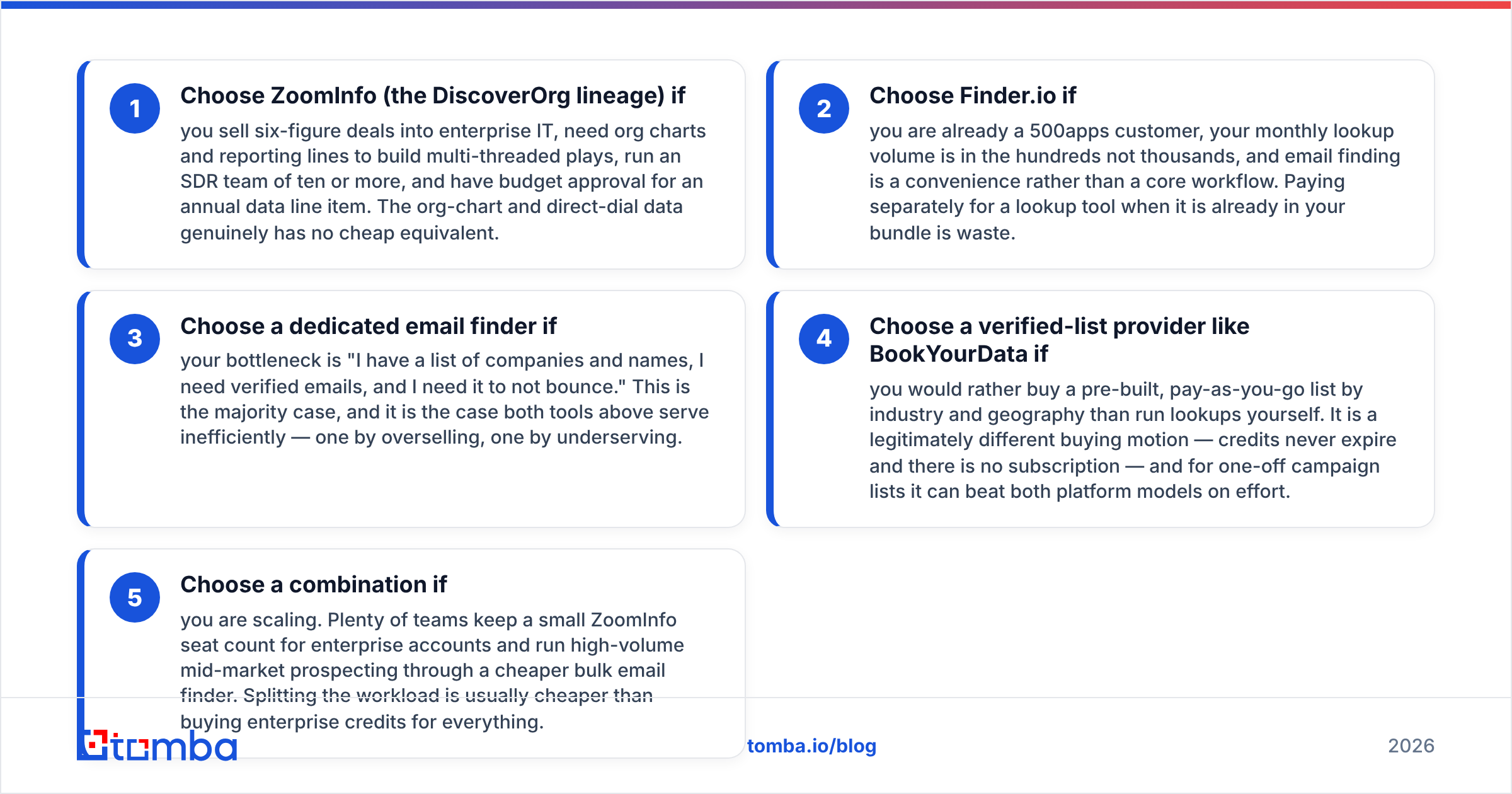
Budget shape decides DiscoverOrg vs Finder.io more often than feature lists do.
Choose ZoomInfo (the DiscoverOrg lineage) if you sell six-figure deals into enterprise IT. You need org charts and reporting lines to build multi-threaded plays. You run an SDR team of ten or more, and you can get an annual data line item approved. The org-chart and direct-dial data has no cheap equal.
Choose Finder.io if you already pay for 500apps. Your monthly lookup volume is in the hundreds, not the thousands. Email finding is a convenience, not a core workflow. Paying twice for a tool that is already in your bundle is waste.
Choose a dedicated email finder if your problem is plain. You have companies and names, you need verified emails, and you need them to not bounce. This is the common case. Both tools above serve it poorly — one oversells, the other underserves.
Choose a verified-list provider like BookYourData if you would rather buy a ready-made, pay-as-you-go list by industry and geography. It is a different buying motion. Credits never expire and there is no subscription. For one-off campaign lists, it can beat both models on effort.
Choose a mix if you are scaling. Plenty of teams keep a few ZoomInfo seats for enterprise accounts. They push high-volume mid-market prospecting through a cheaper bulk email finder. Splitting the load usually costs less than buying enterprise credits for everything.

What are the best alternatives to both?#
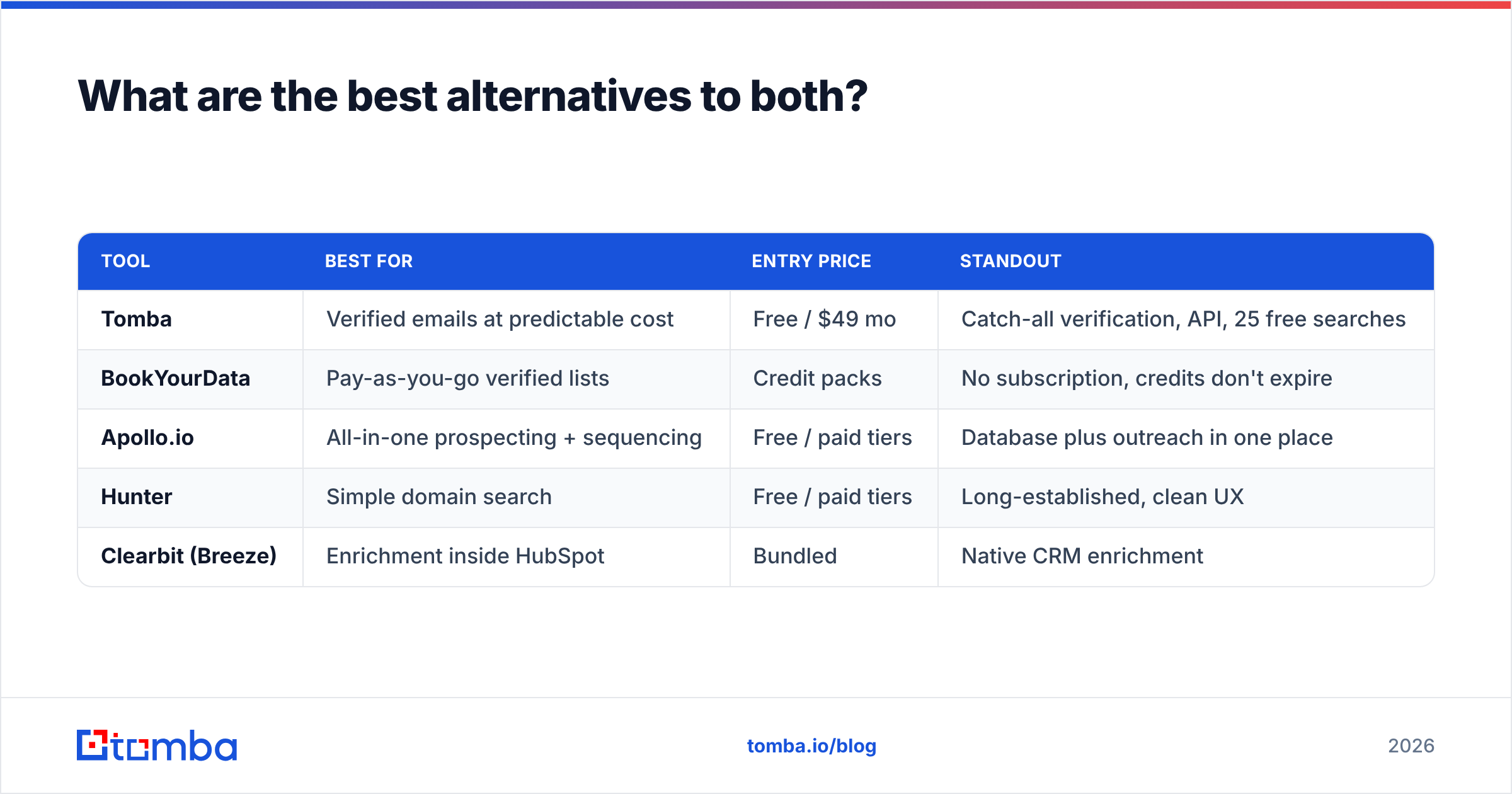
If neither side of DiscoverOrg vs Finder.io fits — no enterprise contract, no 50-app bundle — the shortlist looks like this:
| Tool | Best for | Entry price | Standout |
|---|---|---|---|
| Tomba | Verified emails at predictable cost | Free / $49 mo | Catch-all verification, API, 25 free searches |
| BookYourData | Pay-as-you-go verified lists | Credit packs | No subscription, credits don't expire |
| Apollo.io | All-in-one prospecting + sequencing | Free / paid tiers | Database plus outreach in one place |
| Hunter | Simple domain search | Free / paid tiers | Long-established, clean UX |
| Clearbit (Breeze) | Enrichment inside HubSpot | Bundled | Native CRM enrichment |
The workflow is the same in every case. Find the domain. Resolve the pattern. Confirm the address. Verify before you send. A domain search covers the first three steps in one call. An email finder API drops the same logic into the pipeline you already run.
Is DiscoverOrg still worth considering in 2026?#
Only as a synonym. Search demand for "DiscoverOrg" holds up because the brand was strong for a decade, and because old comparison pages never got updated. The decision in front of you is a ZoomInfo decision. Treat it that way. Request the quote. Ask about credit rollover, seat minimums, and what happens to your exported data at renewal. Benchmark the sample data against your own known-good list before you sign.
Finder.io is worth considering only as part of the wider 500apps bundle. Buying the bundle for the email finder alone is backwards. Getting the email finder as a bonus on a bundle you already wanted is a good deal.
And if you land where most teams land — reliable emails, monthly billing, no procurement cycle — skip DiscoverOrg vs Finder.io and start with a free tier. Run Tomba Email Finder against 25 target accounts this week. Compare the hit rate with whatever quote is sitting in your inbox. Let the bounce numbers decide, not the demo deck.
Related guides#
Ready to find emails that actually work?
Join 150,000+ professionals who stopped guessing and started sending. Free credits on signup — no credit card required.
Get the Tomba newsletter
Practical outbound tactics and product updates — once every two weeks.
About the author